7 min read
RAID Levels for Data Reliability: What to Choose for Your Workload
RAID levels for data reliability: comparison of 0/1/5/6/10 by speed and capacity, rebuild risks, and when other approaches are needed instead of RAID.
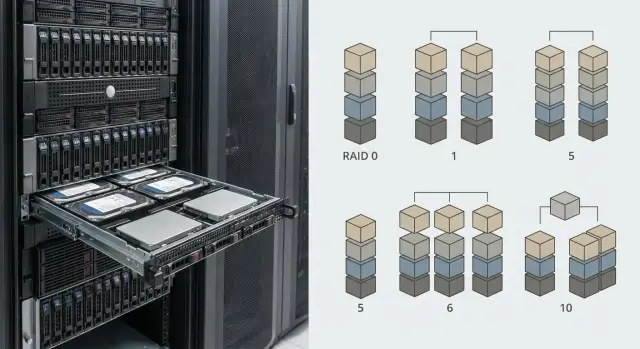
Why RAID at all, and where it's often overrated
RAID solves two practical problems: it helps a system keep running when a drive fails and reduces downtime risk. Sometimes it improves speed, but that's a side effect, not a guarantee.
The most common mistake is to confuse RAID with backups. RAID won't save you from accidental deletion, ransomware, database corruption due to an app failure, admin error, fire or theft. In these scenarios the problem usually affects the whole array at once. So the logic “I have RAID, I don't need backups” often ends in data loss.
Before choosing a level, honestly answer what matters more: uptime, risk of data loss, or budget. For accounting and official documents even a small risk may be unacceptable, while for a test bench price and simplicity matter more. For 1C and databases both speed and predictable recovery are usually important.
First clarify four things: how many hours of downtime you can tolerate, how much data loss is acceptable (0, an hour, a day), how fast capacity grows, and how backups are organized (where they are stored, who runs them, and whether a restore has been tested).
If a server is purchased for critical services (government body, bank, clinic, school), RAID should be considered as part of an overall reliability scheme. In such projects an integrator like GSE.kz typically starts not with “which RAID”, but with requirements for downtime, recovery and 24/7 support.
Basic concepts: capacity, fault tolerance, performance
People often choose RAID for peace of mind, but it’s important to separate two ideas:
- Fault tolerance: the server keeps running when a drive fails.
- Data durability: you have a copy to restore from after deletion, ransomware, admin error or controller failure.
RAID increases availability but does not replace backups.
Most RAID levels are built on two ideas. Striping — data is split into stripes and written across multiple drives, increasing throughput but making the array vulnerable to a single drive failure. Mirroring — data is duplicated to another drive; reads are often fast, but usable capacity is reduced.
Capacity and reliability depend heavily on the number and size of drives. The bigger the drive, the longer a rebuild takes after replacement, and the longer the window of heightened risk. The more drives in the array, the higher the chance one will fail over years of operation.
Performance is not determined solely by the RAID level. Results depend on workload type (small random I/O vs large sequential files), cache and its protection on the RAID controller, interface and drive class (HDD vs SSD), and implementation (hardware controller, HBA with firmware RAID or software RAID).
For example, in a typical 8-drive server for accounting and file archives the same RAID 6 can behave very differently: with a good controller and cache writes will be noticeably faster than on a simple HBA without acceleration. So the choice starts not from the RAID number but from understanding what you protect and what downtime is unacceptable.
Quick breakdown of RAID 0/1/5/6/10
When people talk about RAID levels for data reliability it's easy to get confused: some focus on speed, others on protection, and some try to combine both. Below is a practical view of the most popular options.
- RAID 0 (striping): maximum speed and full capacity, but a single drive failure = loss of the whole array. Suitable for temporary data: cache, test benches, intermediate files that can be quickly recreated.
- RAID 1 (mirror): data is duplicated on two drives. Simple and reliable, reads are often fast, but usable capacity is halved. Good for a system partition or a small set of critical data.
- RAID 5 (parity): a balance of capacity and protection (survives one drive failure). Writes are usually slower due to parity calculation, and rebuild can be long and risky on large drives.
- RAID 6 (double parity): survives two simultaneous failures, which matters during long rebuilds. The cost is lower usable capacity and a larger write performance hit.
- RAID 10 (mirror + stripe): combines mirroring and striping. Often provides more predictable performance and easier recovery, but about half the capacity is used for mirrors.
A simple rule: for departmental file storage where capacity matters, people often choose RAID 6. For databases or virtualization with many small writes and the need for stable latency, RAID 10 usually wins.
And keep this caveat in mind: RAID helps survive a drive failure but doesn't protect against deletion, ransomware or application errors.
Speed: what actually speeds things up and what slows them down
RAID performance usually comes down to operation nature: read or write, small random I/O or large sequential streams. The same set of drives can show different numbers on different workloads.
Reads and writes: where time is lost
Reads are generally easier. In RAID 0/5/6 data is read in parallel from multiple drives, which benefits large files.
Writes often become “expensive”, especially where parity is involved. In RAID 5 and RAID 6 small random writes incur a penalty: the system must read old blocks, compute new parity and write multiple blocks. RAID 10 often wins on writes because it writes to mirrors without parity calculation.
To simplify:
- many small writes (databases, 1C, mail) — RAID 10 usually better, RAID 5/6 worse;
- lots of reads and large files (archives, content distribution) — RAID 5/6 is often sufficient;
- mostly reads (directories, reference data) — differences between levels may be smaller than expected.
IOPS vs throughput and the role of cache
Small operations (IOPS) depend on latency, queue depth and how the controller handles requests. Large sequential streams depend on array width and drive throughput.
Controller cache and write-back mode can greatly speed up writes: the system acknowledges operations faster while data is flushed to disks later in batches. But this is safe only if cache is protected from power loss (battery or supercapacitor). Otherwise a power outage can lose recent writes.
Behavior is also affected by stripe size, partition alignment, filesystem type, queue depth, background scrubbing and whether a rebuild is in progress. So a file server with large documents can perform well on RAID 6, while the same shelf under a database workload will slow on small transactions.
Rebuild risks: time, second failure and latent errors
Rebuild starts after replacing a failed drive: the system recalculates data and writes it to the new disk. On large drives this takes many hours or even a day because a huge volume of data and parity must be read.
During rebuild the array is more vulnerable. For levels that allow only one failure (e.g., RAID 5), a second failure during this time often means total loss. The longer the rebuild, the longer the risk window.
There is a less obvious danger: URE (uncorrectable read error) and silent data corruption. During rebuild the system reads all other drives; if any have bad sectors the read can fail. Depending on RAID level and implementation this can either corrupt part of the data or stop recovery.
Basic measures help: regular array checks (scrubbing, patrol read), SMART monitoring, limiting load during rebuild and reliable backups (they save you in the worst cases).
Rebuild load almost always affects users: latency increases and writes on parity RAID can slow noticeably. So schedule rebuilds during quieter hours and plan extra performance headroom.
Which levels suit different workloads
There is no universal RAID: the same array can be great for file reading but a weak link for virtualization or databases. When choosing RAID for a workload, focus on the request profile and acceptable downtime.
Quick recommendations by task type
Common practical patterns:
- Shared folders and file storage: RAID 6 if you have many drives and want protection against a second failure during rebuild. RAID 5 only for moderate sizes and when long recovery is acceptable.
- Virtualization (many VMs): RAID 10 for more predictable latency and better mixed read/write performance.
- Databases and transactional systems: RAID 10 is usually the calmest option. RAID 6 is possible but writes are heavier and controller load is higher.
- Video surveillance and streaming write workloads: often RAID 6 or RAID 5; with many cameras and constant writes RAID 6 is generally safer.
- Archives and disk backups: sometimes RAID is unnecessary. For backups it's more important to distribute copies and verify restores than to have a “pretty” array.
How not to miss in practice
Imagine an office server: shared documents, mail, 1C and several VMs. If drives are few and simplicity matters — RAID 10 gives stable operation and faster rebuilds. If you have many drives and care more about capacity (e.g., a file archive), RAID 6 gives better protection but longer recovery and higher cost per usable TB.
In rack servers choices are often split by data importance: RAID 10 on fast disks for critical services and a separate RAID 6 for large storage. In these cases avoid putting a database and archive on the same array “for convenience”.
Step-by-step: choose RAID without extra theory
Start simple: what is worse for you — a few hours of downtime or losing some data? If downtime is critical (cash register, mail, customer database), prioritize fault tolerance and fast recovery. If data durability is paramount (archives, medical records), choose a scheme with lower loss risk during failure and rebuild.
Next, calculate capacity and growth. Size with a 1–3 year buffer: new projects, logs, user growth. An overfilled array performs worse and handles rebuilds poorly.
Then evaluate workload. Many small writes (databases, VMs) are sensitive to latency and write penalties. Large sequential files (video, file exchange) are limited by throughput.
A practical decision flow:
- define the goal (minimize downtime or minimize loss);
- estimate current capacity and growth for 1–3 years;
- describe the workload (reads vs writes, small vs large ops);
- pick RAID level and number of disks per conditions and budget;
- include a hot spare and a clear replacement plan.
Example: a server for accounting and 1C with small writes is usually better on RAID 10 (4–8 disks) than RAID 5 with the same disks. For a file archive RAID 6 is usually safer than RAID 5, especially with large drives.
Hot spare is not a “luxury”. It shortens time between failure and rebuild start and thus reduces the risk window.
Practical example: office services and important documents
Simple scenario: a small school or government office. There is a shared folder with documents, mail or collaboration and 1C (often as a VM). The team is small and data is important, so the goal is usually minimal downtime and clear procedures, not record performance.
A reasonable approach is to separate workloads. For critical VMs (1C, domain controller, core services) use RAID 1 or RAID 10: it tolerates drive failure and recovers faster, reducing risk during working hours.
For file storage where capacity and steady operation matter, RAID 6 is a common choice. It survives two drive failures, useful when drives are large and rebuild is lengthy. Yes, usable capacity is smaller, but for document archives this trade-off is often acceptable.
To make RAID actually increase reliability add a few disciplined practices: hot spare, array and drive monitoring, scheduled checks and a quarterly test restore from backup.
Budget-wise this often looks like: RAID 10 for critical VMs costs more in drives but lowers downtime risk. RAID 6 for files gives more capacity but is slower on writes and needs care during rebuild.
Common mistakes and traps when choosing RAID
The main mistake is assuming RAID insures against all data problems. It mostly protects against drive failure (sometimes two), but not against deletions, ransomware, admin errors or app crashes. RAID is about service availability; backups are about being able to return data.
Second trap — building an array from “whatever was available”: mixing models, capacities and batches. This can work but makes failure prediction and replacement harder. Drives from the same batch can age similarly and fail close in time. Better to predefine acceptable replacement models and keep at least one compatible spare.
RAID 5 is often chosen out of habit even for very large drives. The problem is long rebuilds and vulnerability during that time. With 12–20 TB drives and larger, compare RAID 5 vs RAID 6 realistically and consider RAID 10 for critical write-heavy workloads.
Checks are often skipped. Minimum set that saves headaches: regular SMART and error checkups, scheduled scrub/patrol read, restore tests (not just “backup reported OK”), and verifying the server and controller actually send clear degradation alerts.
Finally, avoid “one RAID for everything”. Database, archive, video and backups have different profiles. Often two arrays or separating roles gives fewer surprises during growth and recovery.
Quick checklist before buying and configuring
Before ordering drives and building an array check not only the RAID level but what surrounds it. Those surrounding choices often decide whether a drive failure becomes a few hours of work or a week of downtime.
First secure basic hygiene: RAID does not replace backups. If data matters, keep separate copies at least following a simplified 3-2-1: multiple copies, on different media types, one copy off the server.
Backups must be tested by restoration. Practical routine: once a month restore one folder or one VM to a separate place. This shows what actually recovers and what doesn't.
Before launch set up hardware monitoring: disk monitoring (SMART, controller errors) and array degradation alerts so you know about problems immediately.
Short pre-launch list:
- separate copies exist (simple 3-2-1);
- backups are tested by restore;
- monitoring and alerts are configured;
- hot spare and spare drives are available for replacement;
- a clear incident response plan exists.
One more often-forgotten point: agree who does what during an incident. If the array degrades at night and accountants can’t open the database in the morning, a lack of roles and steps causes chaos.
If the server is bought for an organization where repair times and stability matter (government, healthcare, finance), clarify support and replacement availability in advance. Vendors and integrators with a national service network, like GSE.kz, usually provide easier organization: spare stocks, procedures and incident response are planned from day one.
When RAID is not enough: other approaches to data reliability
RAID mainly protects against drive failure. It won't save you from accidental deletion, ransomware, admin error or filesystem-level corruption. So even correctly chosen RAID levels should be only part of your plan.
The most useful additions are backups, snapshots and replication. Snapshots are convenient for quick rollbacks (for example after a bad update). Backups are needed to survive worst-case scenarios (ransomware, deletion, fire). Replication reduces downtime when minutes or hours matter.
Often a simple measure helps: separate tasks onto different arrays. For example, put the database on its own RAID and archives on another. That way workload doesn't interfere with itself and a rebuild won't “take down” everything simultaneously.
If data volumes are large and growth is fast, distributed storage and erasure coding may be appropriate. These scale well but increase demands on support and monitoring.
Next steps: turn the RAID choice into a working system
After choosing RAID, lock the solution so it works in real life. Start with two business figures:
- RPO - how much change you can lose (hours or days).
- RTO - how fast the service must be back online.
For example, accounting can tolerate an RPO of 1 day sometimes, while an order database cannot. These numbers quickly show whether one RAID is enough or you need frequent backups, replication or a second server.
Then write a clear specification to avoid surprises during procurement and setup: RAID level and drive count (with usable capacity), hot spare, drive type and class, controller (cache and cache protection), and an expansion plan for the next year.
Plan support: alerts for array degradation, disk replacement procedures, where spares are stored, who acts and how steps are recorded. And most important — test recovery from backup.
If RAID is deployed on a high-load server with maintenance requirements, check drive and controller compatibility and firmware, and plan who will handle integration and 24/7 support. In such projects it makes sense to consider vendors and integrators who bundle hardware and service under one support model, for example GSE.kz (gse.kz), especially when reaction times and lifecycle clarity matter.
Frequently asked questions
Why use RAID at all if I can just make backups?
RAID is primarily about **availability**: keeping the server running when one (sometimes two) drives fail so you can replace a drive without stopping the service. RAID only indirectly helps with data safety: it does not protect against deletions, ransomware, logical database corruption or admin errors.
Is it true that RAID replaces backups?
No. RAID mainly protects against **drive failure**, while backups protect against **data loss for any reason**. Minimum things to have in addition to RAID: - separate backups (not stored on the same array); - regular restoration tests; - a clear incident response plan.
Which RAID is better for 1C and other databases?
1C workloads usually involve a lot of **small writes** and need stable latency, so the safe default is **RAID 10**. RAID 6 is possible, but writes are heavier (parity calculations) and rebuild performance can be worse during recovery.
What to choose for a file server with documents: RAID 5 or RAID 6?
For shared folders and archives people usually pick **RAID 6**, especially when there are many drives or large-capacity disks — it survives two drive failures. RAID 5 only makes sense at moderate capacities and when long rebuilds are acceptable.
When is RAID 0 a reasonable option, not a mistake?
Use **RAID 0** when you need maximum speed and the data can be easily recreated. Practical examples: - temporary data and caches; - test environments; - intermediate processing files. For important data RAID 0 is a bad idea: a single drive failure usually means total loss of the array.
Why is rebuild feared and what can actually go wrong?
The main worry is a **long rebuild**. While recovery runs, the array is in a more vulnerable state: for RAID 5 a second failure during rebuild often means losing the whole array. There is also the risk of read errors (URE) on remaining drives. Therefore keep backups and monitor drives before a failure, not after.
Is a hot spare necessary and when is it really useful?
A hot spare reduces time between a drive failure and the start of rebuild: the controller begins recovery automatically without waiting for a manual replacement. This shortens the “window of risk”, especially at night, on weekends, or where there is no continuous duty staff.
What actually determines RAID speed besides the RAID level?
Look beyond the “RAID level” to the combination of factors: - **workload type** (many small ops or large files); - **controller cache** and write mode; - cache protection (battery/supercapacitor); - drive class (HDD/SSD) and drive count. The same RAID 6 can be fast with a good controller and noticeably slower on a basic HBA.
Can I keep database, files and backups on one RAID for convenience?
Don't. Different tasks conflict in I/O profile and in recovery consequences. Practical approach: - separate array (often RAID 10) for databases/VMs; - separate array (often RAID 6) for archives and files. This makes performance predictable and reduces the chance that a rebuild takes down all services at once.
What if one RAID is still not enough for reliability?
RAID is only part of the picture. Usually you add: - **backups** with restoration tests; - **snapshots** for quick rollbacks after bad updates/errors; - **replication** or a second node if downtime must be minimal; - monitoring and replacement procedures. For critical systems (government, healthcare, finance) discuss RTO/RPO and 24/7 support — integrators can often formalize this in service processes.
