7 min read
RAG for internal document workflow: pipeline architecture
A practical guide to building RAG for internal document workflow: sources, text extraction, indexing, cited answers and access control.
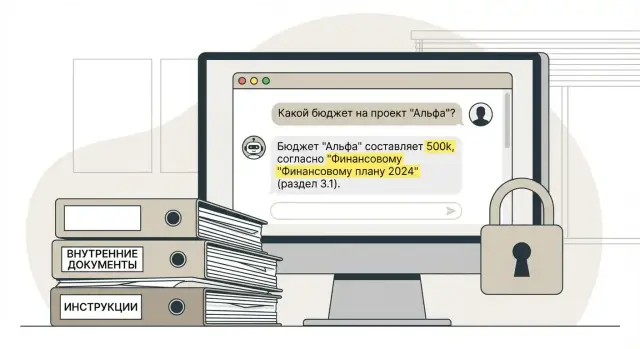
What's the real problem with internal document workflow
The problem is usually not a lack of documents. The problem is too many of them: scattered across systems, each with its own nuances — version, date, department, exceptions, references to other rules. As a result, an employee spends time searching and reconciling instead of working.
Most often people don't ask “where is the document,” but “how to do this correctly right now.” For example: how to process unpaid leave, which fields to fill in a purchase request, deadlines for closing documents, what to do if an access pass is lost. Answers are searched however people can: email, chats, shared folders, a colleague who "surely remembers."
Simple keyword search often fails. It finds 20 files with similar names but doesn't give a precise answer or explain context. Regulations depend on wording, conditions and exceptions. Pulling a single phrase without surrounding paragraphs can easily distort meaning.
A separate pain point in RAG for internal documents is the risk that the “bot sees too much.” In practice this looks like: HR gets a hint from a financial report, accounting accidentally sees personal data, or a new employee learns internal tariffs from a document they shouldn't access.
Usually you must balance four requirements: accuracy (answer from the current version), speed (without long waits), security (access like in the source systems, with no workarounds) and auditability (so it’s clear where a citation came from and who asked what).
If you don't design this up front, the chatbot will either “bluff” without evidence or become a source of leaks.
Document sources: what to connect and under what rules
Answer quality starts not with the model but with which sources you allow it to read. It's better to connect fewer, well-understood and manageable sources than to ingest “everything” and get leaks, disputes about currency and version confusion.
Typically useful sources are: shared file storage (network folders), corporate mailboxes with dedicated addresses (for example, “regulations@”), knowledge bases and portals (wiki, FAQs), scans and archives of paper documents, and workflow/documents systems that store the final approved version with a date.
Assign an owner for each source immediately. This is not a “technical contact” but a person or role responsible for meaning: what counts as the official version, who confirms currency and what to do when documents conflict. For example, at a company like GSE.kz HR owns vacation and travel regulations, accounting owns primary accounting policies and month-end closing policies, and IT owns access instructions.
Formats are almost always mixed: PDF and DOCX, presentations, images (scans), sometimes spreadsheets (XLSX) and system exports. Record this in advance: scans require OCR, tables require special extraction logic, otherwise the model will start to “guess.”
Usage rules are convenient to fix with simple policies. Only approved documents (not drafts) should go into the index. Personal data and commercial secrets only with explicit permission and restricted access. Store each document’s status (active/expired) and approval date. Exclude personal folders and informal correspondence. And provide a clear deletion process on request for every source.
Finally, agree on an update policy: how often to pull changes, what counts as “deletion” (file removed or marked obsolete), and who confirms that an old version should no longer be used in answers. Without this the bot will confidently cite rules that have been revoked.
Text extraction: PDF, office files, scans and tables
RAG quality often depends not on the model but on what you actually extracted from files. If the input text is “broken,” you'll get wrong citations, missing clauses and confident answers about the wrong thing.
For ordinary office files (DOCX, PPTX, TXT) it's important to preserve structure: headings, lists, numbering, subpoints. Otherwise a regulation “3.2.1” becomes a set of lines where it’s unclear what an exception or deadline refers to.
Scans, PDFs and OCR
PDFs come in two types: with a text layer and as an image in a container. The second type requires OCR. Check quality not by general word counts but by the items that most often break: order numbers, IIN/BIN, amounts, dates and clause references.
A short OCR quality checklist:
- share of “garbage” characters and empty pages
- match of key fields (date, number, signature)
- stability when Kazakh and Russian appear in the same document
- correctness of line breaks and hyphenation
Tables: don't lose units and context
For tables it’s important to preserve not only cell values but column headers, units and notes. Otherwise “10” without “days” or “%” becomes a trap. A practical approach is to convert tables into text lines with explicit fields.
Finally, normalize formats (dates, document numbers, encodings, language) and keep parsing logs. If a document yields zero characters or suspiciously little text, it should be visible immediately, not after a user complaint.
Chunking and metadata for reliable citations
You rarely want to put a whole document in the index. The model needs a short, precise context and the user needs a clear citation they can verify.
Chunk size matters: too small and you lose meaning; too large and you drag in noise and hurt search. Fragments of 1–3 paragraphs often work well, but the key is that they remain semantically complete.
Prefer dividing by natural boundaries: headings, clauses, subclauses, appendices. If a document is structured (e.g., 3.1, 3.2, 3.3), preserve that structure and don't mix different clauses in one fragment. For tables keep the caption and the key row nearby, otherwise the citation will be meaningless.
To make cited answers reliable, each fragment must have metadata. A minimal set:
- source and file identifier (source_id), plus path/storage location inside the company
- place in the document: page number, section heading, clause number
- details: date, version, status (draft/active/expired)
- owner and department
- document type (regulation, order, contract, instruction)
The fragment-to-source link must allow audit: from the citation you must find the exact file and place (page and clause), not “somewhere in the document.” Then the user can open the original and confirm the answer wasn't taken out of context.
Agree on versions and duplicates in advance. If an HR instruction moved from 1.2 to 1.3, mark old fragments as “outdated” or remove them from results, otherwise the bot will cite obsolete rules. For duplicates (the same regulation in two folders) use a content hash and a rule: index one canonical source and keep others as pointers in metadata.
Index and search: storage and updates
You will almost always need two parts: an index for fast search and a separate storage for originals. The index holds fragments and metadata; the storage holds original files (PDF, DOCX, scans) so the source can be opened and the citation checked.
Search is rarely a single method. Vector search captures meaning well (e.g., “how to arrange travel”), but may miss exact wording. Keywords and filters find specifics (order number, form code, exact term). A hybrid approach often wins: filter by metadata first, then rank by semantic similarity and refine with keywords.
Decide in advance which fields will filter out irrelevant items:
- department or role (HR, accounting, procurement)
- project or branch
- classification/grade of document (public, internal, confidential)
- validity period and version
- author or owner of the regulation
Test search quality with a set of control queries. Examples: “retention period for personnel files,” “who approves a 5M payment,” “what to do in a data breach.” A good result places 1–3 correct fragments from current documents at the top, without older versions.
Plan index updates: scheduled (e.g., nightly), event-driven (file added or changed) and manual for critical regulations before publication.
Store the link fragment -> document -> version. Then when a file is replaced you reindex only affected parts and answers won’t point to old rules.
Context extraction: what goes into the model's prompt
Answer quality usually depends less on the model’s cleverness and more on which fragments you give it. So decide in advance how a user question is transformed into a search request to the index.
Typically the question is normalized first: remove filler words, extract key entities (document name, department, date, product). For example, “What are SLA response times for 24/7 support?” is better transformed into a query highlighting “SLA,” “response,” “24/7,” plus a filter for document type “regulation/agreement.” If your company has different domains (HR, accounting, IT) add the user’s role and department.
Then choose how many fragments to fetch. Too many fragments often worsen the answer: the model drowns in details and mixes rules. Practice is simple: take several top matches and add 1–2 “backup” fragments only if they’re from the same document or section.
When multiple source types exist (policies, orders, instructions, knowledge base), set clear priorities. Freshness usually trumps older files, approved over draft, contextually relevant department documents over generic ones, and document type (policy over email, email over chat).
If documents conflict, don’t silently “pick the truth.” Better to indicate the conflict and show both sources, with the selection criteria visible: approval date, status, owner.
Log everything: the original question, the formed query, applied access filters, list of found fragments (with relevance scores) and the final context set. This speeds troubleshooting and helps explain why the bot answered as it did.
Answers with citations: make it clear where information came from
Trust rests on one rule: the model only answers based on the found fragments. If the context doesn't contain confirmation, the bot must not invent even “obvious” things. This is easier to explain to users and defend to security and legal teams.
A citation must be verifiable, not decorative. A good minimum:
- document (name, number)
- section or clause (if present)
- version or approval date
- page and/or line range of the fragment
Then the user opens the regulation and sees the same thing. Example: “Travel must be approved 3 business days in advance” and next to it: “Travel Policy, Order No. 12, §3.2, version 2024-09-01, p. 4.”
If data is missing, say so: “The provided documents contain no information” and ask for clarifying details — period, department, contract type. This reduces errors and quickly shows what the corpus lacks.
Adapt answer format by role. An employee needs 2–3 sentences and one citation. Legal or compliance teams need a fuller response with multiple citations and caveats (e.g., “there is an exception for...”), but still only from fragments.
Measure quality by concreteness: citation accuracy (does meaning and location match), share of correct refusals, number of complaints “citation isn’t about this,” and repeated clarifications for the same question.
Access control: preventing the bot from seeing too much
The main mistake is thinking leaks happen only when the bot “shows secrets.” A leak begins earlier: when forbidden fragments enter the model context, or when an answer hints at the existence of a document.
Start with a simple threat model: what data types exist (personal data, finance, procurement, internal investigations), who can read them, and what constitutes a breach (citation, paraphrase, hint about a file, listing file names).
Apply rights in two places to prevent bypasses:
- before search: filter candidates by rights (documents and fragments) before sending text to the model
- after search: re-check results so a rogue fragment doesn't slip through due to metadata or index errors
- at answer level: don't show document names or citations if the user lacks rights to the source
Roles, groups and ACLs should be attached not only to entire documents but to individual fragments. For example, a general regulation is public to many, while an appendix with salary bands is HR/finance only. Each fragment must carry access labels (role, department, project, classification) and the source document identifier.
Don’t rely on a prompt like “do not reveal secrets”: the model doesn’t enforce rights and will continue text generation. Enforcement must live in code and storage.
You need audit. Minimally log who asked and when, which access filters applied, which documents and fragments actually entered the context, the issued answer and whether citations were hidden. This helps investigate incidents and refine access rules without stopping the system.
Example scenario: a bot for HR and accounting regulations
An employee asks in chat: “Can I buy a flight with a layover for travel and how to handle the advance payment?” The complication is that rules changed: last year had one set of limits; this year there are exceptions for certain projects.
RAG handles this not by the model’s memory but by finding the right fragments in current documents before answering. During search the system considers metadata: document type (policy, order, appendix), effective date, department, project, branch.
The pipeline usually works like this. The query recognizes topics: travel, advance, ticket purchase. Search selects latest versions of regulations and official appendices and excludes outdated editions. The answer includes 2–4 short fragments, each shown with a citation: document name, section, clause.
Citations greatly simplify approval. HR or legal teams don’t argue with the bot’s wording; they check the specific clause and say: “Yes, this is our current rule” or “we need to clarify the appendix wording.”
Visibility is limited at search time. For example, a branch employee sees only documents for their branch, and accounting sees financial policies. Personal data (names, IDs, salaries) are excluded by role or masked.
If the question touches several policies (travel plus procurement), the bot answers in parts: separate rules for tickets and for advances. Each part has its own citations and notes on where approval is needed.
Step-by-step: how to build a RAG pipeline for a company
To avoid RAG becoming an endless project, start with a small pilot and agree how you will measure value: response time, share of correct citations, support ticket count.
Build the first working contour so it can scale without rework:
- pick 1–2 sources and 20–30 typical questions (e.g., vacation and travel policies)
- set up text extraction and quality control: share of recognized pages, table gaps, OCR errors in scans
- define metadata and fragmentation rules: document title, version, owner, date, section, access level, page mark for citation
- build the index and run tests on real employee questions, comparing answers to the original source
- add access control and audit: who asked, what was found, which fragments entered context and why
Then expand sources one by one to keep control. In practice the model rarely breaks — it’s the input quality: duplicates, old versions, varied file templates.
Before launch agree on an update process. You need document owners, a clear publication cycle (draft, approved, archived) and reindexing rules.
If this is part of a system integration, build infrastructure for growth: separate pilot and production environments, logging and regular quality checks on the same test question set.
Common mistakes and pitfalls when implementing RAG
The most frequent disappointment is not model quality but data and access rule errors. Externally it looks like “the bot messed up,” but internally it’s usually a pipeline failure: stale index, poor OCR, or incorrectly assembled context.
An unpleasant trap: the index updates on a schedule while documents change more often or are silently replaced. As a result an old regulation appears in answers and users lose trust. Fix: each fragment must have version date, source and checksum, and reindexing should be tied to actual changes.
Second pain: OCR. If scans are recognized with garbage, the model will confidently cite mistakes because “that’s what the text says.” This shows up in stamps, signatures and tables. Minimum mitigation: filter obvious noise, store OCR confidence and avoid returning low-quality fragments without manual review.
Problems often start with chunking. Too large fragments give vague answers and citations “not about it.” Too small fragments lose meaning and search misses. Guideline: a fragment should contain one complete policy clause or one procedure step so it can be honestly cited.
The most dangerous trap: checking access only at display time. If you filter rights only when showing the answer, the forbidden context may already have entered the prompt. Access checks must run before fragment extraction and again before generation.
Without logs and reproducibility you won’t investigate incidents. Save: what documents were searched, which fragments selected, why, with which rights and index version. Then if someone complains about a “weird citation,” you can quickly rebuild the chain and fix the cause.
Short pre-launch checklist and next steps
Before launch, check not “how pretty the answers are” but pipeline manageability: from source to citation, from rights to audit. If this isn’t fixed upfront, the bot will answer confidently but controversially, and incident resolution will take more time than any saved effort.
Quick checklist:
- Sources, owners and update rules recorded: who is responsible for regulations and orders, how often to pull changes, what to treat as truth when duplicates occur
- Text extraction QC in place: stable parser for PDFs and office files, OCR enabled for scans, and errors (empty pages, symbol garbage) reported
- Metadata ready for filtering: department, document type, version date, access level and validity; use these to exclude obsolete items
- Answers always include citations: the model shows concrete fragments (document number, section, pages) and does not add things not present in the context
- Audit and dispute handling enabled: save query, found fragments and final answer; there is a clear disputing process and a document owner role
Next steps usually involve infrastructure and support. Decide where the solution will run (in your environment or a separate zone), required capacity for indexing and OCR, and how to update the index without downtime.
If deploying on-prem, plan server resources, backups and integration with your access systems. Suppliers and system integrators like GSE.kz can help keep data in-house and provide 24/7 support if that is important.
Frequently asked questions
Where is it best to start with RAG for internal document workflow so the project doesn't drown?
Start small with a pilot: 1–2 clear sources, 20–30 typical questions, and a strict rule “answer only with a citation from a found fragment.” This delivers value quickly and shows where the pipeline breaks: text, versions, or access controls.
Which document sources should be connected first?
Connect only managed sources where it's clear what counts as the final version and who is responsible for currency. If you collect “everything,” you'll almost certainly get duplicates, disputed versions and a higher risk of leaks.
Why assign a source owner and who should that be?
The source owner is not an IT admin but the person responsible for the document’s meaning and official status: which version is effective, what to do in a conflict, and when to mark a document obsolete. Without owners, the bot will confidently cite cancelled rules and there will be no one to resolve disputes.
Why is ordinary keyword search often insufficient?
Keyword search returns a set of similar files but doesn’t answer “how to do it correctly right now” and handles exceptions poorly. RAG helps by extracting a specific relevant fragment and showing it as a verifiable citation rather than a paraphrase “from memory.”
What matters when extracting text from DOCX/PDF to ensure accurate answers?
It’s critical to preserve structure: headings, clause numbers, subpoints and the links between exceptions and the main rule. If you extract a flat text blob, you lose context and citations may appear correct but refer to the wrong clause.
How can you tell that OCR for scans works well enough?
A PDF scan often lacks a text layer and requires OCR. Check OCR quality on the items that commonly break: order numbers, IDs (IIN/BIN), amounts, dates and clause references. If OCR produces garbage, the model will confidently cite that garbage because for it it's the ground truth of the input.
How to properly split documents into fragments for the index?
Split by natural boundaries: section, clause, subclause, appendix, and keep each fragment semantically complete. A practical rule: one finished policy clause or one procedure step per fragment, so it can be honestly cited and quickly checked in the original.
Which metadata must be stored to make citations verifiable?
At minimum store source and identifier, document position (page, clause), version date and status, owner and access level. This lets you show a verifiable citation, filter out obsolete items and audit who asked and why the bot answered as it did.
How to prevent the bot from "seeing" documents a user shouldn't access?
Apply rights before search and again before generating the answer so forbidden fragments never enter the model context. Don’t rely on a prompt like “don’t show secrets”: security must be enforced in code, ACLs and filtering logic.
What to do if documents contradict each other or there are multiple versions?
By default, prefer the newer approved document, but don’t silently reconcile contradictions. Show that there is a conflict and state the criterion used: approval date, version status and owner, so the result can be quickly resolved internally.
