6 min read
Rack Cable Management: Order, Color, and Fast Service
Rack cable management clears “spaghetti”, enforces bend radii and speeds up installation, maintenance and scaling without mistakes.
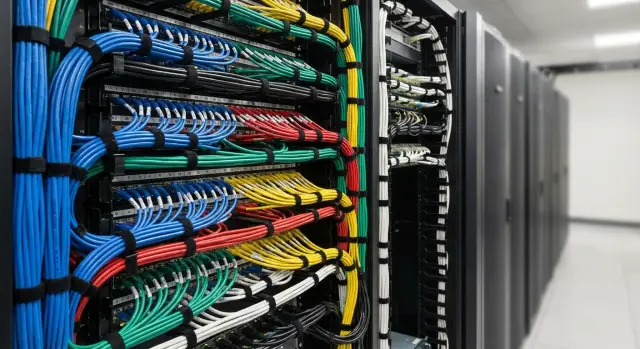
Why "spaghetti" appears in a rack—and why it’s bad
You can spot rack “spaghetti” easily: cables hanging in loops, crossing each other, some routed over the door, some lying on equipment. Labels get lost or stop matching reality. It usually starts with a couple of urgent connections, then every new patch cord is routed the shortest way.
Almost always the reason is the same: it was done “quick and temporary.” Temporary becomes permanent because people return to the rack in emergency mode: a switch was added, a port moved, a server swapped. There’s no time window or owner assigned for a tidy re-layout.
The issue isn’t only aesthetic. As the mess grows, routine operations become slower and riskier: people hunt for ports by chance or use a tone tester, equipment swaps take longer due to fear of disturbing adjacent lines, and any change increases the chance of error (especially at night or under pressure). The usual result is an outage caused by accidentally pulling the “wrong” cable.
There are pure technical risks too. Cables get bent, pinched by doors, or kept under tension. Connectors loosen, latches break, and a patch cord can be pulled out when a server is slid on rails. Another common story: bundles block front-to-back airflow, equipment runs hotter, fans get louder and cooling headroom disappears.
If rack cable management isn’t set as a rule from the start, the rack fills up fast. Add a couple of servers in a hurry and a month later nobody remembers which cable goes where. Every next change cements the chaos, and untangling it becomes a separate project.
Layout plan: zones, routes and growth allowance
Order starts not with ties, but with a plan. If you decide in advance where the main trunks run and where the “service points” are, the rack will stay understandable even after many changes.
Rack zones
Divide the rack into a few simple zones and stick to them. It’s usually convenient to:
- keep power and data separate (on different sides or in different channels);
- keep switching compact (patch panels and switches near each other so patch cords are short);
- plan a “service zone” ahead of time: a place for labeling, spare ports and temporary connections.
Then define movement rules: cables run vertically in organizers, and the transition to a device is a short horizontal segment. One route — one cable type. Diagonals and crossings almost always become future knots.
Growth allowance and change rules
Growth usually happens faster than expected. Plan for it: leave some organizers free, keep spare ports on panels and switches, and allow a reasonable length so devices can be slid out on rails without strain.
A simple example: if two more servers are likely in a quarter, a pre-reserved empty vertical channel for new runs will let you route the cables in 15 minutes instead of dismantling half the rack.
Also agree rules up front: who is authorized to add cables, where changes are recorded (at least in a port table or diagram), and who verifies the result. Without that, any neat plan will quickly unravel.
What to prepare: organizers, fasteners and labeling
Order depends on supplies. If organizers and labels aren’t on hand, installation almost inevitably becomes “temporary,” which then stays forever.
Organizers: where each type works best
Horizontal organizers go between patch panels and switches. They prevent short patch cords from hanging in arcs and blocking ports—especially important when there are many ports and frequent access.
Vertical organizers keep the main bundles along the rack and stop them from spilling across the front. If growth is expected (new servers, a second switch, additional lines), a vertical channel pays off quickly: it’s easier to lay cables neatly along a defined path.
Useful small items include brush panels (neater entry and less dust), guiding rings (smooth turns), and combs when many parallel lines must be routed.
Choose fasteners by use. Hook-and-loop is great where cables are added and removed regularly: it won’t crush the jacket and is easy to re-route. Use plastic ties for stable, infrequently changed areas and don’t over-tighten them near connectors.
Labeling: make service fast
Labels should last months and be readable without guessing. The most reliable options are printed labels or heat-shrink with printing. Tags work if they don’t snag on neighboring cables. A marker is a last resort: markings wear off and look different from person to person.
Keep a minimal kit nearby so you’re not forced to “make do”: scissors or snips, a flashlight, a basic tone tester, spare hook-and-loop and ties, and wipes to clean surfaces before sticking labels.
Step-by-step rack routing: the workflow
A tidy rack comes from a clear sequence. If you throw in patch cords first and then try to squeeze in power and trunks, everything quickly turns into knots.
The right sequence
-
First mark routes: where power runs, where data runs, and where attachment points will be.
-
Work consistently top-down or bottom-up. That makes it easier to self-check and avoid leaving tails for later.
-
Lay in layers: first trunks (power, uplinks, inter-rack connections), then branches to devices, and only after that the patch cords.
-
Choose patch cord lengths so the cable reaches without strain and without sharp bends at the port entrance.
-
Secure the cable at regular intervals: it won’t sag, won’t rub edges, and looks consistent across the rack.
Service loops are needed, but only where the device is actually slid out or removed (for example, a server on rails). Extra coils inside the rack almost always become future “spaghetti.”
Color schemes and labels: stop guessing
Color and labels aren’t decoration — they save time. In six months, when you need to replace a switch or add a server, there should be no guessing which cable is critical and which is a temporary line.
The scheme should be simple and uniform across the server room. It’s convenient to separate by purpose (uplink, access, storage) or by zones. Immediately separate colors for data and power and reserve a color or mark for spares.
Example of a clear scheme:
- data (access) — blue, backbone/uplink — orange;
- storage (iSCSI/FC/Storage LAN) — purple or green;
- power A/B — black and gray (or same color with different marks);
- spare lines — same color with a bright ring mark.
Labels only work with a single format. A handy format: rack-unit-device-port, for example: R03-U18-SW1-Gi1/0/24 or R03-U10-SRV2-NIC1.
Label every cable at both ends, even if “it’s obvious.” For trunks, add intermediate labels at the organizer entry and before passing into a neighboring rack.
Temporary lines should also be regulated: a special label (for example, “TEMP”), an allowed route and a replacement deadline. Without a deadline, a “temporary” line almost always becomes permanent.
Bend radius and spare length: don’t break the cable
Bad bends damage cables faster than you expect. First come intermittent errors and strange disconnects, then connectors loosen, and the issue surfaces at the worst time.
Bend radius is most often violated in three places: at the connector, at the organizer entry, and where a cable rubs a door or side panel. Another cause is an overly tight tie: the jacket is crushed and the cable reacts poorly to door movement or server sliding.
Make turns as smooth arcs without sharp angles. Guide rings and horizontal organizers help: they set the path and prevent sag. As a rule of thumb: the cable should reach without strain and without extra coils in the middle of the rack. If a bend looks like a coin, it’s too tight.
Keep the service loop tidy: place it near the connection point, coil it in wide loops, secure it with hook-and-loop and keep loops together in one place, not scattered across the rack.
A note about fiber: keep connectors clean and protect against tension. Don’t put optical patch cords where they can be easily snagged, and cap connectors during work. If you need to move a bundle, free the fastener first instead of pulling — micro-damage turns into loss and instability later.
Scaling and changes: add cables without chaos
Chaos usually appears not immediately but after a few expansions, when a cable was added on the fly and the tidy work was postponed. The rule is simple: quick check first, then add the new line.
Before running a new patch or trunk, check: exactly which device and port the connection goes to, whether there’s a free route in your zone, whether there’s room in the current bundle without over-tightening, whether both ends will be labeled, and whether the bend radius is maintained with the door closed and equipment extended.
If new ports appear regularly, don’t re-route the whole bundle every time. Leave a growth corridor: free slots in organizers and a small spare length coiled neatly. Then a new cable is added into the same route instead of across the rack front.
If a cable is too short, it’s usually better to replace it with the correct length than to stretch it or make a sloppy loop. A tight patch cord pulls the connector, bends sharply at corners and eventually causes intermittent faults.
To keep changes recorded, maintain a simple work log (even a spreadsheet): date and engineer, what was added or removed (device and ports), cable type and length, route (organizer or zone), labels on both ends.
Typical mistakes that create “spaghetti”
Disorder doesn’t start with “clumsy hands” but with small compromises: grabbing the first long patch cord available, not labeling a temporary line, tightening a bundle too much. After a few tweaks the rack becomes scary to touch.
Common causes of chaos:
- overly long patch cords with the excess hidden on the door or behind equipment;
- over-tight plastic ties, especially on thin patch cords and near connectors;
- mixing power and data in the same bundle without clear rules;
- inconsistent labels (e.g., “LAN-3” and “LAN-03” in the same rack);
- routing cables across cooling zones so they block intakes and perforation.
A quiet source of disorder is “just-in-case duplicates.” The old line is kept, the new one is run next to it, then another is added. Half the cables aren’t used but occupy routes and space.
A good rule: each new line should either follow an existing route with clear labeling or be a reason to tidy a small area while it’s still manageable.
Quick checklist before handing the rack over
Before closing the rack, spend 10 minutes on a check. It’s cheaper than later hunting for the cause of overheating, accidental disconnects or long port swaps.
Check the rack from top to bottom:
- airflow is unobstructed: nothing blocks perforation at the front, cables at the back don’t press on the door and don’t form a dense carpet over fans;
- labels are readable at both ends and not hidden under bundles;
- connectors are not under strain, sit straight and bends are smooth;
- power and data are separated and don’t interfere with port switching;
- there’s a clear path for adding new lines (free slots and space for new labels).
If the rack was built in stages, do a small stress test: gently slide one server on its rails or open the rear door fully. Nothing should pull, come loose from fasteners, or block airflow.
Practical example: expanding a rack without stopping services
A 42U rack: a pair of switches at the top (primary and spare), several servers below, two vertical PDUs on the right. Over a year temporary patch cords accumulated, and before adding new ports it became clear: if we just added 10 lines, in a week no one would quickly find the correct cable.
We first agreed on patch length rules: inside the rack use lengths that route through organizers, not through the air. Leave a small service reserve at each end, but avoid extra coils that block ventilation.
A color logic helped: blue patches for the regular network, yellow for backbone connections, red for management (OOB), and temporary work marked with a separate color and a mandatory replacement within a week. Labels were identical on both ends: “rack-U/port -> rack-U/port” so reading took seconds.
The 10 new lines were added without stopping critical services by following the sequence: route cables through organizers and secure them, then switch ports one by one, checking link and access. If an existing cable needed moving, we first duplicated it temporarily and removed the old one only after verification.
To make the change clear a month later, we documented front and back photos (before and after), marked switch and organizer zones, recorded the labeling rule and kept a short change table.
Next steps: lock in the order and avoid rollback
Order in the rack depends on rules. If each engineer does things differently, even a tidy rack will turn into “spaghetti” within months.
Create a short one-page internal standard: which colors for which lines, how we label, where verticals and horizontals go, allowed spare length, and who approves changes. Appoint a rack owner — without one, things spread quickly.
Then introduce simple requirements for any work, including urgent fixes: cables only along rack routes, labeling at both ends before putting a line into service, temporary lines with date and expiry, and cleanup and replacement of worn fasteners after work.
Plan a 60–90 minute cleanup window monthly or quarterly: replace odd patch cords with correct lengths, update labels, tidy new routes.
If racks grow and there’s not enough time for careful design and work, consider involving a systems integrator. GSE.kz (gse.kz) handles system integration and infrastructure for server rooms and data centers, so these issues can be addressed together with layout planning and ongoing support.
Frequently asked questions
Why does a rack quickly turn into “spaghetti”?
This usually comes from a “quick and temporary” approach. A couple of urgent connections are routed the shortest way, then new patch cords are added, and there’s no time left for tidy rework. To stop the mess from growing, define routes (vertical/horizontal), a labeling format, and a rule: any new connection is done according to the plan and labeled on both ends.
What are the real dangers of cable disorder, besides appearance?
Tangled cabling raises the risk of human error during any work: you might pull the “wrong” cable, confuse ports, or spend a long time searching for a line. Additional impacts on hardware and operations: - bends and tension damage patch cords and connectors; - bundles can block airflow and increase temperatures; - routine tasks (replacing a server, moving a port) take much longer.
How should I divide the rack into cable zones?
Basic rule: keep power and data separate, and keep switching compact. A practical zone layout: - one side/channel — power (PDUs, power leads); - other side/channel — data (uplinks, patching); - patch panels and switches grouped together so patch cords are short; - a dedicated "service area" for labeling, spare ports and temporary connections.
Which routes prevent future knots and tangles?
Keep it simple: route cables vertically inside organizers, then use a short horizontal run to the device. Avoid: - diagonal runs across the front; - crossing different cable types in the same route; - routing across doors or over equipment. One route — one cable type (for example, uplinks separate from regular patches).
What consumables and accessories should I prepare in advance?
Minimum kit that actually helps keep order: - vertical and horizontal organizers; - hook-and-loop straps (where cables change often); - a few plastic cable ties (only for stable areas, not tightened near connectors); - brush panels/entry panels (neater entry, less dust); - printed labels or heat-shrink labels. Without these basics, “temporary” work usually becomes permanent.
What order is best for routing cables in a rack?
A convenient sequence: 1) Mark routes (power/data, attachment points). 2) Work consistently top-down or bottom-up. 3) Lay in layers: mains and backbone → branches to devices → patch cords. 4) Choose patch lengths so there’s no strain and no sharp bends at ports. 5) Secure cables at regular intervals. Keep service loops only where equipment is actually slid out (e.g., servers on rails).
How should I choose a color scheme so the team won’t get confused later?
Start with a simple scheme the whole team can follow. A practical example that often works: - access/data — blue; - uplink/backbone — orange (or another distinct bright color); - storage — green or purple; - power A/B — different colors or same color with different labels. The key is consistent rules across the server room and clear marking of spares and temporary lines.
What labeling format is the most practical?
A working format is one that’s readable in seconds and consistent for everyone. A useful format: `rack-unit-device-port`, for example: - `R03-U18-SW1-Gi1/0/24` - `R03-U10-SRV2-NIC1` Rules: - label each cable at both ends; - add intermediate labels for backbones at organizer entries; - mark temporary lines clearly and set a replacement deadline.
How do I avoid damaging cables: bend radius and service loop?
Make smooth arcs and avoid strain on connectors. Bends are usually damaged: - right at the connector; - where the cable enters an organizer; - where a cable is pinched by a door. Practical tips: - don’t over-tighten ties near connectors; - keep service loops close to the connection point, in broad coils fixed with hook-and-loop; - protect fiber from tension and keep connectors clean; cap them during work and don’t place fibers where they can be snagged.
How do I add new cables and ports without breaking the order?
Short checklist before adding a line: - confirm which device and port the connection goes to; - check there’s room in the chosen route and organizer; - prepare labeling for both ends immediately; - ensure no strain will occur with the door closed or equipment extended. If a cable is too short, replace it with the correct length rather than stretching or creating random loops. Keep a simple change log: date, engineer, ports, cable type/length, route, labels.
