8 min read
Preparing for an Oracle Audit: Virtualization, Hosts and Installation Data
Preparing for an Oracle audit: what to collect about virtualization, hosts and installations, how to respond quickly to auditor requests and avoid last-minute chaos.
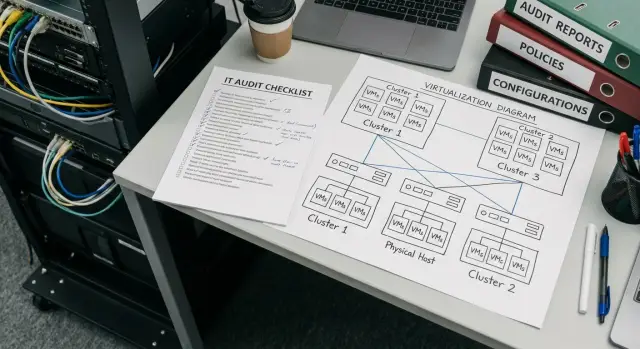
What auditors actually check in an Oracle audit
An Oracle audit rarely comes down to the single question "do you have licenses?". Auditors usually look at where Oracle could have been running, how many compute resources were available, which options were enabled, and whether you can back that up with documents. Good preparation is about collecting facts in advance, not running frantic searches across multiple teams.
Auditor requests most often revolve around four areas: environment description (virtualization, clusters, hosts), the installations themselves (versions, editions, patches, parameters), actual usage (options and packs), and rights (purchases, contracts, vendor letters, transfer and support terms).
Problems arise not because the data is missing, but because it is fragmented. One team manages virtualization, another manages hardware, a third manages databases, and procurement is elsewhere. The same server ends up with different names, dates don't match, and screenshots are not tied to a specific host or cluster.
If you simplify, the three most important sets of data to keep up to date are:
- virtualization: hypervisor type, clusters, migration rules and restrictions, where a VM may end up
- physical hosts: model, CPU, sockets and cores, cluster membership, availability for placement
- Oracle installations: what is installed, where it is installed, and what was actually used
A good outcome looks simple: for a typical auditor request you answer within hours because you have a single view of hosts, virtualization and Oracle installations, plus a repeatable package of evidence.
Who is responsible: roles and access boundaries
To prevent preparation from turning into chaos, first agree on people and responsibilities rather than data. Requests arrive quickly, and if nobody’s ownership is clear, emails get forwarded and teams argue about who "owns" the information.
Assign a process owner and a backup. The owner collects requests into one queue, sets deadlines, ensures a common format and stores evidence. The backup is needed for vacations, departures and night incidents.
A simple system map also helps: where Oracle is definitely installed, where it might appear (VM templates, images, test benches), and who administers each layer: virtualization, hosts, OS, databases, backups. This removes the main risk: "we thought we only had one DB" and then a test stand appears in another cluster.
Roles and access should be fixed in advance. Usually the following set is enough:
- process owner (coordination, correspondence, final assembly of the response)
- virtualization admin (clusters, hosts, migration rules, reports)
- OS/VM admin (VM inventory, images, agents, access)
- DBA (installations, options, usage, parameters)
- procurement/legal (contracts, licenses, vendor letters)
Also agree communication rules: reply only in writing, who approves the final version, and which data must not be shared without approval (for example, dumps, configs with passwords, full inventory exports).
Agree on a format up front: one asset table (host, cluster, VM, environment, service owner) and one evidence folder with versioning. A simple approach: the DBA sends a usage screenshot, the virtualization admin provides a cluster report, the process owner compiles them into a single package and records who confirmed correctness so you do not have to reassemble it a week later.
What virtualization data to collect (and where to get it)
Auditors almost always start with virtualization because it determines licensing boundaries: where a VM can run today and where it might migrate tomorrow. Therefore, you need not only the current picture but also migration rules.
First, record which platforms you have and which are actually used for production workloads. Most often these are VMware vSphere, Microsoft Hyper-V, KVM (for example, Proxmox, oVirt/OLVM, RHEV), Oracle VM. Sometimes cloud platforms with virtual clusters are also involved.
Collect a reproducible set of data you can show:
- management systems: vCenter, SCVMM, cluster management panels (name, version, who administers)
- clusters and pools: names, purpose (prod/test/DR), site and data center
- migration boundaries: is DRS enabled, is vMotion/Live Migration allowed, are there automatic balancing rules
- restrictions: affinity/anti-affinity, VM pinning to hosts, dedicated clusters for Oracle, migration prohibitions
- export date and source: which console the export came from, who exported it
To make this a "source of truth", export inventory directly from the management console, supplement it with cluster settings (migration, DRS policies) and save a snapshot of parameters for the export date.
Example: if the PROD-1 cluster is on site A, DRS is enabled and automatic moves are allowed, then for an audit the entire cluster matters even if Oracle currently sits on a single VM. The evidence package should include migration settings and a list of hosts in the cluster on the same date.
Physical host data: what to record as a minimum
In an audit it quickly becomes clear: even if Oracle runs inside a VM, questions go down to the hardware level. So keep a basic set of physical host data up to date in advance.
Start with a host registry. Important fields are not only monitoring names but also "passport" data: model, serial number, site (data center, branch), owner (department) and responsible person. These fields help show the infrastructure boundary and explain where Oracle can physically be placed.
Next, CPU. For licensing, auditors usually care about sockets and the number of physical cores per socket, and whether Hyper-Threading (or equivalent) is enabled. It helps to note the processor generation to avoid confusing similar models. If servers were upgraded in batches, do not fill this in "by eye".
Also record host parameters that influence VM placement: total RAM, type and size of local disks (if used), network roles (for example, separate interfaces for storage). This is not directly about licensing but often helps explain why a VM was placed a certain way.
Minimum data to keep for each host:
- identification: model, serial number, site, owner
- CPU: sockets, physical cores, Hyper-Threading status, generation
- memory: total RAM and current configuration
- membership: clusters, pools, host groups, migration policies
- purpose: prod or test, and which business systems
Example: a cluster may contain hosts from different generations while only some hosts are eligible for Oracle VMs. If you marked which hosts belong to the prod pool and how their CPUs differ, you answer with facts instead of guesses.
If infrastructure was bought and upgraded in pieces, keep a single registry covering all vendors. The important thing is that for any host you can pull up the data in 10 minutes.
Virtual machines: where Oracle is and where it might be
Auditors often ask the hardest question about VMs: "Where exactly could Oracle run?" So you need to record not only where Oracle is installed but also the zone of "potential execution" within a cluster.
Start with a list of VMs where Oracle is definitely present. Then add VMs where it could have been: templates, golden images, temporary clones, test machines created after migrations. Even if a database has been powered off for a while, installation traces can remain and appear in an audit.
For each VM, keep a short card in a uniform format across sites:
- VM identifier (name), IP/segment, OS, purpose and environment (prod/test/dev)
- where Oracle is installed: product (DB, client, middleware), installation path, service owner
- VM parameters: number of vCPUs, limits/reservations, pinned CPU (if applicable)
- placement rules: affinity/anti-affinity, host pinning, cluster restrictions
- status and lifecycle: creation date, who created it, who approved it
Also map VM-to-host/cluster bindings. If a VM can migrate across the entire cluster, that is one case. If it is pinned to specific hosts, that is another and must be proven with settings and exports.
Snapshots and clones are frequent sources of confusion. Indicate whether active snapshots exist, where clones originated, and whether they have turned into production VMs. If a clone lives longer than a couple of days it is usually treated as a regular server and becomes a risk.
Keep migration history with evidence: vMotion/Live Migration logs, movement reports, dates and purposes. This helps quickly answer where a VM actually was and where it could have run during the audited period.
Oracle installations: what to collect for DBs, options and usage
Auditors ask not only "where Oracle is installed" but also "what exactly is installed and what was actually used". If these data are collected in advance, you will respond calmly.
Start with a full list of installations: Oracle Database (including test ones), Grid Infrastructure/ASM, and client components (Oracle Client, Instant Client, utilities on app servers). It's important to record not only the server but the exact ORACLE_HOME, since there are often multiple homes on a single host.
For each installation keep a single "passport":
- version and release (edition), exact product name (DB, GI, Client)
- ORACLE_HOME (path), service name (SID/DB name) and where it is registered
- which options and packs are enabled, and which were actually used (by usage counters)
- patches and patch levels (RU/PSU), with confirmation from system reports
- special environments: standby, replicas, DR sites, sandboxes and temporary stands (with lifespans)
The difference between "enabled" and "used" is critical. An option may appear as available but never actually used. So keep two kinds of evidence: configuration and actual usage.
A minimal set of confirmations is convenient to collect with OS commands and SQL and store in a dated folder:
$ORACLE_HOME/OPatch/opatch lsinventory
select * from dba_feature_usage_statistics;
select * from dba_registry_sqlpatch;
Pay special attention to standby and DR. A common trap is "it's just a replica". For an auditor it's still an installed and functioning environment, and without clear labeling (role, purpose, activation windows) confusion begins.
Example: a cluster contains PROD, TEST and a temporary sandbox for migration. If the sandbox is omitted from the inventory, it will surface in logs or scans and you'll have to urgently prove dates and purpose.
Documents and rights: what to pull from procurement and contracts
An audit almost always comes down to rights rather than technology. You can perfectly collect hosts and VM data, but without documents you won't prove what you purchased, under which conditions, and which metric you used for counting licenses. So prepare a "rights folder" in advance and keep it up to date.
Basic set: license certificates and specs, contracts and addenda, purchase orders (PO), invoices, acceptance reports, letters and clarifications on metrics and usage rights (including correspondence with the vendor or partner). It's important to surface exact formulations that state the product, metric (Processor, Named User Plus, etc.), restrictions and special conditions.
Also check the change history. Auditors often need explanations for changes in capacity: new licenses purchased, systems moved to other clusters, projects closed, servers decommissioned, environments split. If not documented, any change looks risky. A short timeline per key system with dates and reasons is a convenient format.
Special attention: test, DR and temporary capacity. Don't rely on "how we do things internally". Check how this is described in your documents and what you actually do. If a test environment periodically becomes production or DR is brought up for weeks, that must be reflected and agreed in the paperwork.
To prepare answers faster, keep a short registry alongside technical evidence:
- system or service
- Oracle product and options
- metric and counting rule
- supporting document (contract, spec, letter)
- evidence of use (report, screenshot, export)
Don't forget support: which service contracts are active, which ended, which were partially renewed. A common situation: licenses were bought long ago, but support was interrupted, and you need documents to explain that.
Step-by-step preparation plan: from data slice to evidence package
Make preparation resemble an accounting report: a clear slice on a specific date and a set of files you can quickly show and explain. The principle is simple: everything must align (installation - VM - cluster - hosts - documents).
A typical working sequence resolves most problems:
-
Define the perimeter and the slice date. Record which environments are included (prod, test, DR), which sites and which virtualization types.
-
Export virtualization data into a single file: clusters, hosts, resource pools, migration rules and restrictions. If there are multiple platforms, do not mix them into one mess—use consistent tabs.
-
Collect a list of all VMs and mark where Oracle is installed and where it could be. Mark VMs that move freely and VMs pinned to specific hosts separately.
-
Pull Oracle inventory from servers and collect confirmations: version, edition, installed options and evidence of actual use (utility outputs, DB reports).
-
Link everything in a table and review internally. For each installation you should have: VM, cluster, list of possible hosts and documents (order, license, support). After review prepare 2–3 template answers for the auditor: "where installed", "what virtualization", "what migration limits".
Quality test is simple: open the table and try to explain one row in 2 minutes, for example "Oracle DB on VM-APP01 -> cluster K1 -> hosts H1-H4 -> confirmation of options and purchase document". If you can do it without guessing, the package is ready.
Common mistakes that cause last-minute rushes
The most painful part of preparation is mismatches between teams and sources. They surface at the last moment when you must answer the auditor.
First common mistake: looking only at where Oracle runs now and ignoring where it can move. If a cluster allows migrations, the auditor is interested not in a single VM but in the pool of hosts it could move to.
Second mistake: listing servers and installations but not confirming options and actual usage. You may say "the option isn't used" but be unable to show reports or settings.
Third mistake: forgetting slice dates and sources. One report exported from vCenter a week ago, another from CMDB yesterday, a third manually compiled in Excel. Then core numbers for cores, sockets or VM counts don't match and endless back-and-forth begins.
Another failure is not accounting for "non-obvious" environments: DR sites, stands, clones, temporary test VMs, golden images, old snapshots, disabled but not deleted machines.
Usually problems show up as:
- different numbers for the same hosts in different answers
- no single versioned file labeled "current as of date"
- some data stored in personal chats and email
- DR and test contours not documented
- everyone replies to the auditor separately without coordination
Example: the auditor was sent a list of 6 VMs with Oracle. A day later they ask why the cluster has 12 hosts while the reply mentions only 4. It turns out migration rules changed, some hosts were temporarily added for load, and there's no confirmation of the date for which the configuration was captured. One simple stamp "source + date + who approved" in documents often saves hours and nerves.
Short checklist: what to verify before replying
Before sending a reply, take a single slice of data and record the date and time. It's easier to explain discrepancies and not argue about what changed since then.
Check you have a unified infrastructure map: clusters, physical hosts and VMs linked together. If sites are maintained by different teams, consolidate them into one file and note where each piece of data came from.
Then make sure that for each Oracle installation you can quickly show basic facts: version, edition, list of installed options and packs, and what was actually used.
A quick verification before sending (takes 15–30 minutes but saves days):
- there is a single list of clusters, hosts and VMs with slice date and source (virtualization console, CMDB, inventory exports)
- for each Oracle installation you have confirmations of version, edition and options (command outputs, reports, screenshots, parameters)
- a system owner is assigned and the approval route is clear: who prepares, who checks, who approves the final answer
- an evidence folder is assembled: exports, screenshots, commands, reports, official letters (files named so they can be found in a month)
- a list of exceptions and disputed items is prepared: migrations, DR sites, old VMs, temporary installations, test stands
Example scenario: one cluster, several VMs and an auditor request
Scenario: a virtualization cluster has 10 physical hosts. There are 40 VMs, and only two VMs actually have Oracle Database installed. Migrations are enabled (VMs can move between hosts) and the auditor needs to know where Oracle could have executed and what resources were available.
To avoid extra questions prepare two sets of reports in advance: cluster-level and host-level. Cluster reports should show settings that affect licensing boundaries: whether live migration is enabled, whether movement is restricted (affinity/anti-affinity rules), which pools/clusters exist and how admin rights are distributed.
Maintain an installation card as a single row in a table for each installation. Put into one file:
- VM identifier, name, environment (prod/test), IP or inventory number
- cluster and list of possible hosts (or the rule that limits hosts)
- system owner and admin (name/team), installation date
- Oracle version, edition, list of options and packs (by actual usage)
- evidence of use: what confirms it (DB exports, configs, screenshots)
Collect the evidence package separately: cluster and host reports, VM inventory, and confirmations from the database itself (what is installed and what was actually enabled). This format usually reduces back-and-forth.
If you find an extra installation or an unknown option during the process, do not argue. Record the fact and follow steps: isolate the VM (for example, stop migrations or restrict host lists), capture technical evidence, agree on removal or reconfiguration, update the table and attach a short explanation in the reply.
Next steps: make preparation regular, not one-off
To avoid fires, make audit preparation part of regular work. This is not about endless reports but about a clear rhythm: who, when and what updates, and where it is stored.
Start with a calendar. A reasonable minimum is a monthly slice for virtualization, hosts and installations, plus ad-hoc slices before major changes (migrations, upgrades, new clusters). Assign data owners immediately: virtualization, OS, DBA, procurement. One person should assemble the final package so files do not end up scattered.
Automation yields quick benefits if you not only export reports regularly but also store versions and can show "what was on the request date".
- set up regular inventory and configuration exports to a single storage
- keep versions by date and record who generated them
- introduce a short change template: what changed and why
Then run an internal check on 1–2 key systems. Choose one cluster and one critical DB and try to gather answers to typical questions in 2 hours. Gaps usually show immediately: missing serial numbers, mismatched VM lists, unclear option usage.
If an infrastructure upgrade is planned, evaluate in advance how the architecture will affect virtualization and Oracle licensing. Often it's simpler to separate contours or review placements before changes than to sort things out afterwards.
If you are also updating hardware or building dedicated contours, consider discussing the design with an integrator. For example, GSE.kz (gse.kz) as a server manufacturer and systems integrator in Kazakhstan can be useful at the design and procurement stage so contours and support are clear from the start.
Frequently asked questions
What does an Oracle audit usually check?
An auditor usually checks more than whether you have licenses. They need information about where Oracle is deployed, the available computing resources, enabled options, actual usage, and documents confirming your entitlements.
What data should be collected before an audit begins?
Gather information about clusters, hosts, migration rules, virtual machines, and Oracle installations. Add contracts, specifications, orders, and support confirmations.
Why is an auditor interested in virtualization?
Show the hypervisor type, cluster composition, DRS or Live Migration settings, affinity rules, and other constraints. It is important to confirm where an Oracle VM could move, not just its current location.
What should be included in the physical host register?
For each host, record the model, serial number, site, sockets, physical cores, Hyper-Threading status, RAM capacity, and cluster membership. It is best to obtain this information from inventory records or the management console.
How can you find all VMs with Oracle?
First, find VMs with Oracle Database, Grid Infrastructure, clients, and middleware. Then check templates, clones, test machines, old images, and powered-off VMs where Oracle components may remain.
What should be recorded for each Oracle installation?
For each installation, retain the version, edition, ORACLE_HOME path, service name, patches, options, and environment purpose. Keep separate evidence of the configuration and actual feature usage.
How can you confirm that an Oracle option was actually used?
An available option does not by itself prove it was used. Check usage counters and database reports, for example data from dba_feature_usage_statistics, and retain a dated export.
Should DR and test environments be included in the preparation?
Do not exclude them automatically. State the environment's role, operating period, activation rules, and relationship to the primary system, then compare this setup with the terms of your licenses and contracts.
Who should be responsible for audit preparation?
Assign a process owner who receives requests, collects materials, and approves a single response. The virtualization administrator is responsible for clusters, the DBA for Oracle, and procurement or legal for entitlements and contracts.
How do you prepare an evidence package for the auditor?
Create a single snapshot for one date: the Oracle installation, VM, cluster, possible hosts, and supporting document should be linked in one table. Attach exports, screenshots, and reports with clear file names.
