8 min read
Predictive Maintenance: Pilot, Sensors, and Value
Predictive maintenance: which sensors and data to collect for your first pilot, how to set up monitoring and calculate the economic impact.
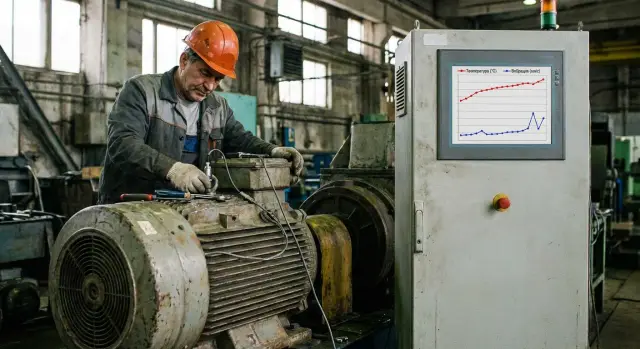
What exactly do we want to prevent and why start with a pilot
Predictive maintenance works best when you already know which failures cause the most expensive downtime. In most plants it’s not “any failure”, but a few typical scenarios: bearing wear on rotating units, misalignment and imbalance, overheating and lubricant degradation, belt drive issues, power problems and motor overloads. These defects often develop over weeks, so they can be noticed before the line stops.
Agree on a specific goal from the very beginning. For example: “warn about a pump emergency stop 3–5 days in advance” or “reduce unplanned downtime on a press by 20%.” If the goal is vague, the pilot quickly becomes “collecting charts” without delivering a solution.
One sensor rarely saves the day: similar symptoms can come from different causes. Vibration increases due to imbalance, bearing wear or loose fittings. Temperature rises can be caused by actual overheating or by reduced ventilation. Therefore even a simple pilot benefits from combining 2–3 data sources: vibration, temperature and control context (load, speed, mode).
A pilot is needed to quickly test a hypothesis without large expenses. In 8–12 weeks you can normally pick 1–3 critical pieces of equipment, install a minimal set of sensors, set up regular data collection and a trends dashboard, collect an events log (repairs, stops, replacements) and estimate the economics based on facts.
Predictive maintenance makes sense where failures are costly and degradation signs appear in advance: pumps, fans, compressors, gearboxes, motors, rotating machine tools. For items with well-known lifetime and low risk (for example, consumables with predictable service intervals), scheduled maintenance is often cheaper and more reliable.
Example: a fan on a line fails suddenly a couple of times a year and stops the section for 6 hours. Start the pilot by monitoring bearing vibration, casing temperature and speed or motor current. If you observe a steady vibration growth at the same operating mode and can schedule replacement in a convenient window, the pilot has already paid off.
Choosing equipment and defining success
To avoid the pilot turning into an endless experiment, start with 1–2 assets where downtime is truly expensive and failure develops gradually. It’s better to pick equipment that often “gives trouble” and is accessible for monitoring rather than the most complex asset.
A practical first choice is rotating machinery: pump, compressor, gearbox, fan. They have many common degradation scenarios and often show advance signs: increasing vibration, changing noise, rising temperature, higher current draw, lower throughput.
Five questions help narrow candidates to 1–2 quickly:
- How costly is downtime (does a line, section or critical support system stop)?
- Are failures repeatable and is their cause reasonably known (bearings, imbalance, coupling wear)?
- Is there anything measurable at least indirectly (current, pressure, flow, temperature)?
- Can you safely access, mount a sensor and service the point?
- Is there a process owner (shift supervisor or engineer) who can confirm events and help label them?
Then formulate the goal so it can be tested. Not “build AI”, but for example: provide early warning of degradation 3–7 days in advance; reduce the share of emergency stops for the chosen unit; learn to plan downtime and parts procurement ahead of time.
Accept constraints upfront: budget and schedule set the minimum scope, access to equipment is limited to shutdown windows, and safety is more important than any diagnostics (especially near rotating parts and hot surfaces).
An example success criterion: on a pumping station, bearings fail most often. The pilot is successful if the system twice in a row detected a degradation before a failure and the repair was done in a planned window without an unplanned stop. This check is straightforward and the benefit is immediately visible.
What data is usually already available on the plant
For a first predictive maintenance pilot you often don’t need to buy sensors. Many sites already have data sufficient to test the idea and decide what to measure next.
1) Repair logs and work orders
CMMS, Excel sheets or even paper logs are already a base. What matters more than number of fields is the regularity and clarity of entries.
For a pilot the most useful fields are failure (or detection) time and recovery time, the assembly or part (bearing, belt, gearbox), cause and symptom, and what was done (replacement, adjustment, lubrication, cleaning). If labor, materials and contractors are recorded, that helps with economics.
A simple example: logs show the same pump eats bearings every 3–4 months. This is a ready hypothesis: what happens before failure and can we detect signs in advance.
2) PLC and SCADA data
Required signals are often already captured by controllers and shown in SCADA. For a pilot, not only alarms but operating parameters that explain load are important.
Usually useful are motor current, power or load, pressure and flow (for pumps and fans), temperature (bearings, windings, oil if measured), speed or RPM, setpoints and modes (start, stop, transitions), and alarms with precise timestamps.
Timestamp quality and clear tag names are critical. When tags are named like “AI_17” without explanation, the pilot stalls.
3) Downtime history and production impact
To evaluate benefit you need downtime data. These are kept in MES, production reports or at least shift logs.
Collect at minimum: downtime duration and cause (preferably with a separate code), which section or line stopped and for how long, and consequences: lost output, wasted raw materials, extra changeovers. If data is missing, start recording at least 2–3 key causes for the pilot equipment. Without this it’s hard to prove value even if the model “guesses” failure.
4) Nameplate and reference data
Nameplate data helps interpret signals correctly and avoid mistaking normal for abnormal. Gather motor power and drive type, rated currents and temperatures, RPM, bearing and lubricant types, service intervals, critical components, and vibration norms if available, as well as installation conditions.
A practical start: pick 1–2 equipment types that have both operational signals (PLC/SCADA) and a clear repair history. Then you can link operating modes to failures and see which sensors are actually needed next.
Sensors for the first pilot: the minimal set
In the first pilot it’s more important not to “arm everything with sensors” but to collect exactly the signals that distinguish normal operation from early failure. It’s easiest to start with rotating units: pumps, fans, compressors, gearboxes. There the effect is usually more visible and measurements are more straightforward.
Minimal set of sensors and signals
Most often 3–5 types of data are enough:
- Vibration (acceleration and velocity). The basic signal for rotating equipment: imbalance, misalignment, loose fittings and bearing defects are often visible earlier than by sound.
- Temperature. Measure where it “heats first”: bearing housings, casing, oil (if available) and control cabinets.
- Motor current and power. Rising current, spikes and phase imbalance point to overload, seizure, power issues or changed load.
- Pressure and flow (if applicable). They provide process context: the same vibration can be normal at one flow and anomalous at another.
- Events and alarms from PLC. Time stamps are needed: starts and stops, interlocks, setpoint changes and manual modes.
A practical scenario: fit a pump with a vibration and bearing temperature sensor, read motor current from the variable frequency drive or panel, and pull “Start”, “Alarm”, “Mode” from the PLC. Within weeks you see which deviations repeat before stops and in which modes they occur.
If the plant already has SCADA, some signals (current, pressure, events) are available without new sensors. The pilot is then cheaper: add only vibration and a couple of temperature points. Agree in advance how maintenance will be logged: date, action, cause. This often adds more value than another sensor.
Sensor installation and connection: simple practical rules
To prevent the pilot becoming “collect everything”, sensors should be installed so the signal is stable and comparable across time and points.
Wired vs wireless: what is simpler in reality
Wired sensors are usually chosen when a control cabinet is nearby and cabling is convenient. Power and communications are more reliable, fewer surprises with radio links, and continuous streams are easier to guarantee.
Wireless options win on remote units or where cabling means a line stop and long approvals. Their limitations are batteries, radio quality in metal structures and information security requirements.
Before mounting, agree on what “normal” looks like: the same point, same mounting method and identical settings. Otherwise you won’t be able to compare weeks.
Mounting and orientation of vibration sensors are especially critical. If today the sensor is glued and tomorrow it’s bolted, or rotated by 90°, the signal changes even if nothing actually failed.
Practical minimum rules that usually save a pilot:
- Place points close to bearings and supports, not just where convenient.
- Use repeatable mounting (stud or rigid magnet if permitted).
- Record axis orientation and note it in the point passport.
- Document the point (photo, distance to the component, surface type).
- Don’t change the mounting mid‑pilot without logging it in the changes journal.
Polling frequency, storage and time sync
Too sparse polling will miss fast changes; too frequent creates mountains of data without benefit. For a first pilot it’s sensible to continuously store aggregates (RMS, peak, temperature) and write raw high‑frequency windows on a schedule or on event.
Check clocks separately. If device, gateway and SCADA clocks drift, you won’t correlate a vibration spike with operating mode, load or an alarm.
Do a quick check before start:
- data flows without gaps for at least 24 hours;
- timestamps match SCADA or NTP, deviations within seconds;
- it’s clear where and how long data is stored and who has access;
- alerts are configured for connection loss or low battery.
And finally — safety. Installation only according to plant rules: permits, lockout, tagging and coordination with HSE and IS, especially in restricted zones. If turnkey work is needed, system integrators like GSE.kz usually help to agree the PLC/SCADA connection scheme and pass internal procedures without unnecessary risks.
Data preparation: checks before any analytics
Predictive models usually “break” not because of math but because of dirty data. Do a short quality check before any forecasting: it immediately shows if the pilot is ready for reliable conclusions.
Signal quality: gaps, noise and “dead” intervals
Start simple: are there data at all and do they come regularly?
Check for time gaps, abrupt unexplained spikes, stuck values, variable sampling steps (seconds vs minutes) and timestamp correctness. When you find a problem, log where it occurs (sensor, cable, network, gateway, PLC/SCADA, storage). This is more useful than immediately “cleaning” data.
Units, calibration and operating modes
Pilots often compare the incomparable: mm/s and g, bearing temperature and ambient temperature, current in amps and percent of rated. Create a short channel passport: units, range, mounting point, how it’s attached, last calibration.
Then split operating modes. The same motor shows different “normal” vibration at idle and under load. Mark at least three states: start, steady run, stop. If PLC/SCADA signals (speed, load, valve position) exist, use them as mode labels; otherwise models will confuse normal transitions with faults.
For a baseline you usually need 2–4 weeks of normal operation to see variation across shifts, raw material and ambient conditions. If modes vary a lot, collect longer.
Also agree on access and change control: who may edit points, who adds comments (“bearing replaced”, “sensor moved”, “planned stop”). Without a change log you won’t explain why an “anomaly” coincided with a normal repair.
Step‑by‑step pilot plan for 8–12 weeks
A pilot isn’t for a perfect model but to quickly check: can we detect problems early, react in time and save money. Discipline in process matters more than sophisticated analytics at the start.
Weeks 1–2: choose the asset and agree rules
Pick one asset that frequently stops the line or is expensive to repair: pump, gearbox, fan, compressor. Collect 6–12 months of repair and downtime history and describe 2–3 typical failures.
At the same time map signals: what is already in PLC/SCADA (current, temperature, frequency, modes) and what must be added with sensors. By the end of this stage record success criteria: for example, at least two warnings confirmed by inspection and a reduction in emergency stops.
Weeks 2–4: installation and data quality check
Install sensors and hook up collection. Then check basics: do timestamps match, is the recording frequency stable, are there gaps or stuck values.
A quick practical test: run the unit in different modes and watch whether vibration, current and temperature change logically. If vibration stays “flat as a ruler” despite clear load changes, the issue is usually mounting or collection settings.
Weeks 4–6: simple rules and first alert test
Instead of a model, start with thresholds and simple rules: RMS vibration growth relative to baseline, overheating at normal load, current rise at same output. Run test notifications to a small group (on‑duty mechanic, instrumentation engineer) and agree how to confirm an event: brief inspection, photo, log entry.
Weeks 6–10: link data to real events
This stage’s task is to stitch data to facts: when was noise heard, when did temperature rise, what inspection found, what was done. Even if you see a slow vibration rise and inspection reveals a loose fitting, that’s already a useful scenario, even without a precise failure date prediction.
Weeks 10–12: results and scaling decision
Record outcomes: how many warnings, how many confirmed, how much lead time gained. Calculate money: cost per hour of downtime, emergency repair cost, quality losses or scrap. The pilot’s conclusion should be simple: which 1–2 signals actually work, what response procedure is needed and which assets to apply the approach to next.
How to estimate benefit: metrics and economic calculation
Pilot benefit is not just “it got better.” You need simple numbers understandable to engineers and finance.
Metrics to track
At an early stage focus on alarm quality and downtime metrics:
- hours (or shifts) of downtime caused by failures of the selected asset;
- MTBF and number of emergency repairs;
- repeat failures (same fault returns within 30–60 days);
- false alarm rate (alert triggered but inspection found no defect or repair);
- missed detections (failure happened without prior warning or warning came too late).
Alarm quality matters because pilots can be killed by too many notifications: people stop reacting and the system loses its value. For a pilot a practical rule: an alarm is useful if it gives time for a planned inspection or part replacement without stopping the line.
Converting results into money
Agree with production and finance what is included in downtime cost and what is considered a prevented event. Typically count cost per hour of downtime (lost output, margin, penalties), scrap and rework, extra energy, urgent procurement and logistics, and higher cost of emergency repairs (night shifts, contractors).
Example: if a line hour costs 1,200,000 tenge and a typical bearing failure stops the line for 6 hours, one downtime equals 7,200,000 tenge. If the pilot provided a two‑day warning and you replaced the unit in a planned window without stopping the line, the benefit is close to that amount (minus the part and labor costs, if those would have been incurred anyway).
Comparing before and after
Compare carefully: same shifts, similar loading, no major capital repairs that change the picture. If there is seasonality, use comparable weeks from last month or last year rather than random two weeks.
A pilot “win” often looks simple: 1–2 avoided downtimes, a clear drop in emergency repairs or repeat failures, and an acceptable alarm quality (most alerts confirmed by inspection).
Common mistakes and traps in the first pilot
The most frequent mistake is trying to cover everything at once: dozens of assets, different sensor types, many PLC/SCADA signals. The team drowns in data and doesn’t answer the main question (is there value and where?).
The first trap is starting without a clear goal. Without 1–2 defined failure scenarios (bearing wear, imbalance, overheating) any charts will look “interesting” but won’t lead to action.
Second — missing repair history. Without a log of replacements, downtimes and causes you can’t compare signals to events. Minimum: repair dates, what was replaced, downtime length and symptom.
Third — wrong sensor placement. A precise sensor is useless if mounted on a thin sheet, painted surface, far from the bearing or picking up vibration from a neighbor. Simple rule: place the sensor near the potential fault source on a rigid base and standardize the mounting point.
Fourth — expecting complex AI on day one. Trends and basic thresholds often work best initially. With little historical data and few real failures, a model will guess. The pilot’s aim is to see if you notice change earlier than an operator or scheduled inspection.
Fifth — no response process. An alert arrives but it’s unclear who confirms it, who opens a work order, in what timeframe and what counts as a successful action.
Minimum to close this gap:
- signal owner (e.g., shift mechanic) and a deputy;
- confirmation rule (inspection, handheld vibration check, temperature check);
- response window (e.g., 24–48 hours) and result recording format;
- escalation criteria (when to stop the line, when to plan repair).
If these traps are closed in advance, the pilot becomes a working test rather than a charts showcase: alarm appears, the team reacts and the result is honestly comparable to previous downtime and costs.
Short checklist and next steps after the pilot
To avoid sensors-for-the-sake-of-sensors, keep three things: a clear goal, a clear reaction and a clear way to count results.
Checklist before the final review
- Roles assigned: pilot owner (makes decisions and removes blockers) and asset responsible (organizes inspections and repairs).
- 1–2 assets chosen and typical failures described: what fails, how it shows up, which early sign you monitor.
- Data collected not only for vibration but at least one contextual parameter (bearing temperature or motor current).
- A response rule exists: who receives the alert, within how many hours to check, what to record and where.
- A unified report template is ready: how many warnings, how many confirmed, what actions taken, and how much time and money saved.
Next steps after the pilot
-
Decide: scale or refine. If signals are few but accurate, that’s a good sign. If there are many noisy alerts, first tune thresholds, mountings and mode accounting.
-
Decide where analytics and history will live. On the start it’s often convenient to process data near the equipment (faster reaction) and store history on a server.
-
Fix the maintenance process: what counts as an incident, how a work order is created, how causes are confirmed and how thresholds are updated after repairs.
-
Prepare a 3–6 month expansion plan: which assets to add, which sensors are needed, which PLC/SCADA points to connect, who is responsible for access and security.
-
If resources are lacking, engage an integrator and estimate compute needs for local processing and storage. In practice reliable servers and workstations are often required along with deployment and operations support — for example, this is the competence area of GSE.kz (gse.kz) as a manufacturer and systems integrator.
A good pilot ends not with a “model” but with a repeatable process: alarm, inspection, action, record the effect and improve the rules.
Frequently asked questions
Which equipment is best to start a predictive maintenance pilot with?
Start with an asset where downtime is genuinely costly and failures repeat with similar patterns. Typical candidates are pumps, fans, compressors, gearboxes and electric motors, because their degradation often shows up in advance as changes in vibration, temperature and load. For a pilot, accessibility of the measurement point and a clear equipment “owner” are more important than technical complexity.
How to formulate the pilot goal so it does not become an experiment for the sake of experimenting?
Phrase the goal so it can be verified by facts. A practical goal is a measurable outcome: for example, warn of a failure within a specific time window (e.g., 3–7 days) or reduce unplanned stops for the selected asset by a clear percentage. If the goal is «build AI» or «collect charts», the pilot will not produce an operational decision for management.
Can we start a pilot using only PLC/SCADA data without buying new sensors?
Yes — you can often start without buying new sensors if signals from PLC/SCADA and repair history are available. For a first pass, motor current/power, speed, modes (start/stop), alarms and process parameters like pressure and flow are useful. However, for rotating equipment it usually becomes clear quickly that without vibration data the pilot is «blind», so teams typically add at least 1–2 vibration points and a couple of temperature sensors.
What sensors are needed in the minimal set for a first pilot?
The minimally useful set for rotating equipment is vibration, temperature and a contextual load signal. Vibration reveals mechanical degradation, temperature confirms overheating and lubrication issues, and current/speed/mode from controls explains operating conditions. A single signal often reflects different causes, so a combination of 2–3 sources is usually more reliable.
Which is better for a pilot: wired or wireless sensors?
Wired sensors are simpler where a control cabinet is nearby and cable routing is convenient: power and communications are more reliable and continuous data flow is easier. Wireless sensors work well for remote assets or where cabling requires long stops and approvals, but you must manage batteries, radio propagation through metal structures and security policies. Pick the option that gives the most stable signal with the fewest interruptions for the pilot.
Where and how should a vibration sensor be mounted so the data is useful?
Repeatability of the measurement point and a rigid, stable mounting next to the bearing or support are key. If a sensor is placed «where convenient», on a thin housing, or its mounting method changes during the pilot, trends will be noisy and incomparable. Record the exact spot, orientation and mounting method at the start and don’t change them without logging it in the changes journal.
How often should data be collected and should raw signals be stored?
For a pilot it is usually enough to continuously store aggregated metrics (e.g., RMS or peak for vibration and trend temperatures) and record raw high-frequency windows on a schedule or when events occur. This keeps data volumes reasonable while preserving the ability to investigate incidents. More important than raw sampling rate is time synchronization between sensors, gateways and SCADA so you can correlate anomalies with operating modes.
What must be verified in the data before any analytics or alerts?
Check for gaps in time series, stuck values, unexplained spikes and inconsistent sampling intervals between sources. Verify units and channel “passports” (units, range, mounting point, last calibration) and separate operating modes at least into start, steady-state and stop. Without these checks the system will confuse normal transient behavior with faults and pilot conclusions will be unreliable.
How do you know the pilot actually paid off and brings value?
Combine technical and business metrics. Technically, look at confirmed warnings, false alarm rate and missed detections. From a business perspective, quantify prevented downtime hours and the difference between emergency and planned repair costs, including lost production and extra logistics. A successful pilot usually shows that an early warning allowed a planned intervention and this is visible in downtime and cost figures.
What are the most frequent mistakes in a first predictive maintenance pilot?
Common failures are trying to cover too many assets at once, fuzzy objectives and lacking a response process. Another typical issue is no repair history or change log, so anomalies can’t be tied to real events. Start with 1–2 assets, define who responds and within what timeframe, and record short inspection and repair notes — this yields useful results faster than building a complex model from day one.
