6 min read
Pre-shipment service: what affects support
Pre-shipment service affects deployment timelines, support requests and component replacements. We’ll review what’s important to check before handing over equipment.
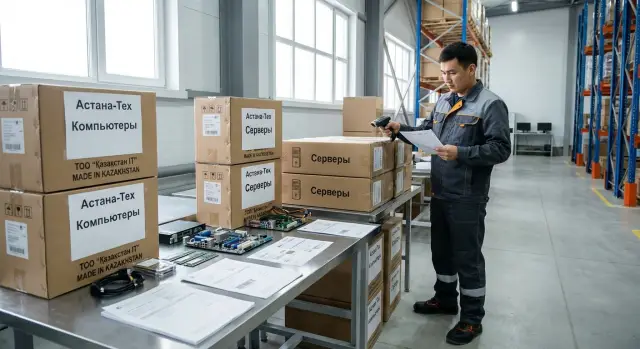
Problems appear before equipment is even powered on
Many assume support starts the day a computer or server is first turned on. In practice, some of the future problems begin earlier — in the warehouse during batch assembly, packing and paperwork. Small mistakes made there later turn into lost hours, extra approvals and deployment delays.
If a cable is missing from the box, the equipment won’t be connected on installation day. If the serial number on the case and in the documents don’t match, registering the device, placing it on inventory or quickly finding it in a support ticket becomes harder. If the box arrives crushed, the recipient immediately wonders whether it’s just a shipping mark or there is internal damage.
At the start these details seem minor. But they are exactly the things that most often add up: incomplete kits, labeling errors, documents for the wrong model, weak packaging or mismatched serial numbers.
The mistake then travels down the whole chain. The warehouse shipped it, logistics delivered it, acceptance recorded the remarks, and support has to deal not with the device’s operation but with what wasn’t checked in advance.
This is especially noticeable in large deliveries for government bodies, schools, hospitals and offices, where equipment arrives in batches. If one batch has mixed contents or labeling errors, it delays not a single employee but the entire local rollout.
Good service doesn’t start after power-up — it starts when the equipment is being prepared for shipment.
What pre-shipment service includes
Pre-shipment service begins not with transport but with preparing each unit to work properly after delivery. When this step is organized carefully, rollout is faster and support doesn’t waste time looking for serial numbers, missing cables and required certificates.
Four things matter: packaging, labeling, completeness and documents. They all affect how acceptance goes, how quickly equipment is put into operation and how many questions arise after delivery.
Packaging must protect the device during transport and while stored at the customer’s warehouse. Labeling must make it immediately clear what’s in the box and where the equipment should go. Each unit’s kit should be complete and clear, not just the batch as a whole. Documents must match the actual delivery and help quickly accept, register and, if needed, contact service.
Usually different people are responsible for these steps: manufacturing or assembly controls configuration, the warehouse checks the kit and physical condition, quality control oversees labeling, and logistics or a project manager is in charge of batch readiness and paperwork. If there isn’t a single process across these stages, errors easily slip through.
In a small delivery such inaccuracies are noticed quickly. In a batch of tens or hundreds of devices the same error repeats many times. One missed adapter or one wrong label becomes a series of identical support requests.
Why packaging affects later support
Packaging is needed not only for neat delivery. It directly affects the number of post-delivery requests and how quickly a problem can be diagnosed.
During transport the equipment faces not one big impact but constant vibration, pressure from stacking, sudden movements and temperature changes. Even if the outer case looks intact, the inside may be damaged. Weak packaging often causes hidden damage: cracked mounts, shifted boards, deformed connectors, and damage to screens and storage devices.
Corner protection, internal fasteners and clear tamper-evidence are particularly important. If the device isn’t secured inside the box, the risk of damage increases sharply. If the box can be opened without visible traces, it becomes difficult to determine at which stage the problem occurred.
Good packaging helps not only in transit but also at acceptance. Boxes are easier to carry, temporarily store, sort and match with documents. For the IT department this means fewer extra checks; for procurement and support, fewer disputed cases.
This is especially important in large batches of PCs, all-in-ones and servers, where boxes may look similar from the outside but contain devices with different configurations and purposes.
Why clear labeling matters
Labeling is not for reporting only. It helps to quickly understand what’s in the box, who the device is intended for and where it should be placed after acceptance. Without that, confusion starts before the first power-on.
There should be simple, visible markings on the box and on the device itself: model, serial number, batch or project number, and when needed, assignment to a room, department or branch. When this data reads at a glance, staff don’t need to open every box and verify everything manually.
Serial numbers and inventory labels are especially important. They are how equipment gets into acceptance acts, internal databases, warranty records and support tickets. If a number is on the box but hard to find on the device or it doesn’t match the paperwork, time is lost on day one.
Good labeling helps in three common situations:
- quickly find the required device within a batch;
- distribute equipment to rooms, departments or sites without mistakes;
- immediately register the device and file a service request without having to request data again.
One simple rule: labeling must exactly match the documents. Model name, serial number, the number of items and the contents of the delivery should read the same on the invoice, specification and the device itself.
Kits without unpleasant surprises
Post-delivery problems often start not with a breakdown but with an incomplete kit. The device may be fully functional, but if one cable, fastener or adapter is missing, the workstation won’t be put into operation on time.
Small items that seem secondary in the warehouse are most often forgotten: power cables, connection leads, mounting hardware, adapters, power bricks and short instructions. On site those parts are often critical.
A single omission can delay commissioning by days. A server may arrive on time but without rack mounting brackets. Formally the delivery is fulfilled, but the launch is postponed and the team spends time not on setup but on finding missing parts.
Another common mistake is to kit all devices identically even though departments have different needs. A classroom, a clinic reception and a server room require different accessory sets. Therefore, it’s better to have a clear kit for each unit rather than a single list for the whole batch.
This approach simplifies both acceptance and ongoing support. If each PC, all-in-one or server has its own recorded kit, it’s easier to quickly check the box contents, replace missing items and understand exactly what was delivered.
Which documentation really saves time
Good documentation saves hours even before the first power-on. When papers are neatly assembled and match the actual delivery, acceptance goes faster and support doesn’t waste time on extra clarifications.
You don’t need thick folders. A short, precise set of documents is usually enough:
- delivery specification with models and quantities;
- list of serial numbers for each unit;
- packing list by box;
- short startup and basic-check instruction;
- handover document with date, installation location and the responsible person.
The most useful document in this set is the list of models and serial numbers. Without it, large batches quickly become confusing: what’s already installed, what remains in the warehouse, which device a ticket refers to, and what configuration is in a specific room.
Accurate models and serial numbers are needed not only for accounting. They help support immediately understand what device the client has, its build and what the warranty covers. Without this information, support typically asks for photos of the sticker, the box or the acceptance act, and a simple question stretches into several emails and calls.
A short startup guide also reduces extra load. It should state first-power sequence, basic checks, the list of cables and accessories in the kit, and who to hand the equipment over to for operation.
How to check everything before shipment
A pre-shipment check reduces disputes, returns and unnecessary support visits. It’s essentially the last point where most small but costly mistakes can be caught.
Start by pulling the specification and matching it to the actual batch contents. Check not only model and quantity but configuration, accessories and any special customer requirements. An error in even one position leads to deployment delays.
Then inspect each unit individually. Check appearance, integrity of ports and labels, completeness of the kit, condition of packaging elements and that everything supposed to be in the box is present.
Next, reconcile labeling with the documents. The serial number on the device, the box and on the paperwork must match. If the customer uses internal inventory codes, it’s better to verify them before packing, not at the recipient’s warehouse.
Before final packing it’s useful to record the device condition. Usually a photo and a note in the inspection report with date and responsible person are enough. This helps quickly resolve questions if damage is reported later.
Finally, have one person confirm the batch is ready. Not a vague “everyone looked,” but a named responsible person who signs that devices are assembled correctly, documents match and the shipment is ready.
Common mistakes when preparing a batch
Most support problems start not after installation but at the warehouse. When a batch is assembled hastily, pre-shipment preparation becomes a formality and this quickly affects acceptance and rollout.
One frequent mistake is mixed boxes without clear markings. From the outside everything looks neat, but the batch contains devices for different rooms, departments or sites. Acceptance drags on and on-site staff spend time sorting.
Serial numbers cause no fewer problems. They may be present in the documents, but on the equipment the sticker can be covered with film, smeared or placed where it’s hard to read quickly. A simple operation like registering the device or filing a ticket then takes much longer.
Another common issue is visually identical models with different kits. Devices look the same externally, but part of the batch has a different cable, more memory, other mounting or peripherals. For schools, offices, hospitals and government entities this breaks a single deployment scenario.
There are also simpler mistakes: documents stored separately from the equipment and lost during handover, packaging looking intact externally while the device is poorly secured inside, accessories placed without reference to a specific unit, or box labeling not matching the contents.
Even good equipment loses convenience if a batch is prepared carelessly.
Short checklist for acceptance and startup
Good preparation shows during acceptance. If a basic check is done immediately, rollout goes smoother and supply issues are resolved based on facts.
What to check in a few minutes
- Match model, quantity and serial numbers with the invoice and internal list.
- Check each unit’s completeness: power supply, cables, mounting hardware and everything needed for the first power-on.
- Make sure the device’s intended location is clear from labeling.
- Accept the documents together with the equipment, not later as a separate packet.
- Record the condition of the packaging at handover.
For a batch of PCs, all-in-ones or servers this is usually enough to proceed to installation without delay. If equipment arrives in stages, repeat this check for each delivery separately.
A simple example: a school receives a batch of all-in-ones but two boxes lack room markings and one kit arrived without the required cable. Formally the delivery exists, but the actual rollout is stalled on day one.
What it looks like in practice
A new company branch opens an office with 60 workstations. A batch of desktop PCs, monitors, keyboards and mice is delivered. On paper everything seems straightforward: unpack, connect, hand out to employees.
In reality delays often start with a small detail. In one box the labeling didn’t match the internal list: the sticker showed one room while the documentation showed another. The sysadmin can’t quickly figure out who should get which computer, accounting waits for serial number confirmation, and employees lose half a day.
If every unit has clear labeling, the serial number is easy to verify, the kit is consistent across the batch and documents are without confusion, the installation crew follows the list without pauses. If later a computer needs replacement or warranty service, it’s found within minutes.
If equipment arrives without any order, time is spent on manual sorting, verifying kits and finding missing parts. The problem seems small but it stops the whole team.
What to do after acceptance
After acceptance don’t just close the act and move on. This moment shows best what worked well and what will later complicate accounting, rollout and support.
The most sensible step is to fix successful rules in advance and use them in future purchases. Then the supplier, IT, warehouse and support can rely on uniform requirements instead of renegotiating for each batch.
Usually recording four things is enough: a unified labeling format, an exact kit for each item, a mandatory set of documents and one person responsible for the process from assembly to support.
It’s also useful after the first acceptance to gather brief feedback from those who actually worked with the batch: warehouse staff, IT specialist, procurement and support. From a single delivery you usually see which requirements should be added to the purchase template and contract appendices.
For organizations in Kazakhstan this approach is often easier when working with a single contractor who understands manufacturing, delivery and subsequent operation. In this sense GSE can be a convenient option: the company manufactures equipment in Kazakhstan and handles system integration, so requirements for labeling, kits, documents and support can be agreed in one chain.
The sooner these rules become standard, the less extra work there will be for future deliveries.
Frequently asked questions
Why does service start before shipment?
Yes. Most problems start before delivery. If packaging, contents, labeling and documents aren’t checked in advance, acceptance, registration and first startup are delayed on site.
How does packaging affect post-delivery support?
Poor packaging increases the risk of hidden damage during transport and storage. Even if the box looks intact, mounts, connectors or a screen can be damaged inside. Packaging also affects acceptance: if boxes are hard to sort and match with paperwork, the deployment of a batch slows down.
What should be shown on the equipment labeling?
There should be clear, readable information on the box and on the device itself: model, serial number and, if needed, assignment to a room, department or site. The simple rule: labeling must fully match the documents.
Why is an incomplete kit already a support problem?
Because without one cable, adapter or fastener the device can be fully functional but useless for launching. Formally the delivery is complete, but the workstation or server still isn’t put into operation. Therefore, it’s better to record the kit for each individual item, not just for the batch.
Which documents are really needed on delivery?
A minimal useful package includes: the delivery specification, a list of serial numbers, a clear packing list and a short first-start guide. These documents save time on the day of acceptance. With accurate data, support doesn’t need to repeatedly request photos of labels or confirm device models.
What to check before shipment so there are no disputes later?
First, match the model, quantity, configuration and accessories to the specification. Then inspect each unit: external condition, intact labels, completeness and that the serial numbers on the device, box and paperwork match. It’s useful to fix the device condition immediately with photos and a responsible person’s note.
What to do if the serial number doesn’t match the documents?
Such a device is harder to register, to process under warranty and to find in a support ticket. Even a simple support request will take longer. Better to stop issuing the device and immediately verify the serial number on the device, the box and the documents while the equipment is still on site.
Why are errors especially painful in large batches?
Yes — especially when equipment is supplied in tens or hundreds. One labeling or kit mistake repeats many times and delays not one person but the whole deployment on site. This is particularly noticeable in schools, hospitals, government bodies and large offices.
What is best to check in the first minutes of acceptance?
Immediately compare models and serial numbers with the delivery note, check the completeness of each box and record the condition of packaging at handover. Also confirm that the paperwork arrived with the equipment, not separately. This quick check is usually enough to spot the main problems in time.
Why is it more convenient to work with a single provider for supply and support?
It’s usually more convenient when one contractor handles the whole chain: from preparing the batch to ongoing support. That makes it easier to agree on uniform rules for labeling, contents, documents and service. For organizations in Kazakhstan this approach can simplify work if the supplier both manufactures equipment and provides integration services, like GSE.
