7 min read
Asset Labeling Before Shipment: When It Pays
Pre-shipment asset labeling speeds up acceptance, reduces inventory errors and lets devices be assigned to departments before arrival.
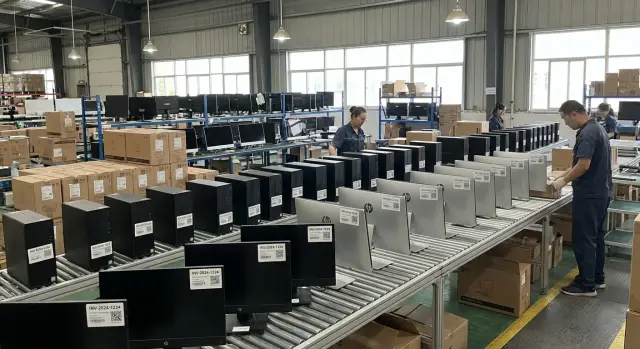
Why problems arise when labeling devices after delivery
When equipment arrives on site without ready labels, acceptance almost always takes longer. You have to open boxes, check models and serial numbers, print stickers, find the responsible person, and only then enter the data into the inventory system. Even a small batch quickly turns into long manual work.
The issue is that labeling starts when the IT team is already at peak load. They must accept equipment, verify completeness, distribute devices across rooms or branches, and get things up and running as fast as possible. If inventory tags are applied the same day, some devices get stuck between stages: the equipment has arrived but is not formally registered yet.
The same errors tend to appear on site:
- the sticker is applied to the wrong device;
- the serial number is entered with a typo;
- the same device is recorded under different names;
- a device is first assigned to one department and then manually moved to another;
- part of the batch is handed out to users without final registration.
After that, inventory accuracy quickly degrades. It becomes harder to know where a particular PC, all-in-one or server is, who is responsible for it, and when it was commissioned. A mistake at acceptance carries over into inventories, service, write-offs and future purchases.
These disruptions are especially noticeable with large deliveries. If dozens or hundreds of units arrive at once, on-site manual labeling almost always creates a backlog of boxes, acceptance forms and spreadsheets. The warehouse waits, IT rushes, and users ask for workstations as soon as possible. In such conditions even a careful team begins to skip steps.
A good example is a delivery of computers and all-in-ones for several branches at once. Without pre-assigned labels, staff first sort devices by model, then manually decide where each item should go, and only afterward apply stickers. If some devices must be issued on the day of delivery, inventory order deteriorates even more.
That's why pre-labeling often turns out to be not just a convenient option but a way to remove chaos at the most intense moment. When basic data is prepared in advance, you don't need to build inventory from scratch on site. All that's left is to confirm receipt and hand over equipment to its destination.
When pre-labeling is truly worthwhile
Pre-labeling isn't necessary for every purchase. But when equipment needs to be distributed quickly, registered and deployed without extra hands, it saves noticeable time. This is most visible where one delivery goes to several branches, offices or classrooms.
The clearest scenario is a mass purchase for standard workstations. When you have dozens or hundreds of identical PCs, all-in-ones or servers, it's more efficient to apply inventory numbers, add QR codes and associate each unit with its destination before shipping. Then on site you don't need to open every box, figure out which computer is intended for whom, and manually transfer data to spreadsheets.
This is particularly useful where inventory is strict and precise mapping to department, room or responsible person matters. If that mapping is done before shipment, the equipment arrives ready for acceptance. IT and facilities only need to check quantity and condition instead of redoing the entire inventory process.
Pre-labeling is especially justified when:
- the batch is headed to multiple offices or branches;
- equipment must be deployed the same day or the next day;
- the company has strict inventory rules by room, department or employee;
- the IT team is small and manual labeling takes too much time;
- the purchase consists of repeated kits, such as standard workstations.
Imagine a delivery of 120 desktop PCs for a branch network. If labeling is done beforehand, each machine already has its number, QR code and assigned installation location. Boxes can be shipped directly to addresses, and on site you don't waste days sorting. This reduces the risk of devices ending up in the wrong room or being recorded under the wrong department.
There is added benefit where fast deployment matters. For schools, hospitals, bank branches and government offices a slow post-delivery process often costs more than the labeling service itself. If equipment arrives prepared, it is accepted, connected and handed to users faster.
For a small delivery to a single office the effect may be modest. If there are few devices and one specialist still configures them on site, savings will be less noticeable. But the larger the batch, the more complex the distribution and the stricter the asset control, the more worthwhile it is to do this work in advance.
What can be applied and assigned before shipment
Pre-shipment labeling is not just a sticker with a number. At this stage you can prepare equipment for acceptance, issuance and inventory so boxes don't need to be reopened and destinations don't need to be determined later.
Typically you prepare both the physical label on the device and the registry data for the delivery. Together these create a simple link: a specific unit, a specific location and a specific recipient.
What is applied to the device
The basic element is the inventory number on the case or a small plate. It should be placed so the number is easy to check but won't wear off during normal use and cleaning. For desktop PCs, all-in-ones and servers it's best to decide the location in advance and keep it consistent across the batch.
A second useful element is a QR code for quick verification and issuance. A warehouse or site employee scans the code and immediately sees the corresponding record in the inventory system or acceptance form. This is especially handy when the whole batch looks the same.
Sometimes a department or location code is applied directly to the device. There is no need to print a long department name — a short branch, floor, room or rack code often suffices. This reduces the chance that the device will be sent to the wrong room or left in a common storage area without an assignment.
What is recorded in the delivery registry
A sticker alone is not enough without an accurate entry in the documents. Before shipment, assemble a single registry where each unit already has its assignment. It usually contains:
- the device's serial number;
- the inventory number;
- the QR code or internal identifier;
- the department, room or location code;
- the box, pallet or position in the shipment.
It's also useful to record kit completeness by box and position. For example, if a shipment has 40 workstations, you can list in advance what each set includes and which box contains each item. That way, on site you won't have to assemble kits manually from different stacks and check for missing items.
A simple example: a batch of all-in-ones for a school or office ships with inventory numbers, QR codes and room codes, and the registry shows which serial number belongs to which room. For IT this means less manual work, and for acceptance — fewer disputes.
The more precise this mapping is before shipment, the easier it is to maintain inventory, handle issuance and deal with service or relocations later.
How to organize the process without confusion
If you need pre-labeling, the main principle is simple: agree on the data first, then print labels. Errors almost always start before the warehouse — when the customer lacks a unified format for numbers, department names and recipient lists.
This is especially important for batches of computers, all-in-ones or servers. If equipment goes to different branches, rooms or responsible persons, pre-labeling saves hours of manual work on site.
Five steps that work
-
Determine which fields are really needed for inventory. Don't try to fit everything on the sticker. Usually an inventory number, QR code and a short department or location code are enough. Decide what will be visible on the label and what will remain only in the inventory system.
-
Agree a single number format and sticker type. The number should be read the same way by accounting, IT and the warehouse. If the code is too long or complex it becomes inconvenient. Also choose sticker material ahead: office PCs may use one option, while devices that are often moved or cleaned need more durable labels.
-
Compile an exact list of where and to whom each unit is going. Avoid vague phrases like "Almaty office" — provide specific data: branch, department, room and responsible person if known. This step usually uncovers duplicates, old department names and multiple variants of the same address.
-
Reconcile data from two sources before printing. At a minimum check the delivery specification against the inventory registry. If one file lists one recipient and another lists someone else, the error will end up on the device and cause extra work on site.
-
Verify labels before packing. It's important not only to stick the label but to make sure the number is readable, the QR code scans, and the sticker is applied straight. After this, create a control export: serial number, inventory number and destination must match.
When the process follows this sequence, equipment arrives ready to be recorded. This is especially useful for schools, hospitals, banks and government bodies where one batch must be quickly distributed across several sites.
If the manufacturer or integrator preparing the shipment is responsible for equipment preparation, this approach is easier to integrate into the overall process. For the customer the main advantage is fewer manual fixes, disputes and delays after delivery.
A simple example from a real delivery
The benefit of pre-labeling is clear in a school delivery. Suppose an institution receives 120 all-in-ones for three buildings: the primary school, the main block and the administration building. Devices need not only acceptance but also quick distribution across rooms without confusion.
If the batch is prepared in advance, each device can receive an inventory number, QR code and an assigned installation location before shipment. For all-in-ones this is particularly convenient: the device arrives already linked to a specific place, such as the IT classroom, library or teachers' room. In the inventory table the required department sits next to the serial number.
Imagine part of the batch goes to the first building, part to the second, and several units to accounting and reception. The box is clearly labeled and the all-in-one has a QR code for tracking. When the shipment arrives, the staff member doesn't need to open every box and decide where each unit goes.
Acceptance then looks like this:
- the employee checks the box number against the waybill;
- scans the QR code;
- sees the room or department in the inventory system;
- sends the box directly to the correct building.
As a result, equipment doesn't pile up in the school's storage and doesn't require resorting. Boxes go straight to classrooms and IT staff don't have to later figure out which device belongs where. For a 120-unit delivery this saves a significant amount of time.
Without pre-labeling, the same acceptance often becomes a separate project: open boxes, check serial numbers, apply inventory stickers, enter data into a spreadsheet, then redistribute devices across buildings. For a large batch this takes days rather than hours.
In education deliveries this approach is especially useful when equipment must be distributed immediately to classrooms. For all-in-ones or PCs, pre-prepared labels help accept equipment faster and maintain inventory correctly from day one.
Common mistakes and unnecessary costs
The main mistake is simple: treating labeling as a formality and then being surprised that inventory doesn't match in the first week. Pre-labeling only works when the number, sticker, QR code and registry entries are created according to the same rules.
A frequent cost-cutting mistake is skimping on label quality. The sticker then quickly wears off, peels in transit or gets damaged after routine cleaning. In schools, hospitals, offices or server rooms a weak material turns labeling into a meaningless adhesive trace.
Just as problematic is a mismatch between what's on the device and what's in the documents. One wrong character in an inventory number, switched boxes or a last-minute manual edit — and acceptance drags on. Staff end up spending hours searching for which PC, all-in-one or server is listed in the registry.
With QR codes the issue is usually not the code itself but the content behind it. One code may open an asset card, another an internal number, and a third only the manufacturer's serial number. When formats differ, people keep parallel lists, which almost always creates errors.
Most extra costs come from four things: reprinting labels after acceptance, manual matching of devices to lists, correcting data in the system after handing equipment to departments, and extra IT trips to locate and reassign assets.
Another common failure is last-minute changes to device assignments. If distribution is set during preparation but plans change before shipment, part of the batch may go to another branch, room or department. Without a final check, the label on the device differs from the system record, and the device may end up in a third place.
The problem grows if labeling is done without accounting for future service and moves. A device placed in accounting today may move to a branch in three months and go for repair in a year. If the code and asset card aren't designed for that life cycle, inventory fragments quickly.
A good guideline is simple: labeling should help not only at shipment but also during inventory, transfers, repairs and write-offs. If it doesn't, the company pays twice — first for applying labels, then for fixing the consequences.
Short pre-shipment checklist
Even well-organized labeling loses its value if no quick final check is done before shipping. At this stage you don't look for new data but quickly confirm that everything is applied, readable and matches the documents.
Check five things:
- the label on the device, the marking on the box and the registry entry must match exactly;
- the number format should be understandable to everyone involved in acceptance;
- the QR code must be scannable with a regular smartphone;
- the breakdown by departments and addresses should be clear and free of duplicate names;
- the kit contents for each workstation must match the registry.
It's useful to appoint one person responsible for the final check. When several people perform the check without a shared list, some errors remain unnoticed and others appear during packing.
In practice this is crucial for large deliveries. If equipment is being shipped to schools, hospitals or offices in different cities, one misplaced box can delay the launch of an entire room or department. It's much cheaper to catch that mistake in the warehouse than after delivery.
A simple rule: each unit should have one clear identifier that looks the same on the device, the box and in the inventory system. That's enough for inventory numbers to actually work instead of creating another manual verification step.
What to do next
If you already realize equipment needs to be quickly distributed across workstations, don't postpone the decision until delivery day. Pre-labeling is especially useful when the numbers run into tens or hundreds and deployment should happen without long manual sorting.
First assess two things: the batch size and the required start date. If you have 15 devices for one office, factory labeling may be a convenient option. If it's 200 computers, all-in-ones and servers for multiple branches, pre-labeling often saves the team's time, reduces errors and simplifies inventory from day one.
Next decide whether to apply the scheme to the whole delivery or only to part of it. Sometimes it's enough to pre-label equipment for critical departments: accounting, contact center, reception or the server room. This delivers quick benefits without incurring labeling costs for the entire batch.
Before placing the order, agree on a few things: inventory number format, label text, whether QR codes are needed, which fields will be in the registry, how equipment will be packed by box, and who approves the final list before shipment. The earlier these are fixed, the less manual work after receipt.
Also discuss packaging and distribution by destination. If one shipment contains equipment for headquarters, branches and a server room, it's better to separate units by recipient in advance. Then on site you won't have to open every box to figure out where each device goes.
A practical scenario: a company orders a batch of PCs and all-in-ones for two offices and a training room. Before shipment the manufacturer applies inventory numbers, adds QR codes and builds a registry with destination assignments for each unit. At acceptance the team doesn't label devices manually but simply verifies boxes and distributes them to the correct locations.
If you buy computers, all-in-ones or servers in Kazakhstan, it's best to discuss this format during the specification stage. For example, with a manufacturer or integrator like GSE.kz, which produces PCs, all-in-ones and servers in Kazakhstan and provides system integration, pre-labeling can be incorporated into batch preparation. This is especially helpful where equipment must be ready to use immediately after delivery.
The next step is simple: take your next delivery and measure how much time is spent on labeling, verification and distribution after receipt. If this stage regularly delays deployment, consider pre-labeling not as an extra service but as a normal part of the process.
Frequently asked questions
What is pre-labeling of equipment?
This is applying inventory numbers, QR codes and service labels before shipping the equipment to the site. Along with that, a registry is prepared in advance so acceptance doesn't require building the inventory from scratch.
When is pre-labeling really beneficial?
It usually pays off for batches of several dozen devices, especially when equipment goes to branches, rooms or different departments. The stricter the inventory rules and the shorter the deployment timeline, the more time you save and the fewer mistakes occur.
What should be applied to the device before shipment?
Typically it's enough to apply an inventory number, a QR code and a short location or department code. Don't overload the sticker: everything else is better kept in the registry and the inventory system.
Can equipment be accepted without opening all the boxes?
Yes — if the boxes and the registry are properly labeled. At acceptance the team checks the box, scans the code and immediately knows where to send the device.
What is the most convenient format for an inventory number?
Choose one short and clear template that IT, warehouse and accounting can all read. If the number is too long or contains many manual exceptions, mistakes are almost inevitable.
Is a QR code needed on every unit?
Yes, if the QR is actually used for quick verification and issuing, not just "in case." The main thing is that all codes in the batch point to one clear record format; otherwise parallel spreadsheets and confusion will appear.
Who should prepare the delivery registry?
It's best if a single owner is responsible for the registry: either the customer or the supplier, with final approval by both sides. The registry should match serial number, inventory number, installation location and kit contents.
How to avoid errors during pre-labeling?
First reconcile the specification and the inventory file, then print the labels. Before packing, verify that the number is readable, the QR scans, and the label on the device matches the box and the registry.
What if the installation location changes at the last minute?
Stop shipment for that part of the batch and update the assignment before packing or before release from the warehouse. If the old label stays on the device while only the table is changed, the inventory will quickly diverge.
Can you order pre-labeling directly from the manufacturer or integrator?
Yes. It's convenient to arrange that at the specification stage of the order. With manufacturers or integrators like GSE.kz, pre-labeling can be embedded in batch preparation so PCs, all-in-ones and servers arrive ready for acceptance and inventory.
