8 min read
PPM system for a project portfolio: entities from idea to closure
PPM system for a project portfolio: which entities and statuses are needed from idea to closure, how to structure a business case, resources, risks, committee decisions and reports.
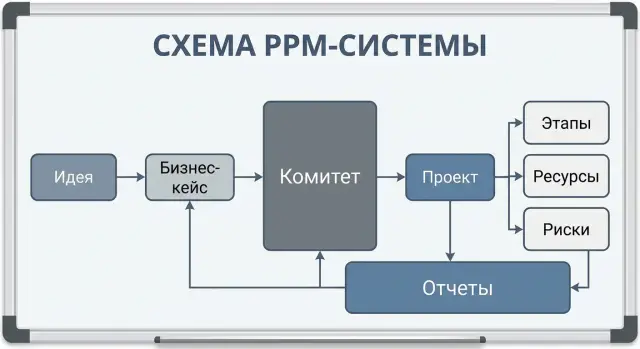
Why you need PPM and what it should record
PPM is useful when projects no longer fit in one person’s head or a single spreadsheet. While every manager keeps their own file, different status versions appear, budget numbers get disputed and there are endless clarifications: what’s approved, what’s in progress, what’s stalled. A PPM for portfolio management relieves this because it becomes a single source of truth: one status, one owner, one set of rules.
It’s important to distinguish levels of tracking.
Portfolio — a set of initiatives and projects that compete for the same money and people.
Program — a group of related projects that together deliver one large outcome (for example, updating IT infrastructure across multiple sites).
Project — a defined effort with a start and an end, schedule, budget and responsible parties.
Initiative (idea) — not yet a project: it may fail selection.
The system should help make decisions, not just store cards. Most often in PPM you need to be able to quickly and transparently do things like:
- launch an initiative or reject it based on a business case
- move deadlines and revise scope
- pause or close a project if the value disappears
- reallocate resources between projects when there’s a conflict
- escalate issues and approve changes to budget or objectives
To make decisions without disputes, PPM records a minimal set of facts: who initiated, what goal is pursued, the expected effect, deadlines and constraints, current status, key risks, and the history of decisions (who approved what and when).
Roles are almost always similar: the initiator formulates the request, the project manager keeps the plan and reporting, the sponsor is responsible for value, finance confirms funding and economics, PMO monitors rules and data quality, and the committee approves priorities.
A simple example: in a large company with multiple sites the same engineering team is needed to deploy a new server and to refresh workstations. Without PPM both projects look “urgent.” With PPM you can see what is more important for the business right now and on what basis the decision was made.
Minimal entity dictionary: what’s necessary and what can wait
To prevent PPM turning into a set of disconnected tables, start with a short dictionary of entities and unified rules. Quantity of objects matters less than the ability to go from request to result without manual stitching.
A basic top-level set is usually:
- Idea (or Request) — incoming signal: what is wanted and why
- Project — work with a clear outcome, timeline and responsibilities
- Program — a group of related projects under one goal (if truly needed)
- Portfolio — the container for prioritization and organization-wide reporting
Next decide which reference data will be shared by all. This reduces chaos and helps compare projects. Often the organizational structure (departments and roles), project types, cost categories and a unified calendar are enough. Add currency rates only if budgets are actually kept in different currencies and this affects decisions.
Each object should have consistent cross-cutting attributes so they can be managed at the portfolio level: owner (who’s accountable for value), sponsor, priority, strategic objective, criticality, status. These fields matter more than long descriptions because they feed selection, sequencing and reporting.
Also agree on identifiers and naming rules. Without them you’ll quickly get duplicates like “CRM implementation”, “Implementing CRM” and “CRM 2026”. Keep simple rules:
- a single unique ID for each idea and project (does not change over time)
- name template: system or product + result + year (or quarter)
- rule “one initiative — one owner”
- mandatory search of key fields before creating a new record
Example: in an IT portfolio a request “upgrade servers” first lives as an idea. Then it becomes a project with an owner and a goal (for example, reliability), and in reporting it appears in the portfolio as a row with priority and criticality. Add a program only if migration, licensing and training run in parallel and truly need joint management.
From idea to project: how to set up an initiative funnel
Without an initiative funnel PPM quickly becomes a junk drawer of requests. The funnel separates “we thought about it” from “we do it” and sets common rules: what must be filled in, who evaluates, and where the decision is made.
The entity “Idea” (or “Initiative”) should be simple but useful. Usually enough: a short description, the problem addressed, expected effect (in money or a clear metric), constraints (deadlines, mandatory requirements, dependencies), owner and proposed stakeholders. It’s important to record success criteria up front, otherwise it’s hard to argue with facts later.
Funnel statuses
A chain of statuses disciplines both the request author and the experts. A typical sequence:
- Draft
- Under assessment
- At committee
- Approved or Rejected
- Backlog (approved but not started now)
Make transitions controlled. For example, an initiative shouldn’t move to “Under assessment” without minimal fields filled, and it shouldn’t reach “At committee” without conclusions from key functions.
How an initiative becomes a project
When converting to a project, carry over what must not be lost: the goal, expected benefits, success criteria, key constraints and the recorded decision. Prepare the plan, detailed budget, schedule and team composition anew, tailored to the chosen delivery approach and actual resource availability.
Example: a GSE initiative might propose “expand compute capacity for a new AI environment in the data center.” At the idea level you record the effect (e.g., target processing time), security requirements and deadline. The project starts only after a committee decision and the appearance of a work plan and budget.
Change history and comments are mandatory: who and why adjusted an estimate, schedule or expected effect. This reduces disputes and helps learn from past decisions.
Business case: fields, calculations and acceptance criteria
A business case is not a pretty document but a way to compare initiatives consistently and avoid arguing why a particular project was chosen. In PPM the business case is often a separate entity linked to the initiative and (after approval) to the project.
Require a section on objectives and alternatives. At least three alternatives: do nothing, a minimal option and a full option. This shows the cost of delay and where the reasonable scope boundary lies.
Fields to include from the start
To make calculations comparable, keep a fixed set of fields:
- problem description and measurable objective (what will change and how to verify it)
- solution options and assumptions (what is taken as true and what is still unknown)
- finances: CAPEX, OPEX, TCO, year-by-year plan, currency, funding sources
- effects: cost savings, revenue growth, and non-financial benefits
- constraints: deadlines, dependencies, regulation, security requirements
Keep the financial block simple. Often a 3–5 year horizon with annual breakdown and a single rule for what counts as CAPEX vs OPEX is enough. If funding is mixed (for example, budget plus grant), make it a separate field rather than free text.
Record non-financial effects equally strictly: regulatory compliance, reduced operational risk, improved service quality, import substitution and supply chain transparency. For example, when refreshing workstations for a government body, not only price matters but also procurement rules and availability of a local vendor.
Criteria and scoring
A simple scoring (e.g., 1–5) and a final score across a few criteria helps the committee decide faster:
- strategic importance
- economic effect (or cost reduction)
- risks and implementation complexity
- urgency and regulatory requirements
- readiness (is there an owner, data, resources)
Scoring doesn’t replace discussion but makes comparisons fair and repeatable.
Phases and schedule: how to describe a project without overload
A good plan in PPM lives at the level of phases and milestones, not microtasks. Otherwise the system becomes a copy of a task tracker and quickly loses trust.
A typical minimal entity set: phase (a large chunk of work), milestone (control point), deliverable (what will be accepted), and scope described in broad units (e.g., “prepare RFP”, “run pilot”, “commission into production”). Keep detailed tasks in the team’s tool; PPM should contain only what matters to the portfolio.
For comparability store a short standard set of fields per phase:
- start/end dates: planned, baseline and actual
- status: planned, in progress, in acceptance, completed, stopped
- phase owner and responsible team (no long lists of performers)
- linked deliverables and acceptance criteria
- key risks and dependencies (e.g., “milestone B impossible until milestone A is signed”)
The baseline exists not for control’s sake but to see deviations honestly. The practice is simple: record the baseline after the launch decision, then change it only through an agreed change. The current plan can be updated, but the baseline remains the comparison point.
Milestones are best set up “for sign-off.” For each milestone define in advance which document or artifact must be accepted: an agreed specification, test report, acceptance act, or architecture committee decision. For example, in a server infrastructure project the milestone “Site readiness” should have a signed checklist for power and cooling. This reduces disputes and speeds acceptance.
If unsure how many phases you need, aim for 6–12 clear phases with firm milestones rather than 60 items nobody updates.
Resources and budget: make plan and actual comparable
If resources and money are described differently across initiatives, comparing plan vs actual is nearly impossible. Agree on simple entities and uniform accounting rules in advance.
The “Resource” entity: one directory, different types
A resource is not only a person. In the resource card keep type, owner and rate so cost can be calculated. Typical types:
- person (name, department, grade)
- role (e.g., “architect” when a specific person is not assigned)
- team (an aggregate when you plan in batches)
- contractor (company or specialist)
- equipment or capacity (server racks, GPUs, test stands)
For load planning use common periods (week or month) and one measure: hours or FTE. Add availability (calendar, vacations, part-time) and a rule for rate calculation (hourly or monthly). Then effort plans translate immediately into planned cost.
Budget: the same breakdown in every project
To reconcile budgets at portfolio level, fix identical categories: labor (internal), contractor services, purchases (equipment), licenses and software, other expenses. For each category keep three values: baseline (approved), current plan (after changes) and actual.
Collect actuals from documents, not memory: timesheets, invoices, service acceptance acts, delivery notes. For example, for a data center server rollout (purchase, installation, configuration) internal labor is recorded by timesheets, purchases by invoices and delivery notes, and integrator services by acceptance acts. Then schedule and financial variances are transparent and comparable across the portfolio.
Risks, issues and changes: what to store and how to link
PPM often breaks on a simple problem: risks live in a single file, issues are discussed in chat, and changes are recorded retroactively. To keep the portfolio manageable, risks, issues and changes must be separate entities and linked to project, phase and key metrics (schedule, budget, scope).
Risks, issues, assumptions and constraints
Separate the concepts.
Risk — an event that may occur.
Issue — something that already happened and needs action.
Assumption — something believed true during planning (for example, “licenses will be renewed on time”).
Constraint — something that cannot be violated (for example, “implementation only during a maintenance window” or a budget cap).
Keep minimal fields for a risk so teams actually fill cards:
- likelihood and impact (1–5 scale)
- owner (who monitors and reacts)
- response plan (avoid, mitigate, transfer, accept) and concrete steps
- review date (when to reassess)
- link to what it affects: schedule, budget, scope, quality
Links matter more than text. One risk can be tied to a phase (e.g., procurement), a cost category (equipment or services) and a milestone. Then reporting shows not just “10 risks” but “2 risks affect phase 2 schedule” and “1 risk may add 8% to the budget.”
Manage issues similarly but focus on facts: discovery date, current status, next action, deadline and who is blocking.
Change request
A change must be a separate card, otherwise committee decisions are hard to reconstruct. A change request should store:
- reason (what changed and why)
- impact (schedule, budget, scope, risks) with numbers
- proposed solution (options if any)
- decision and who approved (role or body)
- effective date and what was updated in the plan
Example: in an IT server upgrade project delivery is delayed. That starts as a risk, becomes an issue, then a change: move the phase and adjust the budget for alternative logistics. Links between cards preserve history and remove disputes about “who approved what and when.”
Committee decisions: how to record them to avoid later disputes
Disputes usually come not from the idea itself but from memory: who decided what under which assumptions and what was allowed next. Therefore record each committee decision as a separate entry, not a comment line.
In the decision card store the minimum that can be shown without retelling: date and time, participants (and quorum), agenda (which initiatives/projects were discussed), the exact wording of the decision and its type. The wording should be short and verifiable, not “generally supported.”
Limit decision types to a few standards:
- Approve (with launch or move to next phase)
- Reject
- Return for revision
- Suspend
- Close
Decisions often come with conditions. Store conditions as separate items with an owner and a deadline: “update the business case”, “agree on the process owner”, “confirm funding”, “run a pilot.” It’s then easy to check whether entry criteria for start or continuation are met.
Traceability prevents “that’s not what we meant.” Link the decision to the specific initiative or project and ensure the system records what changed after it: status, budget, schedule, priority, team composition.
Example: the committee approved server procurement for a new data center segment but required load calculations and a cost cap. After the decision the status changes to “Ready to launch”, the planned amount is clarified and a checkpoint to verify conditions is added.
Reporting and dashboards: a minimal set of indicators without overload
Reports are not “for show” but to help the committee and owners quickly see: where deviations are, what threatens objectives, and where money and people go. Too many indicators mean nobody uses them.
A portfolio dashboard usually fits into 8–12 cards. Keep only what helps decide this week:
- budget plan/actual and forecast to completion (EAC) with a short explanation for variances
- schedule: baseline, current forecast and actuals for key milestones
- status (RAG) and a list of “red” projects by schedule, cost or scope
- load of key roles (architect, analyst, deployment engineer) and shortages
- top risks and frozen projects with reason and review date
The committee needs causes and actions, not micro-details. A useful rule: for one project in a portfolio report — max 3 reasons for deviation and 1–2 decisions to make.
Reporting cadence commonly has three formats:
- weekly project status (one page)
- monthly portfolio (program or direction slice)
- quarterly review (effects, priorities, restart or closure)
Fix data rules in advance. For example: status updates every Thursday by 12:00; actual budget confirmed by the financial controller weekly; a milestone is overdue if missed by more than 3 working days without an approved change; a forecast is mandatory if a project is “yellow” or “red”. Then dashboards stop being arguments about numbers and become management tools.
Access rights, reference data and integrations around PPM
PPM becomes a source of dispute if access rules aren’t agreed. Some people need budget and contract figures, others only status and dates. Design access by roles and data types rather than by individuals.
Role-based access: who can do what
A few clear roles are usually enough:
- Initiator: creates an initiative, attaches justification, sees review status
- Project manager: runs the plan, team, risks and reports for their project
- Financial controller: edits budget, sees rates, verifies plan-vs-actual costs
- Committee and sponsors: see the portfolio, decisions and key indicators without extra detail
- Observer: read-only (audit, security, adjacent departments)
Separate rights for “edit plan”, “confirm actuals” and “approve”. If the same person can do everything, trust in the data falls.
Reference data and integrations: so data matches
PPM should rely on common registries, otherwise portfolio reports will be assembled manually. Minimum set: org structure and departments, vendors, budget categories, product and service catalogs, project and phase types. This is crucial in large organizations running purchases, rollouts and infrastructure projects simultaneously.
Integrations should follow the principle “what produces a fact”:
- HR: headcount, roles, rates or hourly cost, people availability
- Finance or ERP: actual costs, payment requests, purchases and postings
- Document management: document versions, approvals and electronic signatures
To avoid disputes over “who changed what and when,” include an audit: change log for key fields (dates, budget, status), versions of the business case and plan, and storage of committee minutes linked to the initiative or project. For organizations with strict procurement and compliance requirements (for example, the public sector) this is a basic protection.
Example: an IT portfolio from request to project closure
A government agency sees a problem: some workstations are outdated and the server is overloaded. In PPM this starts not with a project but an initiative: a short request card, owner, reason, expected effect and constraints.
An initiative might read: “Refresh 500 workstations and strengthen servers for a new departmental system.” Target metrics are simple and verifiable: reduce incidents by 30%, login time under 30 seconds, service availability 99.5%. At this stage record a rough cost and time range, for example 4–6 months and 180–220 million tenge, plus dependencies (site readiness, specification approval, procurement procedures).
How the committee decides
The portfolio committee looks not only at the idea but at comparable parameters: value, risks, budget, key specialist workload and queue position.
A recorded decision might include conditions, e.g.:
- approved with CAPEX limit up to 200 million tenge and staged financing
- priority P1, but procurement start not earlier than the current network migration completion
- mandatory: local service support 24/7 and an incident response plan
- checkpoint: review the business case after a 50-workstation pilot
Link the decision to the business case version, minutes, owners and next review date.
Execution and closure
After approval the initiative converts to a project: phases appear (spec & architecture, procurement, delivery, implementation, migration, training, acceptance). If a supplier, e.g. GSE.kz, acts as integrator and vendor, reflect that in contracts, support requirements and delivery schedule.
During the project the system stores risks (procurement delay, component shortages, site unavailability), issues (delivery of a batch failed), changes (increase scope by 50 workstations) and regular reports: status, plan-vs-actual for schedule and budget, and key decisions.
Project closure includes an acceptance act, final metrics, a final plan-vs-actual, a list of open obligations (warranty, service) and lessons learned added to the knowledge base for future initiatives.
Short checklist before launch and next steps
Before starting PPM it’s useful to run a short check. This prevents drowning in details and ensures you collect data you can manage, not just store.
Check five things that prevent the portfolio from becoming disconnected cards:
- statuses and transitions are unified for the whole funnel: idea, initiative, project, phases. It’s clear who and under what conditions moves an object forward
- the business case is not “at the author’s discretion”: required fields exist (objective, effect, costs, timeline, risks, owner) and one agreed method to calculate effect (e.g., NPV or annual savings) and compare alternatives
- risks, issues and changes are linked to phases, dates and budgets and to committee decisions. If a date changes, you can see why and who approved it
- reporting is built from system data: plan/actual for timeline, budget and resources, portfolio status, variances and reasons. If a dashboard needs a manual presentation, data are missing or unstructured
- roles and rights are clear: who creates initiatives, who confirms financial figures, who runs the project, who approves changes
Next step — describe your entities and roles on a single page and agree them with PMO and finance. Then fix a minimal set of fields and data quality rules (what counts as “filled”, when a card cannot move further).
If implementation requires integrations with accounting systems and IT infrastructure, you can involve GSE.kz as a systems integrator to design PPM and integrations so reporting and approval contours work without manual effort.
Frequently asked questions
When do you really need a PPM and when is a spreadsheet enough?
A PPM is needed when the number of initiatives and projects grows and data fragments across teams. It provides a single source of truth for statuses, schedules, budget, resources and decisions, so the portfolio can be prioritized and managed without constant reconciliations across files.
What data should PPM capture first?
At minimum, record the objective and expected effect, the value owner, priority and criticality, deadlines and key constraints, current status, main risks and the history of decisions. Without this, a portfolio quickly turns into a set of cards that cannot support decision-making.
How does an initiative differ from a project in PPM?
An initiative is a request still under selection and may be rejected. A project is an approved effort with a defined start and finish, responsible parties, a plan and a budget. Keep them separate in PPM so you don’t count unapproved ideas in overall workload and costs.
Which entities are best to start with so the system isn’t overloaded?
Start with four entities: idea (initiative), project, portfolio and, if needed, program. Add shared reference data like organizational structure, project types and cost categories, and unified statuses. Connect more entities only when lack of them worsens decisions.
How to organize an initiative funnel so it doesn’t become a dump?
Use a simple status chain and entry criteria so drafts don’t reach the committee. Ask initiatives to include a short description, a measurable objective, expected effect, constraints, owner and stakeholders. This filters noise and leaves assessable requests.
Which business case fields are most important for comparing initiatives?
Keep the business case as a separate entity linked to the initiative and, after approval, to the project. Require at least three alternatives: do nothing, a minimal option and a full option. Finance can be simple: CAPEX/OPEX rules and a 3–5 year horizon, so comparisons are transparent.
How to describe project phases and milestones in PPM without over-detailing?
Plan at the level of phases and milestones, not microtasks. Define what is an accepted deliverable for each milestone, record planned/baseline/actual dates, and require changes only via approvals. Let teams keep detailed tasks in their work tools; PPM should hold control points relevant to the portfolio.
How to make resources and budgets comparable across projects?
Use a single resource directory with types: person, role, team, contractor, equipment. Plan in common periods (week or month) and one unit (hours or FTE). Keep uniform budget categories and three values per item: baseline, current plan and actual. Prefer documented proofs for actuals (timesheets, invoices, acts).
How to manage risks, issues and changes correctly in PPM?
Keep risks, issues and change requests as separate cards linked to project, phase and the items they affect (schedule, budget, scope). Risk is a potential event, issue is something that already happened, and a change request records the decision to change with numeric impact and approver details. These links preserve history and reduce disputes.
How to record committee decisions so they aren’t disputed later?
Record committee decisions as separate entries with date, agenda, participants (and quorum), exact wording of the decision and its type. Store conditions as checklist items with owners and deadlines. Link the decision to the related initiative/project and to the changes it caused (status, budget, dates). This lets you reconstruct the rationale later.
