8 min read
Power Strips and Extension Cords in Older Buildings: How to Choose
Power strips and extension cords in older buildings: how to choose a safe model, calculate the load and prevent socket overheating.
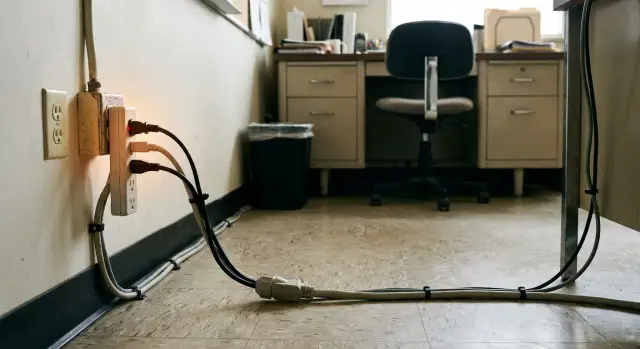
Why extension cords are dangerous in older buildings
In older buildings the problem is usually not the extension cord itself but where it is plugged in. Sockets and wiring wear out over time: contacts loosen, springs lose tension, and metal oxidizes. Resistance at the contact point rises, and the heat appears exactly there. At first it's barely noticeable, then a smell appears, the plastic darkens, and soon melting follows.
There is another common scenario: a modern workstation consumes much more than 10–20 years ago. A single power strip often has a PC, two monitors, chargers, a printer, and sometimes a heater or kettle. For old circuits this quickly leads to overheating of the plug, wall socket and junction-box terminals. So the topic of "Power strips and extension cords in older buildings" always starts with checking contacts and the real load.
The risks look similar: melted socket or plug housing, sparking when moving the plug, cable heating, and frequent (seemingly "mysterious") tripping of breakers. A breaker often trips not because it's "bad" but because the line is overloaded or a weak contact exists. It periodically overheats and causes short current spikes.
A simple example: an old double wall socket has an extension cord plugged in. During the day everything works, but in the evening someone turns on a heater and after 20 minutes the plug becomes hot. This is almost always a story about load and contact, not a "bad model".
Stop and call an electrician if:
- the socket or plug becomes noticeably hot (hot, not just slightly warm)
- there is a plastic smell, darkening or soot marks
- you hear crackling or see sparks
- the plug fits loosely and "wobbles" in the socket
- breakers trip for unclear reasons, even under small loads
If an office has a lot of equipment, it makes sense to check the lines and sockets before mass-connecting workstations. For such tasks system integrators with engineering and IT experience are sometimes involved, for example GSE.kz, but even a basic inspection by an electrician significantly reduces risk.
How to estimate load: how much you can connect
To keep a power strip or surge protector from heating, understand two things: power (W) and current (A). Power is how much energy a device uses. Current is how much flows through the wires. They are related: more watts means more amps.
A quick rule: current (A) ≈ power (W) divided by the mains voltage. In most offices that's about 230 V. So 2300 W ≈ 10 A. That is why the marking on the body (10 A or 16 A) matters more than the number of sockets.
Devices that heat or boil consume current fastest. Heaters, kettles and fan heaters often draw 1500–2500 W each and can easily overload a good power strip. A UPS can also add unexpected load: when charging its battery it may draw more than expected, especially if several devices are connected to it.
You can estimate a workstation's total load without complex calculations:
- check the label on the power supply or device (W); if a max value is given, use that
- add up the power of all devices that will run simultaneously
- compare to the strip/protector limit (for example, 10 A ≈ 2300 W)
- leave a margin: don't run at the limit, especially on old wiring (aim for ~70–80%)
Treat heating devices separately: it's better not to plug them into a desk power strip at all.
Another often-forgotten point is inrush currents. Some devices briefly draw 2–5 times their normal current at startup. This applies to some laser printers and MFPs, some high-power PCs and PSUs, and to UPSes during transfers. In old buildings a startup spike can heat the plug and socket more than steady watt numbers suggest.
If you choose power strips and extension cords for older buildings, plan the load as if the wiring were already "retired": fewer devices per outlet, bigger safety margin, and no kettles on desk strips.
Extension cord, surge protector or UPS: which to choose?
In old buildings people often just want more sockets. But these devices solve different tasks, and none will fix bad contacts inside the wall socket.
A plain extension cord is just cable length and a few outlets. Sometimes it has a switch, but that's not protection. It's fine for 1–2 low-power devices when you are sure the wall socket and wiring are in good condition.
A surge protector (often called a "surge strip") adds protection against impulse overvoltages and interference. This is useful when short spikes occur (for example from elevators or welding nearby). But remember what it doesn't do: a protector doesn't fix voltage drops, guard against prolonged overload, or remove heating caused by a weak contact. If the plug fits loosely the contact will still heat even with a protector.
A UPS is needed when you must protect equipment and keep it running during power loss and smooth out sags. For a workstation with a PC and critical tasks, a UPS is often the best choice if the building has frequent flickers.
Practical guideline:
- need continuity (cash register, critical workstation, mini-server) — choose a UPS
- need protection from short spikes — pick a quality surge protector
- only need to reach a socket for small loads — an extension cord with a proper cable and plug is fine
For high-power and heat-generating devices a surge protector offers little benefit and can become a weak link itself. Heaters, kettles, microwaves, compressors and some laser printers at peak should be plugged into a separate, sound wall outlet without "surge strip chains".
Safety criteria for old wiring
In old buildings the main risk is not a lack of protection but heating at contacts and in the cable. When choosing a safe extension cord or protector for an office, focus first on build quality and connection quality.
Cable: cross-section and length
The larger the conductor cross-section, the less it heats under the same load. For a workstation with a PC, monitor and chargers choose a strip with a normal, not "toy" cable, even if a thin flat cable seems convenient.
Length matters too. The longer the cable, the higher the resistance and the greater the heating under high load. If the socket is 1–2 meters away, don’t buy 10 meters "just in case." Extra length is often coiled, which further raises temperature.
Plug, sockets and protection
The most common cause of melting is a poor contact. In a quality protector the plug and sockets fit tightly without play. If the plug wobbles or the wall socket is "worn out," replace the socket rather than trying to find a "special" extension cord.
Two useful features are a circuit breaker (to quickly disconnect on overload) and thermal protection (to trip on internal overheating). On old wiring this is especially relevant because contact condition can be unpredictable.
Grounding is mandatory for equipment with metal cases and for high-consumption devices. Make sure the strip has an earth contact and that it actually connects to a working PE in the line, not just for show.
Before buying quickly check:
- clear markings for current rating and cable cross-section on the sheath
- length without unnecessary spare (don’t keep the cable coiled)
- tight sockets and plug with no play or sparking
- presence of a circuit breaker and claimed thermal protection (if needed)
- grounding contacts and whether your wall socket has a working PE
Step-by-step: how to choose a model for a workstation
For old wiring it’s safer to choose «with margin» than to hope "it’ll be fine." An office model should handle daily loads and not get hot.
Start with markings on the body: rated current (usually 10 A or 16 A) and maximum power. People often aim for 16 A, but that is safe only if the circuit and wall socket are in good condition. A too-thin strip can overheat under modest loads.
In five minutes list the equipment on the desk and their consumption: PC PSU, monitor, docking station, printer, chargers. If devices list watts, add them. If amps, multiply by 230 V. The idea is simple: the real total should be well below the strip limit, especially in an old building.
Quick pre-purchase checks:
- Verify the rating: 16 A (or other) with clear marking.
- Choose length and number of sockets so you avoid chaining multiple strips.
- If you need surge protection and overvoltage protection, choose a protector rather than a simple extension cord.
- The switch should feel solid, without play.
- Use a model with grounding and only plug into an outlet with a working PE.
Also think about placement. The cable must not be pinched by furniture, coiled under a carpet or routed near a heater. The freer the area around the plug and socket, the lower the overheating risk.
Correct installation and daily use
Even a good surge protector or extension cord can overheat if placed carelessly. Put the unit on a hard surface with air around it: on the desk, an open shelf or wall-mounted if it has fittings. Don’t hide it in a closed box or shove it behind the PC where dust and heat accumulate.
The cable should lie freely. Do not cover it with rugs, runners or insulating materials under the desk: heat cannot escape and insulation ages faster. Avoid pinching the cable with a chair leg, cabinet or door. Over time conductors break inside, contact worsens, and unexplained trips and plastic odors appear.
Store extra length neatly. Don’t tighten the cable into tight knots or sharp bends. Form loose wide loops and secure them so they don’t pull on the plug. Tension at the socket is a common cause of loose contacts.
For workstations in old buildings adopt a short daily check:
- the protector’s body is warm but not hot; no smell of heated plastic
- the cable is not pinched under furniture or covered by a carpet
- the plug fits tightly, doesn’t spark when moved, and shows no darkening
- the wall socket doesn’t wobble in the wall and doesn’t move with the plug
- nothing is connected through a "daisy chain" of adapters
If the wall socket wobbles or the plug fits loosely, don’t "push it tight" with paper. Turn off the load and call an electrician: a weak contact in old wiring quickly becomes overheating and melting.
Signs of overheating and what to do right away
Overheating almost never starts suddenly. It usually builds up: the contact loosens, the plug fits poorly, the load gradually increases. If ignored, this can lead to melted sockets and, at worst, fire.
Warning signs are simple: the extension cord or plug feels noticeably hot after 20–30 minutes, a plastic smell or "burnt dust" odor appears, darkening or melting marks are visible on the socket. Sometimes you hear quiet crackling and clicking, and moving the plug produces sparks.
A safer check: let the workstation run under normal load, then de-energize (preferably switch off the breaker; at minimum turn off the strip and unplug) and only then touch the body and plugs. Inspect the socket and plug in good light. If plastic is deformed, contacts are darkened or there’s a smell, stop using it.
If you notice overheating act immediately:
- unplug high-power devices first (heater, kettle, MFP, powerful chargers)
- temporarily leave only essentials (PC and monitor) and move others to other lines if they are truly separate
- remove adapters and leave a single quality extension cord instead of a "garland"
- check plug play in the socket: loose fit is a common cause of heating
- call an electrician if symptoms repeat or darkening is already present
Important: sometimes the wall socket is the culprit. Replace it if it heats under small loads, the plug fits weakly, there are melting marks or sparking. A safe strip won’t help if the wall contact or wiring is worn out.
Example: organizing power in a room of an old building
Imagine an office from the 1990s: six workstations along one wall, few sockets and all on the same circuit. Chargers are always on desks, a router runs in a corner, and a kettle is occasionally used in the small kitchen nearby. In this scenario socket overheating is usually not caused by a "bad strip" but by everyone loading the same feed.
First clarify circuit groups. If it’s unclear which sockets share a breaker, spend an hour with an electrician to label groups. This is more useful than choosing the most expensive protector.
Then distribute loads sensibly, not just by convenience. A practical layout:
- Desks 1–4: one surge protector per desk for PC, monitor, phone charger. No heaters or kettles.
- Desk 5 with an MFP: put the MFP on a separate wall socket or a short dedicated cord, no chains. MFPs can have peak draws during warm-up and weak contacts heat quickly.
- Desk 6 with a UPS: UPS for PC and monitor, plus router and a small switch so connectivity survives sags. Do not plug an MFP or kettle into the UPS.
When choosing models focus on safety features: grounding, proper cable, tight contacts, circuit breaker/fuse and thermal protection if available. Kitchen appliances should be on their own circuit and outlet, not on an office protector — this is the fastest route to plug and socket overheating.
Common mistakes that lead to melted sockets
In old buildings wiring and sockets often already operate near their limits. Even a good renovation in the office doesn’t change what’s behind the wall: loose contact, thin aluminum conductors or worn terminals.
The most frequent problem is daisy-chaining: plugging one extension cord into another and then into a surge protector. This creates extra connections and transition resistances. Contacts heat, springs in plugs and sockets weaken, and heating escalates.
Another scenario is plugging a powerful appliance "for a minute": a heater, kettle or microwave. For a workstation these loads are inappropriate. Externally it may look fine, but inside the plug and socket temperature can rise quickly.
What most often causes overheating and melting:
- a chain of multiple cords or a coiled cable not fully unwound
- high-power appliances in the same protector with a PC and monitor
- ignoring grounding: jury-rigged adapters and ungrounded plugs where ground is needed
- buying the cheapest option with no clear markings, thin cable and poor contacts
- using cables that are nicked, pinched or temporarily held together with tape
Rule of thumb: any instability (sparks on plugging, hot plug, plastic smell) is not a minor issue — replace the device and check the socket. One day of "tolerating" it often ends with replacing the socket, plug and part of the wiring.
Short checklist before opening workstations
Before turning on workstations in an old building spend 10 minutes on checks. This reduces overheating risk and helps select devices based on real load rather than guesswork.
What to check before the first working day:
- add the power of all devices for one socket (PC, monitor, printer, chargers) and leave a margin; if close to the limit split the load across two circuits
- plug in and gently wiggle the plug: play, sparks, crackling or unstable contact — do not use the socket
- inspect the cable: it must not be pinched by a table leg, trapped in a door or under a rug
- run the setup 30–60 minutes under normal load and then check the plug, socket and protector body: warm is OK, hot is not
- ensure the strip has clear markings for current and cable cross-section; the switch must not be loose or smell of plastic
Then make rules for staff. This usually works better than one-time checks.
What not to connect to desk strips and protectors:
- heaters, fan heaters, kettles and microwaves
- additional extension cords in a chain
- powerful laser printers and MFPs on the same outlet as a PC
- uncertified fast chargers and charging stations
- devices with damaged plugs or darkened contacts
Example: six desks each with a PC and monitor. If you add a shared printer and several chargers into the same strip by the window, the contact in the old socket may start heating by midday. Better to put the printer on a separate outlet or circuit and agree that "heaters" are never plugged into desk strips.
If you are updating computers or adding workstations, ask IT or a system integrator to assess room loads so you don’t try to "fix" overheating by swapping strips when the problem is the outlet or circuit. For such projects GSE.kz can help not only with supplying PCs, workstations and servers but also as a system integrator. They offer 24/7 support and a service network across the country, so power can be considered during hardware upgrades and workspace setup.
Next steps: make power stable for the long term
If sockets heat, breakers trip and equipment sometimes reboots, buying another extension cord rarely solves it. In old buildings reliability starts with checking the circuit: what actually feeds the room, how the load is distributed and the condition of contacts.
Start by inspecting the distribution board for obvious causes of drops and spikes. An electrician should check terminal tightness, breaker and neutral bar condition, absence of burned spots, and correct breaker ratings for cable cross-sections. Loose terminals heat up, resistance increases, and melting of sockets follows.
To avoid ad-hoc solutions, set a company standard. Maintenance and safe use are easier when models are uniform and predictable.
What helps standardize workplace power:
- approve 1–2 models of extension cords and 1–2 models of surge protectors with clear current and cable markings
- ban garlands of multiple cords and adapters
- enforce: plug or socket heating — immediately take the point out of service and inspect
- do a quick inspection every 6–12 months: darkening, socket play, crackling, odors
- appoint a person responsible for tracking loads in rooms (especially where kettles and heaters appear)
For critical points (cash desks, accountant workstations, server racks, medical equipment) the logical step is a UPS. It protects against surges and gives time to finish work safely during outages.
If you need help with selection and deployment, system integrators can assess lines, propose power distribution schemes, choose UPSs and protections, and then support the solution. GSE.kz, in addition to supplying computers and servers, offers system integration and 24/7 technical support with a nationwide service network, so power can be taken into account when upgrading equipment and organizing workstations.
Frequently asked questions
Why can an extension cord melt a socket in an old building even if it looks "normal"?
Most often the heating happens not in the power strip itself but at the contact in the wall socket or the plug. In old sockets springs weaken, oxidation appears, resistance increases, and the heating starts there even under normal load.
How can I quickly tell if I'm overloading the power strip at my workstation?
Add up the power of devices that will run at the same time and compare it to the strip's current rating. For a quick estimate divide watts by 230 V: about 2300 W ≈ 10 A. In old wiring keep a clear safety margin instead of working right at the limit.
Which appliances should not be plugged into an extension cord in an old office?
Heaters, kettles, fan heaters and other heating appliances should not be plugged into a desk power strip. They consume most of the current and are the biggest cause of plug, socket and terminal overheating.
What is the difference between an extension cord and a surge protector, and what does a protector actually do?
An extension cord only adds length and sockets and doesn't protect against spikes. A surge protector can help with short impulse overvoltages, but it won't fix a poor contact or protect from sustained overloads — the socket will still heat up if the contact is bad.
When should I get a UPS instead of a surge protector?
Choose a UPS when uninterrupted operation is critical and you need protection from supply drops: it gives time to shut down properly and smooths short sags. For an ordinary desk without frequent outages a quality surge protector may be enough, but for a cash register, accountant or mini-server a UPS is usually the better choice.
What should I look for when buying an extension cord or surge protector for old wiring?
Check for clear current and cable cross-section markings, not the number of sockets. Make sure the plug and receptacles fit tightly without play, that there is grounding where needed, and that features like a built-in circuit breaker and thermal protection are present if the scenario requires them.
Why are long extension cords and coiled cables dangerous?
Long cables heat more under high load, and coiling the spare length into a reel reduces cooling and raises temperature. If the outlet is 1–2 meters away, prefer a short cable and lay it loosely without tight knots or sharp bends.
Which signs of overheating must not be ignored and what should I do immediately?
Noticeable heat after 20–30 minutes, plastic smell, darkening or melting marks, crackling or sparks — these are signs to stop use immediately. Disconnect the load and have an electrician inspect the wall socket: often the wall outlet, not the strip, is the real problem.
What are inrush (starting) currents and why are they important in old buildings?
Starting currents are short "surges" that can be several times higher than normal consumption. In old buildings such surges heat weak contacts more than steady-state watt figures suggest, so devices like laser MFPs, some powerful PSUs and certain UPS behaviors are best not combined on one worn outlet.
How do you organize power in an office in an old building so the problem doesn't come back?
Standardize 1–2 models of extension cords and surge protectors with clear current and cable markings, ban cascades of multiple strips and adapters, and enforce a rule: any heating of plug or outlet is a reason to stop using the point and inspect it. For many workstations, pre-marking outlet groups and distributing the load prevents recurring problems.
