8 min read
PostgreSQL High Availability: Patroni and Pacemaker on 3 Nodes
A practical guide to PostgreSQL high availability on 3 nodes: Patroni or Pacemaker, network requirements, quorum, failover scenarios, and how to test RPO/RTO.
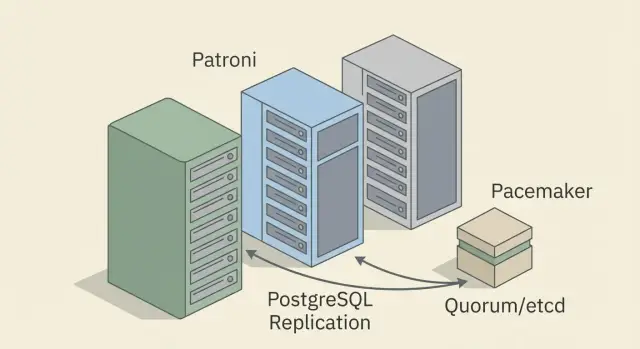
Goal: survive PostgreSQL failures without complex or expensive solutions
High availability for PostgreSQL is not about "perfect architecture" but about keeping the business running through typical failures. Often it's not the database itself that breaks but the environment: hardware, network, power, or human error.
In practice failures usually look like this: a node suddenly becomes unreachable (hangs, reboots, or the power supply dies), a disk starts producing errors or runs out of space, the network suffers drops and intermittent packet loss, an OS or PostgreSQL upgrade goes wrong, or someone changes a config or runs a command on the wrong host.
The most common trap is the idea "one replica is enough." A replica alone doesn't solve the main question: who and by what rules decides to switch roles. If the primary is unavailable, you must quickly and safely promote a standby to primary without ending up with two active databases. If the problem is network-related rather than server-related, a single standby easily becomes a risk: each node may "think" the other is dead.
What you can realistically do without expensive solutions and SAN:
- build a 3-member cluster (1 primary, 1 replica and 1 node for quorum or coordination);
- set up automated failover with clear rules and timings;
- agree in advance acceptable data loss (RPO) and downtime (RTO);
- regularly test failures instead of just trusting documentation.
Risks still remain. With asynchronous replication the latest transactions can be lost when the primary fails. With network partitions and no proper fencing it's easy to get split brain and a difficult recovery.
Put simply, Patroni and Pacemaker/Corosync differ by the level they "think" at. Patroni is closer to PostgreSQL: it understands replication roles and typically relies on an external DCS to elect a leader. Pacemaker/Corosync is a general cluster manager: it manages resources and dependencies at the OS and service level. Both provide high availability, but the cost of mistakes usually lies in network configuration and failover rules, not the tool choice.
A real-life example: a clinic records patients all day. If the primary reboots after an update, the cluster must bring up the replica within minutes. The team must know beforehand how much data loss is acceptable and how to verify the system returned to normal.
Basic terms: HA, replication, RPO/RTO and quorum
High availability (HA) for PostgreSQL means the database survives failures so the application keeps working and failover to a standby happens quickly and predictably. In the simplest model there is one primary (accepts writes) and one or more standbys (receive changes via replication and can become the primary).
Replication means the primary sends changes to standbys. If automatic failover is used, a separate component (for example, Patroni or Pacemaker) decides who is primary and when a standby can be promoted.
RPO: how much data you can lose
RPO (Recovery Point Objective) is the acceptable data loss measured in time. RPO = 0 means you are not willing to lose confirmed writes. RPO = 10 seconds means losing the last 10 seconds of changes is acceptable.
RPO depends directly on replication mode:
- Asynchronous: the primary acknowledges the write to the client immediately, and the standby catches up later. Fast, but you can lose recent transactions if the primary fails.
- Synchronous: the primary acknowledges a write only after a standby has received it. This approaches RPO = 0 but slows writes if the network is slow.
RTO: how fast to get back online
RTO (Recovery Time Objective) is the allowed downtime. It includes detecting the failure, choosing a new primary, redirecting clients, and often warming caches and restoring connections.
If the service must be back within a minute, detection, timeouts and the failover process must fit within that minute. If monitoring discovers a failure after 60 seconds and failover takes another 30, an RTO under 2 minutes is already impossible.
Quorum: why you can't just elect a new primary
Quorum is the majority rule. It's needed to avoid split brain, where two nodes think they are primary simultaneously.
Typical scenario: the network splits into two parts. If both sides act independently, each might promote a primary and accept writes. When connectivity is restored, reconciling divergent data is very hard.
In HA clusters the right to elect a primary is given only to the side that sees the majority of participants (or to a separate arbitrator). Before automating failover you must decide where the "truth" about the primary lives and how the system prevents the other side from accepting writes.
Minimal architecture: how many nodes and which roles
For automatic failover PostgreSQL setups the minimum almost always comes down to three nodes. Two nodes (primary + replica) can replicate, but they cannot reliably agree who is right if the network or a node "wobbles." The third participant is needed for quorum; otherwise you risk downtime or, worse, two primaries.
The clearest minimum is three nodes on a single site (or across two sites if networking is stable and latency is predictable). A "2 nodes plus external witness" option also works: the witness can be a lightweight VM in a different network segment. Its job is to help decide, not to store data.
Typical roles:
- Primary — accepts writes and is the single source of truth.
- Replica (standby) — receives WAL and is ready to be promoted to primary.
- Quorum node — DCS (e.g., etcd/Consul) or witness/arbitrator (depending on the approach).
Important: the quorum node does not protect data. It reduces the risk of split brain.
To make this scheme work you need discipline around the three machines. Agree on consistent PostgreSQL settings (replication, timeouts, slots, sync settings), update order (one node at a time with replica checks) and who may perform manual failover.
Minimum items that often cause surprises: replication lag and disk space monitoring, synchronized clocks (NTP), predictable DNS and hostnames, and alerts for failover events.
Even with HA, backups remain mandatory. Replication protects from node failure but not from human error, accidental data deletion, faulty updates, or silent data corruption. A practical approach is to store backups outside the cluster and regularly test restores. Then your RPO/RTO are proven, not just written on paper.
Patroni or Pacemaker/Corosync: practical differences
If you want PostgreSQL high availability without heavy proprietary clusters, you usually pick one of two approaches.
Patroni manages PostgreSQL roles directly. Pacemaker/Corosync manages resources at the OS level and can run PostgreSQL as one resource alongside others.
Patroni: PostgreSQL-centric management
Patroni keeps cluster logic close to the database: who is primary, who is standby, when and how to failover. Decisions rely on a DCS (distributed configuration store) and policies: candidate restrictions, acceptable replica lag, timeouts.
In daily operations this often means more predictable and faster failovers, and the cluster's behavior is easier for DBAs to understand.
Pacemaker/Corosync: OS-level resource management
Pacemaker/Corosync fits organizations that already standardize on Pacemaker, require strict fencing and regulations, or need the cluster to manage more than just the database.
You define PostgreSQL as a resource, placement rules, dependencies, health checks and node isolation (fencing) to avoid dual primaries. This path requires more operational discipline: changes in systemd, network settings and OS updates should be validated against cluster rules.
Simple questions usually determine the choice. If DBA expertise and role logic are stronger, Patroni is often more convenient. If Pacemaker is mature in the organization and fencing is mandatory by policy, Pacemaker/Corosync is often more appropriate. If you need uniform management of multiple resources (VIPs, services, apps), Pacemaker can win.
What is equally hard for both approaches: networking (latency and loss), regular failure tests, change control, and honest verification of RPO/RTO. Even with solid hardware, mistakes usually come from processes: who changes configs and when, how rollbacks happen, and what to do on partial connectivity loss.
Network requirements: latency, loss, time and availability
For PostgreSQL HA the network often matters more than raw bandwidth. Replication and quorum components exchange small messages but are sensitive to latency, loss and predictability. If the network "stutters," you get not only slow replication but false failovers.
High latency increases replica lag and commit time in synchronous replication. Loss and jitter hit heartbeats and replication connections: sessions drop, nodes stop "seeing" each other, and the cluster makes wrong decisions.
Time, DNS and small things that break failover
Synchronized time is not "for looks." Wrong NTP leads to strange timeouts, incorrect metrics and confusing logs. DNS should be boring and stable: if the DCS or node name sometimes fails to resolve, failover depends on luck.
Before rolling out, check basics: stable latency between nodes without regular spikes, near-zero packet loss on inter-node links, NTP on all nodes with the same timezone, reliable DNS or static records where appropriate. If possible, use a separate network or VLAN for inter-node traffic (replication, quorum).
Ports and segmentation
Typically you need TCP 5432 for PostgreSQL client connections and replication. Beyond that it depends on the stack: Patroni requires access to the DCS (e.g., etcd or Consul) and its ports; Pacemaker/Corosync uses its own channels. More important than specific ports is that inter-node communication and DCS access must be allowed both ways and not filtered en route.
Signs that the problem is network-related rather than database-related: replication sometimes catches up then suddenly falls behind without extra load, logs show many reconnects and timeouts, the cluster manager periodically marks a node "dead," failover happens "for no reason," and pings are usually fine but occasionally show latency spikes or packet loss.
If you build HA without expensive cluster products, start with measurements. Measure latency, loss and stability on inter-node links for 24 hours. It's cheaper than fixing odd failovers in production.
Quorum, split brain and fencing: how to avoid two primaries
Split brain is when the cluster, due to a network split, behaves as two independent clusters and each side promotes a primary. The worst case is when applications write to both primaries and data diverges. Reconciliation after the fact is painful.
The cause is usually network issues: short outages, asymmetric reachability (A sees B but B does not see A), DNS problems, latency and loss. The HA manager must quickly and decisively choose which node stays primary and ensure the other stops accepting writes.
With three members quorum works as "2 out of 3." Only a majority decides. This is safer than a two-node scheme, where each side may think it's the sole survivor after a partition.
Where cluster state is stored depends on the approach. In Patroni the "truth" lives in an external DCS: there is a leader lock, TTL and metadata. In Pacemaker/Corosync membership and quorum are handled by Corosync, while Pacemaker applies rules to start and move resources.
Sometimes a witness (arbitrator) is added to get a majority without a full third PostgreSQL server. It helps vote but doesn't solve the problem if you still cannot reliably determine which node should be primary.
The key mechanism against split brain is fencing, often via STONITH (Shoot The Other Node In The Head). The rule is strict: if the cluster can't be sure the old primary is actually dead, it's better to power it off (power, hypervisor, BMC/IPMI) than risk two primaries.
Practical rule: if you cannot guarantee fencing, you cannot guarantee protection from split brain.
Before going live check at least this: is there a reliable way to remotely power off a node, are timeouts set so you don't react to second-long network blips, quorum is computed correctly, and you've tested a real network partition, not just "stop the postgres process."
Step-by-step: a basic Patroni cluster on 3 nodes
A typical Patroni layout is two PostgreSQL nodes (primary and standby) plus a DCS. A single etcd node is possible but vulnerable; in practice it's safer to have quorum for the DCS as well (e.g., 3 etcd nodes).
1) Prepare nodes and PostgreSQL
Make nodes identical: the same PostgreSQL version, the same extensions and data paths. Decide ports, hostnames and DNS in advance. Check time sync (NTP), open ports between nodes, disk responsiveness and file limits.
Create separate replication and admin accounts and pin a minimal set of replication parameters in postgresql.conf.
2) Replication: WAL, slots and base backup
On the future primary set wal_level=replica, configure max_wal_senders with some headroom and enable archive_mode if you use WAL archiving. Replication slots help prevent WAL from being removed before a replica consumes it.
Create the standby via pg_basebackup or Patroni bootstrap. The replica should start cleanly, see the primary and allow lag measurement.
3) DCS (etcd) and availability checks
Deploy the DCS and verify: any Patroni node must reliably read/write keys and responses should be predictable. If the DCS is intermittently unavailable, Patroni will start noisy leader elections.
4) Patroni configuration and failover policy
In patroni.yml set cluster name, DCS connection parameters and PostgreSQL settings. Failover behavior is heavily influenced by TTL and loop_wait (leader renewal frequency), retry_timeout, maximum_lag_on_failover and candidate restrictions (tags).
Plan how clients connect. If apps talk directly to a node IP, after failover they will keep hitting the old primary. Usually you need a single entry point: a virtual IP, load balancer or proxy.
5) Tests: switchover and failure
First perform a manual switchover and verify the new primary accepts writes and the old primary becomes a replica. Then simulate a failure (stop PostgreSQL or cut network on the primary) and measure failover time.
Useful minimum tests: manual switchover with timing, stop PostgreSQL on primary and wait for automatic failover, bring the node back and rejoin as standby without manual cleanup, check data loss (last transactions and lag), and verify the application reconnects.
If these tests repeatably succeed, the basic setup is usually viable; next measure RPO/RTO under real load.
Step-by-step: PostgreSQL under Pacemaker/Corosync
Pacemaker/Corosync is chosen when you need classic Linux HA with mandatory fencing. Below is the logic for a 3-member cluster: two PostgreSQL nodes and a third voting node.
1) Prepare OS and Corosync
Fix hostnames, configure NTP and preferably dedicate a network or VLAN for the cluster. Predictability matters more than speed. Verify connectivity between all members for Corosync addresses and ensure DNS or /etc/hosts don't "jump."
2) PostgreSQL resource: start, stop and promote
Pacemaker must understand primary and standby. Use an OCF agent for PostgreSQL that can start/stop the service and promote a replica.
Most configuration boils down to three groups: data directory and health-check paths, placement constraints (only one primary), and ordering rules (what starts first and what moves together).
If you use synchronous replication, align it with promotion rules. Otherwise the cluster may "honestly" wait for confirmation that never comes.
3) How clients connect: virtual IP
The simplest approach for applications is a virtual IP (VIP) that moves to the active node. Clients connect to one address and Pacemaker moves the VIP with the primary role.
The VIP must run only on the primary. If it lands on a standby, applications may write to the wrong place or receive errors.
4) Fencing (STONITH): enable it
Fencing ensures the cluster can forcibly power off a node to guarantee a single primary. Ideal tools are IPMI/iDRAC/iLO or managed PDUs.
Test two scenarios separately: a hung node and a node that lost network. Without fencing Pacemaker may have to choose between availability and data safety.
5) Mini failover test
Do a quick check: write data, then cut power or network to the active node (not just stop the service), ensure the VIP moves and the other node becomes primary. Check which transactions were lost (actual RPO) and how long access took to recover (actual RTO).
Failover scenarios and verifying RPO/RTO
Setting up HA is not enough. You must understand how the system behaves in real failures and prove your RPO and RTO with numbers.
Three failures to rehearse
-
Primary failure (process, OS, power). Test each type separately. Stopping the postgres process is usually easier to recover from than a power loss.
-
Network partition between nodes and split brain risk. This is the most dangerous case. Proper quorum and fencing must ensure the "losing" side is stopped or isolated before the other gets write rights. Simulate a network partition with live machines.
-
Disk degradation or growing replication lag. Failures can be silent: the primary is alive but replicas fall behind and real RPO increases. Ensure monitoring alerts on lag and that failover policy doesn't promote a heavily lagging node.
How to measure actual RPO and RTO
Record not only failover time but data loss. A simple method: insert markers in the DB (e.g., a row with a timestamp every second) and compare which marker the new primary reached after a failure.
In each test record: incident start, first client errors, when writes were restored (RTO), last confirmed transaction before failure and first after (basis for RPO), and replication lag before/after.
RPO depends on replication mode. With synchronous replication and a correctly chosen sync standby loss can be near zero, but RTO often grows. With asynchronous replication RTO is often shorter while RPO equals however much did not reach a replica.
Run tests safely: agree on a window, have a rollback plan and log results (scenario, RPO, RTO, findings and fixes). After several runs small issues usually surface: timeouts, incorrect quorum, aggressive health checks, and applications not ready to reconnect.
Common mistakes, quick checklist and next steps
Most failures are due to settings around Postgres, not Postgres itself. The system looks fine until real failures occur: short network losses, node reboots, disk degradation.
Common mistakes:
- Too aggressive timeouts. The network blips for 2–3 seconds and the cluster decides the primary is dead, causing role oscillation.
- No real fencing. This is a direct path to split brain with two nodes accepting writes.
- Confusing backups with replication. Replication does not protect against bad commands, flawed migrations or malicious actions.
- Poor client connection strategy. If clients use a node IP, they won't know where to go after failover. You need one entry point (VIP, proxy, load balancer or DNS with short TTL) and test it as thoroughly as failover itself.
Quick checklist before launch
- Timeouts set based on measured network behavior, not guesswork.
- Fencing configured and you can remotely power off a node.
- Backups available and restore tested on a separate stand.
- Applications survive primary changes (reconnect logic, connection pooling).
- At least three drills run: primary failure, network partition, and node rejoin.
Next steps
A practical path is to start with a three-member pilot, fix target RPO/RTO, and only then port the approach to production. Document who decides on failover, how integrity is checked, how to return a node, and where to view metrics and logs.
If you are constrained by platform (power, disks, remote management for fencing, racks and network), plan that in advance. Integrators often help deploy and support cluster infrastructure and DCS and provide an operational model. For example, GSE.kz as a manufacturer and systems integrator in Kazakhstan supplies servers (including the S200 line) and provides 24/7 support via a service network — useful when fencing and recovery depend on hardware and procedures rather than human memory.
Frequently asked questions
Why do you almost always need 3 nodes for PostgreSQL HA, not 2?
A minimally workable automatic failover setup usually requires three participants because two nodes cannot reliably agree who is right during network problems. The third participant provides quorum: it can be a separate DCS node (for Patroni) or a witness/voting node (for Pacemaker/Corosync).
Why is "adding one replica" not the same as achieving high availability?
Replication simply copies changes from the primary to a standby, but it does not handle role management. In a failure you need a component that will unambiguously decide which node to promote to primary and prevent two active databases. Without that, a single replica can become a source of risk, especially during network partitions.
How to properly understand and choose RPO and RTO for PostgreSQL?
RPO is how much data (in time) you are willing to lose; RTO is how much downtime you tolerate. First, agree these numbers with the business, then choose replication mode, failure detection timeouts, and client switch strategy to meet them. Without target RPO/RTO you won't know if your cluster succeeds in practice.
Which to choose: synchronous or asynchronous replication?
With asynchronous replication the primary acknowledges writes to clients immediately, so you may lose the latest transactions if the primary fails. With synchronous replication the primary waits for standby confirmation, bringing RPO closer to zero but making writes sensitive to network latency and losses. A common approach is synchronous for the most critical operations and asynchronous where speed matters more.
Why is quorum needed and why is split brain dangerous?
Quorum is the majority rule that helps the cluster make decisions when connectivity is partial. Without quorum you can get split brain: two nodes each think they are primary and accept writes, then data diverges. Quorum doesn't fix the network, but it reduces the chance of catastrophic divergence.
What is fencing (STONITH) and why is it dangerous without it?
Fencing is forced isolation or powering off of a node to guarantee a single primary. If the cluster is not sure the old primary is actually down, it's safer to power it off (via power control, hypervisor, or BMC) than risk dual writes. Without fencing you generally cannot honestly promise protection from split brain.
How do Patroni and Pacemaker/Corosync differ in practice?
Patroni reasons in PostgreSQL terms: primary/standby roles, replication lag, leader selection policies and relies on a DCS to record leadership. Pacemaker/Corosync manages OS-level resources: services, VIPs, dependencies, and strict fencing rules, which typically requires more disciplined operations. The choice usually depends on team expertise and isolation requirements rather than a "magical" tool.
Which network problems most often break automatic failover?
Unstable networks cause most failover issues: packet loss, jitter and occasional latency spikes break replication and trigger false failovers. Time drift (NTP), flaky DNS and overly aggressive timeouts also break clusters. Measure the network for a day and tune timeouts based on data rather than guesswork.
How should applications connect to PostgreSQL so failover is less disruptive?
You need a single entry point that will move to the new primary or always point to it. This can be a VIP, proxy or load balancer; applications must handle reconnection and transient errors. If clients connect to a node IP directly, after failover they will keep hitting the old primary and get errors.
How to verify that RPO/RTO are actually met, not just written on paper?
Run repeatable drills: various primary failures, network partition between nodes, and disk degradation or growing replication lag. Measure RTO from the moment clients start failing to the moment writes work again; measure RPO by the last confirmed transaction that reached the new primary. Record test results and adjust timeouts, failover policies and monitoring accordingly.
