8 min read
Postfix Dovecot Rspamd: replacing a mail server in a closed network
Postfix + Dovecot + Rspamd: how to replace a commercial mail server in a closed network, set up SPF, DKIM, DMARC, antispam, redundancy and deliverability control.
Why replace the mail server and what can go wrong
People often choose commercial mail servers for an "all-in-one" approach. Over time practical issues emerge: rising license costs, closed configurations, and every non-standard requirement turns into long communication with the vendor and waiting.
This is more pronounced in a closed network. A closed network usually means an environment without direct Internet access, strict access rules, mandatory auditing and bans on cloud dependencies. There you need transparent settings, predictable updates and the ability to explain what happens to messages.
When replacing a mail system the usual pain points recur: messages arrive with delays, some messages are lost during mailbox and queue migration, spam and phishing increase because policies are weak, and support becomes a blame game between SMTP, IMAP, DNS and filters. Another risk category is non-compliance with internal regulations on logging, retention and access.
The Postfix + Dovecot + Rspamd combo is good because roles are separated. Postfix handles reception and delivery, Dovecot manages mail storage and user access, and Rspamd evaluates messages. This simplifies diagnostics and lets you tune rules to your policy rather than to product limitations.
But "freedom" doesn't prevent mistakes. A typical scenario: an organization is moved into a closed segment, old DNS records remain and no consistent signing/verification process is established. As a result, partners may quarantine some messages and users see only: "mail is broken."
Changing the server should be done not for fashion but when you can document requirements in advance and accept that the first weeks after launch require close monitoring of delivery, spam and logs.
Postfix + Dovecot + Rspamd architecture without unnecessary complexity
In a closed network the Postfix + Dovecot + Rspamd stack is convenient because each component has a clear responsibility.
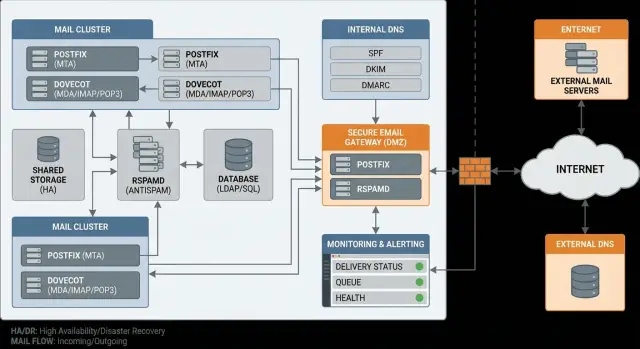
Postfix accepts mail over SMTP and delivers it onward. Dovecot stores mail in mailboxes and serves it to users via IMAP. Rspamd inspects incoming and outgoing messages and decides what to pass, tag or block.
Protocols are typically used like this:
- SMTP for accepting and relaying mail between servers.
- IMAP for users to read mail from multiple devices while keeping messages on the server.
- LMTP is often used between Postfix and Dovecot to deliver mail to storage with clear delivery statuses (useful for logs and troubleshooting).
Antispam can be deployed in several ways. Co-locating it with Postfix/Dovecot is simpler and requires fewer hosts. A separate mail gateway in front of the main server gives better isolation and clearer perimeter rules. Two layers (gateway plus internal filter) increase control but also complexity.
Choose the scheme up front. For a small organization a single machine is often enough if simplicity is the priority rather than high availability. Two machines (gateway and mailbox server) already define a clear boundary: only SMTP is exposed externally, while IMAP and storage remain internal.
A separate question is where mailboxes are stored and how they are restored. Local disks make backups simpler, but hardware failure recovery depends on how quickly you can bring replacement hardware up. Network storage or replication improve reliability but require disciplined change management and a reliable network. Minimum decisions to lock down before deployment: where mailboxes live, how often backups are taken, retention periods, and who tests restores at least quarterly.
Gathering requirements: users, domains, volumes, policies
Before configuring Postfix, Dovecot and Rspamd, record simple numbers and rules. This saves time and reduces the risk of surprises after launch.
Start with an inventory: how many domains are served, how many active mailboxes, how many shared mailboxes (e.g., support@), and expected daily mail traffic. Note typical attachment sizes and real limits: 2–5 GB per user differs greatly from departments storing tens of gigabytes as document archives.
Then define how accounts are managed. If authentication is via AD, agree on login format (user or user@domain), MFA requirements (if applicable) and rules for external contractors. If local users are used, design processes for account creation, blocking and recovery to avoid manual chaos.
Security policies are better written before migration, not after the first incident. Typically agree on:
- TLS for submission and retrieval, plus exceptions for legacy devices if unavoidable
- password requirements and rotation intervals
- retention periods and deletion or archiving rules
- what is logged, where logs are stored and who can access them
- limits on message and attachment size
Also discuss migration windows: acceptable downtime hours, whether parallel operation is possible (old server receiving while new serves users), and how you'll verify no messages were lost.
A practical example: in organizations with branches you often find some users on Outlook, others on mobile clients, and shared mailboxes used as a mini-CRM. These details directly affect protocol choices, limits and the migration plan.
Deployment patterns in a closed network: from simple to resilient
In a closed network mail usually lives across segments: workstations, server zone, sometimes a DMZ, and separate admin subnets. Deployment topology often matters more than software choice. The same Postfix + Dovecot + Rspamd set can be assembled differently; differences affect downtime, maintainability and how easily access is restricted.
From single server to role separation
The simplest option is one server handling reception, storage and filtering. It starts quickly and is easy to explain. The downside is also simple: any failure (disk, update, filter overload) stops everything.
The next step is role separation. A common scheme: a separate SMTP gateway (reception, queues, antispam) and a mailbox server (IMAP/LMTP, storage). This makes sequential component updates easier and isolates storage.
If downtime is unacceptable, add redundancy. For incoming mail you usually deploy two gateways in active-active. For storage teams often pick active-passive: the second node is ready to take over but doesn’t write concurrently.
Don't confuse "two servers" with "dual writes." Simultaneous writes to the same storage from two nodes without a proper architecture often corrupt data. Active-active for mailboxes makes sense only with a shared storage designed for it and clear procedures.
Storage and network: decisions to make early
In closed networks people often start with local disks and RAID: predictable and less dependent on the network. Separate storage makes sense if you need rapid server replacement or large mailbox volumes, but that increases network reliability requirements.
Before installation agree with security and network teams on basics: VLANs for gateways and mailbox servers, how admin access is arranged (jump host, separate subnet), which inter-segment ports are strictly allowed, internal DNS and time synchronization, and where trust boundaries lie (for example between the gateway and mailbox server).
Practical example: with strict segmentation it’s easier to accept mail on the gateway in the server zone, check and queue it there, and allow mailbox server access only from that gateway and the admin subnet. This keeps network exceptions minimal and responsibilities clear.
Deliverability: SPF, DKIM, DMARC and basic domain hygiene
Deliverability is not only about antispam. It’s the clear path of a message: a server accepts or sends a message, checks happen via DNS and reputation, then the message reaches the inbox.
In the Postfix + Dovecot + Rspamd stack issues often appear when the recipient doesn't trust that the message is really from your domain.
Start with domain and IP hygiene. For outbound mail three things are critical: correct MX, consistent hostnames and reverse DNS (PTR), and explicit authorization to send (SPF). If you have a single external IP the rule is simple: the PTR must match the server name and the SMTP greeting, and that hostname should resolve back to the same IP.
Minimal DNS records you almost always need:
- MX pointing to your mail gateway
- A/AAAA for the mail server hostname
- PTR (rDNS) for the external IP that actually sends mail
- SPF (TXT) listing allowed senders
DKIM adds a signature to outgoing mail. The private key is stored on the server (often on the outbound gateway), and the public key is published in DNS as TXT. Rotate keys on a planned schedule, e.g., every 6–12 months: add a new selector and key in DNS, switch signing to the new key, then remove the old one.
DMARC ties SPF and DKIM together and sets a policy. To avoid mass false rejections, start with p=none and collect reports. After a few weeks, when you’ve identified real sending sources, move to quarantine and only then to reject.
If you have multiple domains and some legacy systems (for example an MFP or an old CRM sending directly), don’t break everything at once. First inventory sending sources per domain, then consolidate: either route all sending through your gateway with authentication, or use separate SPF records and DKIM keys for legacy systems.
Antispam and anti-phishing with Rspamd: practical settings
Rspamd fits this stack well, but it’s risky to enable it "at full strength" on day one. The most common migration issue is false positives: important invoices, government messages, or internal notifications suddenly go to spam or get rejected.
Rspamd scores messages by many signals: source reputation (IP, domains), message structure, links, attachments, heuristics and statistical checks. In a closed network some external checks may be unavailable, so predictable rules and careful thresholds are even more important.
How to start without breaking mail
Begin in a soft mode: add headers to mark messages and move them to a Spam folder, but do not reject at SMTP. Allow 1–2 weeks to collect statistics and tune thresholds.
Practically, several steps are usually enough: enable tagging, configure quarantine for obvious junk, separate thresholds for spam, suspicious and critical cases, and add rate limits for connections and sending. For attachments immediately block uncommon executable types and control archives; antivirus can be added per policy.
Greylisting is not always suitable in a closed network. It helps against primitive spam but may delay legitimate mail from partners and services. Often it’s applied selectively or replaced by rate limits and stricter thresholds.
Whitelists and blacklists without creating permanent holes
Keep whitelists minimal: only critical senders and internal systems, and prefer specific addresses or domains rather than "everything from this IP." Use blacklists carefully: if a partner domain is compromised, temporary quarantine is safer than instant rejection.
Agree with the business on rules in advance: what goes to quarantine for review and what is rejected immediately (for example executables or clear phishing). Then antispam protects rather than disrupts work.
Security: TLS, access, logs and basic restrictions
Even in a closed network mail often interacts with the outside: partners, government agencies, banks. Protection starts with transport encryption and clear access rules.
TLS: where to enable and which certificates to use
TLS is needed in two places: between servers (SMTP) and between users and the server (IMAP/Submission). For users it’s better to allow only encrypted ports (IMAPS/Submission) and block plain IMAP/SMTP.
Certificates can be issued by an internal CA (if all clients trust it) or by a public CA for external connections. The certificate name must match the server name (for example mail.company.kz). Otherwise clients will complain and users will look for workarounds.
Access and brute-force protection
Accounts are the most common weak spot. Enforce long passwords, disable legacy authentication methods and add basic brute-force protection: temporary IP lockouts after repeated failed attempts.
To prevent the server from becoming a spam source, check basic limits: disable open relay (outbound only after authentication or from trusted subnets), set per-account and per-network sending speed limits, limit message size and recipients, define rules for bulk mailings, and separate roles (admin, operator, auditor) without shared passwords.
Logs, audit and updates in a closed network
Logs help answer questions quickly: who logged in and from where, what was sent, why a message was rejected. Log authentication events, sends, rejections, antispam actions and configuration changes. Limit log access to a small team and forward logs to a centralized store.
Updates in a closed network are easiest with a simple process: repository mirrors, a testbed, a short deployment window and a rollback plan.
Redundancy and backups: what to plan in advance
Mail breaks in messy ways. Often it looks like this: disk space runs out, an update fails, a disk dies or a server becomes unresponsive. If you don’t decide in advance what you will restore and in how much time, downtime and lost messages become unpleasant surprises.
Backups should enable service recovery, not just save files. For Postfix + Dovecot + Rspamd you typically need to preserve mailboxes and everything that makes delivery predictable and secure: configurations, keys, and rules.
Common backup items:
- Postfix, Dovecot and Rspamd configs (including lists and rules)
- secrets and keys, especially DKIM
- user mailboxes (Maildir or chosen storage)
- antispam training data if used
- queues and spools if it’s critical not to lose in-transit messages
Agree on RPO and RTO in plain language before an incident. RPO is how many messages you can afford to lose (e.g., up to 15 minutes). RTO is how long you have to restore service (e.g., 2 hours to resume sending/receiving). For closed networks with strict regulations these numbers should be written down.
A backup without recovery tests is almost always only "apparently working." Do a short monthly test: bring up the service on a separate host, restore 1–2 sample mailboxes, verify TLS, DKIM and access, and ensure sending/receiving actually work.
Also formalize the failover plan: who decides, who updates DNS or routing inside the contour, who checks queues, disks and logs after recovery, who notifies users and security, and how you revert to the primary node.
Deliverability control: monitoring, alerts and tests
Mail often breaks quietly: messages don’t disappear but get stuck in queues, go to quarantine or receive temporary 4xx rejections. Users notice before admins and report "mail won’t send."
Treat deliverability control as an ongoing process.
What to measure daily
A few metrics and their trends are sufficient:
- size and age of the Postfix queue
- share of 4xx and 5xx errors for outbound and inbound traffic
- delivery time: from Postfix acceptance to outbound send
- portion of mail moved to quarantine or spam by Rspamd
- rejections due to policy (SPF/DKIM/DMARC) and their reasons
Set thresholds relative to your normal day. For example: queue >200 messages or oldest >15 minutes, 5xx >1–2% per hour, quarantine growth ×2.
How to test and trigger alerts
An alert should mean "action required," not just "something happened." Practical practice: schedule periodic test messages — one outbound (to a control box), one inbound, and one with an attachment. If a test doesn't arrive within N minutes, send a notification.
For investigations agree on which facts to always collect: message-id, timestamp, sender, recipient, Rspamd decision, remote server response and the message path in logs. Then you can answer "why didn't it arrive" in minutes.
Regular cadence helps:
- weekly: review queues, quarantine and top errors
- monthly: check DKIM signing, review exceptions and key rotation plans
- after changes: run ad-hoc test mails and monitor metrics for the first 1–2 hours
Step-by-step migration plan: how to move without losing mail
Migrations usually fail on small details: a forgotten system sender, a legacy POP3 client, or an unplanned rollback. Start with inventory and a timeboxed plan.
Map the current system: domains and mailboxes, aliases and shared boxes, forwarding rules, attachment limits, and systems that send mail (printers, helpdesk, 1C, monitoring). Save old server configs and export a few mailboxes as controls to compare results.
Run systems in parallel. The new Postfix + Dovecot + Rspamd environment should be able to accept and deliver mail at least for a test domain or small group. In a closed network pick a pilot of 10–20 users and 1–2 system senders and deploy the new server on a separate VM or dedicated hardware.
A common migration sequence:
- bring up the new server and test inbound/outbound on test mailboxes
- migrate mailboxes in batches (by department), keeping folder structure and rights
- reconfigure clients (IMAP/SMTP, passwords, mobile devices)
- switch MX in a planned window and keep a rollback ready
- freeze changes on the old server and record adjustments
After the switch verify critical scenarios: inbound/outbound mail, large attachments, bulk mailings, mobile clients and sending from all internal systems. It’s practical to keep the old server for 48 hours in read-only mode and monitor its queues so no message is silently stuck.
Common migration mistakes and how to avoid them
Migration problems with Postfix + Dovecot + Rspamd are often not about "complex Linux" but about order of operations and small settings. They show up on the first business day: some mail doesn’t arrive, some goes to spam, internal systems stop sending notifications.
Mistake 1: enabling strict DMARC on day one
Turning DMARC to reject immediately can cause mass legitimate rejections. Forgotten sources like old mailing lists, contractors or departments using a different gateway often surface.
Progress safely: start with p=none and collect reports, then move to quarantine and only to reject once SPF and DKIM cover all sources.
Mistake 2: PTR and DNS configured carelessly
Incorrect MX, missing PTR or mismatched HELO quickly worsen acceptance, especially with large providers. Ensure A, MX, PTR and the server name align, and that TLS certificates use the name recipients see.
Mistake 3: open relay or weak limits
One wrong setting and the server becomes a spam relay, rapidly ruining the IP reputation.
Before launch check:
- relay is blocked by default and allowed only for authenticated users or trusted networks
- connection and sending rate limits are enabled
- separate policies for internal subnets and external clients
- an external unauthenticated send should be denied in tests
Mistake 4: disk runs out or queues are ignored
Mail can "hang" without obvious complaints: the server accepts but doesn’t deliver. Common causes: full disk, oversized logs, or unmonitored Postfix queue. Set alerts for disk, queue size and deferred messages.
Mistake 5: forgetting internal systems
Printers, CRMs, monitoring and alerting may stop sending after a move. Inventory these sources, decide how they will authenticate (SMTP AUTH or trusted subnet), and ensure their From headers don’t break SPF/DKIM/DMARC.
Short pre-launch checklist and next steps
Before switching MX run a final check as if you were an external recipient, not an internal admin. This catches subtle issues that make mail appear to send but actually end up in spam or disappear.
Pre-launch checklist:
- DNS aligned: MX points where needed, SPF is not overly broad, DKIM signs outgoing mail, DMARC at least in monitoring mode and PTR matches server name
- Security: TLS enabled for SMTP and IMAP, no open relay, brute-force protection and basic connection limits
- Antispam predictable: quarantine exists, phishing rules clear, minimal whitelists for critical addresses and systems
- Resilience verified: backups are enabled and recovery tested for at least one mailbox
- Process owner assigned: who approves changes, handles incidents, records decisions and reviews deliverability reports
Plan next steps immediately after the pilot. Measure real load: peak messages per hour, mailbox sizes, concurrent IMAP connections, log and quarantine retention needs. Based on results decide if you need more disk or RAM and whether to provision a spare node.
If you require a turnkey implementation in a closed network and hardware selection for mail roles, it’s often easier to work with a systems integrator. For example, GSE.kz (gse.kz) provides system integration and supplies servers for corporate infrastructure, which helps align mail, hardware and support requirements from the start.
Frequently asked questions
When is it really worth replacing a commercial mail server with Postfix + Dovecot + Rspamd?
Usually it makes sense when you need transparent configuration, predictable updates and the ability to investigate incidents quickly by logs, instead of waiting for vendor support. If the current system meets your requirements for cost, support and security, don’t change it just for the sake of it.
What usually goes wrong in the first weeks after migration?
Most often delivery and reputation suffer: delays, temporary 4xx errors, partner systems place messages into quarantine due to DNS and policy issues, and some internal systems stop sending notifications. Mitigate risks with a pilot on a small group, running old and new systems in parallel, and pre-agreed SPF/DKIM/DMARC rules.
Why separate Postfix, Dovecot and Rspamd instead of using an "all-in-one" solution?
Postfix handles SMTP reception and sending, Dovecot stores mail and provides IMAP access, Rspamd inspects messages and defends against phishing. Role separation simplifies troubleshooting: you can quickly tell whether the issue is delivery queues, authentication, storage or filtering.
What to choose in a closed network: one server or a gateway + mailbox server scheme?
If simplicity and minimal infrastructure are the priority, start with a single server, but be prepared that any failure will stop the whole service. If isolation and manageability in a closed network matter more, separate the SMTP gateway and the mailbox server so only SMTP is exposed externally while IMAP and storage remain inside.
Which requirements should be collected before configuration so you don't have to redo things later?
First record domains, number of active and shared mailboxes, real traffic and attachment sizes; then clarify how accounts are managed (AD or local) and requirements for logs and retention periods. These figures directly affect limits, disk sizing, migration windows and where you may hit bottlenecks.
What must be configured in DNS for reliable deliverability (SPF/DKIM/DMARC)?
The minimum for predictable outgoing mail: correct MX and A/AAAA records, a consistent PTR (reverse DNS) for the external IP, and an SPF that lists allowed senders. Add DKIM signatures next, and enable DMARC only after monitoring (p=none) to avoid mass false rejections.
How to enable Rspamd safely so you don't "break" legitimate messages?
Don't turn on strict rejection thresholds on day one. Start with tagging and moving suspect mail to Spam so Rspamd collects statistics, then adjust thresholds and add quarantine for clearly malicious messages. This reduces the chance of blocking legitimate mail.
How to manage whitelists and blacklists without weakening security?
Keep whitelists short and specific to avoid permanent holes, and avoid blanket "all from this IP" exceptions unless absolutely necessary. To help the business, prefer a clear quarantine and review process rather than disabling filtering for large ranges.
Which basic security measures are important for mail in a closed network?
Close unsecured protocols and expose only IMAPS and Submission with TLS to users; ensure the certificate name matches the server name. Add brute-force protection, disable open relay, and set basic sending limits so a single compromised account cannot become a spam source.
What must be backed up for Postfix + Dovecot + Rspamd and how to verify recovery?
Back up not only mailboxes but also configurations, keys (especially DKIM), and service data used for predictable delivery. Regularly test recovery on a separate machine — a backup that was never restored is often useless in a real incident.
