8 min read
Placing Heavy Servers in a Rack: weight, service, and cabling
Placing heavy servers in a rack: how to distribute weight, keep easy service access and route cables so rails don't skew.
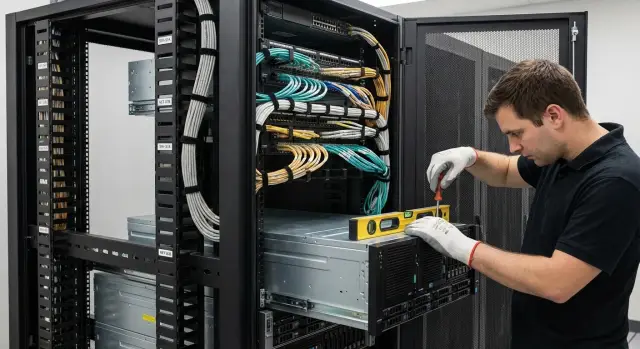
Why heavy servers in a rack cause problems fast
Heavy servers behave differently from lightweight 1U devices. Small mistakes at the start are often invisible but over time become sticking rails, play, broken connectors and safety risks. Planning where to put heavy servers in a rack should be as careful as power and cooling planning.
It usually starts with mechanics. Rails get skewed, the server becomes harder to pull out, play appears, and fasteners loosen faster. If heavy equipment sits high or is unevenly distributed, the rack can "tilt": geometry changes, doors close worse, and when pulling a server out the whole structure leans forward noticeably.
Access is a separate pain. When a heavy server is in an awkward spot, any maintenance becomes a strength job: you must hold the weight, align the rails and watch the cables at the same time. After 2–3 pulls you often see the first signs: scratches on the rails, misaligned stoppers, torn connectors, and suddenly the cables are "too short."
Why doesn't this show immediately? While servers are pushed in, the rack can look perfect. Problems surface when the server is pulled fully for service, when neighbors are removed or added, cable paths are changed, or load on bundles shifts after adding a second PSU or expansion cards.
Everything comes down to three things: safety (preventing rack tip-over and injury), serviceability (so one person can service a node without acrobatics), and cable order (so pulling a server doesn't break power or network).
This plan is useful for admins and engineers who mount and service racks, and for purchasers and planners. Weight, rail and cable requirements are easier to confirm before delivery than to redo in a live data room.
Before you start: what to check in the rack and in the server kit
Before placing heavy servers in a rack, spend 15 minutes inspecting the rack and rail kit. Most problems later stem not from a "wrong spot" but from small details: the rack can't bear the total load, rails don't fit by depth, or cables prevent the server from extending.
First, check the rack datasheet. Important is not only maximum load but how weight distributes over height. If heavy nodes end up high, the rack rocks more easily, rails start working with a skew, and access becomes dangerous.
2-post and 4-post racks behave differently. In 2-post racks heavy servers often suffer sag and front-mount load, so rail skew risk is higher. 4-post racks hold depth and weight better but require accurate spacing between posts and rail compatibility.
Minimum checks
Before unboxing and mounting, run through these basics:
- U space: is there enough height, and does the server conflict with organizers or fasteners.
- Depth: will the server with rails fit, and is there room for a cable management arm (CMA) and cable bend radius.
- Clearances: is there space to extend and open covers so service doesn't become rack disassembly.
- Rail type: fixed rails are simpler but harder to service; telescopic rails are more convenient; stops and locks are mandatory so the server doesn't "roll" out.
- Total weight: include the server, rails, cables, PDU, possible UPS and heavy accessories (KVM, shelves).
Simple example: a server weighs 28 kg, rails 4 kg, cables and CMA another 2–3 kg. The total on mounts and rack is ~35 kg. Plan for that, especially if a UPS goes at the bottom.
Placement planning: list, layout, roles
Before lifting hardware into the rack, spend 30–60 minutes on a plan. It’s cheaper than chasing rail skew, torn cables and suddenly inaccessible nodes.
Start with inventory: one list showing what can go where. For placing heavy servers in a rack you need not only "how many U" but depth, weight, rail type and service points.
In that list record: height (U), depth and approximate weight, mounting type (rails or shelves), elements frequently accessed from front or rear (disks, PSUs, front panels), port locations and the direction of power and network runs. Also add airflow requirements (front intake, rear exhaust), required clearances and dependencies: which switch, PDU and KVM each device must connect to.
Then make a simple vertical rack diagram: number the U and place equipment blocks. Sketch cable routes: power on one side, data on the other (or vice versa). Immediately allow extra cable length for servers to extend on rails.
Assign roles in advance so the job doesn't turn into an argument: who checks and fastens rails (no skew or sticking), who does power (PDU mounting, line balancing, power-on order), who handles cable management and labeling, and who signs off (photos, conformity to the U-plan, extension test and access checks).
Example: if installing heavy GSE S200 rack servers and a couple of switches, decide in advance which parts need frequent access (disks, console/KVM). Don’t place them where cable loops or neighboring equipment will block access.
Step-by-step: basic scheme for weight distribution in the rack
The correct scheme starts with the rack. Place it permanently and level it: set feet, use stabilizers and anchor if needed. Even a small floor tilt later becomes rail problems and extra vibration.
A simple rule applies: heaviest at the bottom. Put heavy servers, UPS and battery packs in the lower third. This keeps the center of gravity low, reduces rocking and avoids overloading upper structure elements.
Then go upward by decreasing weight and avoid "scattered heavy zones." If one heavy server is low and another identical one is mid-height with many empty U between, the load becomes uneven and the rack behaves worse when chassis are pulled out.
Plan access zones in parallel. Frequently serviced equipment (for example, servers with hot-swap drives) is best at chest height so you don’t have to kneel or reach above your head. Rarely serviced items can go lower.
Make room for organizers and proper bend radii so cabling doesn't become an obstacle. Practical guideline: bottom — heavy and bulky; middle — frequently touched gear; top — light equipment and distribution elements. Leave side space for vertical organizers and rear depth for tidy cable loops when fully extended.
Example: with two heavy 2U servers and one 1U switch, place both 2U servers together low, and put the switch above with room for an organizer and neat cable loops.
Rails without skew: installation and verification
Heavy servers quickly "punish" small mistakes when fitting rails. If rails are not matched to the rack or fixed with only a couple of screws, this becomes sticking, a skewed front and the risk of tearing fasteners.
First verify rail compatibility with your rack: depth and mounting type must match — square holes with cage nuts, round or threaded. Some rails have a depth range and adapters for hole types. If the rack is deeper than the rail travel, rails may install stretched and pull posts toward each other.
Next — precision. Choose the correct U and mount both left and right rails at the same U positions. A typical mistake: one side is a U off "by eye" and the server binds in the first centimeters.
Do not leave mounting "temporary." A heavy chassis must rest on all intended points. Otherwise load concentrates on one or two screws, the rail moves and the rack and server suffer.
Checks after installation:
- Smooth motion without jerks on empty rails and with the server.
- Full extension: nothing catches the CMA, PDU or the rear of the rack.
- The front does not twist; left and right gaps are equal.
- No play: the server does not "drop" down when pulled out.
- You do not need to lift the chassis by hand when closing.
Simple test: pull the server fully out and gently rock by the handles. If there is noticeable play, skew or binding, remove and reinstall the rails now rather than waiting for them to deform under load.
Cable routes: so the server can extend without tearing anything
The most common maintenance problem with a heavy server is that cables anchor it when it’s pulled out. Connectors loosen, cables break, and access to neighboring gear becomes a fight. Good rack cable management is planned as carefully as the mount.
If possible, separate power and data on different sides of the rack. Power is usually routed near the PDU and network/optics on the opposite side so cable runs are less likely to be grabbed during extension. This reduces confusion and makes it easier to find a cable later.
Service loop and cable management arm (CMA)
Main rule: the server must be able to extend the full rail travel without tension. Leave a service loop and secure it so it forms a neat arc, not a tangled bundle.
Check that rack depth accommodates the CMA and rear door closure, where the CMA mounts on the rails and whether it interferes with adjacent runs. Make sure loops don’t hit sharp edges or grills, and that cables don't run where you grip the server during extension.
Use vertical and horizontal organizers as "guides" for cables: the main route is obvious and each server has a short branch. Don’t compress everything into one thick middle bundle — when a server is pulled out such a bundle drags multiple lines and adds stress to ports.
Labeling that actually helps
Label each cable at both ends: at the server and at the switch or PDU. Labels should be readable with the door closed and in a dense layout. Useful format — rack/U, device, port (e.g., R12-U20, Srv03, NIC1). This saves time during quick PSU swaps or server removal.
Service convenience: don’t make maintenance harder than necessary
If the rack is assembled "by weight" but hard to service, problems will start at the first engineer visit. When placing heavy servers in the rack, think not only about fit but also about what needs to be done by hand: changing a disk, a PSU, pulling the server on rails, connecting a console.
Place hot-swap drives and PSUs in the most accessible zone — usually the middle of the rack. That reduces time and the risk of dropping a module. Front panels must be clear: don’t mount anything obstructing handles, indicators, drive trays or airflow. Cables should not run across the front even if it seems shorter.
Leave working clearances where hands and tools are really needed. For example, if optical patch cords are near a server, allocate space for tidy entry and fixation rather than yanking connectors every time.
Agree on service rules before mounting: what can be pulled and replaced live, and what needs a work window. Record short rules for the team: which nodes can be hot-swapped, what extends without disconnecting cables, which devices must be powered down and who authorizes work (on-duty, admin, contractor).
Small things save hours. Keep a kit of spare fasteners and a couple of blank panels near the rack, not "somewhere in storage." Integration projects often solve this with a labeled box for each rack and U-range.
Example: with a 2U server with front hot-swap drives and a 1U patch panel above, leave 1U gap or move the patch panel up so an engineer can open drive latches without catching patch cords.
Power in the rack: PDU, balancing and safety
Power often causes hidden issues when placing heavy servers: the server sits fine but while extending something hits a connector, pulls a PSU or accidentally turns off a neighbor.
Start with the PDU location. It’s usually best to mount vertical PDUs along the rear sides of the rack near cable channels. Then plugs and power strips don’t get in the path of rails and won’t stop the server from extending. If a PDU is horizontal, leave clearance and test full server extension before final cable dressing.
Balance load across phases and circuits per electrician rules. A practical rule: if a server has two PSUs, plug each into a different PDU and, if possible, into different inputs. Then one failure won't kill the whole node. If the rack has a UPS, decide in advance which devices are on battery and which can be shed first.
Power cords should not hang off the connector. Leave a service loop, secure the cord to a vertical organizer and avoid tension during extension. Check by hand: pull the server out and if the cord starts to tension before the server reaches its rail stop, the loop is too short or the route is wrong.
Keep management and console cables (iDRAC, iLO etc.), console and service ports separate from power. They’re easy to pull accidentally, so route them separately and leave a small spare length.
To avoid mistakes in an outage, label everything so it reads from the rear: circuit and phase (or breaker group number) on both ends of the cable, PDU and outlet number, device name and PSU A/B, and separate tags for management network and console.
Example: when installing a heavy S200 rack server, plug PSU-A to the left vertical PDU and PSU-B to the right, make neat loops and only then secure with Velcro. Ten extra minutes here save hours at the first service.
Typical mistakes and traps when placing heavy servers in a rack
Most problems arise not from "bad hardware" but from small installation choices. One mistake often leads to another: rail skew, torn cables, hard-to-reach service points and injury risk.
First trap — placing heavy nodes high. It may seem convenient, but raising the center of gravity makes the rack rock and increases front support load when the server is extended. Heavy servers, UPS and battery modules are almost always safer lower.
Second mistake — rails mounted at different U left and right or set "by eye." Rails then are not parallel, the server binds or sags halfway, and you get uneven motion. Clear signs: you pull with two hands and it moves in fits, or the front panel gaps.
Third trap — cables routed so the server cannot be pulled out without disconnecting them. Often people forget about required slack and pivot points: during extraction the cable tensions, pulls connectors or breaks clips. Real scenario: you need to swap a drive, pull the server and the whole bundle comes with it held only by connectors.
A separate risk — rack not secured against tipping. Without floor anchors or outriggers, a heavy server on extension can pull the rack forward.
Quick checklist before calling the install tidy:
- heavy gear is low, top is not overloaded;
- both rails are mounted at the same U and without skew;
- server fully extends and cables do not tension or snag;
- rack is fixed and has tip-over protection;
- power and network lines are separated, cables labeled and routings in organizers.
If any item fails, fix it now. Rework after commissioning is almost always costlier and more stressful.
Quick checklist before you consider the job done
Before closing the rack and putting it into service, spend 10 minutes on a final check. It’s cheaper than tracing causes of rail skew, broken cables and inability to pull a server for a drive swap. This habit is especially useful for racks with heavy servers.
Check off:
- Rack is solid: anchored per instructions, not wobbling, doors and side panels close evenly.
- Rails are level: left and right at the same U, fasteners tightened, server slides smoothly.
- Cables don’t obstruct motion: at full extension nothing is tense, there is a service loop, and connectors don’t hit PDUs, organizers or the rear door.
- Labels are clear and duplicated: markings on both ends, U numbers visible, device names match the diagram.
- Airflow is free: front intake not blocked by bundles or accessories, rear exhaust not blocked, and hot air not recirculating to the front.
A practical test: pull the heaviest server to service position as the manual specifies and observe cables and neighboring gear. If any cable tensions or snags, add loop length or reroute. This test is part of many integrator installation protocols, including teams at GSE.kz.
Example scenario: how to layout equipment in one rack
Inputs: 42U rack, two heavy 2U–4U servers on rails, two 1U switches, two PDUs (A and B), UPS at the bottom, plus a patch panel and organizers. Goal: the rack must not tip forward, servers must extend without jerks, and cables must not pull tight.
Following the rule: heavy and rarely serviced items at the bottom; frequently accessed gear in the middle; network and patch at the top to shorten runs to other racks.
Example U layout:
- 1U–6U: UPS (and a shelf/mount if needed)
- 7U–14U: heavy server #1 on rails
- 15U–22U: heavy server #2 on rails
- 23U–26U: spare/service gap (hands, cables, future modules)
- 27U–30U: KVM/console or light service gear if present
Switches were placed upper, next to the patch panel and horizontal organizers. PDUs mounted vertically: power A on the left side, power B on the right.
Cables were routed so servers don’t pull anything when extended: power cords on their side, network on the opposite, with slack for full rail travel. Each server’s cable strain relief holds the bundle, not the connector.
Issues found before commissioning:
- a server hit the rear door depth-wise (moved the PDU and changed mounting point)
- patch cords were too short for full extension (replaced with longer ones and added holders)
- a cable bundle intersected the rail path (moved to an organizer and secured with Velcro)
After test-extending each server and closing both doors, loop lengths and anchor points were adjusted. Only when everything extended smoothly and nothing snagged was the rack accepted.
Next steps: lock the standard and prepare for growth
After installation, make the next visit predictable by locking the result in a short standard: final per-U diagram, weight by zones, rail type and clear cable routes. This reduces the risk of repeating mistakes during expansion and helps hand over the rack to a new shift.
Minimum to record: current U layout marking "heavy nodes" and service points, weight rules (heavy at bottom, empty U only where needed for cable and hand space), a cable template (lengths, anchor points, extension allowance). Also note what to retighten after services (rail fasteners, Velcro/ties, clamps) and who owns changes (one owner of the diagram and work log).
Schedule short checks after every maintenance and periodically (for example quarterly). Typically what drifts are small things: loose rail fasteners, overtightened cables, smashed bend radii and lost slack for extension.
Bring an integrator when the rack has many heavy nodes and the cost of error is high: several servers at 20–30+ kg near each other, strict uptime requirements, complex power (dual inputs, phase balancing, multiple PDUs), dense cabling where one tug breaks multiple lines. In these cases it’s worth a partner who supplies equipment and handles installation and support, for example GSE.kz for S200 rack-server projects.
When purchasing, always verify rack depth, rail compatibility, max load per U and front/rear access convenience. In Kazakhstan it’s often useful to rely on the manufacturer and a local systems integrator: for example, GSE.kz produces servers and workstations locally and offers integration services for S200 rack servers with 24/7 support. That helps plan racks so future growth doesn't become a chain of rework.
Frequently asked questions
Where in the rack is best to start when you have heavy servers?
Focus on the overall mass and the center of gravity, not only the rack's rated capacity. A safe basic approach: place the heaviest units and UPS in the lower third, and only put light or frequently accessed items higher up.
Why does a heavy server run smoothly at first but then starts to bind on the rails?
It usually starts with a small misalignment: rails mounted at different U, racks slightly spread or pulled together, fasteners not tightened in all points, or the rack not level. When the server is pushed in those issues are invisible; they show up during full extension as sticking, play and load on fastenings.
What must be checked in the rack before buying or installing a heavy server?
Check the rack's load capacity and how that capacity is distributed over height, the hole type (square/round/threaded), and rail compatibility by depth. Also confirm there is space behind for cable loops and that the rear door can close—otherwise it may fit only on paper.
Can heavy rack servers be installed in a 2-post rack?
For heavy servers a 4-post rack is almost always preferable because it better holds depth, weight and telescopic rails. A 2-post rack has a higher risk of sag and misalignment, and often requires shelves or other solutions to avoid overloading front mounts.
How do I know cables are routed correctly and won’t break when the server is pulled out?
Leave a service loop so the server can extend the full rail length without tension. If cables move before the server does during extension, the loop is too short or the route is wrong and will quickly lead to loose ports.
Is a cable management arm (CMA) necessary for heavy servers and when can it interfere?
Ensure full extension is possible without anything hitting the PDU, organizers or the rear door, and that connectors are not in a place where you hold the server. If you use a CMA, verify it fits the rack depth and does not conflict with adjacent routes when the door is closed.
How should a server with two power supplies be connected in the rack?
Use two independent power feeds by plugging each PSU into a different vertical PDU, and if available, to different inputs. That way one failure or circuit trip doesn’t kill the whole server, and there’s less risk of taking the node down by accident during service.
At what height should frequently serviced servers be placed in the rack?
Keep frequently serviced units at chest height so swapping disks or PSUs is easier and safer. Heavy or seldom-serviced equipment should go lower. Leave working space where hands and tools are needed; otherwise every operation becomes a fight with nearby components.
What is the fastest check after mounting a heavy server?
Quick test — pull the server to its service position and check three things: the rack does not tilt forward, rails run smoothly without jerks, and cables do not stretch or snag. If there is play, a skewed front or you must lift the chassis to close, adjust rails and cabling before finishing.
When should you involve a system integrator for assembling a rack with heavy servers?
Bring an integrator when the rack contains several nodes of 20–30+ kg, dense cabling and strict uptime/service time requirements. In such projects it’s critical to verify rack depth, rail compatibility, power and routes in advance — a partner who supplies equipment and handles installation and support (for example, GSE.kz for S200 projects) is useful.
