8 min read
Developing a PIM for a Product Catalog: Attributes, Media, and Channels
Developing a PIM for a product catalog: how to design attributes, media and localization, set filling rules and publish to channels without manual edits.
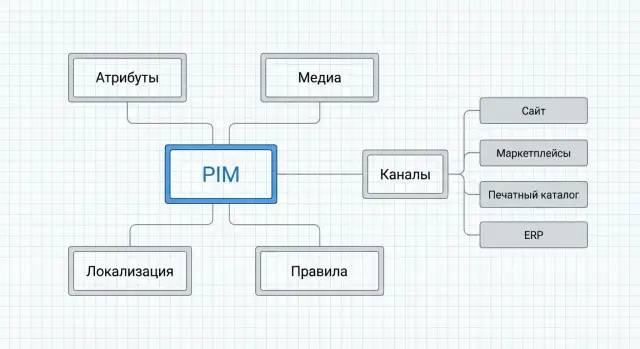
Why you need a PIM and what pains it solves
PIM (Product Information Management) becomes necessary when a product card stops being just “text for the website” and turns into a set of data that must work consistently across sales, marketing, support and integrations. It’s a single place that holds the “truth about the product”: attributes, descriptions, media, versions and filling rules.
Problems PIM addresses
Without a PIM, a catalog usually spreads across Excel files, email and chats. As a result, the same product “exists” in multiple variants and edits must be made manually in each channel.
Typical problems are:
- Duplicates: the same items are created several times because they were named differently.
- Different descriptions and specs in different systems or by different managers.
- Long approvals: unclear who owns a field and who should confirm changes.
- Numeric and unit errors that later appear in quotes, on the site and in exports.
- Manual preparation of cards for each channel (marketplace, site, price list, tender).
How PIM differs from ERP, CMS and DAM in simple terms
ERP handles how you sell and account for products (stock, prices, orders). CMS controls how things look on the site (pages, blocks, content). DAM stores and organizes files (photos, diagrams, certificates). PIM holds “what the product is” and sets unified rules and structure so data can be safely published anywhere.
For example, a manufacturer like GSE.kz may need different descriptions for the same computer model for government procurement, education and corporate clients, plus different configurations. PIM helps avoid rewriting everything: it manages variants and a single source of data in one place.
You need PIM if your assortment grows noticeably, versions and localizations appear, and the catalog is published to more than one channel. Signs include:
- A product card is edited “in five places” with no certainty where the current version is.
- Launching a new line takes weeks due to data preparation.
- Many mandatory fields, reference lists and checks that Excel can’t handle.
- Different teams create content and without rules there’s a dispute about “whose truth” is correct.
Expected results from developing a PIM for a product catalog are simple: one source of truth, less manual work, faster new item launches and noticeably fewer errors in cards and exports.
Data map: what will be in the catalog
Before designing an attribute model, agree on the basic entities. Otherwise the PIM quickly becomes a set of fields where the same value lives in three places. In developing a PIM for a product catalog this is a key step: you define what counts as a product and at what level data is filled.
Start with a short glossary:
- Product (model): the general object, e.g. “server S200”.
- SKU (item/article): a specific configuration or variant, e.g. different RAM sizes or disk types.
- Variant: a difference by one attribute (color, keyboard language, form factor) if it matters for sales.
- Kit: a set of multiple SKUs sold as one offer.
- Service: installation, extended support, training. Often published to the same channels but governed by different rules.
Then decide which identifiers are stored where and which is primary. Usually you need an internal ID (for links and history), manufacturer SKU, supplier codes and, if present, ERP/warehouse codes. Don’t mix roles: the SKU should be stable, while “integration codes” may change when systems are replaced.
It helps to split data into three layers: commercial (price, availability, warranty), technical (specs, compatibility, certificates), marketing (display name, benefits, description, key images). This makes role assignment easier: engineers own technical data, marketing owns presentation.
Define statuses and the card lifecycle. Minimum set: draft, under review, published, archived. For a manufacturer or integrator like GSE.kz it’s especially important to record when an item is retired: the card may remain for service history but should not be included in new exports.
Attribute model: types, reference lists and inheritance
A good attribute model makes the catalog predictable: data is easy to fill, validate and publish to various channels without manual edits. When developing a PIM for a product catalog it’s convenient to separate attributes by meaning and responsibility.
Common grouping:
- Basic: name, SKU, status, short description.
- Technical: CPU/chipset, memory, interfaces, power, operating conditions.
- Logistics: dimensions, weight, packaging, contents, lead time.
- Marketing: selling points, use cases, key specs for storefronts.
- Service & compliance: warranty, certificates, service terms.
Choose field types. For stability, avoid storing everything as a “universal string” where format checks are possible:
- Number: capacity, power.
- Boolean: yes/no.
- Date: deadlines.
- List: fixed choices.
- Measurement (value + unit): dimensions and weight.
This simplifies filters on the site and exports to marketplaces.
Reference lists and taxonomies keep the catalog tidy: brand, family, category, compatibility, case type, connectors. Ensure each reference has stable codes and display names can be localized.
Inheritance saves time: a family (e.g., a line of desktops or servers) defines common attributes while SKUs override differences (RAM size, storage type, port set). Practical rule: inherit only what is identical for all variants and forbid overrides where it breaks meaning.
Specify units and precision explicitly: mm and kg, W and V, Gbit/s. Define rounding steps (e.g., weight to 0.01 kg, dimensions to 1 mm) and store the raw fact, letting channels handle formatting.
Media and files: how to organize DAM alongside PIM
In PIM projects for product catalogs, media often become the main source of chaos: the same product may have ten “final” photos while a certificate sits in someone’s email. A practical approach: PIM stores the truth about the product and links, while heavy files live in DAM (or a file store with DAM logic).
Practical split:
- In PIM: links to media, role and status (approved or draft).
- In DAM: originals and derivatives (web, print, preview) for images, video, 3D models, datasheets, manuals, certificates and warranty docs.
For servers and workstations at GSE it makes sense to keep hero photos, port diagrams and PDF datasheets in DAM and only what’s needed for channel publication in PIM.
To avoid duplicated files, set a simple naming standard and structure reflecting product, variant and file purpose, e.g. SKU_variant_type_angle_lang_version (S200-12G_front_ru_v2). Basic rules: one owner of the master file; others are autogenerated; forbid spaces and filenames like "final_new_really".
Make media metadata mandatory: angle (front, back, ports), resolution and format, background (white or interior), language, validity period, usage rights, source (photoshoot, supplier, tech doc). Then a channel can pick the correct version: marketplace — white background, print — CMYK/PDF, site — webp/preview.
Attach media at three levels: category (shared banners and icons), product (model datasheet), variant (photos of a specific configuration, labels, certificates). This reduces manual edits when updating.
Set roles and approval separately: who uploads, who reviews (marketing and tech), who publishes, who can replace masters and edit usage rights, and where a change log records reasons for replacements.
This turns media from “a folder on disk” into a managed asset that can be inserted into the right channel and version without constant manual assembly.
Localization and regional requirements without manual edits
Localization in PIM is not just translation. Language, currency, measurement units and even required fields can change by country and customer type. If you don’t design for this, teams start editing descriptions manually in Excel and channel admin panels and errors become the norm.
Start with a locale matrix: which languages (e.g., Russian, Kazakh, English), which countries and regions, currencies for price lists, measurement units (mm/inches, kg/lbs), date and number formats. B2G and B2B often need different field sets: government procurement requires some fields, marketplace others.
Not everything is translated. Split fields into localizable and shared to avoid creating unnecessary versions:
- Localizable: name, marketing description, benefits, warnings, sometimes terms in specs (e.g., “connector”, “interface”).
- Usually shared: SKU, barcode, dimensions and weight (only display format changes), certificate codes, media IDs.
- Region-dependent: contents, warranty terms, allowed wording under regulations.
To keep text consistent, maintain a glossary and style rules: how to write model names, abbreviations, units, and forbidden terms. This is crucial in PIM projects where the same product goes to multiple channels and documents.
Store regional requirements as separate entities: certificates, markings, status “approved for procurement”, address formats and service center contact data. For Kazakhstan, for example, it may be important to attach proof of domestic manufacturer status and related documents.
Use templates and auto-assembly to avoid manual edits: composite names (brand + series + key parameter), unit substitution, rounding rules and mandatory checks before channel publication.
Filling rules and data quality control
Without rules, PIM quickly becomes a large archive of “what happened.” When developing PIM for a product catalog it’s best to define which fields are ready for publication and which can be filled later.
Start with an obligation matrix: the same attribute should not be mandatory for all categories. For servers, form factor, slot counts, power and noise are critical; for all-in-ones, diagonal, sensor type and port set matter more. The matrix is usually set at category/subcategory level with additional rules for statuses like "new", "discontinued", "made to order".
Add field-level validations. They catch most manual fixes because errors are found at entry:
- Ranges and lists: frequency, memory size, PSU power, allowed color values.
- Formats and length: SKU, serial schema, EAN/GTIN, title length.
- Uniqueness: SKU, internal code, brand+model combination.
- Required links: if "NVIDIA" is selected, the GPU model must be filled.
- File checks: minimum photo resolution, allowed types (PDF, PNG), size limits.
A separate layer is logical consistency and business rules. Examples: units (mm vs cm), gross weight not less than net, supply voltage matches region, dimensions fit shipping limits, “2U” not conflicting with measured height. For compatibility you can add rules: if server S200 has dual PSUs, specify redundancy type and number of power cables in the kit.
Quality control relies on roles and a short approval flow: author fills the card and attaches media, catalog editor checks style and units, legal/compliance confirms warranty and certificate wording, tech expert validates specs and compatibility.
Measure quality with scores: “95% filled”, “duplicates present”, “media outdated”. If a photo or datasheet is older than the current model revision, the card should not go to channels until the file is updated.
Publishing to different channels: mapping and formats
Publishing is the moment where a well-developed PIM either saves hours or creates chaos. The same product must look different on the site, B2B portal, marketplace and printed catalog. Design PIM as if there will always be multiple channels, each with its own rules.
Typical channels: public site (cards and filters), B2B portal (commercial terms and availability), marketplaces (strict templates and required fields), print catalog (short texts, unified style), price lists (tabular format, SKUs, prices, VAT). Even if you only need a website now, structuring for future exports usually pays off quickly.
Mapping: what goes where
Map not as a field-to-field copy but as rules per channel: which attributes are required, their names, and expected formats. For S200 servers the site prioritizes specs and photos, a price list needs SKU, short name and unit, while a marketplace demands a strict set of parameters with little free text.
Common transformations include concatenating fields (brand + series + model), normalizing units (GB vs TB), rounding (weight, dimensions), and creating short and long descriptions from a single source. These should be templates and rules, not manual edits per channel.
Publish only what’s ready
To avoid exporting raw items, use statuses and explicit readiness checks. Practical states:
- Draft: being filled, not public.
- In review: visible to editors/content managers.
- Ready to publish: passes quality rules.
- Published: export version recorded.
- Archived: hidden but kept for history.
If a publish goes wrong (wrong power or missing photo), versioning helps. Keep which version went to each channel and roll back by switching to a previous snapshot and re-exporting, not by manual file edits.
Integrations with ERP and other systems: how not to get tangled
Integrations usually fail not because of APIs but because of confusion: who owns data, how often it updates and what to do when values don’t match. First, fix sources: ERP for prices and statuses, warehouse for stock, CRM for customer terms, PLM for engineering specs, service desk for warranties and repairs, suppliers for component cards. PIM becomes the descriptions and catalog structure center, not the repository of every number.
Key step — choose a master system per data type. Don’t make one system responsible for everything; assign by responsibility. Practical rule: the master is where data is created and verified by the business; PIM stores the publishable version and history.
Typical responsibilities:
- Descriptions, marketing texts, contents: master in PIM.
- Price, currency, VAT, purchase availability: master in ERP.
- Stock, lead times, serials: master in WMS/warehouse.
- Technical parameters, drawings, revisions: master in PLM/engineering.
- Warranty rules, service regs, fault codes: master in service desk.
Then set update frequency. Stock and statuses often need near-real-time (event-driven). Texts and media can update in daily batches. Manual triggers are allowed but must be controlled: who initiated the exchange and what passed validation.
Conflicts are inevitable: the same field arrives from multiple systems or people edit in the wrong place. Best approach is single ownership (one field — one master). If impossible, set priority rules and conditions. All discrepancies should go into a queue for review, not silently overwrite data.
For quick diagnostics, you need logs and monitoring. Example: when launching a new workstation line at a manufacturer like GSE, you need to see that ERP already has SKU and price, but PIM lacks a required field "case type" and therefore the card didn’t go to partner channels.
Minimum control set:
- Exchange log: time, source, record count, result.
- Per-record errors: field, reason, responsible person.
- Delay metrics: how many records are queued and how long they wait.
- Alerts: no updates for 2 hours, rising error rate, export drop.
- Safe retries: repeat sends without duplicates or version loss.
Example scenario: launching a new equipment line
Imagine GSE launches a new update to the S200 server series. The catalog already contains several lines (desktops L200, all-in-ones M200, servers S200), each with dozens of specs, plus datasheets, manuals, drivers and certificates. The catalog needs two languages (e.g., Russian and Kazakh) and must publish to multiple channels: site, sales price list, tender specs and partner export.
Release assembly in PIM follows clear steps so cards are not manually edited per channel:
- Create categories and families: "Servers -> Rack 2U", "Servers -> Rack 1U" to inherit common fields.
- Define attributes: technical (CPU, RAM, slots, networking, consumption), commercial (SKU, warranty), logistics (weight, dimensions).
- Connect reference lists: memory type, form factor, interfaces, certificates so values stay consistent.
- Add media and documents: photos, diagrams, datasheet, manual and set version rules.
- Enable filling rules: what’s required for the site, and what’s required for the tender package.
A product card stores everything in one place: strict fields ("Number of LAN ports", "RAID support"), marketing text (short description, benefits), kit contents (cable, rails, documents). For localization you don’t create separate cards: only text fields are translated; numeric specs and references remain shared.
Before release use statuses and approvals. Typical route: "Draft -> Filled -> In review -> Approved -> Published." Publication is batched by filter (e.g., all S200 models in the Q2 release), and channel mapping generates the required names and formats.
Maintain changes without chaos: update a spec or release a new manual version — upload the document as a new version, tag affected models and re-export only those cards. Developing a PIM for a product catalog helps launch new items faster and cleaner, without manual edits everywhere.
Common mistakes when designing PIM
The first mistake is trying to model the entire world on day one. When attribute models are built "for scale" and immediately include hundreds of fields, lists and relations, the team loses control: filling drags on and users bypass the system.
Teams also mix up product and SKU levels. As a result, inheritable attributes are duplicated on each variant, causing divergence: one model gets updated while another in the same series is forgotten.
Drafts that never become published
If you lack simple rules for readiness, cards turn into perpetual drafts. Symptoms: partially filled data and no one knows what’s missing for a specific channel.
Define a minimum readiness and make it visible:
- which fields are mandatory for product vs SKU;
- which fields are mandatory per channel (site, marketplace, print price);
- who approves a card and who fixes issues;
- what is an "error" vs a "warning".
Media and channels: pain after the first 1,000 files
Another common problem is media without metadata. When images, datasheets and certificates are just files, it’s hard to find the current version. For hardware this is critical: specs change, manuals update and new photos are needed.
A related issue is channels. Different channels require different formats: short titles for one, full descriptions for another, strict numeric fields elsewhere. If transformations and mapping aren’t in place, teams start tailoring texts and images manually for each channel.
Finally, don’t ignore data owners. In an equipment catalog (e.g., when launching new workstation or server lines like those from GSE.kz) some fields should be filled by engineers, some by marketing, some by quality. If a field has no owner, it’s either empty or changed randomly, and trust in the catalog falls.
Checklist and next project steps
If you plan PIM development for a product catalog, finish the project not with a system rollout but with a clear set of outcomes: which data is ready, who owns it and how it reaches channels without manual edits.
Quick pre-start checklist
Make sure you can answer these questions in writing (one page at least):
- Data: which sources are primary (ERP, Excel, site) and where the truth for each field is stored.
- Attributes: is there an attribute dictionary, field types (text, number, list), units, reference lists and inheritance rules.
- Locales: which languages and regional variants are needed, what we translate and what stays unified (e.g., SKU, dimensions).
- Media: allowed file formats, naming rules, who uploads, main image definition, where rights and versions are stored.
- Process: roles, statuses (draft, in review, published), quality criteria and list of publication channels.
Minimal pilot and success criteria
Don’t start with the entire catalog. Take 1–2 categories and 1–2 channels (e.g., site and partner price list). Set measurable criteria: percentage of mandatory fields filled, share of items with correct units and references, time to publish without manual edits.
Effort estimates usually hinge not on system setup but on cleaning and preparing reference lists. Quickly estimate how many unique values there are for brands, models, materials and interfaces and how many dirty variants (typos, different names for the same thing).
Document the attribute dictionary, filling rules (what’s mandatory vs conditional) and channel mapping (how a PIM field becomes a site, marketplace or print catalog field).
Next steps: choose architecture and team (data owner, content manager, analyst, integrator), approve the pilot and then scale. If you need to link PIM with infrastructure, integrations and publication channels, involve a system integrator. For GSE.kz this is often useful when building an equipment catalog, ERP integrations and support for multi-channel publishing.
Frequently asked questions
When is a PIM really necessary, and when can you manage with Excel and a CMS?
PIM is needed when the same product is published in several places and the data must match: site, price lists, tender documents, B2B portal and integrations. It provides a single source of truth for descriptions, attributes, media and versions so you don’t have to edit the same item “in five places” and chase inconsistencies.
What common catalog problems does PIM solve fastest?
The most common pains are drifting specs and names across Excel, email and different systems, duplicate records and long approvals about who should fill which field. Another clear sign is that launching new models takes weeks because product cards are prepared manually for each channel.
How does PIM differ from ERP and CMS in simple terms?
ERP handles accounting and sales: prices, orders, stock and financial rules. CMS handles site presentation and page content. PIM handles ‘‘what the product is’’ — its correct attributes, texts, versions and filling rules so the data can be safely published anywhere.
Why use a separate DAM if you can upload images directly to PIM?
DAM is for files: storage, versions, previews, rights and formats for web/print. PIM usually stores links and rules: which photo is the main one, which documents are current for a model or SKU, and what can be published to which channel.
How to correctly separate “product”, “SKU” and “variant” to avoid drowning in fields?
Treat the product (model) as the general object and the SKU as the specific sellable configuration. First agree which attributes belong to the model and are inherited, and which are filled only at the SKU level — otherwise you get duplicates and inconsistencies during updates.
Which identifiers should you include in PIM and which should be primary?
Choose one stable primary identifier for the life of the card, typically an internal ID and/or manufacturer SKU. Integration codes (ERP, warehouse, partner exports) should be stored separately and not treated as the single source of truth, since they may change when systems are replaced.
How to reduce errors in specs and measurement units?
Use typed fields and reference lists instead of free text: numbers, lists, measurements with units. Add validations for formats, ranges and logical links so errors are caught during entry, not after export to a channel or quotation.
How to organize localization (ru/kk/en) without duplicating product cards?
Create a locale matrix and split fields into localizable and shared. Typically you translate names and marketing texts, while SKUs, numeric specs and reference codes remain shared; only display format and regional conditions (warranty, legal phrases) change.
How to publish one catalog to site, price lists and tender docs without manual edits?
Set statuses and readiness criteria per channel so only validated cards are published. Then implement mapping as transformation rules (concatenate fields, normalize units, round numbers), not as manual edits in each system.
How not to get lost in integrations between PIM, ERP and warehouse systems and keep ‘who owns data’ clear?
Define a master system for each data type and avoid split ownership at the field level. For example: texts and structure in PIM, prices and VAT in ERP, stock in WMS. PIM keeps the publishable version, change history and reasons for edits, which is crucial for complex product lines like L200/M200/S200.
