8 min read
PDU Telemetry: Rack Overload Control and Thresholds
PDU telemetry helps detect rack overload early: which currents and peaks to monitor, how to set thresholds, and what to include in a monthly report.
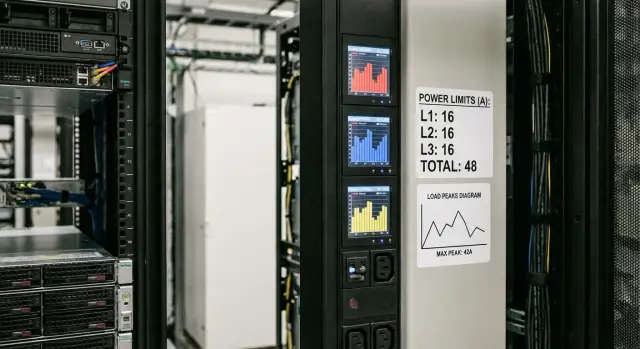
Why a rack needs telemetry and where overloads usually hide
Rack overload rarely looks like “everything went dark at once.” It usually starts with small symptoms: warm cables and connectors, random reboots of some gear, intermittent breaker trips that are hard to reproduce. Overload can be local: not across the whole rack but on a single feed, an outlet group, or a phase.
A building-level meter or room total almost never helps to understand what's happening in a specific rack. It shows the sum, while risks live in details: one PDU is already at its limit, one outlet bank is loaded denser than others, or one phase is pulling more. By the total number it’s “all fine,” but there can already be a point in the rack that will be the first to trip.
PDU telemetry gives that detail: how much current flows through each line, how load is distributed across phases, whether there's imbalance, and where peaks occur. This helps spot problems before shutdowns and plan changes without guessing.
Operators and engineers need to answer practical questions quickly:
- Where exactly is the overload: rack-wide, by phase, by feed or by outlet group?
- Is it steady load or short spikes (e.g., on job start or when a redundant PSU powers up)?
- How close are we to the limit: “there's margin” or “one more server and it’s risky”?
- What changed: what equipment was added, moved or switched to another circuit?
Simple example: the rack shows an acceptable total power, but one PDU serves heavier nodes and one phase current is near the limit. Any short peak or power transfer can trip that leg even though the main meter would not predict it.
What exactly you can measure in a PDU and how to read it
Modern PDUs are not just "a power strip in the rack" but sensors that show where overload risk appears. Telemetry depth varies: from total rack consumption to currents on individual outlets.
Typically data are available at several levels:
- Inlet: total current and power entering the rack.
- Phases (for 3‑phase): current per phase L1/L2/L3.
- Branches/banks: groups of outlets combined by a breaker or channel.
- Outlets: current and sometimes power of each individual device.
In a single‑phase rack you mainly look at one total current and, if available, branch or outlet detail. In a three‑phase rack the main trap is that the “total sum” may look safe while one phase is already near its limit. So reading usually starts with phases, then the overall total makes sense.
If a rack has two inlets A/B (typical for redundancy), analyze them separately and together. Separately — to see overload on a particular inlet and balance issues. Together — to understand the real "thermal" and energy picture of the rack. A common situation: equipment should split load 50/50, but in practice it’s 80/20 because of how PSUs are distributed.
Units people often confuse
On PDU screens you'll see different values and they are not interchangeable:
- A (amperes) — the most direct indicator of risk to cable, breaker and inlet.
- V (volts) — voltage sags can raise current at the same load.
- kW — active power, i.e., how much is actually consumed.
- kVA — apparent power, important for UPS and headroom.
- kWh — energy over a period, useful for reports and trends.
Simple reading example: if outlet currents look steady but one phase shows regular peaks, the cause is likely not a single server but simultaneous bursts from a group (e.g., many nodes booting after an update).
The basic set of metrics without which control doesn't work
If a rack has PDU telemetry, you don't need to collect dozens of metrics immediately. For overload control a set that answers two questions is enough: will the breaker trip, and is risk quietly growing?
The main metric is current. Watch currents by inlets (PDU feeds) and by phase if the rack is 3‑phase. Breakers and thermal protection trip by current, so it’s the most honest indicator. And it's important to capture not only average but the maximum over an interval.
Power is also needed, but in two forms: active (kW) and apparent (kVA). kW shows how much the loads actually use. kVA helps understand how close you are to current limits even when kW looks low. This appears when a rack has many PSUs and UPSs operating in non‑ideal regimes.
Voltage helps notice sags and odd deviations. If at the same load current rises while voltage drops, breaker margin is eaten faster than watts suggest.
Power factor (PF) — a simple guide. If PF is noticeably below 1, kVA will be much higher than kW and the rack will hit current limits sooner than expected from watts.
Energy (kWh) is not for emergencies but for trends and reconciling with operational data. It shows what changed after adding servers or replacing equipment.
Minimum dashboard and alert set:
- current per PDU inlet and per phase
- maximum current over an interval (e.g., 5–15 minutes)
- kW and kVA
- voltage by phase
- PF and accumulated energy (kWh)
Simple example: a rack shows 6 kW and looks safe, but kVA rises to 8, PF drops, and one phase current is already near the breaker rating. Without kVA, PF and per‑phase current you can easily miss this risk.
Peaks, spikes and short events: what to actually catch
Average values almost always look calm. Rack overload often shows as short spikes: when servers start after updates, during simultaneous VM starts, or during power transfers. If PDU telemetry shows only "current now", it’s easy to miss moments when a breaker was close to tripping.
What counts as a “peak” and why window size matters
A peak depends on the window you measure it over. A 1‑minute window catches sharp starts and short "hits." 5 minutes shows more sustained bursts (e.g., bulk tasks). 15 minutes is convenient for comparison with overall load and for trends.
A practical approach is to store maxima for several windows. Then you can see whether the issue is short events or sustained overload.
Single spikes versus trends
One monthly maximum alone is not enough: it can be randomness. It's more useful to look at min and max over a period together with frequency. If a maximum is high but occurred once, check the scenario rather than urgently changing power. If you see many repeats “near the threshold,” that’s an operational risk: any coincidence of events will cause overload.
For control usually track:
- threshold exceedances (line or phase overload)
- approach to threshold (e.g., 80–90% of limit) and frequency of repeats
- duration: how many minutes stayed above the level
- time of day: helps find batch causes
- related power events (if visible): UPS to battery, bypass, or return
If a PDU has temperature sensors (in the rack or nearby), correlate rising current and heat. Often the issue is not just “extra watts” but heating increasing contact resistance, which raises current and losses during peaks. Typical scenario: daytime AC is weaker, temperature is higher, and warnings by current appear then.
If you use higher‑level integration systems for a data center, it’s useful to align PDU telemetry and UPS events on one timeline. Then it’s easier to prove the cause of short peaks and stop arguing by sight.
Phase imbalance: how to spot it and when it becomes a problem
Plainly put, phase imbalance is when one phase in a three‑phase rack is loaded noticeably more than the others. By kilowatts the rack may look fine, but a breaker or inlet on one phase is already close to its limit. The result is sudden trips of some equipment and awkward troubleshooting.
The easiest is to watch current per phase in the PDU and compare them. Two clear indicators:
- difference in currents between phases, e.g., L1 14 A, L2 8 A, L3 7 A
- percent imbalance: compute average current and see how much the most loaded phase deviates from the mean
Why this matters without theory: imbalance raises neutral current and heating in cables and terminals, and protection trips on the most loaded phase. So a rack falls not because of total power but because of imbalance.
Imbalance usually appears gradually. You fill the rack with servers that have similar PSUs, add another node or PDU, or plug a new server into the nearest free outlet. If outlets and branches map to a specific phase, load drifts to one side.
Guidelines for acceptability:
- up to 10% is usually fine and recorded as normal
- 10–20% should be watched, especially if there are peaks and little breaker margin
- above 20% you should plan to redistribute loads across phases
Example: in a rack with servers and storage one phase regularly reached 85–90% of its limit, while total power stayed below 70%. Moving a couple of PSUs to another phase restored margin and stopped false alarms. When assembling racks or integrating infrastructure it’s useful to design phase distribution upfront, not rely on “we’ll fix it later.”
How to set thresholds: step by step and without heavy math
Start not from charts but from constraints. List breaker ratings (rack inlet and branch breakers), the type of power (1‑phase or 3‑phase), whether A/B feeds exist, and the equipment list in the rack. The limit is set by protection and cabling, not the PDU.
Then define the operating zone. For continuous load a practical guideline is 70–80% of the line rating. This leaves margin for growth, contact aging and unexpected peaks. For a 16 A line a comfortable continuous zone is about 11–12 A.
Thresholds in 4 steps
-
Define the base: breaker ratings for each line and the rack inlet (or per phase).
-
Set a "Warning" threshold at 70–80% and decide the action: check outlet distribution, move some load to another line, evaluate growth after changes.
-
Set a "Critical" threshold at 90–95% and determine a stronger action: forbid new connections, urgently rebalance power, check connector heating, or, if needed, remove some equipment.
-
Apply thresholds per phase and separately for total load. The sum may look fine while one phase sits near its limit.
Simple example: a 3‑phase rack shows 65% of inlet capacity by sum, but phase L2 is at 92% most of the day. The total graph is calming while the real risk is in one phase.
Polling and averaging
To avoid reacting to noise, choose a polling interval of 30–60 seconds and averaging of 1–5 minutes. For alerts add a rule “triggers if sustained for N minutes” (e.g., 3–5). That way you catch real overloads and peaks, not single load clicks.
Common mistakes when configuring telemetry and thresholds
The most frequent problem is not lack of data but that they are configured “just for show.” Then PDU telemetry doesn’t help to foresee risk and instead distracts.
One‑size‑fits‑all thresholds are a typical trap. Racks often have different breakers, PDUs and branch loads. If you set the same current threshold for all lines you either miss overloads on a weak segment or get noise where margin is large.
The other extreme is overly sensitive thresholds. If a warning fires on every short spike (e.g., at server start or UPS test) the team soon ignores alarms. It’s better to have fewer alerts that require action.
People also underestimate polling frequency. Infrequent polling (e.g., once every 5–10 minutes) can miss short peaks and overloads that actually heat cables or trip breakers. If hardware allows, poll more often or store interval maxima.
Another mistake is watching only the rack total and ignoring A/B power. Result: “overall fine,” but A is nearly full and B almost empty. If one feed fails the other can suddenly overload. Finally, an alert without an owner doesn't work. If there's no responsible person and a clear response scenario, notifications become background noise.
Quarterly check list:
- thresholds vary by breaker, phase and A/B lines
- two levels: Warning and Critical
- polling and peak capture are sufficient to catch short events
- alerts go to people who can act
- there's a defined action and timeframe for each alert type
What to include in a monthly rack report
A monthly report is not a checkbox; it’s to quickly answer: is there an overload risk, where is it, and can we safely add new equipment. A good report is readable in 5 minutes and helps decide without arguments.
Start with a short "rack passport": how many inlets, breaker ratings, phases, permitted current per line, and the actual average load for the month. Record remaining margin per phase separately, not only the total. This is crucial if you want the real picture, not the average of the room.
Keep the report structure simple:
- load summary: average current and power for the month by phase and inlet
- peaks: maximum values with date/time and phase/line context
- events: how many threshold exceedances, their durations, and actions taken (rebalancing, limits, connector checks)
- phase imbalance: monthly maximum and days it exceeded norms
- trends and forecast: how average load changes and how much reserve remains if growth continues
Show peaks with context: "peak 18:42, phase B, lasted 2 minutes." In racks with multiple servers and storage a short job start can cause a spike invisible on averages but important for breakers and cabling.
Finish with recommendations—3–4 concrete actions: what to add now, what requires phase redistribution, what needs a power chain check, and what to monitor next month.
Practical example: rack safe by total but risky by phase
42U rack: two A/B inlets, three‑phase power on each feed, PDUs with multiple outlet banks. Total power seemed ok: even after adding two servers total load stayed below usual limits (around 60–70% of inlet rating).
The issue appeared not in the sum but on one phase. New servers were plugged into the same outlet bank as some existing nodes. As a result currents across phases became uneven: one phase noticeably higher than the others.
Telemetry shows this immediately if you look beyond total current and check per‑phase values. The typical picture: average phase current is already close to the threshold, and during job starts or backups short peaks appear that are barely visible on the total graph. The imbalance indicator helps: as phase difference grows, the margin on a single phase disappears first.
What we did:
- moved one server to another outlet bank on a less loaded phase
- reviewed other consumers and leveled phase loads
- revised thresholds: set earlier warnings per phase before the inlet emergency threshold
In the monthly report we fixed three items so the story won’t repeat: current averages and maxima per phase, top peaks for the month with date/time, and a list of rack changes (what was added, where plugged, what moved). This makes it easier to link imbalance growth to specific actions instead of hunting retrospectively.
Quick 10‑minute checklist before planning changes
Before adding servers, changing configurations or moving loads, spend 10 minutes on PDU telemetry. It’s cheaper than troubleshooting sudden trips after changes.
Five checks that give the fastest answer
-
Verify breaker ratings and the actual rack power scheme. Monitoring thresholds (warning and critical) should match these breakers, not arbitrary numbers.
-
Open maximum currents per phase and key lines for the last 7 and 30 days. If 7‑day maxima were near limits, planning growth is risky even if averages look calm.
-
Check phase imbalance and mark days with the biggest deviations. Often the problem is not the rack total but one phase at the edge while two others are free.
-
Ensure you see peaks and have an event log. Short spikes (e.g., at PSU starts) may miss average charts but are the ones that trip breakers or cause sags.
-
Compare racks by growth rate. If one rack grows faster than others, check PDU distribution and prepare a scaling plan.
If any point looks alarming, don’t postpone investigation. In practice across Kazakhstan data centers this scenario is common: a couple of nodes were added and within a week in a peak moment a breaker tripped even though the rack’s total wasn’t in the red.
What to do in 2–3 minutes
Write down one concrete action: redistribute phases, move some consumers to another PDU, add a feed (extra inlet) or postpone changes until peaks are clarified.
If racks are serviced under procedures, this checklist is easy to fold into monthly control. When deploying new servers, including racks for AI infrastructure, it helps avoid overload up front.
Next steps: how to adopt this in processes without overloading the team
Start with the goal. Do you need safety (prevent trips), fewer incidents (early risk detection), or capacity planning (know how many more devices fit)? The goal determines which alerts matter and which are noise.
Then define a standard for all racks: thresholds, metric names and monthly report format. Having different rules makes the team spend time figuring out what an alert means in each rack. Thresholds should still reflect actual protection and breaker ratings, so the standard is usually one methodology with parameters tuned per line.
Practical rollout:
- pick 1–2 pilot racks (critical and typical) and enable PDU telemetry with basic thresholds
- set alert routing: where warnings go and who acknowledges receipt
- agree which events require immediate action and which are only recorded in reports
- do a short review after a week: which alerts were useful, which unnecessary
- scale the settings to other racks without creating special rules unless needed
Assign roles:
- duty engineer responds to warnings and records the fact
- data center owner decides actions (rewire, redistribute, forbid new installs)
- service owner confirms maintenance windows if intervention is needed
To avoid overloading the team, limit alert levels to two: Warning (time to investigate) and Critical (immediate action). Everything else lives in the monthly report as trends and recurring deviations.
If you need help at the start, system integrators often handle these tasks: from selecting servers and PDUs to configuring monitoring, thresholds and reporting for your processes. For example, GSE.kz (gse.kz) as a manufacturer and integrator in Kazakhstan works with data center infrastructure and can help link rack telemetry with overall power schemes and support.
Frequently asked questions
Why can the breaker trip if the rack's total power looks “normal”?
Start with current on the PDU inlets and by phase (if the rack is 3‑phase). Often the total sum looks safe, while the overload is on one phase, branch or outlet bank that will trip first.
Which PDU metrics are really necessary if the goal is to avoid overload?
Minimum needed to prevent overload: current on inlets and phases, peak current over an interval, active power (kW), apparent power (kVA), voltage and PF. Energy (kWh) is useful for trends and reconciling changes, but it does not catch emergency peaks.
What's the difference between A, kW and kVA, and what should I look at first?
Amperes show the risk to the cable and breaker directly, because protection trips by current. kW shows how much useful power the load consumes, while kVA shows the full load on power and UPS; with low PF kVA can be noticeably higher than kW, and the current limit may be reached earlier than you expect from watts.
How quickly can I tell that a rack has a phase imbalance?
Look at currents L1/L2/L3 and compare them. If one phase is consistently higher and approaching its limit, that's already a problem—even if the total load is low. Practical guidance: up to 10% imbalance is usually acceptable, above 20% you should plan redistribution.
Why do average current values almost always mislead?
Averages often deceive because peaks are short: server startups, simultaneous VM boots, power transfers. If monitoring shows only averages, you may miss the moment when the breaker was close to tripping. Record maxima over intervals and analyze repetition rather than a single monthly record.
How to set Warning and Critical thresholds without complex calculations?
Basic approach: set Warning at 70–80% of the breaker rating and Critical at 90–95%. Apply thresholds per phase and per inlet (A/B), not a single number for the whole rack. Define actions for each level immediately, otherwise alerts become noise.
What mistakes are most often made when configuring PDU telemetry?
Common mistakes: identical thresholds for lines with different breakers, monitoring only the rack total, ignoring A/B feeds, overly sensitive alerts, infrequent polling without peak capture. Another frequent issue is alerts without an owner: if it's unclear who acts, notifications stop working.
What polling frequency and averaging should I choose to catch short peaks?
Polling every 30–60 seconds is usually enough to see dynamics; averaging of 1–5 minutes helps reduce noise. For alerts add a rule “sustained for N minutes” to avoid reacting to single spikes. If possible, store maxima for 1/5/15 minutes—this helps distinguish short hits from sustained overloads.
How to properly analyze a rack with A/B power?
Monitor A and B separately: currents, peaks and remaining margin to thresholds for each inlet. A common issue is 80/20 distribution instead of 50/50 because of how PSUs are plugged in. This is dangerous because if one feed fails the remaining one can instantly overload.
What must be included in a monthly rack report to make it useful?
Make the report quick to read: rack passport (inlets, breakers, phases), average and maximum currents by phase and inlet, list of peaks with date and duration, statistics of threshold exceedances and actions taken, maximum phase imbalance and days with deviations. Finish with concrete recommendations what can be safely added now and what only after redistribution.
