8 min read
PC resistance to disinfectants: choosing equipment for a medical room
PC resistance to disinfectants helps prevent corrosion and failures. We review materials, keyboards, cases and cleaning rules for a medical room.
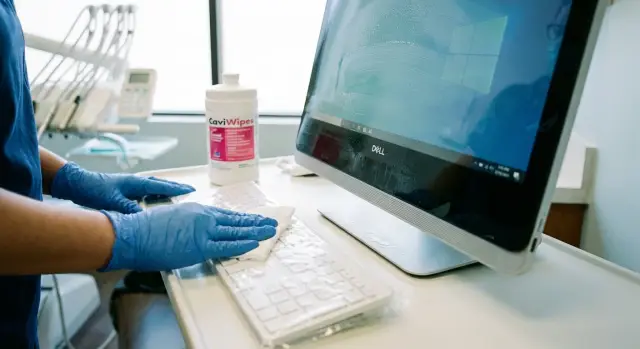
Why disinfecting wears out PCs quickly
In a medical room equipment ages faster than in an office: dozens of people touch it daily and it's wiped almost on a schedule. There are sprays nearby, higher humidity and temperature swings (for example, during ventilation or when an air conditioner runs).
Cleaning itself is useful, but many disinfectants are designed for countertops and door handles, not electronics. When liquid gets into seams, ports and under keys, it washes out lubricants, leaves salts, degrades coatings and speeds up corrosion. So “PC resistance to disinfectants” is not a single parameter but a combination of materials, design and a correct cleaning regimen.
Regular wiping most often leads to typical problems: legends on keys and buttons wear off and keys start sticking; plastic and varnish become cloudy, sticky areas and microcracks appear; connectors (USB, audio) oxidize and create intermittent contacts; ventilation holes clog, cooling worsens and noise increases; the display deteriorates (streaks, stains near the bezel, delamination of coatings).
There is a conflict of goals: you must follow hygiene and safety rules, but you don't want to ruin devices within a year. If you wipe a computer "like a table" with any wipe, especially too wet, failures will occur even with careful handling.
A simple example: in a procedure room the keyboard is cleaned after every patient. After a few months a regular model loses its legends, moisture accumulates under the keys, and oxidation appears in the port. First missed keystrokes appear, then full failure.
Below — what case materials and finishes hold up best, how to choose keyboards and mice for frequent cleaning, and how to set up cleaning so hygiene requirements and device lifespan don't contradict each other.
Which disinfectants are most aggressive to materials
Equipment in medical rooms lives under constant cleaning. So what matters is not a general promise of “resistance” but knowing which compositions and how often will contact the case, keyboard and screen.
Usually problems come from four groups:
- Alcohols (ethanol, isopropanol). They degrease surfaces quickly. Over time plastics and rubber become harder and get microcracks. Matte coatings and painted cases often suffer.
- QACs (quaternary ammonium compounds). They often leave a sticky film that attracts dust and grime. If the product flows into seams, it contacts the material longer and accelerates wear.
- Chlorine-containing solutions. The most aggressive for metals and coatings: they cause corrosion, darkening, stains and eat away markings and paint.
- Hydrogen peroxide and activated oxygen. Strong oxidizers: can change plastic color, make surfaces chalky and accelerate aging of some finishes.
It's dangerous not only to wipe but also to have vapors, aerosols and residues. When a product is sprayed near a PC, microdroplets get into vents, settle on boards and connectors. Liquid trapped in joints or between keys acts like a “long compress”: contact lasts hours, not minutes.
Add humidity and temperature swings after cleaning or airing. Condensation forms on cold surfaces. Moisture can build up inside the case, especially if the PC is near a window, under an AC unit or next to a sink.
A useful practice is to agree in advance on an approved list of disinfectants with the equipment supplier and infection control: record compositions, concentrations, application method (wiping, not spraying nearby), exposure time and allowable frequency. The manufacturer or integrator, for example GSE.kz, can advise which case materials and peripherals will best withstand your regimen and which areas to protect additionally.
Case materials and finishes: what to choose
If cleaning is done several times a day, durability depends not only on the "hardware" but on what the case, bezels and external parts are made of. Often it's not the computer that fails, but its outer layer: it clouds, cracks, paint "flows", and legends wear off.
For plastic cases the composition and thickness matter. ABS often develops fine cracks and looks worse after regular wiping, especially at corners and latch areas. Polycarbonate usually resists impact and is less prone to cracking, but with frequent contact with alcohol- or chlorine-based solutions it can become cloudy if the surface is soft or the coating is poor. A good sign is a uniform matte texture without a “rubbery” coating.
Metal is usually easier: steel or aluminum panels last longer with a proper finish. Powder coating often tolerates regular cleaning better than a thin wet paint: there is less chance of edge wear. Anodizing on aluminum can also be durable, but layer quality and the absence of sharp edges where the coating chips are important.
Soft-touch and rubberized inserts almost always lose in a medical environment. Such finishes quickly become sticky, collect dirt and begin to peel after the first months of active cleaning.
Markings and inventory numbers are a separate topic. Stickers and printed legends wear off fastest, so plan ahead. It's better when a plate is covered with clear film or laminated, and where possible use engraving or a metal plate. Labels last longer when adhered to a flat surface, not an edge or near ventilation. Keep spare identical labels for scheduled replacement.
If in doubt, ask the supplier (including system integrators like GSE.kz) for a specification of external materials and a sample finish. The most honest test is a trial wipe with the actual products used in the room.
Keyboards and mice: requirements for frequent cleaning
If you want equipment to survive frequent disinfection, start with peripherals. Keyboards and mice are touched most often and they show wear first: legends fade, plastic cracks and inserts go sticky.
Keyboard: the simpler the surface, the longer it lasts
For frequent cleaning washable models with a single top panel are best: membrane, silicone or special medical keyboards. They have fewer gaps for liquid to run into and are easier to wipe in one pass.
When choosing, check practical aspects: the surface should be as seamless as possible; legends should be durable (prefer laser engraving or underlayer print rather than paint on top); the cable entry should be sealed; avoid soft-touch coatings; and cleaning should not require removing or prying keys.
If staff work in gloves and enter data often, low-travel keys and a flat platform are more convenient: less effort to type, faster wiping and less dirt in corners.
Mouse and pointing devices: smooth plastic and few parts
Mice share the same weak points: seams, the scroll wheel and rubber elements. Simple models made of smooth plastic without rubber side grips and extra buttons last longer. A closed or low-relief scroll wheel is preferable so it doesn't trap residue.
Disposable covers and sleeves make sense when cleaning occurs every 10–15 minutes (for example, in a procedure room) or when many different patients use the device in one shift. This reduces chemical contact, but covers must be changed regularly — otherwise moisture and dirt accumulate underneath.
A practical scenario: in a room where the keyboard is wiped after each patient, install a washable keyboard with a single panel and a simple rubber-free mouse. During peak hours use disposable covers. If you procure PCs and peripherals through GSE.kz as a system integrator, it makes sense to include these requirements in the specification so keyboards and mice don't need to be replaced every quarter.
Screen and all-in-one systems: how not to damage the panel and bezel
In medical rooms it's often external parts that suffer: screen bezels, buttons, seams and the plastic around the panel. Two factors matter here: how many joints the device has and where liquid can accumulate.
An all-in-one is usually easier to maintain: fewer separate blocks, cables and gaps. But an all-in-one has vulnerable zones — the lower edge, ventilation holes and connector area. A "PC + monitor" setup has more joints, but the monitor can be chosen with a simpler bezel and replaced separately if the plastic degrades from frequent cleaning.
A touchscreen at reception is convenient: less keyboard use, faster input and easier staff training. The risk is that touchscreens are wiped more often and sometimes more aggressively. Oleophobic coatings and the adhesive around the glass perimeter are vulnerable, especially if wiped "until it squeaks" or with an overly wet cloth. If you choose a touch monoblock (for example M200), check whether the front panel is rated for frequent wet cleaning and which agents are permissible.
Matte screens are easier to use without glare but show streaks from a poor cloth more noticeably. Glossy looks brighter but reveals any marks. In both cases habit matters: a soft cloth, minimal liquid, no pressure.
Before purchase look at connector and button placement. Connectors are safer when positioned on the side or bottom rather than the top edge. Buttons are better recessed or touch-based. Port covers for rarely used connectors are useful. A bezel with no deep grooves or pockets and downward-facing cable exits secured in place help prevent cable tugs during daily cleaning.
An example: in a procedure room the screen is wiped after every patient. If ports face up, a few drops will eventually get inside and cause intermittent faults. Proper connector placement and a smooth bezel often solve the problem without changing the model.
Dust and moisture protection: ventilation, filters, placement
Even if the case and keyboard tolerate wiping, air intake and ports are often weak spots. After wet cleaning, fine dust and aerosol rise. Fans draw this inside, dust sticks to moist areas, speeds up contact corrosion, clogs heatsinks and raises temperatures. Reliability suffers as well as appearance.
Ventilation and filters
Look for cases where air intakes are covered by filters that can be removed and washed or replaced without disassembly or tools. The key point is external access. If cleaning the filter requires opening the system unit, it will be done rarely and failure risk increases.
Before purchase check the basics: is there a removable filter at the main intake and is its location obvious; are grilles not directed toward zones where products are often sprayed; are front ports protected (by a cover or placement); and is there enough internal space so cables don't touch fans and collect dust.
Placement in the room
Mount the system unit on a bracket or cabinet, not on the floor: the floor has more moisture and dirt after cleaning. Bad places are under sinks, next to sprayers and where splashes occur. Leave a small gap from the wall so ventilation isn't blocked.
Cables also affect lifespan. Secure them with ties and anchors so daily wiping doesn't pull connectors. This reduces the risk of loosening ports and breaking mounts, especially when medical equipment and peripherals are attached.
How to choose a setup for the room: a step-by-step plan
If a PC in the room is wiped several times per shift, choose it not only by performance. The main criterion is how long the case, peripherals and screen will withstand regular cleaning without cracks, stickiness and worn markings.
Five steps that save a year of service life
-
Mark contact zones and actual wipe frequency: keyboard, mouse, power button, top of the case, screen bezel. This shows where the load is highest.
-
Based on room conditions determine needed simplicity of external surfaces: are there splashes, aerosol from spraying, frequent wet cleaning of tables and floors. The higher the risk of moisture, the more important sealed seams, minimal gaps and clear cleaning access.
-
Check material and marking durability. Matte plastic can cloud, soft-touch becomes sticky, key paint wears off. Ask for compatibility confirmation with typical agents and test on an inconspicuous spot.
-
Consider placement and power. Position PCs so there are no "drip" zones above them (shelves with bottles, dispensers). Add a UPS, secure cables and count outlets for PC, monitor, printer and chargers.
-
Approve a simple cleaning regimen: what to wipe with, what not to use, exposure times and responsible persons. A short briefing reduces the chance someone will wipe the screen with a surface cleaner.
Practical example: in a procedure room the keyboard and mouse usually fail first. It's logical to spec a washable keyboard with durable markings and smooth surfaces, and place the system unit or all-in-one out of direct splash zones. If you buy equipment through an integrator, fix material and maintenance requirements in the spec to avoid replacing peripherals every 10–12 months.
Common mistakes that make equipment die within a year
PCs in medical rooms often fail not because of bad hardware but because of daily cleaning practices. The typical scenario: a computer is wiped like a table, the wipe is soaked, and excess liquid runs into seams, key edges and ports. Then corrosion starts, keys stick and ports fail.
The second mistake is using aggressive agents where they are unnecessary. Chlorine-containing solutions and strong solvents quickly matte plastics, eat soft coverings and wash out paint. Sometimes they are used "just in case" though an allowed alcohol-based cleaner at the right concentration is often sufficient for equipment surfaces.
The problem is amplified by "cocktails". When different products are applied one after another to the same surface they can react and speed up destruction of plastic, rubber and markings. The result is visible quickly: key legends disappear, the case becomes sticky, the surface roughens and is harder to clean.
Screens suffer differently. Abrasive wipes and too hard rubbing remove oleophobic coating, leave micro-scratches and streaks that remain. Bezels and areas near buttons are especially vulnerable, where moisture lingers.
Finally, equipment is often placed where it isn't safe. If the system unit or all-in-one is near a sink, dispenser, sprayer or where aerosol regularly reaches, not only moisture but chemicals get inside. This accelerates fan, port and cable wear.
Short rules that really extend service life:
- Wipe with a slightly damp cloth and don't "flood" seams and ports.
- Use only products suitable for plastics and electronics.
- Don't mix agents and don't apply a new one until the surface is dry.
- For screens use a soft lint-free cloth and no pressure.
- Move equipment out of splash and spray zones, secure cables and close unused ports.
If buying equipment for frequent cleaning, request care recommendations and compatibility tests from the manufacturer. Suppliers that cover the full lifecycle and support (for example, GSE.kz) usually provide guidance before installation so you don't learn by failures.
Short pre-purchase and installation checklist
If cleaning with disinfectants happens several times a day, choose equipment suited for that regime in advance. Otherwise within 6–12 months coatings become sticky, plastic dulls, keys stick and ports oxidize.
Before ordering, ask for a sample (or at least close-up photos) of the case, keyboard and screen bezel. You can often see things by eye that specs don't show.
What to check:
- Case without soft-touch or rubberized coatings; smooth plastic or painted metal. The fewer decorative inserts, seams and grilles near hand areas, the easier the cleaning.
- Keyboard and mouse designed for disinfection: seamless surface, no deep gaps. Key legends should be engraved or under a protective layer, not painted on top.
- Connectors and buttons not facing up where drops can collect; plus port covers or raised edges to prevent liquid ingress.
- Screen and bezel should tolerate wiping with a soft cloth without abrasives. Ask whether there is protective glass or coating and which agents are allowed.
- Installation planned: system unit or all-in-one placed off the floor and away from sinks, dispensers and spray zones. A short cleaning regimen: what to use, how often and who is responsible.
A simple pre-commission test: choose one allowed agent and wipe a small inconspicuous area of the case and bezel for 7–10 days. If stickiness, clouding or plastic "waves" appear, change the model before mass procurement.
If procurement is institutional, record requirements in the technical specification. Local manufacturers and integrators like GSE.kz can usually agree materials, peripherals and installation conditions to suit frequent disinfection.
Example: equipping a room with frequent disinfection
A general practice room: 20–30 patients per day, table and equipment wiped after each visit. After a year keys usually fail, surfaces cloud and the case develops play from constant exposure to solutions. What matters is not paper protection but considered details.
A well-performing kit (not necessarily the most expensive, but well chosen) typically includes: a PC or all-in-one with smooth panels and minimal seams; a washable keyboard (membrane or protected) with large durable markings; a simple rubber-free mouse; a separate holder for cables and power bricks under the desk so they don't get splashed; placement so wiping goes "top to bottom" and not into ports.
Keep wipes and solutions off the desk near equipment — store them in a closed container on a separate shelf or cart. Rule: apply product to the wipe, then the wipe to the device. Do not spray near keyboards or vents. Wring the cloth so there's no overflow into key seams and ports.
After 3 months evaluate: the surface isn't sticky or patchily matte, keys are legible and responsive, nothing squeaks or loosens, there are no accidental double presses, ports aren't oxidized and the PC doesn't reboot unexpectedly.
If procurement is centralized, align requirements with the supplier and service. Manufacturers and integrators like GSE.kz can discuss a configuration for medical rooms and maintenance conditions so equipment doesn't become a consumable.
What to do next: requirements, tests and support
To make PC resistance to disinfectants more than a slogan, start by documenting the actual cleaning routine: which agents are used, how often, who cleans and where the equipment stands (by a sink, next to a patient, at the station).
Collect requirements in one document and hand them to the supplier. Add constraints: under frequent cleaning markings must not rub off, keys must not become sticky, bezels must not crack or panels cloud.
How to verify compatibility before purchase
Ask for specifics, not generic claims about "resistance". Useful questions:
- What materials are used for the case and keyboard and what is allowed for their cleaning?
- Are there cleaning recommendations and a list of permitted agents?
- What constitutes misuse of the device?
- How are repair and replacement handled in case of failure?
If possible, run a short test on a sample: take one peripheral or a case panel and perform a series of wipes with the same wipes and solutions used in the room. In a few days you usually see stickiness, whitening, cracking or fading of legends.
Support and operation so equipment lasts longer
Plan consumables in advance. Keyboards and mice in medical rooms often fail faster than the system unit — that's normal when cleaning is constant.
Provide a short briefing for staff: do not flood surfaces, do not spray directly on equipment, let surfaces dry, use separate wipes for screen and case.
If you need supply and integration for a medical facility in Kazakhstan, consider GSE.kz: they have PCs, monoblocks and servers of their own manufacture, plus service and 24/7 support. In your request indicate your disinfectants and cleaning frequency so suitable materials can be selected and care rules fixed in advance.
Frequently asked questions
Why do PCs in medical rooms age faster than in offices?
External surfaces and places where liquids get in wear out fastest: keyboard, mouse, ports, case edges and screen bezel. Regular wet cleaning washes out lubricants, leaves salts and speeds up corrosion, especially when liquid seeps into gaps and stays there.
Which disinfectants most often damage the case and ports?
The most harmful are usually chlorine-containing solutions and strong oxidizers: they accelerate corrosion and ruin coatings. Alcohols and QAC-based products can also cause damage if used often: alcohols dry out plastics and rubber, while QACs often leave a sticky film that attracts dirt.
Can I spray disinfectant near the computer or monitor?
No. Spraying near equipment is one of the most common causes of hidden problems. Microdroplets enter ventilation and ports, settle inside and lead to intermittent failures. It's safer to apply the product to a wipe and wring it out so there are no drips.
What keyboard is suitable for disinfection after each patient?
Choose washable models with a single top surface and minimal seams. Important: markings should be durable (preferably laser engraving or underlayer printing rather than paint on top); cable entry should be sealed; avoid soft-touch coatings; and cleaning should not require disassembling or prying off keys.
Which mouse should I choose so it doesn't become sticky or fall apart from wiping?
A simple mouse made of smooth plastic without rubber side grips and without many extra buttons is best. Weak points are the scroll wheel and seams, so the less relief and gaps, the longer it will last under regular cleaning.
How to clean the screen without ruining the coating and bezel?
Wipe with a soft lint-free cloth with minimal liquid and no pressure. Don’t wipe 'until it squeaks' — that removes oleophobic coatings and leaves micro-scratches and streaks. In all-in-ones, watch the bezel and glue around the glass, which can be damaged by excessive wet cleaning.
Which case materials withstand regular wiping best?
In medical rooms, metal with a quality finish and a simple matte texture usually performs better than soft-touch or rubberized layers. Soft-touch and rubber inserts almost always become sticky and peel under frequent disinfection, even if they look fine initially.
How to protect ports and buttons from liquid ingress?
Ensure ports aren't facing up, and close rarely used connectors with plugs or at least hide them in a recessed area. Also follow the habit: don't let liquids run into seams, and avoid wiping so that drops flow into USB and ventilation openings.
Where is the best place to locate a computer in the room so it lasts longer?
Don't place the system unit on the floor or next to sinks, dispensers and spray zones; mount it on a cabinet or bracket and leave clearance for airflow. Secure cables so daily cleaning doesn't pull on connectors and loosen ports.
What to ask a supplier before buying equipment for frequent disinfection?
Ask the supplier for specifics: materials of external parts, which agents and concentrations are allowed, and what constitutes misuse. A practical step is a short wipe test on a sample or an inconspicuous area; an integrator or manufacturer like GSE.kz can usually help align the cleaning regimen and select suitable cases and peripherals.
