7 min read
Packaging and Transportation of Computer Equipment in Kazakhstan: Requirements for Packaging
Packaging and transport of computer equipment in Kazakhstan: requirements for packaging, seals and labeling to reduce breakage, tampering and shortages.
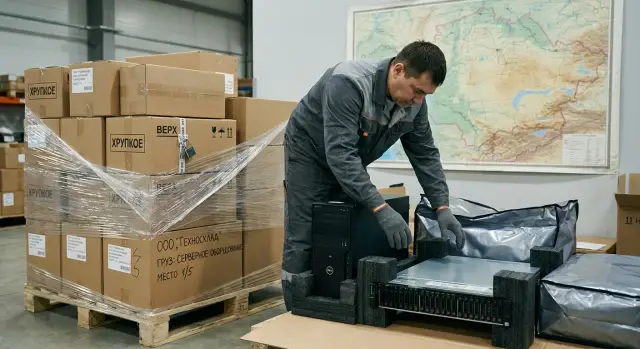
Why equipment gets damaged or lost in transit
Computer equipment is more often harmed by a sum of small impacts than by one strong strike. A box may be tossed during transloading, rattle on a bad road, then sit in a warehouse next to damp goods. As a result, damage appears where it was least expected.
The most common causes are:
- Impact and drops: cases crack, mounts break, connectors bend.
- Vibration: components loosen, microcracks form.
- Moisture and condensation: corrosion, stains, short circuits.
- Static electricity: especially dangerous for circuit boards and memory modules.
Servers are at higher risk because of their weight. If a box does not hold its shape, loads quickly punch through corners and the bottom.
Shortages usually begin with confusion over cargo places. Some boxes are sent on the wrong route, places get resorted at a terminal, and similar-looking boxes are swapped. Another frequent reason is documentation errors: different names, mismatched place counts, or serial numbers not tied to a specific box.
The cost of these mistakes is not only repairs. The most expensive part is downtime: deployment schedules slip, repeat logistics raise costs, and warranty disputes drag on because evidence is lacking.
There are signs of weak packaging that show risk was high: crushed corners, a pushed-in bottom, tears in corrugated cardboard at handles, tape applied over old seams, "blistering" of the box from moisture, as well as dents and abrasions concentrated in one spot (often a drop). If you know these signs in advance, it’s easier to document the problem at acceptance and resolve the issue with the carrier faster.
What to prepare before packing and shipping
Before boxes and tape, record what exactly you are shipping. Many disputes with carriers arise not from breakage, but from the lack of a clear list: what was in the batch, in what quantity and with which serial numbers. For PCs, monitors, all-in-ones and servers this is critical: boxes look similar and the cost of a mistake is high.
Next, assess the route. Within Kazakhstan the same cargo can travel different roads, with or without transloading at a warehouse, in summer or in freezing weather. This determines whether reinforced shock absorption, condensation protection and how best to group places are needed. If equipment is going to a region with temperature swings, plan time for acclimatization at acceptance so devices are not powered on immediately.
Separately define requirements for orientation and loads. Some devices allow only vertical transport, and for rack servers it’s important to limit top pressure. This affects the choice of crates, the need for rigid inserts, and whether items can be palletized or should be shipped as separate places.
To prevent the process falling apart on small details, assign responsibilities in advance: who packs and takes pre-shipment photos, who accepts in the region and checks against the list, where the register is stored (device type, quantity, serial number, completeness), and what transloading/storage conditions may occur en route.
Packaging and cushioning: how to choose and assemble
The purpose of packaging is simple: the equipment inside must not move, and impacts should be absorbed by the cushioning layer, not by the case. For routes across Kazakhstan this is especially important: vibration and sudden braking more often break mounts, connectors and case corners than a single heavy impact.
Start with the box size. Too large a box leaves voids and the device starts to "walk" inside. Too small squeezes the case and panels, and on impact the load is concentrated in the corners. Ideally, there is a cushioning layer on all sides.
For expensive and heavy units (servers, towers with heavy internals, monitors) double packaging works better: an inner box with tight inserts, then an outer box with a second cushioning layer. This reduces the risk of wall puncture and protects when the outer packaging gets crushed in transit.
Cushioning must hold its shape. Typically the best options are polyethylene foam, molded inserts, corner protectors and air cushions. Newspapers and loose paper compress quickly and then the equipment hits the cardboard.
Pack separately anything that can strike the case: cables, power supplies, fasteners, rails. Put them in a bag and fix them inside the box so they don’t roll. A typical scenario: a power cable scores a panel or chips an edge.
Before sealing, check a few things: the device doesn’t move when lightly shaken, corners are protected by inserts (not just bubble wrap), seams are taped crosswise, and there are no hard objects inside that can hit the case. If rough transloading is expected, add stretch film to the outer protection and, if necessary, a wooden frame.
Protection from static, moisture and temperature swings
Static and condensation damage equipment more often than is assumed. A board can fail without visible impact, and moisture droplets can appear inside a case due to a rapid temperature change on unloading in winter.
Use anti-static bags for small components (boards, SSDs, memory modules, network cards). Ordinary plastic or bubble wrap does not protect against discharge. Inside the box, secure parts so they don’t rattle or rub.
For shipments involving cold and temperature "jumps" add moisture protection: a heat-sealed bag or a sturdy sealed bag plus desiccant (silica gel) sized to the package volume. This is especially important for servers and all-in-ones: they contain many metal parts and condensation can settle on connectors.
After delivery follow a simple acclimatization rule: do not power on equipment immediately after cold transit. Let it sit until the case temperature is close to room temperature. In practice, 3–6 hours is usually enough for a tower or monitor; servers in tight packaging may require more time.
Pack monitors and all-in-ones so nothing presses on the screen, not even "a little." Protect the screen with soft padding, secure the stand or foot, and do not press straps or stretch film directly onto the front panel.
Quick winter checklist before handing to the carrier:
- modules are in anti-static packaging and labeled;
- moisture protection is sealed and desiccant is inside;
- heavy parts have no free play;
- the screen is protected by padding and nothing presses on the matrix;
- the package is marked with a note about waiting before powering on.
Example: a batch of all-in-ones goes from Astana to a region at -20°C. If they are powered on immediately at acceptance, the risk of condensation is maximal. It’s easier to wait a few hours than to argue later that a device "stopped working on its own."
Palletizing and securing cargo in the vehicle
A pallet often solves half the problems with breakage and shortages. It’s almost always needed when you have a batch of several boxes, a long intercity delivery, expected transloading at warehouses or manual resorting en route. Individual boxes are easier to damage and easier to lose.
Stacking rules are simple but important: put heavy items below (servers, UPS), light ones on top; build rows of similar dimensions without steps; avoid overhang beyond the pallet edge; fill voids so boxes don’t shift.
Next, secure the load. First, wrap stretch film in several layers from bottom to top with overlap onto the pallet to tie the load to the base. Then apply strapping (plastic or textile) in two directions. For expensive loads use protective corner pieces and a top sheet (cardboard or plywood) under the final wrap.
To reduce vibration in the vehicle, remove voids between boxes with pads (corrugated board, foam) and ensure nothing is loose. If the batch includes servers, place them on a separate pallet or in the lower layer and level the top with a rigid sheet.
Always mark the pallet as a separate cargo place (for example, "Pallet 1 of 2"), even if boxes already have stickers. This simplifies counting at loading and acceptance.
Seals and tamper control: practical rules
A seal does not protect against impacts, but it significantly reduces the risk of shortages and swaps, especially during warehouse transloading and driver changes.
For boxes with PCs, monitors and accessories, numbered adhesive seals are usually sufficient. For pallets and transport crates plastic numbered cable ties are convenient. If visibility of tampering along the entire length is important, use tamper-evident tape.
Place seals where opening is actually possible. On a box that’s the lid seam and a side seam, so it cannot be opened and closed unnoticed. On a pallet seal the stretch wrap knot (or the tail of the wrap), and when using strapping place a numbered tie at the joint.
For seals to be effective you need record-keeping: the seal number and which place it is on (box 3 of 10, pallet 1), date and responsible person, several photos (overall view, close-up of the number, overall pallet view), and for expensive items a link to serial numbers.
If a seal is broken, missing or the number doesn’t match at acceptance, act calmly and by the book: stop acceptance of that place, invite the carrier’s representative, take photos from all sides and draw up an incident report. Open in the presence of witnesses and immediately check against the list and serial numbers; record the result in the consignment notes.
One seal does not replace labeling and documents. If boxes are not labeled and the consignment lacks a clear list of places, proving that a specific device is missing will be much harder.
Labeling: what to write and how to stick so items don’t get mixed up
Proper labeling makes transport calmer: cargo moves around warehouses less, places aren’t confused with each other, and acceptance in the region is faster. For Kazakhstan routes this is especially important because similar equipment boxes are easily mixed up even within a single vehicle.
What to write on each place
Keep the data short and consistent across all boxes in a batch. Usually enough: sender and contact phone (no unnecessary personal data), recipient and city, order or batch number, place numbering ("place 3 of 12"), short description ("PC", "monitor", "server", "spare parts").
It’s also convenient to make a small label "Contents / serial numbers" and place a second copy inside the box. This way you don’t expose extra information externally, but at acceptance you can quickly verify what is inside that box.
Handling marks and how to stick them
"Fragile", "Top", "Do not tilt" help only when they are readable and repeated. Place them where the risk of breakage is real: monitors, all-in-ones, glass panels, rack servers. Stick labels to a clean dry surface. Not on a seam and not on stretch film that stretches and tears. A good practice is to duplicate the main label on two adjacent sides so it’s visible in any stacking orientation.
Example: a batch of 12 places with PCs and one server. If each box has "place X of 12" and the batch number, the receiver immediately sees if, for example, "place 7 of 12" is missing and records the shortage at unloading rather than the next day.
Step-by-step: packing and handing to the carrier
A well-established routine works better than trying to "remember on the fly." It’s easier to understand where a dent appeared or at which stage a small part went missing.
-
Prepare the workspace and materials. The table should be clean and dry. At hand: the box (or transport crate), cushioning material, anti-static bag, tape, marker, seals, and a knife.
-
Document the device condition. Take 2–3 photos from all sides and a separate shot of the serial number (sticker or visible in BIOS if convenient). This takes a minute but helps when handling claims.
-
Pack without voids. The device should not "walk" inside the box: shake the closed box — there should be no knock or play. Tape seams crosswise and reinforce corners.
-
Add documents inside. Include the contents list and notes about acclimatization if the season requires it.
-
Label and seal. Apply recipient, city, place number (e.g. 2/8), batch number and handling marks. Place seals on seams that are realistically openable.
-
Make final records. Photo each place and then the pallet (if any) from all sides and close-ups of seal numbers.
When handing over, ask to have the number of places and seal numbers recorded in the consignment note. If there is one seal per pallet, note this separately: it makes it easier to prove that opening occurred en route.
Example scenario: batch of PCs and a server between cities
Delivery: 20 towers, 20 monitors and 1 server travel from Almaty to Kostanay via a transload warehouse. At the transload the cargo is rearranged, may be stored temporarily and reloaded. So three things matter: each place must be easy to count, any opening must be noticeable, and damage should be recorded immediately.
Typical breakdown: towers separate, monitors separate, server separate. Don’t mix PCs and monitors in one box even if it seems to reduce the number of places. The server should be double-boxed: an inner box with cushioning, then an outer reinforced box with a rigid bottom and corner inserts.
Labeling should be duplicated on two sides of the box: for PCs — "PC 01-20", for monitors — "MON 01-20", for the server — "SRV 21". If the cargo is on a pallet, number the pallet, e.g. "PAL 01", and indicate the range of places on it.
Seals: use a numbered seal on the pallet’s stretch knot or strapping, and adhesive seals on individual boxes across the lid seam.
To have evidence later: collect photos of each box with its number and overall view (plus corners and seal), photos of the pallet before and after wrapping, record seal numbers in the consignment note or registry, and make a handover act with the number of places and a note on package integrity.
Acceptance in the region: how to detect damage and shortages immediately
Acceptance should start before signing the paperwork. If you sign and then find a problem, proving it happened in transit becomes harder. Allocate 10–20 minutes for a calm inspection right at the vehicle or the carrier’s warehouse.
First check each cargo place from the outside: punctures, dents, torn seams, drop signs (crushed corners, "waves" on cardboard), wet spots and stains. In winter check for ice and wet cardboard — common causes of corrosion and shorts after powering on.
Then verify the number of places. It’s easiest when boxes are labeled "N of M." Then you can immediately see, for example, 11 of 12 arrived and halt unloading until clarified.
Seals: compare numbers with the consignment note or sealing act. Any mismatch should be recorded immediately even if the package looks intact.
Whether to open all boxes or selectively depends on risk and contract. If packaging is dented, there are moisture signs, seals don’t match, or the cargo is valuable, it’s better to open completely in the presence of the driver and warehouse representative.
If something is wrong, record three things: photo/video (overall view and close-ups of problem areas), an entry in the documents ("accepted with package damage", "shortage of places"), and an act listing missing items/place numbers and damage description. Also note that functional checks will be done after acclimatization.
Common mistakes that are hard to prove later
Most disputes hinge not on what happened but on the inability to document it. Several typical errors repeat frequently.
Too large a box and voids inside. The device starts to "walk" and bangs into walls at every braking. The outside of the box may look acceptable while inside there are chips or cracks, and the carrier will claim the packaging was the wrong size.
Tape only in the center. When seams and corners are not reinforced, the box opens or tears at the edge. After that it’s hard to prove that contents did not fall out on your side.
Mixing devices and accessories without dividers. A power supply or fastener leaves dents on the case; small parts go missing. Later you see shortages but can’t prove they occurred during transit.
Labeling only on top. It gets covered by stretch film, worn off, or the top becomes the "bottom" during transloading. Result — misrouting: cargo leaves for the wrong branch.
Seals without recording numbers or photos. If the number is not written in the consignment note and there is no pre-handover photo, signs of tampering become a he-said-she-said dispute.
The minimum that realistically reduces risk: choose packaging to size and fill voids with cushioning; reinforce seams and corners; separate device and accessories; duplicate labeling on two side faces; record seal numbers in documents and photograph each place.
Short checklist and next steps
Before the vehicle leaves check five points:
- the packaging is sized correctly, voids are filled, corners reinforced;
- seasonal anti-static and moisture protection is applied, and acceptance will respect acclimatization;
- labeling is readable: city, recipient, place number, batch number, handling marks;
- seals are placed at the correct points, numbers recorded, photos taken before shipment;
- acceptance in the region: inspect before signing, verify places and seals, and record all remarks immediately.
If any item raises doubts, fix it before dispatch. After signing on acceptance proving that damage occurred en route is usually much harder.
To make the process repeatable, agree unified requirements for packaging, sealing and labeling with the supplier and carrier, assign a person responsible for photo documentation and the registry, and for branches prescribe a simple acceptance routine. If equipment is supplied and supported by a manufacturer or integrator, it’s convenient to synchronize delivery and acceptance rules with their service team in advance. For example, for batches of PCs, all-in-ones and servers from GSE.kz (gse.kz) such an agreement helps all parties have the same understanding of what normal packaging is and how discrepancies are recorded on site.
Frequently asked questions
Why does equipment break in transit even if the box looks almost whole?
Most damage is caused not by a single big impact but by a series of small effects: drops during transloading, constant vibration on the road, pressure from above on the box, and moisture in storage. So an externally “intact” package can still hide chips, microcracks and loosened mounts inside.
What signs immediately show that packaging was weak or the cargo was dropped?
Look for crushed corners, a pushed-in bottom, tears in corrugated cardboard near handles and seams, tape placed over older seals, swelling of the cardboard from moisture, and local dents or abrasions in one spot. These signs should be documented immediately at acceptance, before signing anything.
What must be recorded before packing so you don’t argue with the carrier later?
Prepare a clear batch register: device type, quantity, serial numbers and completeness for each package. Take a photo of the device and its serial number before packing, then a photo of the finished box with labels and seal — this makes it much easier to prove what you shipped and in what condition.
How do you know a box is the right size?
The box should be sized so the device does not move, but also not be squeezed by the walls. Ideally there is a cushioning layer on all sides, and when you gently shake the closed box nothing inside rattles.
When is double packaging needed and who benefits most from it?
Double packaging is recommended for heavy and expensive items, especially servers: the inner box holds the device and inserts, the outer box absorbs impacts and crushing. This is useful when transloading is expected or for long routes with vibration.
How to pack cables and accessories so they don’t damage the device?
Pack cables, power supplies, fasteners and racks separately and fix them firmly inside so they cannot roll. A common failure scenario is a power cable scoring the panel or leaving chips on an edge during braking.
Is anti-static protection needed for components and what specifically to use?
Use anti-static bags for circuit boards, SSDs and memory modules — not ordinary polyethylene or bubble wrap. Components inside should be secured so they don’t rub or move; static discharge and friction can render a part inoperative without visible impact marks.
What to do about condensation in winter and how long to wait before powering on?
Add moisture protection and include desiccant (silica gel) inside the packaging. After delivery from cold, do not power on equipment immediately — allow acclimatization until the case temperature is close to room temperature. For desktop PCs or monitors 3–6 hours is usually sufficient; servers in tight packaging may need longer.
When should cargo be palletized and how does that reduce damage and shortages?
Palletizing helps in many cases: it makes the load easier to count, harder to lose individual boxes, and reduces damage during transloading. Place heavy items at the bottom, avoid steps in the stack, do not let boxes overhang the pallet, and fill voids so boxes cannot shift.
How to use seals properly and what to do if a seal is broken at acceptance?
Use numbered seals and keep records: which place has which seal number, who applied it and photos taken before handover. If a seal is missing or the number does not match at acceptance, stop accepting that place, take photos from all sides and note the discrepancy in the paperwork before signing.
