8 min read
Organizing a Spare-Parts Warehouse (ZIP): Repair and Exchange Stock to Prevent Downtime
A practical guide to organizing a spare-parts (ZIP) warehouse, exchange pool and diagnostics workflow to reduce equipment downtime and repair costs.
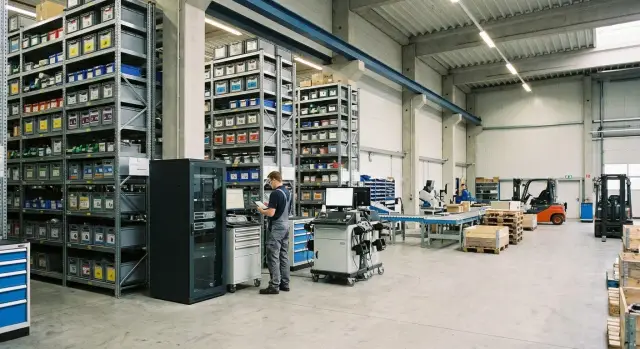
Where downtime starts — and what a ZIP warehouse has to do with it
Equipment downtime often begins not with a breakdown but with waiting. The repair itself may take an hour, but finding the right part, approving the purchase, delivery and service queues stretch the story into days or weeks. In the end the equipment stands idle, people wait, and the business loses time and money.
ZIP means spare parts and consumables kept on hand for quick repairs. Simply put, it's everything that lets you replace a failed unit without long procurement. The exchange pool is ready-to-issue devices or modules you can swap in immediately (for example, a system unit, power supply, drive, monitor). You repair the broken item later without stopping work.
The problem is almost never budget; it’s the lack of a clear process. Usually three things fall short:
- inventory: what is in stock, where it is, how much remains and what is already reserved;
- priorities: what we restore first and which items must always be available;
- diagnostics and replacement route: who receives the request, who checks it, who issues ZIP or an exchange device, and where the result is recorded.
When rules appear, the effect is quick. Downtime decreases, costs become predictable, and purchases shift from “urgent and expensive” to “planned and clear.” Even a basic order in the warehouse pays off: fewer emergency stops and fewer disputes about who should do what and where a part “went missing.”
Define what you support and under what rules
To keep repairs from turning into chaos, first fix the scope: which equipment you will support, in what timeframes, and who makes decisions. Without that, the warehouse quickly becomes a pile of random boxes and downtimes grow.
Create a map of equipment classes. Usually five groups are enough: office PCs, all-in-ones, workstations, servers and peripherals (monitors, printers, UPS). For each group it helps to know common failures and what can realistically be swapped quickly. For example, desktop PCs and all-in-ones are often fixed by swapping the power supply, drive or memory, while servers commonly need drives, fans and PSUs.
Next, set criticality. The same failure can be minor for back-office and a full stop for a clinic reception or bank teller. A practical approach is to assign levels:
- critical: the unit of work stops, replacement needed within hours;
- important: can wait until the end of the day;
- planned: can wait several days;
- no impact: repair by residual-priority.
Define support for these levels. Where first-line actions are enough (reboot, cable check, consumable swap), where you need a field engineer, and where you should immediately involve a service center. If you have many models, decide in advance what is repaired on site and what goes only to service.
The most common conflict area is responsibility boundaries. Fix a simple rule: who diagnoses, who issues the replacement, who completes disposals, who orders replenishment, who communicates with contractors. For example: IT logs the incident and does initial checks; the warehouse issues the part or device from the exchange pool on request; procurement replenishes minimum stock; a contractor or service center does complex repairs.
Short example: an all-in-one at a district service desk fails. If it’s marked “critical,” first-line support files a request and immediately receives a replacement from the exchange pool, while the faulty unit goes to diagnostics. Downtime is measured in minutes, not repair wait time.
Stock standards: a simple way to start
Stocking answers one question: which parts should be on the shelf so a failure doesn’t become downtime. Here clear rules you can maintain monthly are more important than perfect calculations.
Start with facts. Take 3–6 months of incident history: what failed, how often, how long it took to find parts and repair. If you have no history, start collecting it from service requests and engineers’ notes. Alongside, make a list of supported equipment: models, counts, locations, owners.
Then highlight components that fail often and are easy to swap on site: power supplies, drives, memory, fans, motherboards. For servers you may add RAID controllers and network cards, but don’t expand the list too early.
To prioritize, use a simple ABC:
- A: fails often or immediately stops work (keep always);
- B: fails less often but affects work (keep in limited numbers);
- C: rarely needed or awkward to store (order as needed).
After that set a minimum and maximum. Minimum is how many must be on hand at all times (for example, 2 drives and 2 PSUs per 20 servers). Maximum caps stock so the warehouse doesn’t bloat (for example, no more than 6 drives for the same fleet). The logic is simple: minimum covers typical failures until the next delivery, maximum protects the budget.
A good test: if a PSU in an accountant’s workstation or a drive in a server fails on Friday evening, you should already know whether a replacement is on the shelf and when to reorder.
Exchange pool: don’t wait for a repair, swap immediately
An exchange pool is needed where downtime costs more than the repair. The principle: don’t repair under time pressure; quickly replace the module with a working one. The faulty device goes for verification and repair without interrupting operations.
When to keep a part and when a whole unit? If the component is replaced in minutes and needs no configuration (a cable, fan), ZIP is sufficient. If replacement requires lengthy diagnosis, disassembly, testing, or may reveal other faults, keep a full unit in the exchange pool. This is especially important for critical workplaces and servers where every hour of downtime is noticeable.
Most often the exchange pool contains drives, power supplies, system units and server nodes (typical hot-swappable modules). In organizations with a homogeneous park of PCs and servers this works best: one working unit solves many potential incidents at once.
Compatibility: check in advance
An exchange pool won’t help if the hardware doesn’t fit. Set rules in advance for models and revisions, form factor, interfaces and firmware. A short “what fits what” table and the rule “any questionable match is first tested, not fitted blindly” help in practice.
Labeling and statuses to avoid confusion
Each exchange item should be tracked as a separate entity: serial number, receipt date, where issued, and current status.
Three to four statuses are enough: “working,” “under verification,” “in repair,” “written off.” Then you can see how many units are actually ready to issue and the exchange pool won’t turn into a “closet of surprises.”
Storage and recordkeeping without complex systems
Even without a WMS or expensive ERP modules you can set order so the right part is found in minutes. The system matters less than consistent rules everyone follows.
Start with a simple item card (in a spreadsheet or paper folder). Record not only name and quantity but compatibility (which models it fits), lead time, acceptable equivalents and criticality. Then in a shortage you won't have to figure out on the fly what can be safely used.
Physical order relies on clear addressing. Divide the warehouse into zones (for example: “exchange pool,” “boards/modules,” “cables/consumables”), then use addresses like “Zone-Rack-Shelf-Bin.” The label on storage must match the record. Otherwise inventory becomes a formality.
Receiving can be simple but strict:
- verify item and quantity against the document;
- check completeness (mounting, cables, covers, packaging);
- take a photo of condition on receipt;
- if there’s an issue, file a discrepancy report immediately, not “later.”
To keep ZIP from becoming stale, use FIFO: issue the oldest stock first and note receipt dates on the item card. Do a short quarterly review: what is unused, what is consumed more than average, which items are obsolete (for example, tied to decommissioned workstations or servers). This keeps stock live and avoids freezing money in excess parts.
Diagnostics and replacement route — how a case should proceed
A defined route ensures every failure follows the same clear path and the replacement decision is made quickly and without disputes. Decide in advance who may say “replace now” and by what criteria.
Typically authorities are distributed like this: first-line support logs the request and performs basic checks; an engineer confirms the diagnosis; the IT manager or exchange-fund owner approves replacement if the case exceeds set rules (for example, an expensive item or recurrent failure).
Steps from request to restoration
Keep the workflow short:
- request: what failed, location, criticality, contacts;
- quick diagnostics: 10–15 minutes to confirm the symptom and rule out obvious causes (power, cables, settings);
- reservation: assign the needed part or exchange device to the request in records;
- swap and start: install the working module or device and run a short test;
- return: send the faulty item to repair or examination, close the request when service is restored.
It’s important not to lose the failure cause. Record not just “won’t turn on” but context: model, serial number, conditions (power surge, overheating, dust), what was replaced, and how long it took. This data later helps adjust stocking standards and decide where preventive maintenance is needed.
If the needed part is not available
Decisions should also be predescribed and approved:
- allowed equivalents (from the compatibility list);
- temporary replacement from the exchange pool;
- cannibalization with approval (only from written-off or reserve equipment);
- expedited procurement.
Example: a clinic’s front-desk PC fails to boot. The engineer confirms the PSU failure in 10 minutes, reserves a matching unit, swaps it and returns the workstation to service. The faulty PSU goes for inspection, and the record notes “repeat failure after 8 months.” After a month it becomes clear this batch fails more often; stock is adjusted and the supplier or configuration is reconsidered.
Diagnostics without wasting time: minimal checks
The goal of diagnostics is not to find everything at once but to quickly make the right decision: repair on site or swap from the exchange pool. For that you need a short, identical checklist for everyone and clear thresholds for when to stop digging deeper.
Quick diagnostics up to 15 minutes
This should be performed identically for common incidents: won’t power on, overheating, drive errors. Keep it as a checklist to avoid variation between shifts.
- power: cable, outlet/UPS, indicators, response to power button, smell or signs of overheating;
- overheating: fan noise, clogged filters/grilles, sensor temperature if available;
- drive: SMART status/controller errors, drive visibility in BIOS/UEFI, signs of unstable operation;
- memory: quick test, swap modules between slots (if allowed), note the slot;
- visual inspection: bulging capacitors, loose connectors, cracks, liquid traces.
After these steps classify the case: “quick on-site repair possible” or “replace now.” The decision must follow rules, not mood.
Deeper diagnostics
Perform deeper checks only if they won’t delay service restoration. This usually includes disassembly, long stress tests, and searching for rare intermittent faults.
Thresholds for when to replace rather than dig deeper:
- no boot and no clear cause after quick checks;
- overheating recurs immediately after cleaning and ventilation check;
- drive shows repeated errors or instability;
- problem affects a critical service and a replacement is available.
Simple example: a server shows drive errors during business hours. Quick diagnostics confirm degradation and risk. The right move is to replace the drive or node according to rules, return the system to service, and perform in-depth repair on the bench without business downtime.
Roles and documents — avoid disputes and losses
Even with good stock, downtime often comes from disputes: who approves issuance, who is responsible for return, where is the act, who writes off. First agree on roles and rules in writing, then configure recordkeeping.
Usually five roles suffice if formally assigned:
- process owner: sets rules, deadlines, metrics, and resolves disputes;
- storekeeper: issues and receives items, monitors stocks and storage conditions;
- engineer: diagnoses, fills defect reports, confirms what to replace;
- purchaser: replenishes stock per norms and consumption, manages suppliers;
- write-off responsible: checks documents, initiates disposal and recycling.
Keep documents short and uniform across departments. A minimal working set typically includes:
- request for ZIP or replacement (what failed, priority, location);
- issue record (what was issued, serial number, to whom, when);
- return record (what was returned, completeness, condition);
- defect report (what was checked, engineer’s conclusion, repair/replace decision);
- write-off (reason, who approved, destination).
For warranty cases decide in advance what you preserve. Usually keep the part itself, packaging, serial-number labels, photos of damage and a short symptom description. Packaging should protect against static and shocks, otherwise you risk a warranty refusal due to transport damage.
To see status you need a single incident log: request number, device, timelines, who is working it, what was issued and what is expected. This can be a spreadsheet or a simple ticketing system. The key is one source of truth.
Example: an accountant’s PC won’t boot. The engineer files a request and a defect report, the storekeeper issues a PSU from ZIP, and the old one is returned marked for completeness. The log shows the workstation restored the same day and procurement later replenishes stock based on consumption.
Common mistakes with ZIP and exchange pools
Major downtime often comes not from rare failures but from small organizational mistakes. They are invisible in calm times but during peaks turn repairs into a chain of waits, clarifications and searches.
One common mistake is “a bit of everything” instead of holding focused critical items. Money is then frozen in rarely used parts while the needed PSU or SSD is missing. It’s more practical to choose a short list of items that most often stop work and keep those.
Second problem: ignoring compatibility and revisions. The same part name doesn’t mean it fits. Different batches, connectors, form factors, BIOS or controller versions can make a part useless. A good rule: each item record must clearly state which models and revisions it fits.
Many losses come from a lack of return rules. Working parts “disappear” while faulty ones accidentally return to shelves and get reinstalled. Minimum safeguards:
- returns only with a reason noted;
- verification before restocking;
- separate place for rejects and questionable items.
Another mistake is not revising norms. Fleet changes, suppliers change, lead times fluctuate, but norms stay the same. Quarterly review of failures, procurement times and stock levels is useful.
Finally, don’t mix the exchange pool and ZIP “in one heap.” The exchange pool must have clear statuses (ready to issue, under verification, in repair, written off) and quality control. Otherwise you’ll issue a “replacement” that returns the next day, increasing downtime.
Short checklist: is your ZIP warehouse ready to work?
A ZIP warehouse works when you can quickly answer three questions: what we keep, how much we keep, and how it turns into a replacement without disputes and waits.
Check the basics. For each model there should be a short list of critical modules — what really stops the device. For PCs or workstations this is PSU, drive and memory; for servers — drives, PSUs, fans. Without this list stock usually becomes “a bit of everything” and the right part isn’t available during failure.
Next — norms. For key items set minimum, maximum and replenishment lead time (how many days from order to actual arrival). Norms without lead times don’t work: you don’t know how long the warehouse lives “on leftovers.”
Without clear statuses inventory turns into a search. Minimal statuses: “in stock,” “in use,” “under verification,” “in repair,” “written off.” This shows where an item is and why it can’t be issued now.
Assess whether there’s a clear diagnostics and replacement route: who does initial checks, who authorizes replacement, and where the removed module returns (quarantine/verification/repair). One short scenario on an A4 sheet often saves hours.
Finally: review norms monthly by failure stats and downtime. If an item ran out twice before delivery, raise the minimum; if it sits unused for a year, reduce or remove it from ZIP.
Example scenario: cutting downtime with ZIP and replacements
Situation: a company has 6 branches, each with 30–50 work PCs and 1–2 servers. Drives and PSUs fail most often, and downtime drags into days: confirm failure, order part, wait for delivery and installation.
The team sets a simple goal: recovery in hours, not days. To do this they configure ZIP and a small exchange pool.
They choose 10–15 items that fail most often and are quick to replace. A set that usually gives the biggest impact:
- SSD/HDD of typical capacities for your models;
- PSUs for the most common PCs and workstations;
- RAM sticks of common sizes;
- fans and small consumables (cables, fasteners);
- network cards (if separate).
At the same time they allocate 2–3 exchange-pool units: for example, 1–2 identical PCs for branches and 1 server of the same family as the production one. This works best when the fleet is unified (e.g., L200 and S200 series).
How one incident goes. A user files a request, the duty technician performs a quick check (power, SMART, PSU indicators). If signs of failure are clear, the part is swapped from ZIP or an exchange device is issued. The defective part is labeled, returned and sent for scheduled repair — the workstation is not left “waiting.”
Measure the effect by comparing before and after:
- mean time to repair (MTTR);
- share of recurrent failures after replacement;
- number of emergency purchases;
- stock cost per device;
- share of repairs closed without a trip to the head office.
Next step after 2–4 weeks is to expand norms and refine compatibility by specific models and revisions so ZIP and the exchange pool fit without surprises on site.
Next steps: lock in the process and enable support
The most important thing after setting up ZIP and the exchange pool is to prevent the process from slipping. If you make it a habit, downtime reduction becomes noticeable in 1–2 months.
Next week start with a short set of actions. This builds a foundation even without complex inventory systems or a large team:
- do a quick inventory: what is on the shelf, what is recorded and what is missing;
- list critical modules for the 10–20 most important devices (what affects a department or service);
- set norms: minimum and maximum per item, plus replenishment rules;
- decide what stays in the exchange pool and what is repaired only after diagnostics;
- assign a process owner: who decides “replace/repair/order.”
To improve ZIP and the exchange pool collect data that actually helps make decisions. Three data blocks are enough: causes of failures (what fails and why), lead times (how long you wait for parts) and actual repair time (from request to return to service). After a month it will be clear which items to keep in stock and which are more efficient to address by replacement.
Engage a partner when the fleet is refreshed quickly, models proliferate, or there are 24/7 requirements and tight recovery SLAs. In those cases you need not only parts but a practiced replacement route, service network and clear escalation.
If you need domestic PCs and servers for a typical fleet (including L200, M200 or S200 series), as well as system integration and 24/7 support with a service network across the country, consider GSE.kz. In practice it’s useful to discuss not only hardware supply but how the exchange pool, inventory and diagnostic procedures will be organized.
Formalize the result with a 2–3 page procedure, short training for IT and users, and a monthly incident review: what failed, what delayed replacement, and which norms we change next month.
Frequently asked questions
What are spare parts and consumables, and why are they needed?
Spare parts and consumables for fast repairs, such as drives, power supplies, memory, fans, and other components. They are kept in stock so you do not have to wait for approval and delivery when something fails.
How does a replacement pool differ from spare parts stock?
A replacement pool includes ready-to-use working devices or modules that are issued in place of faulty ones. The workstation or service is restored immediately, while the removed equipment is checked and repaired later.
Which parts should you start with when building spare parts stock?
Start by gathering service requests from the past 3-6 months and a list of supported equipment. Select components that fail often or immediately stop work, then set minimum and maximum stock levels for them.
Which spare parts are most commonly kept in stock?
For standard PCs, power supplies, SSDs or HDDs, memory modules, and fans are usually needed. For servers, drives, power supplies, and fans are commonly kept in stock, while some models also require RAID controllers and network cards.
How do you calculate the minimum stock of parts?
The minimum should cover a typical failure until the next delivery. For example, if you have 20 identical servers, you can start with two compatible drives and two power supplies, then adjust the stock level based on actual failures and delivery times.
When do you need a spare part, and when do you need a complete replacement device?
Keep a complete device or module when diagnostics and repairs take a long time and downtime is critical. Spare parts are usually enough for a cable or fan, while it is more practical to have a ready replacement for an important workstation, system unit, or server component.
How can you avoid spare-part compatibility issues?
Specify the model, revision, form factor, interfaces, firmware version, and acceptable alternatives. Before adding an item to the pool, test it on a test device, especially when the equipment comes from different batches.
How can you track spare parts without a complex system?
It is enough to record the serial number, storage location, receipt date, compatibility, current status, and the related ticket when an item is issued. For the replacement pool, use these statuses: working, under inspection, under repair, and written off.
What should the repair process look like when equipment fails?
First-line support logs the incident and performs basic checks within 10-15 minutes. If the failure is confirmed and replacement is allowed by policy, the engineer reserves the part, installs it, verifies operation, and sends the removed component for inspection or repair.
Which mistakes most often lead to downtime?
Do not issue a part without a ticket or return removed components directly to the shelf. First, record the reason for replacement, check their condition, store questionable parts separately, and regularly review stock levels based on consumption and delivery times.
