7 min read
Oracle licenses in the SOW: which environment parameters to request
How to specify Oracle licenses in the SOW: which host, cluster, core and virtualization parameters to request from IT so the vendor's license calculation is verifiable.
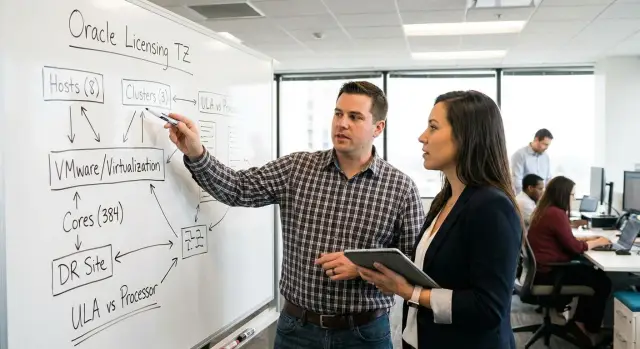
What exactly you need from IT so the calculation is verifiable
If the SOW only says “calculate the licenses”, the result will very likely be a calculation that cannot be rechecked. The vendor will be forced to make assumptions about virtualization, cluster boundaries where Oracle can actually run, which options are enabled. Those assumptions usually surface during an audit or procurement, when it’s too late to argue.
A verifiable calculation starts with fixed input data and explicitly recorded assumptions. Then another specialist, using the same set of facts, should get the same numbers. That is repeatability: it must be clear which servers were counted, which metrics were applied, and under which Oracle rule and why.
Usually a few simple artifacts are enough: inventory exports of hosts and clusters (from the CMDB or virtualization platform), CPU configuration confirmation for each physical server, a placement diagram for Oracle (where it is allowed to run, including migrations), a list of products and options (from DBA exports), and a list of environments (prod, test, DR) with rules for their use.
Divide requests inside IT by roles. Infrastructure confirms hardware and hosts, the virtualization team describes clusters and migration rules, DBAs provide actual usage of options, and security/architecture record constraints (for example, banning VM movement to certain hosts).
A simple example: if you write only “VMware cluster of 10 hosts”, the calculation might be done for all 10. If IT confirms Oracle VMs are pinned to 4 hosts and this is technically enforced, the numbers will be different and defensible.
First, clarify the scope: what are we licensing and why
To make the calculation unambiguous, fix the scope first. Otherwise the vendor will guess: sometimes assume the maximum, sometimes exclude parts of the environment. In the end you won’t be able to prove who is right.
Start with the purpose: buying licenses for a project, renewing support (and which items), legalizing current usage, migrating to new hardware or to a virtual environment, consolidating databases. The purpose sets the period, the data “snapshot” and the acceptable level of risk.
Then list the exact Oracle products and editions in scope. Don’t just write “Oracle Database”; be specific: Database Standard Edition 2 or Enterprise Edition. Separately list options and management packs if they are used. If uncertain, state that usage must be confirmed.
Immediately determine which metric is intended for each item: Processor or Named User Plus. A full calculation will still require server and virtualization data, but at the scope level it’s important to understand what you consider acceptable and on what basis.
To avoid arguing about basics, answer these five questions in the SOW:
- purpose of the calculation (purchase, audit, migration, support renewal);
- which Oracle products and editions are included;
- which environments are included (prod, test, dev, DR, training, pilots);
- preferred metric for each item;
- inventory cut-off date and planning horizon (e.g., 3 years).
If you legalize prod and test now but plan a DR site in a year, state that up front. Otherwise the calculation will be only for the current state and the budget will “appear” later.
Physical server parameters: sockets, cores, CPU model
Verifiability often breaks down at the hardware level. It’s important to unambiguously tie the licensed Oracle installation to specific physical hosts. A common problem is naming: the same server can be named differently across systems (hostname, asset tag, monitoring name), making it impossible to prove the same item was counted.
Ask IT for a physical server inventory as a separate table, one row per host. Fix the minimal set of fields in advance:
- identifiers: server model, serial number or asset tag, location (DC/site), role (prod DB, test, DR);
- CPU: vendor and exact model, number of sockets, physical cores per socket;
- CPU settings: whether Hyper-Threading/SMT is enabled (for reference);
- resource constraints: whether hard partitioning exists, which technology, and evidence (export/screenshot);
- OS and management: OS type and version, whether a hypervisor is installed, how it is managed.
Separately define what is considered the “source of truth”. For example: “Core counts are taken from the vendor/inventory system, not from the guest OS of a VM.” This avoids disputes when the guest OS shows only allocated vCPUs.
If you have two identical servers in the same DC but one is for prod and the other for test, the table must show different asset tags and roles. That way they cannot be accidentally merged as one object or one omitted.
Virtualization and clusters: where Oracle can actually run
In a virtual environment the main question for licensing is not “how many vCPUs does the VM have” but “on which physical hosts could this VM end up tomorrow”. If this is not fixed, the boundary can easily expand to the whole cluster and the calculation becomes disputable.
Start by asking IT to describe the virtualization platform and topology. Details differ for VMware vSphere, Hyper-V, KVM and others, but the idea is the same: show the real (and allowed) migration area.
Introduce the concept of a “licensing boundary” in the SOW and tie it to input data:
- list of clusters and all hosts in each cluster (name, sockets, cores, CPU model);
- DRS/HA rules: whether automatic movement is enabled, whether affinity/anti-affinity is used, and which hosts are considered failover;
- where Oracle VMs are allowed to run by operational rules (allowed hosts, dedicated cluster);
- Oracle VM parameters (vCPU, RAM) and any enforced limits;
- evidence: exports from vCenter/SCVMM/CMDB and screenshots of policies when needed.
Example: a cluster of 8 hosts but Oracle is allowed to run only on 2 dedicated hosts and movement to others is prohibited by policy and configuration. In the SOW it’s important not only to state “2 hosts” but to attach the list of those hosts, describe how movement is blocked, and explain what happens on failure (where the VM will be restarted). Then the boundary is clear to both sides.
High availability and redundancy: RAC, Data Guard, DR and test environments
High availability almost always affects the calculation. Oracle may be counted not only where the database currently runs but also where it can be brought up by procedure or technically. Therefore, fix site roles and failover rules in advance.
RAC and database cluster
If Oracle RAC is used, request simple facts: how many nodes, which hosts they are on, which nodes are always active and which are used only for failover. Even if some nodes are usually idle, it’s important to know whether an instance can be started on them and under what conditions.
Data Guard, DR and test environments
For Data Guard, focus on parameters rather than names: physical or logical standby, mode (synchronous/asynchronous), where the standby is located (separate server, separate cluster, other site). For DR, record hardware composition and scenarios: how often DR tests are run, how long the database may operate on DR, who authorizes a failover.
To avoid guesses, ask that for each environment (Prod, Standby, DR, Test/UAT) the following be provided:
- solution type (RAC, single instance, Data Guard, no redundancy);
- list of hosts/clusters where an instance may be started;
- roles (active, passive, standby) and failover rules;
- permitted uptime during an incident and frequency of DR tests;
- who administers and who is authorized to start instances.
If a test database sits on the same hosts as prod and, by rules, may be started at any time, state that explicitly. Otherwise the calculation may use a different assumption.
Options and management packs: what is actually used in the database
The most frequent cause of disputes is not servers but enabled options and management packs. It’s important to record not only “Oracle Database exists” but which features are actually used in each environment.
Collect basic details per database: Oracle Database version, edition (SE2 or EE), and where it is deployed (host or cluster). This matters because some options are available only in Enterprise Edition and management packs are licensed separately.
Then list options and packs that are enabled or have been used even once. Typical disputed items include Partitioning, Advanced Compression, Advanced Security, Database In-Memory, RAC, plus Diagnostic Pack and Tuning Pack.
Do not rely on “word of mouth.” Ask DBAs for evidence with date and source, for example:
- versions and editions per database (from Oracle system views);
- reports on feature usage (for example, DBA_FEATURE_USAGE_STATISTICS);
- signs of pack usage (AWR/ADDM reports for Diagnostic Pack, SQL Tuning Advisor tasks for Tuning Pack);
- parameters and configs (compression, partitioning, RAC setup).
In the SOW, set the rule: treat the base Oracle Database license separately and each option/pack separately, with explicit assumptions. That makes it easier to compare the vendor’s calculation with your inventory.
Also address differences in feature usage across environments. For example, partitioning and compression may be enabled in prod but disabled in test. If not reflected in inputs, options are often counted across all environments and the total becomes hard to contest.
Processor or Named User Plus: what data is needed to choose
Specify the metric directly in the SOW. Otherwise the vendor will pick “what’s convenient” and it will be hard to verify.
Named User Plus (NUP) fits when the user base is limited and can be counted. For a verifiable calculation you need not “about 200 people” but a source and method: who connects to the DB directly or through an application, and whether external systems can run queries.
For NUP you typically need:
- roles and access groups (users, admins, developers, contractors);
- service accounts and technical users (how and by whom they are used);
- integrations (external systems, APIs, reports, bots, RPA);
- number of potential application users if the DB is behind an app;
- access controls (VPN, subnets, SSO groups, application license as an upper bound).
Processor is often chosen when users are many, access is via shared applications, or integrations are so numerous that NUP becomes a dispute. Then you resolve infrastructure facts: on which servers Oracle can run, including clusters, migrations and failover. For that the SOW needs sockets, cores, CPU model and a list of hosts/clusters where Oracle is allowed by policy and configuration.
Practical rule: if IT cannot confidently confirm the number of users and all non-human connections, ask for both NUP and Processor calculations with explicit assumptions and a list of what must be clarified for the final choice.
How to present input data in the SOW: tables and assumptions
Input data should be structured so the vendor’s result can be rebuilt from your source rows. This is especially important where cluster boundaries and migrations are disputed.
Typically two tables and a short requirements section for the result format are enough.
1) Input data table (facts)
Choose a unit of accounting (row per host or row per cluster) and keep it consistent throughout. Minimal columns:
- object (host/cluster/pool) and role (prod/test/dev);
- CPU (model, sockets, physical cores, Hyper-Threading flag);
- virtualization (platform, whether vMotion/Live Migration exists);
- Oracle (product/edition, metric Processor or NUP);
- constraints (where Oracle may run: yes/no, list of allowed hosts).
2) Assumptions table (what and why)
Record everything taken without full confirmation and the basis for it. For example: “we include all cluster hosts because migration is not prohibited” or “we exclude DR because the environment is powered off and used only for tests twice a year.” If an assumption cannot be verified by a document or configuration, state that.
It’s useful to add a “where Oracle can run” matrix: list of allowed hosts and explicit prohibition for others. Without this, calculations almost always expand to the whole cluster.
Require the result format in the SOW: a row-by-row calculation with formulas, coefficients, intermediate totals and an explanation for each step. For example, if the SOW states “cluster of 6 hosts, Oracle allowed only on 2”, the calculation should show why 2 hosts are licensed (if migration prohibition is confirmed) or 6 (if not).
Common SOW mistakes that later make the calculation disputable
Disputes usually start with input data, not price. If the SOW lacks clear boundaries and assumptions, the vendor will calculate for the “worst” scenario and the customer then tries to prove otherwise.
Typical mistakes:
- describing only the current VM placement (“Oracle on ESXi-03”) but not where it can migrate. In a cluster with vMotion/DRS the calculation is usually done for the whole pool unless restrictions are documented;
- forgetting about standby and DR. A server may be off most of the time, but if it is powered during tests or drills, its usage mode must be described;
- not recording options and packs. People often say “not used”, but a feature can be enabled and requires separate licensing;
- mixing prod and test in one cluster without strict movement rules, which blurs licensing boundaries;
- no cut-off date and change control: while the SOW is agreed, a host is added, CPU changed or cluster expanded, but the calculation stays based on the old picture.
A good practice is to add a short example scenario: “Oracle VM runs in a cluster of 6 hosts, migration is allowed only on 2 by affinity rules, others are excluded.” Then the vendor must show the calculation exactly under those conditions.
Short checklist before sending the SOW to the vendor
Before sending, ensure the input data can be verified.
- a complete list of sites, clusters and hosts where Oracle may be (including test, DR and migration windows);
- per host: sockets, physical cores and exact CPU model;
- virtualization rules affecting placement: DRS/HA, migrations, affinity/anti-affinity, pinning, prohibitions;
- Oracle products and options confirmed by DBA or inventory, not “word of mouth”;
- the vendor must deliver a table of input data and a separate block with all assumptions.
Add a short verification scenario: if “cluster of 6 hosts, migration allowed to all”, the calculation must be based on the whole cluster, not on the current host. Mismatches are visible immediately.
Example of a simple environment and how to verify the calculation
Consider a typical setup: Oracle Database runs as a VM in a VMware cluster of 4 hosts, and a separate DR site has a standby database. The task is to describe this so the calculation can be reproduced from the same data.
Scenario (one paragraph)
Prod: one VM with an Oracle DB that can migrate across the VMware cluster. Test: a separate VM in the same cluster with smaller resources. DR: Data Guard standby on another site, with a defined mode (always on or started only during an incident).
To remove guesses, ask IT to answer in writing:
- the exact list of ESXi hosts in the cluster and whether DRS/auto-migrations are enabled;
- whether migration restrictions for Oracle VMs exist (and who approved them);
- VM resource allocations (vCPU, RAM, reservations/limits);
- how DR is organized: separate cluster, which hosts, standby mode, DR test frequency;
- which Oracle options are used in which environments.
Then break the calculation into rows: prod, test, DR, and separate rows for options and management packs, indicating the metric (Processor or NUP) and assumptions about boundaries.
Verifying the vendor’s response comes down to three things: do the host/cluster lists match, do assumptions about migration match, and are prod, test and standby calculated separately. If the vendor excludes hosts, they should show the basis (migration rule, prohibition, architectural decision) and who approved it.
Next steps: how to organize work and keep details safe
For a reproducible calculation, agree who owns each block of data and where the “truth” is stored. The best practice is a single template for infrastructure, virtualization and DBA and mandatory recording of assumptions.
Start with data owners: who confirms clusters, who confirms host configs, who confirms VM placement, and who confirms option usage.
A practical workflow for 1–2 weeks:
- collect inventory from the CMDB, vCenter/analogs and DBA reports and combine into one table with export date and responsible person;
- agree on licensing boundaries: where Oracle may run by placement rules, which hosts are excluded, which clusters are available for migration;
- fix change rules: what constitutes a violation (for example, moving a VM to another cluster without recalculation) and who approves such changes;
- ask the vendor to provide the calculation in tabular form: one row per server/cluster, separate columns for metrics and an explicit list of options and packs;
- perform an internal check on 1–2 nodes manually to ensure the logic matches.
After that, assemble a “proof folder” so you can repeat the calculation in a year without guessing: exports from the virtualization system (clusters, hosts, migration settings) with dates, hardware inventory (CPU, sockets, cores) with sources, confirmation of Oracle placement boundaries, DBA reports on options and packs, and the vendor’s final calculation with assumptions and the rule version.
If data is scattered across teams, consider engaging a system integrator. For example, GSE.kz can assist with infrastructure inventory, consolidation of inputs and preparing an SOW so the calculation is verifiable and audit-ready.
Frequently asked questions
What data should I request from IT to calculate Oracle licenses?
Request a fixed set of facts: a list of hosts and clusters, CPU models, the number of sockets and physical cores, Oracle VM migration rules, a list of Oracle products and options, and a description of prod, test, and DR. Specify the inventory snapshot date and attach the data sources.
Why are hosts important for Oracle, rather than just a virtual machine's vCPUs?
You need to describe not only the VM's current host, but also every physical host that Oracle can move to under the cluster rules. If migration is permitted across the entire cluster, the vendor will typically count the whole cluster.
Which CPU details are needed for a Processor-based calculation?
Provide the exact processor model, the number of sockets, and the number of physical cores per socket for each server. Get the data from the hardware inventory or the manufacturer's documentation, not from the VM guest OS.
What should an RFP say about a VMware cluster?
Document the makeup of each cluster, DRS and HA, automatic migration rules, failover hosts, and affinity policies. Separately attach a list of hosts on which Oracle VMs are allowed to run.
How can I prove that Oracle runs on only some hosts in a cluster?
Such restrictions affect the calculation boundary only when they are actually enforced and can be confirmed through configuration and policy. You need a list of permitted hosts, a description of how migration to the remaining servers is prevented, and a failover scenario.
When should I choose Processor versus Named User Plus?
Processor is more convenient when there are many users or access is provided through applications and integrations. Named User Plus is suitable if you can accurately count every person and technical system using the database, and meet the requirements of this metric.
Should I include DR and test environments in the RFP?
Include every site and environment: prod, test, dev, standby, and DR. For each environment, record where the database can run, how failover works, and how often DR tests are performed.
How do I check the use of Oracle options and management packs?
Ask the DBA to confirm the edition and version of each database, along with reports on enabled features and packs. Separately check Partitioning, Advanced Compression, Advanced Security, RAC, Database In-Memory, Diagnostic Pack, and Tuning Pack.
How should I prepare source data for the vendor?
Create one table for facts and another for assumptions. In the facts table, list hosts, CPUs, clusters, products, and environments. In the assumptions table, explain why you include or exclude specific hosts, DR, or options.
How can I verify that the vendor's calculation can be independently checked?
Request a line-by-line calculation: by server or cluster, environment, product, option, and metric. The response should include formulas, coefficients, subtotals, and the reason the vendor included each host in the calculation.
