8 min read
Open-source SFTP/FTPS gateway: migrating and controlling file exchanges
A migration plan to an open-source SFTP/FTPS gateway: exchange zones, logs, antivirus scanning, retention and delivery control without surprises for partners.
Why exchanges usually break when replacing the gateway
File exchanges rarely rely only on the SFTP or FTPS protocol. They usually depend on small details: where a file sits before checks, who and when picked it up, what counts as delivery, how long to keep copies. When a commercial gateway is replaced with an open-source SFTP/FTPS gateway, these “invisible” rules are often not carried over. The result is losses, disputes and downtime.
The issue is that the old gateway was not just an "entry point" but part of the process. It might have automatically placed files into zones, queued them for antivirus, kept clear logs, restricted access by partner, deleted old files by retention rules and stored delivery confirmations.
Typically, the old gateway covered things that suddenly disappear after migration:
- separate folders and permissions for each partner (isolation instead of a shared dump)
- quarantine and antivirus checks before files reach the internal network
- logs with exact time, filename, user and IP
- retention and archive rules so disks don’t fill and history isn’t lost
- proof of delivery: what was accepted and in what form
You can tell it’s time to change the solution by symptoms: manual work increases, there’s no clear audit, partners “lose” files, and you can’t quickly prove otherwise. Another common trigger is when updates or licenses start blocking changes.
A real example: a partner reports a registry as "sent successfully" on their side, while the file never appeared in your internal folder. Without quarantine and logs it’s unclear what happened: it didn’t arrive, was deleted by mistake, or was blocked by antivirus. If you keep the partner’s expected scenario and add clear acceptance evidence during migration, the switch goes through without conflicts.
Inventory: who sends what files
Before migration it’s most useful to collect facts. An open-source SFTP/FTPS gateway will behave predictably only when you clearly know who connects, what they send and what counts as successful delivery.
Start with a list of partners and break down exchanges by type: manual upload (a person logs in and puts a file) or automation (scripts, ETL, integration bus). These scenarios fail in different ways. Manual exchanges tend to have rights and user-habit issues; automation fails more often on schedules, retries and timeouts.
Next record protocol and access method: SFTP or FTPS, password or keys, any IP restrictions, and whether separate accounts are needed for each partner. This helps keep compatibility and avoids sliding into a "shared login for everyone".
A short exchange card template (per partner) is best:
- which files (types, name patterns) and where they are placed or taken from
- sizes and frequency, and whether there is a time window for exchanges
- deadlines (for example, a registry must be delivered by 10:00)
- storage requirements: how long to keep files and how long to keep logs
- who owns the process and who raises the alarm on failure
Example: accounting receives registries from 15 partners once a day, but two partners send files every 15 minutes and require delivery confirmation. Inventory makes this obvious, and you can plan different retention, notifications and retry rules in advance.
Finally assign responsibilities: IT is responsible for availability and backups, security for access policies and audit, and process owners for schedules and file formats. This saves days of emails after go-live.
SFTP or FTPS: how to choose and not lose compatibility
SFTP is almost always simpler to operate: one port, works over SSH, and keys are easier than passwords. If you build an open-source SFTP/FTPS gateway from scratch and have freedom to choose, standardizing on SFTP is usually sensible.
FTPS is often kept not because it is "better" but because partners are historically set up that way or internal requirements demand it. It may be necessary when a partner already uses PKI and certificates.
The main FTPS risk is client compatibility and network nuances. Some partners only support passive mode, others have restrictions on cipher suites and TLS versions. So choose not by preference but by fact: which clients do partners use and what actually passes through their firewall.
To avoid surprises on cutover day, record a support matrix in advance and send it in a short message with specifics:
- FTPS: minimum TLS version and allowed ciphers; passive mode as default, active mode only by agreement.
- SFTP: keys (or keys plus password during transition); key length requirements and rotation periods.
- General: host name, open ports, partner test contact and your team’s test contact.
A simple scenario: of 15 partners, 12 are ready for SFTP and 3 still use old FTPS clients. Then FTPS remains only for those 3, but with clear constraints (e.g. TLS 1.2+ and passive mode only), and the rest move to a unified SFTP template. You end up with a clear “supported” list and a separate “forbidden” list that’s useful for security and partners.
Zone pattern: DMZ, quarantine, internal zone, archive
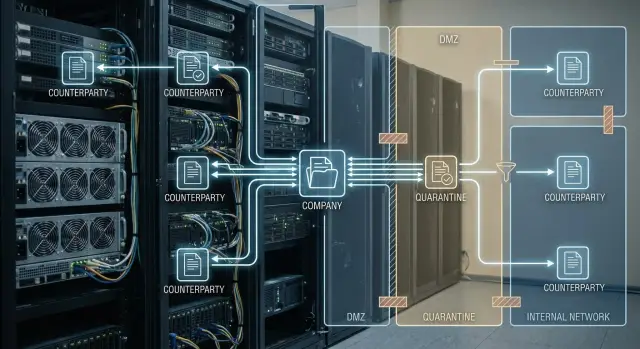
Zones are not decorative — they make the file follow a clear path: it arrives from outside, is checked, reaches internal systems and is stored where it can be retrieved in a dispute. When zones are missing, an SFTP/FTPS gateway quietly becomes a shared drive. That usually leads to incidents and loss of traces.
Four zones are usually enough. Each has simple access and retention rules:
- DMZ (external zone): only receive and hand out files to partners. No direct connections to internal databases, file shares or services. Keep files in DMZ briefly and don’t store history there.
- Quarantine: files move here immediately after intake, before any checks. Minimal access: service accounts and, if needed, security team. Partners do not access quarantine.
- Internal zone: only files that passed checks (antivirus, format, size, name, checksum) end up here. Business systems pick files up from this zone.
- Archive: a separate place for copies and investigations. Ideally it’s protected from modification at least by permissions and has clear retention periods.
How this works in practice
A partner uploads a registry to SFTP. The gateway puts it in DMZ, then automatically moves it to quarantine and runs checks. If it’s clean, the file goes to the internal zone where the accounting system picks it up. A timestamped copy with technical metadata goes to the archive in parallel.
If later there is a dispute about whether the file was sent, you raise the archive and the chain of zone movements instead of searching random folders.
Partner accesses: isolation, keys and rotation
Basic rule for partner file exchange: one partner — one user and one separate directory. That prevents situations where a partner accidentally sees another’s files and you can’t precisely say who put what and when.
Set permissions according to the exchange scenario, not "broad just in case." A few clear variants usually suffice:
- upload only — partner places files but cannot read the directory
- download only — partner picks up files prepared by you
- two-way exchange — two directories
inandoutwith different permissions
Separate tests from production: assign a dedicated technical user or separate test directories so test transfers don’t mix with live traffic.
Keys and passwords should rotate regularly without stopping exchanges. A working practice is to have the "old" and "new" key active in parallel for 1–2 weeks, then disable the old one. Agree a rotation window and a contact for failures with partners in advance.
If policy requires, add IP and time restrictions. For example, a contractor connects only from one whitelisted IP and only during business hours.
In an incident it’s important to quickly restrict access and preserve traces:
- block the account or temporarily disable the key
- stop intake into a specific directory without affecting others
- save connection and operation logs for the required period
- record checksums of disputed files and their appearance time
- agree next steps with the partner via the agreed channel
Logs and audit: what to record to prove facts later
When an exchange breaks or a dispute arises, don’t rely on "remembering from emails" — show facts: who connected, what was transferred, when a file passed checks and where it was delivered. This is critical when components and boundaries change during a move to an open-source gateway.
Collect a minimum set of events without which investigations usually end in guesses:
- authentication: successful logins and failures with reason
- connection: IP, protocol, version, chosen account
- operations: upload, download, rename, delete
- errors: timeouts, disconnects, no space, permission denied
- administrative actions: user/keys/rule changes
Then add a "file passport" so you can prove the received object hasn’t been altered. A minimal useful set of fields:
- partner (login), source (IP), target directory or zone
- filename, size, transfer start and end times
- checksum (e.g. SHA-256) and verification result
- check statuses: antivirus, quarantine, file-type policy
- final result: accepted, rejected, delivered, retried
To avoid log tampering, restrict access to logs. A good practice is to store them separately from the gateway and collect them centrally in append-only mode where records cannot be altered unnoticed.
Retention periods should balance two needs: audit (usually months) and incident investigation (often longer for financial or medical disputes). Even with limited space, keep the full field set and compress/rotate logs rather than drop fields.
Antivirus scanning: a simple flow without manual routine
Place antivirus not "somewhere later" but on the boundary between external exchange and internal systems. The idea is simple: everything that arrives through the open-source SFTP/FTPS gateway first goes to the DMZ, then to quarantine for scanning, and only after a clean status moves to the internal zone.
A typical flow looks like:
- partner uploads file to DMZ; the file receives a unique identifier
- service moves the file to quarantine and starts antivirus scanning
- if clean, the file moves to the internal exchange directory and is marked ready
- if suspicious or infected, the file remains in quarantine and internal release is blocked
- scan results are recorded in logs and a separate report
To avoid rescanning the same file repeatedly, use hash-based control (e.g. SHA-256) and the scan status. If a file was already scanned and unchanged, no need to scan again. This matters when partners resend the same archive due to retries.
When a file is stuck in quarantine, people should know what to do next. Typically alerts go to on-duty security (decision: allow or block release), the process owner (decision: request re-send in another format) and support (decision: help partner resend).
Agree on the report format in advance: which fields are mandatory (time, partner, filename, hash, verdict, engine/signature), where the report is stored and how long. Then scanning is part of the process, not manual email.
Retention and archive: retention periods, deletion and disk planning
Retention in the exchange gateway solves two tasks: being able to quickly retrieve a file for incident analysis and avoiding full disks at the worst moment. In open-source SFTP/FTPS gateways this is usually set up as simple rules by folder and data type.
Practically, split storage into several “buckets” with different retention. For example: keep incoming files longer (for proof of receipt and reprocessing), outgoing until delivery confirmation and dispute closure, temporary/partial uploads very briefly, quarantine on a separate schedule (often longer), and archive long-term in separate storage.
Deletion should be predictable and safe. Prefer scheduled cleanup run by a service account rather than a manual admin action, and log each deletion.
To reduce accidental loss and protect against tampering, keep zones separated and restrict rights: a partner sees only their folder, an operator cannot modify the archive, and use immutable copies for the archive (WORM mode or snapshots). This is important when you later need to prove the file’s original content.
Estimate volume simply: take a peak day (for example, month-end), multiply average volume by number of partners and retention period, and add margin for retries and quarantine. If 15 partners send 200 MB/day and you keep incoming for 30 days, that’s about 90 GB for incoming alone.
For sensitive files use at-rest encryption and strict access controls, keeping keys separately from the server. This gives a basic level of protection without complex schemes.
Delivery control: confirmations, integrity and retries
"Delivered" is not when a file started uploading, nor when it appeared in a folder. For an open-source SFTP/FTPS gateway, agree on a verifiable criterion in advance: the file is fully accepted, verified and safe to pick up for processing.
Minimum delivery protocol
It’s useful to separate "receipt" and "ready". That reduces disputes and manual work.
- The partner uploads a file under a temporary name (for example,
name.tmp) and then renames it to the final name when done. Renaming usually means the upload completed. - The gateway records size and computes a hash (for example, SHA-256). If the partner provides a hash, compare it; if not, use your own for control and investigations.
- A confirmation is recorded as a separate fact: a log entry with final status and a unique transfer ID, or a receipt file (for example,
name.ok) with date, size and hash.
Retries must be safe. If a partner is unsure whether a file arrived, they will resend. To avoid duplicates, use a business key (registry number, date, partner) plus hash. If the same business document arrives again, mark it as a retry and do not reprocess.
A transfer identifier links three things: filename, log entry and business meaning. It’s convenient to store transfer_id in logs and include the document or registry number in the receipt.
Handling disputes
When a dispute arises, partners usually need a minimal set of facts: start and end times, final size, hash, scan status and transfer_id. That proves delivery or explains rejection (for example, size mismatch) without exposing internal infrastructure details.
Monitoring and alerts: what should scream immediately
When replacing a commercial gateway with an open-source SFTP/FTPS solution, the worst outcome is hearing about a problem from a partner in the morning. Proper monitoring catches issues before exchanges fail.
Daily checks should cover not only "is the server up" but signs of degradation: spikes in login errors, rising failed transfers, stuck files in processing queues (for example, antivirus quarantine or the transfer-to-internal step).
Events that should trigger immediate alerts:
- sudden increase in failed logins (brute force, expired key, partner IP changed)
- transfer errors and rising interrupted sessions
- queue of files not decreasing for more than N minutes (stuck process, no space, AV failure)
- free disk space below threshold (different thresholds for DMZ, quarantine, archive)
- integrity errors (hash/size mismatches, truncated files)
Availability checks should be varied. From outside (as partners see it) you catch DNS, certificate, firewall and routing issues. From inside (as internal systems see it) you detect service crashes, folder permission problems and stuck processing.
To avoid noise, set thresholds and responsibilities: critical — immediate, non-critical — digest. A simple procedure is usually enough: who’s on duty and who is backup, SLA for response and recovery, a quick check template (network, space, service, queue, logs), and who informs partners if an exchange window is missed.
Schedule maintenance windows separately: notify in advance, fix their duration and keep a fast rollback to avoid partners noticing changes.
Step-by-step migration plan to open-source without interrupting exchanges
A rule that helps almost always: the new gateway should behave like the old one until you are sure all partners “survived” the change. This is especially important for open-source SFTP/FTPS because details like ciphers, paths and permissions often differ.
First, deploy a separate test stand and replicate the usual zone scheme: external intake, quarantine, internal zone and archive. Immediately migrate policies that affect the process: antivirus, retention, size limits, forbidden extensions, naming rules.
Then do the cutover in waves:
- enable parallel mode: keep the old gateway as the source of truth while the new one takes mirrored traffic or serves test partners
- run test files: small and very large, names with Cyrillic, names with spaces, long paths and nested folders
- switch partners in small batches of 1–3: start with the simplest, then those with complex scenarios
- for each switch keep a short verification log: file arrived, moved to quarantine, passed checks, reached internal zone, archived, deleted by retention
- prepare rollback: keep old accounts and routes so you can quickly revert a partner without manual digging
Practical example: a partner sends a registry with a Russian name and a 2–3 GB size. In tests the new service accepts the file but truncates long paths or interprets encoding differently. Switching partners one by one prevents stopping exchanges for everyone, and a fix takes hours, not days.
Example scenario: registries and documents exchange with 10–20 partners
Typical picture: a company receives two types of files daily from 10–20 partners — registries in CSV/XLSX (for accounting import) and scanned documents in PDF. Exchanges are scheduled, but partners often send manually, so clear rules and quick incident resolution matter.
On an open-source SFTP/FTPS gateway the flow is usually implemented via zones. The external intake is the DMZ: a partner places a file only in their incoming folder. The file automatically moves to quarantine, where antivirus and basic checks (name and size) run. After success the file moves to the internal zone (monitored by internal processes) and a copy goes to archive.
Delivery confirmation should be formal and uniform for everyone. A clear option is a response file: once a file is accepted and checked, the gateway places a receipt in the partner’s folder such as OK_<original_name>_<date>.txt. If the check fails, the partner receives REJECT_... with a short reason and an event identifier. Receipt waiting time is agreed in advance, e.g. 30 minutes during business hours.
Two typical failures:
- partner sent an infected PDF — file remains in quarantine, a
REJECTreceipt is sent automatically, and the log shows which engine detected the threat and where the file was stopped - upload was interrupted mid-way — logs show connection attempts, partial writes and absence of a successful transfer event to internal zone
This makes disputes easier. The partner has upload time and a receipt; you have session logs, checksum after intake and proof of zone transfers. The question “did it arrive or not” is solved by logs in minutes, not by a day of emails.
Common mistakes, pre-launch checklist and next steps
Most failures when switching to open-source SFTP/FTPS are not about software but process discipline. Classics: one shared directory for all partners, no quarantine for incoming files, and any incoming file immediately lands in the internal zone. Another common mistake is missing hashes and integrity checks: a file could be truncated or replaced and you only learn from a business error.
Compatibility is a separate pain. Some partners suddenly have strict requirements for ciphers, key formats, RSA length or allowed algorithms. If you don’t check this in advance, exchanges can fail on cutover day.
A short checklist you can complete in 15 minutes and log in a ticket:
- zones are separated: DMZ, quarantine, internal, archive; no "bridges" bypassing checks
- accesses are isolated: separate accounts, directories and keys; there is a rotation plan
- logs and audit are written and quickly searchable: who, when, from where, what uploaded and downloaded
- antivirus scanning is enabled and blocks suspicious files without manual routine
- retention is configured and delivery confirmations (receipt, done-file, hash) are agreed
After go-live keep the process healthy: quarterly restore tests from backup, monthly review of rights and stale accounts, check retention against reality so disks don’t fill unnoticed.
If you also need servers and turnkey deployment, GSE.kz can supply locally produced S200 series servers and assist with system integration and 24/7 support.
Frequently asked questions
Why do files suddenly start getting lost after replacing a commercial gateway with an open-source one?
Most often, what is lost during migration are the "process" things: per-partner isolation, quarantine, clear logs, retention and formal delivery confirmation. The SFTP/FTPS protocol remains, but the rules that used to make exchanges predictable and provable disappear.
What exactly should be collected in the inventory before migration?
Start with a list of partners and describe for each: what files are transferred, where they are placed or picked up from, how often and in which time windows. Also record what counts as "delivered" and who raises an alert on failure — this significantly reduces disputes after go-live.
SFTP or FTPS — which is better for new connections?
By default, choose SFTP if you have the freedom: one port, easier keys, fewer network surprises. Keep FTPS only where the partner already has an established process and client; otherwise you'll spend time on modes, ports and TLS compatibility.
Why are DMZ/quarantine/internal/archive zones needed and can you do without them?
At a minimum, split the file path into an external intake zone, quarantine for checks, an internal zone for business systems and an archive for investigations. This way a file won’t wander into random folders and its state is clear: received, checked, delivered and stored for possible dispute.
How to organize partner accesses correctly to avoid confusion?
A safer and more convenient rule is "one partner — one user — one directory." This prevents a partner from seeing others' files and stops investigations from turning into guesswork. Grant rights according to the exchange scenario and don’t broaden them "just in case."
Which logs must be kept so delivery can be proven later?
Keep facts you can show in a dispute: who logged in, from where, what they did with the file and how the operation ended. Additionally, maintain a "file passport" with size, transfer time and checksum so you can prove the object was received and unchanged.
Where is the right place to do antivirus scanning of incoming files?
Place scanning at the boundary between external intake and internal systems: the file first goes to quarantine, is scanned, and only after a clean verdict is it moved to the internal zone. This keeps business systems out of risk handling and reduces manual investigations.
How to set retention and archive so storage doesn't run out but history is preserved?
Retention serves two purposes: to quickly retrieve files for incident investigation and to avoid running out of disk space. Schedule deletions by a service account and log each deletion — that makes cleanup predictable and auditable.
How to define "delivered" properly and avoid disputes with partners?
Agree on a clear criterion: delivered means the file was fully received, verified and marked as "ready for processing." A practical approach is to rename from a temporary name to the final one and record acceptance as a separate fact (a receipt or a log entry with status and transfer ID).
How to switch to an open-source gateway without downtime and partner panic?
Migrate partners in batches and keep a quick rollback: the new gateway should mimic the old one until all partners pass tests. Run real cases like large files, Cyrillic names and interrupted transfers; verify success through the chain “received → quarantine → checked → internal zone → archive.”
