8 min read
Open-source NTP: precise time and drift control in a distributed network
Open-source NTP: how to build a time hierarchy in a distributed network, what to log, how to measure drift and quickly find node issues.
Why a single precise time is needed in a distributed network
A single precise time in a distributed network is not about “nicety.” It makes events comparable: what, where and when happened. Without it, logs, reports and investigations become a set of guesses.
The first thing that breaks when clocks diverge is trust in logs. One server writes “login succeeded,” another at the same moment records “login denied,” and across sites it can look like different days. For security this is critical: SIEM, EDR and ordinary event correlation rely on a timeline.
Accounting and processes suffer next. Certificate lifetimes, Kerberos tickets, one-time codes, task schedules, replication and backups all depend on time. If workstation clocks run forward, employees may suddenly “lose access.” If they run backward — disputed operations and “missing” actions can appear in reports.
Common symptoms that are easy to blame on the network or “system glitches” include authentication errors and forced logouts, mismatching events between sites, TLS problems (“certificate not yet valid” or “already expired”), and odd delays in scheduled jobs and monitoring.
Good news: a properly built NTP hierarchy and open-source tools usually solve most issues. They provide a single source of truth, discipline clocks and let you see drift.
But there are limits. NTP won’t fix bad hardware clocks, links with large latency and jitter, or UDP 123 being blocked by firewalls. In such cases you must improve transport, choose appropriate server levels and account for drift control.
A simple example: in an organization with three sites, accounting at one site closes the day while the warehouse at another sees operations “from the future.” After aligning time, disputes disappear because all systems start speaking the same time language.
Brief NTP overview: terms, strata and time sources
NTP (Network Time Protocol) is not only for making clocks “approximately match.” It provides predictable accuracy and, importantly, clear metrics for synchronization quality. In most networks open-source NTP on servers and workstations is sufficient, but it’s important to understand basic terms.
SNTP is often called “simplified NTP.” In practice the difference is that SNTP usually works without the complex algorithms for selecting and evaluating sources and handles unstable links and delay spikes worse. For simple workstations SNTP may be acceptable, but for servers, security logs and distributed sites, full NTP is preferable.
Terms that really help
When checking time service status people rarely look only for “is it running”; they watch the numbers:
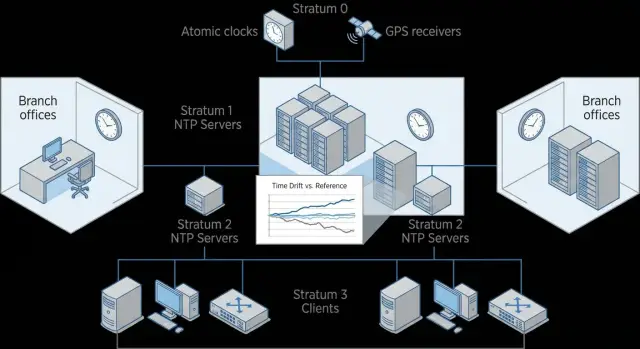
- Stratum: the “level” of closeness to the reference. Stratum 1 gets time from GNSS or atomic clocks, stratum 2 syncs from stratum 1, and so on.
- Offset: how much your node is ahead or behind the chosen source (usually in milliseconds).
- Jitter: how much the offset jumps over time, a measure of channel stability.
- Drift: how much the server’s own clock frequency would run off if left uncorrected.
If offset is small but jitter is high, the time is “correct on average” but timestamps in logs will jump around. This is especially noticeable when part of the systems are in the same DC and part are in a branch over a congested VPN.
Time sources: types and why one server is not enough
Sources are external (public or partner), internal (your reference servers) and hardware, such as GNSS (GPS/GLONASS) receivers. Inside a company it's common to have 2–3 reference servers and give them several independent sources.
One time server for the whole company is a risk. It’s a single point of failure and a single point of error. A network failure, wrong time after reboot, or an attack on the source is enough to “break” logs, Kerberos/AD, certificates and scheduled jobs. Plan redundancy from the start: two reference nodes in different racks or sites, for example on separate systems in your data center.
How to build a time hierarchy: a simple reliable layout
A clear model for open-source NTP looks like a chain of trust: external time sources -> reference servers (core) -> local servers at sites -> clients (servers, workstations, network gear). The closer a node is to the “core,” the stricter the reliability and observability requirements.
Basic layout and how many servers you need
A good rule for each level is a minimum of three independent sources. This reduces the chance that a single bad source will pull everyone to the wrong time.
Practical minimum:
- reference layer: 2–3 time servers in a central DC or primary site
- site/branch: 1–2 local time servers (at least one if resources are limited)
- clients: synchronize only with local servers on their site
In a small network you can start with two reference servers, but a third source is still useful (for example, an external source or another server in a different rack). Independence should be real: different machines, different paths, and if possible different external sources.
Placement and branches with unstable links
Keep reference servers where power, cooling and monitoring are best. Place local time servers closer to consumers to reduce latency and the impact of channel quality.
If a branch link is unstable, don’t force all workstations to reach the central DC over WAN. Deploy a local time server in the branch that syncs to the center, and have clients use only that server. If the link drops, the local server will continue serving time from its own clock (“holdover”), and you will avoid time jumps on every PC.
Example: three offices, one has a “flaky” link. The central site runs 3 reference servers, while the problem office has a local server that takes time from the center and serves all local PCs and servers. Drift becomes visible and manageable without causing chaos on clients.
Open-source tools and server roles
For distributed networks two options usually suffice: chrony and the classic ntpd. Both sync time, but their behavior differs and that affects stability.
Chrony is often more convenient in modern networks: it acquires correct time faster after reboot, copes better with unstable links, and keeps time more accurately on virtual machines and laptops. Ntpd is chosen where it is historically used, existing configuration templates exist, or strict backward compatibility is required.
You can assign roles differently. The ideal is dedicated internal NTP servers that pull time from external sources and serve everyone else. If you can’t dedicate machines, give the NTP role to existing infrastructure servers but only if they are stable, always-on and not overloaded.
Hardware and OS requirements are simple but important: stable hardware clocks, reliable power and predictable network. A server that goes to sleep, has variable load, or drops packets is a poor reference. In practice rack-mounted continuous servers or reliable hosts are better than workstations.
A dedicated time server is especially needed where errors are costly: domain infrastructure (e.g., AD), databases and message queues (order of events matters), SIEM and centralized logging (a unified timeline), VDI and terminal farms, and critical business services where auditing depends on precise timestamps.
If you deploy new servers and workstations (for example, on domestic platforms and across branches), decide in advance which nodes will be reference servers and document their roles. This prevents parts of the network from accidentally syncing “from anywhere” and letting drift accumulate unnoticed.
Step-by-step setup: from reference servers to clients
Start not with configs but with a map: where are your sites, what links connect them, and where can you place reference nodes. For a distributed network two reference sites (primary and backup) are usually enough to survive link failures and maintenance.
A simple sequence helps:
- Choose time sources: at least 3–4 independent external sources (or GNSS/radio clocks if available), plus a list of internal nodes that will get time first.
- Configure reference NTP servers: allow queries only from your subnets, close management from outside, enable multiple upstream sources and forbid any client from becoming a source for you.
- Deploy a local time server at each site: let it sync with two reference servers and have clients sync only with it.
- Configure clients (servers and workstations): specify 2–3 internal time servers, enable automatic sync on startup and after resume, and apply the same policy across all images.
- Check status and record a baseline: measure current offset, delay and the chosen source, then save results for future comparisons.
Practical tip: host the local time server role on dedicated VMs or separate nodes in the DC so application updates don’t interfere with the time service.
For initial checks two commands are often enough: verify synchronization is active and inspect sources and current offset. Record values (time, hostname, offset, source, reach) in a note or ticket — this greatly speeds up drift investigation later.
What to log and which metrics really help
Even well-configured NTP will eventually «wander» because of link issues, server load, virtualization or problems with the time source. So agree in advance what constitutes an incident and which metrics indicate acceptable operation.
First, log events that change the synchronization picture: switching sources, sudden offset jumps, entering unsynchronized state and returning to sync. These explain why security logs across sites might diverge.
To make logs useful, record context as well as the error. Minimum data to collect from an NTP server and important clients:
- current offset and the maximum during the interval
- jitter and delay to the source
- selected source (peer) and its stratum
- sync status (synced/unsynced) and reason for source change
- type of correction: step or gradual adjustment
Store these records in a way that allows cross-site comparison: use a single time format (UTC), consistent hostnames and a uniform sampling interval (e.g., every 1–5 minutes). If there are multiple sites, add a site tag and node role (reference, distribution, client).
Set alert thresholds carefully to avoid noise. Practical triggers include:
- unsynchronized for more than 2–5 minutes
- jitter rising above normal by 3–5x for 10–15 minutes
- offset consistently above a threshold (e.g., 100–500 ms for servers) across several measurements
- frequent source switching (flapping) more than N times per hour
How to check drift on servers and workstations
Check time regularly; otherwise issues surface at the worst moment: during incident analysis, log reconciliation or certificate validation. Minimum checks: critical servers (authentication, databases, security logs) daily, normal servers weekly, workstations monthly or when users report login/signature issues.
Method: compare against your local reference, not “the internet.” The client should show a small offset and a stable trend. If you use Chrony, it’s convenient to view overall state and the source list.
chronyc tracking
chronyc sources -v
In tracking pay attention to offset and frequency. A single small offset is not critical; more important is whether it grows between checks. Keep a simple log: date, offset, jitter, selected source. After 1–2 weeks you’ll see whether a host is drifting slowly or problems occur in spikes.
To distinguish clock drift from network issues, look at the pattern of deviations:
- gradual drift: offset slowly grows in one direction, jitter usually low
- jumps: offset swings positive/negative, selected source often changes
- worse after reboot: check settings, disabled sync or hardware clock
- remote site over a poor link: jitter is high, but trend may be stable
Jitter shows measurement “roughness.” High jitter is usually network-related: latency, congestion, Wi‑Fi, VPN. If the source keeps switching, upstream instability or a heterogeneous source set is often the cause. In such cases give clients 2–3 reliable local servers and ensure those servers themselves sync stably.
Practical guideline: if a workstation’s offset jumps by seconds, that’s a reason to investigate. If a critical server shows drift in tens of milliseconds and it’s increasing, inspect the source, the network path and the state of the time server itself.
Common mistakes and pitfalls when deploying NTP
The most dangerous mistake is exposing an NTP server to the public without limits. Publicly reachable UDP 123 quickly becomes a target: the server can be used in reflection attacks, and you’ll see traffic spikes and sync delays. At minimum restrict who can query the server and separate external and internal roles.
A second frequent problem is relying on a single source or server without redundancy. While it’s working everything looks fine, but on failure clients start “finding time” anywhere or freeze at the old value. Logs diverge and incidents become hard to analyze. Even small networks should have at least two independent sources and two internal time servers.
Overly aggressive time corrections on critical hosts also break systems. A sudden step can drop Kerberos, break certificate checks, scramble event order in logs and upset job schedules. Where continuity matters, avoid large steps and plan how to fix big drift safely.
Another trap is mixing different time chains in one network. For example, some machines sync from internal servers while others use random external sources. You’ll end up with “islands” of different accuracy in the same subnet, which makes incident analysis look like events happened in different orders.
Don’t forget human factors: time zones and manual adjustments. A user can set the wrong timezone or manually change the clock, and the workstation will conflict with domain policies and logging.
Before production check the basics:
- NTP is not reachable from the Internet except by explicit rules
- upstream and internal server redundancy is in place
- manual time changes on workstations are forbidden where possible
- each site has a single synchronization chain
- a runbook exists for large drift: who is responsible and what to do
Example: a company with 3 sites, one with a flaky link. If that site has only one time server and workstations are allowed to use external sources, you’ll get different clocks inside one domain and chaos in logs. If instead the site syncs only with two central servers and has clear restrictions, issues remain local and predictable.
Quick checklist: what to check in 15 minutes
If time in the network “seems to work,” a quick audit can catch the most dangerous mistakes: a single source across the perimeter, exposed NTP, and quiet drift on workstations.
Five checks that give the most value
-
There isn’t just one source at the top. Ideally you have several independent reference sources, and servers don’t “stick” to a single upstream.
-
Each site has a local time point or a clear failover plan. If the link to the center is poor, clients should use the nearest server rather than reaching across the WAN.
-
NTP exposure is limited. Access is controlled by addresses and segments: clients may query but not everyone, and definitely not from the Internet.
-
Alert thresholds are defined. Decide allowable offset and maximum time for being unsynchronized.
-
Regular checks are in place and results are stored. Trends matter more than single readings.
Mini scenario for self-check
If a branch reports “broken signatures” or “jumping” log events, compare time on two servers and one PC, then check which sources they use. Often a server syncs to an internal node while workstations drift to public sources or lose sync entirely.
These 15 minutes are usually enough to determine whether the problem is the topology, access rules or missing drift monitoring.
Practical example: three sites with different link quality
Scenario: a head office in Almaty, two branches (one in the city, one in a region) and a separate data center. The DC connects to the office via a good link, the city branch uses a stable VPN, and the regional branch occasionally has packet loss and latency spikes.
A simple hierarchy: keep two reference servers in the data center (stratum depending on source), and place one local server at each site that serves all local clients. Don’t have workstations or application servers reach the DC directly; they sync with the local node and therefore depend less on link quality.
In one such project the regional branch complained: “document signatures don’t match time, and security logs have a strange event order.” With open-source NTP this often appears as “time jumps,” but the root cause can be the link, the upstream source or the server’s hardware clock.
To be able to prove the root cause, agree in advance what to log. Minimum helpful data:
- offset and jitter on the site’s local server
- reachability (reach) and source changes
- sync status (synchronized/unsynchronized) and stratum
- delay spikes to upstream sources
- time service restarts and manual time edits
When a complaint arrives, check the branch’s local server first, not the clients: has it lost upstream sources (reach and peer change), what is its offset to the DC and to local clients, do delay spikes coincide with the incident, and is there a second sync mechanism running in parallel?
Dedicate time servers on corporate equipment when a site has many critical systems, a poor link, or strict audit needs. That way the time service doesn’t compete with application loads and passes checks more easily.
Next steps: consolidate and simplify support
To keep NTP from being a one-off setting, document how time is arranged in the network. The most useful artifact is a simple “time map” that both IT and security understand.
Include: which external sources are used and which are primary; which NTP servers are reference and their stratum; who is responsible for changes and how change work is coordinated; maintenance windows and rollback procedures; where configs are stored and which parameters are the standard.
Then treat rollout as a small project rather than a mass change. A pilot at one site shows how links, virtualization and OS variations behave. Practical approach: choose one site and 10–20 heterogeneous nodes, introduce reference servers, move clients to them, observe metrics for a week, record the “golden” settings and scale to other sites. Also agree ahead of time what to do if external sources are lost.
To keep results stable for years add monitoring and periodic reports. IT needs availability and sync quality checks; security needs traceability: who was the source, what were the spikes, and how quickly the system recovered. A short weekly drift and incidents report is a good habit (even if there are no incidents).
If NTP needs to tie into wider architecture topics (segmentation, DC design, redundancy, security requirements), discuss with an integrator early.
When precise time is critical for audits and investigations, standardize reference nodes: stable servers, clear lifecycle and support. In Kazakh projects this role is often filled by solutions and integration from GSE.kz (gse.kz), especially when DC infrastructure is built or server and workstation fleets are updated.
Frequently asked questions
Why is a single precise time important in a distributed network?
A single timebase makes events comparable across servers and sites. Without it, correlation in SIEM/EDR, investigations and even ordinary reports turn into debates about “what happened first,” because timestamps diverge.
What symptoms usually indicate time problems rather than “system glitches”?
The most common early signs are login errors and forced logouts, TLS problems (messages like “certificate not yet valid” or “already expired”), mismatching logs between sites, and strange delays in scheduled jobs. If these occur in waves without obvious causes, it's usually worth checking time synchronization.
What should I choose: NTP or SNTP?
NTP implements algorithms for selecting and evaluating sources and handles unstable links, latency and spikes better. SNTP can be acceptable for simple workstations, but for servers, security logs and distributed sites it's safer and more stable to use full NTP.
What do stratum, offset, jitter and drift mean, and what should I look at first?
Stratum shows how far a source is from the reference: the lower the number, the closer to the primary time. Offset is your clock’s current deviation from the chosen source; jitter is the variability of those measurements (how much the offset jumps); drift is the tendency of a clock to run away if left uncorrected. In practice, check offset and jitter first — they reveal problems fastest.
Why can’t I rely on a single time server for the whole company?
One server is a single point of failure and a single point of error. If it loses upstream sources, boots with wrong time, or becomes unreachable, logs, authentication, certificates and scheduled tasks will all break at once. Plan for at least two internal time servers and several independent upstream sources.
How to organize time in a branch with an unstable link?
Have reference servers at the central site and a local time server in each branch that all branch clients use. This reduces WAN dependency: if the link drops, the local server continues to serve time from its own clock so workstations don’t start showing jumps. The worse the link, the more important the local time point.
Which is better: chrony or ntpd?
Chrony typically reaches correct time faster after reboot and performs better on virtual machines and over unstable links. Ntpd is often chosen for legacy compatibility and existing deployments. If you expect fluctuating links or many VMs, chrony usually gives more predictable results.
How to begin building an NTP hierarchy if everything is currently configured “ad hoc”?
Start with a map of sites and network links, then define 2–3 reference servers and their upstream sources. Deploy local time servers at branches and move clients to them, preventing clients from acting as sources for others. Finally, record baseline values (chosen source, typical offset/jitter) so you can spot deviations later.
What should I log and monitor to quickly find drift and sync problems?
Log the events that explain why timestamps could diverge: source switches, transitions to unsynchronized and back, offset spikes, jitter growth and delay changes to upstream sources. Also record whether corrections were stepped or applied gradually, since a step often breaks authentication and event order in logs.
What are the most dangerous mistakes when configuring NTP and how to avoid them?
Exposing NTP to the Internet without restrictions and allowing “anyone” to query your server is dangerous — it can be abused in reflection attacks and causes traffic spikes and sync delays. Other typical mistakes: mixing time chains so some machines use internal servers while others use random external sources, and applying large time steps on critical nodes. Prevent these by restricting access, ensuring redundancy, and planning how to correct large drifts safely.
What basic checks should I do before putting NTP into production?
Check that NTP isn’t open to the Internet without rules; have redundant upstream and internal servers; forbid manual time changes on workstations where possible; ensure a single synchronization chain per site; and define a runbook for large drift events describing responsibilities and actions.
