8 min read
Open-source CMDB for 500–2000 devices without a dead registry
Open-source CMDB for 500–2000 devices: how to define entities, choose data sources, and set update rules so the database stays current.
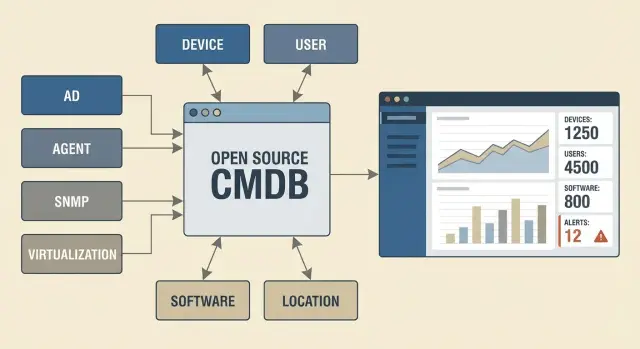
Why a CMDB often dies after 3 months
A "dead registry" is a CMDB that formally exists but nobody trusts. The data looks plausible but doesn't match reality: devices have been replaced, owners changed, services moved, and records stayed the same. The database becomes a reporting artifact rather than a working tool.
At the scale of 500–2000 devices the problem accelerates. You can still keep a list in Excel for 150–300 items when changes are rare and one person manages them. Beyond that, constant movements start: new workstations, repairs, devices issued to branches, OS reinstalls, network changes. The spreadsheet turns into a queue of edits where it's unclear which version is current and who should update a row.
A "minimal" CMDB should first cover a few grounded tasks that provide immediate value:
- quickly identify what a device is and where it is
- know the responsible person and contact for incident handling
- see basic relationships: device — user — department — service (at least "which system cares about this")
- have evidence of freshness: when the data was obtained and how it was validated
A common reason for failure is inflated expectations. If you try to model every relationship between all systems, licenses, cables and "how it works according to ITIL" from the start, the team drowns in modeling. The second trap is expecting the CMDB to "fill itself" without agreeing on primary sources: where is the truth about hostname, owner, and location.
A useful mindset at the start: an open-source CMDB for 500–2000 devices is not an encyclopedia of your infrastructure but a working map. It should help support and admins every day. If it doesn't, after three months it stops being updated and becomes a checkbox registry.
Goals and boundaries: what counts as a "minimal" CMDB
A "minimal" CMDB isn't for a perfect world view but for answering practical questions quickly: what is this device, where is it, who owns it, how is it managed, and what fails if you turn it off. For the scale of 500–2000 devices this is especially important: the wider the scope, the more expensive manual maintenance becomes.
Start with boundaries. Choose what you are willing to keep current every day and postpone the rest. Usually you "strictly track" servers, virtual machines, network equipment, workstations in critical departments, and key services (mail, core business apps, clinical systems, access control). "Not tracking for now" might include consumables, every monitor and peripheral, and ephemeral test benches.
How to measure success
Metrics should be simple and visible without a "reporting circus":
- Freshness: share of CIs updated within X days (e.g., 14).
- Completeness: share of CIs with required fields filled (owner, location, serial number or other unique ID).
- Response time: how long to find the owner and dependencies during an incident.
- Conflicts: how many conflicts between sources were found per week and how many were resolved.
Minimal processes without which the database dies
You need three agreements: who creates CIs, who can change key fields, and what is considered the "truth" when sources disagree. Add a short change cycle: purchasing or commissioning creates a record, moving updates location, decommissioning closes the CI.
Fix terminology in advance.
CI — something that affects a service.
Asset — something on the balance sheet (not always a CI).
Service — what matters to the user (e.g., "access to the clinical system").
A practical example: in a hospital with 1,200 devices, all PCs in registration might be assets, but only the ones participating in a critical process with an owner and support become CIs.
Choosing an open-source platform: what to look for without fanaticism
Open-source CMDBs for 500–2000 devices usually fail not because of the "wrong" platform but because of data discipline. There is no one to validate records, sources are undefined, and integrations are done ad hoc.
Choose pragmatically: what will give you a living database quickly, not a perfect schema.
Types of solutions
Under the CMDB label people often pick one of three system types:
A classic CMDB focuses on entities and relationships (hardware, software, services).
IPAM and DCIM are strong in network addressing, racks and ports.
ITSM is more about tickets and changes; CMDB often comes bundled with it.
In practice: if the main pain is network and physical infrastructure, NetBox is convenient. If you need a registry with processes and approvals, consider iTop or CMDBuild. If you want the CMDB next to tickets and incidents, GLPI is often easier.
How to choose without overthinking
Don’t focus on how many entities come "out of the box"; look at how the system supports your data discipline:
- Access control and roles: who can edit, who can view, who approves.
- API and integrations: can you regularly pull facts from AD, virtualization, scanners, MDM?
- Import and bulk edits: CSV, templates, field mapping.
- Change audit: who changed what and when, so you can investigate disputes.
- Lifecycle support: statuses ("in service/in stock/decommissioned") and simple validation.
NetBox usually wins when you need precise network and hardware accounting without heavy processes. iTop is chosen when service relations and change control matter. GLPI is good if you start from a service desk and gradually add inventory. CMDBuild fits when you need a customizable model and forms.
A simple rule: the platform must be easy to feed from sources and support update rules. Without integrations and ownership, any CMDB quickly becomes a registry.
Entities and relationships: a simple data model that lives
For an open-source CMDB at 500–2000 devices it’s better to start with a model you can realistically maintain daily. If there are too many entity types, people stop filling cards and the database becomes an archive of guesses.
A minimal set usually covers most needs:
- Device (PC, server, printer, network device)
- User (employee or role, e.g., "on-call shift")
- Location (building, floor, room or rack)
- Software (key packages and versions)
- Service (e.g., "Mail", "Accounting", "Video surveillance")
More important than the number of cards is a consistent minimum of fields.
For a device: unique identifier (inventory tag or serial), type, model, owner/department, lifecycle status, date of last confirmation.
For a user: employee ID or login, department, status (active or not).
For location: code and the person responsible for the room.
For software: name, version, criticality.
For service: service owner and list of key components.
Create only relationships that help decisions: device — user (who uses it), device — network (segment or IP if available), service — components (which servers, databases, apps support it).
Example: you have 30 servers and 900 workstations. If the "Accounting" service fails you quickly see which servers and what software belong to it and who owns them.
Limit lifecycle statuses to simple labels: "in service", "in stock", "under repair", "decommissioned". Rule: status change is mandatory on any move or issuance.
At the start don’t model too deeply. Usually you can postpone:
- all ports, cards and serials of every component
- every minor dependency between applications
- financial accounting to the last cent inside the CMDB
- "perfect" diagrams that nobody updates
- manual filling of data that can be obtained from management systems
Data sources: take facts, not opinions
The main rule for a minimal CMDB: a field should contain only attributes that have a clear source of truth. If a field cannot be regularly validated, it quickly turns into a dispute.
Split data into three layers: identification (what the object is), presence (it actually exists in the network/system), and management (who is responsible, where it is, on what basis it is used).
Directory and device management: AD and MDM
From AD you can take hostname, OU/groups, last activity, owner (if maintained) and domain binding. Update daily. The "last logon/activity" field can be updated more frequently if you need to catch disappearances quickly.
MDM (for laptops and phones) gives more reliable facts: serial number, model, OS version, compliance status, encryption. Update these daily because they directly affect security and support.
Agent collection: when it’s needed
An agent is justified when you need hardware composition, installed software, versions, patches and events. For 500–2000 devices it’s often the only way to get accurate software data without manual checks.
But don’t collect everything. Keep the minimum: OS and version, serial, CPU/RAM/disks, key applications (office, browser, VPN), and last agent report date. If there is no report for 14 days, consider the device unreliable as "current".
Network: SNMP, DHCP, IPAM and presence evidence
The network answers "was the device actually on the infrastructure". DHCP and ARP tables show that a MAC appeared; SNMP confirms managed devices (switches, printers, UPS) and basic parameters.
Agree on what counts as presence. A practical rule: an object is "alive" if in the last N days there is at least one reliable signal (agent, MDM, DHCP/ARP, SNMP). Then the CMDB does not keep "eternal" records.
Virtualization and cloud: what matters
For virtualization capture: hypervisor/cluster, host, VM name, CPU/RAM/disks, network, tags/project, and service owner. The most valuable link is "VM -> host -> rack/site" and last confirmation date.
Procurement and stock: link without duplicates
Procurement records answer "on what basis does the asset exist". Capture contract/request number, date, cost (if needed), warranty and serial. Serial plus device type is a good key to glue technical sources together.
To avoid duplicates, apply this rule: a new asset appears from procurement/stock as "awaiting commissioning", and becomes a "live device" only after confirmation from an IT source (agent/MDM/network). That keeps CMDB a database of facts, not opinions.
Reconciliation rules: who is right and how to enforce it
A CMDB lives by rules: who updates data, how often, and what to do when sources disagree. For an open-source CMDB at 500–2000 devices this is crucial: manual edits quickly turn the database into a collection of opinions.
Divide attributes and assign a source of truth to each. Serial and model should come from inventory (agent, network scan, procurement), while owner and department should come from HR or the service desk. Without agreements fields get overwritten "as it seems right".
Fix rules in a short 1–2 page procedure:
- Source of truth for each attribute: e.g., serial from inventory, location from movement records, decommission status from a ticket.
- Responsibility matrix: who makes changes, who approves, who reads. Prefer roles (operations, service desk, security, warehouse) rather than names.
- Frequency: hardware on events (delivery, move, repair) and quarterly reconciliation; software more often (weekly or after updates); ownership monthly or triggered by HR events.
- Rules for manual fields: which may be edited by hand and which only from a source system.
- Statuses for disputed objects: "quarantine", "unconfirmed", "to be decommissioned" with time limits.
Conflicts are inevitable: one source says "device in office", another "in remote network".
How to resolve conflicts:
-
Source priority: set in advance which source "wins" per attribute.
-
Freshness rule: if both sources are acceptable, the newer confirmation wins.
-
Human check: if critical fields (owner, location, status) are affected, create a task for confirmation.
-
Quarantine: if an object cannot be confirmed within N days, mark it "undefined" and exclude it from reports that require accuracy.
A useful habit: changes should happen either "by event" (ticket, delivery, repair) or automatically from the source of truth. Everything else leads to a dead registry.
Step-by-step rollout in 4–8 weeks: an MVP without pain
To prevent an open-source CMDB for 500–2000 devices from becoming a dead registry, start with an MVP: minimal entities, minimal sources, but clear rules. The goal is to establish a flow of facts and ensure data updates automatically or through a clear process.
4–8 week plan
Work in short iterations where each step delivers value:
- Week 1: collect a minimal catalog of devices and locations (offices, floors, server rooms, racks) and agree on a naming format.
- Weeks 2–3: connect 1–2 data sources and set up auto-fill of fields (serial, model, OS, IP, owner, last activity).
- Week 4: add statuses and a simple change process: "created — changed — decommissioned", without complex approvals.
- Weeks 5–6: enable reconciliation and discrepancy reports to see where the database drifts.
- Weeks 7–8: expand the model only after stability, when discrepancies decrease and handling is understood.
Decide which fields are required for the MVP. Usually: unique identifier, device type, location, responsible, status, date of last check.
How to avoid process overload
Assign roles so responsibility is clear:
- CMDB owner: approves rules and resolves disputes.
- Site responsibles: confirm locations and moves.
- Operations: manage statuses and decommissioning.
- Security: sets minimum requirements for critical assets.
A simple example: a laptop moved from office to a meeting room. The change is one operation updating location and date. A weekly reconciliation highlights devices seen on the network but missing in the CMDB (or vice versa). If those reports are reviewed and deviations closed weekly, the CMDB survives on routine, not on one person's enthusiasm.
Reconciliation and data quality: keep the database from drifting
When a CMDB drifts, the cause is usually not the tool but different sources describing the same device in different ways. For 500–2000 devices agree beforehand how you match records and what you treat as truth.
Matching should rely on stable keys, not on fields people change by hand. Practical order:
- serial number (best for physical hardware)
- UUID/Asset Tag (if actually filled and exported)
- hostname (auxiliary, since it gets renamed)
- MAC address (beware docking stations, Wi‑Fi vs ETH and replaced NICs)
Deduplication must be a rule, not a one-off cleanup. If an import finds a match by a strong key (serial/UUID), update the existing record rather than create a new one. If the match is only by a weak key (hostname), put the record into a verification queue.
Normalization prevents chaos in catalogs. If the same laptop appears as "HP 840 G8", "EliteBook 840" and "840G8" you cannot filter the fleet effectively. Create canonical lists for models, locations and departments and restrict edits to a limited group.
Audit changes. Log who and when changed owner, location, status, serial/identifier and which source provided the update. This helps investigate: "why did the device disappear", "who renamed the server", "where did the new asset come from".
To keep quality, three weekly reports usually suffice:
- "New and changed this week" (what appeared and what changed significantly)
- "Matching conflicts" (weak-key matches and suspected duplicates)
- "Stale data" (devices without updates for N days and empty critical fields)
If these reports are reviewed regularly and there is a simple process to act on them, the database stays alive.
Common mistakes and traps with open-source CMDBs
The main reason an open-source CMDB for 500–2000 devices turns into a "dead registry" is not the tool choice. The problem is the database living separately from reality: people change equipment and settings while records stay the same.
What most often breaks a CMDB
First trap — trying to model everything at once. When the model looks like an encyclopedia (dozens of entity types, hundreds of fields, complex relations), nobody knows what to fill and check. Data is entered "for the sake of it" and then stops being updated.
Second — lack of data owners. Saying "IT is responsible" often means "nobody is responsible." Each data category needs an owner: who decides the truth for devices, users, network addresses.
Third — relying on manual entry as the main update method. Manual edits are fine as exceptions, but if 70% of CMDB changes are done manually the database will lag.
Fourth — no statuses and lifecycle rules. A device can be decommissioned, in repair, lost or moved, while CMDB still shows "in service." Without statuses you can’t distinguish current records from ghosts.
Fifth — CMDB is not tied to change processes. If disk replacements, OS re-installs, server moves and laptop issuance bypass the CMDB, freshness breaks daily.
A quick reality check with an example
Imagine a fleet of 1,200 devices: some PCs move between rooms, some servers are serviced by tickets, new laptops are issued in batches.
If after a move only the physical sticker changes and CMDB is not updated for place, responsible person or status, the database has begun to die. A simple rule saves it: any change that affects support (where it is, to whom it was issued, condition, key characteristics) must leave a trace in CMDB — automatically from a source or via a mandatory step in a ticket.
Quick checklist: is your CMDB alive or already a registry?
A CMDB is alive when it has not just cards but clear rules: where a fact comes from, who owns it and how often it’s updated. Use this self-test to see where the database will start to stale.
Five check questions:
- Does each important field have a source of truth and an owner?
- Do all devices have a unique identifier and a clear status (in service, in stock, in repair, decommissioned)?
- Are at least two data sources connected and scheduled for updates?
- Is there a regular discrepancy report and a simple process to fix issues?
- Can adding a new device and decommissioning be done without manual "quests": one action should trigger the chain (ticket, intake, status assignment, appearance in CMDB).
If you answer "no" to at least two items, the CMDB is already heading to "dead registry". Start with the most painful: define the source of truth for 5–7 key fields and assign owners. That will create improvement faster than trying to fill all fields at once.
Example scenario: keeping accuracy for 1,200 devices
Initial conditions: 1,200 office PCs, 80 servers, 5–7 branches. There is an AD domain, some servers virtualized, and managed switches. Inventory is kept in spreadsheets and "in people’s heads". The minimal CMDB goal: quickly answer "what is this device, where is it, who is responsible, and where does that information come from".
Start with three entities: Device, Location, Responsible. For devices, 8–10 fields are enough: type, name/hostname, serial (if present), OS, owner (department), location, criticality, source of fact. Then an open-source CMDB for 500–2000 devices starts delivering value in the first weeks.
Filter AD and network imports or they will flood the CMDB with noise. From AD take only active computers and servers (e.g., seen in the last 30 days) and only needed attributes. From the network capture binding points (MAC, IP, port, switch) and store them as observations with a date rather than an eternal truth.
Weekly routine should be short and mandatory:
- scheduled fact collection (AD, scanner, hypervisor) and upload to CMDB
- discrepancy report: "in AD, not in CMDB", "location changed", "device unseen for 30+ days"
- resolve top-20 discrepancies with responsibles and record decisions (move, decommission, replace)
- update rules: what is the source of truth for each field
After 2–3 months of good discipline you usually see:
- 85–95% of devices have confirmed location and owner
- new devices appear in CMDB within 1–3 days rather than "sometime"
- decommissions and replacements keep trace (you can see what and why changed)
- time to find "whose PC/server is this" and prepare inventories for audits decreases
The secret is habit: close discrepancies every week, don’t accumulate them monthly.
Next steps: how to start and not end with a half-finished project
The CMDB should answer 5–10 real questions that hurt daily. Examples: "which laptops lack encryption", "which servers have no support", "what runs the critical system", "who owns the service and where is it located". If you don’t have such questions, the database is likely to become an archive.
Collect a minimal list of entities and fact sources for your organization. For 500–2000 devices that is usually inventory objects (devices, software/agents, network) and 2–3 business entities (department, owner, criticality).
Fix change rules and minimum roles. Without this you get opinions instead of facts:
- Data owner: who decides the truth (devices — operations team, users — HR/AD, locations — building admin).
- Import owner: who watches import schedules and errors.
- Conflict rule: which source wins on disagreement and what to do if both disagree.
- Freshness rule: after how many days a record is stale and what happens next.
Build the pilot on the principle "one piece done completely": one department or one region where you close the loop — collection, normalization, reconciliation, updates. For example, a branch with 250 devices: within 2 weeks reach ~90% coverage for serials and owners, then add a second source (MDM or network scanner) and check conflict resolution.
Consider a systems integrator when you have many sources, branches, audit requirements or need to link CMDB with tickets and monitoring without manual glue. If the pilot requires infrastructure updates (servers for CMDB, workstations, site support), it’s often easier done alongside integration. For example, GSE.kz as a manufacturer and integrator can help with infrastructure projects and 24/7 technical support so CMDB doesn’t depend on one person or a manual process.
Frequently asked questions
Why does a CMDB often turn into a "dead registry" after a few months?
A CMDB usually "dies" when it stops providing daily value to support and admins. If data is updated manually, there are no agreed sources of truth, and ownership of key fields is unclear, the database quickly drifts from reality and loses trust.
Where should you realistically start a "minimal" CMDB for 500–2000 devices?
Start with what you can keep up to date: devices, users/responsibles, locations and a few critical services. Add everything else only after statuses, automated updates from sources, and regular reconciliation are working.
Which fields should be mandatory on a device card at the start?
The minimum that gives impact: a unique identifier (serial number or inventory tag), type and model, location, responsible party/department, lifecycle status, and date of last confirmation. This lets you quickly know "what it is, where it is, and who to call" without drowning in details.
Which lifecycle statuses are best to use so the database doesn't drift?
Pick a simple set: "in service", "in stock", "under repair", "decommissioned", and optionally "unconfirmed/quarantine". The key rule: any move, issue, or decommission must change status and record a confirmation date, otherwise records become ghosts.
How to agree where the "truth" is for hostname, owner and location?
Decide the source of truth for each attribute in advance. For example: hostname and activity from AD, technical characteristics and installed software from an agent or MDM, location from the movement process, and financial details from procurement records if those belong in the CMDB at all.
Is automatic collection enough to keep the CMDB current?
Automatic collection provides speed and regularity but doesn't replace rules. Facts should be pulled on a schedule, while disputed or critical fields (owner, location, status) are confirmed via a task if sources conflict or data is stale.
How to choose an open-source platform: NetBox, iTop, GLPI, CMDBuild — which to pick?
Choose by need. If the pain is the network, address and rack accounting, start with IPAM/DCIM-style tools; if you need tickets and change processes, an ITSM with a built-in CMDB might be easier; if service relationships and change control matter, a more classic CMDB fits. Pick what is easiest to feed from your sources and supports data discipline.
How to avoid duplicates when importing from AD, network, MDM and procurement?
Use strong keys and deduplication rules. For physical hardware, serial number or UUID/Asset Tag works best; hostname and MAC are auxiliary and often require manual checks. Ensure imports update existing records on a strong-key match rather than creating duplicates.
Which metrics show that the CMDB actually works?
Use simple metrics: share of objects updated within the chosen period, share of cards with required fields filled, time to find an owner and dependencies during an incident, number of conflicts between sources and time to close them. These are visible without heavy reporting and quickly show whether the database is alive.
How to integrate CMDB into procurement, moves and decommissioning so it isn't abandoned?
Make the CMDB part of the change chain: procurement or intake creates a record with status "awaiting commissioning", commissioning is confirmed by an IT source, moves update location and date, and decommissioning closes the record. If you have many sites or infrastructure changes in parallel, consider integration or support so accuracy doesn't depend on one person.
