7 min read
On-prem, Cloud or Hybrid: a decision matrix for applications
On-prem, cloud or hybrid: a practical decision matrix for business applications focusing on data, integrations, latency, risks and total cost of ownership.
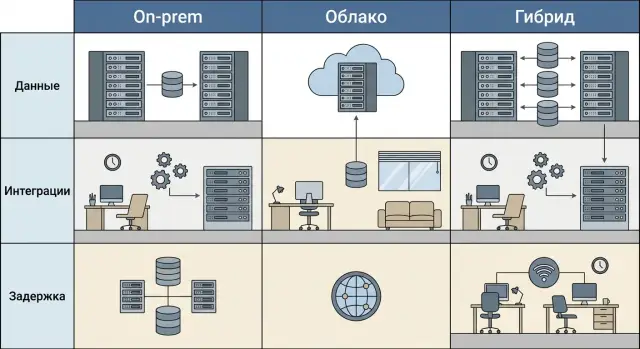
Start from the problem, not the technology
You don't choose a hosting model for the sake of a "correct architecture". You choose it so the application works as expected: data is available on time, integrations don't fail, users aren't waiting minutes, and IT isn't putting out fires at night.
The "on-prem, cloud or hybrid" debate often starts from habits or trends. In practice, it comes down to three things: where the data lives, how it moves between systems, and how long you can wait for a response.
Data sets the rules. If you have lots of personal, medical or financial data, requirements for storage, access, logging and audits appear immediately. It's not about "where is cheaper", it's about "where is permitted".
Integrations add hidden complexity. An application almost never exists alone: accounting, warehouse, CRM, BI, e-invoicing, portals, POS, terminals, government services. If you move only the "core" and leave exchanges "as is", queues, duplicates and manual exports appear quickly.
Latency matters even in office systems. Users don't think in milliseconds but they feel them: searches "think", records open slowly, printing stalls. In manufacturing, healthcare or a bank's front office, latency becomes downtime and direct loss.
Signs the model is wrong:
- complaints about slowdowns at peak times or from branches;
- downtime due to links or server overload;
- manual reconciliation of data in Excel;
- integrations break with every update;
- maintenance costs rise while business value doesn't.
Three tools help: a criteria matrix, a step-by-step algorithm and quick checks. They help choose a model per application, not a single rule for the whole company.
If you have data localization or supply-chain transparency requirements, fix in advance which components must remain inside the perimeter and on which infrastructure they will run. A sensible pattern is often: keep critical data and integrations close, move analytics, test environments or backups to the cloud.
Three hosting models in plain words
To avoid drowning in terms, answer one question: where will the data and applications live, and who will be responsible for them day to day?
On-prem
On-prem means servers and systems are physically on your site: in a server room, corporate data center or at a contractor but on dedicated equipment. You manage almost everything: access, updates, backups, monitoring.
Pros — control and predictability. It's easier to explain to auditors where systems are and keep data near users and integrations. Cons are obvious: hardware, space, power, cooling, spare capacity and people to support it are needed.
Cloud
Cloud means compute and storage are bought as a service and some responsibilities shift to the provider. Responsibility depends on the model:
- IaaS: you rent virtual servers and disks; you maintain the OS and applications.
- PaaS: you get a platform (for example, a managed database); you focus more on code and data.
- SaaS: you use a ready-made application and the provider handles almost everything except your configuration, users and data.
Limitations often come not from technology but from conditions: where data is stored, how export works, recovery time, and what counts as downtime.
Hybrid
Hybrid links the two worlds: some components stay on-prem, others move to the cloud. It is used when you cannot move sensitive data but want cloud scalability for front-end, analytics or backups.
Where hybrid often "breaks":
- the internet link (bandwidth and latency between sites);
- integrations and constant back-and-forth exchange;
- access management (different accounts and roles across environments);
- support (unclear who owns incidents at the boundary);
- cost (unexpected traffic and duplication expenses).
Simple example: if the app UI is in the cloud and the database is on-prem, every click hits link latency. Then you either move data and app closer or keep the critical loop entirely on one side.
Data and requirements: what not to miss
Choice almost always starts with data. Understand what data you store, who should access it and what happens if the system stops.
Classify data: customer and employee personal data, financial documents, medical records, production data (telemetry, recipes, equipment parameters), technical logs. Each class has its own rules for access, audit and retention.
Where "store in country" and access limits appear
A localization requirement can come from law, industry rules, procurement conditions or internal security policies. In Kazakhstan this often becomes decisive for public sector, financial organizations and some healthcare projects.
Check not only "where the DB sits" but where backups, logs, encryption keys and admin accesses are stored.
Practical checks:
- which data is critical and can be moved out of the country;
- who by policy can administer the system and read logs;
- whether immutable logs (who did what and when) are needed and how long to keep them;
- acceptable downtime and maximum data loss;
- certification, audit and reporting requirements.
Encryption, keys and logs: who controls them
Encryption won't help if it's unclear who controls the keys. In the cloud keys and logs often live in provider services, so roles must be agreed in advance: who issues keys, who can revoke them, where logs live and how you get them for audits.
On-prem usually gives full control over keys and logs, but you must configure and maintain everything. In hybrid avoid a "gray zone" where some logs are in the cloud, some local, and no one has the full picture.
Backup and recovery responsibilities also differ. Cloud makes copies easy, but that doesn't equal a tested restore. On-prem you are responsible for schedules, media, copy isolation and tests. In hybrid decide in advance where the "source of truth" is and how you'll recover during an incident.
Simple example: a clinic that stores medical data and has branches working from a shared database often keeps the main DB and logs locally while moving noncritical reports and analytics to the cloud. Then if the internet link fails the main work continues and localization requirements are easier to meet.
Integrations: the main source of hidden complexity
Hosting decisions usually fail because of integrations, not server prices. An application exchanges data daily with accounting, CRM, warehouse, HR, branch terminals, shop floor equipment or medical devices.
Start with a simple connectivity map: who talks to whom, how often and what happens if the link is lost.
How applications integrate
Common patterns:
- APIs (REST/GraphQL) for online exchange;
- queues and message buses for events and background processing;
- file exports on schedule for reports and batch tasks;
- POS and terminals where network stability and offline mode matter;
- equipment (scanners, sensors, printers) often tied to a local network.
API integrations are especially sensitive to network boundaries. If one service is cloud and another local, each request goes through extra hops and latency grows. Queues and files tolerate more but can be overwhelmed by volume: a nightly export of hundreds of GBs becomes a long transfer and any failure delays morning processes.
Another risk is single points of failure. VPNs, gateways, proxies, firewalls and load balancers increase security but add places where things can stop. The more critical integrations cross the cloud-local boundary, the more sense it makes to keep related components close.
Practical guideline: for each integration record frequency, volume, allowable latency and the answer to "what happens with a 30-minute outage". This table quickly shows what should not be separated.
Latency and performance: how to translate into numbers
Latency is the time between a user action and the system response. In practice: a cashier waits for payment confirmation, a call-center agent opens a customer record, a shop-floor terminal must show an operation status immediately. If responses are late, people bypass the system, use paper notes and make errors.
Separate "annoying" from "unacceptable." For a POS, an extra second often creates a queue. For a call center, 2–3 seconds per click quickly eats call time. For MES, latency can mean line downtime.
Guidelines to speak with the business in the same language:
- 50–100 ms: almost unnoticeable, suitable for frequent clicks and interactive screens;
- 100–300 ms: fine for most office actions;
- 300–800 ms: noticeable but tolerable for occasional operations;
- 1–3 seconds: acceptable for reports and heavy forms;
- tens of seconds or minutes: only for background tasks.
You don't need complex tools to see the current picture. Pick 5–7 key actions (by role: cashier, operator, shift supervisor, accountant) and measure "click to result" during a normal workday. Note two signs: is it slow only at peak or always, and how many users perform the same actions simultaneously. If the issue appears only at peak, it's often the server/DB performance, not distance.
If some functions must be near the user, you don't have to pick a single model for everything. A common compromise: a fast local loop (cache, local queue, small print service) and centralize the rest. For example, a POS writes to a local buffer and confirms the sale immediately; synchronization with the central system happens in the background.
Before locking the model check:
- the maximum latency business tolerates for 3–5 key operations;
- what happens on a 10–30 minute link outage;
- where local data is required (cache, reference data, stock levels);
- how load will grow in a year.
Step-by-step algorithm to choose a model per application
Don't decide by feeling; use steps. Then the "on-prem, cloud or hybrid" argument becomes a comparison that reveals what you pay for: downtime risk, integration complexity, latency or data requirements.
5 steps that bring clarity
-
Describe critical processes and allowable downtime. What stops if the app is unavailable: sales, warehouse, patient scheduling, calculations? Fix the downtime window: "no more than 30 minutes", "can be up to 4 hours at night", "downtime unacceptable".
-
Classify data and access rules. Group data and note who should access it (office, branches, contractors), and which checks are mandatory (logs, retention, roles).
-
Draw the integration and data flow diagram. One sheet is enough: which systems exchange data, what is the source of truth, where queues, files and APIs are.
-
Fix latency and peak requirements. Not "fast" but measurable: response times of key ops, concurrent users in normal and peak days, spike frequency.
-
Choose 2–3 options and compare in one table. For example: on-prem, cloud, hybrid. For each evaluate data, integrations, latency, TCO and change velocity.
Practical pointer: if data is sensitive, integrations many and latency critical (shared DB for branches and warehouse), hybrid often balances. Keep the "heavy" part local and put external services and backups separately.
Decision matrix: criteria and how to fill it
A matrix removes emotion from the "on-prem, cloud or hybrid" debate and reduces choice to verifiable facts. Fill it per application: CRM, accounting, VDI and video surveillance have different data, integrations and response needs.
Criteria and scale
Pick 5–6 criteria that truly affect your apps. Common ones:
- data (sensitivity, storage location, regulator demands);
- integrations (number of systems, protocols, exchange frequency);
- latency and performance (required response, peaks);
- availability and recovery (SLA, RTO/RPO);
- team and budget (skills, CAPEX/OPEX, timelines).
Create a 1–5 scale with observable signs, not impressions. Example: for latency 5 = response under 50–100 ms for most operations, 3 = under 200–300 ms, 1 = seconds OK. For data 5 = personal/medical data with strict restrictions, 1 = public or easily anonymized.
To reduce subjectivity record sources: monitoring measurements, security requirements, integration stats, real incidents and downtime over the last year.
How to score and get a result
Assess how much each criterion pulls toward local hosting: 1 = hardly, 5 = strongly. Add weights (1–3) if some criteria matter more.
After scoring use simple rules:
- high scores on data + latency + strict RTO often point to on-prem (especially with predictable load and local integrations);
- low data restrictions, variable load and fast launch often point to cloud;
- if data and integrations are local but external services are needed (analytics, backup, front-end) hybrid usually wins.
Example: a government agency with an internal DB and dozens of legacy integrations may keep the core on local servers and move data marts and backups to the cloud. The matrix then becomes a plan, not a taste argument.
Common mistakes and traps
The biggest problem isn't technology but unclear rules. Teams debate "on-prem, cloud or hybrid" without fixing where data lives, who owns what and what normal operation means.
Boundaryless hybrid
Hybrid is often chosen as a compromise but without clear boundaries it becomes chaos. If you don't define which data stays inside the perimeter, which moves to the cloud, and who owns security, backups and access, outages and audits turn into team disputes.
One document helps:
- the source of truth for each entity (customers, orders, reference data);
- who owns each integration channel;
- what is critical: downtime, data loss, latency.
"VPN will fix everything"
VPN connects sites but doesn't remove latency, packet loss or channel overload. Mistake: force every DB operation through VPN or make the app too dependent on link quality.
Typical case: branches submit orders while the DB is in headquarters. At low load it's fine. At peak, unstable links turn order entry into endless waits and users revert to Excel.
Choosing only by price
Compare not only payments but the cost of downtime and support. Cheaper often means harder to guarantee predictable operation and fast recovery. If critical services must be local, owning servers and on-site support can be the smarter option.
Backups "sometime"
Design backup, restore tests and monitoring from day one. Common trap: backups exist but no one tested recovery or timing.
Moving integrations as-is
If you simply lift legacy integrations, problems move too. When changing hosting, update exchange formats, add queues, make operations idempotent and tolerant of retries. Otherwise short outages become duplicates and manual cleanups.
Realistic example: a company with branches and a shared DB
Imagine: ERP in headquarters, sales and service in branches, warehouse receiving and shipping, accounting closes periods. All share a catalog, stock and receivables DB and branch work depends on link speed and stability.
Hybrid often fits such a scenario, but not by picture—by rules: decide which data and services must be near users and what can be moved.
Typical split: operational, sensitive and frequently changing data (stock, prices, orders, postings) stay inside the company contour. Things that don't require instant response move out: backups, analytics, archives, test environments.
Low latency is critical where work is "in tempo": warehouse scanners and terminals, POS, printing invoices and labels, mass picking and inventory. If each scan waits 1–2 seconds because of the link, users bypass the system.
A practical scheme:
- ERP and DB in HQ on dedicated servers.
- Branches run local services for printing, cached references and a sync queue for outages.
- Warehouse operations go through a local node that confirms quickly and synchronizes with the central DB.
- Cloud for backup, analytics and dev/test environments.
Check success in 2–4 weeks with metrics: response time for key ops, share of exchange errors, number of work stoppages due to links, speed of day/shift close, and support load. If branches and warehouse stop "waiting for the system" and reports are collected without manual exports, the split is correct.
Quick checks and next steps
If time is short, you can quickly filter out unsuitable options and avoid taste debates.
Run a short checklist of facts:
- where the "main" data lives and who owns it;
- how many integrations and with whom (accounting, e-invoicing, CRM, production, government services);
- allowable latency for key operations;
- what happens on a link drop (offline mode, queues, cache);
- compliance needs (localization in Kazakhstan, audits, logs, access segmentation).
Next, ensure you can safely roll back if needed:
- what to test (load, response, recovery, access rights);
- rollback plan and duration;
- maintenance windows and dependent systems;
- task owners (business, security, network, apps, contractors);
- backups and recovery points: who is responsible and where copies are stored.
For a pilot pick a minimal set for a fair comparison: 3–5 typical scenarios (most frequent operations), users from different roles and daily metrics to measure (response time, error count, sync speed, downtime).
Typical next steps: a short audit of current infrastructure (network, storage, servers, backups), a draft architecture for the chosen model and a 2–3 year TCO estimate. If you see many integrations and strict data or latency requirements, involve a systems integrator.
If on-prem or hybrid require local assembly, service network and procurement rules, in Kazakhstan organizations often consider GSE.kz: the company produces computers and servers domestically and provides system integration and support, which helps reduce the responsibility gap between hardware and deployment.
Frequently asked questions
Where to start choosing between on-prem, cloud and hybrid if time is short?
Start with three things: where the data must reside, which systems the application exchanges data with daily, and the maximum allowable response time for key operations. If there are strict constraints on at least one item, the hosting model is usually narrowed down significantly.
How to know if you can move data to the cloud when there are "store in country" requirements?
Check not only the database location but also where backups, logs, encryption keys will be stored and who will have admin access. Often these "secondary" components violate localization and audit requirements.
What matters more when choosing a model: where the app is or where the database is?
As a rule of thumb, keep together what communicates frequently and synchronously: the application and its database, plus the hottest integrations. If the interface is in the cloud and the database is on-prem, every request crosses the site boundary and latency is felt on each click.
What signs show the hosting model was chosen incorrectly?
The most common symptoms are slowdowns during peak hours or from branches, outages due to connectivity, manual reconciliation in Excel and integrations that break after updates. If these become normal, components are likely misplaced or responsibilities are not defined.
How to quickly assess whether a hybrid will 'break' because of integrations?
Create a simple table: exchange frequency, volume, allowable latency and the answer to "what happens with a 30-minute outage". If many critical integrations require online responses, it's usually better to keep the connected contour on one side rather than shuttling traffic back and forth.
What latencies are acceptable for business applications?
Measure and set goals for 3–5 key user actions and record "click to result" during a normal day and at peak. For most office operations, hundreds of milliseconds are acceptable; seconds are generally only OK for reports and heavy forms.
Why "we will use VPN and everything will work" often fails?
A VPN links sites but does not remove latency, packet loss or channel overloads, and it adds points of failure on gateways and configurations. If an app makes many small DB requests over VPN, users will notice long waits first.
Who should manage encryption keys and logs in cloud and hybrid setups?
Define roles up front: who issues and revokes keys, where logs are stored, who can view them and how you provide them for audits. If some logs are in the cloud and some local, agree in advance where the unified view of events is and who ensures its availability.
How to correctly approach backup and recovery across different models?
Specify RTO and RPO and test recovery in practice, not just the existence of backups. In the cloud, making copies is easy, but that doesn't guarantee restoreability; on-prem requires discipline with schedules, copy isolation and drills.
When is hybrid truly justified and when is it unnecessary complexity?
Hybrid makes sense when critical data and integrations must stay inside the perimeter but you want to move analytics, test environments or backups to the cloud. To avoid chaos, define boundaries in advance: the source of truth, which exchange channels are critical and who handles incidents at the intersection.
