7 min read
Offline updates in air‑gapped networks: certificates, time, CRL
Offline updates in air‑gapped networks: how to update root certificates, time and revocation lists without manual chaos, using a clear repeatable procedure.
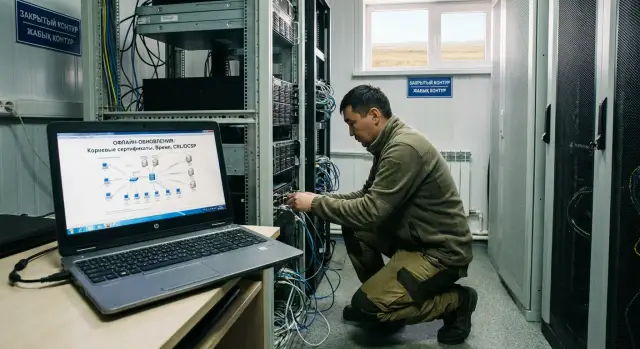
What breaks without internet
In an air‑gapped network many things look stable until the first “why isn’t this working” moment. External services are unavailable, and machines and servers cannot pull what would normally be updated silently: trusted certificates, up‑to‑date revocation status, and accurate time.
This usually shows up suddenly. An internal HTTPS service stops opening for some users, signature validation breaks for documents, smart‑card logins or domain authentication fail. Sometimes it looks like an application bug, but the root cause is the network’s stale cryptographic reference data.
A manual approach almost always makes things worse. When updates are carried on USB sticks and copied “wherever someone remembers,” control is quickly lost: different departments get different file versions, one server is skipped, elsewhere an “older” package is applied over a new one. After a couple of months it’s hard to answer a simple question: which root certificates are actually present on workstations and who approved them.
To avoid chaos, keep three supports in focus: the set of trusted root and intermediate certificates (trust chains), correct time (so signatures and certificates fall within validity periods), and revocation checking (CRL/OCSP) so revoked certificates do not pass validation.
This is especially relevant for organizations that must operate isolated for security reasons: government, banking, healthcare, education, industry. The larger the fleet of PCs and servers, the faster “manual updates” become a source of outages and disputed incidents.
What exactly needs updating: certificates, revocation, time
In an air‑gapped network it’s rarely just one update missing — usually three things: trust (certificates), revocation status (CRL/OCSP) and correct time. If you maintain them irregularly, errors surface at the worst times: during login, signature checks, or establishing secure channels.
Root and intermediate certificates
Root and intermediate certificates are the foundation of trust. They live in OS and application stores and answer the question: “who can we trust?” You need to update not a single file, but the whole set of trusted certificate authorities that are actually used in your environment: on workstations, servers, browsers, mail clients and document systems.
A common scenario: a new server or PC arrives in the network with a different set of roots. As a result, the same service is “green” on some machines and shows warnings or won’t open at all on others.
CRL and OCSP: revocation checking
A certificate can still be valid by date yet be revoked (for example, after key compromise). That’s why revocation checking exists.
CRL is a list published periodically and downloaded as a whole. OCSP is a query/response for the status of a specific certificate. In isolated networks OCSP is often unavailable or must be hosted internally, so many rely on CRLs. If CRL/OCSP aren’t updated, the risk increases: systems may accept invalid certificates or begin to fail checks en masse due to “unknown status.”
Time: an invisible cause of major failures
Even a 5‑minute difference breaks many things: Kerberos authentication, certificate chain validation (“not yet valid” or “expired”), document signatures and event logs. In an air‑gapped network time must stay synchronized and consistent across all nodes.
One task: make a repeatable process. Not one‑off “fixed by hand,” but a clear scheme where certificates, CRLs and time are updated on schedule and verified each cycle.
A basic process to avoid chaos
To keep offline updates from turning into a manual “quest,” start with a simple process where each step has a place, an owner and an audit trail.
Split the process into three zones
A common mistake is mixing package preparation and application in one “grey” spot. It’s clearer to maintain three distinct zones.
An external zone contains a dedicated internet‑connected computer used strictly to download certificates, CRLs and utility files. Next is the transfer zone: a separate media or a quarantined PC where files are verified and signatures/hashes are recorded. The internal zone is the isolated network where updates are applied and tested.
This limits the risk of introducing extraneous files and makes it easier to pinpoint where a failure could have occurred.
Assign roles and one clear procedure
Even with a small team, separate roles. One person prepares the package and computes checksums, another controls media intake and inventory, a third applies updates and records results. If a single person performs all tasks, use role checklists: “prepared — verified — applied.”
A practical cadence is a planned window once a month (or quarterly for very stable environments) plus out‑of‑band updates for incidents: CA compromise, mass revocation, or critical policy changes.
Keep a log. Record the date and package number, source and versions of sets (certificates/CRL/time), participants (who prepared, who imported, who applied), package hash/signature and verification result, list of nodes or groups where applied, and short notes on tests. If something went wrong, add a line with cause and remediation.
How to prepare offline update packages
To prevent offline updates becoming a jumble of files on USB sticks, follow one rule: prepare packages only on a dedicated trusted computer in the open zone. This workstation is not used for daily tasks and all actions are recorded.
Take sources only from a pre‑approved list: official certificate authorities (root and intermediate certificates, CRLs), software vendors and your internal CA if you have one. Keep that list as a document with an owner, review date and exact items to fetch from each source.
Before moving into the isolated network, verify integrity. At minimum check checksums (hashes) and digital signatures of signed files. If a vendor provides both a signed file and a published hash, verify both. After verification store a control sheet: what was downloaded, from where, how it was checked and the result.
Prepare media as a container for a single update: one media — one package — one date. This greatly reduces confusion during investigations and rollbacks.
A package structure can be simple: a folder named by date and release number containing update files, a hash file and a description (what, from where, for which systems), plus verification results and an action log (who prepared, who checked, who authorized the transfer). Label the media with the same package number.
How to distribute updates inside the air‑gapped network
To prevent offline updates from becoming “whoever copied where,” define one clear path: where the canonical package resides, who publishes it and how machines retrieve it.
First pick an internal distribution point. In small networks this can be a read‑only shared file resource. In large ones a dedicated update server or internal repository near key services is better. Ensure write permissions are limited to responsible staff.
Use a consistent directory format: date, version, purpose. Admins and auditors should be able to quickly find what was deployed on a given day.
Separate packages by purpose. Keep root and intermediate certificates separate from CRL/OCSP data and separate from time settings. This way you don’t “break everything at once” and can roll back a single problematic part.
Before mass application perform a short validation: a test bench of 1–2 machines with typical configuration, then a pilot group of 5–10 workstations, record results and only then roll out to remaining PCs and servers.
Offline updates of root certificates without manual edits
In an air‑gapped network you cannot auto‑pull root certificates from the internet, but you also must avoid adding them manually on each PC. That quickly produces varying trust sets, strange signature validation errors and endless local exceptions.
A workable approach is one approved trust set and one delivery method. In a domain environment this is typically done via Group Policy: publish root and intermediate certificates into the appropriate stores (Trusted Root Certification Authorities and Intermediate Certification Authorities) and let clients receive them centrally.
To avoid a “zoo,” forbid local root additions by rule. If someone “urgently needs” a root, process it as a change to the trust set, not an edit on an individual machine.
A practical sequence: assemble a canonical package (root, intermediate and a document with versions and start date), test it on a pilot group (several PCs and one non‑critical server) and exercise typical scenarios (TLS to internal services, document signing, access to portals), then deploy centrally.
Split maintenance windows. For workstations use a soft schedule (night or next reboot). For servers use planned maintenance, control service restarts and verify critical connections after policy application.
Always have a rollback plan. Keep the previous set as a separate package and a short playbook: export current stores (package version), restore the previous package via policy, force policy update on nodes, then verify 2–3 key services and one typical workstation.
Updating revocation lists (CRL/OCSP) in an isolated network
Revocation checking in an isolated network often fails not because of cryptography but because of “where to look” and “what to do when a list expires.” To make the process reliable, assign a single publication point and a clear schedule.
CRLs are typically distributed as files. Key rule: clients must find CRLs at the addresses embedded in certificates (CRL distribution points). Don’t change those addresses after the fact; instead publish CRLs internally at stable paths: a read‑only shared resource or internal web server with current CRLs under the same file names.
OCSP isn’t always required in isolation. It’s useful when applications need quick per‑certificate responses, but it’s harder to maintain: you need an internal responder reachable by all systems and the responder’s address must be embedded in certificates. If there’s no explicit need, CRLs with reasonable validity are often sufficient.
The most frequent failure is an expired CRL. Once Next Update passes many systems treat status as unknown or invalid, and certificate logins, signatures and TLS can suddenly stop working. Update CRLs ahead of expiry and keep an emergency publication procedure.
After each update perform short checks: on the CA side verify CRL generation and This Update/Next Update dates; at the publication point ensure the new file replaced the old one and is read‑only; on clients and critical apps verify revocation checks succeed and a test login/signature/TLS flow works. Also configure reminders a few days before CRL expiry.
Time synchronization without internet: a clear NTP scheme
In air‑gapped networks time often drifts unnoticed. Later signature validation fails, event logs become meaningless and troubleshooting turns into guesswork. Time sync is as much a part of the process as CRLs and root certificates.
Reference point: a single time source
The simplest model is one internal time reference and a clear hierarchy. The reference is usually an internal NTP server on a reliable machine.
Typical architecture: one authoritative time server in a protected zone, 2–3 internal NTP servers for redundancy, and all other servers and workstations as clients. Critical systems (PKI, domain controllers, SIEM, databases) take time only from internal NTP.
If there is no internet, the reference gets time by other means. The cleanest option is a GPS/GLONASS receiver with an antenna (satellite time, no network access). If that’s impractical, perform periodic controlled calibrations: take the reference machine to a controlled zone, sync to a trusted source and return, recording the calibration in the log.
Rules to avoid manual chaos
Set simple rules in advance: one time zone for all systems (UTC or a single local time by policy), forbid manual time changes by users, use a single sync method on clients without “duplicates,” monitor drift with thresholds and alerts.
Typical mistakes and pitfalls
The biggest problems in isolated networks stem not from “PKI complexity” but from small organizational failures. They’re invisible on the update day but later cause a chain of failures: signed documents won’t open, VPNs fail, TLS breaks and users see “certificate invalid.”
Confused media and packages
One common trap: a USB stick contains packages from different dates and sources. As a result one server gets “yesterday’s” roots, another gets a “day‑before‑yesterday” CRL, and a third accidentally imports extra files.
Follow a simple rule: one media — one release package, with a clear structure (date, source, type: roots, intermediate, crl, time).
No signature or checksum verification
In offline mode you cannot assume “the file is correct.” Without verifying signatures and hashes you cannot distinguish a copy error from corruption or substitution.
Minimum standard: keep a checksum file and record verification results in the log (who, when, on which machine).
Updated roots but forgotten CRLs
After updating roots and intermediates signature checks may start failing if CRLs remain old or unavailable. Logs often show “unable to check revocation” or “CRL expired” even though certificates themselves are valid.
Good practice: update “roots + CRL + time” as a related set and test on a sample document/signature before wide deployment.
No test environment
If you deploy to all PCs and servers at once, any mistake becomes widespread. Maintain a small test environment: 1–2 typical PCs, one application server, one domain node. Run login, signature and TLS scenarios there first.
Time errors and a domain cascade
Incorrect time on a key server (domain controller or NTP source) starts a cascade: Kerberos fails, certificates are “not yet valid” or “expired,” CRLs look expired.
Keep a single time reference, configure an NTP hierarchy and check offsets on multiple nodes after updates. Even 5–10 minutes can break signature checks.
Quick checklist after each update
After an offline update make sure nothing broke: time matches, trust chains are in place, and revocation is checked. This control takes 10–20 minutes but saves hours of troubleshooting the next day.
1) Time: reference and spot checks
Check the time on the authoritative internal NTP and ensure timezone and date are correct. Then pick 5–10 PCs from different segments and compare their time to the reference. If the difference exceeds your thresholds, investigate immediately.
2) Certificates: trust chain without local exceptions
Ensure root and intermediate updates were applied centrally, not ad‑hoc. Check one rarely powered machine and one frequently reimaged one — problems usually surface there first.
3) CRL/OCSP: freshness and accessibility inside the network
Verify CRL issuance and validity dates and that clients can reach the revocation lists where expected. If using OCSP, ensure clients are not trying to reach external addresses.
4) Quick business checks
Perform 1–2 live checks in critical systems: user login, signature verification and a TLS connection to an internal service.
5) Logs and responsibility
Record in the log who and when applied updates, which package, on which nodes, and the verification results. If you cannot quickly prove that time, trust and revocation work, the update is not complete.
Example: regular updates in a closed organization
Imagine a district hospital or a bank branch with workstations and servers in an isolated network. Internet access is prohibited, but root certificates, revocation lists and accurate time are still required. Otherwise “strange” errors appear: internal portals won’t open, signatures fail, TLS breaks and event logs become unreliable due to wrong timestamps.
Once a month the team performs offline updates following the same short scenario. The principle is simple: one package, one control point, clear verification.
They assemble the package (roots and intermediates, CRLs and OCSP responses if needed, plus NTP configuration for internal servers). The package is transferred via an approved gateway or media, with hashes and version recorded. Then it’s installed on a test bench and checks are run: logins, signatures and TLS connections. Next the package is rolled out by groups and errors are tracked. Finally the team records date, package contents, where applied, which checks were performed and who confirmed.
If an urgent certificate revocation occurs (key compromise), they run an accelerated cycle: an out‑of‑band package containing only the necessary CRL/chain, a quick test and prioritized rollout to critical systems (VPN, gateways, authentication servers). A brief notice goes to security/IT: what was revoked, where applied and expected propagation time.
Simple metrics show whether the process works: number of post‑update incidents, time to recovery and completeness of logs (package version, successful install, checks and exceptions). If metrics worsen, manual chaos has returned and the procedure needs strengthening.
Practical next steps for your infrastructure
Start small: design a short repeatable process instead of relying on admin heroics twice a year.
First step — a 1–2 page procedure. Document what is updated (root certificates, CRL/OCSP, time), how often, approved sources, where packages are stored, who approves and who executes. Appoint primary and backup owners and keep a simple change log.
Next build minimal supporting infrastructure: an internal NTP server (or several) with a clear hierarchy, an internal repository for packages with controlled permissions and immutability, a test group (a few PCs and one server), and an internal publication point for CRL/OCSP so clients don’t try to reach outside.
When the basics are ready remove manual edits on individual machines. In a domain environment this typically means centralized distribution via policies and scheduled scripts: an approved package lands in the repository, goes to test and then to production. Transfer into the isolated network is a separate operation with checksum and signature verification.
For larger modernizations or many sites include updates and support in the integration project: roles, maintenance windows and acceptance criteria. Standardizing the fleet helps: identical PCs and servers are easier to maintain and test. When infrastructure uses standardized images and a single support contour, it’s simpler to keep stable images and test benches. In Kazakhstan such projects are often done with vendors and integrators: GSE.kz (gse.kz) provides L200/M200/S200 lines and experience in system integration for isolated environments where controlled updates and regulated support are important.
Frequently asked questions
Why does HTTPS or signature validation suddenly stop working in an air‑gapped network?
In an isolated network three things usually fall out of sync: trusted root and intermediate certificates, revocation data (CRL/OCSP), and accurate time. Because of that, HTTPS can start complaining about certificates, signature validation can fail, and domain or smart‑card logins can become unreliable. Often it looks like an application error, but the root cause is outdated cryptographic reference data.
What exactly needs to be updated offline: only root certificates or something else?
Update the trust set (root and intermediate certificates), current CRLs (and OCSP if you use it), and the time synchronization configuration. If you update only the “roots” without CRLs and time, errors usually remain, just in a different form. Treat these three elements as a linked cycle and verify them after every release.
How often should offline updates be performed in a closed network?
A practical baseline is once a month with a short planned window and a clear verification procedure. Very stable environments may use a quarterly schedule, but CRLs often have shorter lifetimes, so their validity should drive the cadence. Unplanned releases are needed for incidents: key compromise, mass revocation, or critical changes in the CA policy.
Where should offline packages be assembled and what sources should files come from?
Prepare packages only on a dedicated machine in the open zone that is used specifically for downloads and update preparation. Sources must be pre‑approved and the package contents fixed and documented. This prevents updates from turning into a random collection of files and simplifies investigations if something goes wrong.
How can I be sure an offline package wasn't corrupted or tampered with?
The minimum standard is to verify checksums (hashes) and digital signatures where available, and to keep the verification results alongside the package. Without this you cannot distinguish a copy error from corruption or tampering. In the log record who verified, when, how, and what the result was.
How do I avoid confusion with media and package versions when transferring into the network?
Use the rule “one media — one package — one date” and do not mix releases on the same USB drive. Inside the package keep a clear structure with version number, composition description and an integrity file. Such discipline greatly reduces the risk of accidentally installing the wrong set or overwriting new files with old ones.
How to update root certificates without installing them manually on each PC?
In a domain environment the most controllable way is centralized publication using Group Policy to the appropriate certificate stores. This gives the same trust set on workstations and servers and removes ad‑hoc local exceptions. Local additions of roots should be forbidden by policy; any change must be handled as an update to the approved trust set.
What commonly breaks with CRLs in isolation and how to prevent it?
Clients must reach CRLs at the addresses and file names embedded in certificates, so provide a stable internal publication point. The most common failure is an expired CRL: when Next Update has passed many systems treat status as unknown and authentication, signing and TLS may stop working. Update CRLs in advance and verify the new file is available and used by applications.
How to ensure accurate time without internet so authentication and signatures don't fail?
Make a single internal time reference and an NTP hierarchy so all nodes synchronize predictably. Even small drift can break Kerberos and certificate validation, so forbid manual time changes and monitor drift. If there is no internet, the reference clock can be calibrated via a satellite receiver (GPS/GLONASS) or by controlled periodic synchronization against a trusted source.
What checks should I run after an update to catch problems early?
Run the package on 1–2 test machines, then on a small pilot group, and only after that roll out to the whole network. After applying updates perform short business checks: user login, signature verification and one TLS connection to an internal service, plus time and CRL freshness checks. Finally, record in the log which package was applied, where, who executed it and which checks passed.
