8 min read
Office power quality: measurements and equipment protection
Office power quality: what to measure, when you need stabilizers and filters, and how to tell network issues from PSU faults.
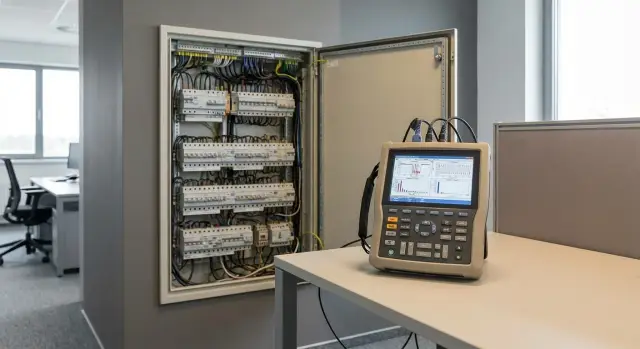
Common office issues related to power quality
Computer and peripheral failures are not always hardware faults. Often the reason is simpler: the office power is unstable, and equipment reacts faster than people notice.
Power problems usually don't show up as a tripped breaker but as small, repeating symptoms. Workstations reboot during the day, a printer suddenly reports an error, while the next room is fine.
Typical signs of a "bad" supply include:
- spontaneous reboots, brief freezes, sudden shutdowns;
- disk errors and corrupted files after very short power losses;
- noise or hum in speakers, light flicker when the air conditioner or kettle starts;
- overheating and premature failure of power supplies and chargers;
- problems that appear only at certain times (for example, peak hours).
Why can identical equipment fail in one room and work in another? Because the "conditions at the outlet" differ. Some lines are long with poor contacts, near heavy loads, or have an overloaded neutral or phase imbalance (especially in buildings where much of the load is on one phase).
In practice, causes usually fall into a few groups: voltage sags, short overvoltages, high-frequency interference, a "dirty" waveform due to nonlinear loads, and simple line overload.
From the start it's useful to split the task into two parts: quickly protect critical equipment (servers, PCs, network gear) and at the same time find the root cause. A combined approach usually works best: temporary protection plus measurements to fix the cause instead of endlessly fighting symptoms.
Voltage sags, spikes and phase imbalance in plain language
When we talk about office power quality, we usually mean three things: voltage can "dip", sometimes "spike", and in three-phase networks the load can be distributed unevenly.
Voltage sag is when instead of the expected ~230 V the voltage falls noticeably for a short time. On PCs and monitors this often looks like random reboots, freezes, disk write errors, or USB devices dropping out. On servers it shows up worse: reboot, array failure, lost sessions, false power alarms.
The most troublesome are very short dips lasting fractions of a second. The lights may not even go out, but equipment can already stumble. Power supplies try to compensate, current and heating rise. When voltage returns, components can get another stress.
Overvoltages and impulse spikes are the opposite problem. They occur when large loads start (elevator, compressor, nearby welding), during switchings in the distribution board, after lightning, or due to neutral issues. Signs include PSU failures, dead chargers and adapters, burnt surge protectors, smells of overheating, or clicking noises from outlets.
In three-phase offices there is also phase imbalance: one phase may carry many workstations and AC units, while another is lightly loaded. Voltage on the overloaded phase sags more often. If the neutral is overloaded or contact is poor, connections heat up in the panel and outlets, plastic darkens, insulation melts, and a burnt smell appears. This hidden cause must not be ignored.
Simple example: at the end of the day someone turns on a kettle and a microwave on the same line where a mini-server sits. The lights flicker slightly and the server reboots. That's a typical short sag, not a "mystical" hardware failure.
Harmonics and THD: when a "dirty" supply damages equipment
Sometimes the voltage in the outlet looks textbook-correct, yet equipment behaves oddly. A common cause is harmonics: extra components on top of the 50 Hz fundamental that make the voltage and current waveform distorted. In offices these are created by devices with switching power supplies and power electronics.
Where harmonics come from
Sources are often ordinary: computers and servers with switching PSUs, UPSs (especially when running from battery or simple designs), LED lighting and drivers, VFDs in ventilation and pumps, chargers and powerful adapters.
Important: usually not a single device but the sum of loads is the culprit. Individually each device may seem fine, but together they degrade power quality in the office.
THD by voltage and by current: what's the difference
THD (Total Harmonic Distortion) is measured separately:
- THD-U (by voltage) shows how distorted the network voltage is;
- THD-I (by current) shows how "dirty" the load's current draw is.
In offices THD-I is often high due to many nonlinear consumers, and THD-U rises as a consequence. This is especially visible with weak wiring, overloaded lines, or long cables.
Why it's dangerous: cables and breakers heat up, the neutral can overheat in three-phase systems, transformers and UPSs work harder, and you may hear a hum in the panel or equipment.
Suspect harmonics (not a hardware fault) if plugs or extension leads heat noticeably under normal load, there's humming or vibration in the panel, UPS, or transformers, and equipment shows strange errors without clear logic. This often coincides with office upgrades: more workstations added or lighting switched to LED.
If symptoms match, plan THD and phase/neutral current measurements rather than only checking "how many volts are at the outlet."
What parameters to measure so you're not guessing
When equipment behaves oddly (reboots, disk errors, intermittent problems) it's important to move from guesswork to numbers. To assess office power quality you need parameters that show not only "how many volts now" but what happens over time.
Minimum set that gives a clear picture
Usually five groups of data are enough:
- RMS voltage per phase and its range over the monitoring period (min, max, average);
- events of sags and spikes: how deep the drop or rise is and how long it lasts (milliseconds, seconds, minutes);
- mains frequency and its deviations (rarely critical, but important for sensitive equipment);
- waveform distortion: THD and contributions of individual harmonics (5th and 7th often stand out);
- three-phase parameters: phase imbalance, neutral current, and power factor (PF).
How these numbers help decide
RMS answers whether there's generally enough voltage. But if sags are short, a multimeter won't catch them while equipment reboots.
THD and harmonics explain cases when volts look normal but PSUs overheat, UPSs switch to battery more often, or transformers hum. Phase imbalance and high neutral current often indicate uneven load distribution, for example many workstations on one phase.
Example: during the day many printers and AC units start, and a server rack (e.g., an S200) logs random errors. A log showing sags of even 100–200 ms often leads to the right fix faster than blindly replacing suspect PSUs.
Where to measure: outlet, panel, service entrance, server room
Measuring in only one place can lead to wrong conclusions. The problem may be at a specific outlet, on the floor line, or coming from the building service entrance. A practical approach is to measure at several points and compare.
Outlet at the workstation
Start at the outlet where the problematic PC or printer is located. This often reveals simple issues: poor contact, overloaded extension, or faulty wiring after renovations.
Minimum: measure voltage at different times (morning, peak load, evening) and see whether it dips when the kettle, heater, or MFP is turned on nearby. If problems appear only in one room, a local wiring or outlet issue is likely.
Distribution panel (floor or office)
At the panel you can see what happens to the whole line: overloaded breakers, heated terminals, signs of burning, or loose contacts. If panel parameters look normal but the outlet is bad, the issue is between them: cable, junction box, or outlet group.
Building service entrance
Measure at the service entrance when similar failures occur across multiple rooms. This helps determine whether instability is arriving "from outside": fluctuating voltage, short sags, or phase imbalance.
Server room and IT spaces
In the server room measure power to racks, AC power for the room, and grounding quality. A common scenario: servers are on one line while HVAC is on another, but spikes or sags coincide with compressor starts.
To avoid guessing, measure simultaneously in two points (for example, a user outlet and the panel). If a sag appears everywhere, the issue is upstream. If only at one point, look locally.
How to perform measurements: step-by-step plan
Good measurements start with facts, not the instrument. To understand office power quality, first correlate equipment failures with time and place. Otherwise you'll treat symptoms.
One-week plan
-
Collect symptoms and times. Keep a simple incident log: date, time, what happened (PC reboot, network outage, UPS trip), device location and what was being done.
-
Check the basics on site: outlet, plug, extension lead, and contact tightness. Feel if the plug or connector is hot. Often the culprit is an overloaded extension under a desk.
-
Clarify the power scheme. Which breaker feeds the problematic area, is there a separate line for the server room, are AC units and workstations on the same group?
-
Install a power-quality logger for 3–7 days to catch short events. One-off multimeter checks rarely catch sags.
Remember the network changes by time of day. Note large loads by time: kettle, heater, AC, elevator, welding nearby, compressor start. Even if it's "not your" equipment, a sag can travel over the building's common line.
-
Correlate events. Combine sag/spike/THD logs with times of reboots, disk errors, and freezes.
-
Draw conclusions about the source. If events coincide across many devices and rooms, look at the mains or service entrance. If only on one group, inspect the line, contacts, or breaker. If a single device keeps failing, suspect its PSU, cabling, or internal fault.
What instruments to use: multimeter to analyzer
Inspect office power quality by stepping up from simple tools to instruments that can record short events and "dirt" on the network. A one-off reading calms you but doesn't answer what happens during glitches.
Basic tools many have
A multimeter is fine for an initial check: is there voltage, any obvious deficiency, and correct outlet wiring. But it usually averages values and won't catch sub-second sags.
Clamp meters show current per phase and neutral, including inrush currents. Useful when many AC units, MFPs, or servers are present and you suspect overloaded lines or phase imbalance.
For a first stage, a multimeter + clamp meter + a simple outlet tester are enough to spot gross wiring errors, overloads, and odd neutral current.
When you need an analyzer and a specialist
If symptoms are rare and intermittent, a power quality analyzer helps. It logs events: sags, swells, outages, phase imbalance, and harmonics (THD). This is crucial in server rooms where even short sags can cause storage errors and RAID issues.
An oscilloscope with the right probes is less often needed but indispensable to see waveform shape, impulse noise, or why PSUs enter protection. Measurements in panels and at the service entrance can be dangerous — don't attempt them without experience.
Also review OS and server logs: power events and reboots, disk errors, temperature spikes. If several different computers across offices record "unexpected shutdowns" simultaneously, it's more likely a network power issue than mass PSU failure.
When to use stabilizers, filters, and other measures
If measurements show unstable office power, choose protection based on the specific problem. No single device solves everything.
A voltage stabilizer is useful when voltage is frequently and persistently below or above normal and equipment reboots or overheats as a result. But a wrongly chosen stabilizer can create issues: relay-based units may produce stepped switching and clicks, and in combination with a UPS they can cause false transfers to battery. For many PSUs with active PFC, the absence of sags and sudden transients matters more than having a perfectly regulated 230 V.
A surge filter and SPD (surge protective device) handle different issues. A local filter at a workstation reduces high-frequency noise but won't save equipment from long sags. An SPD (usually installed in the panel) takes the hit from impulse overvoltages, for example after network incidents or switchings. It's protection from a "shock," not a cure for a bad outlet.
A UPS is required where continuity matters: POS terminals, server rooms, workstations, and network equipment. Choose a UPS based on three parameters: real watt load, required autonomy time, and output waveform. For critical equipment (e.g., racks of S200-level servers) a true sine wave UPS is usually safer to avoid strange power errors.
In practice measures usually combine: if sags are frequent, put UPSs on critical loads and repair lines/contacts; if the voltage is persistently low or high, add a stabilizer selectively; for impulse overvoltages install SPDs at the service entrance or panel and use filters as a supplement.
Example: one row of workstations reboots when the AC kicks in while the neighboring row is fine. The cause is often not bad PSUs but a shared line, poor outlet contact, or an overloaded breaker. In that case a filter won't help; redistributing the load and fixing connections will solve it for the long term.
Common mistakes when diagnosing and protecting equipment
The most expensive mistake is treating the symptom instead of the cause. When a PSU "burns out", often the network is to blame — a poor contact in the outlet, an overheated terminal in the panel, or a voltage sag during peak hours. Without measurements this becomes guessing, and you risk replacing PSUs and PCs when the network is the culprit.
Another trap is choosing an overpowered "solution." A large UPS connected to a weak line with poor contacts or an overloaded breaker doesn't save you — it adds load: plugs, extension cords, and terminals heat up and trips become more frequent.
A separate hazard is long extension cords and multi-sockets under constant load. They are convenient "temporarily" but over time cause voltage drop and overheating, especially when powering PCs, printers, and heaters.
When many switching PSUs are present (PCs, monitors, chargers, network gear), people often forget neutral loading. Symptoms can be odd: random reboots, audio noise, and intermittent errors across workstations. Phase currents may look normal while the neutral is hot.
Finally, don't take a single reading and relax. Many problems are short: a 1–2 second sag, a spike when an elevator starts, or a local switching event. Without recorded logs you'll only see "everything is fine now."
If you need a short rule: check contacts under load, don't put a UPS on an extension cord as a permanent fix, ensure the line and breaker are rated for the actual combined load, and log measurements for at least a day.
Example: in an accounting office two PSUs on identical PCs failed twice. It turned out one outlet had a burned contact while a heater ran nearby continuously. After replacing the outlet and redistributing the load the problems disappeared without buying new filters and UPSs.
How to tell a network problem from a PSU fault
The idea is simple: check whether the fault stays in one place or "travels" with a particular computer. This quickly shows where to look and what to protect — important when assessing office power quality and figuring out what's damaging equipment.
If several different PCs and monitors behave oddly on the same outlet, in the same room, or on the same line, suspect wiring, contacts, the breaker, or local load. If the same computer fails everywhere, even after moving to another room, the PSU, motherboard, or overheating is more likely.
Signs the problem is the network, not the PC
Usually it shows as multiplicity and location/time binding:
- lights flicker, clicks are heard, multiple UPS units on the same line react;
- 2–3 devices on one line reboot at the same time (PC, printer, switch);
- errors appear during peak hours when the kettle, AC, or heater turns on;
- plugs, outlets, or extension cords heat up or smell of melting plastic.
Signs of a faulty power supply
These are more "personalized" and increase under load: smell of burning, crackling, whining, occasional pops on startup; reboots when heavy tasks run (accounting software, many browser tabs, updates); instability only on one PC even when moved to another line. If you can, you may also see internal rail drops (often on the 12 V line).
A simple test often settles it: note the failure time and try two steps on different days. First move the PC to another line (different outlet and breaker). Then temporarily replace the PSU with a known-good unit. If the fault "stays with the outlet," fix the line. If it moves with the PC, repair the hardware.
If you find burning smells, hot contacts, or melted plastic, stop using that outlet and inspect panels and loads. In such cases call an electrician and service — it's safer than running until the end of the day.
Short checklist, a real-life example and next steps
Before buying a stabilizer or replacing PSUs, keep a short observation diary. It often tells you more than single checks.
At the moment of the fault record:
- exact time (to the minute) and how often it repeats;
- place: room, outlet group, UPS, rack;
- what load was on (kettle, MFP, AC, elevator);
- what happened: PC reboot, monitor off, server error;
- weather and building mode (hot, heating on) if relevant.
Then inspect things often hidden in plain sight. Even without instruments you can find signs of a bad contact.
What to check in the panel and outlets:
- heat and smell in the panel, darkened plastic;
- terminal tightness (by an electrician);
- clear labeling of lines and breakers;
- outlet condition: wobble, sparking, burn marks;
- even distribution of load across lines.
If no obvious defects are found, do a minimal week of logging to catch rare events. Keep logs of voltage over time, events (sag, swell), THD and phase imbalance (if you have 3 phases). Measure at several points: the problematic outlet, the floor panel, and the service entrance.
Real-life example: an office with AC units where compressors start at the same time during the day and cause brief voltage sags on some outlets. Users see random reboots and freezes, and PSUs run at the limit. If sags and increased harmonics are recorded at that time, it's unlikely to be single PSU failures.
Next steps are best written as a work plan: who is responsible (electrician, IT, building management), which points to measure, a time window (e.g., 7 days), and an allowed budget for protection measures. Results usually lead to a combination: redistribute loads, repair contacts, filter interference, install stabilizers or UPSs where really needed.
If you need a comprehensive approach, bring a team that can both survey the power and build a reliable IT setup for your load. GSE.kz (gse.kz) does system integration, supplies workstations and servers of Kazakhstani manufacture, and provides round-the-clock technical support nationwide.
Frequently asked questions
What signs point to power supply problems in an office?
Frequent restarts, freezes, disk errors, flickering lights, and hot plugs are often power-related. It is especially suspicious if the failures occur in one room or when the air conditioner, kettle, or multifunction printer is switched on.
Why does a computer restart even though the outlet voltage seems normal?
A brief voltage dip can last fractions of a second: the lights may barely show it, but a PC or server can already restart. A multimeter usually displays an average voltage, so these cases require a power-quality recorder.
Where is the best place to measure power quality?
Start with the problematic outlet, then compare readings at the office distribution panel. If the same failures occur in several rooms, add measurements at the building's incoming supply. Taking simultaneous readings at two points helps distinguish a local fault from a general one.
What instruments are needed to check an office electrical system?
For an initial check, use a multimeter, an outlet tester, and clamp meters. They help reveal obvious low voltage, wiring errors, and overloads. An analyzer that records events is needed for infrequent dips, surges, phase imbalance, and THD.
What parameters should be measured besides voltage?
Record voltage on each phase, the minimum, maximum, and average values, as well as the duration of dips and surges. In a three-phase system, check phase imbalance, neutral current, and power factor. For unusual failures, add voltage and current THD.
What are harmonics, and why is high THD dangerous?
Harmonics arise from many non-linear loads: switching power supplies, LED drivers, UPS units, chargers, and variable-frequency drives. They can heat cables, the neutral conductor, circuit breakers, and transformers, even if the normal voltage looks fine.
How can you tell a wiring fault from a failing power supply?
Move the problematic PC to another circuit or room. If the failures remain at the original outlet and affect other devices, check the wiring, contacts, and circuit breaker. If the problem moves with the computer, check its power supply, cable, and cooling.
When does an office need a UPS?
Choose a UPS for servers, network equipment, cash registers, and other devices that cannot shut down unexpectedly. First calculate the actual load in watts and the required battery runtime. For sensitive equipment, a UPS with a pure sine wave is usually chosen.
How do a voltage regulator, surge-protector power strip, and surge protection device differ?
A voltage regulator helps with prolonged undervoltage or overvoltage, but it does not replace repairing the wiring. A surge-protector power strip only partly reduces interference at a workstation. A surge protection device in the distribution panel protects against transient surges, not sustained voltage dips.
What mistakes are most common when protecting office equipment?
Do not permanently connect UPS units and high-power equipment through old extension cords and power strips. Do not replace power supplies without checking the circuit. If an outlet, plug, or distribution panel gets hot, smells of plastic, or shows signs of discoloration, stop using that circuit and call an electrician.
