8 min read
NVIDIA DGX for on‑prem AI: deployment plan and data center readiness
NVIDIA DGX for on‑prem AI: how to gather requirements, validate power and cooling, choose network and monitoring, and confirm readiness for production.
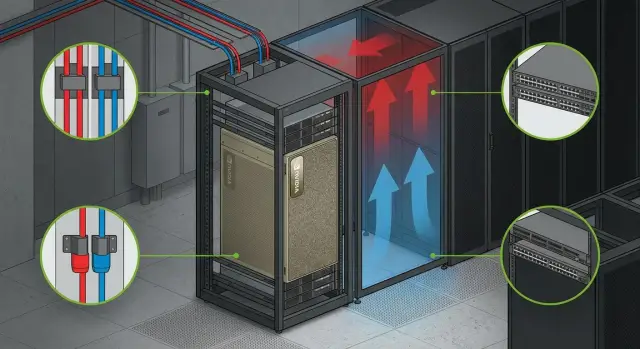
Where a DGX on‑prem project starts and why it matters
On‑prem AI is rarely chosen out of stubbornness — it’s chosen for practical reasons: data can’t leave the premises, latency must be predictable, total cost of ownership should be stable, and you need full control over access. This is especially true in government, banking, healthcare and education, where security and audit requirements often outweigh a fast time‑to‑market.
An NVIDIA DGX for on‑prem AI can be seen as a ready compute "engine" for training and inference: several powerful GPUs, fast network interfaces and a tuned base platform. But it doesn’t live in the architecture alone. It needs other "organs" — network, storage, power, cooling, access processes and monitoring. If any of these is weak, GPUs will sit idle and the launch will be delayed.
Projects usually fail not because of the servers themselves, but because infrastructure details surface too late. Typical causes: underestimating power draw and redundancy (and real UPS load), miscalculating heat and airflow in the rack (hot spots, noise), designing the network "like ordinary servers" and hitting latency limits, placing data so that compute constantly waits for loads, and not agreeing on access rules and responsibilities.
Fix early the decisions that are costly to change: where the DGX will sit, how many rack units are needed, the power and cooling scheme, required network speeds and topology, where data will live and how it will be protected. Things that can be tuned after launch should be separated up front: detailed role‑based access policies (once the basic model is clear), fine‑tuning monitoring, optimizing data pipelines, and choosing specific tools (if compatibility needs are known).
A practical start looks like this: one business owner defines scenarios (for example, training models on internal documents), and the data center team plus an integrator verify whether the site meets the "hardware" requirements. When local vendors and a service network are involved, many operational and support questions are convenient to close before procurement and delivery. For example, GSE.kz as a systems integrator and manufacturer can join at the assessment stage to minimize surprises on installation day.
Requirements gathering: tasks, data, security, timelines
To avoid turning your NVIDIA DGX on‑prem deployment into a set of guesses, begin with something simple: what must the system do daily, and how will you know it’s doing it?
Tasks and metrics
Scenarios usually mix: model training, production inference, enterprise search (including RAG), analytics for data teams, sometimes AI VDI and visualization. Each scenario has different expectations for speed and availability, so agree on metrics in advance.
Four to five measurable goals are enough. For example: time to train a typical model or a pipeline stage (e.g., "nightly run completes within 8 hours"), inference latency for a single request and at peak, allowed maintenance windows, how many users or teams work concurrently, and the "Plan B" in case of failure (acceptable downtime).
Data, security and constraints
Clarify data: current volume, growth for 6–12 months, where data is stored and how sensitive it is. Decide what must remain strictly inside the perimeter, what can be anonymized, and which datasets must be hot so GPUs don’t wait for loads.
For security, define boundaries: network segmentation, roles and access (admins, ML engineers, analysts), audit of actions, project isolation and account provisioning procedures. Government and financial organizations often add regulatory and internal policy requirements.
Finally, capture pragmatic constraints: procurement and delivery timelines, budget, local manufacturing or service requirements. If you work with an integrator, collect requirements in an acceptance document early — that reduces later disputes about what exactly should be running and by when.
Site readiness: rack, space, access and serviceability
Before discussing power and network, answer honestly: exactly where will the NVIDIA DGX be placed and how will you service it day‑to‑day?
Start with the rack and mechanics. Check depth and mounting rails, weight‑bearing capacity (equipment plus cabling), raised floor and rails. Plan the delivery path: doorways, elevators, turns, ramps. Deployments are often delayed not by IT but because the crate can’t be safely brought into the server room.
Cabling paths are a separate topic. If fiber and power cables are laid "however they fit" you will quickly see bends, tension, port confusion and higher service risk. Plan a clear scheme: separate power and low‑voltage paths, provide slack, label cables and use tidy fixings. Small details that will save hours later.
The service plan must answer whether you can reach front and rear without dismantling half the rack. Leave working clearances, ensure rails extend, and that filters, fans and cables are accessible for replacement. If the rack rear is blocked by a neighbor, replacing a network module may become a maintenance‑window job.
Check room conditions: stable temperature, controlled humidity, low dust and a clear housekeeping policy. Add access control and a maintenance log so it’s clear who opened a rack or moved a cable and when.
Quick site readiness checklist:
- rack and floor support the weight and allow mounting and rail extension
- delivery route is agreed and physically passable
- separate and labeled routes for power and fiber with spare length
- front and rear service access without stopping neighboring systems
- room meets temperature, humidity, dust and access requirements
If working with an integrator, request a site requirements template and walk it on‑site with operations. This reduces surprises on installation day.
Power: capacity, redundancy and validation
For NVIDIA DGX on‑prem AI, power is not just "are there enough kilowatts." It’s whether the site handles peaks, how quickly you detect overloads, and what remains operational during an outage.
Start by estimating consumption: use nameplate values per node and add margin for peaks and growth (usually 15–30%). Account separately for networking, storage and console infrastructure. Real conditions often differ when training, heavy network exchange and active storage writes occur simultaneously.
Next — redundancy. Two independent feeds look good on a diagram, but "independence" must be confirmed: separate cable routes, separate breakers, separate PDUs and, if possible, different distribution sources at the panel level. A common mistake is both feeds converging into the same distribution unit so one failure cuts everything.
Check PDUs and protection: breaker ratings, correct connectors for specific equipment, and phase balance in the rack (for three‑phase setups). Phase imbalance and overheated contacts are common causes of instability under load even when aggregate kilowatts look sufficient.
With UPS and generator define a simple rule: how many minutes of autonomy you must have and what is prioritized. Sometimes the goal is to ride through brief outages and shut down gracefully. Sometimes it’s to keep management and monitoring alive while compute stops.
Before equipment arrival, take onsite measurements. Minimal checklist:
- actual voltage and voltage sag under test load
- presence of two independent lines and correct switchover behavior
- breaker/PDU headroom and absence of overheating at connectors
- phase balance in the rack (if applicable)
- UPS behavior: autonomy time and graceful shutdown
A practical scenario: connect a temporary load (load banks or approved equivalent), run 1–2 hours, record currents, temperatures at connection points and UPS logs. If you see spikes, trips or overheating now, fix them before DGX installation.
Cooling: how to avoid GPU overheating and a failed launch
For GPU servers the threat is not only "room temperature" but hot inlet temperatures at a particular server. So sizing cooling by floor area is risky: two similar halls can behave differently due to airflow patterns, raised floor height, rack density and cable routing.
If you deploy NVIDIA DGX on‑prem, start with a simple evaluation: how much heat will the rack dissipate under expected load and where will it go. In practice the inlet air supply to the front of equipment and predictable hot‑air removal from the hot aisle are critical, not the average room temperature.
Hot and cold aisle basics without major DC changes
Even without major works you can greatly reduce overheating risk by following base rules: cold air must reach the equipment front, hot air must exit the rear and not reenter the cold aisle.
Quick wins include: orient racks with fronts to the cold aisle, install blanking panels in empty units, seal cable entry gaps and aisles, avoid blocking intakes with dense cable runs, and ensure rack and server fans are not fighting each other’s airflow.
Sensors and measurement points
Measure temperature where it matters: server inlet (rack front) and outlet (rear). Place sensors top, middle and bottom because the top often gets hotter in dense racks.
Follow vendor guidance (often 18–27 °C at the inlet) and watch for temperature swings under load. The delta between inlet and outlet is informative: a steep rise often signals airflow problems.
Acceptance temperature test
Before commissioning, run a short but honest test: generate sustained compute load (training or synthetic stress) and verify the system does not throttle.
Acceptance criteria example:
- sustained load for 2–4 hours without emergency shutdowns
- stable inlet temperature below threshold
- no signs of throttling (frequency drops, sharp performance loss)
- no recirculation of hot air into the cold aisle
If the test fails, fixes are often mechanical: correcting rack layout, sealing gaps, adding blanking panels, or improving cable routing rather than "more air conditioning." In integration projects such checks are commonly done before final acceptance to avoid a failed launch due to a single gap or airflow direction issue.
Network: connection topology and bandwidth requirements
The network in an NVIDIA DGX on‑prem project has two jobs: give GPUs fast access to data and not interfere with administration. A typical mistake is that hardware is ready but training is slow due to a bottleneck between the server, storage and users.
A practical approach is to separate traffic by purpose. Usually you create segments for management (admin and service access), data (node‑to‑node exchange), storage (access to storage arrays) and out‑of‑band (remote management if the main network is down). This simplifies security and diagnostics: it’s easier to see where latency grows.
Topology depends on scale: a single DGX or growth into a cluster. For a single rack a ToR switch often suffices with a clear port plan. If you expect more GPU nodes in 6–12 months, consider spine‑leaf early: it’s costlier initially but easier to scale without reworking the whole fabric.
Bottlenecks vary. For training, dataset access and parallel reads commonly choke performance (GPUs waiting for data). For inference workload, spikes matter: stable latencies to applications and enough throughput to return results at peak are critical.
RDMA and low latency are not always required. With one server and local data gains may be minor. RDMA becomes important in distributed training across nodes and heavy access to networked storage.
To avoid surprises on install, prepare a port list and cabling rules:
- which DGX ports are used for data, storage, management and OOB
- connection types (fiber or DAC) and cable lengths
- labeling on both ends and a unified naming format
- spare ports and cables (typically 10–20% for growth and replacements)
- where and how you will measure latency and real throughput
If integration is by an integrator team, ask for test results too: measured throughput to storage and latency stability under load. This proves the network is ready, not merely "connected."
Storage and data: ensuring GPUs don’t idle
Even if NVIDIA DGX GPUs are ready, training can be limited by storage. A symptom: GPU utilization jumps and training moves slower than expected.
Start with the I/O profile. Large sequential reads need GB/s bandwidth. Many small files and parallel streams require low latency and high IOPS. If data sits remotely (on another network segment or behind a slow gateway), excellent storage can still appear slow due to latency.
Classify data flows: training datasets (heavy reads, often parallel), model checkpoints (periodic large writes critical for recovery), artifacts (exports and results), and logs/metrics (many small writes where stability matters).
Discuss backups with two numbers: RPO — how much data you can afford to lose (e.g., last 4 hours of training), and RTO — how fast you must recover and resume jobs (e.g., within 2 hours). These guide snapshot frequency, backup zones and recovery speed requirements.
Access control for data is equally important. For sensitive environments decide ahead where datasets live, who can read, who can delete and who may export results. It’s easier to set this up before launch than to investigate incidents later.
Before commissioning run tests "as you will use them," not just vendor benchmarks: copy sample datasets, run parallel reads across jobs, and write checkpoints. Minimal checks:
- stable dataset read speed with 2–4 concurrent jobs
- checkpoint writes complete within the allowed window
- logs and metrics are written without delays or drops
- access rights validated with real user roles
- a clear backup plan and tested restore
If you work with an integrator, include these measurements in acceptance. Then the phrase "GPUs did not idle" becomes a verifiable criterion.
Software and access: from installation to user rules
Once hardware is onsite, software and access policies often decide the project’s fate. For NVIDIA DGX on‑prem AI it’s important to choose a base stack and agree who runs jobs. Otherwise the first weeks will be chaotic with manual fixes.
Base stack and update plan
Start with a repeatable system image: a proven OS version, GPU drivers, CUDA environment and container layer (e.g., Docker with NVIDIA Container Toolkit or Kubernetes if already adopted). Containers let teams bring dependencies in images while infrastructure remains stable.
Agree on update windows: how often drivers, CUDA and firmware are updated, who approves changes and how quickly to roll back. A practical approach is a test node or test pool where updates are validated on representative workloads (training, inference, data loading) before production rollout.
Minimum to finalize before launch: a compatibility matrix (OS, driver, CUDA, container runtime), standard images for popular frameworks and inference, an update and rollback policy, inventory of packages and licenses (if commercial components are used), and configuration templates for network and storage clients.
Access, queues and security
Separate roles: admins handle OS, drivers, network, storage and security. Platform engineers maintain container images and pipelines. Researchers and data scientists access queues and workspaces, not system settings.
To prevent resource hogging, set simple scheduler rules: GPU limits per user or team, maximum job runtime, separate queues for experiments and production inference, and priority for critical services. This can be implemented in Slurm or Kubernetes via quotas and limits — the key is transparency.
Don’t rely only on passwords. Store secrets (keys, tokens) in a secrets manager, enable admin action logging, restrict privileged containers and use image control (trusted registry, vulnerability scanning, disallow unknown images).
Before go‑live produce operations docs: who is on call, how accesses are granted, how projects are created, incident response, where to check logs, and which changes require approval. If an integrator is responsible, ask them to hand over runbooks along with final configs and contact details.
Monitoring and operations: keeping the system healthy
When NVIDIA DGX on‑prem AI is running, the main task shifts from "launch" to preventing subtle degradations. GPU infrastructure often fails quietly: inlet temperature rises, network throughput drops, logs fill storage — and a week later training jobs fail.
What to monitor
Monitoring should answer: why are GPUs idle or why are jobs failing? Usually five groups of signals suffice:
- compute: GPU/CPU utilization, memory, GPU errors (ECC, Xid), driver restarts
- temperatures and fans: GPU, CPU, rack inlet temperature, fan speeds
- power: per‑server and PDU consumption, UPS events, sags and switchover
- network: bandwidth, packet loss, port errors, inter‑node latency
- storage: IOPS and latency, capacity, array degradation, write queues
Alerts should be "smart": thresholds plus duration (e.g., temperature over limit for 10 minutes) and maintenance windows. Configure escalation: who gets immediate notification, who after 15–30 minutes, and what counts as an incident versus a warning. This reduces alert fatigue from false positives.
Procedures and on‑call
Store logs and audits centrally with clear retention: system events, user access logs and configuration changes separately. Restrict access to logs and record admin actions.
Define an internal SLA simply: response time for critical incidents and warnings, recovery time (RTO) and acceptable data loss (RPO), on‑call schedule and communication channels, update and rollback procedures, and who can decide to stop the cluster.
Decide spare parts in advance: what to keep onsite (cables, SFPs/fiber, drives, fans, PSUs) and what can be ordered. If 24/7 support is required (in‑house or via partner), fix it in procedures and test with a drill.
"Ready for production" criteria: quick checks and acceptance
To avoid a launch full of hot fixes, agree in advance on checks and what acceptance means. Then teams have a shared target: what risk is closed and what remains.
Quick checklist before first power‑on
Before applying power make sure conditions are met onsite, not just on paper:
- power: dedicated capacity confirmed by measurements, redundancy (A/B) working, breakers and PDUs checked
- cooling: required temperatures and airflow achieved at the inlet, sensors configured
- network: ports active, speeds and MTU agreed, cables labeled, management access available
- access and security: accounts and roles created, access via jump host or corporate VPN, logging enabled
- operations: runbooks for alarms, on‑call contacts, change process and maintenance windows
Load and stability tests
Next, stress the system under real load: at least 1–2 hours at peak modes and a day under a mixed profile (training, I/O, network). Watch not just throughput but absence of degradation: GPU throttling, memory errors, temperature spikes, repeated service restarts.
Test network separately: no packet loss, correct MTU for jumbo frames, stable throughput between nodes and to storage. These checks reveal small issues that later cause days of downtime.
Failure scenarios and acceptance criteria
Acceptance is stronger if you simulate failures: take one power feed down, one link, one switch or one storage shelf (within agreed limits). The system should remain manageable and consequences understandable.
Ready for production if:
- load runs for 24 hours without critical errors
- temperatures and power stay within safe margins with headroom
- network meets agreed metrics and has no packet loss
- monitoring and alerts are operational and response actions are clear
- acceptance documents signed: diagrams, settings, access and support plan
If any item fails, it’s not "almost ready" — it’s an action item with an owner and deadline.
A realistic deployment scenario and next steps
A typical starter case: one rack, one NVIDIA DGX node, a team of 2–3 engineers (data center, network, systems) and 10–20 users (data science and applied teams). The goal is simple: run training and inference without surprises in power, cooling, network and access.
A weekly plan might look like:
- week 1: requirements gathering (models, data volumes, maintenance windows, security needs, user list and roles)
- week 2: site survey (rack, PDUs, available power, cooling, cabling paths, network and storage connection points)
- week 3: data center prep (order cables and fiber, configure VLAN/ACL, power redundancy, cooling checks under load)
- week 4: installation and basic setup (rack mounting, labeling, initial configuration, CMDB entry, accounts, baseline policies)
- week 5: testing and acceptance (load runs, failover tests, monitoring, admin training and pilot launch)
Minor issues always surface mid‑project and consume time: missing switch ports or licenses, undefined access rules, local heat dissipation limits, or unexpected storage throughput limits. A good rule is to budget 20–30% extra time for approvals and adjustments and predefine who signs off changes.
Record results not verbally but in clear documents: rack placement and cable log, up‑to‑date network diagram, backup and update procedures, and an acceptance report with measurements (power, temperature, network tests, workload runs).
Next steps: a 2–4 week pilot with real workloads and quotas, then scale based on pilot bottlenecks (additional nodes, storage, network fabric), staff training (admins, ops engineers, users) and agreeing support and SLA.
If you lack hands or experience a systems integrator can cover survey, design, deployment and operations. For example, GSE.kz (gse.kz) as a manufacturer and integrator in Kazakhstan supplies server infrastructure, integrates into data centers and provides 24/7 technical support through its service network.
Frequently asked questions
Where should you realistically start a DGX on‑prem project to avoid getting stuck on "small details"?
Start with concrete scenarios and metrics: what will be done daily (training, inference, RAG, analytics), required latencies and maintenance windows, how many teams run in parallel and what downtime is acceptable. This immediately shows where network and storage are critical and where access policies and queues matter more. Then lock in what is expensive to change: rack location, power and redundancy, cooling, network topology and data placement.
What usually causes DGX deployments in data centers to fail?
The most common cause is unverified site readiness: power rated "on paper" without peak or UPS checks, inlet overheating due to airflow issues, network designed like ordinary servers leading to unexpected latency, and storage that cannot deliver required read performance. Another frequent reason is lack of pre‑agreed roles and rules: who administers, who runs jobs, how accesses are granted and who approves changes.
Which metrics should be agreed before procurement and installation?
Yes — define 4–5 measurable goals in advance. Typical minimum: time to train a reference workload, inference latency for a request and under peak load, allowed maintenance window, number of concurrent users/teams, and acceptable downtime after failures. With these metrics you can accept infrastructure not just as "powered on" but as "operating at required level."
How to describe data requirements for on‑prem AI correctly?
Collect three things: current data volume and growth forecast for 6–12 months, data sensitivity (what must stay strictly on‑prem and what can be anonymized), and access speed requirements for hot datasets. If datasets must be "fast," decide where they reside physically and in the network, otherwise GPUs will wait for loading and real performance will be lower than expected.
How to be sure power is enough and redundancy works?
Check not just total kilowatts but behavior under load: power peaks, voltage sag, UPS behavior and true independence of two A/B feeds. A useful practice is a 1–2 hour test load with recorded currents, connection temperatures and UPS logs. That is cheaper than troubleshooting after the GPU server is installed.
What matters most for cooling DGX and how to verify it?
Measure temperature at the server inlet, not the average room temperature. In dense racks airflow patterns, blanking panels, sealed cable openings and preventing cables from blocking intakes are critical. Before acceptance run 2–4 hours of sustained compute load and confirm there is no throttling and inlet temperatures remain within acceptable limits.
What is the minimal network approach so training does not stall on latency?
Separate traffic by purpose: management, data, storage access and a distinct channel for out‑of‑band management. This simplifies security and troubleshooting. Network readiness is proven by measurements under load: real throughput to storage and stable latencies, not merely that "the link is up."
How to choose storage and prove it won't be a bottleneck?
Start with the I/O profile: large sequential reads need GB/s bandwidth, many small files require low latency and high IOPS. Separate datasets, checkpoints, artifacts and logs since they have different needs. Before launch, run real‑life tests: parallel reads from several jobs and checkpoint writes within the allowed window. If these fail, GPUs will very likely be idle.
What must be decided about software and access before going to production?
Define a reproducible base image: OS, GPU drivers, CUDA and container runtime. Agree update windows, approvers and rollback procedures so changes do not break pipelines. Also split roles, set job queues and GPU quotas so users do not fight for resources during the first weeks.
Which criteria show DGX is truly "ready for production"?
Acceptance must verify stability, not only performance. Minimum — 24 hours of mixed load without critical errors, temperatures and power within safe margins, network without packet loss and with agreed metrics, alerts working and on‑call actions clear. Also ensure delivery of up‑to‑date diagrams, configurations, cable logs and support procedures. If an integrator manages the project, for example GSE.kz, include these deliverables and acceptance criteria in advance.
