7 min read
Notification architecture in an enterprise system: channels
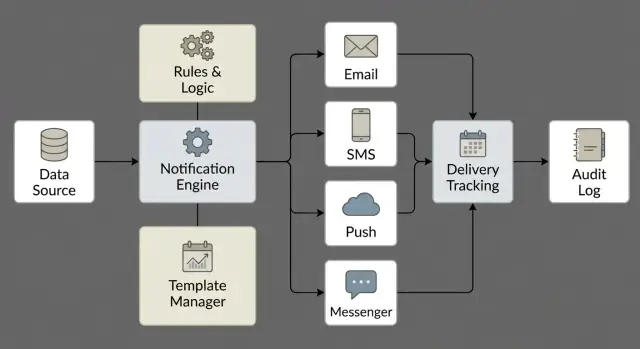
Notification architecture in an enterprise system: channels, templates and languages, sending rules, delivery tracking and history storage for audit.
Why design notifications as a separate system
Notifications are often treated as minor: send an email or SMS and forget. In reality they are the first to break as a product grows. The reason is simple: notifications are tied to the business logic of dozens of services, each with its own timing, formats and common errors.
When sending is "embedded locally", familiar problems appear quickly: the same messages are sent twice, some arrive late, and some are lost when a queue fails, a timeout occurs, or a service restarts. Even worse is when nobody can answer: “Did a specific person receive the message and when?”
Without history and statuses, notifications become a risky area. Disputes with users and contractors arise, audits become harder, and security cannot prove that important events (login, permission change, approval, block) were communicated.
Business expects predictability: important messages must arrive, unimportant ones should not create noise, and failures must have clear retries. Security and support expect control and transparency: who initiated the send, which rule chose the channel, which template was used, what the provider answered, and how the delivery ended.
Typical bad solutions:
- sending logic scattered across services and impossible to change consistently
- templates edited in code without versions or approvals
- no delivery statuses, making “not received” uninvestigable
- no tracking or deduplication, so users get duplicates
A dedicated notification system gathers everything in one place: events, rules, content, channels, statuses and history. Notifications stop being a "side effect" and become a manageable service that can be audited and verified.
Basic concepts: event, message, channel, status
To prevent notifications from becoming a collection of disconnected emails and pushes, agree on terminology. It makes it easier to discuss requirements, set rules and investigate incidents.
Mini glossary
- Event: a fact in the system that triggers a notification. For example, “request approved”, “server unreachable”, “user changed password”.
- Recipients: who should learn about the event. It can be a single person, a role (e.g., accounting) or an on-call group.
- Message: the specific text and data sent to a recipient. Data (request number, amount, deadline) should be separated from presentation.
- Channel: the delivery method — email, SMS, push, messenger, internal feed.
- Status: what is happening with the send. At minimum: planned, queued, sent, delivered, error, canceled.
Notifications are often divided into transactional and informational. Transactional messages confirm actions or security (login, credential change, one-time code). They require speed, accuracy and auditability. Informational messages are “for information” (daily reports, news) and usually have lower urgency and higher tolerance for delays.
Criticality is easier to capture as priority: urgent, normal, low. It affects send timing, retry counts and channel choice.
Also think about idempotency: one event should produce one notification even if the sending service fails and retries. A unique key is needed for each message (for example, event_id + recipient + channel).
Finally, consents and restrictions: not everyone can receive everything. Consider subscriptions, working hours, security requirements and minimizing personal data in texts.
Modular architecture: building blocks
To keep the notification system manageable, assemble it from separate blocks. This lets you add channels, change texts and rules without touching business services.
A useful split by responsibility:
- Event collector: accepts triggers from CRM, ERP, portals, support systems and other services, normalizes them to a common format (event type, recipient, context, priority).
- Queue and dispatcher: buffers load, respects provider limits, manages retries, deduplication and ordering (e.g., urgent notifications first).
- Templating engine: injects data into templates, selects language, builds subject and body, prepares attachments and validates required fields.
- Channel adapters: send via email, SMS, push and corporate messengers, hide API differences and return a unified status.
- History and audit store: records the fact of sending, parameters, template versions and delivery statuses; provides search and exports for checks.
Separate "content" from "delivery." Texts and localization should live in templates, not in service code, otherwise any edit becomes a release.
A simple example: in a government organization a procurement request is approved. The event comes from the portal, the dispatcher queues it, the templating engine chooses Russian and inserts the request number, the email adapter sends the message, and an SMS is sent only if there is no confirmation within 30 minutes. The history records the initiator, template and version, send time, provider responses and retry count. This greatly simplifies incident investigation and audit preparation.
Delivery channels and their practical limits
Channels are not equal in reliability and speed. Accept their limitations up front or support will drown in “why didn’t it arrive?” questions.
Email and SMS
Email is good for long texts and careful formatting, but has many external dependencies. Attachments can be blocked by security policies and large emails can be truncated. Domain settings, sender reputation and spam filters often decide a message's fate as much as your code.
SMS is usually faster and more noticeable, but strict about text discipline. There are tight length limits; Cyrillic reduces available characters and can affect cost. Operators may have delays during peak times, and each extra retry costs real money.
Push and messengers
Push suits mobile scenarios but relies on device tokens: they expire, reset after reinstall and depend on platform. User consent and device notification settings — which you don't control — are also important.
Messengers and chat bots add convenience but require permissions and reliable identity: who actually reads the message and is authorized to receive it. Also, a message in a chat at 02:00 may be technically delivered but practically useless.
If the primary channel is unavailable, define a simple fallback. Typical rules:
- duplicate critical events to a second channel (e.g., email + SMS)
- set an escalation timer if there is no delivery or read confirmation
- switch channel based on clear signs of unavailability (provider error, expired token)
Example: for a data center incident, send an SMS to the on-call immediately and follow up with a detailed email to avoid losing important instructions.
Templates and languages: making content manageable
To avoid "texts in code", move content into managed templates. That way wording and language changes won’t need a release, and support can quickly see exactly what was sent.
Treat a good template as a small form. It usually contains a subject (or email subject), body, variables (e.g., {full_name}, {request_id}, {due_date}), and channel parameters (priority, SMS length limits, analytics tags).
Versioning is critical. Storing only the "current" version is insufficient: for incident analysis and audit you must know who changed a template, when, and which version was sent to a recipient. Simple rule: record not only the template ID but also its version number (or a content hash) in the send history.
Localization is more than translation. Different languages have different forms of address, politeness rules, and formats for dates, times and amounts. In Kazakhstan you often need at least RU and KZ, sometimes EN for contractors.
Create a unified variable dictionary: the same field must be named identically across events and channels. Otherwise "{fio}" in one place and "{full_name}" in another will quickly lead to empty values.
Before launch, add clear testing: previews for different channels, sending to test recipients, checks for empty fields and overly long values, verifying language selection by user profile, and safe rollout of new versions (e.g., to a limited group).
Sending rules: who, when and by which channel
Model sending rules as a matrix rather than burying them in code. This clarifies: what happened, who we notify, how we notify, and why.
A simple rule looks like:
event -> recipients -> channel -> template -> conditions.
For example: “Procurement request rejected” -> author + manager -> email (detailed) and push (short) -> templates RU/KZ/EN -> only during working hours.
What to capture in rules
Typically capture:
- recipients by role and context (author, assignee, service owner, on-call group)
- channel selection by message type (urgent, informational, legally significant)
- template and language by user profile, plus a fallback option
- sending conditions (object status, importance, region, department type)
- an identifier for tracking and linking to history
When not to send: time, frequency, load
Quiet hours, weekends and holidays should be part of rules, otherwise staff will turn off notifications entirely. For critical incidents allow exceptions: permit sending anytime but only via channels that legitimately wake people.
Limit frequency as well: e.g., no more than N notifications per hour per user and deduplicate identical messages ("server down" every 30 seconds). Otherwise internal anti-spam becomes mandatory.
Under load, priorities and separate queues help: urgent messages go first; mass mailings go to a separate queue and can be delayed.
Security is a separate rule layer. Secrets and unnecessary personal data must not be sent via any channel. Plan for masking (e.g., show only the last 4 digits) and forbid sensitive details in SMS and push.
Delivery tracking: statuses, retries and support visibility
Delivery tracking is not only for dashboards. It helps support answer: was the notification actually sent, to whom, when, via which channel, and where did it fail?
Start with simple, unequivocal statuses that both developers and support understand:
- accepted (system received the request)
- queued (awaiting processing)
- sent (handed to provider or mail server)
- delivered (provider confirmation)
- error (send failed or retries exhausted)
To tie everything into one story, store correlation data: business event ID, user, channel, template and version. With a single ID you can reconstruct the chain: event -> send attempts -> result.
Make retries configurable: 3–5 attempts with increasing intervals (e.g., 1, 5, 15 minutes) and a hard stop by age (e.g., no later than 2 hours after the event). Distinguish temporary errors (timeout, provider overload) from permanent ones (invalid address, delivery forbidden). Retry temporary errors and record and switch channel on permanent ones.
Support needs real-time visibility. Minimum monitoring: queue length and delay, error rates by channel and provider, retry counts, spikes by event or template, and alerts when critical messages lack a “delivered” status.
History and audit: how to store to prove sending
When notifications affect decisions and deadlines (approvals, system access, outage notices), sooner or later someone will ask: who received what and when. History becomes evidence, not just logs.
To prove sending, record context as well as text. Practical minimum:
- event and message identifiers, notification type, priority
- recipients (user and destination address), chosen channel and provider
- template version and language, substitution parameters (within limits)
- timestamps: queued, sent, delivered/read (if available)
- statuses and errors: provider codes, reason for failure, retry count
For audit, immutability matters. A common practice is append-only history with tightly restricted edit/delete rights. If internal disputes are possible, store a content hash or signature so changes are detectable.
Retention periods should follow business, regulatory and internal policy, not “as it happens.” Splitting into a hot store for support and an archive for audits often helps.
Do not store more than necessary: mask personal data and, when possible, store a template reference and a safe set of parameters instead of full text.
Step-by-step rollout: from event catalog to launch
Avoid getting lost in details by following a plan with owners and outcomes for each step.
-
Collect an event registry: what happens, who cares, and what effect is expected.
-
For each event choose a primary channel and a fallback: email, SMS, push, internal inbox. Record constraints (length, delivery time, cost, provider availability).
-
Define templates and languages: structure, variables, tone, required fields. Assign content owners and a change owner so texts are not edited "in code."
-
Configure sending rules: recipients, conditions, limits, quiet hours and critical incident exceptions.
-
Enable tracking and accounting: delivery statuses, retries, deadlines, logs and history storage for audit.
Before launch run tests: load, SMS/email provider failures, bad data (empty phone, wrong language, missing variable). In regulated organizations verify that the logs can prove who received what and when.
Common mistakes and how to avoid them
The most costly mistake is notifications living scattered inside services. Then no one sees the whole picture: where rules were, who sent what, why one person got three emails and another got nothing. Better separate event generation from delivery and keep rules centralized.
Another common issue is the lack of a single Notification ID that travels from event to provider. Without it support cannot investigate whether retries are the same request or different messages. The fix: issue an ID when creating the notification and propagate it in payloads and logs.
Content also breaks: templates edited ad-hoc without versions. In a week you cannot prove what text a recipient saw, which is critical for regulatory checks. Version templates and bind sends to a version.
Other pain points:
- no rate limits or grouping, causing floods of emails and pushes
- no quiet hours or priorities for critical messages
- no protection from duplicates during provider outages
- history storing excessive personal data
Quick checklist before launch and for regular review
Before release, run a quick check. A good sign is a single source of truth: an event registry with owners and delivery expectations.
Verify that each event has a primary channel and a clear fallback. For example, if push is undelivered for 2 minutes, send an email. If email is rejected, record the error and create a support ticket instead of silently losing the message.
A short monthly checklist:
- event registry is current, each event has an owner and expected delivery time
- channels are configured with limits: rate limits, quiet hours, spam protection, fallback rules
- templates under control: versions, preview, test recipients, necessary languages and required fields
- delivery observable: statuses, retries with backoff, separation of temporary and permanent errors
- history is audit-ready: append-only log, search by user/event/time/correlation ID
Also define metrics and responsible parties: delivery rate, average delivery time, retry count, top errors, and backlog of unresolved incidents.
Example scenario: approval flow and delivery status control
Imagine a large organization where procurement moves through multiple approval levels. To avoid notification chaos, events, channels and what counts as “delivered” and “read” are defined in advance.
Typical events for one request: creation, sent for approval, rejection, approval, supplier confirmation.
Map channels by intent. Email is for documents and details (request number, amount, attachments, deadline). Push is for urgent statuses like “signature needed by 16:00.” SMS is a reserve if push is unavailable or the user lacks a corporate app.
Control relies on statuses: “created”, “sent to provider”, “delivered”, “not delivered”, “read” (if the channel supports it). In the request card support should see who was notified, when, by which channel, and which template version was used.
If a failure happens, simple rules help:
- queue delay: show SLA timer and send an internal alert
- provider unavailable: switch to backup channel (push -> SMS)
- temporary error: retry with backoff and a cap on attempts
- permanent error (invalid number): mark as “requires data correction”
- duplicates: idempotency by key “request + event + recipient”
Next steps: turning the scheme into a working service
To get the system working, start with the hardest-to-fix items: auditability and provable sends, retention periods, languages and localization, channel set, and provider limits (rate, message size, quiet hours).
Then assign responsibilities. Business describes events and user expectations; security approves data handling rules and log access; support defines necessary statuses and reports for investigations. Appoint a template owner: who can change text, in which languages and how changes are approved.
A practical launch path:
- pick 2–3 processes with clear impact (procurement approval, account recovery, payment notifications)
- document recipients, priority, default channel and fallback, and retry rules for each event
- prepare templates in required languages and align tone
- design infrastructure: resilience, monitoring, backups, separate history store for audit
- run a pilot, collect metrics (delivery, time, complaints), then expand events
If notifications tie to critical infrastructure (data center or corporate perimeter), align the service design with platform and support capabilities. In such projects the system integrator GSE.kz often assists with the infrastructure side — from servers and workstations to deployment and 24/7 maintenance of IT systems.
Frequently asked questions
Why separate notifications into a dedicated system instead of sending them directly from services?
Separating notifications into a dedicated service provides unified rules, templates, statuses and history. Business services simply publish events while delivery and control are handled centrally, reducing duplicates, losses and “silent” failures.
What is the difference between an event and a message in a notification system?
An event is a fact in the system that triggers a notification. A message is the already-formed content (subject, body, parameters) for a specific recipient and channel that can be tracked through statuses and history.
Which delivery statuses should be implemented first?
Start with these statuses: “accepted” (system received the send request), “queued” (awaiting processing), “sent” (handed to provider), “delivered” (provider confirmation), and “error”. If a channel supports it, you can add “read”, but don’t rely on it as a mandatory indicator for all channels.
How to avoid duplicates if a service or queue retry triggers another send?
Use an idempotency key stored in the sending system so the same key does not create a second send. A practical key is a combination of the event identifier, recipient and channel, so a retry continues the same notification rather than creating a new one.
When is a fallback to another channel needed and how to configure it without chaos?
Start with a simple rule: duplicate critical events to a second channel, while non-critical ones use a single primary channel. Add an escalation timer: if there is no delivery confirmation within a set time or the provider is clearly unavailable, switch to the backup channel.
Why is it important to version notification templates?
Templates must live outside code and be versioned so every edit is controlled and reviewable. Record not only the template ID but also its version (or a content hash) in the send history so you can reconstruct exactly which text was sent to a recipient.
How to choose the notification language and what about RU/KZ/EN?
Choose language by user profile; if missing, fall back to the unit or system setting with a clear default. For Kazakhstan, RU and KZ are often required, sometimes EN for contractors. Account for date, time and number formats, not just word translation.
How to describe sending rules so they don't get scattered in code?
Tie a rule to the chain “event → recipients → channel → template → conditions”. In conditions, fix priority, business hours, rate limits and security restrictions so sensitive data cannot be accidentally sent via SMS or push.
How to configure retries on errors and when to stop?
Use several retry attempts with increasing intervals and a hard time limit for message relevance. Retry temporary errors (timeouts, provider overload); stop and record permanent errors (invalid address, delivery forbidden) to avoid wasting resources and money.
What should be stored in history to prove delivery for audits?
Store event and message IDs, recipient and destination address, channel and provider, template version and language, key timestamps and provider error codes. Make the history append-only where possible, and minimize stored personal data so the log is useful for both support and audits.
