7 min read
Network segmentation: practical VLAN design and access rules
Network segmentation separates employees, guests, cameras and servers: a clear VLAN, ACL and micro‑segmentation plan without unnecessary rules.
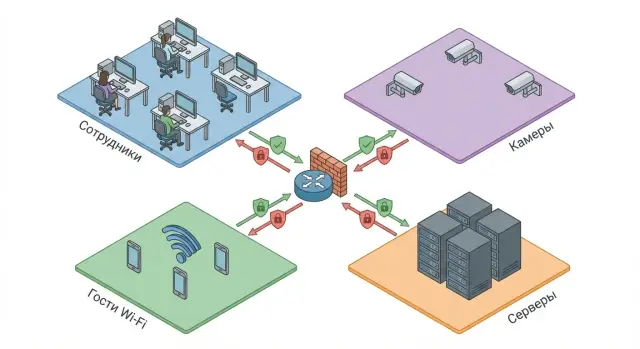
Why bother with network segmentation?
In many offices all devices live in a single flat network: work PCs, accounting laptops, guest Wi‑Fi, printers, cameras, phones, servers and even smart TVs. That may be convenient at first. Later it becomes risky: devices have different protection levels and purposes, but everyone ends up with the same access rights.
Usually workstations, contractors' laptops, guest devices (phones, personal laptops), IP cameras and NVRs, printers/MFPs, servers and NAS end up together in one network.
In a flat network an infection on one PC quickly becomes everyone’s problem. A user opens a malicious attachment and the code looks for where to "crawl": neighboring PCs, shared folders, vulnerable services, credentials. If servers are nearby, the consequences are usually the most expensive: downtime, data encryption, leaks.
Cameras and printers are a special pain. They are often installed with a "let it run" approach: updates not applied for months, default passwords left in place, and access open in the same network as critical systems. A weak device then becomes an entry point into the corporate environment.
Network segmentation fixes this without unnecessary complexity: you separate devices into zones and give each zone only the paths it needs. Employees keep using mail and corporate services, guests can’t see internal resources, cameras can’t go wherever they want, and servers only answer who they should.
Practically, this means a smaller "blast radius" in an incident and fewer reasons to halt business over a single mistake. If your infrastructure includes local servers and workstations (for example, in projects using GSE equipment), this approach helps keep key systems available even when one workstation has a problem.
Key concepts: VLAN, ACL and micro‑segmentation in plain terms
Network segmentation means dividing one shared network into several isolated zones to remove unnecessary contacts between devices. It makes incidents easier to contain and reduces the chance that an accidental error or infected laptop reaches cameras, servers or accounting.
VLAN: separation at the switch level (L2)
Think of VLANs as separate "rooms" inside one physical network. Cables and switches can be shared, but devices in different VLANs don't see each other directly unless you allow communication.
In practice VLANs help to:
- separate guests, cameras, users and servers even if they use the same switches;
- remove accidental "neighborhoods" (when a printer or camera ends up in the same subnet as work PCs);
- simplify addressing and rules (each zone gets its own subnet).
L3 routing and firewall: who "connects the rooms"
To let devices in different VLANs talk (for example, PC -> server) you need a router or L3 switch. It's like a door between rooms.
A firewall is the guard at that door. It inspects who goes where and enforces access rules. In small offices some simple controls can live on the L3 switch, while stricter controls and logging are on the firewall.
ACL: minimal rules between segments
ACLs (access control lists) are allow/deny rules for traffic between VLANs. Good practice is to start small and allow only what's needed for work.
The logic is simple: users get access to servers on required ports, guests only get Internet, cameras only reach the video server.
Micro‑segmentation: fine slicing when justified
Micro‑segmentation goes beyond VLANs: you limit communication even within a zone (for example, between two servers or between workstations). It's appropriate where the risk and impact are high: financial systems, medical data, critical services.
But in a typical office micro‑segmentation often adds unnecessary complexity: more rules, more exceptions, and a higher chance to "break" something. A practical approach is: first clear VLANs and simple ACLs, then add fine restrictions only where they clearly help.
Basic zones: users, guests, cameras and servers
Starting segmentation with simple zones makes further VLAN and rule work easier. A basic layout usually uses four groups of devices that differ by risk and by what they really need to see on the network.
1) Users
Work PCs, laptops and sometimes desk printers. They need Internet and several corporate services: mail, file shares, accounting (1C), portal, remote desktop. They almost never need direct access to cameras, devices or network admin interfaces.
2) Guests and personal devices
Treat guest Wi‑Fi and BYOD as untrusted. These devices should have Internet only and no visibility of internal subnets. That way an employee can connect a personal phone without you worrying they’ll see the accounting server or NVR interface.
3) Cameras, intercoms, IoT
Cameras, intercoms, access controllers, NVRs and other IoT are updated rarely and often use default passwords. Give them a separate VLAN and restrict communication as much as possible. Typically cameras only need to send streams to the NVR/VMS, sync time (NTP) and sometimes reach updates (when necessary).
4) Servers and admin access
The server zone includes AD, file and application servers, databases, storage and accounting. It’s useful to create a separate admin zone (jump host or admin workstations) so infrastructure management is done only from one controlled place.
For a 50–100 person office: create 4 VLANs and add rules. Guests — Internet only. Cameras — only to NVR. Users — only to required services. Admin interfaces — only from admin zone. This noticeably improves security without complex micro‑segmentation.
How to design VLANs without chaos
The main risk with VLANs is organizational, not technical: you add networks and a year later no one remembers why. Good segmentation starts with a simple rule: VLANs should reflect device roles, not moving history or temporary fixes.
How many VLANs do you need? Most offices are fine with 4–6 zones: users, guests, cameras/IoT, servers, management (admin access), and sometimes separate zones for telephony or printers. If you start with 12–15 VLANs, stop and check: are these distinct roles or just departments? Segmentation by department rarely helps until you know exactly which accesses you want to limit.
To avoid confusion, define a consistent naming convention and use it everywhere: switches, DHCP, documentation and change requests. A useful template: SITE-ROLE-ID (e.g., ALM-USR-10, ALM-GUEST-20). If you have multiple sites, the SITE tag helps.
Next you need an addressing plan. Pick one private range and carve it into clear blocks so each zone gets its own subnet and size. Don’t make everything /24 "just in case." Leave a small buffer where devices actually grow (users, Wi‑Fi, cameras).
Practical addressing rules:
- Users and guests: DHCP almost always — easier support and fewer errors.
- Cameras/IoT: DHCP with MAC binding or reservations so addresses stay stable for the video server and monitoring.
- Servers and network gear: static addresses (or static DHCP reservations) so critical services don’t "move" after a reboot.
- Management (MGMT): static only, and access only from admin subnets.
- Documentation: VLAN ID, subnet, gateway, DHCP range, and the zone owner.
Example for a small office: 10 (USR) - 10.10.10.0/23, 20 (GUEST) - 10.10.20.0/24, 30 (CCTV) - 10.10.30.0/24, 40 (SRV) - 10.10.40.0/24, 99 (MGMT) - 10.10.99.0/24. That’s enough to grow rules without confusion.
Step by step: deploying segmentation in an existing network
Start from the question: which devices and services must actually talk to each other. If you create VLANs first and then remember accounting, printing and video, you’ll get lots of downtime and manual exceptions.
A practical sequence that usually works in 1–2 iterations:
-
Draw a dependency map: subnets, device types (users, guests, cameras, servers) and critical services (DHCP, DNS, domain, print, NTP, NVR). Note who needs to reach whom and which ports.
-
Create VLANs and enable routing between them on an L3 device (switch or router). Don’t change everything at once: start with one zone, e.g., cameras or guests.
-
Apply a default deny for inter‑VLAN traffic. That is, block all inter‑VLAN traffic by default.
-
Add permissions selectively: only needed directions, only required ports, and when possible only to specific addresses (e.g., cameras -> recording server, users -> print server). The fewer any→any rules, the fewer surprises.
-
Test scenarios and enable logging for critical rules (access to servers, management, storage). Logs help quickly see what is blocked and why.
Example: move CCTV to its own VLAN. Cameras get addresses as before but now can only reach the NVR and DNS/NTP. User PCs no longer see cameras directly, which immediately lowers risk if a workstation is infected.
To avoid losing track, keep a single document: list of VLANs and subnets, zone purpose, 5–10 key ACL rules and the person responsible for changes.
Minimal access rules: a ready ACL logic
A good ACL starts from: block everything between VLANs by default and only add the necessary holes. That way segmentation actually increases security instead of becoming endless exceptions.
The "least necessary" logic
Think in flows: who talks to whom and why. Don’t think "allow subnet to subnet," think "allow service." Users usually need domain services (if AD exists), file and print access, and a few internal web services. Everything else between zones should be closed.
A common starting point that works:
- Users -> Servers: allow only specific services (DNS and authentication, file shares, printing, required internal web ports), block the rest.
- Guests -> Internet: allow DHCP/DNS to their gateway and outbound Internet; block any access to local subnets.
- Cameras -> Server/NVR: allow only traffic to the recording server; block access to user VLANs and Internet.
- Servers -> Users: where possible, deny initiating connections to user VLANs.
- Administration: a separate management zone from which admin access to equipment and servers (SSH/RDP/HTTPS) is allowed, and denied from other zones.
A small example to illustrate
If you have VLANs "Office", "Servers" and "CCTV", an Office user doesn’t need direct access to cameras. Cameras only need to reach an NVR (for example, on a GSE S200 rack server). Even if a workstation is compromised, it won’t reach cameras or servers.
In practice enable logging on inter‑VLAN interfaces and watch for 1–2 days what is actually blocked. Add exceptions only for identified services and owners, not just to "make it work."
Micro‑segmentation: when to complicate things and when not to
Micro‑segmentation is often confused with "more VLANs will make things secure." They are different. VLANs split the network into coarse zones by purpose, while micro‑segmentation restricts connections inside a zone: between servers, applications, and workloads. It’s usually implemented by roles, tags, security groups or host/virtualization policies rather than IPs.
It’s especially useful where east‑west traffic matters, like inside a data center or server room: databases, 1C, medical systems, payment systems, domain controllers. There a single breached server shouldn’t grant access to everything else. Segmentation blocks inter‑zone access and micro‑segmentation limits spread inside the server zone.
Before enabling blocks, avoid breaking business processes. A common approach is "observe first, then deny":
- collect actual flow data: who talks to whom and which ports;
- group systems by role: "web", "app", "DB", "admin", "backup";
- set default deny but initially in logging mode;
- allow only what’s needed for operation;
- enforce in stages starting from less critical services.
When micro‑segmentation is unnecessary: a small office with one or two servers, no sensitive data, and no resources to maintain rules. In those cases careful VLANs and simple ACLs are usually enough.
A useful principle so rules last: define policies by role rather than IPs — e.g., "role A can access role B on this service." Then replacing or scaling servers keeps policies valid.
Common mistakes and traps during segmentation
The worst part of segmentation is not VLANs and rules themselves, but little decisions that "simplified" operations and later became security holes or caused outages.
What typically undermines a good plan
- Creating dozens of VLANs "just in case." Then nobody can explain the difference between VLAN 23 and 24.
- Leaving broad inter‑zone permissions "to make it work." A single any→any rule quickly reduces segmentation to a drawing on paper.
- Connecting cameras and work PCs mixed on the same ports without port control. If a port isn’t tied to a role (camera, user, printer), devices can easily "move" into the wrong zone.
- Forgetting core services. DNS, NTP, updates, activation, domain services, antivirus repositories — if you don’t account for them, enabling filters will cause "nothing works."
- Not keeping documentation. A month later a new admin sees a rule and doesn’t know if it’s critical or a temporary workaround.
How to avoid chaos without too much bureaucracy
Keep zones large and meaningful: users, guests, IoT/cameras, servers, network management. If you create a new VLAN it must have a short purpose and an owner responsible for it.
Start access rules with default deny and add exceptions by request: who needs what, on which ports and why. Before applying ACLs check dependencies: are DNS and NTP allowed, is update access open, is admin access planned?
Log every change: VLAN map, subnet list, main rules and the reason for each exception. This saves hours when "something stopped working" after a change.
Quick checklist before launch and after changes
Before enabling new VLANs and rules, verify basic logic. The goal: segmentation increases security and doesn’t break business.
Before launch
Do checks in a test area or during off hours and record results.
- Guest Wi‑Fi: try to open local subnet addresses, access web interfaces of devices and print to the office printer. These should be denied.
- Cameras: verify they only reach the recording server (NVR/VMS) and NTP. Everything else should be blocked.
- Workstations: verify DHCP, correct DNS, access to internal services (files, mail, 1C/CRM, domain) and update servers.
- Administration: access to switches, routers and servers only from a separate management zone. Check accounts, enable MFA where possible and avoid shared passwords.
- Documentation: record VLAN IDs, subnets, gateways, key ACL rules, the change owner and rollback plan.
After changes
Don’t only check "it works/it doesn’t" — watch side effects.
- Logs and counters: confirm new ACLs block unwanted traffic and there’s no unexpected inter‑zone traffic.
- "Silent" failures: scanning, printing, telephony, video calls, and file share access.
- Server access: ensure only required ports are allowed and only from appropriate VLANs.
- Rollback plan: verify you can quickly restore the previous configuration (backups, clear rollback steps).
- Update the diagrams: record final subnets and rules and inform users how things changed and who to contact.
Real example: split an office network in 1–2 iterations
Office with 40 people. There’s guest Wi‑Fi, 16 IP cameras, a network printer and two servers (files and accounting). Before changes everything was in one network: any infected PC could see cameras, servers and try to brute force passwords.
The first iteration usually uses 4–6 VLANs. Don’t overcomplicate: the goal is clear boundaries and minimal rules.
Typical layout for most offices:
- VLAN Users: employee PCs and corporate Wi‑Fi
- VLAN Guests: guest Wi‑Fi (Internet only)
- VLAN CCTV: cameras and NVR
- VLAN Servers: servers and storage
- VLAN Printers (optional): printers and MFPs
Then map common flows. An employee printing: their PC must reach the printer, but the printer doesn’t need to reach PCs. A camera writes video: it needs only the NVR or storage, not workstations. A guest needs Internet and maybe a captive portal, but not internal resources.
Minimal ACL logic between VLANs:
- Guests -> Internet: allow; Guests -> internal VLANs: deny
- Users -> Servers: allow only required services (file access); block the rest
- CCTV -> NVR/Servers: allow; CCTV -> Users/Guests: deny
- Users -> Printers: allow printing; Printers -> Users: deny
Effect is immediate: a virus on a user PC can't reach cameras or servers, and guests can't see printers or accounting systems.
The second iteration tightens things: refine which services are truly needed, remove extras, and add a separate admin VLAN for network and server management. If a branch office appears later, you repeat the same VLANs there and allow only specific services between sites (for example, access to the accounting server). The network then grows predictably and without chaos.
Next steps: deployment plan and maintenance
Once the scheme is clear, order matters. The first useful steps take a few hours and often no new hardware.
Start with inventory: list devices and mark which zone they belong to (users, guests, cameras, servers, printers, Wi‑Fi APs, phones). Then sketch the flow map: who must reach what and which ports. That map becomes the ACL list. Without it segmentation turns into random blocking.
To keep changes controlled, create a short policy:
- who creates a new VLAN and who approves access;
- naming conventions for VLANs and subnets;
- where documentation is stored and who updates it;
- how changes are performed (maintenance window, rollback, notifications);
- how results are tested (minimum test set).
Implement iteratively. For example: first separate guests and cameras, then create a server zone, and only then tidy access rules. After each step record which rules were added and why.
Some tasks are best done as a project, especially if the network grew without a single plan. Contractors usually cover audit, VLAN/ACL configuration, documentation and ongoing support well.
If you’re also upgrading infrastructure, treat workstations and servers as a single system: addressing, redundancy, power, racks, remote access and support. In GSE.kz projects it’s convenient to combine these into one aligned scheme: from servers and workstations to system integration and 24/7 support, so segmentation doesn’t break when a new office or service appears.
Frequently asked questions
Why segment the network if "it works as is"?
Segmentation ensures devices with different risk levels don't share the "same room." That way, an infected PC or a weak camera password won't let an attacker quickly reach servers, file stores or accounting systems. The practical effect — a smaller "blast radius," easier incident isolation and a lower chance that one mistake will stop business operations.
Which VLANs should I start with in a typical office?
- **Users** — work PCs/laptops and corporate Wi‑Fi - **Guests** — guest Wi‑Fi and personal devices (Internet only) - **CCTV/IoT** — cameras, intercoms, access controllers - **Servers** — AD/files/apps/DBs/storage - **MGMT (if possible)** — admin access to equipment and servers Starting from this set is simpler than creating many small VLANs right away.
How is a VLAN different from routing between VLANs?
**VLAN** divides the physical network into isolated L2 segments (like separate "rooms"). To let devices from different VLANs communicate you need **L3** (a router or an L3 switch) — that’s the "door" between rooms. You apply access rules on that door; otherwise segmentation stays only on paper.
What ACL rules count as "minimally sufficient"?
A practical starting approach: - Default to **deny everything** between VLANs - Allow **only necessary services** and directions - When possible, restrict access to **specific addresses** (e.g., cameras → only the NVR) Examples: - Guests → Internet: allow; Guests → internal subnets: deny - Users → Servers: allow only required ports (files/mail/accounting), block the rest - CCTV → NVR/VMS: allow; CCTV → Users: deny
How to set up guest Wi‑Fi so it can't see office resources?
Simple rule: **Internet — yes, internal network — no**. Typically you keep only: - DHCP/DNS towards the guest gateway/local services (if needed) - Outbound Internet access - Block access to internal VLANs Additionally, it's useful to block local web interfaces of equipment and printers so guests can't see them.
What should cameras be allowed to do in their VLAN to avoid breaking anything?
Cameras and IoT tend to be less secure, so put them in a separate zone and tightly restrict what they can reach. Usually cameras only need: - Access to the NVR/VMS (recording server) - NTP (time) - Sometimes DNS (if they resolve hostnames) Everything else (access to user PCs, network admin interfaces, or unrestricted Internet) should be closed and opened only when specifically required.
How to roll out segmentation in a live network without causing downtime?
A common migration plan that avoids disruption: - Move **one zone at a time** (for example, Guests or CCTV first) - Enable inter‑VLAN blocking by default and add permissions as needed - Test common scenarios: printing, file access, domain authentication, video recording It’s critical to account for core services in advance: **DHCP, DNS, NTP, domain services, updates** — these are often forgotten and cause outages after enabling filters.
How many VLANs is reasonable, and when is it overkill?
Signs you've gone too far: - VLANs reflect "history and departments" rather than device roles - Broad rules like **any→any** appear to "just make it work" - Nobody can explain a VLAN’s purpose or exceptions A good rule of thumb to start is **4–6 VLANs by role**. Add more only when you clearly know what connection you want to restrict and who owns that need.
Which services commonly break after enabling inter‑VLAN filtering?
The services most often missed after enabling filtering: - **DNS** (name resolution) - **NTP** (time sync — critical for domains and logs) - Domain services (if you use AD) - Printing and scanning - Updates and antivirus repositories Practice: enable logging on key rules and watch for 1–2 days to see what is blocked. Add exceptions only for clearly identified services, not just "to make it work."
When is microsegmentation needed and when are VLANs + ACLs enough?
Microsegmentation is useful where a breach would be costly: critical servers, financial/medical systems, important databases. For a typical office, VLANs plus simple ACLs are usually enough. Consider microsegmentation when: - There are multiple servers with many internal dependencies - You need to limit east‑west lateral movement inside the server area - You have resources to maintain and troubleshoot detailed rules Good sequence: observe traffic first, then apply targeted blocks, and only later expand policies.
