8 min read
NetApp FAS for File Services and Archive: Tiers and Policy
NetApp FAS for file services and archive: how to design hot and cold tiers, set retention policy, and avoid overpaying for capacity.
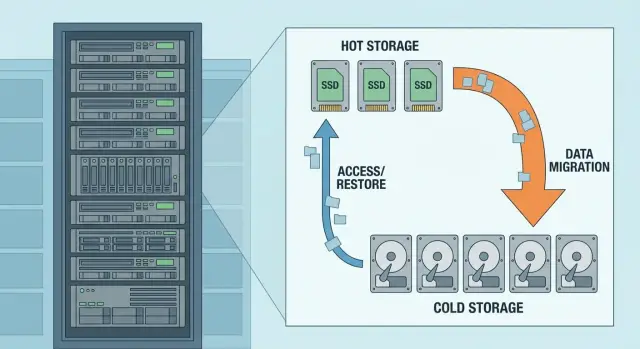
Why split storage into hot and cold at all
File services and archives almost always grow faster than forecast. The reason is simple: folders live for years, owners change, and “temporary” rarely turns into “delete”. Heavy formats appear (scans, video, CAD), and duplicates accumulate unnoticed: “final_2”, “final_really_final”, “copy_for_review”.
At first this seems like a minor nuisance, but common symptoms soon surface. Space runs out “suddenly”, even though you expanded it recently. Backups stop fitting in the window: file count and volume grow, and even files that nobody touched change (for example, due to resaves or application behavior). And almost always someone says “everything is important”, turning any cleanup attempt into an argument.
Splitting into hot and cold solves not the “disk problem” but the rules problem. Hot tier is for what’s actively used: active projects, team shares, profiles, documents accessed daily. Cold tier is for what must be kept long-term but is rarely read: closed projects, contract archives, old versions, “just-in-case” materials.
How "expensive" storage differs from "cheaper" storage in practice
The difference is not just price per terabyte. Expensive storage is where you pay for speed and predictability: fast response, consistent performance under load, fewer risks during business hours. Cheaper storage assumes different expectations: slower access, stricter maintenance windows, and tougher recovery and verification conditions.
Importantly, “expensive” often shows up not in hardware invoices but in related costs. When everything sits on one tier, you overpay for backing up everything, for expanding capacity “just in case”, and for incident triage when performance drops because of a general data mess.
What this guide will cover practically
What follows is not abstract advice like “tidy up data”, but concrete steps and checks: how to determine what counts as hot and cold for you, which requirements truly affect tier choices, how to set retention policies so they work without endless approvals, and where money usually leaks due to fuzzy rules.
What data you have and how it behaves
Before configuring storage tiers in NetApp FAS for file services and archive, honestly describe what files live in your shares and how people use them. Typically, working data and a “storeroom” are mixed in the same space. Because of that, retention policy quickly becomes an expensive compromise.
File services usually contain department shares, home directories and collaboration zones. These change often, involve many small operations, and response times noticeably affect user productivity.
Archive is closed projects, “documents for retention”, exports, survey results, scans and source data that must be kept for years by regulation. They are rarely read but occupy a lot of space and grow quietly.
The simplest way to talk about hot, warm and cold is by data behavior, not technology:
- Hot: opened every day, frequently edited, speed matters.
- Warm: opened occasionally (weekly–monthly), edits are rare.
- Cold: almost never opened, stored mostly for compliance or just-in-case.
- "Frozen": must be available but immutable (for example, closed project versions).
Problems start when working folders and archived data sit together without rules. A user copies old ZIPs or videos into "Shared" "because it’s easier", and after a year those terabytes are under the same performance and backup requirements as active files.
You don’t need a long audit to understand data behavior. Answer a few questions and record them for each major share or directory:
- How often are files read and how often changed?
- What file types dominate (office docs, CAD, scans, exports, app backups)?
- Are there retention periods and who owns the data?
- What matters more: access speed or predictable cost?
- Can changes be forbidden after a project is closed?
A small example: in a shared “Projects” folder current estimates and drawings are actively edited, but next to them are “Project_2019_final” and “Old versions”. They feel like the same thing, but access frequency and risks differ. If you separate data by behavior, it becomes easier to assign clear movement rules and avoid overpaying where speed is no longer needed.
Requirements that actually affect tier choices
For tiering (hot/cold) to work, capture measurable requirements, not wish lists. For file data this is especially important: growth is often unnoticed, and wrong expectations quickly lead to unnecessary purchases.
Performance: what matters for files
For file shares it’s less about “maximum IOPS in the spec” and more about latency and stability under mixed loads: many small operations, metadata, antivirus scans, indexing, office apps.
Check three things: typical latency during business hours, peaks during mass copies, and “storms” on Mondays or month-end. If users complain about "Explorer freezing" or "folders opening slowly", it’s usually about metadata and latency, not throughput.
Capacity: now and for 12–36 months
Plan capacity as a range: how much is used now, how much is added monthly, and what happens if growth doubles. Separately estimate the share of “junk”: duplicates, old ISOs, personal archives, temporary exports from email and messengers.
A simple rule: if more than 40–60% of data hasn’t been opened for months, plan a cold tier sooner rather than later.
Protection: recovery, retention and immutability
Protection requirements determine what can move to cold and how. Useful questions:
- RPO/RTO for file services: how much data can you lose and how quickly must access be restored?
- Is immutability needed (protection against deletion and ransomware) and for how long?
- Retention periods by data type (contracts, medical records, training materials, projects).
- Deletion rules: who approves and how is it recorded?
If retention periods exist but deletion rules don’t, capacity will always "just grow".
Operations and cost: where the bill really rises
Tiers must be understandable to admins: who assigns policies, how compliance is checked, how exceptions are handled (for example, "a project is on pause but will be active next week"). The more complex the rules, the more manual work and the higher the risk the policy won’t be applied.
A wrong strategy increases not only disk costs. Backups grow (more volume and longer windows), licenses and replication capacity increase, recovery time rises, and sometimes users face downtime. In integration projects you often see the same pattern: it’s cheaper to agree in advance on what counts as archive than to expand the entire protection and backup chain later for data that isn’t needed daily.
Short example: if a project archive is not separated from the active zone, nightly backup starts to “creep”, admins reduce backup frequency, and the business risks more than the savings on a single array.
How to design storage tiers: a step-by-step approach
A good tier design starts not with disk choices but with answers to two questions: how fast data grows and how often it’s actually used. In NetApp FAS wrong boundaries between hot and cold quickly make an archive into an expensive working datastore.
5 steps to a clear design
-
Measure current volume and growth. At minimum, monthly data for the last year. Preferably split by data type (office docs, CAD, scans, mail exported to files, media, backups in shares) and by key folders.
-
Gather the data "temperature". Look not only at size but at read frequency: what is opened every day, what monthly, and what hasn’t been touched for years. Watch for "falsely hot" folders where permissions or attributes change often but files are rarely read.
-
Define 2–3 data classes and assign simple rules. Three groups often suffice: working (frequent access and collaboration), project (active in waves then fading), archive (rarely read but stored long-term).
-
Set thresholds for moving to cold. Agree in advance what counts as cold: e.g. “not opened for 90 days” or “project closed + 30 days”. The boundary must be understandable to the business and verifiable by metrics.
-
Decide how archive search will work. If fast search is needed, plan where metadata and index live and who maintains them. A common mistake is “we’ll build the archive and search later”, which leads to keeping the archive in the hot tier for convenience.
A short example to validate the logic
There are department shares: active contracts and templates opened daily, project folders active 2–4 months, and closed projects accessed a couple of times a year. Hot tier holds working data and active projects. Cold tier accepts closed projects under the rule “not opened for 120 days”. For archive, decide in advance whether name-and-structure search is sufficient or if content indexing is needed (for scans and PDFs).
Retention policy: simple rules instead of vague agreements
A retention policy exists not just to “bring order” but so people don’t argue every time: what is archive, when a file becomes cold and who decides if it can move. In NetApp FAS without clear rules automation can work against you: things move too early or never cool down.
Start with a simple measurable criterion — idle time. For shared file resources a rule like "if a file hasn’t been opened for N days, it moves to cold" often suffices. Use last access/modify times, not creation date, otherwise old but active documents get misplaced.
To avoid disrupting work, define exceptions up front. Typically you must not cool user profile directories and templates, data read by systems (1C, CAD/PDM, scan streams, medical or financial stores), and folders that require fast searches and frequent historical queries.
Next, assign a data owner. Not an admin or “IT in general”, but a business owner for each share or folder set (department head or process owner). They approve N-day thresholds, exception lists and any changes; IT records and enforces them.
Document rules so non-admins understand: a one-page resource sheet. Resource name, owner, cooling time, exceptions, what counts as archive and how to return data to hot tier.
Review policy regularly: practical cadence is quarterly and after business changes (new system, new retention rules, audit). Without this you’ll quickly face either complaints about slowness or quiet capacity growth as rules drift from reality.
Where capacity costs usually leak
The most frequent overspend on NetApp FAS file services is when the “archive” on paper stays on the expensive hot tier in practice. Old files remain on the same tier, included in the same snapshots, replication and backups. You then pay not just for disks but for the entire protection chain.
Second classic mistake: “we keep everything forever.” This almost always leads to unnoticed growth: old versions, duplicates, email exports, temporary project folders. After a year these become “historically important” and no one remembers what can be deleted or moved to cold.
Common hiding places for losses:
- "Leave it here temporarily": exceptions multiply and become permanent.
- Archive without retention: no deletion timing — nothing moves or is removed.
- Misclassification: a project folder marked “critical” keeps everything in hot forever.
- Default protection: the archive gets the same frequent snapshots and replication as working data.
- Growth of hidden copies: data ends up in backups, secondary sites, and test environments, and capacity grows much faster than the primary files.
A reverse mistake is "freezing" data people still use. For example, accounting may open last quarter’s documents daily, but they look old by creation date. Moving them to cold solely by age produces complaints and many "restore as it was" requests. This breaks policy and creates new exceptions.
A practical way to catch problems early is to check behavior, not only age. Sample folders and see what changed or was read in the last 30–60 days. In a pilot apply a soft rule: first move files that haven’t been opened for a long time and keep a short return window before making the move permanent.
Also review protection settings for budget impact. If the archive doesn’t need frequent replication and deep snapshot history, relax those protections for that tier. This often saves more quickly than buying new disks.
Metrics and monitoring the policy needs
A retention policy lives exactly until the first unexpected “out of capacity”. NetApp FAS tiers (hot and cold) work only if you regularly check that data actually migrates to its proper tier and that growth is understood and forecastable.
Minimum set of metrics
Start with metrics that can be viewed weekly and explained to the business:
- Utilization by tier: used/free and trends for 7/30/90 days. Focus separately on 3–5 most important shares.
- Top folders by growth: who added the most GBs and which file types (scans, media, images, exports).
- Top “dead” volume: data without reads/changes for 180–365 days — prime cold candidates.
- Share of rarely-read data in the hot tier: if cold data stays in hot, rules are too soft or exceptions too many.
- Backup: window duration, throughput, change rate. High change rate often means the share contains working app data or noisy temporary files.
Show these numbers as trends and forecasts: with current growth, how many weeks until a threshold.
Alerts that save budget
Alerts are for action, not panic. They let the team respond: move data, adjust rules, or consult owners.
- Less than 20% free on a tier or aggregate: analyze reasons and plan action.
- Forecast to fill in fewer than 30 days: trigger cleanup, moves and exception reviews.
- "Cold in hot" exceeds agreed threshold (e.g. 25–30%): revisit timings and rules.
- Backup misses the window twice: investigate change rate and noisy directories.
Example: the design department stores source files and renders in a shared working share. Utilization shows accelerated growth, one folder appears in the top list, the share of rarely-read data in hot grows, and backup no longer finishes overnight. Instead of buying disks, move heavy outputs to cold and keep only active projects in hot.
Practical example: office files and project archive
Imagine a typical layout: a department has folders (contracts, invoices, presentations), a shared project resource (one folder per project, active templates, correspondence, sources), and an archive of closed projects kept for years for audit and possible returns.
To avoid overpaying, split storage into two layers: hot for daily work and cold for archive. In NetApp FAS this is usually done by rules that move data to a cheaper tier based on activity, not by manual relocation.
How to place data across tiers
A practical rule for office files:
- Hot: department folders and active projects (changed in the last 30–60 days).
- Cold: closed projects and documents not accessed for 90–180 days.
- Exceptions: accounting, legal, and policies — these need fast access regardless of age.
Don’t aim for a "perfect" scheme at the start. Begin with one project resource where rules are easy to agree on and you can quickly see results.
How to agree on timings without conflict
A common mistake is assigning move timings without data owners. A workable flow: the business head confirms a project is closed and IT starts the transfer timer. If the project becomes active again, it returns to hot automatically by activity, without tickets.
Measure user impact: compare open times for typical files (e.g. 20–50 MB presentations, 5–10 MB spreadsheets) in working folders before and after rules are enabled. Collect feedback from 5–10 heavy users who work most with network shares.
A gray zone is projects formally closed but revisited quarterly. For them use an intermediate rule: move to cold only after two conditions — project closed and no access for 120 days. That avoids keeping everything in hot “just in case” while not annoying teams with delays on rare but important files.
Quick checklist before rollout and after 30 days
Before enabling tiers on NetApp FAS for file services and archive, verify basics. This list helps catch mistakes that make hot tier grow quickly or turn policy into IT-business conflict.
Before rollout
- Data classes named simply (e.g. “working documents”, “project archive”, “scans”, “user profiles”) and each class has a business owner for rules.
- For each class define retention: how long to keep and after how many days of inactivity to move to cold. The trigger must be measurable, not "when no one uses it anymore".
- Exceptions documented: what never goes to cold and how to request an exception. There must be a clear approval route: who agrees, for how long and how it is recorded.
- Reporting plan: who will monitor share growth and target share of "cold" data allowed in hot tier (usually a small percent).
- Backup considered: RPO/RTO defined per class and consequences noted. Otherwise you can shift growth into backup storage or get long recoveries.
After launch don’t wait for complaints. In 30 days you should already have numbers showing whether policy works and where it stalls.
30 days after launch
- A report exists: overall growth, top-10 shares growth and type dynamics. It’s important to see not only "how many TB added" but "what exactly added".
- The share of data long unchanged but still in hot tier is visible. If high, rules are too soft or exceptions too many.
- Collect 5–10 real cases "why this file should not move to cold" and resolve them. This quickly improves rules and reduces chaos.
- Check backup and recovery impact: backup windows, volumes and test restores for one example in each data class.
- Set review cadence: monthly for the first 3 months, then quarterly. Without this the policy gets outdated within six months.
Next steps: how to roll out without disrupting users
When configuring NetApp FAS for file services and archive, the principle is simple: prove the policy on a small scope first, then expand. This lowers user risk and avoids sudden capacity costs.
Start with inventory and a pilot on one clear dataset: a department share or archive of closed projects. Choose a scope where owners are available and can confirm speed is acceptable, files are intact and processes aren’t broken. In the pilot immediately monitor what moves to cold, how often data returns, and how open times for old documents change.
Then formalize rules in a short policy and assign roles. Typically the minimum is:
- Data owner (business): decides what is working data and what may be archived.
- Storage admin: configures tiers, quotas, schedules and controls.
- InfoSec/compliance: sets retention and access/deletion requirements.
- Service desk: takes user requests and records typical issues.
To avoid disruption, roll changes out in phases and leave a path back. Make switches in agreed windows, apply policy first to new data, and attach historical data gradually. If mass moves are expected, warn users: old files may open a bit slower and that is expected.
Policy without control becomes a formality. Introduce regular reports (at least monthly) and predefine triggers for review: cold tier growing faster than planned, frequent returns of data to hot, filling of specific shares, complaints about archive access. A report must answer two questions: where capacity grows and why.
Finally, plan expansion: target growth rates by department, capacity buffer, a runbook for reaching 70–80% utilization and who approves purchases. Then expansion is a planned task, not an emergency.
If you need help at this stage, GSE.kz (gse.kz) can join as a systems integrator: perform an assessment, help design storage tiers and provide 24/7 support while keeping a vendor-neutral stance where it matters.
Frequently asked questions
Why split file data into hot and cold tiers?
The hot tier holds data people work with every day: active projects, shared folders, and frequently used documents. The cold tier stores closed projects, old versions, and archives that are rarely accessed, so there is no need to pay for them as if they were working data.
How do you determine which files should move to the cold tier?
Look at actual activity, not just a file's age. Hot data usually includes items that are read and modified frequently, while cold data includes files that have not been accessed for 90-180 days or closed projects after an agreed period.
How many storage tiers do file services need?
Three classes are enough to start: working data, project data, and archives. This approach is easy for folder owners to understand and does not require complex exceptions that later become difficult to maintain.
Can all old files be sent to the cold tier?
Do not move data based on its creation date alone. Consider the last access or modification date, project status, and exclusions for system folders. Otherwise, old but regularly used documents will start opening more slowly.
Which data should not be automatically moved to a cold tier?
User profiles, templates, application folders, 1C data, CAD/PDM, scan streams, and resources that require fast search are usually excluded. The data owner and IT team should approve the specific list.
How can you safely begin implementing storage tiers on NetApp FAS?
Start by selecting one straightforward resource, such as the archive of completed projects for a single department. Set a conservative migration period, test file access, returns to the hot tier, and the effect on backups, then expand the approach.
Who should approve the storage policy?
The business-side data owner decides what counts as an archive and approves retention periods and exclusions. The storage administrator configures the rules, monitors their execution, and prepares capacity growth reports.
Which metrics should be monitored after launch?
Check tier utilization, growth by shares and folders, the proportion of rarely used data in the hot tier, and backup duration and volume. These metrics reveal the cause of growth, not just the remaining free space.
Why can an archive significantly increase backup costs?
Archives often receive the same snapshots, replication, and backups as active data. Separate their protection and recovery-time requirements if the business does not need the same backup frequency.
What should you do if file storage is running out of space quickly?
First, determine why capacity is growing: large files, duplicates, temporary exports, or data that has not been used for a long time. Then move suitable data to the cold tier, review exclusions and protection settings, instead of urgently purchasing more capacity.
