6 min read
Multi-organization in a single system: holding company and branches
We explain how to set up multi-organization in a single system: holding and branches, shared directories, data boundaries, access and reporting without confusion.
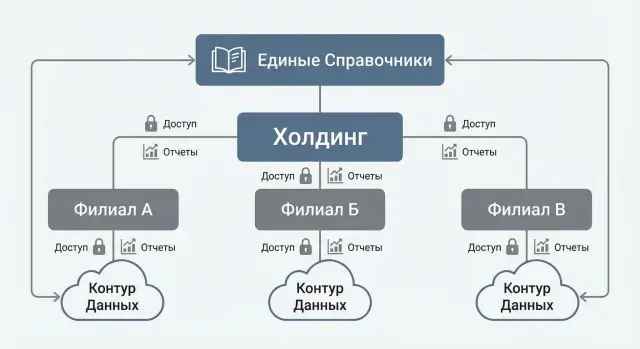
Why have multi-organization at all
When several legal entities, branches and departments operate in a single database, it may seem easier at first: one directory, one set of documents, unified access. But without predefined rules confusion quickly appears: "foreign" invoices get processed, contracts are duplicated, and reports stop reconciling.
The point of multi-organization is to agree in advance which data is shared and which must be strictly separated — and to configure it so separation works automatically: in access, in documents and in reporting. That way the system enforces responsibility instead of forcing manual control.
If you run multiple organizations "as it happens", the same problems usually arise. You lose a clear answer to "who is responsible for this document", duplicates of counterparties and items appear, requisites get mixed up (bank accounts, print forms, payment terms), access is built "by people" and kept with exceptions, and reporting is either too aggregated or turns into manual exports and edits.
Disputes appear in the first month: who can see payroll documents of another legal entity, can a branch manager see head office prices and margins, who approves a purchase if the invoice is issued to one company but another pays it?
If rules are not fixed before roles and reports are set up, decisions are made ad hoc: "we'll give temporary access", "we'll sort it out later", "we'll copy the directory". In 3–6 months this becomes chaos: temporary exceptions become the norm and the system stops reflecting the real accountability structure.
A short example. Accounting maintains three legal entities while sales work by two branches. Without clear boundaries one manager issues an invoice on behalf of another legal entity, the client pays "to the wrong place", and a chain of corrections and manual reconciliations starts — all of which could have been prevented by configuring structure and data rules.
Holding and branches: which entities to distinguish
Multi-organization work starts not with settings but with clear entities. If you mix them up, later it’s hard to separate access, produce correct reports and explain to staff where each piece of data belongs.
It's useful to distinguish several levels (you don't have to use all of them):
- holding (group of companies) — the top level for consolidation and executive slices;
- management company — the rules center (budgets, standards, procurement, IT, methodology);
- legal entity — the unit for contracts, taxes, invoices and source documents;
- branch or separate subdivision — a part of a legal entity with its own geography, warehouse, cash register or staff;
- subdivision — a department within a company or branch, usually for internal analytics.
Next, decide what is shared and what is strictly separate. Often shared are rules and key directories (item catalog, counterparty standards, cost classifiers), while operations with legal and financial consequences stay separate: contracts, invoices, payments, stock balances and HR documents.
A separate question is what counts as the accounting and reporting unit. For accounting and tax reporting the base unit is almost always the legal entity. For management reporting the unit often becomes a branch, site, service network or project.
A common mistake is to mix legal structure with management structure. Legal structure answers "who signs and pays", while management structure answers "who performs and is responsible". In the system these two dimensions are best stored separately: then you can see profit by branch while correctly fulfilling obligations by legal entity without breaking access rules or creating duplicates.
Shared directories: where to keep unified data and where to separate it
Problems in a multi-organization model often arise from directories. If everything is shared, branches will struggle to work. If everything is separate, the holding loses comparability and control.
A practical principle: share what must be read the same in reports and processes across organizations. Keep local what depends on local rules, site specifics or the responsibility of a particular legal entity.
A commonly effective approach is:
- Items — shared catalog and units of measure, but local prices, procurement terms and warehouse restrictions;
- Counterparties — a unified "passport" (tax ID, details, status), while contracts, limits and payment terms belong to the specific organization;
- Employees — one person identifier, but HR data per legal entity;
- Projects — shared structure and codes, but budgets and responsibles can be local;
- Cost items — unified classification, but closing and allocation rules may differ.
Disputes most often start with items and counterparties. For example, one branch enters "UTP cable 305m" as "UTP 305", another as "Twisted pair cable". A consolidated report shows two different positions even though consumption is the same.
To avoid this you need simple naming rules and a minimum set of mandatory attributes. Don't overcomplicate: agree on a short name template (type + key parameter) and require basic fields for creating a record. For items, category, unit of measure, VAT rate and a flag (for purchase/for sale/for internal use) are usually enough.
Even more important is assigning an owner for each directory. Without an owner any change turns into email threads and manual corrections. The owner sets rules and is responsible for quality; changes follow a clear request: what we change, why and effective from which date. Periodic duplicate and obsolete record checks help keep directories tidy.
Data boundaries: what to separate and by which rule
Set data boundaries not by "what's convenient today" but by a simple rule: who bears responsibility and who will answer in audits and reports.
In most cases the basic boundary runs along legal entities. This gives a clear picture for contracts, payments and tax documents. Branches and sites within a single legal entity become separate slices of accounting and access: warehouses, cash registers, requests, service.
To avoid endless debates, fix the perimeter that is isolated by default between organizations:
- documents and postings (orders, sales, acts, invoices, requests);
- contractual details and requisites (signer, limits, bank accounts);
- prices and price lists, if they are tied to a legal entity;
- stock balances and movements by warehouse, including lots and serial numbers;
- payments and personal data (HR, payroll, contacts).
Then decide where the boundary is finer. For example, branches within one legal entity can share item and counterparty directories but should not be allowed to see each other's warehouses or requests.
Describe exceptions before configuration, otherwise they become "temporary" accesses forever. Typical exceptions: centralized procurement, shared warehouse, shared service center. For each exception define the data owner, who can view and edit, how movements and intercompany settlements are recorded, and how local and consolidated reporting is formed.
Access and roles: how to divide rights without manual control
For multi-organization to work, rights should be built by roles and data boundaries, not "by people". The principle is simple: least privilege. A user sees and does only what is needed for their tasks and only within their organization.
Start with a roles matrix: describe typical scenarios, then map people to roles. In a holding with a central office and branches common roles include branch accountant, consolidation accountant, purchaser, manager and auditor.
It is important to separate not only "which data" but also "which actions". In practice a few levels suffice: view; create and edit; approval; post and close period; export and print.
The most common leak is via reports and exports. If a user shouldn't see another organization's data, they must not get it through a consolidated report, export or print form. Ensure organization filters are mandatory, no universal "all organizations" reports exist for inappropriate roles, and export rights are as strictly controlled as view rights.
A simple pre-launch test: log in as a branch role and try to find a foreign document through search, reports and export. If it is visible somewhere, data boundaries are not fully configured.
Reporting: local, management and consolidated
Reporting often breaks not because of formulas but because of mixed objectives. Branches need quick daily figures, while the holding needs a clear group picture. So decide in advance which reports are the authoritative source at each level.
Operational branch reports usually answer simple questions: how much was shipped, which requests are overdue, what remains in stock, where is the cash gap. They should rely on the branch's own documents and work without waiting for period close.
Management reporting sits above branches and legal entities. It needs unified metrics (revenue, margin, costs, lead times, turnover), but accept that data sources and accounting nuances may differ. A practical approach is unified calculation rules plus transparency of sources and adjustments. Otherwise you'll get an "overall number" nobody trusts.
In consolidated reporting the key risk is intercompany settlements. To avoid weeks of reconciliation, define verification rules in advance: how intercompany operations are marked, which documents must be symmetric on both sides, how dates are treated (document date vs recognition date), and who is responsible for resolving discrepancies.
Another practical step is to assign responsibilities for data quality up front: branches are responsible for source documents and timeliness, accounting for period closing and adjustments, finance for metric rules and consolidation, and IT for access and immutability of settings.
Step-by-step plan to implement multi-organization
1) Agree on org structure and goals
Describe the actual scheme: holding, legal entities, branches, sites, project offices. Record why separation is needed: security, separate accounting, different budgets, separate contracts, regulator requirements.
Then proceed in order:
- fix entities and hierarchy (what is an organization, a branch, a cost center);
- build a data matrix: what is shared, what is strictly separate;
- assign directory owners and rules;
- configure roles and test access on real scenarios;
- agree on the set of reports and reconciliation rules between organizations.
2) Test everything with real cases before launch
The most common mistake is rights that "mostly fit" but reveal workarounds in live operations. Run short tests with business users: accountant, purchaser, HR specialist, branch manager.
A minimal set of checks that often catches problems:
- a branch user sees only their documents but can work with shared directories;
- a manager gets consolidated metrics without access to unnecessary personal data;
- interbranch operations are recorded and reconciled according to agreed rules.
If this is not fixed beforehand, within a month shared counterparties, mixed contracts and incomparable reports usually appear.
Common mistakes and traps when configuring
The most painful problems normally show up 1–2 months after go-live during period closes, reconciliations and bulk exports.
Typical errors that break the model:
- Merging legal entities and branches into one entity. Initially convenient, later impossible to properly separate contracts, bank operations and responsibilities.
- Making all directories shared without rules. Result — duplicates and inconsistent names.
- Limiting document access but forgetting reports and exports. A user cannot see a document but sees sums in consolidated reports.
- Not assigning directory owners. Changes are made chaotically and analytics stops matching.
- Starting with rights before agreeing data boundaries. Rights become patched: too strict in some places, too loose in others.
A practical rule: first document in writing what exactly is separated (organization, branch, project, warehouse, cash register) and where a common base is needed (e.g., items). Only then configure roles, reports and integrations. Test access not only in cards and documents, but also in standard reports, print forms and export files.
Quick check: pre-launch checklist
A short check before launch takes a couple of hours but saves weeks of investigating why "a branch lost documents" or "organizations got mixed in a report".
Five checks that most often reveal problems:
- org structure documented: unified list of legal entities, branches and sites, clear codes and abbreviations;
- clear list of shared vs separate data with an owner for each directory;
- data boundaries described for key areas: documents, finance, personal data (who can view and who can change);
- roles tested for typical tasks (create a document, find it, post it, generate a report, export);
- agreed minimum set of reports: at least one operational for branches and one management for the holding, with the same organization filters.
If implementation is part of a broader IT rollout, agree up front where directories live, who supports access and who is responsible for maintenance. This reduces gray areas where no one takes ownership of access errors.
Example scenario: how a scheme may look in a real company
Imagine a holding in Kazakhstan: one management company and three branches in different cities (for example, Almaty, Astana and Shymkent). The goal is simple in words: work in a single database but do not mix finances and responsibilities.
In the database distinguish legal entities and branches as responsibility centers. Branches have their own warehouses, cash registers, bank accounts and local expenses. Directories are shared: unified item catalog, counterparties and units of measure. This prevents the purchaser from entering the same item differently in each city and makes procurement reports comparable.
Procurement case: a centralized purchasing department places orders with suppliers, while goods are received at different branch warehouses. The document records which branch and which warehouse the delivery is for; stock and expenses remain within that branch. The purchasing team sees the overall plan and prices, while branches see their own stock and movements.
Reporting typically has three levels: operational branch reports (stock, sales, procurement), legal entity reporting and a consolidated group picture. It is critical that every document contains an organization or branch marker from the start. Without tags reconciliation will inevitably become manual.
Next steps: how to start without risking the business
Start with one clear step: agree who makes decisions and who owns the data. Errors often stem not from settings but from different teams having different understandings of branch boundaries, shared directories and access rules.
Form a working group covering business and control: IT, finance and accounting, security, leaders of 1–2 branches and owners of key directories. Then fix three things: org structure (legal entities, branches, warehouses, cash registers), data matrix (what is shared, what is separate, who owns it) and a list of reports (local, management, consolidated). Note which dimension each report uses (legal entity, branch, project) and who may view it.
To avoid risking the whole company, plan a pilot at one branch with average turnover and typical operations. Define success criteria in advance: accesses work without manual exceptions, period close happens on time, reports match control figures, directories do not diverge.
If infrastructure needs updating for this model (workstations, servers, support), plan it together with access and storage settings. As a system integrator, GSE.kz (gse.kz) often participates in such projects at the infrastructure and support level so the accounting system and its access contours run reliably across a branch network.
Frequently asked questions
Why have multi-organization if everything can be kept in one database?
It prevents mixing responsibility, money and documents of different legal entities and branches in one database. With correct configuration the system itself enforces boundaries: who can view and create documents, which details are inserted, and how reports are assembled without manual fixes.
Which structure levels are important to distinguish: holding, legal entity, branch, subdivision?
Start by defining entities: holding (for consolidation), management company (for rules), legal entity (for contracts and taxes), branch/site (for warehouses, cash registers and responsibility), and subdivision (for analytics). Keep legal and management structures separate to avoid breaking source documents and reports.
What should be separated between organizations and what can be shared?
By default, separate anything that carries legal or financial consequences: contracts, invoices, payments, source documents, stock balances, payroll and HR data. Common items are usually directories and rules that must be read the same across reports and processes, e.g. the item catalog and cost classifiers.
How should item catalog be organized: one catalog or separate per branch?
Typically use a shared item catalog with unified units of measure and basic attributes so consolidated reports are comparable. Prices, price lists, procurement terms and warehouse restrictions should be stored per organization or branch if they differ in practice.
How to handle counterparties: unified or per legal entity?
Best practice is a single "master" record for each counterparty with core details to avoid duplicates and preserve history. Contracts, limits, payment terms and bank details should be tied to a specific legal entity to prevent errors in requisites and settlements.
How to manage employees who work across multiple legal entities?
Keep one identifier per person to avoid duplicate profiles, while HR records and payroll documents are kept per legal entity. This simplifies access control for personal data and correctly handles hires, transfers and payroll across organizations.
How to split access rights so everything doesn't need manual control?
Build access around roles and data boundaries rather than ad-hoc "by person" exceptions. Define in each role what can be seen and done, and test reports, print forms and exports as these are common places where other organizations' data leak through.
How not to get confused between local, management and consolidated reporting?
Agree in advance which reports are authoritative at each level: operational reports for branches, management reports by responsibility centers, and consolidated reports for the group. If the same metric is computed differently across levels, people will lose trust in the numbers, so standard calculation rules and mandatory filtering by organization/branch are essential.
How to handle intercompany settlements and operations inside the holding?
Mark intercompany operations from the start and set rules for symmetric documents on both sides; otherwise reconciliations will take weeks. Define who resolves discrepancies, which dates are control dates, and how movements, payments and offsets between organizations are recorded.
How to quickly check that multi-organization is configured correctly before launch?
Run real scenarios under typical roles before go-live: create a document, find it via search, post it, produce a report and try to export data. If a branch user sees other organizations' sums or documents anywhere, the data boundary is incomplete — after go-live such "temporary" access usually becomes permanent and creates chaos.
