8 min read
On‑prem MLOps: choosing Kubeflow, MLflow or ClearML for your team
On‑prem MLOps: how to choose Kubeflow, MLflow or ClearML for data control, experiment reproducibility, model registry and deployment within a closed perimeter.
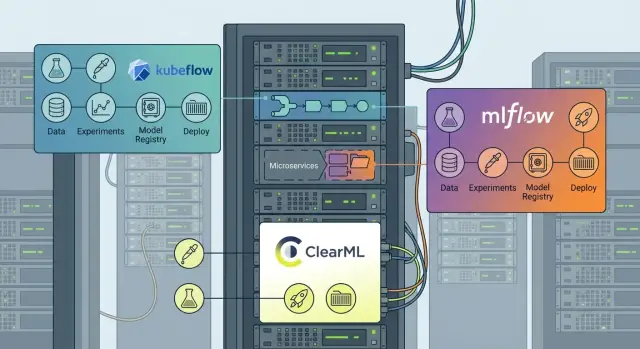
What on‑prem MLOps solves and where it usually hurts
On‑prem MLOps is chosen not out of love for hardware, but for control. When data cannot be taken outside the perimeter (personal data, banking secrecy, state secrets, medical records), the cloud becomes problematic. Often security requirements are added: closed networks, separate perimeters, strict access logging. Another reason is dependence on external channels and providers: if training or deployment rely on the Internet, any outage becomes downtime.
Without a platform, everything quickly degrades into a collection of notebooks, folders and verbal agreements. Today a model was trained, tomorrow no one can reproduce the result: data versions, code and parameters have drifted apart. The real pain begins when you need to turn "it works for me" into a production service — with monitoring, controlled releases and rollback.
Problems usually concentrate in four areas: data and artifacts are scattered, experiments are not reproducible, deploying a model to production is slow and risky, and audits are nearly impossible (who trained it, on which data, what changed?).
More than data scientists are involved in the process. You need an ML engineer (pipelines, packaging), DevOps (clusters, CI/CD), security (segmentation, access, logging) and a product owner (what counts as value and how to measure effect).
Success looks like this: iterations speed up, deployment becomes predictable (versions, rollback, identical environments), and you can assemble a "dossier" for any model for reviews. In banking or government this is especially visible: the model not only works, but passes internal approvals without weeks of manual explanations.
What we're comparing: Kubeflow, MLflow and ClearML
The boundary is simple: this is not a comparison of "who trains models better." It's about processes and platforms: how the team stores artifacts, records experiments, runs a model registry and moves results to production inside a closed perimeter.
Kubeflow is often chosen as a platform built around Kubernetes. Its strength is incorporating training and pipelines into the production path: jobs, orchestration, repeatable runs and cluster execution. This is logical if you already have Kubernetes and want training, data preparation and deployment to live in a single infrastructure model.
MLflow is usually not a "monolith" but a convenient component that is easy to integrate almost anywhere. It covers basic but critical things: experiment tracking, packaging, model registry and simple version promotion mechanics. MLflow is often deployed alongside an existing orchestrator and CI/CD, rather than replacing them.
ClearML is closer to an "all‑in‑one" for the team: tracking, task queues, agents to run on various machines, plus a UI that's convenient for daily use. Teams pick it when they want to quickly bring order without a lot of custom wiring.
Before diving into details, answer some practical questions: do you have Kubernetes and who supports it; how mature are your DevOps and CI/CD (monitoring, logging, secret management); what matters most in the first 2–3 months — quickly bringing experiments in order or building a unified production path.
In banks or government, where the perimeter is closed and change control is critical, the choice often comes down not to the interface but to whether your infrastructure team can support the platform.
Data and artifact control: what must live inside the perimeter
In on‑prem MLOps the main question is simple: where does the data live and how do you prove a model was trained on a specific dataset version. Without this, any audit, incident or dispute over quality becomes guesswork.
Datasets usually live in several places: file shares (NFS/SMB) for large binaries, object storage for addressing and retention policies, corporate databases and data marts. The goal is not to "move everything into one folder" but to build a clear contour: where the data comes from, how it is cleaned, where prepared samples are stored and who can see them.
Data versions and lineage
Versioning data is easiest with snapshots and immutable references: record a hash of the set, storage path, date, schema and a short description. For regulated environments a retention policy is useful: what you keep for years (raw dumps, control samples) and what can be removed (temporary intermediate files). Data lineage should answer one question within a minute: "which data was model version X trained on?"
Minimum expectations from a platform (or surrounding tooling): a link to the dataset and its fingerprint (hash, version, snapshot), code and dependencies (commit, image, requirements), run config (parameters, features, filters), result artifacts (model, metrics, reports, logs), and who and when ran it and where it executed.
Artifacts and access rights
Artifacts are more than just the model file. They include quality reports, configs, logs, feature tables, charts and sometimes feature exports for retraining. All of this should go into managed storage with clear names and retention periods.
Access control is easier when separated by roles: who sees raw data, who can run training, and who can only view metrics. In an on‑prem perimeter it's crucial that access and audit are handled by your infrastructure (AD/LDAP, network segmentation, action logs), not left to "trust in notebooks."
Experiment reproducibility and tracking: what to look for
In on‑prem MLOps the failure mode is often not training itself but trust in the result: "why was the model better yesterday?" and "can we reproduce the same score on the same data?" Tracking must record an experiment as a single unit, not a pile of random logs.
The basic minimum: launch parameters (hyperparameters, flags, seeds) and final metrics; code and exact version reference (commit or archive) with a short note on what was tested; environment (library versions, container image, GPU drivers if used); data and features (dataset version, hash, date window, schema); artifacts (model, reports, charts, configs).
Reproducibility almost always hinges on discipline. If the team runs experiments locally and changes configs "by eye," no UI will save you. A good sign is when the system not only shows metrics but forces saving the run context: config templates, immutable artifacts and clear naming rules.
For comparing runs it should be easy to group experiments by tags (e.g., date slice, feature version, model type), filter and leave comments. In practice this looks like: an analyst runs 20 scoring variants and a reviewer quickly sees which runs used the same dataset and environment and which cannot be compared.
A separate block is roles and audit. It's useful when you can see who started an experiment, who edited its description and who approved the result for model registration.
Before choosing, decide what matters more: a convenient UI for daily work, strict rules enforced by CI and immutable artifacts, or a balance where the UI helps discipline but does not replace it.
Model registry: versions, stages and change control
A registry prevents confusion about "which model is currently in production," enables fast rollback and clarifies who promoted a version and why. In on‑prem setups this is especially important: everything is stored inside your perimeter and order relies on team processes.
A good registry starts with a clear structure: versions, stages and owners. Each version should be tied to metrics, date, author, link to code (commit), and artifacts (weights, config, preprocessing). Stages are usually simple: dev for experiments, staging for checks, prod for live use. It's important that stage transitions are recorded as actions, not "we agreed in chat."
To avoid surprises in production, store dependencies alongside the model (requirements, container image or lock file), input schema (types, required fields, allowed values) and the dataset version or slice used for training.
Promotion policies should be formalized. For example: the data scientist registers a version in dev, the ML engineer moves it to staging after test runs, and the service owner promotes to prod after quality and security checks. For banks and government, mandatory approvals and audit trails are typically added.
Check how the registry integrates with your deployment: containers and REST for online, batch for nightly calculations, sometimes streaming. The minimal set without which a registry doesn't work: version history, metrics, artifacts, access control and change logs.
Deployment and orchestration: from training to production
Model deployment usually splits into two modes: online inference (responses in milliseconds or seconds) and batch jobs, where cost and stability of the nightly window matter more. In on‑prem environments this is more acute: resources are limited and production mistakes are costly.
Online services require predictable latency, scaling and monitoring. Batch jobs need scheduling, repeatability and input control: the same input set should yield the same output, otherwise incident investigation becomes a detective story.
Pipelines and triggers
Kubeflow shines where training, data preparation and deployment need to be tied into one managed process: pipelines, step dependencies, schedules and event‑triggered runs. MLflow often acts as a "record center": tracking, artifacts and model registration, while orchestration is handled by external tools (for example, an existing scheduler). ClearML is closer to "everything in one": tracking, task queues, agents, experiment runs and basic delivery scenarios.
Before choosing, check whether you truly need orchestration or just convenient model publication: do you need schedules for retraining and feature recomputation; how does the model get production data (API or batch); who owns the pipeline (DS or DevOps); where does configuration live (code, UI or Git); are there isolation requirements by project or team.
CI/CD, rollback and safe releases
In production, change management matters more than deployment itself: building images, tests and promotions between environments. Kubernetes helps if a cluster exists and the team can operate it. If not, it can delay the start and consume time for infrastructure work.
To reduce risk, agree on a release scheme early: versioning model and environment (code, dependencies, parameters), canary releases (route a portion of traffic to the new version), quick rollback, and quality checks before promotion (metrics, smoke tests).
Example: a scoring model is updated weekly in batch, while an online service reads the latest approved version from the registry. In this setup Kubeflow is convenient for the full pipeline contour, MLflow covers the registry and version control, and ClearML can be a compromise if you want a single tool for tasks and experiments without heavy assembly around it.
Security and compliance: access, network, audit
On‑prem is often chosen for security: data and models remain inside the perimeter and access is configured according to company rules. The downside is clear: responsibility for network, accounts, secret storage and audit is entirely on you.
Access and network: separate zones
It's practical to split the perimeter into zones: training (notebooks and pipelines), storage (datasets, artifacts, model registry) and production (inference services). Define explicit rules between zones: who connects on which ports, where a proxy is required, and where only one‑way artifact export is allowed.
Access is easier when the platform integrates with corporate accounts (AD/LDAP/SSO) and supports role‑based models. Typical roles: researcher, engineer, release manager, administrator. It's important that access to data and models can be separated, especially when contractors are involved.
Secrets (tokens, DB passwords, object storage keys) must not live in configs or notebooks. Verify whether the chosen stack supports a centralized secrets store, rotation and a clear issuance process.
For checks and investigations, define in advance which logs are required: who started a training run and with what parameters, who downloaded datasets and artifacts, who promoted a model to prod, which containers were deployed and what access incidents were recorded.
Operating on your own infrastructure: what will cost time
The main cost of on‑prem MLOps is often not the license but operation. The first weeks go to installation; afterwards, time is spent on upgrades, monitoring and user support.
Systems differ by component count. Kubeflow typically brings Kubernetes, network policies, storage, Ingress, sometimes a service mesh, plus separate services for pipelines and auth. This gives flexibility but requires a mature platform team. MLflow is easier to start: tracking, artifacts, a database and maybe a proxy. ClearML usually sits in the middle: server, agents, queues and executor configuration for CPU and GPU.
Upgrades and compatibility
Plan upgrades as projects. Kubeflow often suffers from Kubernetes version compatibility, pipeline component mismatches and dependency issues (especially with custom CRDs). MLflow upgrades are usually simpler but require careful DB migrations and artifact format changes. ClearML needs consistent server and agent versions; otherwise tasks can behave differently.
Observability and support
Without monitoring, operation quickly becomes manual incident triage. Minimum to provision: resource metrics (CPU, RAM, disk, GPU and queue lengths), logs (access, pipeline errors, worker crashes), alerts (artifact storage full, stuck jobs, registry unavailability), quotas and limits so one experiment doesn't consume the whole cluster.
Example: a team launches training overnight on GPUs. Without limits and alerts, a wrong run occupies all GPUs and critical recalculations can't start in the morning.
Cost of ownership usually boils down to people: who is on call, resolves incidents, updates, and maintains pipeline and environment templates. Standardize "golden paths" for common tasks and make a short onboarding to cut this cost.
How to choose a platform: a step‑by‑step plan from requirements to pilot
The choice between Kubeflow, MLflow and ClearML is rarely decided "by features." In on‑prem setups what's more important is what actually fits your perimeter: data, access, network, team processes and production ownership.
Start with a short but strict requirements gathering. Record which data and artifacts cannot leave the perimeter, security rules (network segments, MFA/SSO, audit), expected SLA, deployment types needed (batch, online, edge), and who will support the platform (ML, DevOps, security).
Then describe the current model path: from data to production, without idealization. Where do datasets and parameters get lost, where is there no environment versioning, where does manual copy‑paste begin, who and how rolls back a model.
To avoid drowning in discussion, use a simple plan: state perimeter requirements and constraints; draw the current process and mark 3–5 points needing control and automation; pick 1–2 pilot cases (one typical, one problematic but not the worst); agree comparison criteria in advance (tracking, model registry, deployment, roles and access, convenience for the team); run a 2–4 week pilot and record metrics (cycle time, number of manual steps, repeatability).
After the pilot, formalize rules: unified naming and tags for experiments, artifact and log retention policy, promotion rules (who moves from staging to production and by which signals). These matters often outweigh the choice of a specific tool.
Practical example: a local perimeter for a bank or government agency
A team of 6–10 people builds scoring or demand forecasts. Data and features cannot leave the perimeter, and every model must be explainable and verifiable. In such scenarios on‑prem MLOps is chosen not for experiment speed but for auditability, access control and reliable rollback.
Typical picture: most computations are batch (nightly marts, weekly retrains), while online inference is needed selectively, e.g., for an application screening service. The main risk is not missing real‑time deadlines but not being able to prove how a model version was produced.
What the workflow looks like
The process relies on simple rules: experiments are tracked (code, parameters, data versions, metrics, artifacts); before publishing a model it goes through approval (metric checks, drift, constraints and risk); deployment happens via the model registry only from an approved stage, with tags and a note on changes; rollback takes minutes and is recorded with a reason; monitoring checks quality and data and reports go to the model owner and support.
To keep this working, agree roles in advance. The data scientist is responsible for model quality and documentation, the ML engineer for pipelines and packaging, and the operations team for environment, access and incidents.
Questions that will appear during the pilot
Resolve them before choosing a platform: who owns the model and who may promote it to prod; where responsibility for pipelines lies (DS, ML engineer or DevOps); how dataset versions are recorded and who validates data legitimacy; what SLA exists for rollbacks and who performs them at night or on weekends; what counts as an audit (action logs, artifact history, approvals).
In practice the perimeter is often deployed on internal servers and workstations, and then teams decide which tool best solves tracking, registry, pipelines or deployment.
Common mistakes and pitfalls during adoption
The first mistake is choosing a platform by popularity or shiny demos instead of real constraints: network segmentation, security rules, logging requirements and who will maintain the system. The result can be a solution that looks good in a presentation but struggles inside a closed perimeter.
The second trap is an overly large start. Teams try to cover everything at once: experiments, pipelines, registry, deployment and monitoring for all teams. The pilot stretches for months and user trust drops. It's better to start with 1–2 typical scenarios and bring them to a working production cycle.
Projects often stall due to data discipline. If datasets aren't versioned and features and artifacts are scattered, tracking won't save you: the model can't be honestly reproduced and incident investigation becomes speculation.
Typical signs you're in a trap
- There is a model in production but no one can quickly say which data and code it was trained on.
- Experiments are recorded, but artifacts (weights, metrics, environment) get lost between servers.
- Deployment is manual and not tied to a registry version.
- It's unclear who approves models and who is responsible for rollback.
- Platform updates are postponed because "no one can touch it."
How to avoid this
Assign roles and simple rules: data owner, model owner, the person who grants production permission, and the operations engineer. Fix a minimal standard: dataset version, code version, environment, artifact storage, registry entry, and only then deploy.
A practical example: a scoring model is deployed without version control, then the data source changes and metrics drop sharply. If the registry links models to specific artifacts and datasets, rollback takes hours instead of weeks.
Quick checklist before deciding and next steps
Before choosing a platform, ensure key requirements are written down and agreed. This reduces the risk of buying a "showcase" instead of solving daily problems.
Short checklist that usually reveals gaps before the pilot:
- Data and artifacts: sources are clear, versioning exists, retention and access rules and owners are defined.
- Experiments: code, environment, parameters, metrics and artifacts are recorded so a result can be reproduced after a month.
- Model registry: versions, stages (test/stage/prod), owner, change history and promotion rules exist.
- Deployment: scenarios (batch or online) are defined, rollback plan exists, quality monitoring and clear degradation signals are in place.
- Infrastructure: CPU/GPU, network, storage, backups and who handles nights and weekends are confirmed.
A simple test: imagine an employee goes on vacation. Can someone else reproduce the experiment, find the exact data version, identify which model is in production and safely roll back the release? If not, the choice of tool is secondary.
Next steps
Start with a pilot on your on‑prem infrastructure using one real case (not a demo). In 2–4 weeks you'll see where the bottleneck is: access, storage, GPUs, processes or the registry being detached from deployment.
After the pilot, document the decision on 1–2 pages: what you'll adopt, what you won't, and which rules are mandatory for the team. If infrastructure and support must be addressed in parallel, it's useful to work with an integrator: for example, GSE.kz can help assemble an on‑prem perimeter on local hardware and organise 24/7 support.
Frequently asked questions
When is on‑prem MLOps really needed, and when can you do with something simpler?
On‑prem MLOps is typically chosen when data cannot leave the perimeter and full control over access, networking and logging is required. This is especially relevant for banks, government and healthcare, where you must be able to quickly demonstrate which data and environment a particular model version was trained on.
Where does the process usually "break" without an MLOps platform?
The most common pain is the lack of an experiment "trail": datasets, code, parameters and artifacts are scattered, and results cannot be reproduced. The second major issue is turning a model into a production service: without a registry, managed releases and rollbacks, everything relies on manual steps and is risky.
When is Kubeflow the better choice for an on‑prem perimeter?
Choose Kubeflow if you already have Kubernetes and want to tie training, pipelines and delivery into a single infrastructure model. It shines when orchestration, repeatable cluster runs and step dependency management are critical.
For which tasks is MLflow the most practical choice?
MLflow is a good fit when you need to quickly bring order to experiments and model versions without a large infrastructure "combine harvester." It often acts as an accounting center: tracking, artifacts and a model registry, while orchestration and CI/CD remain with existing tools.
What does ClearML provide and who is it suitable for?
ClearML is convenient if you want a single tool for everyday team work: tracking, task queues, agents across machines and a clear UI. Teams often pick it when they want to quickly start managed experiments and executions without heavy Kubernetes wiring.
How to correctly record data versions and data lineage in an on‑prem MLOps?
A minimal standard is to store a link to a specific dataset version or snapshot and its fingerprint (for example, a hash) so the data cannot be "silently" replaced. That way you can answer "which data was model X trained on" quickly and consistently for the team, security and auditors.
What should be logged so experiments are truly reproducible?
Log not only metrics but the full launch context: code version, dependencies, parameters, seeds, environment and result artifacts. Rely on immutable artifacts and naming rules—one UI without discipline won't save you from "it was better yesterday but why is unknown."
What should a model registry look like to avoid chaos in production?
The registry should answer two questions: which version is currently in production and how quickly to roll back to the previous one. Practically, use stages like dev, staging and prod, and make stage transitions explicit actions with an owner, date, metrics and links to code and data.
How to organize on‑prem model deployment and avoid turning it into manual chaos?
First define modes: online inference and batch, because they have different requirements for stability, latency and input control. Then agree a release workflow: build environment, tests, safe promotion of versions and quick rollback so deployment is predictable instead of manual file copying.
How to begin implementation and run a pilot without stretching it over months?
Start with a pilot on 1–2 real cases and predefine success criteria: cycle time, number of manual steps, reproducibility and readiness for inspections. At the same time assign roles (model owner, ML engineer, DevOps, security) and agree who can promote models to production and who handles rollbacks and incidents.
