7 min read
Mixed IT Project: How to Consolidate Deliveries into One Plan
A mixed IT project needs a shared schedule, a single equipment list and clear responsibility zones. Here’s a plan to avoid delays and confusion.
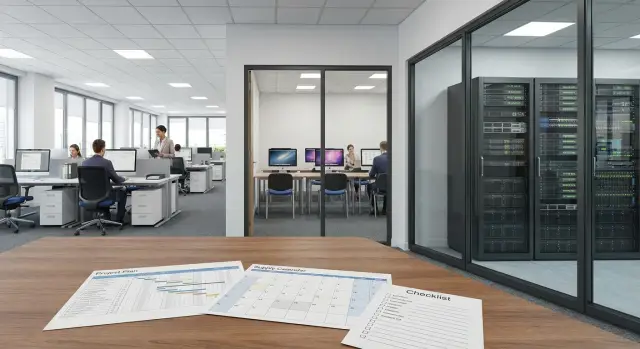
Why these projects quickly fall behind schedule
A mixed IT project rarely fails because of a single big mistake. Deadlines are usually broken by several small mismatches that weren’t consolidated into one plan in time. The office, the classroom and the server room operate by different rules, yet they’re often brought together in the schedule too late.
The main issue is that these areas are almost never ready at the same time. The office furniture may be in place, but ports aren’t labeled yet. The classroom renovation might be finished, but power isn’t connected. The server room may look ready, but the rack, cooling or installation permits aren’t confirmed. On paper the hardware arrived on time, yet the launch still gets postponed.
The server room is often the bottleneck. If servers, storage, switches or UPS units are delayed, other stages stop. You can set up workstations, but without a finished backbone you can’t properly test user logins, file access, printing, backup and other shared services.
Another frequent cause is different versions of the plan used by different teams. Procurement looks at the spec, builders at the room, IT at the network diagram, and the installation contractor at the actual site readiness. If this isn’t combined into a single document, typical issues appear: PCs arrive but the patch cords are the wrong length; servers are ready but IP addresses aren’t assigned; the classroom is set up but user accounts haven’t been issued; the network is built but some workstations lack power.
Even when some equipment comes from the same vendor, that alone won’t save the schedule. Deadlines depend not on the fact of delivery but on how early all dependencies are mapped in one scheme. So a project slips not on the installation day but earlier, at the moment when one zone is considered ready while the adjacent zone is still not.
What to lock down before procurement
Every project starts with a simple question: what exactly will be placed and where. Without an answer, procurement quickly turns into a set of separate orders that don’t fit together well.
It’s better to count workstations not as a single total but by rooms: offices, classrooms and service areas. For the office, understand how many employees work there full time, how many reserve seats are needed, whether extra monitors or peripherals and additional network ports are required. For a classroom, you need not only student seats but the teacher’s workstation, a display, a printer, network access and a clear storage policy for equipment.
The approach for the server room is different. Phrases like "we need one server" are useless here. You must define in advance which tasks the room will cover: file storage, accounting systems, virtual machines, backups, services for the classroom and office. Only then does it become clear how many servers, switches, racks and power supplies are actually needed.
Three zones, three different requirement sets
Office, classroom and server room are often treated as a single type of delivery, but they have different operating conditions. In the office convenience and a unified workstation configuration matter. In the classroom, easy administration and identical behavior of all machines are key. In the server room, power, cooling, racks, cabling and load reserve are critical.
Before the first order, fix four things:
- the layout of equipment by room
- the tasks of each zone and the critical services
- requirements for network, power and cooling
- the people responsible for approving changes
The last item is often underestimated. If you don’t appoint a single person or a small group to approve changes, the project starts to drift. One department asks to add workstations, another changes the classroom layout, a third moves the server rack. Even a small edit can trigger new switches, cables, licenses and timelines.
A good practice is to compile a single equipment list before the first order. It should include not only computers and servers but everything that makes them work: switches, UPS units, racks, patch panels, cables, mounts, monitors, keyboards, mice and spare parts. One combined list is easier to check for compatibility and to compare with the budget.
This approach is especially useful if a single contractor handles both equipment and integration. Then delivery of workstations, the network part and the server room can be synchronized before signing the order, rather than on site.
Who is responsible for what
Confusion in these projects starts not because of the hardware but because of unclear roles. A simple rule works best: every task has one owner, and the whole project has one coordinator.
The coordinator doesn’t have to personally accept every box or check every cable. Their job is to keep the big picture: who is waiting for delivery, which zone is ready for installation, where permits are needed and on which day testing can begin.
Without such a person it’s easy to get the familiar situation: PCs have arrived but the classroom has no sockets; the server is delivered but the rack isn’t assembled; the network is mounted but no one confirmed the test date. One coordinator closes these gaps and prevents teams from working blindly.
Zone owners
In addition to the overall coordinator, you need owners for each zone. It usually looks like this:
- office — a person who knows the seating plan, the composition of workstations and staff start dates
- classroom — a representative of the academic unit or administration who confirms the placement and operating mode of the room
- server room — an IT specialist or contractor responsible for racks, power, cooling and access
These people don’t have to do everything themselves. But they should answer questions quickly, approve changes and prevent the project from stalling on minor decisions.
It’s also important to decide in advance who accepts deliveries. This is not a formality. You need a specific person who will, on the delivery day, check quantities, packaging condition, labeling and completeness against the paperwork. If acceptance is "for everyone," in practice no one does it.
It’s helpful to separate acceptance stages: one person accepts the delivery, another confirms readiness for installation, and a third records the test result. That reduces disputes about which step a problem occurred.
If an integrator runs the project, the customer-side roles should still be assigned. Then installation and test dates are approved faster: it’s clear who opens rooms, who confirms the work window, and who signs off the result.
Step-by-step commissioning plan
In a mixed project, order matters more than speed. These projects fail not because there’s a lot of equipment but because equipment is brought, installed and configured without a shared sequence.
It’s better to build the work schedule not from the delivery date but from site readiness. If the classroom wiring isn’t finished and the server room cooling isn’t checked, early delivery only adds confusion. Boxes will sit in the wrong place, installers will wait, and deadlines will shift in a chain.
Work sequence
First confirm the physical readiness of each zone. For the office that means power, sockets, furniture and the seating plan. For the classroom — finished workstations, network access and a clear equipment layout. For the server room — racks, power, cooling, grounding and access for installation.
After that, approve the final contents of deliveries by zone. Not a generic list like "computers, servers, network," but a precise specification: how many workstations go to the office, how many to the classroom, which network equipment will be placed between them and which servers are needed in the server room. At this stage forgotten items such as patch panels, cables, mounts or missing ports usually surface.
Next, split deliveries into waves. First arrive items without which infrastructure can’t start. Then equipment for the server room and network. After that come the workstations for the office and classroom. Finally — spare parts and small add-ons. This order reduces downtime and prevents the site from turning into a warehouse.
It’s also convenient to carry out installation by zones. Usually the server room is assembled first, then the backbone and local network, and only afterward user devices are connected. For large projects, assign a responsible person for each zone and one coordinator for the overall schedule.
One more rule that often saves deadlines: allow buffer time. Even with good preparation, a 1–2 day shift is possible due to access issues, finishing work delays or repeating power checks.
How to align delivery, installation and configuration
The main risk isn’t procurement but the wrong order of work. When workstations arrive before the network and server components are ready, the hardware just waits and the team loses time.
It’s best to assemble the project by zones but according to a single logic. Start with the foundation: switches, servers, racks, power and the basic network. Only then does it make sense to deliver and connect user devices.
The correct order of work
For the server room, a simple rule applies: install and test what the other zones depend on first. If servers and network equipment aren’t ready, you can’t properly test the office and classroom in real conditions.
The classroom is easiest to set up using a template. If the room has twenty identical seats, you don’t need to configure each one as a separate mini-project. Build and test one reference kit, then replicate it for the rest. This reduces errors and speeds up launch.
It’s usually better to phase the office rollout. It’s not necessary to deploy all workstations at once. Launching them in batches — for example by department or floor — helps staff start earlier, and the team can address minor issues without overload.
A typical sequence looks like this:
- Prepare the server room and network.
- Assemble and test the classroom using a template.
- Bring the office workstations online in batches.
- Configure each zone immediately after its installation.
- Do a full launch only after an end-to-end test.
Don’t postpone configuration. If a zone is installed today, perform basic checks of the network, user logins, printing, access to shared resources and required applications right away. Otherwise small issues accumulate and only surface at the final launch.
A full test is needed even when each part already works individually. Make sure the server room sees all network segments, the classroom connects to required services, and office workstations access shared systems without failures.
Example schedule for three zones
It’s more convenient to manage such a project by zone readiness than by equipment type. Then the server room doesn’t wait for the office, the office doesn’t block the classroom, and deliveries of workstations and network gear follow a clear order.
For a site requiring office workstations, a computer classroom and a small server room, five weeks is usually enough for a careful start without rush.
Week 1 is for measurements and final confirmation of the project scope. At this stage you verify the seating plan, number of sockets, cable run lengths, rack location, and the list of servers, switches and workstations. This is where small details that later derail timelines usually surface: wrong rack size, lack of ports or extra seats in the classroom.
Week 2 is for preparing the foundation: electrical work and cabling. Contractors bring power lines, label ports, check grounding, assemble patch panels and prepare connection points for the office and classroom.
Week 3 is typically the most important for the technical team. First the rack is installed, then servers, UPS units, switches and basic cabling. If rack equipment is mounted on time, it’s easier to test power, network and system access before mass deployment of user hardware.
Week 4 is dedicated to end-user places. In the office, PCs, all-in-ones or thin clients are installed; in the classroom identical workstations are assembled using one template. This approach reduces configuration time and helps spot deviations faster.
Week 5 is for final verification. The team tests the network, user logins, printing, access to shared folders, educational software, backups and basic resilience. Only after that is the project handed over to operational mode.
Signs of a good schedule are simple:
- the server room is launched before the user zones
- classroom and office receive equipment only after the network is checked
- final acceptance happens once, not in pieces
Common mistakes and unnecessary delays
Many problems start before procurement. Equipment is ordered from a table but real premises aren’t checked: where desks stand, whether there’s space for a rack, adequate power and cooling, and access for installation. As a result, part of the equipment is already en route while the site isn’t ready.
For such projects this is especially painful. The office, classroom and server room follow different rules, but a failure in one area quickly drags the others. If servers arrive on time but the server room lacks cooling or power lines, the whole schedule breaks.
Another common source of delay is different equipment lists among contractors. One works from an old spec, another counts only workstations, a third expects a different set of network gear. On paper everything is agreed, but on site it turns out switches exist, patch cords are missing, and mounting hardware wasn’t ordered.
Often timelines are shifted by small details:
- not enough sockets near workstations
- cable routes not ready in all rooms
- forgot shelves, organizers, mounting hardware or patch panels
- cable lengths don’t fit the actual layout
- some equipment arrived while consumables and labels are still in transit
There is also an organizational mistake that seems harmless but is costly: inviting users too early. Staff or teachers are called to the launch before access, network checks and workstation testing are complete. Trust in the project falls, and the team spends time on urgent explanations instead of finishing work.
A simple rule: don’t invite anyone before a short internal test. First check power, network, accounts, printing, access to shared resources and basic work scenarios. Only then announce the launch date.
A short checklist before installation
Even a well-planned project can stall in one day if the site isn’t ready. It’s better to resolve contentious issues before the installers arrive, not with boxes at the door.
Check these five things before installers go on site:
- premises are physically ready, dusty work is finished, and access to desks, racks and sockets is free
- the network is labeled, cables are marked, ports are reconciled with the diagram and tested for connectivity
- every workstation has power and a network port in the correct location
- the server room is ready to receive equipment: access granted, cooling operational, and a clear order for carrying in and placement
- a day for the full test is scheduled, when workstations, switches, servers, printers and basic services can be checked immediately
Problems usually hide in details. In a classroom the desks are in place but some sockets are blocked by furniture. In the office ports are routed but no one knows which port belongs to which desk. In the server room the rack space is free, but passes were issued for only one person.
A useful rule is simple: if an item can’t be confirmed in a minute, it’s not ready. The phrase "we’ll fix it quickly later" before installation almost always means another schedule shift.
Next steps without new confusion
Once the plan is assembled, avoid creating new approvals at the last minute. Close the project with one short package of decisions: what arrives, when it arrives, who accepts and who launches.
The first practical step is to make a consolidated table for all zones. A few columns are enough: office workstations, classroom, server room, delivery date, installation date, responsible person, and site readiness status. Such a table quickly shows where readiness is real and where a risk of delay exists.
Next, create a single delivery and installation calendar. Not three separate schedules from different teams, but one document that shows task dependencies. Workstations can’t be fully launched without the network, and some services can’t be tested without servers and basic configuration.
It’s useful to agree in one place:
- the delivery date for each zone
- the installation and connection window
- the acceptance and basic test day
- the escalation contact if something slips
Also decide in advance who commissions equipment and who is responsible for integration. If a server arrives but no one is assigned to bring it into operation, the schedule already starts to unravel. The project must have not only owners for stages but also an owner for the result.
If you need a single contractor for both equipment and integration, discuss that option early. In Kazakhstan, companies like GSE.kz handle such tasks — including workstations, servers and systems integration. This is especially useful where it’s important to combine delivery and launch into one clear plan without extra handoffs between vendors.
The conclusion is simple: one table, one calendar, one set of responsible people. The earlier this is fixed, the lower the chance that the office, classroom and server room will each follow their own scenario.
Frequently asked questions
Where should I start when planning an office, classroom, and server room?
Start with a single zone-based plan covering the office, classroom, and server room. For each zone, list the equipment, room readiness, dependencies, delivery and installation dates, and the person responsible.
Why is the server room launched before the workstations?
Prepare the server room and core network first. They support user sign-in, file access, printing, backups, and workstation testing.
What should be checked in the server room before the servers are delivered?
Check power, cooling, grounding, racks, installer access, and the cable layout. Also confirm that the room is ready for equipment delivery and placement.
Who should be responsible for a mixed IT project?
Assign one project coordinator and owners for each zone. The coordinator maintains the overall schedule, while the owners promptly confirm room readiness and changes.
How should I calculate equipment needs for an office and classroom?
Count workstations by specific offices and classrooms, not as one overall number. Include monitors, peripherals, network ports, spare workstations, and the instructor's equipment.
What should be included in the overall equipment specification?
Include not only PCs and servers, but also switches, UPS units, racks, patch panels, cables, mounts, monitors, and spare items. This helps identify missing details before ordering.
In what order should delivery and installation be handled?
Prepare the infrastructure first, then install the server room and network, and connect the classroom and office afterward. Configure each zone immediately after installation, then carry out the full launch after end-to-end testing.
How can I set up a computer classroom faster?
Set up one reference workstation, then check the network, user account, required software, and printing. Then replicate that configuration on the remaining computers.
How should equipment acceptance be organized?
Assign equipment receipt to one specific employee, who will verify the quantity, completeness, labeling, and packaging condition against the documents. Do not leave acceptance as a shared responsibility across several departments.
When can the overall launch date be announced?
Run an internal check of power, network, user accounts, printing, shared resources, and backups. Invite employees and instructors only after all identified issues have been resolved.
