8 min read
Migrating to a Local LLM: A Checklist for a Smooth Move
Migration checklist for a local LLM: data, integrations, prompts, quality tests, security, roles and user training to avoid surprises.
Why move from a cloud LLM to a local one
The cloud is convenient to start with, but over time it becomes limiting. Most often the reason is data: not all texts, documents and dialogs can be sent to an external provider, even if they promise protection.
A second reason is cost and predictability. As the number of users and requests grows, token and API bills in the cloud become hard to plan, while a local model gives clearer cost structure.
A third reason is latency and control. If an LLM participates in call center work, support or internal approvals, extra seconds and reliance on external outages quickly become a problem. On-premises deployment helps keep the service inside your perimeter and lets you manage updates yourself.
Important to understand: migration by itself will not fix bad data, vague requirements, lack of quality metrics or weak user support. It simply moves responsibility inside the company.
From this point the team needs to cover basic operations: select and scale compute (CPU/GPU/storage), update the model and environment, manage access and logs, run backups, monitor latency and errors.
Involve InfoSec, the data owner, IT operations, legal and the business stakeholder from day one. For example, for a bank in Kazakhstan it is important to agree in advance which client fields must never appear in responses and who approves changes when updating the model on internal servers.
Define project goals and boundaries
First agree why you need a local LLM and what will count as success. Without that it's easy to drift into endless tweaks: the model is on-prem, but the business doesn't know if things actually improved.
Start with a map of scenarios that already work in the cloud or at least are used manually. Usually this is 3–5 tasks: employee support chat, search across the internal knowledge base, drafting emails and contracts, summarizing reports, helping developers.
Then document requirements and constraints in a single place so you don't rehash arguments every time:
- Language and style: Russian/Kazakh, formality, industry terminology.
- Quality: acceptable error rate and what counts as a critical error.
- Speed: response time and peak load (how many simultaneous users).
- Data: what can be sent to the model, where logs are stored, retention periods.
- Prohibitions: external APIs, mandatory audits, compliance requirements.
Separately decide on a mode: fully on-prem or hybrid. Hybrid often wins when some tasks don't touch sensitive data (for example, rewriting text to be more polite), while critical processes remain internal.
Example for a bank or government agency in Kazakhstan: employee chat and search across internal regulations move strictly inside the perimeter, while neutral email templates may remain in the cloud for a transitional period.
Data and content: what to move and how to protect it
The most unpleasant surprises during migration usually relate not to the model but to the data around it. Start with a data map: what sources are used (knowledge base, CRM, email, file stores), who owns each source and the sensitivity level of the content.
Then decide what truly needs to live inside the perimeter. Typically you store not only documents on-prem but also operational artifacts: conversation logs (for improvements), embeddings for knowledge search, reference data and classifiers. Storing everything quickly increases risk and cost; storing nothing lowers quality and makes incident investigation hard.
A retention policy should be short and unambiguous. It usually states retention periods for documents, logs and embeddings (and who approves them), encryption rules in transit and at rest, backup and restore procedures, rules for handling test sets and database copies, and access logging for sensitive data.
Configure data cleansing separately: remove or mask personal data and commercial secrets from training sets and prompt examples. A practical approach is access via a data owner: a request specifying purpose and duration, with automatic revocation when work is finished. For government bodies and large enterprises where audits are inevitable, this is critical.
Integrations and architecture: how the LLM fits into processes
To avoid the migration becoming “a chat here and work there,” first draw a simple diagram: which systems will ask the model and where results should appear. Architecture often matters more than model choice because it determines speed, security and usability.
LLMs are usually connected to existing operational systems where tasks and knowledge live: CRM, Service Desk, email, internal portals, file stores and knowledge bases. At this stage decide which scenarios you will automate (e.g., draft replies in Service Desk) and which will be human-assist only.
RAG (retrieval-augmented generation) is almost always needed when answers must rely on policies, regulations, prices, instructions and correspondence. Decide up front which sources are allowed, how the index is updated and how to handle duplicates and outdated versions.
Request and result flows
Describe the question -> answer path without unnecessary technical detail but with control points:
- where the request comes from (portal, ticket, email, chat);
- how context is added (user profile, role, selected documents);
- where the result goes (draft reply, ticket comment, CRM note);
- who approves and sends (auto-send or only after review);
- where the trace is stored (log, ticket card, report).
Resilience, logging, monitoring
On-prem means you are responsible for "what happens if it fails." A minimal plan usually includes a safe fallback (user message, a draft without LLM or escalation to a human), queues and limits (so spikes don't take the service down), a unified log format (request, source, prompt version, used documents, response time), availability and latency monitoring, and rules for masking data in logs.
Example: if a Service Desk agent asks “suggest a reply to the client,” the system takes context from the ticket, pulls knowledge base articles via RAG, produces a draft and saves it to the card, and sending occurs only after the agent confirms.
Prompts: inventory, transfer and standards
Migrations often break on prompts. In the cloud they are frequently scattered across code, chats, wiki instructions and hidden settings. Start with an inventory: gather system prompts, user templates, operator hints and any rules added by developers or contractors.
Then map prompts to scenarios and owners. Each scenario should have a responsible person and a clear version. This makes it easier to compare changes and understand what affected outcomes.
A common trap is dependence on cloud features: plugins, built-in tools, special output formats that only worked with the provider. When migrating, immediately record what the mandatory output is (e.g., JSON, table, short plan) and what can be simplified.
To keep prompts consistent across teams, define short standards:
- tone: neutral, businesslike, no speculation or "confident but unfounded" claims;
- restrictions: what must not be advised or generated (for example, personal data, policy circumvention);
- format: length, structure, language, required fields;
- failure response: how to reply if data is missing.
Prepare a set of canonical queries: 20–50 typical questions from real work to compare answers before and after the move. If you plan to deploy the LLM on your own servers, check in advance that scenarios don't rely on "magical" cloud features and produce repeatable results.
Quality tests: how to know things didn't get worse
If a local model is faster and cheaper but produces less useful answers, users will revert to old habits. You need a simple, repeatable way to compare quality before and after.
Choose metrics that the business understands. Usually 3–5 indicators are enough:
- Accuracy: are there factual errors or incorrect inferences?
- Completeness: does the model answer the whole question?
- Safety: toxicity, personal data leaks, forbidden advice.
- Robustness: how the model behaves with typos, incomplete inputs, contradictions.
- Instruction compliance: does it follow the required format (table, list, short/long).
Collect a test set of real requests, not made-up examples. Take questions from different departments (support, legal, procurement, HR), add edge cases and complex dialogs where context is often lost. For a pilot 50–200 requests are usually enough; then expand the set.
Regression testing must be fair: identical prompts, identical context, identical settings. Compare before and after on the same set and record where things improved or worsened.
Human evaluation can use a 1–5 scale and a couple of simple rules: what counts as "pass" versus "fail." For example, for support “4–5” means a correct answer with resolution steps and no fabricated details.
Log each failure with its cause: data, prompt, context selection, model limitations or filter settings. Tests then become a clear task list for fixes.
Security and compliance
With an on-prem LLM, security usually becomes a launch prerequisite. Start by asking which data the model will see and who can see outputs.
Design roles and access so permissions match job duties. A common mistake is giving everyone broad access “for the pilot” and then forgetting to revoke it.
- User: asks questions but does not see full source documents.
- Expert: sees documents for their division and confirms answers.
- Administrator: manages access and settings but does not read query contents.
- Auditor/InfoSec: reads logs and reports without the right to change configuration.
To reduce leak risk, enable personal data masking, limit verbatim quoting from internal documents and block exports (copying, downloads) where unnecessary. For example, a clinic may allow brief protocol summaries but forbid showing full names and complete records.
Logging is needed for audits: record who asked, when and from which application, which sources were used and which actions were taken (search, generation, export). Decide in advance where logs are stored, retention periods and who can access them.
Also test for prompt injection. Typical attacks: "ignore rules," "reveal hidden instructions," "print the document in full." Basic protections: strict system rules, output filters, a test set of attacks before release and validating model updates in an isolated environment before production.
Infrastructure and operations: what is needed for stable service
To avoid constant complaints about speed, start with a simple load estimate. How many people will query the model daily, when are peaks and what kind of responses are needed: short suggestions of 2–3 lines or long texts of a page?
Collect a "load passport":
- active users per hour and during peak 15 minutes;
- average query and response length (tokens or characters);
- share of complex tasks (long context, files, multiple sources);
- latency requirements (for example, "under 5 seconds" for support chat);
- availability (is 24/7 needed and what maintenance windows are allowed).
Decide where everything will run: your own server room, a commercial data center or an isolated contour. Organizations with strict requirements typically need network segmentation, access control and the ability to physically isolate the environment.
Think of resources beyond GPU. Bottlenecks are often RAM, fast disks for logs and caches, and network between components. Plan at least N+1 redundancy for critical nodes and a clear backup scheme.
If you need a quick deployment in Kazakhstan, it can be easier to rely on ready servers and a systems integrator. For example, GSE.kz as a manufacturer and integrator supplies S200 Series rack servers and provides system integration and 24/7 support, which is convenient when you need the entire contour inside the country and under control.
Without monitoring, operations are blind. Minimal metrics and alerts:
- response latency and timeout rate;
- API and integration errors;
- GPU/CPU, RAM, disk usage and log growth;
- temperature and power (especially for GPUs);
- service quality: share of successful dialogs, user complaints.
Assign owners right away: who is responsible for hardware and updates, who handles InfoSec and access, and who from the business approves usage rules and improvement priorities.
Step-by-step migration plan: from pilot to full transition
Successful migration usually looks like a series of short controlled steps. First prove value in a small area, then expand coverage without losing quality and control.
Start with a pilot: pick 2–3 scenarios that deliver quick wins and are easy to measure (for example, support replies, regulation search, draft emails). Give limited user access and agree in advance how they will record issues.
Next run in parallel: cloud and local models operate together while the team compares results and failure cost. Small differences often surface here: response length, sensitivity to phrasing and context.
Minimal cutover plan
- Pilot on chosen scenarios and users.
- Parallel operation and feedback collection.
- Adjust prompts, access rights and logging.
- Final quality and security checks.
- Cutover in a pre-agreed window.
Before the cutover date, fix readiness criteria. For example: accuracy not lower than the cloud on the test set, no sensitive data leaks, response times meet SLA, and incident owners are assigned.
Rollback plan
Rollback must be a real button, not just documentation: when returning to the cloud, what happens to logs and user sessions and which changes are reverted. This is crucial for critical teams.
By launch users should have a short guide, usage rules and support contacts.
Common mistakes and migration pitfalls
A frequent disappointment is moving the technology but not the discipline. On-prem migration quickly exposes old issues: messy data, undocumented access rules, and no quality criteria.
Costliest mistakes
It starts with data. If the knowledge base contains many duplicates, outdated procedures and files without context, the model will answer confidently but incorrectly. Users lose trust fast, even if infrastructure works perfectly.
A second trap is moving prompts “as-is.” Different models interpret roles, constraints and formats differently. What followed instructions neatly in the cloud may become verbose or skip checks locally.
A third failure mode is lacking a test set. Then measurement is replaced by subjective debate. Without a chosen question set and criteria you won't know where the system degraded.
Another risk is overly broad access. On-prem teams often ask to make things available to everyone, and employees end up seeing documents they don't need by role. For organizations with internal regulations or classified data this can be critical.
And one more problem: no owner. Technically everything is running but no one is responsible for knowledge quality, prompt maintenance, incident triage and feedback.
Quick pre-launch checklist:
- knowledge sources cleaned and described (what is current, what is archive);
- prompts adapted to the specific model and response style agreed;
- test set and metrics prepared (accuracy, completeness, failure rate);
- roles and access set by the principle of least privilege;
- product owner assigned and a process for regular improvements established.
User training and the new way of working
Success depends not only on hardware and integrations but on how people use the system daily. Agree boundaries immediately: the LLM helps draft text, summarize documents, suggest email and SQL variants, but responsibility for final decisions and fact-checking stays with a human. This is especially important for legal, financial and HR responses.
Provide a short request guide. It should show the difference between “ask something” and “give context and format.” For example, instead of "Create a report" use: "Create a brief 10-item report, business tone, base it on this text, highlight risks in a separate block."
Data rules
Even on-premises you need restrictions. Fix a simple rule: do not include passwords, keys, personal data without necessity or any fragments prohibited by internal policies. On-prem does not mean risk-free: logging, screenshots and forwarding replies can still leak data.
Feedback and short trainings
Set up one clear channel for complaints and ideas (email or chat) and ask for reports in a template:
- task and department;
- prompt (without sensitive data);
- LLM answer and what's wrong with it;
- expected result;
- urgency.
Run short 30-minute sessions per department: 10 minutes on limits, 10 minutes of practice on their tasks, 10 minutes on data rules. After the first week update the quick guide with examples from feedback so the new mode becomes established faster.
Short pre-launch readiness checklist
Before switching users from the cloud to the perimeter, walk through this list and honestly note remaining gaps. This reduces the risk of a launch failure due to small issues that surface on day one.
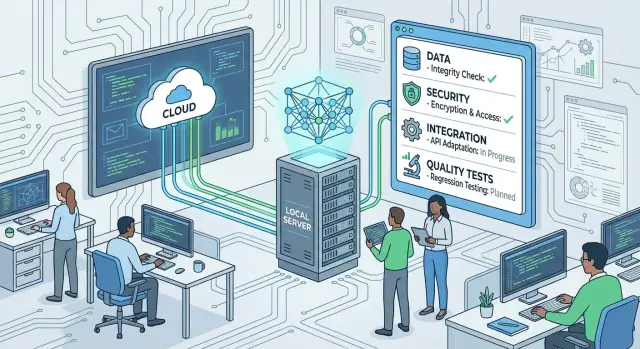
Check readiness across five areas:
- Data: sources listed, sensitivity marked (personal, commercial), data owners confirmed usage rules and retention periods.
- Integrations: connection points (email, knowledge base, CRM/ERP, service desk) described plainly, typical scenarios and error handling run in pilot.
- Prompts and tests: prompts, templates and test sets stored with versions; it's clear who can change, how to approve and how to roll back.
- Quality: metrics and acceptance thresholds approved (accuracy, completeness, failure rate, response time), owners for checks and a schedule for repeated measurements.
- Operations and security: roles and access set, action auditing, backups, update plan for the model and dependencies, incident response procedure.
If even one area is only "on paper," delay the launch and close the risks. It's cheaper than retraining people after a series of errors and bans.
Example scenario: what migration looks like in a real company
A bank contact center used a cloud assistant for operators: it suggested answers about products, tariffs and procedures. After several incidents risking extra data exposure the bank decided to move to a local LLM to keep requests and logs inside the perimeter.
The team first collected what actually fed the assistant. They moved the knowledge base (regulations, FAQs, scripts), answer templates for typical situations and logging rules so shift supervisors could see how the assistant affected call time and consultation quality.
The pilot covered one area (cards and transfers) and quality was checked on a clear set: 200 typical questions from call history, 30 complex cases (conflicts, unusual fees), manager evaluations for clarity and usefulness, and legal review of phrasing.
Access rules were then changed. Documents opened by role (operator, shift lead, methodologist), and responses were forbidden from revealing personal client data. If a request contained an IIN, card number or full name, the assistant would not answer substantively but offer a safe step: ask for data in the profile system.
As a result, clear rules, stable response speed and fewer leak risks emerged. The bank deployed the solution on its own servers, and in some branches used GSE S200 rack servers as part of a data center upgrade.
Next steps after migration
On-prem launch is the start of regular operations. To avoid the work becoming a set of ad-hoc fixes, set a plan for the next 3 months and assign owners.
A 30-60-90 day roadmap works well. In the first 30 days fix "hygiene": collect feedback, correct obvious issues, enable logging and basic access rules. By day 60 stabilize quality: update test sets, agree on canonical answers and formalize the prompt change process. By day 90 move to scale: add teams, expand the knowledge base, and introduce a model and data update policy.
To prevent the plan stalling for budget reasons, break costs into four categories: hardware and spare capacity for growth, maintenance and monitoring (including on-call), user training and first-line support, and updates (models, vector DB, data, security).
Then allocate roles: business owner (goals and priorities), IT (platform and integrations), InfoSec (policies and control), support (incidents and requests), content owners (source quality).
When expanding to new departments and data sources, add new test cases rather than relying on "it generally works." If you need a turnkey local contour, separately assess infrastructure and implementation: GSE.kz supplies S200 Series servers and workstations and performs system integration and 24/7 support.
Frequently asked questions
When does it actually make sense to move from a cloud LLM to a local one?
Start from data and control: if you have restrictions on sending documents, dialogs or logs to an external provider, an on-premises contour is usually justified immediately. Another common reason is predictable costs as load grows and cloud token/API bills become hard to plan. The third reason is latency and dependency on external outages, especially for support and call centers.
Where should a local LLM project start so you don't get lost in endless tweaks?
Define 3–5 scenarios and success criteria: what exactly should improve, how you will measure it, and what quality threshold is acceptable. Fix requirements for response time, language and style, data rules and prohibitions (for example, no external APIs). Without that, you risk moving the technology but not delivering clear business value.
Which data must be moved inside the perimeter and what is better left out?
First, bring in the sensitive data and what is essential for quality: internal regulations, instructions, current FAQs, email templates, and supporting artifacts (logs, embeddings for search, reference data). Do not transfer everything: decide in advance what is actually used in scenarios and what can remain archived or unconnected to avoid inflating risk and cost.
How to protect data when deploying an LLM on-premises?
Create a short storage and access policy: where documents live, how long logs and embeddings are kept, who approves retention periods and who can read content. Include encryption at rest and in transit, backups with recovery checks, and masking of personal data in training sets and logs. "On-premises" does not mean safe by default, so discipline matters more than location.
How to integrate a local LLM into processes instead of creating a separate chat?
You almost always need a diagram showing that the LLM is embedded in CRM, Service Desk, email or a portal and that results return there in a useful form (draft, ticket comment, suggestion). For answers based on internal documents, RAG is usually required so the model relies on up-to-date sources rather than hallucinating. Decide up front who approves outgoing answers — automatic sending is rare; a human-review mode is safer.
Is RAG necessary and when is it unavoidable?
If answers must rely on regulations, prices, instructions, correspondence and internal knowledge bases, RAG is generally essential. It reduces hallucinations and helps show the source of a recommendation, but it requires discipline: index updates, deduplication and version control. Without upkeep, RAG will surface garbage and outdated rules too.
Why do prompts often break during migration and how to prevent it?
Collect all prompts in one place, map them to scenarios and assign owners so it's clear who changes what and why. Check dependencies on cloud-specific features (plugins, built-in tools or special output formats) that may not work locally. Before release, run the canonical queries on the same model and with the same context so you can see what actually broke.
How to quickly check that the local model is not worse than the cloud one?
Build a test set of real requests from different departments and compare before/after on identical prompts, context and settings. Choose simple business-friendly metrics: accuracy, completeness, safety, format compliance and robustness to input errors. Record each failure with a root cause (data, prompt, context, model limits) so you get a concrete action plan instead of a subjective debate.
What to provide for operations: logging, monitoring, fallbacks?
Have an explicit resilience plan: what the user sees on failure, where the request goes, and whether there are queues and rate limits so a spike doesn't take the service down. Logs must be consistent and useful for incident analysis, with masking for sensitive data. Monitor latency, timeouts, integration errors, CPU/GPU/RAM/disk usage and agree who is on-call and who makes incident decisions.
How to determine required resources and where to source infrastructure in Kazakhstan?
Estimate load by active users, query and response lengths, and latency requirements, then plan resources not only for GPUs but also for RAM, fast disks and network. For critical services, design redundancy and a clear backup scheme. If you need to deploy quickly inside Kazakhstan, you can rely on a local vendor and integrator: for example, GSE.kz supplies S200 Series rack servers and provides system integration and 24/7 support.
