8 min read
Migrating to IPv6 in a Corporate Network: Plan and Pitfalls
Migrating to IPv6 in a corporate network: how to plan dual-stack, addressing, security and applications, and where failures most often occur.
Why companies move to IPv6 and what will change
IPv4 addresses are long exhausted — this is no longer theoretical. Companies rely on NAT, ad-hoc subnets and layered port-forwarding schemes, but the cost is rising: support becomes harder, single points of failure multiply, incidents are harder to investigate, and configuring access for contractors and branches takes longer.
Organizations usually migrate to IPv6 not for fashion but to grow more easily. IPv6 provides an almost unlimited address space and predictable addressing: every device can get a unique address without NAT workarounds. It’s simpler to build end-to-end connectivity between sites, clouds and data centers, and to run services that need many addresses (virtualization, containers, IoT, guest networks).
It’s important to understand what IPv6 does not solve by itself. It doesn’t automatically make the network more secure and it doesn’t replace segmentation, filtering, monitoring and access control. It also doesn’t guarantee that old applications, VPN clients or identity systems will suddenly behave better.
For the business, changes are often indirect. Users won’t see “IPv6 on the screen,” but they may experience fewer access issues to external services, better video calls, smoother remote work and easier provider integrations. The IT team gets a clearer addressing scheme and fewer manual exceptions, but a new responsibility appears: managing security and address accounting for two protocols from day one.
Typical goals are: meeting provider or data center requirements, connecting new sites without address shortages, simplifying service publication, and reducing reliance on complex NAT.
Before starting, estimate the scope of work with simple questions: where do you need dual-stack, which applications and devices are critical, are firewalls, load balancers and VPNs ready, who owns the addressing plan and DNS, and how will you verify service quality after enabling IPv6.
If you’re upgrading server infrastructure (including in data centers), plan IPv6 support in network settings, deployment templates and security rules up front so you don’t have to redo everything piecemeal later.
Defining a strategy: dual-stack or IPv6-only
The initial strategy sets the project’s pace and reduces surprises. For most companies, the migration doesn’t start with abandoning IPv4 but with a sensible interim model.
There are three modes: IPv4-only, dual-stack (both IPv4 and IPv6) and IPv6-only. Full IPv6-only is usually realistic only in limited areas: new segments, internal services, test zones, or sometimes in the cloud. In production environments there’s typically at least one component that still needs IPv4: VPN clients, legacy apps, certain vendors or specific equipment.
When dual-stack is justified
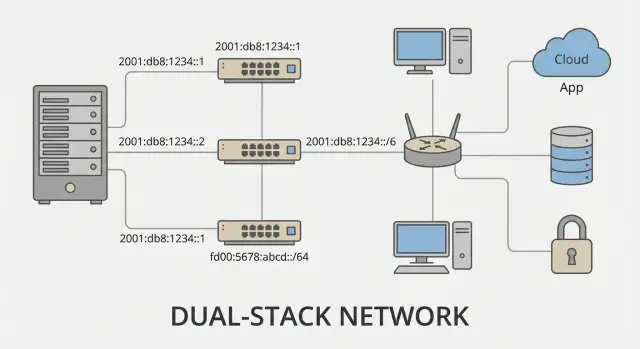
Dual-stack is almost always the best compromise during migration: enable IPv6 where ready but don’t break systems still depending on IPv4. The key is to define boundaries up front or the project will spread.
Document the coverage in advance: offices and branches (wired, Wi‑Fi, guest networks), data centers and server segments (services, monitoring, backups), VPN and remote access, clouds and external SaaS, perimeter and service publication.
A simple example: a branch gets IPv6 from the ISP, but the VPN to headquarters and some point-of-sale software work only over IPv4. Dual-stack allows IPv6 on Wi‑Fi and user subnets while leaving critical systems on IPv4 until they’re updated.
How to define success and rollback
Success criteria must be concrete: which services must work over IPv6 (DNS, web portals, mail, corporate apps, OS updates, monitoring), in which segments and with what SLAs.
You also need a rollback plan even in dual-stack. Define triggers and actions in advance: if authentication errors spike, access to key systems breaks, or call quality drops, you temporarily disable IPv6 in the problem segment (for example on a Wi‑Fi SSID or a specific site), restoring routing and policies to their previous state.
Readiness audit: hardware, OSs, services and provider
Before you begin, run a short but honest audit. The goal is simple: find where IPv6 is already supported and where surprises will come from — hardware, firmware, configuration and external dependencies.
Inventory devices: routers, L3 switches, firewalls, load balancers, proxies, Wi‑Fi controllers. For each device check not only “IPv6 supported” but details: ACLs, IPS, logging, filtering behavior, RA Guard and DHCPv6 Snooping, and the actual firmware readiness.
Then check client OSs and servers. Windows, Linux and macOS are generally ready, but management often breaks: GPO templates, EDR agents, local firewall policies, VPN clients. A separate risk group is legacy apps that store IPs as strings and don’t understand colons. Also review mobile devices if they access corporate services over Wi‑Fi.
Peripherals and “smart” devices are frequent surprise sources: printers, IP phones, cameras, terminals, IoT. They may advertise IPv6 but not work properly (for example no AAAA in DNS or broken autoconfiguration).
Mini-checklist so nothing is forgotten:
- ISP IPv6 support and the channel details: SLA and limitations.
- BGP/static routing readiness and prefix assignment format.
- Dependencies: DNS, NTP, PKI, AD, monitoring, SIEM.
- Logs and visibility: what exactly is logged for IPv6.
- Firmware upgrade plan and maintenance windows.
A practical approach: if you’re introducing new servers (private cloud or VDI), start the audit with that segment and verify the full traffic path to the internet and key services before expanding IPv6 into offices.
IPv6 addressing plan: prefixes, subnets and rules
A good addressing plan solves half the problems. If it’s clear and consistent across sites, you’ll deploy dual-stack faster and spend less time untangling the network later.
First choice: PI or PA prefix. PA (Provider Aggregatable) is usually given by an ISP: simpler and cheaper, but changing providers typically forces a renumbering. PI (Provider Independent) lasts longer and is preferable for companies with multiple transit links or strict independence needs, but it’s harder to obtain and manage.
Next come subdivision rules. Don’t skimp on /64s: many mechanisms (SLAAC and some OS/equipment features) expect a /64 per L2 segment. A common corporate model is: /48 for the organization, /56 per site or large department, /64 per VLAN or subnet.
To keep addresses readable and scalable, decide in advance which fields represent what: site, network type, VLAN. For example, reserve ranges for office VLANs, Wi‑Fi, guest networks, server networks and management.
Allocate separate /64s for servers and services and keep some spare capacity. Assign static addresses from a dedicated range with clear naming and ownership rules. For critical systems (virtualization, storage, server racks) reserve extra addresses for growth and migrations.
Rules to document in writing:
- /64 per VLAN without exceptions.
- Separate prefixes for users, servers, management and DMZ.
- A unified template “site + function + VLAN” for subnets.
- Ranges for static addresses and ranges for autoconfiguration.
- A prefix table: owner, date introduced, comments, change history.
Documentation is not optional — it saves hours during incidents and helps expand address space safely without conflicts.
DNS, DHCPv6, SLAAC and address management
DNS is often the first place things look “enabled but broken.” When you add AAAA records, clients may prefer IPv6 and an application can hang if IPv6 routing, firewalling or proxying is worse than IPv4. Therefore enable AAAA gradually: test services first, then key services. Also configure the ip6.arpa reverse zones so logs, monitoring and investigations remain usable.
There are two main addressing approaches: SLAAC (clients self configure from Router Advertisements) and DHCPv6 (a server assigns addresses and parameters). Corporations frequently use both in different segments.
A practical scheme: user VLANs use SLAAC for the address and DHCPv6 for DNS and additional parameters when needed. Server segments use DHCPv6 or static addresses. Guest networks and Wi‑Fi often use SLAAC with strict access policies.
A key risk is Router Advertisements (RA). A single accidental RA from a misconnected router can send clients to the wrong gateway. Filter and control RAs at switch ports and anywhere unmanaged devices may appear.
Manage prefixes and addresses as a process, not scattered spreadsheets. In IPAM store which prefix is assigned to a site, how subnets are carved, where DHCPv6 or SLAAC are used, and who owns each segment.
Don’t forget dependencies that “break everything”: NTP, internal repositories, LDAP/AD, monitoring. Example: DNS starts returning AAAA for NTP, clients try IPv6, but UDP/123 over IPv6 is blocked by the firewall. Within a day certificates and authentication start failing.
IPv6 security: rules, filtering and control
The main trap in migration is running IPv4 and IPv6 in parallel while security policies remain IPv4-only. IPv6 traffic can then bypass controls and services become unexpectedly reachable from outside or between segments.
Start with the firewall: IPv6 needs its own rules and testing. Don’t rely on NAT to “keep things closed”: IPv6 typically doesn’t use NAT and addresses are routable. Follow the same principle: deny by default, then open specific directions (DNS, web, mail, admin) and record who requested each exception and why.
A typical failure scenario: perimeter IPv4 rules are strict, but IPv6 is left “allow all” because “we’re just testing.” A week later a test web UI, RDP or admin panel is reachable over IPv6. This is common on servers and workstations where IPv6 is enabled by default.
Verify that security tools actually see and filter IPv6 in production traffic: IDS/IPS, WAF, proxy, DLP. It’s not enough that a product “supports IPv6” — policies, signatures and exceptions must apply equally to both stacks. If part of the chain (for example a proxy) doesn’t handle IPv6, users will bypass it and you’ll lose control.
For logs and forensics ensure your SIEM and logging systems accept IPv6 addresses without truncation or format issues. Test IPv6 searches, user-address correlation, and how events from firewalls, proxies and DNS are recorded.
Protect the local network from routing spoofing: enable RA Guard and DHCPv6 Guard on switches and limit trusted uplink ports. On Wi‑Fi controllers enable the same protections, otherwise a rogue hotspot can advertise itself as a gateway. Ensure segmentation (VLAN/ACL) treats IPv6 as strictly as IPv4.
Applications and services: where IPv6 fails unexpectedly
The most unpleasant part of migration is that IPv6 can appear “on its own” without your plan. Many OSs enable it by default and applications prefer IPv6 if available. You may think you’re still on IPv4 while some clients already use IPv6 and hit unprepared services.
A common cause of odd symptoms is different paths for IPv4 and IPv6. Split DNS, proxies and access policies may be configured only for A records, while AAAA records go to a different resolver or receive a different response. A user opens a site: IPv4 works, IPv6 times out or returns “403,” and it looks like a random failure.
Typical places that break unexpectedly
Frequent problem areas:
- L7 load balancers and reverse proxies: the real client IP may be lost or headers formatted differently (e.g., X-Forwarded-For), breaking ACLs and restrictions.
- VPN: tunnels may not carry IPv6 or clients may not receive routes/addresses, causing some resources to be unavailable only to remote users.
- Mail: SPF/DKIM/DMARC and anti-spam may be tuned for IPv4; an IPv6 sender may lack rDNS or be excluded from allowed ranges.
- VoIP and printing: devices see IPv6 but don’t handle DNS names or discovery correctly.
- Monitoring: if it checks only IPv4, IPv6 degradation accumulates unnoticed.
How to diagnose quickly
Avoid chasing ghosts by separating symptoms by protocol stack:
- Test service reachability over IPv4 and IPv6 separately (from client subnets).
- Compare DNS A and AAAA responses and which resolver issued them.
- Check proxy/load balancer logs: what client address does the application see and which headers are present.
- For VPN: confirm the client has an IPv6 address, has routes to required prefixes, and that DNS works.
On practice you often must tidy up the application “surroundings”: DNS, proxy, WAF, load balancers, VPN and monitoring. If working with an integrator, agree on application-level tests, not just network tests.
Deployment roadmap: a step-by-step plan
Do the migration in waves, not a single big flip. You’ll find unexpected issues faster and keep control. Start with a pilot where rollback is easy: one office, one VLAN or a small server segment.
A typical working order for most companies:
- Pilot: enable IPv6 in one segment, set addressing and routing, collect metrics.
- Core and perimeter: enable dual-stack on routers, firewalls and VPNs, verify internet egress and inter-site links.
- Core services: prepare DNS (AAAA and reverse), NTP, AD/PKI so clients don’t hang on IPv6 attempts.
- Endpoints and Wi‑Fi, then branches: expand one network type at a time with a clear change window and rollback plan.
- External services: publish over IPv6 only after the internal environment is stable and security and monitoring are ready.
After each step perform a short acceptance. IPv6 usually breaks not at routing but in the details: DNS, security policies, legacy agents.
What to confirm at every stage:
- Clients receive address, gateway and DNS and can access internal resources by name.
- IPv6 firewall policies are enabled and equivalent to IPv4 — there is no “allow all” by default.
- Logs, monitoring and inventory include IPv6 addresses and don’t label them as “unknown.”
- Critical apps (mail, proxy, VPN, EDR) run without stack-selection delays.
- There’s a documented rollback procedure: how to quickly disable IPv6 on a segment without affecting others.
If you’re also upgrading infrastructure, include dual-stack requirements in procurement and deployment. Integrators and vendors who can assemble server and network parts and support the pilot/rollout reduce manual exceptions and accelerate achieving a stable state.
Testing and acceptance: what to check before expanding
Run a pilot in a controlled area: a floor, a branch or an isolated IT segment. The goal is to catch issues where they won’t impact everyone and to fix acceptance rules.
Start with connectivity but not only ping tests. Often the issue is how the device obtains an address and a route.
Minimal technical checklist
Record results (expected vs observed, where and when tested):
- Routing and addressing: correct prefixes on interfaces, expected RAs, expected route table entries, no unexpected routes.
- DNS: AAAA records where needed, split-horizon working, reverse zones configured, caching not masking issues.
- Applications: SSO/AD login, OS and software updates, file shares and printing, critical SaaS and their agents.
- Security: IPv6 firewall rules are not “allow by default,” segmentation enforces zones, scans show no unexpected open ports.
- Observability: logs capture IPv6 without truncation, alerts fire on real events, NetFlow/sFlow shows IPv6, SIEM groups sources correctly.
Then acceptance: define which metrics must be green before expansion. For example, share of successful logins, no update-related user complaints, stable DNS without NXDOMAIN spikes and repeatable test results at different times.
A practical pilot: dual-stack for 20–50 users and a couple of servers (for example, a file server and an update server). If you can set up a test bench with typical hardware, do so to avoid surprises from drivers or NIC firmware.
Don’t forget communication. Inform users about change windows, signs of issues (for example “internal resources won’t open but the internet works”) and where to report problems quickly.
Common mistakes and migration pitfalls
The nastiest incidents are not about address assignment but about security and manageability silently dropping away. IPv6 can start working “by itself” and the team only learns through odd incidents or inconsistent test results.
Most frequent failures
The first typical error is missing IPv6 firewall coverage. Traffic may already flow over IPv6 (for example via autoconfiguration) while rules and logging are absent because policies were written only for IPv4. Some flows then bypass controls.
The second trap is accidental Router Advertisements on L2. A single misconfigured machine or “smart” router can send devices to a different gateway, DNS or route. Symptoms look like intermittent behavior, especially for internal services.
Third: trying to use subnets smaller than /64 on access VLANs. This breaks SLAAC and some OS/network functions. If you need to conserve addresses, redesign rather than compress /64s on access.
Fourth: mixing DHCPv6 and SLAAC without a clear policy. Addresses may exist but inventory, DNS registration and app expectations diverge: support sees one address for connectivity and another in inventory.
Fifth: forgotten dependencies — monitoring, backups, EDR agents, scanners and asset systems. They may silently not support IPv6 or require separate configuration.
Before expanding the pilot verify at least:
- IPv6 rules and logs exist on the firewall for key segments.
- L2 protections against rogue RAs are enabled and only trusted devices may be gateways.
- Every user subnet remains a /64.
- Policy is documented: where SLAAC is allowed, where DHCPv6 is used, and how accounting is done.
- A rollback plan and change control (who enabled what and when) exist.
Example: a branch enabled IPv6 on switches but forgot perimeter rules and monitoring. Users sometimes access external services faster, but security reports show “gaps” because part of the traffic moved to IPv6 and stopped appearing in usual reports.
Quick checklist, sample scenario and next steps
Before enabling dual-stack run a short check to avoid the situation “it seems to work but some users can’t access services.”
30-minute checklist before enabling dual-stack
- Ensure the edge router has an IPv6 prefix from the provider (a prefix, a default route, reverse path).
- Verify DNS only exposes AAAA for services actually reachable over IPv6.
- On key VLANs check RA/SLAAC or DHCPv6 (and that they don’t conflict) and that addresses are recorded in inventory.
- Enable IPv6 logging on the firewall and prepare a quick rollback plan (what to turn off first).
- Run 3–5 typical scenarios: mail, file shares, corporate portal, VPN, printing.
Minimal IPv6 firewall policy set
You cannot “leave IPv6 for later”: traffic will flow as soon as routes and RAs exist.
- Explicitly block inbound internet traffic to user subnets; open only required services.
- Allow ICMPv6 basics (otherwise MTU and neighbor discovery break), but restrict unnecessary types.
- Block unwanted transition mechanisms (Teredo/6to4) if you don’t use them.
- Write inter-segment rules by service groups, not any-any, and make separate management rules.
- Enable RA-spoofing protection on switches (where available) and control DHCPv6.
A simple addressing registry template helps keep owners and dependencies visible:
| Prefix/subnet | VLAN/segment | Purpose | Key services | Owner | Notes |
|---|---|---|---|---|---|
| 2001:db8:.../64 | 120 | Office | DNS, proxy | IT Network | RA + DHCPv6 |
Example timeline for a mid-size company (office + branch). Week 1: audit hardware, OSs and provider; inventory services and DNS. Week 2: addressing plan, pilot on 1–2 VLANs, basic security rules, training for on-call staff. Week 3: connect a branch, test applications, fix bottlenecks (VPN, monitoring, printers). Week 4: expand to remaining segments, acceptance, procedures and metrics.
Next steps: assign a project owner (network), responsible parties for security and apps, allocate a test environment and change windows, and schedule firmware upgrades and hardware replacements. If the audit shows you need additional DNS/DHCP/monitoring servers or workstation upgrades, plan these alongside the migration. An integrator and the vendor GSE.kz (gse.kz) can help by supplying PCs and servers and providing system integration and support during pilot and rollout.
Frequently asked questions
Do we even need IPv6, or can we live on IPv4 and NAT?
In short — yes, if you need to grow: more sites, devices, services, clouds and guest networks. IPv6 removes the persistent pain of address scarcity and complex NAT, but by itself it won’t make the network “simpler and safer” without a clear addressing plan, firewall rules and proper monitoring.
What should we start with: dual-stack or IPv6-only?
The safest way to start is **dual-stack**: run IPv4 and IPv6 side-by-side, enable IPv6 where you’re ready, and avoid breaking IPv4 dependencies. IPv6-only is usually deployed selectively (new segments, test zones, internal services) once you are sure applications, VPNs and security tools can handle it.
How do we know the migration succeeded and how to prepare a rollback?
Define success criteria before enabling IPv6: - which services must be reachable over IPv6 (DNS, key portals, mail, updates, monitoring); - in which segments (Wi‑Fi, office VLANs, server networks, branches); - which metrics matter (login errors, latency, access to SaaS). Rollback should be simple: be able to quickly disable IPv6 on a specific segment (for example an SSID or VLAN) without touching the rest of the network.
What should we check with the provider before enabling IPv6?
At minimum: the provider must assign you an IPv6 prefix, provide routing (static or BGP) and a reasonable SLA. In practice: clarify **the prefix size you will get**, how often it may change, and what happens during failover/switchovers. Without this, your addressing plan and stable service publication will suffer.
How to carve IPv6 subnets and why do people always mention /64?
Rule of thumb: **/64 per L2 segment (VLAN)** — almost always without exception. A typical company layout: - /48 for the organization; - /56 per site; - /64 per VLAN. Decide in advance how you encode site and network type into the prefix (users, servers, management, DMZ) and leave room for growth, otherwise the plan becomes unreadable within a year.
SLAAC or DHCPv6 — which to choose and can they be mixed?
For users a common approach is: **SLAAC for the address + DHCPv6 for parameters (e.g., DNS)**. For servers — **DHCPv6 or static** to keep addresses predictable and easy to manage. Important: whatever method you use, keep a record of prefixes/subnets and segment owners (IPAM or a single registry). And control Router Advertisements — a single rogue RA can send clients to the wrong gateway.
Why does everything break after adding AAAA records to DNS?
A frequent cause of incidents: you add AAAA records and clients prefer IPv6, while IPv6 routing/firewall/proxy is less prepared. Practical steps: - enable AAAA **gradually** (test services first, then key ones); - set up **reverse DNS** for IPv6 so logs and investigations remain useful; - verify A and AAAA responses and which resolver provides them (especially with split DNS).
Does IPv6 make the network safer or more dangerous?
No — IPv6 does not automatically add security. The biggest trap is maintaining security policies only for IPv4 while IPv6 traffic flows parallel and bypasses controls. Minimum requirements: - separate firewall rules for IPv6 (usually **deny by default** and explicit allow rules); - basic ICMPv6 allowed (otherwise MTU and neighbor discovery break), but limit unnecessary types; - RA Guard / DHCPv6 Guard on switches and control who may act as a gateway; - verify IDS/IPS, proxy, WAF, DLP and SIEM actually handle IPv6 in production policies and logs.
Where does IPv6 unexpectedly break: apps, VPN, mail, edge devices?
Most often the breakage comes from surrounding systems rather than routing itself: - VPN clients may not receive IPv6 routes or DNS, so remote users lose access to some resources; - load balancers/reverse proxies may not forward the real client IP, breaking ACLs and rate limits; - mail: IPv6 sender addresses may lack rDNS or aren’t included in allowed ranges for anti-spam checks; - printers/VoIP/cameras ‘support IPv6’ but fail with DNS or autoconfiguration; - monitoring only checks IPv4 and IPv6 degradation accumulates unseen. Diagnose by testing IPv4 and IPv6 access separately and reviewing DNS/proxy/firewall logs.
What does a reasonable IPv6 rollout roadmap look like?
Start with a pilot that is easy to roll back: one office, one VLAN or a small server segment. A typical sequence that works: - pilot: enable IPv6 in one segment, configure addressing and routing, collect metrics; - core & perimeter: enable dual-stack on routers, firewalls and VPN, verify internet access and inter-site connectivity; - core services: prepare DNS (AAAA and reverse), NTP, AD/PKI so clients don’t hang on IPv6 attempts; - endpoints & Wi‑Fi, then branches: expand type-by-type with change windows and rollback plans; - external services: publish over IPv6 only after internal stability and security/monitoring are ensured. If updating servers and network gear concurrently, require dual-stack in procurement and implementation specs. An integrator/manufacturer that can deliver servers and handle pilot/rollout reduces manual exceptions and speeds stabilization.
What to test and validate before scaling IPv6?
Do a pilot on a limited scope: a floor, a branch or a small IT segment. The goal is to catch issues where they don’t affect everyone at once and to lock down acceptance criteria. Don’t test only with pings — many problems are in how devices obtain addresses and routes. Minimum technical checks to record (expected vs actual): - routing & addressing: correct prefixes on interfaces, expected RAs, route table entries, no unexpected routes; - DNS: AAAA records where needed, split-horizon behavior, reverse zones configured, caching not masking issues; - applications: SSO/AD login, OS and app updates, file shares and printing, critical SaaS and their agents; - security: IPv6 firewall rules are not “allow all”, segmentation enforces zones, scans don’t show unintended open ports; - observability: logs preserve IPv6, alerts trigger on real events, NetFlow/sFlow includes IPv6, SIEM correlates sources correctly. Acceptance metrics before expanding could include successful logins, no reported update failures, stable DNS without spikes in NXDOMAIN, and repeatable test results over different times of day. Communicate change windows and how users should report issues to reduce noise and capture accurate symptoms.
