8 min read
Migrating from Microsoft AD to FreeIPA: a migration plan without disruptions
Migrating from Microsoft AD to FreeIPA: how to move users and groups, Kerberos and policies, configure Linux and keep Windows workstations working.
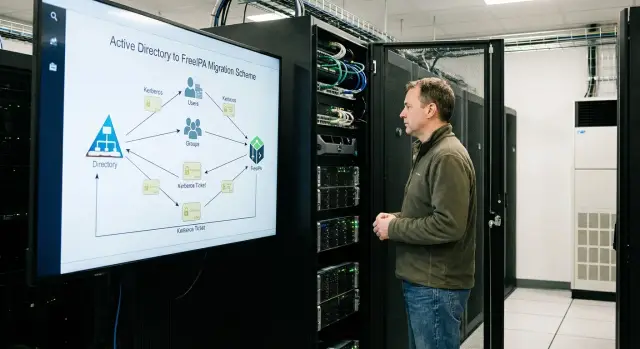
What changes when you move from AD to FreeIPA
Active Directory usually covers four tasks: single sign-on (accounts and passwords), groups and permissions, Kerberos SSO for services, and centralized policies for workstations. When migrating from Microsoft AD to FreeIPA, first document what must remain unchanged: who accesses what, which groups grant access, which applications rely on Kerberos, and which security requirements are actually enforced.
The main difference is that FreeIPA is primarily a Linux-oriented identity and policy platform. It fits especially well where there are many Linux servers, SSH accesses, sudo rights, web services and internal apps. Traditional Windows scenarios often require additional solutions or compromises.
If you don’t prepare, the most common failures are:
- logins to services that strictly expect AD attributes or the old realm;
- access to file shares and printers if everything was built around AD and SMB;
- SSO failures when service accounts and SPNs are migrated without verification;
- accustomed workstation policies, because there is no one-to-one equivalent of GPO.
A quick way to decide if FreeIPA suits you: where are your critical dependencies — on Linux infrastructure or on Windows workstations. If key systems (app servers, databases, CI, web) run on Linux, FreeIPA usually delivers quick benefits. If most things rely on GPO and Windows domain logon, plan a separate strategy for policies and SMB.
For users, changes typically boil down to the domain name (realm), the login prompt in some services, and possibly a required password change. Expect support requests like “SSO not working,” “no access by group,” or “host failed to join,” so prepare short instructions and diagnostic procedures in advance.
Requirements gathering and AD inventory
Migration doesn't start with server installation but with a clear picture of what currently works in the domain. If you skip inventory, service accounts, hidden Kerberos dependencies and old but critical access groups are the items most likely to be lost.
First, document the structure: domains and forest (if multiple), OUs, key groups and the delegation model. Note critical accounts separately: administrators, break-glass, service accounts and anything tied to automation (scripts, schedulers, integrations).
Then list services that use AD authentication or groups. Usually these include file shares and printers, mail, VPN, Wi‑Fi (802.1X), proxy, corporate apps, terminal farms, and any LDAP- or Kerberos-enabled systems. For each service, record an owner, the current login method and a success criterion for migration.
Check infrastructure dependencies: DNS, NTP and certificates. Kerberos fails even with a few minutes of clock drift, and AD-integrated DNS is often woven into processes so tightly that problems appear only during a cutover.
Agree on security requirements early: password and lockout policies, account expiration, auditing, mandatory MFA (if any), and industry-specific needs. In government, healthcare and finance, login logs and administrative action control are typically critical.
A short questionnaire to capture requirements:
- Which domains, OUs and groups actually participate in access control?
- Which services use LDAP, Kerberos or DNS, and which accounts are configured there?
- Where are certificates stored and how are they issued (LDAPS, Wi‑Fi, VPN, web apps)?
- What are the password, audit and MFA requirements?
- What maintenance window is acceptable and how much downtime can you tolerate?
The outcome of this stage is a prioritized list of objects and services. This often saves days during the pilot and greatly reduces the risk of silent failures after switching.
Target FreeIPA design: DNS, realm, replication and trusts
A correct FreeIPA design solves half the migration problems. Before moving accounts, decide where servers will sit, which DNS will be authoritative, what the realm and DNS names will be, and whether a bridge to the existing AD is needed.
How many servers and where to place them
FreeIPA is typically deployed with at least two instances so a single node failure doesn't stop user logins and Kerberos ticket issuance. Place them in different racks or sites, close to primary network segments.
A practical setup for most organizations:
- 2 FreeIPA servers (primary + replica) in one site;
- 3 servers if you have branch offices and want more resilience during network outages;
- a separate test environment (node or VM) to safely validate changes.
Plan DNS from the start. FreeIPA's integrated DNS is convenient when you want to manage zones in one place and quickly create records for services. External DNS is suitable when DNS is tightly controlled or split between teams. A common pattern: keep external DNS authoritative, give FreeIPA a subdomain and let it manage that zone.
Trusts, names and AD compatibility
If migration is phased, you may need a trust to AD so some users and services continue using the old domain. This helps during a period when Windows workstations are not yet ready to change their authentication source.
Document name plans before installation:
- realm (usually uppercase) and DNS domain (lowercase);
- login and UPN formats to avoid surprises in mail and apps;
- rules for service accounts and SPNs;
- hostname and service naming conventions.
Don’t forget time and backups. Kerberos is sensitive to clock skew, so configure NTP on all servers and clients and verify acceptable drift. Decide how you will back up FreeIPA (including keys, certificates and DNS zones) and how quickly you can restore.
Preparing data: users, groups and attributes
Clean up data before migration. Migrating “as-is” brings the same problems into the new system: unused accounts, unclear groups and permissions no one maintains.
Start by tidying AD. Common finds are forgotten ex-employee accounts, test logins, duplicates and “just-in-case” groups. Simple rules often help: disable accounts with no logins for 90–180 days, remove empty groups without owners, resolve duplicates and clearly mark service accounts with owners and usage.
Next normalize attributes. FreeIPA commonly relies on uid, mail, givenName/sn and a readable display name. Typical issues: some employees still have an old email domain, or logins exist in multiple formats (ivanov, i.ivanov, ivanov_i). Resolve these ahead of time and create a mapping table.
Review admin privileges: who is in privileged AD groups and how built-in roles are actually used. Often “Domain Admin” was granted for file or printer access and can be replaced with narrower rights.
Finally, plan equivalence: AD OUs don’t map one-to-one, so decide which OUs become groups, which become HBAC rules, and how privileges will be represented in FreeIPA. For the pilot pick a small but representative sample (for example, 20–30 users from different departments and 2–3 service accounts) to see real behavior.
Migrating users and groups: what to move and how
The crucial part is agreeing which accounts are truly needed. Usually you migrate employees and contractors, access groups and some service accounts. Computer accounts from AD are often not migrated one-to-one: Linux hosts are easier to rejoin to FreeIPA, and for Windows workstations you need a compatibility plan.
What to migrate
Minimum set:
- users (username, full name, email, department, phone, status);
- groups (names, purpose, owners, membership);
- service accounts that are actively used and have owners;
- rules for expiration and lockouts (if applicable).
Passwords are a common surprise. You usually can’t transfer current AD passwords directly to FreeIPA, so choose a scenario in advance: force reset on first login, bulk reset on the cutover day, or staged resets by department. Prepare notification texts and an elevated support window to avoid disrupting work.
Be pragmatic with nested groups: nesting can be migrated but the structure is often worth simplifying — fewer levels, clear names, separate groups for access and for mailing lists.
Verification and rollback plan
After import, check user search, key group memberships, locked accounts and expirations. Keep test scenarios practical: accounting must be able to log in and access required servers and folders, while terminated accounts must remain blocked.
Define a rollback plan in advance: keep AD accessible during the pilot, don’t delete AD objects and switch systems one by one. If something breaks, you can return a specific service to AD-based authentication and debug the issue without stopping the whole company.
Kerberos in FreeIPA: SSO and service accounts
Kerberos in FreeIPA provides single sign-on: a user gets a ticket once and accesses servers and services without re-entering a password. To make this work after migration, first verify basics: correct realm, reachable KDC and time sync on all nodes. Even a 5-minute difference can break logins.
Identify which services should accept Kerberos. Each requires service principals and keys (typically via keytab). Common cases are SSH for Linux, web apps (HTTP) and file services.
Typical SSO scenarios
On Linux, a user obtains a ticket (for example, at session login) and SSH to other hosts works via GSSAPI. For web apps, SPNEGO is often used: the browser uses Kerberos and the service sees the user without a login form. This noticeably reduces password reset requests on internal portals.
Keytab: storage and rotation
A keytab is effectively a service password, so treat it as a secret. Store keytabs only on hosts that need them, don’t email them or place them on shared network folders. Track where each keytab is used and plan rotations. If compromise is suspected, reissue service keys immediately.
For troubleshooting follow a simple flow: if kinit fails to get a ticket, first check DNS (name and reverse zone), then time (clock skew), and only then account rights and state. Often the problem is an incorrect service name in the principal or an outdated keytab after key reissue.
Policies and access control: analogues of familiar GPOs
In AD many are used to a single lever — GPO. FreeIPA’s approach is different: instead of one big policy you compose rules from several blocks. This is often even more convenient because it’s easier to explain why someone has access and someone else does not.
What replaces GPO
FreeIPA access is usually built from groups, hosts and rules:
- HBAC (Host-Based Access Control): who can log in to which servers and by which services (e.g., SSH);
- Sudo rules: who may run privileged commands on which hosts;
- Host groups: group servers by role to apply rules in bulk;
- RBAC: delegate administrative functions without granting full directory access.
Example: the “Linux Admins” group is allowed to log in only to the prod-linux host group via HBAC and, via sudo rules, may restart services but not hold broader privileges. Such rules are precise and auditable.
Passwords, audit and certificates
Password policies in FreeIPA are centralized: length, complexity, expiration, history and lockouts. Plan exceptions for service accounts so applications don’t break due to unexpected password changes.
Enable auditing early and decide who reviews it. Typical items to monitor include changes in privileged group membership, issuance and modification of sudo and HBAC rights, operations on key service accounts, and certificate issuance and revocation events.
FreeIPA’s integrated CA is an advantage. It can automatically issue certificates for hosts and services by policy, simplifying internal TLS and reducing renewal errors.
Integrating with Linux: joining hosts and unified rights
After deploying FreeIPA, the next step is to join Linux servers so logins, groups and rights are consistent everywhere. For many organizations this is the most visible benefit: fewer local accounts and less per-host manual configuration.
Usually configuring SSSD and performing an ipa-client join is enough. After that, the server queries FreeIPA for user information and SSSD caching helps survive short connectivity issues. Home directories can be created on first login or provided via network mounts (e.g., automount) so the user path is the same across servers.
Unified groups and rights
Build rights around groups: access to servers, sudo and host restrictions. HBAC answers who can log into which server and via which service (SSH, console, etc.).
Agree on naming for hosts, host groups and user groups to avoid confusion. Consistent, descriptive names reduce support errors.
Maintenance and checks after joining
Add regular tasks: client updates (sssd, ipa-client), keytab rotations for services and automation (for example Ansible) so joining and base settings are repeatable.
After joining each server, test a sample user login, group retrieval, sudo rule enforcement (not local /etc/sudoers), HBAC application, home directory creation and time sync.
Compatibility with Windows workstations and SMB
Decide in advance which Windows behaviors must remain the same and where changes are acceptable. FreeIPA covers Linux and Kerberos well but does not directly replace Windows domain scenarios. Compatibility is usually built from targeted solutions.
Commonly you can preserve SMB access, printing via a print server (if not tied to AD logic), Wi‑Fi 802.1X via RADIUS (if FreeIPA stores accounts), and a consistent password change flow if synchronization or trust is planned.
For SMB and file shares you’ll almost always need Samba. If shares are on Linux, Samba becomes the junction where FreeIPA accounts and groups meet Windows clients. Don’t try to copy AD ACLs verbatim — agree in advance on an access model: which rights are group-based, who owns folders, and how department shares are structured. Then permissions will be predictable for both Windows and Linux.
If you need AD-compatible Windows domain join and profiles, common options are: keep AD for workstations and establish trust with FreeIPA, or run a hybrid where FreeIPA manages Linux and services while AD remains the center for Windows. Running a separate Samba AD DC is another option but requires careful operation and clear responsibilities.
Tell users in advance where passwords are changed, how the login name format looks, what to do on lockout or expiration, and whom to contact on day one. Good communication reduces support load more than any “perfect” technical design.
Pilot, testing and phased cutover
A pilot checks FreeIPA on live workloads without taking everyone down at once. Typically a small representative group of 15–40 users, several typical roles and at least one important app is enough.
A good choice is a team that uses network resources and printing but doesn’t manage critical systems. Add 1–2 IT people and one mobile user to test offline mode and credential caching.
Keep the test plan short but strict:
- workstation and Linux server logins, including lockouts;
- password change and recovery flows;
- group-based resource and app access;
- Kerberos SSO for key services and service account checks;
- behavior during temporary network outages.
Define success metrics, e.g.: no more than 3–5 incidents per week during the pilot, first-line response within 15 minutes, and critical issues resolved within the business day.
Perform cutover in phases: by department or by service. Mixing both increases the risk of chaotic permissions and makes diagnostics harder.
Prepare support: many repeated questions will come in the first days. Typical issues include login problems (time, password, lockouts, cache), group access, SSO failures (tickets, SPN/service principal), delayed password application (policy and replication), and offline access problems (cache settings and timeouts).
If working with an SI, allocate an escalation window during the pilot. For example, GSE.kz offers system integration and 24/7 technical support, which helps resolve incidents faster during cutover.
Common migration mistakes and how to avoid them
The most painful part is not copying accounts but small things that suddenly prevent people from logging in on cutover day.
Kerberos: time and DNS
Kerberos is highly sensitive to time and DNS. If clocks on FreeIPA servers, Linux hosts and Windows workstations drift by minutes, SSO breaks: password prompts appear, share access fails and services drop.
DNS causes similar effects: incorrect A/AAAA, SRV or PTR records or resolver order (clients still querying old AD DNS) can make a client see the wrong realm or KDC.
Before the pilot check: a single NTP source, SRV records for Kerberos and LDAP, correct PTRs for FreeIPA servers and the DNS server order that workstations receive. Test logins on 2–3 typical services, not only a shell.
Data and rights: migrating “as-is” usually backfires
Bringing the directory without cleanup imports duplicates, stale logins and nested groups no one understands. Some users get excessive access and others lose needed rights.
Service accounts without owners are a special trap: one forgotten account can break a critical process after migration.
Organizational mistakes are also risky: mixed admin roles, overly broad rights and auditing that can’t answer “who and why” changed rules.
Most importantly, have a rollback plan. Assign responsible people, define the return steps to AD (at least temporarily) and ensure support is ready on cutover day. If working with a contractor, agree on the maintenance window, success criteria and rollback conditions before the pilot starts.
Short checklist before launch and after cutover
Before launch
- Inventory completed: domains, OUs, groups, service accounts, app dependencies, and critical servers.
- Test FreeIPA environment deployed with a data copy (even partial) and agreed success criteria.
- Maintenance windows and rollback plan agreed: who decides and how to restore AD logins quickly.
- Naming and attribute rules fixed (logins, UPN, e‑mail), with an exceptions list.
- Password policy decided: how resets are handled and how users and service owners are notified.
Before switching, verify DNS records, NTP sync, Kerberos ticket issuance, access to required resources, keytabs for services and correct SPNs.
Immediately after cutover
The first 24–72 hours are the most critical. Track issues by fact:
- monitor logins (successful login rate, common Kerberos errors, lockouts, delays);
- keep a unified incident log with owners and actions taken;
- check permissions on key file shares and apps (groups, sudo rules, shared folders);
- record changes and enable auditing;
- retire old AD controllers only after stabilization and control checks.
Next steps: 30–60 day work plan and support
Treat FreeIPA migration as a project with a clear set of functions that must work on day one. List the services that employees depend on and assign owners to confirm tests.
On day one ensure predictable behavior for Linux logins with domain credentials, password changes, basic access (SSH, sudo, file shares if any), SSO for key internal web services (if using Kerberos), service accounts for jobs/backups/monitoring, and a clear helpdesk recovery procedure.
Then expand the pilot and gradually onboard departments. Decide where a hybrid with AD is needed and where you can fully move to FreeIPA. Hybrids usually remain where Windows-specific policies and apps are critical; pure FreeIPA is faster to roll out for Linux hosts and new services.
A sample 30–60 day plan:
- Week 1–2: final inventory, pilot, attribute and group fixes.
- Week 2–3: migrate service accounts, Kerberos keys, verify SSO.
- Week 3–4: expand pilot, prepare instructions and automation.
- Week 4–6: staged onboarding of departments, incident control.
- Week 6–8: cleanup, rights audit, final documentation.
Also plan infrastructure: at least two FreeIPA nodes, backups, monitoring and periodic recovery tests. If you need help with design and implementation, GSE.kz (gse.kz) can provide system integration and support, and if necessary supply server infrastructure tailored to your needs.
Frequently asked questions
Where should I realistically begin the migration from AD to FreeIPA to avoid breaking things?
Start with an inventory: which services use LDAP/Kerberos, which groups actually grant access, which service accounts exist and where they are used. Without this, hidden dependencies are often missed and logins to critical systems break on cutover.
What usually breaks when migrating from AD to FreeIPA?
Most often Kerberos/SSO breaks because of DNS and time issues, group-based access fails due to attribute mismatches and application expectations, and Windows scenarios tied to GPO and domain logon stop working. Service accounts and their keys are another frequent risk if moved without verification.
Can users keep their old passwords when moved from AD?
Usually no: you generally cannot directly transfer current AD passwords into FreeIPA. A practical approach is to plan a forced password change (staged or on the cutover day) and prepare support, since user requests in the first days are inevitable.
Why does Kerberos SSO suddenly stop working after migration?
First check NTP and DNS: even a few minutes of clock skew or wrong DNS records often cause intermittent failures. Then verify the realm, service principals and that the keytab is up to date — an old keytab after key rotation will stop working.
What is a keytab and why must it be handled carefully?
A keytab is a service secret — effectively a service password. Its leakage allows impersonation of the service. Keep keytabs only on the hosts that need them, restrict file permissions, and have a rotation and reissue procedure in case of suspected compromise.
What replaces GPO when moving to FreeIPA?
There is no one-to-one analogue of GPO, and that’s normal. In FreeIPA you recreate effects using HBAC, sudo rules, host groups and delegated admin roles. Describe what your GPOs actually enforced, then reproduce those effects with access rules and client configuration rather than trying to copy AD’s structure verbatim.
What about Windows workstations if we need the familiar domain logon?
Commonly a hybrid is used: keep AD for Windows domain logon and policies, and use FreeIPA for Linux and services, or establish trust between domains during migration. This reduces risk for workstations and allows moving services and users gradually.
Is it possible to keep SMB share access after moving to FreeIPA?
Typically you need Samba as the bridge when shares live on Linux. Samba can map FreeIPA accounts and groups to SMB access for Windows clients. Agree on a permissions model and ownership in advance — trying to carry over all AD ACLs exactly usually causes confusion and unpredictable access.
How to organize a pilot and testing before mass cutover?
Run a small but representative pilot, and test concrete user workflows: group-based resource access, password change and recovery, SSO for key services, and behavior when connectivity is temporarily lost. If the pilot meets acceptable incident levels and diagnostics work, scaling to other teams is much smoother.
What rollback plan is needed if something goes wrong after cutover?
Keep AD available during the pilot and switch services one by one so you can quickly restore a specific service to the old login method. The rollback plan must answer: who decides to roll back, and what exact steps restore access without long investigations.
