8 min read
MIG and GPU partitioning for inference: limits and capacity
MIG and GPU partitioning for inference: how to slice one GPU for multiple services, set limits and estimate capacity by queues and response time.
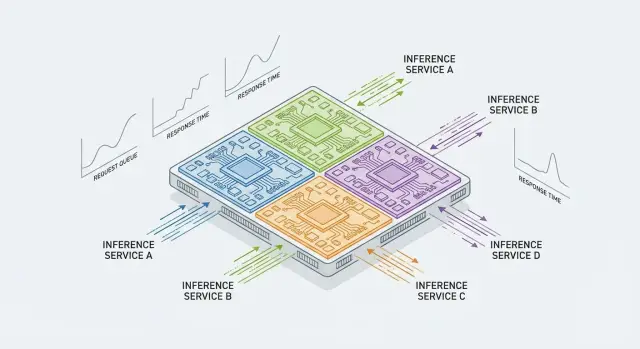
Problem: one GPU, multiple services and predictable response
A single powerful GPU often sits underutilized if only one inference service runs on it. Teams want to place 2–3 more models on the same card: a chat bot, a document classifier, image recognition. It's cheaper and easier to operate, especially when GPUs are scarce or procurement cycles are long.
The problem starts when sharing is unmanaged. One service gets a traffic spike, fills the GPU queue, and others see increased response times. From the outside it looks like "yesterday it was 200 ms, today 2 seconds", even though the code hasn't changed. Worse, a heavy model can occasionally take nearly all memory and bring down neighbors with out-of-memory errors.
For inference, "capacity" is not abstract TFLOPS but concrete metrics visible to users and monitoring: how many requests per second you can sustain under a given SLA, tail latencies p95/p99, how the queue behaves under a peak, and whether there are errors or timeouts.
Predictable response means something simple: when load grows, the queue increases first (and metrics show it), rather than a chaotic spike in latency due to resource contention. GPU partitioning (for example, via MIG) aims to give each service a clear share of compute and memory and reduce mutual interference.
MIG is not always the right fit. It's not available on every GPU and requires driver and platform support. Even with MIG there is a shared envelope (power, cooling, some host resources) that affects stability. There are scenarios where hard partitions hurt: if one service occasionally needs the whole card for rare large batches, slicing will reduce its peak performance. So first define SLAs (for example, p95 < 300 ms) and the load profile, then decide whether to split the card or give a dedicated GPU.
What MIG is and how it differs from other sharing methods
MIG (Multi-Instance GPU) is a mode where a single physical GPU is divided into multiple hardware-isolated instances. For inference this is useful when different services share a card and it’s important they don't interfere.
Each MIG slice gets dedicated memory and an assigned share of compute resources. Isolation happens at the hardware level: one service cannot suddenly "eat" all memory or saturate compute so that others slow down drastically.
MIG is often confused with simpler approaches:
- Multiple processes on one GPU — quick but without guarantees. Contention for memory, caches and compute easily causes latency spikes.
- MPS (Multi-Process Service) helps saturate the GPU and reduce overhead, but isolation is weaker. It's more cooperative sharing than hard boundaries.
- MIG gives more stable behavior because it partitions resources in hardware.
MIG is especially useful when multiple APIs with different SLAs live on one card. For example, a chat bot needs fast responses (200–400 ms), while batch document classification tolerates 2–3 seconds. Without isolation, a batch service under load can evict the fast service and ruin the user experience.
In practice MIG fits well into server-class AI platforms and data centers, where it's important to agree upfront on resource shares and then verify those shares via latency and queue length metrics.
Checking hardware and environment compatibility
The MIG conversation starts not with Kubernetes or limits, but with one simple question: does your GPU support MIG? It's a hardware feature. If not available, other options remain: service-level queues, tighter parallelism control, or sometimes virtualization.
Which GPUs support MIG and why that matters
MIG is available on some NVIDIA server accelerators, primarily A100, H100 and A30 (and close variants). The point of support is exactly that: one physical GPU can be split into isolated instances with dedicated resources. For inference this gives more predictable response times because a neighbor can't suddenly take all memory or compute.
What else must be in place in the environment
Even with a compatible GPU, MIG may not work because of software. Check the NVIDIA driver version, OS compatibility and the presence of management utilities (at least nvidia-smi). In container environments, NVIDIA Container Toolkit and a correct runtime are crucial; otherwise MIG instances may not be visible inside containers.
MIG is most often used in rack servers and clusters (including Kubernetes) where multiple models or teams share a GPU. For example, on a GSE S200 server you can pin one MIG instance to a chat bot, another to OCR, a third to ranking, and each will have its own boundaries.
Before you start, do a quick inventory:
- GPU model and MIG support
- GPU memory size and current load
- driver and CUDA versions (if needed) and OS
- runtime environment: bare metal, virtualized or Kubernetes
- models and their requirements: weight size, precision, expected QPS and latency SLA
How to plan slicing the GPU for your services
Planning starts by answering what you want to isolate. Most often the unit is a service (one API and one SLA). But sometimes it's better to slice by model (heavy LLM separate, lightweight classifier separate) or by customer if you must prevent one client from affecting another.
A practical trick is to separate traffic into "fast" and "background". Fast gets a guaranteed GPU share, minimal queue and strict batch limits. Background lives in a separate slice (or a smaller profile) and can accumulate queue when resources are busy.
Then estimate model load: weight and activation sizes, max batch size, precision (FP16/INT8) and frequency of peaks. Memory often limits you before compute. If a model barely fits, a small MIG slice will lead to OOM or force you to reduce batch size, hurting throughput.
Quick planning checklist:
- record SLA per service and target RPS
- estimate memory: model plus headroom for batch and queue growth
- decide what matters more: stable p95/p99 or maximum overall utilization
- choose MIG profiles so the "fast" service doesn't compete with background
- leave reserve for spikes, warm-up and model updates
Sometimes one large slice is better than many small ones — when one service carries most traffic, the model is heavy or batch flexibility is needed. Many small slices work well when services are independent and you prioritize predictable latency even on bad days.
Step-by-step: enabling MIG and creating instances
Before starting, ensure your GPU supports MIG (e.g., A100, A30, H100) and that NVIDIA drivers and management utilities are installed. The quickest check is to confirm the system sees the GPU and there are no errors.
nvidia-smi
nvidia-smi -q | grep -i mig -n
1) Enable MIG and confirm the mode is active
Enabling MIG is done at the GPU level and usually requires a reset or node reboot for the mode to apply cleanly.
# enable MIG mode
sudo nvidia-smi -i 0 -mig 1

# check
nvidia-smi -i 0 -q | sed -n '/MIG Mode/,+3p'
If you see MIG Mode: Enabled, you can proceed to create instances.
2) Create GPU instances (profiles) and verify they appear
First list profiles available for your GPU model. Then create slices for services (for example, one larger for a heavy model and two smaller for light ones).
# list available profiles
nvidia-smi mig -lgip

# create GPU instances for chosen profiles (example)
sudo nvidia-smi mig -cgi 19,14,14 -C

# inspect results
nvidia-smi mig -lgi
nvidia-smi mig -lci
Check that MIG devices (UUIDs) appear. These are what you'll bind services to.
3) Pin a service to a specific MIG instance
The simplest run-time method is to pass the MIG UUID via an environment variable.
# example: pin a process to a single MIG device
export CUDA_VISIBLE_DEVICES=MIG-xxxxxxxx-xxxx-xxxx-xxxx-xxxxxxxxxxxx
./your_inference_service
4) Make configuration survive restarts
MIG configuration often resets after reboot. A practical approach is to store creation commands in a systemd unit or startup script and run them at node start. In Kubernetes the NVIDIA GPU Operator typically manages MIG if the MIG strategy is enabled. Still, document chosen profiles and check them after driver updates.
Limits and isolation: what to constrain and where
MIG provides the main benefit for inference: predictable memory and better isolation so a single service cannot suddenly monopolize the GPU. But MIG alone is usually insufficient. To achieve stable latency, set limits in multiple layers: GPU, container and the inference server itself.
What to limit first
Inference often fails not on compute, but on memory and request contention. So think VRAM first, then parallelism and queues.
Common critical controls:
- GPU memory (VRAM): how much a service may use and behavior during peaks
- request concurrency: how many simultaneous requests you permit so latency doesn't balloon
- inference server settings: number of workers/instances, batch size, timeouts
- noisy-neighbor protection: guard a service that accepts too many or too-heavy requests
Where to apply limits
At the MIG layer you fix a slice: a service sees its instance, not the whole card. This protects VRAM and greatly reduces mutual interference. But discipline is still needed: even in a reserved slice you can create a queue if you allow too much parallelism.
A practical stack looks like:
- GPU (MIG): pin a profile to the service and don't change it without testing
- orchestrator: request a specific MIG device and set CPU/RAM limits so preprocessing doesn't become the bottleneck
- inference server: limit concurrency, set timeouts and max batch, enable backpressure
Real-life example: a small model suddenly receives 5x more requests. It should not evict a neighbor with strict SLA. MIG holds GPU boundaries, while concurrency limits and an input queue prevent latency from ballooning. Test these settings on a staging server (for instance a GSE S200 Series node) to simulate production load.
Metrics: what to measure to understand capacity
When you split a GPU between services, the key question is: how many requests can you actually sustain at the required latency? Looking at a single "GPU busy" graph is not enough. You need metrics for GPU, queues and the service.
Basic metric set
Collect at least:
- GPU utilization and SM load
- GPU memory usage and OOM frequency
- request queue length and queue wait time
- latency p50/p95/p99 and inference time (excluding queue)
- errors: timeouts, 5xx, cancellations, retries
"GPU busy" does not always mean "service overloaded." The GPU may be busy with background tasks, incorrect batching or waiting for data. Conversely, a service may struggle at low GPU utilization because of CPU preprocessing, network or locks.
Read queues this way: if the input stream is steady and backlog grows, throughput is insufficient. If the queue is near zero but p95/p99 jump, jitter is likely the cause: model warm-up, thread contention, or unstable I/O.
Quick diagnostic signs:
- low GPU utilization but rising latency: check CPU, network or disk bottlenecks
- GPU memory near limit: check model size, batch size and fragmentation
- growing queue while inference time is stable: you need a larger MIG share or stricter concurrency limits
- timeouts with normal GPU metrics: check load balancer, connection limits and pool sizes
In infrastructure using rack servers and integration projects like GSE.kz, separate metrics per MIG instance, pod and service. Capacity becomes visible by numbers: where the queue accumulates and what breaks SLAs.
How to measure capacity via queues and response time
Inference capacity is best understood as the point at which the request queue starts to grow without returning to baseline. While the service can handle incoming load, queue size wanders at a low level. Once incoming RPS exceeds real throughput, queue growth and latency follow.
A simplified model: if average processing time per request is T, one worker cannot stably serve more than about 1/T requests per second. In reality batching, copy overheads and resource contention change the break point, so measure it.
Do stepwise load tests. Start at a safe level, then raise RPS in small increments and hold each step long enough for stability.
- increase RPS in steps (e.g., +10–20% per step) and hold 5–15 minutes
- at each step record p50/p95/p99 latency, throughput (actual RPS), queue length and error/timeout rate
- separate a warm-up period (first minutes) from the stable interval
- repeat tests under "bad" scenarios: heavier payloads or max batch size
Read graphs like this: throughput increases roughly linearly until a plateau, then fails to grow despite added load. At that moment latency (especially p95/p99) rises and the queue no longer returns to zero between bursts. This is the practical capacity boundary for the chosen configuration (MIG slice, workers, batch, model).
In final documentation avoid saying "max RPS" alone. Use phrasing suitable for SLA and planning: "Service A sustains N RPS at p95 < X ms (and p99 < Y ms), with no errors and without queue growth." That makes it easy to compare MIG profiles and know how many services can realistically share a GPU without surprises.
Example: splitting one GPU among three services with different SLAs
Imagine a server with a single GPU (e.g., a rack node based on GSE S200) where three inference services share it: chat bot, classifier and OCR. They have different latency requirements: the chat bot needs fast user-facing responses, the classifier values steady throughput, and OCR often runs in batches and tolerates higher latency.
A typical slicing logic: give the most latency-sensitive service a separate, not-too-small slice to avoid constant queuing; give batch workloads smaller or medium slices.
Example scheme for a MIG-capable GPU:
- chat bot: medium MIG profile to keep p95 low even under spikes
- classification: small profile with the option to scale by replicas
- OCR: small or medium profile depending on image/document sizes
Set limits not only by the GPU slice but also at the service level: cap max concurrency and batch size. Otherwise a service may accumulate queue internally and you'll see rising latency even if the GPU is not fully loaded.
In the first days keep a few metrics visible that quickly show real capacity:
- p50/p95/p99 per service
- request queue length (app-level or ingress)
- error and timeout rates
- GPU utilization and memory per MIG instance
- queue wait time separate from execution time
You know a service needs a larger MIG profile when its internal queue grows, p95 climbs at the same input load, and its MIG instance is pegged on memory or compute while other services have headroom. Re-slicing or shifting traffic yields a predictable improvement.
Common mistakes and pitfalls
Most painful issues come not from slicing itself but from expectations: people assume each service will get exactly "its" performance. In reality memory, request characteristics and measurement methods decide outcomes.
Mistake 1: slicing too small
Tiny slices quickly run out of memory: the model doesn't fit, there's not enough room for batch, caches and intermediate tensors. Overheads also increase: on a small slice any extra operation is more noticeable.
Symptoms: the model loads but real traffic causes frequent OOMs, reduced batch size and sudden latency spikes.
Mistake 2: mixing different SLAs in one slice
If urgent, low-p99 requests share a slice with long-running ones, you will likely see jittery p99. Long requests fill the queue and fast ones wait.
Example: service A handles short requests with tight SLA, service B does rare heavy work. If both share a slice, several B requests in a row will worsen A's p99 even if averages look fine.
Mistake 3: only watching mean latency
Mean response time soothes, but users notice tails. For inference, tails matter more: if p99 rises, you're at or past overload even if the mean is OK.
Mistake 4: the bottleneck is not the GPU
Sometimes MIG is configured correctly, but CPU preprocessing, postprocessing, network or disk (e.g., swapping, large input loads) are the bottleneck. Cutting GPU slices further won’t help.
Quick check: GPU underutilized while queue grows, or GPU busy but the main delay happens before sending data to the GPU.
Mistake 5: no protection against spikes
Even with MIG, a service can fail if there are no limits on inbound traffic: queues swell, wait times increase, timeouts accumulate and retries cascade.
Mitigations:
- cap queue length or queue wait time
- backpressure: reject or degrade under overload
- separate queues by request class
- sensible client and server timeouts
- warm-up and predictable batching
MIG provides resource isolation, but predictability appears only when traffic is split by SLA and you monitor not just averages but tails and queues.
Short pre-launch checklist
Before enabling MIG in production, run through basic checks. It takes an hour or two and often saves days of post-release debugging.
What must be clear before first production traffic
Have measurable numbers, not vague "the model is fast":
- list of services and SLAs: p95/p99 response times, acceptable error rates, client timeouts
- memory estimate: model size plus peaks from activations, cache and batches; initial batch sizes and concurrency
- metric and alert set: queue length, queue wait time, end-to-end latency, errors, GPU/CPU utilization, GPU memory
- stepwise load test results: at what QPS/concurrency the queue grows, where p99 breaks SLA, where OOMs or throttling occur
- overload playbook: first actions (limit concurrency, reduce batch, degrade quality, shift traffic, re-slice MIG, add GPU)
Quick realism check
Simulate one service suddenly getting 3x requests. It should not "eat" the accelerator and drown neighbors. That means concurrency limits and timeouts are set, and queue plus p99 are visible on the dashboard.
If these points are covered, production rollout becomes a controlled experiment: you know where capacity will be reached and what to change when that happens.
Next steps: pilot, standards and infra support
The safest start is a pilot on one node. Pick 1–2 critical services, enable MIG, fix profiles and run realistic load. The pilot’s goal is predictability: what throughput you get at a target latency and where the queue grows.
To avoid the pilot becoming a one-off, agree on standards: which MIG profiles are allowed, naming conventions and how capacity is validated. Capture results in a simple table both developers and operators understand:
- MIG profile (and GPU type tested on)
- service/model and version, batch size and key parameters
- allowed load: RPS or tokens/sec under which constraints
- SLA: p95/p99 latency and max queue length
- headroom: at what traffic growth to revisit slicing
Example: you found Service A keeps p95 = 120 ms up to 10 RPS, but after 12 RPS queue grows and p99 exceeds 300 ms. This is a clear rule for alerts and planning.
When should you stop co-locating services on one GPU? Signs include: tail latencies depend on neighbors, traffic becomes very spiky, or cost of degradation exceeds the cost of a dedicated GPU. If you frequently re-slice MIG for individual releases, it’s simpler to give a service its own resource or add another node.
If you need help moving from a pilot to production, GSE.kz can handle infrastructure: select and supply servers (including S200 Series), build the inference stack, set up monitoring and provide 24/7 support across Kazakhstan. This speeds up standardization and avoids keeping all expertise in one team.
Frequently asked questions
When does it make sense to enable MIG for inference?
MIG makes sense when multiple services with different SLAs run on one physical GPU and you need predictable responses. It helps when you already face "noisy neighbor" problems: spikes in p95/p99 and OOMs caused by other workloads.
How is MIG different from running multiple processes on one GPU or from MPS?
MIG provides hardware isolation: each slice gets dedicated memory and a share of compute so one service cannot "eat" all VRAM and unexpectedly crash others. Running multiple processes or using MPS leads to shared usage without hard boundaries, which is worse for stable p95/p99.
How do I know whether my hardware supports MIG and what else should be ready?
First check whether your GPU supports MIG — it is a hardware feature and cannot be enabled by software on any card. Then ensure the NVIDIA driver, management utilities and container runtime are configured so MIG instances are visible where you run services.
How to properly slice one GPU for multiple services with different SLAs?
Usually you slice by service/SLA: a separate MIG instance for a latency-sensitive API and others for background/batch jobs. A practical approach is to separate "fast" and "background" traffic so long-running requests don't bloat the queue and affect tail latency for critical APIs.
What matters more when choosing a MIG profile: compute or VRAM?
Prioritize memory: model weights, activations, caches and headroom for batches and spikes often hit VRAM before compute. If a slice is too small you'll see OOMs or be forced to reduce batch size, which immediately reduces throughput.
What steps are needed to enable MIG and pin a service to a specific instance?
Basic flow: enable MIG mode on the GPU, create GPU instances with the needed profiles, then pin each service to a MIG device by its UUID. Also plan how to restore the layout after reboot, since MIG configuration often needs automation to survive restarts.
Is a single MIG slice enough to make latencies stable?
No. MIG is only part of the solution: it reserves a slice of the GPU and reduces interference, but queues and tail latency still depend on concurrency, batching and incoming traffic. To stabilize latency you must limit concurrency, set timeouts and enable backpressure at the service/inference server level.
Which metrics are mandatory when multiple services share a GPU via MIG?
Measure at least p50/p95/p99, request queue length and queue wait time, plus errors and timeouts. From the GPU side, look at utilization and memory per MIG instance — a generic "GPU busy" metric without per-instance visibility doesn't explain which service consumes capacity.
How to measure inference "capacity" and recognize service overload?
Find the point where the request queue stops returning to near zero and starts growing steadily, while p95/p99 exceed SLA. Do stepwise load testing: increase RPS in small increments, hold each step long enough and record latency, actual throughput, queue length and error rate.
What are the most common mistakes when using MIG for inference?
Common mistakes are slicing too small, causing OOMs and constant queues; mixing different SLAs in one slice and ruining p99; relying on mean latency instead of tails and queue length; or trying to fix a non-GPU bottleneck (CPU preprocessing, network or disk) by chopping the GPU further.
