8 min read
MES-lite for the Shop Floor: an MVP First Release Without Overload
MES-lite for the shop floor: what to automate in an MVP (output, scrap, downtimes, shift orders), and requirements for terminals and offline mode.
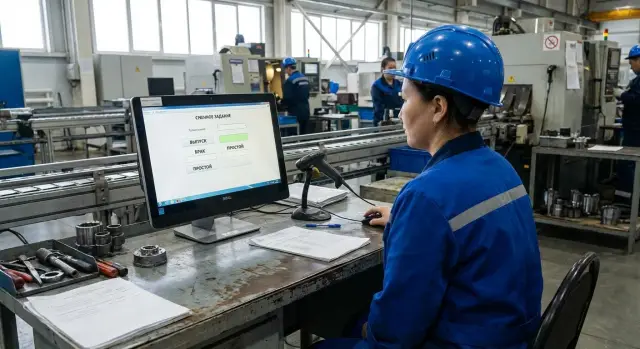
Why a shop floor needs MES-lite and how to judge success
MES-lite isn’t for "pretty dashboards" — it’s to stop daily arguments and guesswork. In a first release the usual problems are the same: shift orders live in chats and on paper, output is lost or "drawn up" at the end of the shift, and scrap becomes a topic for discussion instead of a recorded fact.
Put simply: MES-lite differs from a full MES by scope and speed of rollout. A full MES can handle detailed process flows, complex routes and planning. MES-lite as an MVP enforces data discipline: what was done, how much was produced, what failed and why. Without months of rollout or an encyclopedia of reference data.
After 4–8 weeks, measure success not by "the system was deployed" but by clear signs:
- 90–95% of shift orders are issued and closed in the system, with no double-entry in notebooks.
- Output is recorded on the production day, not "chased" once a week.
- Scrap has a reason and a clear responsible entry, not a single "other" line.
- Downtimes are logged at least on key equipment, and the supervisor trusts those numbers.
Agree roles and input rules in advance. A simple scheme usually works: the supervisor issues and oversees shift orders, the operator records output and downtimes, QC confirms quality and classifies scrap, and the process engineer ensures reasons remain clear and don’t proliferate. When these roles accept the rules, the MVP starts delivering value within weeks.
MVP criteria: what to include in the first release and what to leave out
The first MES-lite release should help the supervisor and operator make daily decisions. If a piece of data doesn’t affect the shift plan, quality or downtimes, postpone it. This is the 80/20 rule: collect the minimum facts that are actually used every day.
The main MVP constraint is input time. A typical operation should take 3–10 seconds. If it’s longer, people will go back to paper and the system will become a showroom. In the MVP keep only short actions: select a shift order, record output or scrap, mark a downtime and return to work.
What must be in the first release
You need a single source of truth: shift order and facts must match in one system, without parallel Excels or "two correct versions". A practical minimum is:
- Shift order: item, planned quantity, operation or area, due date, assignee.
- Output fact: quantity by interval or shift, timestamp, who entered it.
- Scrap: quantity and 5–10 clear reasons (not 50), with limited use of "other".
- Downtimes: start and stop, plus 8–12 reasons the shop recognizes.
- Shift-level reports: plan vs actual, scrap, top downtimes.
Keep reference lists short: product list only for the pilot, list of machines or posts, employees, scrap and downtime reasons. Add the rest later when people are used to recording.
What to leave for later
MVPs are often ruined by trying to do everything at once: detailed batch traceability, complex routes with dozens of statuses, minute-by-minute OEE, integrations with every system and extensive approval workflows.
A sanity check is simple. If an operator needs to pick plant, line, order, operation, series, batch, shift, rejection reason and then confirm with a signature just to record output, the data won’t be entered on time. In the MVP it’s enough to select a shift order and perform two or three quick actions for the fact.
Shift orders: minimal features needed right away
A shift order in the MVP must answer one question: what to do right now. The operator usually only needs to see the area or line, the product (or operation code), the shift plan in pieces, standard time (if available) and a short note from the supervisor. The fewer fields and the less text, the higher the chance the data gets used.
Limit statuses to four: "issued", "in progress", "pause", "completed". This covers typical shop floor life and gives the supervisor a clear view. Changing status should be one click and require no explanation.
Recording start and end of an operation must be as simple as possible: the operator taps "in progress", later taps "completed", and the system timestamps it. Keep only quantity done and, if needed, a short note as required fields.
Supervisor confirmation isn’t always necessary. In the MVP include it only for exceptions: closing an order with zero output, reassigning the order to another operator or manually adjusting times.
If an order changes mid‑shift, preserve chronology and don’t break reporting. A working pattern is: pause the current order with a short reason, issue a new order as "issued", and later resume the old one without losing the quantity already recorded.
Output tracking in the MVP: just the facts, no complications
The first release must answer one question: how much was actually produced so far and for which order. No cost calculations, no "perfect" traceability, no long forms.
The recording method depends on the process. If items leave one by one and the operator can quickly tap a button or scan, record per piece. If output comes in batches (for example after machine setup), record by batch so operators aren’t distracted. Time‑based counting (how many per hour) fits only where this method is already standard and the supervisor controls data quality.
Keep the minimum data short but mandatory:
- product (or operation/route number if simpler at the start)
- quantity
- timestamp
- area/machine (or workstation)
- performer (employee number, badge, account)
Always link output to a specific shift order. This prevents "output to nowhere" and helps compare facts to the plan during the shift.
Filter errors at entry with simple rules: no negative values, no double-closing of the same event, and highlight gaps (for example, an order exists but no output records for a long time).
A useful MVP check is "shift plan vs current fact". Example: order is 120 pcs, at 10:15 the operator records a batch of 20 pcs, the system shows 60/120 and remaining 60. That’s enough for the supervisor to see lag and act.
Scrap: quick logging and clear reasons
Scrap in the MVP must be recorded in minutes and not turn into an argument. Start by separating two cases: scrap found immediately on the operation and scrap found later (QC, packing or customer). That avoids confusing responsibilities and skewing area statistics.
Keep the reasons list short and "alive": 10–20 items people actually pick. If the right reason isn’t found in 3–5 seconds, operators will pick the first thing they see. Keep an "other" option but require a short comment and review those entries weekly to update the list.
Record only what gives immediate value:
- quantity (pcs, kg, m) and unit
- reason from the list
- comment (optional but often helpful)
- photo if needed (e.g. disputed defect)
Typical roles: the operator logs scrap at the terminal, and QC confirms disputed or late-discovered cases. Confirmation must not block the shift, otherwise people will bypass the recording.
Don’t turn recording into punishment. In the first release avoid personal "scrap ratings". Start with the goal: find where quality is lost. If scratches spike on one operation, investigate tooling, fixtures or training — don’t start by finding a scapegoat.
Downtimes: how to collect data that will be trusted
Downtime data only becomes useful when everyone agrees what counts as downtime. First, define the border between downtime and setup. If a setup is planned and part of the process, classify it separately; it should not be hidden in downtimes. In the MVP, count downtime as periods when the equipment is not producing while there is an expectation to produce and a reason exists.
To ensure people actually log events, input must be quick: one "Start downtime" button and one "Stop". Choosing the reason can be done right after stopping, but also in 2–3 taps.
Keep the reason classifier short. For a first release 4–6 options are often enough, otherwise guessing begins:
- no material
- no order
- breakdown
- waiting for QC
- other (with a required short comment)
Rule: downtimes are recorded for a specific machine, not in a general shift log. Otherwise you can’t tell if an issue is a real machine problem or simply that no one was available to work, and trust in the numbers disappears.
Reports in the first release should be simple but useful for the area supervisor. Typically three are enough: top downtime reasons for the week, total downtime per machine, downtimes by shift (day/night).
Example: an operator taps "Start", selects "no material", taps "Stop" after 18 minutes and leaves comment "waiting for bearings, warehouse 2". The report shows this repeats in the night shift and is related to supply, not the machine.
What not to add in the MVP so it doesn’t collapse
The goal of the first release is to get people reliably recording output, scrap, downtimes and shift orders. Anything that doesn’t affect daily recording discipline should be postponed. Otherwise the team gets stuck in settings and the shop ends up with an inconvenient system.
MVPs are most often overloaded in three directions.
First — weekly or monthly planning and any optimizations (changeovers, batch sequencing, resource loading). That needs clean data, rules and approvals. For the MVP shift orders and execution facts are enough.
Second — full traceability by serial numbers, routes and batches everywhere. That is a separate project: labeling, scanners, discipline and exception handling.
Third — OEE, SPC and deep quality analytics. They don’t help if base events are collected poorly. For the first release simple reports are enough: output by shift, scrap by reason, downtimes by type.
Integrations with sensors and fully automatic signal collection are also better for phase two. Start with manual entry at workstations and then add 1–2 critical data sources where it actually saves time and improves accuracy.
How to know when to add complexity
Usually it’s obvious when:
- events are entered reliably during the production day without backfilling
- scrap and downtime reasons stop being "other"
- the supervisor has enough data for daily reviews
- repeat requests appear for the same report
Don’t introduce complex roles and many screens at the start. Keep 2–3 roles (operator, supervisor, process/quality) and one clear interface. Fewer roles mean fewer mistakes and faster training.
Requirements for terminals and PCs at workstations
To keep MES-lite from becoming an "IT project", use a simple checklist: the operator must complete actions in 5–10 seconds without taking off gloves or leaving the machine.
Common form factors work: a stationary PC in a cabinet with a monitor, an all‑in‑one at the post, an industrial terminal on a bracket or a tablet for mobile tasks (supervisor rounds). Don’t choose the cheapest option — choose what withstands your area conditions and is convenient for the role.
A minimal set that usually works in the first release:
- 10–15" screen with good brightness and readable fonts
- touch or large on-screen buttons, minimal input fields, mostly list selections
- fast login and user switch (card/PIN), auto-lock on idle
- secure mounting, dust and vibration protection where needed
- uninterruptible power for critical posts (otherwise you’ll have "lost shifts")
Take peripherals only for specific operations. For output recording a barcode scanner on a tote or route sheet is often enough. For labeling a small label printer beside packing is useful. RFID makes sense only if tags already exist and the purpose is clear (warehouse, tools, access); otherwise it drags the pilot out.
Server components are usually placed on-site (if autonomy and low latency are needed) or in a data center/corporate infrastructure per company policies. If you’re buying workstations and servers for production, plan typical configs in advance. For example, GSE.kz offers lines of PCs and all‑in‑ones for workstations (L200, M200) and servers for site or data center (S200).
Offline mode: scenarios, synchronization and protection against data loss
Network issues on the shop floor are normal: Wi‑Fi drops between machines, the network becomes overloaded, and power sometimes goes out. If the system stops in those moments, operators quickly return to paper.
Offline should cover only what’s needed for the shift: the operator must see the current shift order and be able to record output, scrap and downtimes. Reports, analytics and large reference lists can remain online.
To avoid lost records, save data locally on the terminal or PC immediately after entry. A practical minimum is a buffer for 2–3 shifts (or 1–3 days) with a clear limit. If storage is nearly full the system should warn the supervisor, not silently stop recording.
Synchronization works best as a queue: every event gets a timestamp and a unique ID, is sent to the server when the connection returns and retried if needed. Retries must not create duplicates.
Resolve typical conflicts with simple rules:
- one order closed on two posts: accept the first closure, the second goes to "requires review"
- duplicate output: events with identical ID and timestamp are not summed
- backdated edits: recorded as separate correction events with a reason
The operator needs a clear on-screen status: online/offline and a counter of unsynced records. Then after 20 minutes of outage they can keep recording and later see: "6 records uploaded, 0 remaining."
Step‑by‑step plan to launch an MVP in 4–8 weeks
Start narrowly: one area and 1–2 typical operations. The goal is to get honest daily facts about output, scrap, downtimes and shift orders — not to model the whole plant.
A plan that fits 4–8 weeks:
- Week 1: choose the pilot area and operations (e.g. one assembly line and one inspection operation). Assign a process owner from the shop and an IT responsible.
- Weeks 1–2: agree minimal reference data: products, areas, employees (at least an ID), scrap reasons and downtime reasons. Limit to 10–20 reasons without rare exceptions.
- Weeks 2–3: configure input screens and required fields. The operator should have 2–3 actions: take a shift order, record output, record scrap or a downtime.
- Weeks 3–4: install terminals or PCs at workstations, test the network and offline scenarios. Minimum: local event storage, visible sync status, protection against data loss on reboot.
- Weeks 4–5: train on the shop floor and collect feedback for 3–5 days. Note where people make mistakes and why: unclear reasons, extra fields, awkward buttons.
After the first week of live work, fix the rules: who and when enters data, who checks reports, what to do on a terminal failure. Expand to the next area only after data from the first is stable.
Example scenario: one shift in a small area
Imagine an area with three machines and two operators per shift. There’s a supervisor responsible for plan execution and a QC person who inspects and logs quality. This size is convenient for the first launch: benefits appear quickly without overload.
A shift starts simply. The supervisor opens shift orders and assigns them to machines. Operators confirm start at their station and see only what applies to them: product, shift plan and important notes.
Events then happen like on any shop floor:
- in the morning one operator starts an order and records the first output when the first part is ready
- during the day one machine stops because material wasn’t delivered; the operator selects downtime reason and logs it in a couple of taps
- later the operator closes output as a batch so they don’t record every single piece
- at the end of the shift QC records two scrap cases: selects a reason (e.g. dimensions or surface) and attaches photos if needed
Before handing over, the supervisor opens a summary: plan vs actual per machine, how many good units, how much scrap, and the longest downtimes. The picture appears without manual reports or recalculations.
Common mistakes in the first release and how to avoid them
Early versions fail not because of code but because of overload and unclear rules.
The most common problem is forms with dozens of fields and long reason lists. An operator doesn’t have time to pick from 60 options and will either choose randomly or skip. Start with 5–10 reasons and collect suggestions to expand monthly.
Second, trying to cover all areas at once. Without a pilot you’ll get disputed numbers and many manual exceptions. Choose a representative area and 1–2 machines, get recording into habit, then replicate the template.
Third, no single rule about who logs downtimes and scrap. If the supervisor records downtime later and the operator reports scrap from memory, trust in the data disappears.
Confirm you have three short rules:
- who records the event (role and shift)
- when they record it (immediately, after operation, on signal)
- what is considered a fact (time, quantity, reason from a short list)
Fourth, no offline plan. The shop network fails, a terminal reboots and the shift “disappears.” Test: cut the network for 30–60 minutes and verify events accumulate locally and sync later without duplicates.
Fifth, reports for the sake of reports. If numbers aren’t used for daily decisions, data quality falls quickly. Prefer one summary screen for meetings: output, scrap, top‑3 downtimes and a short comment from the responsible person.
Quick readiness checklist for launch
Before the MVP day check that people can actually work every hour of the shift. If any item is missing, the system will quickly be bypassed.
What must be ready before day one
- pilot area chosen and a local process owner assigned (often the supervisor) who enforces rules and input discipline
- entries take seconds: output, scrap or downtime are recorded in 5–10 seconds
- short, clear reference lists: scrap and downtime reasons 8–15 items in the shop’s language
- workstations prepared: terminals/PCs mounted, scanner (if needed), power and network tested; an offline plan is clear
- clear confirmation rules: who closes the shift and confirms downtimes, which scrap cases require QC confirmation
What the shift will see in reports
Keep reports few but relevant to daily questions. Usually 2–3 reports suffice: plan vs actual output by shift, scrap by reason, downtime by time and reason. If a report doesn’t help the supervisor make a decision today, move it to a later release.
Next steps: pilot, hardware and support
Put the MVP plan in one short document: where to pilot, which operations to record (output, scrap, downtimes, shift orders), who inputs and confirms, and what is definitely out of scope for the first release. The more concrete this sheet, the less "creativity" during the shift and the higher trust in the numbers.
Then check hardware for real shop conditions. Stability matters more than raw power: the screen must be readable under your lighting, the device must resist dust, ports for the scanner must be available, power shouldn’t drop from a slight tug, and someone must be responsible for replacements and repairs.
Decide placement before the pilot: will the input post be at the machine or at the line, how the terminal is mounted, which scanner is needed, where power comes from and how cables are protected, who handles repairs and whether spare devices exist.
Run the pilot in real mode on a small area: for example one supervisor, 3–5 workstations and a fixed set of products. After the first week collect facts: where operators make mistakes, which scrap/downtime reasons are missing, and where the UI is slow.
Then the logic is simple: refine based on pilot results, roll out to other areas, then provide ongoing support. Preassign someone to maintain reference lists, train new staff, handle failures and manage offline incidents.
If you need pilot or rollout hardware and servers, GSE.kz produces workstations and all‑in‑ones for posts (L200, M200) and site or data center servers (S200). This is useful when you want to include equipment in the typical shop configuration alongside a support plan.
Frequently asked questions
When is MES-lite really needed and when is it unnecessary?
MES-lite makes sense when the main problem is discipline of facts: shift orders scattered in chats, output being “caught up” at the end of the week, and scrap discussed instead of counted. MES-lite gives a fast start and clear recording rules without trying to model every process and route like a full MES.
Which metrics show that the MES-lite MVP "took off" in 4–8 weeks?
Measure success by people’s behavior and the data, not by installing software. A practical sign is when almost all shift orders are issued and closed in the system, output appears on the production day, scrap entries have meaningful reasons, and downtimes are recorded on key equipment so the supervisor can trust the numbers.
What must be included in the first MES-lite release?
Include only what helps make decisions during the shift: the shift order, output recording, scrap logging with short reasons, downtimes with start/stop, and simple shift reports (plan vs actual). Everything that does not affect the operator’s or supervisor’s daily actions should be left out of the first release.
What most often "breaks" an MVP and what should be postponed?
Don’t try to cover full traceability by batches/serials, complex routes and statuses, monthly planning, or deep quality analytics in the MVP. These require clean reference data and consistent event entry; if base events are entered late or perfunctorily, adding complexity will only worsen results.
What is the minimal functionality of shift orders?
A shift order in the MVP should answer: "what to do right now". Keep it very short: product or operation, shift plan, station or line, assignee and a short note from the supervisor. Four statuses are usually enough: "issued", "in progress", "pause", "completed"—so the interface doesn’t create confusion.
How to record output in the MVP so the data is honest?
Tie output to a specific shift order so nothing is recorded “to nowhere” and supervisors can compare plan vs actual during the shift. Keep entry short: quantity, timestamp, workstation and who entered it. Use per-unit, batch, or time‑based recording depending on the process—whichever interferes least with work.
How to record scrap without endless disputes and too much "other"?
Keep the reason list small and clear so operators find the correct item in a few seconds. Distinguish at least two cases: scrap detected on the operation and scrap detected later (QC, packaging, or customer). Limit use of “other” and review those entries weekly to update the list.
How to collect downtime data so it’s trusted?
Agree in advance what counts as downtime and what is planned changeover. Input must be fast: Start and Stop buttons, with reason chosen in 2–3 taps. Record downtime per equipment, not in a general shift log, and keep the reason list short so reports show real bottlenecks instead of vague averages.
What are the most important requirements for terminals/PCs at workstations?
Make sure actions take 5–10 seconds without the operator removing gloves or stepping away. A bright 10–15" screen with large touch controls, quick sign-in (card/PIN), solid mounting and reliable power are more important than the cheapest option. Add peripherals (scanner/printer) only where they save real time.
What offline mode does MES-lite need and how to avoid data loss and duplicates?
Offline must let the shift continue: the operator sees the current shift order and can record output, scrap and downtimes. Store events locally (enough for 1–3 days or 2–3 shifts) and show an online/offline indicator and a counter of unsynced records. Use queued synchronization with unique IDs so retries don’t create duplicates.
