8 min read
MES and ERP: Division of Responsibilities and the Shop-Floor Data Model
A clear guide for configuring MES and ERP responsibility split: what to store in each system, which data to exchange, and how to link plan, actual and finance.
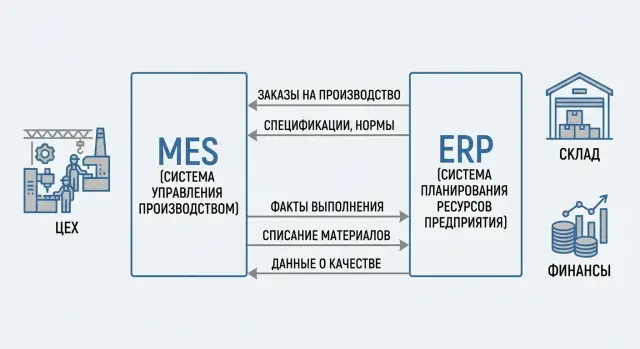
Why separate MES and ERP on the shop floor
In manufacturing, plan and actual are often confused because they live close to each other. The plan says what and when should be done. The actual shows what really happened during a shift: how many were produced, how much scrap, where downtimes occurred, who performed the operation, which material lots went into the product.
When MES and ERP start to record the same things, double accounting appears. In one system an order is already “completed”, while in the other it’s still “in progress”. Or vice versa: ERP wrote off materials by the norm, while the shop floor actually used more because of setup. On reports this looks like a small discrepancy, but for management it quickly becomes a conflict between production, planning and finance.
The pain usually shows up in three places:
- Deviations are hard to analyze: is it an accounting issue or a real line problem?
- Trust in the numbers falls, and people revert to Excel and “manual adjustments”.
- Any change becomes expensive: one entity must be edited in two systems and then reconciled.
The goal of separation is simple: one source of truth per data type. ERP is responsible for what should be: orders, plan, budgets, cost accounting and bookkeeping. MES is responsible for what was: operation execution, actual times, actual consumption, equipment state and traceability by lot. This is how MES and ERP responsibility split helps the shop floor operate without disputes over numbers.
Imagine a company assembling workstations or servers for a government order. ERP’s plan says: assemble 50 units this week, reserve components, calculate cost and shipping dates. On the shop floor the reality is different: some components arrived late, a defective batch was found during testing, two units were sent for rework. If ERP tries to store all execution details it grows lots of “production events” and becomes heavy. If MES starts to calculate finances, it loses accounting accuracy and turns into a bookkeeping system.
Below are answers to common questions from managers and IT: where the border between plan and actual is, which system “owns” which data objects, what and when to transmit, and how to set up an end-to-end process from planning to order closure and deviation analysis.
If you work with a system integrator, agree data boundaries and a common data dictionary in advance. In projects for manufacturing organizations in Kazakhstan this is especially important: accounting, the shop floor and support converge faster into a single scheme, and a 24/7 service supports the process instead of “fixing reports”.
MES and ERP roles in plain language
A useful agreement is: ERP is responsible for what needs to be done and what it will cost; MES is responsible for how it was actually done on the shop floor. The principle “ERP plans, MES executes” simplifies integration and reduces fights about “who owns the reference data”.
ERP typically lives in the world of money, deadlines and obligations. It helps promise a delivery date to the customer, buy materials, calculate cost and close the period. MES lives in the world of shifts and machines: who, where and on which operation is working now, how many good parts were produced, what downtimes happened and why.
Things usually kept in ERP for the whole company:
- customer orders and production orders at the item level
- planned dates and quantities, planned routes as the normative reference
- procurement, warehouses, finance, costs and accounting postings
- reference data (item master, units of measure, accounting accounts)
MES takes responsibility for what changes every minute on the shop floor and matters for shift control:
- dispatching: queues for equipment and crews
- actual operations: start, stop, quantity, scrap, rework
- actual material consumption and production of semi-finished goods
- shop-floor events: downtimes, reasons, measurements, quality checks at control points
A key boundary to confirm before integration is simple: “who owns the fact.” If a fact is created in MES (production, scrap, time, downtime), ERP should not retroactively “fix” it. ERP should accept the fact and reflect it in accounting.
Small example. ERP planned 100 units today and calculated material needs. In reality the machine stopped for 40 minutes, the shift produced 92 units and 3 were scrap. This is not a “planning error”, it is a production fact. MES records the event and result, and ERP recomputes stock, costs and plan fulfillment based on that fact.
It’s good to formalize this MES and ERP responsibility split in a document (RACI or a regulation). Otherwise integration becomes endless “why don’t numbers match” arguments instead of production management.
Responsibility matrix by data objects (who owns what)
Main integration rule: each data object has one owner. The other system can hold a copy but must not silently change the primary source. Then responsibility boundaries are clear and auditable.
Below is a practical matrix: who creates and approves, and who uses and records the fact.
| Data object | Owner (source of truth) | What ERP does | What MES does | Comment |
|---|---|---|---|---|
| Master data (nomenclature, counterparties, divisions, UoM, calendars, operations directory) | ERP (or a separate MDM) | Creates and approves changes, maintains versions | Uses data, may add local attributes (e.g., line code, workstation) | Any change to master data should go through a formal request to avoid duplicates and reporting errors |
| Production order | ERP | Creates, plans, releases to production, closes financially | Executes: start/pause/complete operations, records facts and deviations | Keep statuses separate: ERP — business statuses (created, released, closed), MES — execution statuses (in progress, completed, scrap) |
| Routes and specifications (BOM) | ERP | Stores normative composition, norms, base route, versions | Clarifies execution: detailed steps, work instructions, machine parameters, actual times | MES may add shop-floor instructions but should not change normative data without returning it to ERP |
| Materials and inventory (reservation, issue, return, write-off) | ERP (accounting) + MES (operational fact) | Reserves, maintains accounting/management records, values inventory and cost | Records issue to line, returns, actual consumption and reasons for overuse | Common pattern: MES initiates a movement by fact, ERP confirms and posts it in accounting |
| Quality and traceability | MES (primary fact) + ERP (aggregation for reporting) | Stores aggregated KPIs, quality costs, claims, certificates | Records control results, measurements, serial numbers, lots, scrap reasons, who and where checked | It’s important that scrap reasons and defect codes are unified in reference data, otherwise analytics will break |
To avoid disputes between IT and production, lock down data governance rules:
- One owner per object and a single change channel (no manual edits “bypassing” integration).
- Versioning for BOMs and routes so facts always tie to a specific version.
- Permissions: ERP approves normative data and final business statuses; MES records facts and deviations.
- Discrepancy protocol: what to do if MES records an operation but ERP hasn’t released the order.
- Common directories for scrap reasons, downtimes and deviations.
Shop-floor example: a technologist changes a material consumption norm. The change is approved in ERP and pushed to MES as a new specification version. MES records actual issuance and overconsumption with a reason (e.g., “setup”), and ERP calculates cost and plan vs actual variance.
End-to-end process: from ERP plan to MES fact
An end-to-end process works reliably when ERP owns “what and when must be done” and “how it will be reflected financially,” while MES owns “how it was actually done on the shop floor.” This keeps one logical thread: plan lives in ERP, fact is recorded on the floor in MES.
The start is usually in ERP. A need appears there: a customer order, a forecast or an internal request. ERP checks inventory and procurement, capacity at the calendar level and issues production orders. Important here are dates, priorities, BOM, route (operations) and planned norms.
ERP then sends an execution task to MES. MES should not reinvent the plan: it receives the base and breaks it down to the operational level (areas, shifts, work centers). It also pulls in data needed by supervisors and operators: what to do, which materials to use, and which quality checkpoints to follow.
Event-level exchange typically looks like this:
- ERP -> MES: production order, operations, time norms, planned quantities, dates, assigned resources (if present)
- MES records: operation start/finish, downtimes, actual output, scrap, rework, actual times and performers
- MES -> ERP: confirmations of output and movements (finished/semi-finished), material postings, labor, deviations from norms, order statuses
During execution MES records reality. For example: the shift started 100 units, produced 92 good and 8 scrap; there was a 35-minute downtime due to setup; material was substituted by an approved equivalent. These details are critical for root-cause analysis and improvements, but ERP usually stores them in an aggregated form.
Returning facts to ERP is needed for finance: to close steps, post finished goods to stock, write off materials, calculate cost and see variances. A good practice is to return aggregated facts to ERP by operation or shift, leaving the detailed history in MES.
Mini-scenario: ERP released an order for 500 workstations for the week, while MES shows by shifts that one cell’s throughput dropped due to a missing component. MES returns the deviation and actual productivity; ERP recalculates dates and cost impact. Plan and actual remain reconciled, but each lives in its own domain.
Data schema: which entities live in ERP and which in MES
To prevent MES and ERP fighting over the same “truth,” assign an owner for each entity in advance. Simple principle: ERP stores what’s needed for planning, accounting and money; MES stores what happens on the line by minute and event. This is the MES and ERP responsibility split at the data level.
Core directories and who owns them
Directories are often shared, but it’s better to designate a master system and a secondary copy.
ERP commonly holds master data: item master (code, units, accounting attributes), BOM, norms and accounting dimensions. MES consumes these for execution and shop-floor detail.
MES may be the master for shop-floor directories that change frequently: real work centers (availability, constraints), tooling, shift crews, downtime reasons. ERP keeps aggregated versions for reporting.
Planned entities in ERP, actuals in MES
ERP contains planned objects: production orders, routes and operations, planned time and material norms, planned dates and resource requirements. ERP owns cost, postings, period close and variance analysis according to accounting rules.
MES stores actual execution: operation start and end events, statuses (running, downtime, setup), actual times, actual output, material consumption “as it was”, breakdown by lots/serials and by workstation.
Quality is almost always better managed in MES because it’s tied to moment and location: control results, defects, causes, holds, corrective actions. ERP usually receives the summary: good/bad counts, write-offs and financial consequences.
Minimum “glue” keys so systems understand each other without duplicates:
ERP (план)                         MES (факт)
-------------------------------    -------------------------------
ProductionOrder (OrderID)   -->    Dispatch/WorkOrder (OrderID)
Operation (OrderID+OpNo)    -->    OperationExecution (OrderID+OpNo)
Item (ItemID)               -->    MaterialConsumption/Production (ItemID)
WorkCenter (WCID)           -->    Machine/Line (WCID)
Batch/Lot (LotID)           -->    Traceability/Quality (LotID)
Example: ERP creates an order for 1,000 housings and plans 3 operations. MES records under that OrderID that shift #2 had an 18-minute setup, 920 good output, 30 scrap with cause “edge damage”, and posts the actual material usage. ERP accepts the results, calculates variances and records them in cost and reports.
Integrations and exchange: what, when and in what form to send
A good MES–ERP integration follows one rule: ERP sets “what and when to do” and calculates money, while MES records “how it was done” at the level of operations, people, machines, lots and serials.
From ERP to MES
ERP usually sends everything that describes the plan and norms so the shop floor works from a single version of truth:
- production orders: number, item, quantity, dates, priority, destination warehouse/cell
- routes and operations: sequence, work centers, allowed alternatives, setup rules
- specifications (BOM) and versions: composition, substitutions, coefficients, effective date
- norms and tolerances: planned times, material consumption norms, control characteristics, sampling rules
- restrictions and documents: production release status, quality and traceability requirements (lots, serials)
Agree that MES does not edit routes and BOMs; if deviations occur MES records a reason and ERP changes the normative data as a new version with an effective date.
From MES to ERP
MES should return facts sufficient for accounting, costing, stock and customer order fulfillment. Detailed machine telemetry can remain in MES while ERP receives aggregates and movements.
- output: quantities of good and semi-finished and scrap, by lot/serial, linked to order and operations
- scrap and rework: quantities, defect codes, where it occurred, what was written off or sent for rework
- material consumption: actual issue, substitutions, returns, lot/serial linkage if required
- labor and machine time: actual hours, shift, crew, downtimes with reasons (if they affect accounting)
- execution statuses: started, in progress, partially completed, completed, stopped, with timestamps
To join data reliably, you need common identifiers: item codes, units, work centers and continuous links to production order and operation. For lots and serials decide in advance who issues them: often material lots are created in ERP/warehouse while MES assigns serial numbers at assembly.
Frequency: statuses and key facts (start, output, posting) are best sent as near-real-time events via API/message bus, while extended reports (shift summary, downtime detail) can be transferred in scheduled batches.
Integrators often begin with batch exchanges for stability, then move critical events to online when processes stabilize. In GSE.kz projects this pattern appears often: stabilize basic contours, then accelerate exchanges where they truly affect shift management.
How to implement in steps without stopping production
Start not with interfaces but with two answers: which scenarios must work on day one and who owns each data object. If an owner isn’t assigned, the system quickly becomes a dispute about whose numbers are correct.
Basic rule: ERP holds plan and money, MES holds execution facts. Then, for each object (order, operation, material, lot, scrap, downtime) record where the source is and where a copy may live.
Step-by-step approach
It’s safer to proceed in small loops that each provide value and don’t break current work:
- Normalize master data: item codes, units, areas, work centers, process versions. Small mismatches later create unreconciled stocks and wrong costs.
- Start with a minimal exchange: ERP sends production order and planned operations; MES returns production and operation facts.
- Extend MES facts: material postings, QC results, downtimes, labor. ERP receives aggregated results for accounting while the detail stays in MES.
- Set up reconciliations and deviation reports: where plan didn’t match actual, reasons, who corrects and by when.
- Introduce a change support process: who changes master data, how new fields and statuses are agreed, what counts as an incident and rollback procedures.
Describe the minimal loop as a “data contract” between systems: which fields are mandatory, which directories are shared and which statuses are final.
How to reduce risk at the start
Choose a single line or product type and run the full cycle there. For example, ERP creates an order for 100 units; MES records shift outputs 60/40 and deviation reasons (setup, waiting for material). ERP receives final output and timing variances while MES keeps detailed operation events.
Critically agree on “editing rights”: MES facts are not edited retroactively without reason and trace, and ERP plan changes occur only via a clear procedure. This keeps the roll-out running and preserves trust in the numbers.
Example scenario: one order, ERP plan and MES fact
Take an order for 20 units assembled from 5 components (housing, board, cable, fasteners, packaging). There is incoming inspection and a final quality check. The point of the split is simple: ERP manages plan and money; MES manages real execution on the shop floor. This is the MES and ERP responsibility split in practice.
Sales posts the order in ERP, ERP checks dates and creates a production order. Based on BOM and route ERP calculates needs, reserves stock and creates material pick tasks. ERP also sets planned dates, planned labor, planned cost and accounting rules: how to write off materials and how to post output to inventory.
ERP sends the production order to MES with the key instructions: what to make, how many, which route and which quality checkpoints are mandatory. On the floor MES records the facts. An operator starts an operation, scans component lots, records the output of a subassembly or finished unit and logs quality results. If the line stops, MES asks for a reason (e.g., waiting for a technician, missing cable, equipment failure) and records downtime minutes.
One unit fails final inspection: MES records scrap with a reason (e.g., defective board) and a disposition (repair, write-off, retest). If repair needs extra cable, MES records overconsumption relative to the norm and ties it to the specific lot and operation.
For ERP to calculate cost and produce reports, MES usually sends a limited set of facts:
- Output: good quantity, scrap quantity, lot numbers, completion timestamps
- Consumption: actually posted materials and overuse by operation
- Labor and equipment: actual hours, downtimes and their reasons
- Quality: control results and defect statuses
- Traceability: which component lots went into which product lots
Deviation analysis starts by comparing plan vs actual. ERP sees: planned 20, 18 good received to stock, 2 scrap; cable consumption exceeded norm; labor up due to a 40-minute downtime. MES provides operation-level breakdown and reasons; ERP converts this into money: unit cost, scrap losses and schedule impact. MES explains what happened, ERP says what it cost and what to plan next.
Common mistakes and traps when splitting responsibility
The most common problem in MES–ERP projects is not interfaces but boundaries: who is responsible for what and who is right when numbers don’t match. If this isn’t fixed in rules and data, systems start to “argue with themselves.”
When directories multiply and no one owns them
Often it starts innocently: MES adds its own items, operations and work centers because “it’s faster.” The same objects also live in ERP. After a few months different names, units and norms appear and integration becomes manual work.
Practical rule: each directory must have one owner (ERP or MES) and a clear change procedure (who creates, who approves, how updates reach the other system and how history is handled).
Double cost accounting and “two truths”
Another trap is trying to compute financial results in both MES and ERP. MES knows facts very well: how much was produced, consumed, idle time and scrap. But financial accounting, postings, valuation, period close and cost allocation should remain in ERP. Otherwise you get two costs: an “operational” cost and an “accounting” cost, and each side will consider theirs correct.
Working agreement: MES sends facts (output, postings, time, scrap) in the required detail and ERP converts them into money by accounting rules.
What typically breaks the responsibility split in practice:
- No common lot/serial identifier: MES and ERP use different values and traceability breaks at receiving or shipping.
- Exchange is too infrequent: ERP runs yesterday’s plan while MES facts arrive too late to react.
- No reconciliation process: discrepancies accumulate until month-end and are then fixed manually.
- MES events are recorded late: an operator enters facts at shift end while the dispatcher saw the wrong picture all day.
- Norm and route changes are applied “by-passing” the process: ERP plan is already different and MES keeps working to the old version.
A useful test: ERP released an order for 100 units with lot P-001. MES actually made 98, 2 were scrap and material was substituted by agreement. If lot or deviation reasons are recorded differently, month-end you’ll find ERP shows “100 produced” and MES “98 produced” and a dispute about who erred.
Minimum that saves the project: a common lot key, frequent status exchanges (start, output, scrap, completion) and a short daily reconciliation of key figures before they become month-end closures.
Quick checklist and next steps
For MES and ERP responsibility split to work on a real shop floor, agree not only “who does what” but who owns which data and which events count as facts. Otherwise systems become a disputed directory instead of a management tool.
Before integration starts, check basic things:
- Assign data owners by domain: master data (items, operations), orders and planning, quality, inventory movements, finance and costing.
- Define the minimal set of MES events that record reality: operation start and finish, good output, scrap, downtime, material consumption and lot movement.
- Introduce common identifiers and ensure they live in all systems: order, operation/step, lot, serial number (if needed), work center.
- Agree exchange frequency: what goes online (critical statuses) and what is batched (shift close). Also define retry and deduplication rules.
- Document error scenarios: what to do if ERP or MES are unavailable, where queues are stored and who resolves discrepancies.
A clear sign you are on the right track: the dispatcher sees “what is happening now” in MES, while the accountant in ERP gets “what it means for money and reporting” without manual spreadsheets.
Next steps in small increments to avoid stopping production:
- Choose one flow or area and limit integration to 3–5 key events (e.g., output, scrap, consumption, operation status).
- Inventory infrastructure: where MES will run, where the integration layer is, and requirements for resilience and logging.
- Fix a “master” for directories and change rules (who creates, who approves, how updates reach the other system).
- Test reconciliation: one order, one lot, one shift. Achieve matching counts and statuses before scaling up.
- If you need a turnkey project, estimate contours in advance: MES and integration servers, shop-floor workstations and support procedures. In Kazakhstan such projects are often delivered together with system integrators like GSE.kz, especially when local infrastructure and support matter.
Frequently asked questions
What is a simple boundary between ERP and MES?
Separate by the rule “plan and money” vs “facts and events”. ERP stores what should be done and how it affects schedules, inventory, cost and period closing. MES records what actually happened on the shop floor: start/stop of operations, good output, scrap, downtimes, actual consumption and traceability.
Why do MES and ERP often show different numbers when used together?
Most often the reason is double accounting. When both systems manage the same entities and statuses, you end up with an order “completed” in one place and “in progress” in another, or materials issued by norm instead of by actual use. That quickly turns into disputes between production, planning and finance and forces people back to Excel.
Which data should logically be owned by ERP and which by MES?
ERP typically owns master data, production orders, normative routes and specifications (BOM), planned norms and dates, and inventory and financial records. MES typically owns execution facts: operation events, actual times, downtimes with reasons, actual consumption, production/scrap and traceability details. The secondary system can keep a copy but should not quietly change the source of truth.
What exactly should be exchanged between ERP and MES to avoid drowning in details?
Send from ERP what’s needed to execute: production order, operations, norms, dates, BOM/route versions and quality requirements. Return from MES the facts needed for accounting and costing: good/scrap output, material issues and returns, labor and key order/operation statuses. Keep detailed event history and equipment telemetry in MES; send aggregated results to ERP.
Which identifiers are mandatory so integration works without duplicates?
At minimum — consistent identifiers for order and operation, identical item codes, units of measure and work centers. For traceability agree in advance rules for lots and serial numbers: who issues them, where the truth is kept and how they are passed between systems. If keys don’t match, you will likely lose the linkage “material → product → shipment”.
How to handle BOM and route versions so facts don’t “break” the plan?
Keep the normative data in ERP with versioning and effective dates so plans remain controllable and auditable. MES must record the fact against the specific version actually used, and note reasons if the team deviated from the norm. If you need to change the norm, do it as a new ERP version rather than patching the route or BOM directly in MES without returning it to ERP.
Why shouldn’t cost be calculated simultaneously in MES and ERP?
Leave financial calculations to ERP: postings, valuation, cost allocation and period close. MES should supply reliable facts — what was produced, what was scrap, what was consumed, how much time was spent and which downtimes occurred. If both systems compute cost, you will almost certainly end up with two different costs and a dispute about which is correct.
Where is it better to keep quality and traceability — in MES or ERP?
Primary quality facts are best kept in MES because they are tied to a place and time: check results, measurements, defects, causes, serial numbers and lots. ERP usually needs aggregated results for accounting and reporting: quantities of good/scrap, write-offs and financial impact. Make sure defect codes and scrap reasons come from the same reference data, otherwise analytics fall apart.
How often should data be exchanged: online or in batches?
Choose frequency based on criticality. Key events that affect operations and inventory should be sent near real-time so ERP doesn’t live on yesterday’s plan and discrepancies don’t pile up. Aggregated shift reports and deep downtime detail can be sent in batches if that doesn’t hinder operational decisions.
Where to start implementation so production does not stop?
Start with a minimal loop on one area or product type and get key numbers to match for a single order: production, scrap, material consumption and operation statuses. Before interfaces, assign data owners and rules for edits: MES facts should not be edited retroactively without reason and trace, and ERP plans should change only through a clear procedure. If using an integrator, agree the data dictionary and responsibility boundaries so support helps the process instead of endlessly reconciling reports.
