5 min read
Populating Server Memory Slots: DDR4/DDR5 Frequency and Databases
How populating memory slots affects DDR4/DDR5 frequency and why channels and ranks can noticeably speed up or slow down databases.
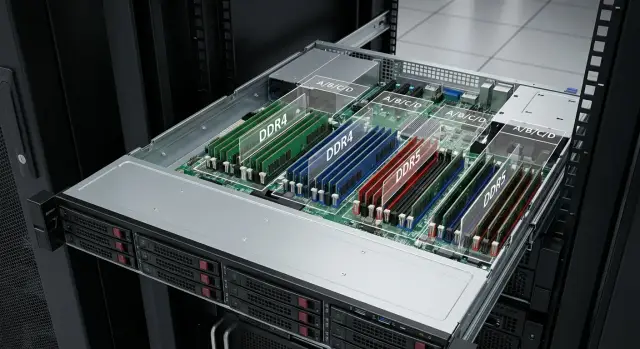
What happens to memory frequency when you populate slots
"Losing frequency" means modules labeled DDR4-3200 or DDR5-4800 run at a lower speed in a real server, for example DDR4-2933 or DDR5-4400. The server does this not to be malicious, but to choose a mode that will remain stable with your current population and workload.
The same sticks can behave differently in two configurations even if the CPU and modules are identical. Frequency depends not only on the DIMM, but on how the slots are populated: how many modules per channel, what ranks they have, and what electrical load the memory controller in the CPU sees.
Three basic ideas to avoid mistakes:
- Memory works by channels. To get maximum bandwidth, modules should be spread evenly across channels.
- Modules have ranks. The more ranks in a channel, the harder it is to keep high frequency.
- The number of modules per channel often matters more than the size of a single module. Two DIMMs per channel are usually “heavier” for the controller than one, and the frequency can drop according to platform specifications.
Why does this come up after upgrades? Servers often start with 1 DIMM per channel, then you add modules to increase capacity. The scheme changes to 2 DIMMs per channel, ranks or batches may be mixed, and the BIOS automatically lowers the frequency.
A typical scenario: the database hit a memory limit, you buy more DIMMs, capacity grows, but queries start taking longer. The culprit may not be disk or CPU, but a reduced frequency and increased RAM access latency.
Channels and ranks: short and practical
Memory channels are defined by the memory controller in the CPU. In a dual-socket server channels are counted separately for each processor: each CPU has its own channels and slots. If you put all modules near one processor, the second CPU will have little local memory and some accesses will go through the neighbor, adding latency.
On the motherboard slots are usually labeled by channel (for example A1/A2, B1/B2). Order matters: the vendor defines the “first” slot in each channel. Common logic is to fill the "1" slots across all channels first, then the second slots. Start from the population scheme for your model.
What is a rank (1R, 2R) in plain terms
A rank can be thought of as a group of chips the controller addresses as one block.
- A 1R (single-rank) module is usually easier for the controller and more likely to hold higher frequency.
- A 2R (dual-rank) module increases the controller load but can be effective in some workloads due to internal parallelism.
Important: rank is not the same as the number of PCBs or one-sided/two-sided. It’s a separate characteristic.
Why more modules doesn’t always mean faster
Each additional DIMM in a channel increases the electrical load. When there are more modules (especially at 2DPC — two DIMMs per channel, and especially if they are 2R), the controller often reduces DDR4/DDR5 frequency so the system stays stable.
In practice this looks like: you added memory to improve performance, but installed two modules per channel and mixed 1R and 2R. The frequency drops, latencies increase, and the extra capacity doesn’t give the expected performance. When upgrading, think not only about “how many gigabytes,” but also “how they are distributed across channels and ranks.”
Why frequency drops: main reasons
Frequency drops are almost always related to limits of the CPU memory controller. A platform supports certain modes: what maximum frequency is possible with a given number of DIMMs per channel and electrical load. So you may see a DIMM that "supports 3200" but the system runs it lower.
A practical rule: the higher the load on a channel, the lower the stable frequency. Load increases when:
- you move from 1 DIMM per channel to 2 DIMMs per channel (2DPC);
- you use “heavier” modules (often multi-rank and/or high-density);
- you mix modules with different organizations (size, ranks, chip density, revisions);
- the BIOS chooses the safest mode because the configuration is mixed;
- a particular CPU model limits frequency more in the same population scenario.
With DDR5 the logic is similar: frequencies are higher, signal requirements tighter, and the penalty for 2DPC is often more noticeable. The principle is the same — the controller reduces speed if the configuration becomes complex.
Many consult only the QVL, but it’s not the only source of truth. QVL proves a specific memory ran on a specific board, but it doesn’t guarantee maximum frequency for all population schemes and CPUs. Check the mode tables in server and CPU documentation: they usually state the supported frequency at 1DPC and 2DPC and for which module types.
What to check before buying or upgrading memory
Before buying modules, record the current configuration. Missing this step often costs the most: the memory will boot, but the server will run at lower frequency and the database will slow down on heavy queries.
Gather the following:
- exact CPU model and platform generation;
- memory type (DDR4 or DDR5);
- DIMM types supported by the server: UDIMM, RDIMM or LRDIMM (ECC is usually important in server configs and different DIMM types are typically not mixed);
- how many processors are installed and which slots belong to each (critical in dual-socket systems).
Then estimate capacity needs for the next 1–3 years and leave room for caches, sorts and temp tables. Sometimes it’s better to add memory early than to later expand at the cost of moving to 2DPC and losing frequency.
Four questions that guide the decision:
- What frequency is specified for your exact channel population (1DPC/2DPC) and CPU?
- Which DIMMs are approved by the platform (DDR4/DDR5, RDIMM/LRDIMM/UDIMM, ECC)?
- How many channels will you actually populate per CPU?
- For your workload which is more important: frequency or capacity?
Example: for OLTP workloads keeping one module per channel and preserving frequency can be better. For workloads where the working set doesn’t fit in RAM, capacity may be more important even if frequency drops.
How to populate slots without losing frequency
The goal is to keep the highest supported frequency for your platform and avoid forcing the controller into a slower mode by overloading channels.
-
Identify channels and the “first” slots. Find the population table in documentation: which slots to fill first and what frequency is guaranteed at 1DPC and 2DPC.
-
Start with symmetry across channels. It’s better to populate all channels evenly with the same modules than to install fewer large modules and leave channels empty.
-
Keep modules homogeneous within each channel. The most common cause of unexpected modes is mixing DIMMs with different ranks (1R/2R/4R) or densities in the same channel.
-
Verify actual frequency after installation. Check BIOS/UEFI or system utilities for real frequency, downclock warnings and channel distribution.
-
Document the layout. Note which modules are in which slots, their part numbers/ranks, BIOS version and memory settings. This is useful when you manage multiple identical servers and need repeatable behavior.
A short rule of thumb: fill the “first” slots in all channels with identical DIMMs before adding the “second” slots.
Common mistakes and traps when installing DIMMs
Memory was “added” but the server got slower — most often the issue is population scheme and the BIOS choosing safer parameters.
Frequent problems:
- Broken channel symmetry. One “capacity stick” breaks balance and part of memory becomes more expensive in latency or lower in bandwidth.
- Mixing similar but not identical modules. Even if the server boots, the overall frequency typically drops to the minimum supported by the installed DIMMs.
- Too many modules per channel. Moving to 2DPC often triggers a step down in frequency — this may be normal for the platform.
- NUMA in dual-socket systems. If the second CPU has little or no local memory, threads will more often access remote RAM and tail latencies worsen.
- BIOS and firmware. Updates can change memory training and auto-configuration. Sometimes new firmware improves running modes; other times, without updates new memory runs at conservative settings.
Signs you fell into a trap:
- frequency in BIOS/OS is lower than before the upgrade;
- bandwidth barely increased while latencies went up;
- DB load becomes “spiky”: worse p95/p99, more waits;
- one socket is noticeably hotter and busier than the other.
Why this matters for databases
Databases are sensitive to memory in two ways: latency (how fast the CPU gets data) and bandwidth (how much data flows per second). When DDR4/DDR5 frequency falls due to slot population, it often shows not as a small percent loss but as a chain of small delays noticeable to users.
- OLTP workloads (many short transactions) suffer more from latency increases.
- Analytics and reporting are more constrained by bandwidth and the number of active channels.
Capacity can sometimes be more important than frequency. If the working set no longer fits in cache and the DB hits disk more, even fast NVMe is orders of magnitude slower than memory, so adding RAM can easily outweigh a small frequency drop.
A useful approach: first get channel population correct, then address capacity, and finally tune ranks and frequency — because these often break when you add DIMMs into the second slots of channels.
Real-life example: memory upgrade and unexpected DB slowdown
A DB server ran stably with 256 GB RAM. New reports increased the working set and memory was expanded to 512 GB. The server booted fine and integrity tests passed, but after a few days queries became slower.
The problem was the installation scheme: new modules were added asymmetrically across channels and some were of a different rank. The memory controller lowered frequency and switched to a conservative mode for stability.
The fix was simple: rearrange modules strictly by channel, harmonize the configuration where possible, and check the actual frequency and mode in BIOS. The team measured request latencies and report times before and after — the drop disappeared and behavior became predictable.
Checklist before rolling to production
Spend 15–20 minutes checking before applying memory changes on a production server. A bad population often looks like “everything booted,” while frequency and mode quietly slipped down.
- Check the actual frequency and memory mode in BIOS/UEFI or with OS utilities.
- Verify even channel population per CPU.
- Ensure modules in critical channels are of one type and organization (size, ranks).
- Compare expected frequency with platform mode tables: 1DPC/2DPC and DIMM type.
- Run a short repeatable DB test before and after changes and save the numbers.
If time is limited, pick one scenario and one metric: for example latency of simple SELECTs under parallel load, or time for a typical report. These checks quickly show if memory became “more expensive” in latency.
Next steps: how to choose a server configuration for your DB
Start with DB requirements: how much memory you need now, how critical reliability is (ECC is almost always required for servers), and whether frequency or capacity is more important for your workload. Plan growth for 12–24 months and decide if you want to leave spare slots for expansion.
Then define the target DIMM population for your CPU: how many channels the processor has, whether you will use 1DPC or 2DPC, and which ranks are acceptable at the needed frequency. A clear "DIMM population plan" protects you from the situation where memory suddenly runs slower after an upgrade.
If you purchase servers for databases in Kazakhstan and want to pre-validate module compatibility and channel population without surprises at launch, this can be worked out with a systems integrator like GSE.kz during the specification stage.
Frequently asked questions
Why does memory start running at a lower frequency after adding DIMMs?
Frequency drops because the memory controller in the CPU chooses a mode that will be stable under the current electrical load on the channel. When you add modules and move, for example, from 1 DIMM per channel (1DPC) to 2 DIMMs per channel (2DPC), the load increases and the platform’s allowed frequency can be lower. The server doesn’t “damage” the memory — it switches to a safe mode to avoid errors.
What are 1DPC and 2DPC, and why does 2DPC often reduce frequency?
1DPC means one DIMM per channel; 2DPC means two DIMMs per channel. In 2DPC the signal must remain clean across more devices, so many platforms automatically lower DDR4/DDR5 frequency. If you need maximum frequency and minimal latency, keeping 1DPC and using larger modules (if the platform and budget allow) is often better.
How do 1R/2R ranks affect memory frequency and stability?
A rank is the internal organization of a module that the controller addresses as a single set of chips. The more ranks present in one channel, the greater the load on the controller and the more likely the frequency will be reduced. Single-ranked (1R) modules generally hold higher frequencies more easily; dual-ranked (2R) modules can provide benefits in some workloads but more often complicate maintaining high frequency in dense configurations.
Can you mix DIMMs of different sizes or ranks without losing performance?
Mixing modules with different organizations often causes the BIOS to pick a common frequency based on the weakest combination to ensure stability. Even if the server boots and shows no errors, you may end up with lower frequency and higher latencies. The best practice is to keep modules identical at least within each channel, and ideally use a matched kit across the server.
What matters more for speed: filling all channels or using larger modules in some slots?
In most cases it’s better to evenly populate channels with identical modules than to install a few large modules and leave some channels empty. Even channel population increases bandwidth and makes behavior more predictable. Follow the server manufacturer’s population table to avoid unexpected downclocking.
Why is it important to distribute memory across both CPUs in a dual-socket server?
In a dual-socket system each CPU has its own local memory. Accessing memory attached to the other socket is usually slower. If you put most DIMMs near one CPU, the other will often access remote memory and tail latencies (p95/p99) can worsen significantly. For databases this often shows up as more erratic response times even at the same average load.
How can I quickly check what frequency memory is actually running at after an upgrade?
The most reliable way is to check the actual frequency in BIOS/UEFI after installation and confirm there are no downclock warnings. In the OS you can additionally verify that modules are distributed across channels and sockets as planned and that the system reports the expected mode. After an upgrade, compare latency and bandwidth metrics before and after to detect degradation early.
For databases which is more important: RAM capacity or memory frequency?
If the working set doesn’t fit in RAM and the database starts hitting disk more often, adding capacity usually matters more than keeping a slightly higher frequency. If the database already fits in memory and you’re limited by latency and access speed, preserving higher frequency and 1DPC can yield noticeable gains. A practical approach is: ensure sufficient capacity first, then optimize channel and rank layout for your workload.
Can a BIOS update affect memory frequency and why?
Yes. BIOS updates can change memory training logic and automatic selection of frequency and timings. Sometimes a new BIOS allows a platform to run at the rated mode with the same modules, and sometimes it applies more conservative settings for compatibility. After any update, re-check actual frequency, channel distribution and run a short repeatable DB test.
How to plan a memory upgrade to avoid a hidden frequency drop in production?
Record the current configuration and the goal: required capacity, how many channels you want filled per CPU, and whether you’re willing to move to 2DPC. Don’t rely only on the sticker frequency — check the supported frequency for your exact 1DPC/2DPC scheme and DIMM type on your CPU/platform. When procuring or upgrading database servers, it’s useful to coordinate with a systems integrator such as GSE.kz to get a predictable memory population and mode at launch.
