8 min read
MDM Master Data Hub: Reconciliation, Deduplication, and Distribution
A practical guide to building an MDM master data hub: change reconciliation, deduplication, format contracts and distributing master data to other systems.
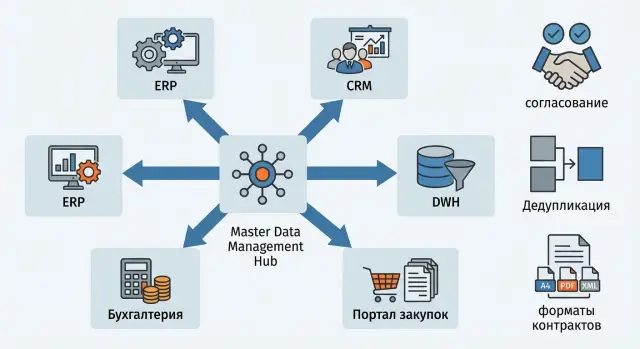
Why you need a master data hub and what it solves
Master data are the reference lists that processes rely on: who is our customer or supplier, what the product is, which employee works in which unit. Unlike transactions (invoices, orders, payments, tickets), master data should be stable and identical across systems. An error in one record quickly spreads through the chain and breaks reports, limits, contracts and delivery.
Problems usually arise not because people don’t try, but because there are too many sources. The same counterparty may be created in accounting, CRM and procurement with different names, addresses change, and IIN or BIN may be entered with typos. Over time duplicates appear, attributes diverge, and different systems end up with conflicting versions of the same reference record.
A master data hub (MDM) solves this by acting as a single source of truth: it accepts changes, validates them by rules, eliminates duplicates and distributes a reconciled record to other systems.
Most often MDM holds counterparties, products and services, employees and org structure, and locations (addresses, warehouses, points of sale).
You can tell it’s time to build MDM by simple signals:
- reports show mismatched totals between systems due to different reference data
- the same customer appears multiple times under different names
- changes in records take a long time to propagate through integrations and get lost
- the business argues which system is "master" for the same object
- every new application rollout starts with manual data cleansing
Example: sales creates a new customer in CRM, while procurement already has the same party as a supplier under another name. Without MDM you spend time reconciling; with MDM you get a single reconciled record for everyone.
Inventory: which master data you have and where they live
Before building MDM, honestly answer two questions: which domains are critical and in which systems they already exist. Without this map you'll argue not about rules but about whose data are "more correct."
Start with a list of sources and each source’s role. Distinguish where a record is first created, where it can be changed and where it should be read-only. Typical picture: ERP stores accounting directories and statuses; CRM — leads, customers, contacts and interaction history; accounting — details, invoices and tax attributes. A separate risk area is Excel and email, where temporary lists and manual directories live, as well as external registries if you use them.
Next, design the entity card and the minimal set of attributes the business needs. For counterparties in Kazakhstan this is often IIN/BIN, name in required languages, legal address, bank details, and status (active, under review, archived). For products and services — codes, units of measure, VAT rates, marking flags, lifecycle statuses.
It helps to record not only which fields exist but which are actually used. Quick test: which fields go into contracts, invoices, reports and compliance checks.
Also note data quality issues that break processes: missing required fields (IIN/BIN, address, code), inconsistent formats (spaces, case, phone masks, address variants), typos in key identifiers, mismatch with reference lists (country codes, OKED, units), and "divergent truth" between systems after manual edits.
After inventory you need a simple table: entity, source systems, who creates, who approves, where it can be edited, required fields, and needed validations. This becomes the basis for reconciliation, deduplication and publication rules.
Governance model: roles, rules and responsibilities
MDM relies not on software but on rules: who decides, who is responsible for quality and who can change a directory. Without that, the hub quickly becomes another source of disputes.
Start with a single domain. Most often teams choose counterparties or the catalog: they are involved in almost every process (procurement, sales, warehouse, accounting, CRM, service). One domain is easier to agree on, measure impact and tune roles.
Typical roles:
- Data Owner: makes final decisions on rules and disputed cases
- Data Steward: maintains the directory daily, reviews requests, monitors quality
- Requester: files a request to create or change a record and attaches evidence
- Approver: confirms changes in their area (for example, finance or security)
- Integrations Owner: ensures changes are correctly delivered to other systems
Key rule — the "golden record." Agree upfront who decides which version is authoritative and by what criteria. For example, finance confirms legal name and IIN/BIN, delivery confirms address, account manager confirms contacts. If a conflict cannot be resolved automatically, escalate to the data owner.
Keep policies short and actionable: who can change which fields, what is required, how change reasons are recorded, and how history is kept. Simple example: when a counterparty name changes the requester attaches a document, the steward validates IIN/BIN and matches, the approver confirms, and the system stores the old value and date so reports and audits remain intact.
Change request processes: how to arrange the request flow
To avoid manual chaos, changes should be made via a clear request flow. This protects data from accidental edits and makes it easy to explain why a record looks the way it does.
Usually four change types are distinguished: record creation, attribute update (address, IIN, status), duplicate merge, and record closure (when the object should no longer be used but history matters).
Basic request flow
A practical flow looks like this:
- request: the requester describes what to change and why, attaching a source (contract, email, ERP card)
- validation: the steward checks completeness, format, required fields and potential duplicates
- approval: the data owner confirms the business rationale (e.g., that the counterparty is new and not a branch)
- execution: MDM applies the change, runs quality checks and deduplication
- publication: the record receives a final status and is sent to other systems
SLA, priorities and exceptions
Define clear SLAs and escalation rules. For example, standard requests are processed in 1–2 business days, urgent requests follow an accelerated route but require justification and a responsible approver. Agree in advance which changes can be made urgently (e.g., blocking a fraudulent counterparty) and which cannot.
Audit and change log
The log should store at least: who requested, who approved, what changed (before and after), when, why and based on which document. That way you can reconstruct the decision chain when disputes arise.
Example: accounting asks to change a supplier’s legal address. The steward checks the change won't create a duplicate, the data owner confirms the source, and MDM publishes the update to ERP, CRM and procurement as a single reconciled change.
Deduplication: rules for finding duplicates and merging
Deduplication prevents reports and processes from seeing two "different" customers or products that are actually the same object. Typically you start with two match types: exact matches (IIN/BIN, serial number, item code) and fuzzy matches where names or addresses differ by one or two characters.
How to tune matching to avoid false duplicates
First agree which fields are mandatory for comparison and which only provide context. A practical approach assigns weights to attributes and sets match thresholds: at a high threshold merge automatically, at a medium threshold send for manual review.
Common rule sets:
- hard key: a unique identifier match (IIN/BIN, GUID, inventory number) — definite duplicate
- soft key: name + birth date, or name + address, or name + phone — compute a similarity score
- normalization: unify case, remove extra spaces, standard address abbreviations, handle transliteration
Merging records and resolving conflicts
When merging, preserve not just the chosen value but relationships: contracts, invoices, tickets, change history. If two records have different phones or addresses, define priority rules in advance (for example, "last confirmed", "from source system A", "entered by sales"). The merge should leave an audit trail: which identifier became primary, which values were replaced, and which data were discarded.
Not all cases should be automated. Manual review is for pairs near the threshold where error risk is high, conflicts in critical fields (IIN/BIN, birth date, legal name), active links in multiple systems making it unclear which record is primary, or when there is a known reason to reject (same surname, relatives, different branches).
Example: "LLP Alpha" and "Alpha LLP" match by BIN but have different addresses. The system chooses a primary profile, transfers links, and marks the second record as merged so other systems don’t recreate the duplicate.
Quality and standards: what to check before publication
Data quality ensures you see the same entity in reports, procurement and integrations — not five versions. In MDM this is implemented as quality gates before publication.
First layer — completeness and validity. For each entity define required fields and rules: which reference lists to use, allowed values, and forbidden combinations. For counterparties critical fields usually include IIN/BIN, country of registration, type (legal/individual), settlement currency and status.
Second layer — normalization so identical values look identical. This reduces duplicates and simplifies search.
Minimal normalization set
- addresses: consistent field order, unified abbreviations, separate house/building/office
- phones: E.164 format, store country code and extension separately
- names: casing rules, remove extra spaces, consistent quotation marks style
- units: only from an approved reference list
- identifiers: masks for IIN/BIN, check length and character composition
Also agree on versioning. If a factual detail changes (for example, an office address) you usually update the record. If something affects legal interpretation or history (supplier status, effective period of a price list), it’s convenient to create a dated version.
What typically blocks publication
- required fields missing or masks violated (IIN/BIN)
- value not from an approved reference (currency, region, unit)
- uniqueness violated (same IIN/BIN across two records)
- no data owner approval for critical changes
- deduplication checks not passed before release
Practical example: if procurement created a supplier as "GSE KZ" without BIN and with a phone in arbitrary format, publication is blocked until the record meets the standard. This saves time across dozens of systems that would otherwise each correct the same error in their own way.
Format contract: how to agree with all systems
For master data to live consistently across systems you need a format contract. It’s a simple agreement: which fields are passed, how they’re named, which values are allowed and what counts as an error. Without it one system sends "ИНН", another expects taxId, and a third accepts empty addresses and later breaks reports.
A good contract specifies field composition (required and optional), validation rules, data types and constraints (string/number/date, length, phone format), reference lists and codes (countries, currencies, statuses) with allowed values, plus business rules and error descriptions: what blocks publication and what is a warning.
Stability matters more than elegance. Version the contract and change it carefully:
- incompatible change (renaming a field, changing its type) → new major version
- adding a new optional field → usually compatible (minor version)
- every version has an introduction date and a support period
- changes are approved by the data owner + integrations owner
Identifiers deserve special attention. Define a global key for the entity (for example, masterId) and a set of source keys (sourceSystem + sourceId). That simplifies matching and preserves links during migrations.
Also explicitly define events and statuses: what counts as creation, update and closure. Practical approach: a closed counterparty is not deleted but marked Inactive with a closure date so dependent systems stop operations while history is retained.
Distributing master data to other systems: integration options
When a record in the hub is ready (validated, approved, and deduplicated) it must be delivered to other systems so everyone receives the same version. Decide the exchange model in advance and set rules: who triggers transmission, how often, and what counts as successful delivery.
Two basic approaches: Push — the hub publishes changes to subscribers. Pull — systems request current data when needed. In practice a mix is common: changes are pushed, while full directory exports are pulled on demand or by schedule.
Choosing the channel
Queues, APIs or files are typical. The choice depends on the task, not the vendor:
- message queues are good for events (created, updated, closed) when speed and reliability matter
- APIs suit pull and point checks (e.g., find a counterparty by IIN/BIN)
- files (exports) are appropriate for batch scenarios, large volumes and legacy systems
If there are many receivers with different speeds, separate publication from consumption so a slow consumer doesn’t block others. If traceability is critical, choose a channel where it’s easy to store send history and statuses.
Frequency depends on the process. Online is needed where an error immediately breaks an operation (e.g., contract creation). Scheduled batch suits reporting and data marts where some delay is acceptable.
Feedback
Distribution without acknowledgements quickly becomes "we sent it, you figure it out over there." MDM should implement a minimal control loop:
- receipt acknowledgement (ack) and record version
- delivery errors and reasons (format, missing required field, unavailability)
- retries and a deadline after which human investigation is required
- send logs for audit
Example: the hub publishes "Counterparty updated." CRM acknowledges receipt immediately, while accounting picks up the package hourly. If accounting rejects the record due to format, the error returns to the hub and the responsible person sees that distribution is incomplete.
Example scenario: onboarding a counterparty from request to publication
A company connects a new supplier for procurement. It must be created once and then used identically in ERP, accounting and procurement. This is a typical MDM scenario to prevent divergent versions of the same counterparty.
Typical flow:
- requester files a request: name, IIN/BIN, legal address, bank details, contacts, VAT status
- system runs initial checks: required fields, IIN/BIN format, allowed characters, account correctness
- duplicate search runs: matches by IIN/BIN, name and address (accounting for typos)
- if a duplicate is found the request goes to merge or linkage with an existing record
- approvals follow: procurement confirms need, finance checks bank details and terms, compliance (if present) confirms it is allowable
- after approval a global ID is assigned and the record goes to ERP and accounting per the format contract
A typical failure is a receiving system rejecting the record due to format. For example, the contract expects bankAccount as a 20-digit string without spaces, but the request provided the account with spaces or a KZ prefix.
To avoid manual fixes in each system, define normalization rules in MDM (remove spaces, adjust case, validate masks) and resend the same record with the same global ID. Integrations become predictable and records stay reconciled.
Common pitfalls in MDM implementations
The most common reason MDM fails is trying to "do everything at once." Teams tackle counterparties, products, employees, addresses and contracts together, get bogged down in approvals and rule debates. Timelines slip and users don’t see results, so interest wanes.
Second mistake — lack of clear data owners. If no one is responsible for how the canonical counterparty should look and who can change critical fields, requests circulate or stall. Decisions still get made, but randomly: "like last time" or "what’s easiest for the source system."
Third mistake — not versioning the integration contract. A team splits "full name" into three attributes or adds a new code and suddenly loads into ERP, CRM or accounting break. Trust in MDM falls and systems start bypassing it.
Another common failure — treating deduplication as a one-time cleanup. Duplicates come back because there are no ongoing rules, thresholds and a queue for disputed matches that require manual resolution.
Avoid these traps with simple rules:
- start with one domain and 2–3 key processes where pain is highest
- assign a data owner and the set of approvers before configuring flows
- version the format contract and keep backward compatibility rules
- make deduplication a continuous process with metrics and a manual queue
Example: procurement creates a supplier while contracts change details. Without a domain owner for counterparties you get two different "truths" across systems. MDM should resolve this via predefined rules, not chat threads.
Quick readiness checklist for a master data hub
You can tell if your MDM is ready for a pilot by a few signs. If you can confidently answer "yes" to these, you can run reconciliation, cleansing and distribution without endless manual fixes.
Minimum required for MDM to succeed
- domains are defined (e.g., counterparties, employees, equipment) and required attributes listed for each
- roles are assigned: data owner, steward, approvers, support, and the request path from creation to publication is clear
- deduplication rules exist: which fields to compare, match thresholds, and merge process
- merges are audited: who merged, what changed, how to roll back a mistake
- a format contract for distribution is documented: field names, types, reference values, required fields and rules
Integration and quality control
- a versioning plan for the contract exists: what’s compatible, how systems are notified and how long the transition lasts
- a test distribution environment to 1–2 systems is set up to safely validate exchange
- error monitoring is in place: undelivered messages, rejected records, missing required fields, duplicate growth
A simple benchmark: if you can create one counterparty, run approval, remove a duplicate and deliver the record to two systems via one contract without manual fixes, you have basic readiness.
Next steps: how to launch a pilot and how an integrator can help
Don’t try to cover all directories and integrations at once. Launch a pilot to verify processes: who approves changes, how duplicates are caught, and how data reach consumers without surprises.
A practical start is one domain (counterparties or employees) and two target systems (for example, ERP and CRM). This gives enough complexity to reveal weak spots without making the project a long-term effort.
6–10 week pilot plan
- choose the domain and a data owner (final decision maker)
- describe the request flows: creation, update, blocking, closure
- agree the format contract: required fields, reference lists, error codes
- prepare operational requirements: SLA, monitoring, logging
- run the cycle: test data, incidents, root cause analysis
After initial integrations, infrastructure questions usually surface: where to host MDM, how to organize redundancy, how long to keep logs, who has access and how to run audits.
An integrator is useful when you need to assemble process, architecture and operations at once. For example, GSE.kz (gse.kz) as a system integrator can help build the MDM contour, data center infrastructure and support, and, if needed, assist with sourcing servers and workstations for the expected load.
Before starting, document what you expect from a partner:
- pilot readiness criteria and data quality metrics
- redundancy and recovery scheme
- monitoring and alerting rules
- incident and change procedures (who responds and in what timeframes)
- logging and protection requirements
Frequently asked questions
When does a company really need MDM, and when can it do without it?
MDM is needed when the same counterparties, products or employees exist in multiple systems and start to diverge. A master data hub produces one reconciled record and distributes it to other systems so reports and processes rely on the same reference data.
Which domain is best to start MDM implementation with?
Usually you start with counterparties or the product catalog, because they are present in almost every process and deliver quick benefits. Choose the domain with the most duplicates, manual reconciliations and debates about which system is "master."
How to understand where the current "truth" lives for master data and who should manage it?
Do an inventory: list systems where the entity exists and mark where the record is first created, where it can be edited, and where it is read-only. Then fix the minimal required attributes and which fields are actually used in contracts, invoices and reports.
What roles are needed in master data governance for MDM to work?
At minimum you need a data owner who makes final decisions on rules and disputes, and a data steward who checks requests and daily quality. Typically you also have initiators, business approvers (e.g., finance) and an integrations owner to ensure changes reach consuming systems.
What is the "golden record" and how do you decide which data in it are authoritative?
The "golden record" is the chosen canonical version of an entity that is treated as the authoritative source for distribution. Decide in advance which fields each function confirms (finance verifies legal name and IIN/BIN, logistics confirms address, sales confirms contacts) and what happens if there is a conflict that can’t be resolved automatically.
How to organize the request process for creating and changing master data?
A clear flow usually includes a request, checks for completeness and format, duplicate search, approval of critical fields, and publication to target systems. If you need deadlines, set a simple SLA: standard requests follow the normal route, urgent ones require justification and a responsible approver.
How to set up deduplication so you don't merge different counterparties by mistake?
Start with exact keys where mistakes are unacceptable (IIN/BIN or unique codes), and add softer rules for similar records by name and address. To avoid false positives, apply normalization (spaces, case, common abbreviations) and send borderline matches to a manual review queue.
What data quality checks should be included before publishing from MDM?
Before publishing, check required fields, masks and formats (for example, IIN/BIN and phone numbers), uniqueness of keys, and conformity with reference lists (currency, region, units). If a rule is broken, block publication so the error does not propagate to dozens of systems.
What is a "format contract" and why version it?
A format contract is an agreement on which fields are passed, their names, allowed values, and what counts as an error. Version it: adding an optional field is usually compatible, while renaming or changing a field’s type requires a new version and a coordinated migration.
How is it better to distribute master data to other systems — push or pull, API or files?
Typically use push for events (created/updated/closed) and pull for requests or periodic full exports; a hybrid is common. Add feedback: acknowledgements, rejection reasons and a delivery log, otherwise you won’t know who actually received an update.
