8 min read
Managing Contractors on Site: Accreditation and Permits
Managing contractors on site: what data to keep about companies and people, permits and zones, and how to run a quick checkpoint check.
What exactly needs to be controlled and why
Managing contractors on site doesn't start with folders — it starts with understanding the risks you're mitigating through control. Contractors often work in unfamiliar environments, with higher hazards and restricted access. A mistake in permission can end in injury, a production halt, data leak, or a breach of site rules.
Problems usually arise in three areas: safety (occupational and fire safety), site regime (who may go where), and accountability (who authorized and under what conditions). Control isn't "for show" — it should let you at any moment confirm that only those authorized to work here today are admitted.
During inspections and audits they often don't ask "how many documents are in the folder" but whether you can quickly show:
- on what basis the company is allowed on site and who approved it;
- whether a specific employee has the required documents and current briefings;
- whether a work permit (or another authorization) is issued for the current job;
- whether the work boundaries are clear (place, time, responsible persons, safety measures);
- whether the history is recoverable: who entered, when, and on what grounds.
It's important to distinguish accreditation from a one-time admission. Contractor accreditation is a company-level approval to cooperate: legal documents, competencies and permits are checked, responsible persons are assigned, and rules are agreed. A one-time admission is permission for a specific task and period: for example, installation in an electrical room from 10:00 to 18:00 under a work permit, with restricted access zones.
For the scheme to work, roles must be defined in advance. Usually the owner (client), security/checkpoint, HSE, and the contractor's work supervisor are involved.
A simple example: an electrician from a contractor arrives at the gate. Security sees in the system the full name and photo, the company's active accreditation, a current briefing, an open work permit for today, the access zone "shop 2, electrical room," and a permitted entry window from 09:00. If any item doesn't match (permit expired, wrong zone, missing status), the person is turned away or sent to the responsible person — not "let in by phone."
Basic record structure: organization, employee, work
To avoid contractor management turning into endless messages and "lost" files, it's convenient to build records around three entities: organization, employee, and work. Then any admission is clear: who arrived, from which company, what they're doing, where, and until when.
1) Organization: a single source of truth
The organization record answers the main question: can this company be allowed on site at all. Record basic details, current contracts and responsible persons so you can quickly confirm the basis for presence.
Typically the profile contains: full name and business ID, legal and actual address, contacts, the client's curator name and contacts, contract data (number, date, term), and an appendix or letter confirming the right to perform work on the site.
2) Employee: exactly who is entering
The employee profile is needed both at the gate and for HSE. Data should be readable in seconds: full name, photo, company, position, ID number and expiry.
If requirements are strict, add qualifications (for example electrical safety permits) and medical restrictions — but only what is actually checked. A common mistake is name variations: the system shows "Ivanov I.I.", while the document reads "Ivanov Ivan Ivanovich." It's more practical to store both "as in the document" and "as on the pass" so the person doesn't vanish during a search.
3) Work: where, when and in which shift
A work record links the organization and specific people to location and time. This prevents issuing access "everywhere forever" and simplifies gate checks.
Minimum fields for work records:
- site and area (shop, floor, zone);
- work period (start and end dates) and time windows (day/night/weekends);
- work type (installation, service, commissioning);
- basis for admission (request, contract, letter) and who submitted it.
When these three profiles are linked, gate checks become predictable: security sees the active organization, the employee's right to work in a specific zone today, and the document that confirms the basis.
Organization documents: what to store and how to update
For each organization you need a clear minimum: who they are, on what basis they work for you, and whether they may perform specific work. During security checks and audits they usually look at legal status, contractual basis, permits for special work, and liability.
Minimum package for the organization
Store scans (and original reference data) only for documents that actually affect admission:
- statutory data and details (including business ID, address, contacts);
- contractual documents (contract/framework agreement, request/specification, access conditions);
- permits for specific work types (licenses, SRO approvals or other permits) — only if required for your work;
- insurance (if required by contract);
- agreed lists of employees and the contractor's responsible persons.
An agreed list must include a date and basis (letter, appendix to the contract, request). Without that, it's hard at the gate to explain why someone is on the approved list.
Currency, expiry and versions
The problem is often not missing documents but that they're outdated or it's unclear which version is current. A simple rule saves headaches: every file has an owner, an expiry (or review) date, and a note on who confirmed currency.
Practical update workflow:
- the contractor sends an update and explains what changed;
- your responsible person checks expiry, signatures/stamps (if applicable) and relevance to the work type;
- the old version is archived with an end date rather than deleted;
- the profile records who accepted the document and when.
Keep originals where they may actually be requested (usually the contracts team or the site manager). On site, access to scans and a short "admission summary" is enough: contract is valid, permits are current, responsible persons are assigned.
Example: a contractor arrives to install racks in a server room. Security doesn't need a 40-page contract, but it is critical to see the active request/basis for the work, required permits, and that the person is on the agreed list and linked to the work supervisor.
Employee data: IDs and qualifications
The contractor employee profile is not for paperwork's sake but so you can understand in a minute who stands before you and whether they have the right to be on site and perform the job.
First block — identity document: full name, date of birth, document number, expiry (if applicable) and photo.
Second block — link to the contractor: assignment to a specific organization and, if possible, to a contract/request (who sent them, on what basis, for which period). This reduces the risk that a person remains in the database after the project ends and tries to enter later.
Qualifications, training and permits
Next, record proof of the right to perform work. The content depends on the site, but the logic is the same: store not "scans for the sake of scans" but key details and expiry dates. Usually these are certificates and records for electrical safety, work at height, occupational safety, fire safety, and professional permits if required.
A practical minimum per document: type, number, issuing body, issue date, expiry date, status (valid/expired/under review) and who checked it. A scan is useful, but even without it you can decide on access.
Third block — medical and restrictions. If the work requires a medical exam or psychiatric clearance, store the date, expiry and result (fit/unfit/limitations). Don't store needless medical details.
Expiry and statuses: so the gate doesn't guess
The checkpoint should have a clear "traffic light": allow or deny and why. Key elements must have expiry dates and statuses, and the system should show upcoming expirations.
A quick check: security matches the document and photo, opens the profile and looks at the basis for presence, admission period and statuses of required documents (ID, trainings, medical clearance if needed). If something is expired or "under review", access is blocked and the reason is immediately visible.
Briefings and training: how to record them without confusion
Briefings get confusing not because there are many, but because records live in different places: some in paper logs, some with the foreman, some in files. During an inspection it's hard to quickly show who was briefed and when.
Follow a simple logic: each briefing has a purpose (general rules, specific area, specific task) and a clear tie to the site, place and work. Then records are less duplicated and easier to check.
Which briefings to record and what to log
Record the introductory briefing as the "basic admission to site rules." It doesn't replace on-the-job briefing. For the record keep the same minimum: date and time, full name and organization of the attendee, name and position of the instructor, format (in-person/video with confirmation), signatures or electronic confirmation, and expiry (if locally established).
On-the-job briefing should be tied to the area and work type. It shouldn't be "universal": transferring to another shop or site requires a new tie.
Task-specific briefing should logically be part of preparation for a particular work permit. For hot work or work at height, record that the specific risks and controls were reviewed: PPE, barriers, responsible persons, shutdown procedures.
Knowledge testing can be simple: pass/fail, date, who tested, the program version and which version was used.
Unified log: how to keep records safe
One journal with common rules is more reliable than several "convenient" ones for different people. Usually these agreements help:
- one person — one identifier (ID card/assignment number) to avoid duplicates;
- the record is created immediately after the briefing, not "at the end of the shift";
- any correction keeps author and time;
- each briefing type has a template of fields;
- expiry is visible immediately.
Example: an electrician took the introductory briefing a week ago, today they are moved to another area and a work permit is issued. The log should show three things: the introductory briefing is current, the "on-the-job" briefing matches the new area, and the task-specific briefing was done for the permit.
Work permits: minimum fields that save inspections
A work permit is required where an error quickly leads to an accident: hot work, working at height, electrical installations, confined spaces, shutdowns, excavations, or work near live equipment. For contractor management the permit often matters more than "beautiful procedures" — it shows that risks were identified and controls applied.
Don't overload the permit with unnecessary fields. Keep the minimum that can be quickly checked at the gate and on site:
- where and what: exact location, work type, equipment/line;
- who does it: organization, crew list by name, required permits/ratings, contact of the work supervisor;
- who is responsible: issuer, approver, work supervisor, observer (if required), phone numbers;
- how we protect: key risks and measures in simple terms (barriers, LOTO, gas analysis, ventilation) and mandatory PPE;
- timing and regime: start/end date and time, work windows, shift.
The risk assessment should be understandable to the inspector and the crew. The phrase "follow safety rules" proves nothing. Be specific: "de-energize and lock cabinet SH-12," "verify absence of voltage," "assign an observer post," "2 fire extinguishers at the cutting location."
Also record stop-work conditions: crew composition or responsible persons changed, leaving the zone, missing barriers/locks or PPE, changed conditions (wind, gas, wet floor, neighboring work), permit expiry or shift end.
Closing the permit must be as strict as issuance: note on completion, cleanup, removal of temporary barriers (if allowed), return of keys/tools/portable grounds, signatures of responsible persons. Example: the crew finished welding. Without a note on removing the observer post and returning the extinguisher the permit should not be closed, otherwise there will be a gap at the next inspection.
Zones and access levels: how to avoid giving too much
A common cause of problems is issuing a pass "just in case." Then the person can access unrelated areas, and incident investigation turns into an argument about who allowed it and why. It's safer to define access by zones and tasks, not by "trusting the company."
Describe zones so security and the work supervisor understand them the same way: checkpoint and admin areas, production shop, warehouse, server room, hazardous zones (height, electrical installations, confined spaces, areas with vehicle movement). For each zone set an access level: free access, escort required, or forbidden.
Follow the principle of least necessary access: exactly what the task requires and no longer than the work duration. A contractor servicing a rack in the server room doesn't need warehouse or shop access. A crew in the warehouse doesn't need server room access, even if the same company performs both tasks.
To prevent access creep, tie the zone to the request or work permit and set an expiry. For one-off jobs use temporary passes or an "escort only" mode. The escort controls route and time, and security should see in the profile: "entry only with escort Ivanov I.I., until 18:00."
Passage history is not for surveillance but for quick investigations: whether the person was in the zone, at what time, on what grounds and who escorted them.
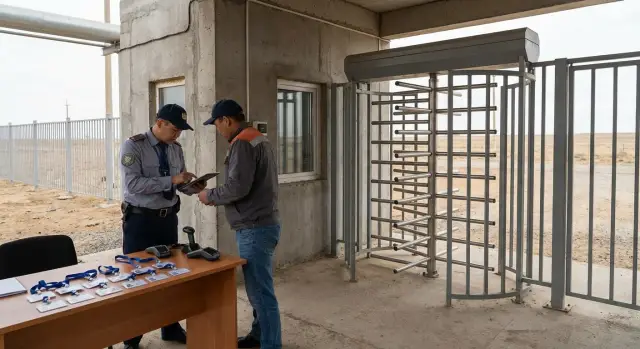
Quick checkpoint check scenario: step by step
At the gate speed and consistent rules matter more than depth. The procedure is easiest to build around a single visitor card: who they are, which organization they represent, why they're here, where they go, and whether they are authorized to work.
-
Identity check by document and photo. Match full name, date of birth (or business ID), photo and ID expiry. If the photo is old or doesn't match, deny entry until clarified.
-
Verify organization and basis for admission. It should be clear which company the employee is from, who the client's curator is, and on what basis they are here (request, contract, letter). This removes "I was called verbally" situations.
-
Statuses of briefings and mandatory IDs. Security looks at statuses and dates: introductory, fire safety, electrical safety (if required), medical clearance (if required). If expired, entry is blocked.
-
Check the work permit (if needed today). For hazardous work security needs a short answer: is there an active permit for the current date, site, area and shift. Enough to show permit number, status "open," time window and responsible work supervisor.
-
Zone, time, escort and pass issuance. The screen should show allowed zone, time interval, escort requirement and who escorts. The pass is issued with the same restrictions.
If a problem arises, arguing at the gate is pointless. Better to have a short rule: stop passage and record the reason (no basis, expired, no permit, wrong zone), contact the responsible person, record the decision (denied or single exception with conditions), and save the log (who checked, time, reason, result).
Typical mistakes and pitfalls in contractor accreditation
The worst issues surface at the gate when the crew has arrived, equipment is booked, and security can't let people in. The root cause is usually a gap between data sources: security has one thing, HSE another, contractor a third.
Where the process most often breaks
The first trap is no data owner. If several parties maintain lists they quickly diverge: security relies on an old request, HSE on a separate log, contractor on their Excel. The second is expiries that nobody tracked. Briefings, medicals, IDs, permits and authorizations expire on different days. If it's not defined "what counts as valid" and who monitors dates, the gate will discover it.
Five common conflict triggers:
- crew composition changes without client confirmation;
- access granted broader than needed and not revoked after work ends;
- a permit was issued but not closed;
- documents exist but no note on who checked and on what grounds they were approved;
- the gate checks only ID without tying it to works, zones and time.
Another trap: "the document exists" is not the same as "the document is valid." If you only have a scan without version, check date and status, it's hard to prove during an incident that control actually worked.
Mini-scenario: how a dispute appears in 2 minutes
A contractor brings electricians for urgent cable replacement. The request listed one crew, but two new people arrived. One's briefing expired a week ago, the other's OK, but the permit is for a different zone. Security sees the passport and a letter, HSE says "no," the work supervisor insists "it's all agreed." Calls start and work stops.
This situation is almost always solved by one approach: keep the minimum verifiable facts in one place — current crew composition with confirmation, expiry dates of key documents and briefings, link to the permit and zones, and a history of approvals (who, when, for what period).
Short checklist and next steps for implementation
When there are many contractors the goal is not "collect all the papers" but to ensure any admission can be checked in a minute.
Before issuing a pass and allowing work, check the minimum:
- Organization: active contract/basis for work, current contacts, assigned responsible persons on both sides, accreditation period, insurance (if required by your rules).
- Employee: confirmed identity, photo in the profile, required qualifications, medical clearance and permits for high-risk work if needed.
- Briefings: marks for introductory and task-specific briefings, date, who conducted them, expiry and site/area tie.
- Work: location and dates, crew list, work supervisor, permit number and status.
- Access: zone and access level, time window, escort (if required), revoke pass after work ends.
If you automate three things first — unified cards for organization-employee-work, expiry control with notifications, and issuing passes only when the status is green — the gate won't have to dig through messenger scans and folders on a PC.
Next steps for implementation:
- Agree the rules: which documents are mandatory, validity periods, which work requires a permit, and who approves exceptions.
- Define roles: work initiator, security, HSE, contractor responsibles, and who can issue a pass and close a permit.
- Fix the minimal fields for profiles and statuses so the gate immediately sees the decision: allow or deny.
- Pilot on one area (2–3 contractors, one zone, one shift), then scale.
- Select and deploy infrastructure: access control, checkpoint workstations, servers for storage and logging, backups and support.
If you need help with infrastructure and a reliable database for these records, GSE.kz as a systems integrator can cover the server side, workstations, integration with access control and 24/7 support so the process runs without manual workarounds.
Frequently asked questions
What exactly should be controlled when admitting contractors and why?
Primarily control three things: work safety, access regime, and responsibility for decisions. The goal is simple — to be able at any moment to prove that only people who are allowed to be here at this time are present on site.
How does contractor accreditation differ from a one-time site admission?
Accreditation is company-level approval to cooperate: verification of legal details, contractual basis, permits, and assignment of responsible persons. A one-time admission is permission for a specific task and period, usually tied to a zone and a work document.
What contractor record structure is the simplest to work with?
The most practical approach is to keep records around three entities: organization, employee, and works. This way you can quickly answer who the person represents, what they are doing, exactly where, and until when the permission is valid.
Which organization documents should be stored in the contractor profile?
Keep only what actually affects admission: company details, current contractual basis, any required permits for the type of work, and the agreed lists of employees and responsible persons. Each document should have a clear validity period and a confirmation that it is the current version.
What employee data is needed for the checkpoint and HSE?
Minimum — full name as in the document, photo, company, position, ID number and expiry date. Add only verifiable items: required work permits, trainings, medical clearance (if needed) with statuses and dates so the checkpoint doesn't have to guess.
How should briefings be recorded to avoid confusion during inspections?
Record introductory, on-the-job, and task-specific briefings tied to the site and type of work. For each entry record the date and time, who instructed, which site/area it applies to, and how completion is confirmed so it can be shown within a minute.
When is a work permit required and which fields are critical?
A permit is required for higher-risk work where mistakes can quickly cause injury or an accident. The permit should clearly state location and type of work, the crew composition and responsible persons, main risks and controls, and exact timing and regime so it can be checked at the gate and on site.
How to limit zone access so contractors don't get more than necessary?
Grant access on the principle of least privilege: only the zone needed and only for the duration of the work. Tie zones and restrictions to the work request or permit, and use temporary passes or an "escort only" mode for one-off tasks.
What does a quick contractor check at the checkpoint look like, step by step?
First check identity document and photo, then verify the organization and basis for presence. Next, check statuses of mandatory briefings and IDs; if needed, confirm there is an active work permit for today. Finally issue a pass with the correct zone and time window.
What mistakes most often cause conflicts at the gate and downtime?
Common failures are outdated or inconsistent data: a different crew arrived, a briefing or permit expired, the zone on the permit doesn't match, or there is no record of who approved the change. Keep key facts in one place with statuses, expiry dates and a record of who verified and authorized.
