8 min read
Low-Latency Server for Financial Applications: Measurements
Low-latency server for financial applications: how to set up a test bench, measure latency and jitter, and which BIOS and hardware settings give the biggest benefit.
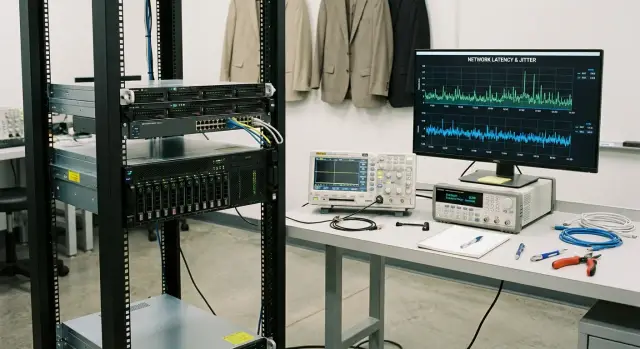
What we actually measure: latency and jitter in plain terms
Latency is the time from when an event occurs to when the system reacts. In financial workloads this often looks like: a packet arrives over the network, the application processes it, and a response is sent back. What matters is not only the average latency but also how often the system behaves worse than usual.
For that reason you almost always look at several numbers. The mean is convenient for a general picture but hides rare — yet painful — spikes. The 99th percentile (P99) is much more useful: the latency the system does not exceed in 99% of cases. You also record the worst case (max), because that often explains sudden slippages and missed deadlines.
Jitter is the spread of latency. Two systems can have the same average but one is steady while the other jumps around. For trading and settlement paths predictability is often more important than peak numbers: predictable response times are easier to put into risk models and timeouts.
Microseconds are usually lost across a chain: CPU scheduling, memory waits, NIC handling, drivers and OS background tasks. Sometimes disk I/O contributes if there are synchronous writes or aggressive logging in the hot path.
Before changing settings capture baseline metrics. Minimum set:
- mean, P95, P99 and max for latency
- jitter (for example, P99 minus median)
- CPU utilization and frequency (check for drops)
- network counters: losses, retransmits, errors
- BIOS/UEFI, OS and driver versions as the bench passport
This gives you a reference point and makes clear what really improves results versus what just changes numbers because of random noise.
Design the test to resemble production
If a bench test does not resemble production, numbers will be pretty but useless. For low-latency financial apps what matters is the tails: rare spikes that break SLAs and trading logic. So start not with tuning but with a precise scenario description.
First define what you test: an order gateway (e.g. FIX), an input risk check, market data processing or internal event routing. Each path has its own hot spots and bottlenecks. The same server can show excellent ping results but fail on a realistic message stream.
Drive load the way it appears in production: message size, rate, bursts and concurrency. Capture the traffic shape: steady flow and short spikes behave differently. If production receives batches of orders on news, model that specifically.
Before the first run answer a few questions:
- which path are we measuring: client–server–response or only inside the server?
- what are the measurement boundaries: network separately, application separately or everything together?
- which metrics are pass/fail: p50, p99, p99.9, max over a window?
- test duration and whether a warm-up is needed?
- which peaks are critical (for example: no more than X µs more than once per minute)?
A practical approach for a trading gateway: measure client–server RTT to see what the trading logic sees, and simultaneously collect internal timestamps at the handler entry and after risk checks. That quickly reveals whether the network, in-application queues or computation are the worst offenders.
How to assemble a bench and avoid confusion
For latency measurements the bench should be simple and repeatable. The goal is to remove extra variables so you see effects from hardware and settings, not random factors.
A minimal bench typically includes: a traffic generator (or a separate host sending requests), the test server, a switch and an accurate timer. The timer can be an NIC hardware timestamp or an external measurer. Even with software timing, make clear where timestamps are: at send, at receive, or inside the application.
Good practice is to dedicate a separate network for the test: a single switch, short identical cables, no extra VLANs and no parallel traffic. On the generator and server disable anything that creates background noise: auto-updates, extra monitoring agents, backups, indexing, antivirus scans. Otherwise you will start optimizing the noise around the server rather than the server itself.
Repeatability depends on version discipline. Record and freeze: BIOS/UEFI, NIC firmware, CPU microcode, driver version, OS version and kernel configuration. When you change one thing, keep everything else the same so conclusions are valid.
To avoid drowning in iterations follow a simple rule: one settings set — one run — one log. In the log save not only p50/p99 and jitter but the run passport: date, rack temperature, CPU frequencies under load, firmware versions and BIOS parameters.
Example bench for a trading gateway: a separate generator on a second server, the tested node on a rack server (e.g. class S200), and one switch between them. This makes it easier to see what actually improved latency: a different NIC, BIOS latency-oriented settings, or just removing background processes.
Measurement tools: from application level down to the system
Start with the measurement closest to the user and then dig down. This helps pinpoint where microseconds disappear: in code, the network or the OS.
The simplest option is application-level round-trip (RTT): timestamp send, timestamp receive, compute the difference. This is quick, repeatable and shows what the trading logic observes. The downside is RTT aggregates all delays, making it harder to separate network from processing.
If one-way network measurements are required, they only make sense with precise clock synchronization between machines (e.g. PTP with suitable hardware). Otherwise you may get a neat number that actually reflects clock drift, not latency.
At the system level it helps to look not only at how much delay exists but why. Three common observations help: scheduler delays (how fast a thread gets CPU), interrupt patterns and their CPU affinity (IRQ and softirq), and the network stack (queues, drops, coalescing, NUMA placement).
A practical toolset for the bench usually includes application metrics and timings (p50/p99/p99.9), system counters and tracing (perf/ftrace), and for the network — captures and interface counters (ethtool, nstat, ss). The point is not quantity of tools but corroboration across layers.
To make runs comparable, record the bench passport. Minimum:
- OS version and kernel boot parameters
- NIC model and driver version, firmware
- CPU frequencies (base and turbo), enabled C-states and P-states
- NUMA topology: which socket the NIC is on and where the process runs
These details decide whether a result can be reproduced next week after a driver update or a NIC swap.
Step-by-step measurement plan: baseline and iterations
To use measurements to choose hardware and settings stick to one idea: first capture a baseline, then change only one factor at a time. Otherwise you won’t know what caused improvement or regression.
Start by stabilizing the bench: same OS and driver versions, same set of running services, same test and input data. Take the baseline with default BIOS and OS settings (no fine-tuning) so you have something to compare to.
Then iterate. A useful order:
- capture baseline: 5–10 runs of the same test with identical duration
- pick one parameter (power profile, Turbo mode, NUMA setting) and change only it
- repeat the same 5–10 runs and compare the latency distributions
- if there is an effect, keep the change and move to the next one
- if there is no effect or variance increases, revert and mark it as non-target
Look at more than the mean. For financial apps the tails matter, so record at least p50, p99, max, jitter between runs and errors (if the test reports them).
Check different load modes. Idle can highlight power-saving/resume issues. Moderate load shows scheduling and resource contention. Peak load reveals queues, interrupts and overload. One good run usually deceives; stability matters more than a single record.
Hardware that most affects latency
For low latency predictability matters more than peak throughput. The system wins when request processing time hardly jumps from run to run.
CPU: steady frequency and uniform cores
The CPU often gives the most visible contribution. High turbo helps averages but frequency drops due to power saving, power limits or temperature hurt more. The steadier the frequency under sustained load, the shorter the tails at p99 and p99.9.
Core count matters, but not in a "more is always better" way. If a thread constantly migrates across cores you get cache misses and added jitter. It’s more practical to have spare cores so critical threads can be pinned and not share with noisy tasks.
Memory: channel balance and uniformity beat headline specs
RAM affects access latency and bandwidth. Frequency and timing matter, but configuration often has bigger impact: populate all channels evenly and use symmetric DIMMs. Uneven population can silently route some accesses to slower paths and add instability.
PCIe and networking are critical for trading systems. Ensure enough PCIe lanes for the NIC, the right slot and predictable interrupts. If the adapter shares lanes with other devices or hits a congested root complex you’ll see rare but bad spikes.
Disks are usually not in the hot path for order processing but matter for cold starts, log writes and queues. Synchronous logging to a slow drive can suddenly appear in latency tails.
A quick pre-check before runs: confirm CPU frequency stability under typical load, check memory channel symmetry, see where the NIC is placed and whether it shares lanes, and separate hot-path disk writes from background logging.
On the bench compare identical configurations, change one factor at a time and record not only mean but p99/p99.9.
BIOS/UEFI settings that typically give the biggest impact
BIOS/UEFI often yields more gain in latency stability than ad-hoc OS tweaks. In low-latency contexts predictability is king: fewer rare spikes and less jitter.
Power saving: the main source of jitter
Power-saving modes suit office workloads but hurt short, frequent events like market-data handling. C-states (deep sleep) and aggressive P-states (frequency jumps) introduce micro-delays visible as tails in distributions.
Practical approach: enable a maximum-performance BIOS profile, limit or disable deep C-states, and keep frequency control in a predictable mode. Turbo can lower average latency but may worsen stability if the CPU constantly changes frequency due to power or temperature limits.
Threads, memory and I/O
SMT/Hyper-Threading can help for many parallel tasks but in low-latency contexts it can add unpredictability by causing resource contention on the same core. Compare SMT on and off on the bench, and watch not only means but p99.9.
NUMA is crucial on dual-socket systems. If the packet-processing thread runs on one socket but memory and the PCIe device are on another, latency increases and becomes ragged. Check topology and try to keep the NIC, CPU and memory in the same NUMA domain.
PCIe power-saving (ASPM and similar) for NICs and critical devices is usually better disabled. Otherwise the link may enter a low-power state and add microseconds after short idle periods.
Settings to check first (one at a time, with repeated runs):
- C-states: limit or disable deep states
- P-states and power profile: maximum performance mode
- SMT/Hyper-Threading: compare enabled vs disabled
- NUMA: set according to real topology, avoid random migrations
- PCIe ASPM: disable for low-latency I/O
On a trading gateway bench you’ll often see that disabling deep C-states barely changes the mean but significantly reduces rare peaks that break SLOs. Such changes bring real production benefit.
OS and drivers: what to check before fine tuning
Good hardware won’t help if the OS constantly interrupts your critical thread. Before tweaking many BIOS options, clean up base OS behavior: pinning, interrupt handling, background processes and power profile. This is especially important when building a low-latency server for financial apps and comparing iterations.
Process pinning and core isolation
Start by deciding where the request path executes. Pin critical processes (gateway, market-data handler, risk checks) to specific CPU cores and move noisy system tasks to others.
If you don’t do this the scheduler will migrate threads and cause cache misses and jitter. Also ensure NIC IRQs don’t compete with the main thread on the same core.
NICs, interrupts and background noise
A NIC often surprises: one core gets flooded with interrupts while another idles, and latency jumps.
Useful checks before deep tuning:
- distribute IRQs and NIC queues across cores so network cores don’t overlap with the critical process cores
- disable or limit background services that wake periodically (updates, indexing, extra monitoring agents)
- remove excessive logging from the hot path (especially synchronous writes and verbose debug)
- check NIC driver: version, offload modes and change one driver parameter at a time
Frequencies, governor and throttling
The performance profile must be predictable. Make sure frequencies don’t fluctuate and there is no overheating or throttling.
A typical failure mode: the bench looks fine, but after 15 minutes under load temperature rises, frequency drops and p99 degrades. So watch stability over long runs, not only peak numbers.
Common mistakes that spoil measurements and conclusions
The main reason for magical latency improvements is poor measurement discipline. Numbers look convincing but you compared different conditions or chased randomness.
The most common trap is mixing results from different tests. One run measures network RTT, another only in-application processing, a third disk time. If any part of the chain changes, comparisons lose meaning.
Another mistake is confusing cold start with warmed-up behavior. After a reboot CPU, caches, frequencies, background services and driver warming behave differently. Two tests with identical settings can produce different numbers.
Changing multiple parameters at once also spoils analysis. You changed the power profile, disabled C-states and updated the NIC driver — there is an effect but the cause is unknown. That turns tuning into guessing.
And tails are often underestimated. Mean and p50 may improve while p99.9 worsens due to rare stalls. In financial apps tails show up as slippage and timeouts.
Finally, overheating and throttling. The first 5 minutes look good, then frequency falls, jitter grows and you get false optimism. This is especially dangerous in dense server configurations.
A short checklist to keep handy:
- compare only the same scenario and the same metric (the same request path)
- separate cold-start and warmed runs
- change one parameter per iteration and record what changed
- monitor p95, p99 and p99.9, not only the mean
- track temperature, frequencies and signs of throttling during the whole run
Example: you disabled power saving in BIOS and saw an 8% drop in the mean. If p99.9 got worse or throttling appears after 20 minutes, production results will be the opposite: rare but painful delays.
Quick checklist before trusting numbers
Latency measurements are easy to break with small things. One run can look great and the next be incomparable due to an updated driver or a different CPU frequency. Before deciding — and especially before choosing hardware — run a quality control pass.
First fix the environment: BIOS/UEFI and firmware versions (including NIC), OS, drivers and important packages. If something was updated, run a separate test labeled with the new state.
Record not only averages but tails: p50, p95, p99, p99.9 and max. Also log CPU load, context-switch counts and interrupt stats to identify rare spikes.
Check CPU frequencies under load: frequencies must not jump unexpectedly and there should be no thermal or power throttling. Otherwise you are comparing different CPU modes.
Understand NUMA: which node holds memory, where the NIC is, and which cores the process and queues are pinned to. If the thread jumps between nodes you get extra microseconds and instability.
Finally, save the state: BIOS profile (or exported settings), test run parameters, pinning/affinity and each run’s results in a single format. Then you can revert and honestly compare before and after.
Simple example: you changed a BIOS setting and got -3 µs on p50 but p99.9 worsened. Without tails, frequencies and IRQ data you might wrongly conclude the system got faster while production stability declined.
Example real scenario: a bench for a trading gateway
Imagine a trading gateway that accepts orders from one network segment (internal) and forwards them to another (exchange or provider segment). Formulate the goal simply: p99.9 latency for processing an order must not exceed a threshold, and jitter should be predictable with no long tails.
Build the bench so the packet path matches production: two NICs (or two ports), a separate load generator and a separate receiver. Run the gateway on a server class that corresponds to intended production (but with no extra services).
First run on default settings. Capture baseline metrics: p50, p99, p99.9, max, and also frequency and pause durations if you see rare spikes. Already here you will often see bottlenecks: CPU frequency jumps, thread migrations, network interrupts on random cores.
Second run — BIOS/UEFI changes that typically impact latency: disable aggressive power saving, lock predictable frequencies, set a performance profile. After each change repeat the same-duration test in the same setup.
Third run — NUMA and NIC IRQ tuning. Pin the gateway process and its network interrupts to the proper NUMA node and cores, and compare tails (p99.9 and max) rather than just the mean.
To make conclusions easy to verify, summarize results in a single table (fill in your numbers):
| Run | Change | p99.9 | Max | Jitter (tail description) | Notes |
|---|---|---|---|---|---|
| 1 | Default | ||||
| 2 | BIOS: power and frequencies | ||||
| 3 | NUMA + NIC IRQ |
Next steps: moving from bench to stable production
Bench numbers are useful only if they can be reproduced in production. Start by fixing goals and the conditions where you already saw the target result on the bench. The same server can show different numbers because of small details: microcode versions, power settings, NIC firmware or even the rack’s power scheme.
Collect requirements up front: which percentiles matter (p99 and p99.9), network topology and expected load profile (peaks, bursts, steady flow), and allowable power headroom. Then make a test plan where every step leaves a trace: what changed, why and what effect it produced.
Before rollout create a configuration passport and stick to it during delivery and operation:
- target metrics and percentile thresholds, plus allowable jitter
- fixed parameters: BIOS/UEFI profile, firmware, driver and OS versions
- network scheme: speed, MTU, hop count, switch settings
- change governance: who can change settings and how changes are validated
- observability plan: what we monitor continuously and how regressions are investigated
Ask the vendor for a BIOS profile and reproducible bench runs when possible. That can save weeks: vendors often have tried-and-tested setting combinations for low latency.
If local manufacturing, transparent delivery and integration matter, consider GSE S200 servers and system integration services from GSE.kz (GSE.kz). In such projects it’s valuable to agree on a single settings profile and lock it in for delivery, installation and ongoing support.
Frequently asked questions
What is latency in a financial application?
Latency shows how much time passes from an event to the system's response. For a trading gateway, this can be the path from receiving an order to sending a response.
Why can't you look only at average latency?
An average hides rare spikes. P99 shows the threshold within which 99% of measurements fall, so it better reflects the risk of delays in the production workflow.
How does jitter differ from latency?
Jitter shows how much latency varies between requests. Low jitter helps tune timeouts more precisely and reduces the risk of rare failures in trading logic.
How can you make a test environment resemble production?
Measure the same path an order will take in the production system: message size, rate, concurrency, and short load spikes. A test with steady traffic cannot replace burst testing.
Which metrics should you record in a test environment?
Collect p50, p95, p99, p99.9, and the maximum, then record jitter, CPU frequency, utilization, temperature, and network errors alongside them. This makes it easier to link a spike to its cause.
When is RTT sufficient, and when do you need a one-way measurement?
Application-level RTT shows the time seen by the trading logic. To measure one-way latency, synchronize the clocks on both machines, for example with PTP and suitable hardware.
How should you compare BIOS and OS settings?
First establish a baseline, then change only one parameter and repeat identical runs. Compare latency distributions, not a single favorable result.
Which BIOS settings most often affect latency?
Limit deep C-states, choose a predictable performance profile, and check PCIe ASPM. Compare Turbo mode and SMT in your own test environment, because they may improve the average while worsening tail latency.
How do the OS and NUMA affect latency?
Pin critical threads to selected cores and separate network card IRQs from application cores. Try to keep the process, memory, and NIC in the same NUMA domain.
Why should you test a server for at least 15-20 minutes?
Run a sustained load test and check CPU frequencies, temperature, and signs of throttling. The first few minutes may look good, but heat can later increase p99 and p99.9.
