8 min read
LMS for a Closed Network: How to Design Offline Training
LMS for a closed network: how to plan content, tests, progress, reports and account synchronization without cloud dependencies.
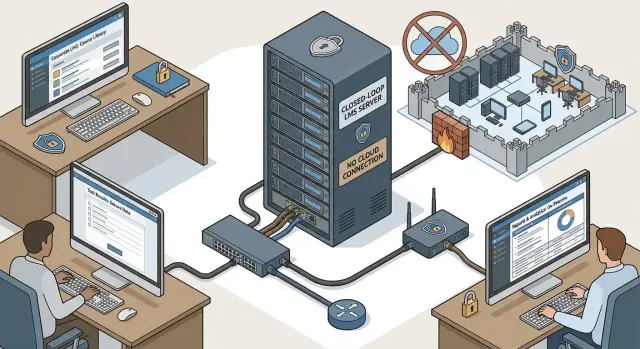
Why you need an LMS in a closed network and what it means
A closed network is when training runs inside the corporate network and does not rely on the public internet or third-party cloud services. Users access the system via internal addresses, data is stored on local servers, and external access is either fully blocked or allowed only through secure gateways.
Cloud LMSs often don’t fit where information security requirements, internal policies or regulators impose restrictions. The reason is simple: in the cloud you don’t always control where data is physically stored, who administers it, how backups are made, or what goes out to external integrations (analytics, notifications, embedded players, third-party libraries).
Closed networks almost always come with constraints. Internet may be disabled or allowed only by whitelists. Updates are permitted only via approved packages. Data exchange between segments requires approvals and logging. Even sending emails or push notifications can be unavailable if corporate mail is isolated.
At the same time, the training system must cover basic tasks: deliver materials and log acknowledgment, run tests and assignments with clear scoring rules, track progress and eligibility (for example, for work or equipment), produce reports for managers and audits, and manage access via corporate accounts.
Such a system matters to several stakeholders. Security owns risk and data control, HR and the learning center own programs and outcomes, and IT owns servers, updates and support. The earlier these parties agree on rules, the fewer surprises at rollout and audits.
Gathering requirements: content, tests, progress, reports, accounts
A closed-network project doesn’t start with choosing a platform but with clear answers: who are learners, how do you verify them, what counts as a result and who needs to see the metrics. Without this, you risk a system where materials sit unused and confirming learning or preparing reports is hard.
First, describe audiences and training types. Typically this includes onboarding for new hires, annual mandatory programs (health & safety, information security, compliance), and role-based training: accounting, IT, security, managers. Decide upfront what must be uniform and what varies by position, branch or access level.
Next, agree content formats. Closed networks often use PDFs, slide decks, video files and, where permitted by security policy, interactive modules (for example, SCORM/xAPI). Also clarify update frequency and who can publish a new version.
Knowledge checks are easier when goals are separated: quick checks after a topic, practical assignments, and final certification. For each check type define rules: number of attempts, passing score, time limits, retake order and consequences of failure (repeat course, notify manager).
To avoid endless wish lists, collect a minimal requirement set:
- which progress statuses are needed (not started, in progress, passed, overdue)
- which reports are mandatory for management and audit (by department, by course, overdue lists)
- what exports are required (format, frequency, signatures, change log)
- how users are provisioned (LDAP/AD, manual import) and how often data changes
- which roles are needed (learner, author, curator, administrator)
Practical example: in a government body with branches it’s useful to agree on a unified annual-course report and a separate inspection report per unit, and populate accounts from AD on a schedule so transfers and dismissals update automatically without cloud services.
On-premise architecture: designing a system without the cloud
In a closed network you must decide where the LMS will live: on a single server, in a cluster, or as separate services. A common mistake is to start with everything on one powerful server and hit limits in disk space, backups and updates a year later.
Common deployment models:
- single server — quick to launch and easier to maintain, but lower fault tolerance
- separated — application and database on different servers, easier to scale
- application cluster — multiple web nodes plus a separate DB for higher availability
- isolated environments — separate instances per division if policies require it
Decide where to store courses and media. Videos and large SCORM packages shouldn’t fill the system disk. It’s practical to allocate a dedicated file volume or network storage and set rules: upload limits, duplicate checks, retention for drafts, scheduled cleanup of temporary files.
Choosing between an off-the-shelf platform and custom development depends on requirements. A ready on-premise LMS quickly covers basic functions (courses, tests, reports, roles). Custom development is justified when you have non-standard processes, strict audit needs, or must integrate with internal systems in ways boxed solutions can’t.
Roles and access are best captured in a matrix: admin manages the system, instructional designer creates content, instructor grades assignments, manager sees team reports, and employee takes courses. These boundaries should match both interface permissions and reporting.
The minimal environment usually includes an OS, DBMS, web server, backup system and a separate test environment. For local deployment organizations often use enterprise-grade servers, for example S200 Series from GSE.kz, to reliably host the database, course storage and concurrent-user load.
Content: storing, updating and presenting materials
In a closed network content is an asset that must open without internet, perform fast on workstations and remain under control.
If you plan to move courses between systems or buy off-the-shelf courses, support standards like SCORM and, if needed, xAPI. SCORM packages a course with tests and progression logic. xAPI is useful when you need to record actions outside a classic course (for example, a simulator on a separate PC) and then upload events to the LMS.
Versioning is critical. A common mistake is updating a PDF or video while old links remain in the course, so employees take the wrong edition. A practical rule: give each course a version number and date, and publish updates as a new version with clear policies on learners already in progress.
To avoid chaos at upload, set simple rules for authors: a unified naming template (course, module, version, language), size limits and recommended formats (e.g., MP4 for video), storage structure (by program, department, year), mandatory metadata (purpose, duration, owner), access label and validity period.
Also consider copyrights and restricted materials. Closed networks often contain classified documents or internal regulations. For these, enforce access roles, disable downloads when needed and log who opened the document. In practice this looks like: the health & safety team updates an instruction, publishes version 1.3, and the system shows it only to the assigned learners while logging views for verification.
Tests and assignments: checking knowledge without complexity
Testing in a closed network should be simple for employees and clear for reviewers. Fewer complex mechanics make rules easier to explain and results easier to defend.
Formats to include
A basic set usually suffices: single choice, multiple choice, matching (term-definition pairs) and open answer. Open answers are useful where wording matters: describe incident handling or fill a template.
To reduce cheating, build a question bank and draw random question sets for tests. Shuffle answer options and include several equivalent phrasings of the same question.
Settings that are almost always needed and should be clear in the admin UI:
- number of attempts and retake rules (e.g., 2 attempts, then access after 24 hours)
- time limit and auto-submit on timer
- passing score and criterion (percentage or X out of Y)
- when to show results: immediately, after the test window closes or only the final score
Human-graded assignments
Practical tasks can be graded by a manager or instructor: file upload, text response, on-site checklist. Include reviewer comments, a “needs revision” status and a deadline for resubmission. This keeps learning within one system instead of turning into email threads.
Record results so they can be verified: who submitted, when, from which workstation, which test version, which question set, final score and reviewer decision. For audits, maintain event logs and timestamps.
Example: in an agency, employees take an information security briefing. The test is 20 questions drawn from a 200-question bank, 15 minutes, passing score 80%. A specialist grades the practical assignment with comments. Results are saved in a report that can be pulled later to show who took which items.
Progress and learning paths: how to count course completion
For predictable operation in a closed network, decide in advance what counts as completion. Don’t rely on vague log traces — rules must be transparent and equal for all.
Progress is usually counted in levels. Don’t mix “viewed” and “passed”, or reports will be disputed:
- viewed — the user opened the material and spent a minimum preset time
- attempted — the user finished required actions (e.g., submitted answers)
- passed — achieved the required result (e.g., 80%+) within allowed attempts
- course completion — all mandatory course elements are finished, not just the test
- confirmation — when needed, a manager or instructor signs off
Then define obligations and deadlines. For mandatory courses set deadlines, reminder rules and consequences for overdue status. Maintain statuses like “assigned”, “in progress”, “overdue”, “completed” so both employee and manager see the same picture.
Paths are easiest to build by role: position, department, access level. On transfer the system automatically changes required courses and recalculates deadlines.
Account for real work conditions. For shift workers, business trips or leave, deadlines shouldn’t be a trap. Common rules include freezing deadlines during leave, shifting deadlines on position change, or scheduling access windows by shift.
Finally, certificates. For recurrent certification (e.g., annual safety training) store issuance date, validity period and renewal rule: a new certificate replaces the old one or extends from the issuance date. Example: in a clinic an information security course must remain current, so “completed” switches to “requires retraining” 30 days before expiry.
Reports and audit: what to log and how
In a closed network reports must answer two questions quickly: who actually trained, and can you trust the numbers. If data can’t be exported externally for later aggregation, reports need to work right away.
Operational reports should be available in a few clicks and show the current state. Typical set: course completion, overdue items, average score, attempt rates, list of non-starters.
It’s useful to have two detail levels. A learning specialist sees a per-user card, while a manager gets a summary by unit, role and location. For example, the chief physician sees how nurses and doctors completed infection control briefings and immediately spots overdue staff and who needs re-certification.
For inspections you need an immutable trail. A tamper-evident activity log should record who assigned or removed assignments, who changed deadlines or attempt rules, who edited or manually confirmed results, who exported reports, and who edited courses and when.
Plan exports early. Most requests are for CSV or XLSX for internal analytics and PDF for commissions and inspections. Useful exports include filters (period, department, position, course) and metadata: generation date, report author and data source.
Another topic is history retention. Don’t delete old results when a course is updated. Store versions like “course 2024.1” and “course 2025.1” so you can prove which edition an employee took at the time of qualification.
To keep reports usable for years, design backup and retention policies (for example, 5–7 years). This is easier on local infrastructure: a dedicated database and servers inside your contour with storage margin and logging.
Account synchronization without the cloud
In a closed network accounts typically already live in your infrastructure, most often Active Directory or LDAP, and sometimes an HR system. For contractors or temporary groups manual entry is needed. The LMS should not become another place for manual account management — it should pull data from the source of truth.
Synchronize the minimal fields that prevent manual “clean-up” of reports: full name and personnel number (or other unique ID), department and position, manager or cost center, employee status (active, on leave, dismissed), and corporate email or login (for search and internal notifications).
Decide a deletion policy. Learning history matters: who took what and when. Usually deletion is replaced with blocking: the account becomes inactive, login is disabled, but results and reports remain. For routine events (dismissal, transfer, parental leave) set clear rules: on transfer update the department but keep history; on dismissal block the account and revoke access while preserving records.
Single sign-on inside the network reduces passwords and support calls. If you have AD, use domain authentication (SSO) and assign rights via groups (for example, “Learners”, “Tutors”, “Administrators”).
If no API exchange exists, it’s not a blocker. Typical closed-network scenarios:
- scheduled CSV/Excel export from the HR system to a secure folder
- scheduled import on the LMS side with format and duplicate checks
- offline export to removable media under procedure for highly isolated segments
Example: in an isolated government network AD provides logins and groups, and the HR system daily exports personnel number, department and status. The LMS on a local server picks up the file, updates user cards and automatically blocks dismissed users while preserving results for audit.
Security and operations: making the system run for years
In a closed network reliability matters more than fancy features. The system should be predictable: access only for those who need it, data doesn’t leak, and failures can be quickly recovered.
Start with the network. Place the LMS in a dedicated segment and allow access only from required subnets (training rooms, office, VPN for remote staff). For admin interfaces use a separate subnet or a jump host. Temporary firewall rules often become permanent gaps.
Encryption and account policies set the baseline. Enable HTTPS with corporate certificates, require password complexity and rotation, limit login attempts. Set short session timeouts and avoid “eternal” tokens, especially if access from shared workstations is possible.
Backups must cover not only the database but also content storage, configurations, keys and certificates. Practical minimum: daily DB and content backups plus a weekly full snapshot, store copies separately (another server or array), regularly test restores on a staging environment, and fix RPO/RTO targets (how much data you can afford to lose and how quickly you must restore).
Treat updates as a service: patch schedule for OS and LMS, maintenance windows and rollback plans. For local servers verify compatibility of updates with drivers, storage and UPS beforehand.
Monitoring isn’t optional. Track free disk space (logs and attachments grow unnoticed), CPU and RAM load, background task queues (notifications, progress recalculation), SMTP send errors to internal mail and the number of 500 errors in server logs.
Common mistakes when deploying an LMS in a closed network
Even a well-designed system can fail due to organizational choices rather than code.
Content and storage: when learning materials break the system
The most frequent story is large, unoptimized videos and presentations. After a few months storage balloons, backups grow and users complain about slow loading. Agree on formats (limit video bitrate), versioning rules and retention policies to avoid this.
Access rights, audit and “who did what”
The “give everyone access, we’ll sort it later” approach backfires. Without a role model chaos follows: someone sees others’ courses, someone edits tests, someone accidentally deletes attempts. Missing audit logs are equally painful — you cannot prove who created a course, changed questions, assigned training or exported a report.
Basic rules that help:
- define roles (learner, author, instructor, administrator) and their permissions
- enable activity logging: logins, assignments, content changes, test attempts, report exports
- forbid shared accounts and using a single login for multiple people
- prefer AD/LDAP sync over manual user management
- create a recovery plan and regularly test restores
Example: an employee is added manually to the LMS while HR already moved them to another department. They get wrong assignments and safety reports become inconsistent. Auto-sync with the directory and clear department rules fix this faster than manual checks.
Quick pre-launch checklist
Before launch check not only “does it work?” but “how will it live in a month?” Most issues appear in small details: who sees what, how courses update, where to get a report for an inspection, what to do on dismissal.
Minimum you should not launch without
Go through these items and mark “yes” with concrete proof (screenshot, export, test report), not “we think it’s set”:
- roles and permissions documented and tested in real scenarios (admin, author, manager, learner); employees see only needed courses and personal data access is limited
- content formats agreed, upload and update rules defined: who publishes, how courses are versioned and how to roll back
- tests and assignments configured: retakes, attempts, timers, passing score, deadlines; verified behavior on network interruption and re-login
- progress counts consistently in course card, employee profile and reports; edge cases checked (partial completion, repeat attempts, department transfers)
- key reports ready and aligned with InfoSec and HR expectations: completion by unit, overdue items, test results, activity log; export templates available in required formats
Also test account sync with LDAP/AD: creation, blocking, rename, department changes, duplicates. Run tests with 20–50 accounts that include problematic data (spaces, non-Latin characters, identical full names).
Finally: backups and restore. Do a test “fire drill” — deploy a copy on a staging host and ensure database, content files and reports restore correctly. If the LMS is on local servers, verify capacity and disk margins for user and content growth.
Practical example and next steps
Imagine a distributed organization with 1,000 employees: offices in several cities, some workstations in closed networks and no internet access. Annual information security training is required, and inspectors want to see who completed it, who is overdue, all test attempts and confirmations of reading.
In this case the LMS is usually deployed in a central data center with branch access over secure channels. Courses are assigned by structure: department, role, access group. Accounting gets phishing and document handling modules, IT gets admin and logging modules, managers get responsibility and control modules.
To control overdue items introduce uniform rules: the course is required every 12 months, reminders at 30 and 7 days, and escalation to the manager after the deadline. Store these rules in a single policy and keep assignment dates in the system.
Offline tests work if all resources are local: videos, slides, questions and results. The user completes a lesson, passes the test and results are written immediately to the database. If a branch is fully offline, configure scheduled exports of results to the central contour.
Prepare two report sets: management reports (coverage by department, overdue items, monthly dynamics) and inspector reports (assignment logs, test attempts, completion protocols, exportable to PDF/CSV).
Next steps before rollout:
- assess content, user counts, peak loads and InfoSec requirements
- run a pilot with 50–100 employees to validate reports and permissions
- prepare servers, backups, monitoring and update procedures
- appoint an owner of the learning process and a system administrator
If you don’t have an internal team to manage servers, integrations (AD/LDAP) and operations, consider a systems integrator. GSE.kz (gse.kz) provides system integration and infrastructure, manufactures servers and offers 24/7 technical support, which can be convenient for on-premise solutions in a closed network.
Frequently asked questions
What does “LMS in a closed network” mean in simple terms?
A closed network means the LMS runs inside your corporate network: users access it via internal addresses and data and content are stored on local servers. External access is usually blocked or allowed only through secure gateways, so you control where data is stored and who can access it.
Why use an LMS without the cloud — can’t we just use a cloud service?
When there are security requirements, internal policies or regulatory restrictions, cloud solutions often don’t meet data control and administration requirements. In a closed network it’s easier to demonstrate where materials and results are stored, how backups are made, and that nothing is sent to external integrations.
Where should I start a project for an LMS in a closed network?
Start by answering four questions: who you train, how completion is verified, what progress statuses are needed, and which reports managers and auditors will request. Then agree on content formats, test rules and how users will be provisioned (for example, via AD/LDAP) so the system doesn’t become just a “file repository.”
Which content formats are best for a closed network?
For closed networks, PDFs, slide decks and local video files are usually sufficient; for interactive content, SCORM is common if permitted by security policies. Agree in advance on rules for updating materials and who is authorized to publish new versions.
How to update courses correctly so employees don’t take an “old” version?
A practical minimum is a version number and date for each course, plus a clear rule for what happens to learners who have already started when a new version is published. This reduces the risk that some users will take an old edition and reports will be inconsistent.
How to configure tests so results hold up during an audit?
Typical question types—single choice, multiple choice, matching and open answer—are usually enough. Use a question bank with random draws to reduce cheating. Define attempts, timer, passing score and when results are shown so settings are consistent and auditable.
How to measure progress so there’s no dispute about “passed/not passed”?
Decide upfront what counts as completion: viewed (opened and spent minimum time), attempted (finished required actions), passed (met the passing score within allowed attempts), course completion (all mandatory elements finished) and confirmation (manager or instructor sign-off if needed). Use clear statuses like “assigned”, “in progress”, “overdue”, “completed”.
Which reports and logs are mandatory for a closed network?
Keep not only the final score but also the audit trail: assignments, deadline changes, test attempts, manual confirmations, report exports and content edits. For audits it’s helpful to keep course versions so you can prove which edition the employee took at a given time.
How to sync users with AD/LDAP and what to do with dismissed employees?
Syncing with AD/LDAP is optimal so logins, departments and statuses update automatically. For dismissals, prefer blocking the account instead of deletion so the learning history and test attempts remain available for audit.
What’s critical for security and reliable operation of an LMS in a closed network?
Focus on predictability: HTTPS with corporate certificates, network segmentation, separate admin access, regular backups of database and content, and recovery tests on a staging environment. Disk overfill from content and logs is a common issue, so monitor storage and set cleanup rules from the start.
