7 min read
Caching LLM Requests: Model Routing and GPU Cost Savings
Caching LLM requests and routing between models reduces GPU load, speeds up responses and keeps costs under control.
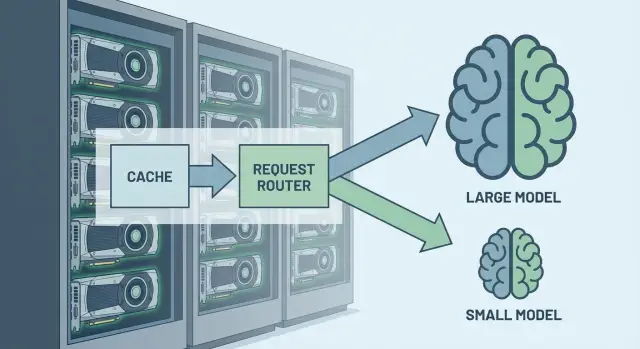
Where GPU overload comes from when working with LLMs
GPU overload often appears unexpectedly: there are few users, but latency is already rising. The reason is that an LLM stresses the GPU not "per person" but per request. One active user can easily generate dozens of consecutive calls (clarifications, edits, reformulations), and the load adds up quickly.
Most time is usually spent not on “intelligence” but on computation mechanics. The most expensive factors are generating long responses, large input context (chat history, documents, instructions) and repeated questions that are recomputed each time. So caching LLM requests pays off even in small projects if people often ask the same things.
Early symptoms are usually the same: a request queue appears and responses “stick” during peak minutes, latency jumps (sometimes 2 seconds, sometimes 20), throughput drops on long prompts, and costs rise (more GPU hours for the same useful output).
There is also a less obvious cause: many requests are simple (paraphrase, extract a date, short summary), but by habit they are sent to the largest model. It’s like driving a truck to buy bread.
Optimization becomes more sensible than buying another GPU when you see queues and unstable latency and the load repeats day after day. In such cases adding hardware often only postpones the problem. Without cache, context limits and rules for routing between models, growth in requests will again consume the spare capacity.
What to cache and where it gives the most effect
Caching LLM requests is most effective where users ask similar questions and expect identical results. If some answers can be returned without rerunning the model, GPU load drops immediately: fewer tokens, shorter queues, faster response.
First, cache final answers for common requests: FAQs (how to get access, how to restore a password), template emails (confirmation, rejection, request for clarification), help texts and excerpts from regulations. These formulations are often repeated almost verbatim, and users value speed and stability more than slight variations in wording.
Besides final answers, it can be beneficial to cache intermediate results. If the system first finds a relevant document and then asks the model to craft an answer, cache the found fragment and metadata (which section, which version). Another saving area is template pieces: greetings, email structure, standard disclaimers. These are easy to assemble without a model call or store as stubs.
Maximum effect usually comes from highly repetitive queries: internal procedures and regulations, standard support requests, short reference questions with a single correct answer, notifications and emails with identical structure.
There are also things you should not cache. Don’t store answers containing personal data, secrets, tokens, financial details, or one-time responses that depend on current state (application status, balance, stock). Even if it speeds things up, the risk of leaks and errors is too high.
Quality-wise, cache almost always wins in speed but can lose in freshness. Therefore set TTLs and refresh rules: regulations change, prices update, policy wording is refined. A good practice is to tag answers with source and version so it’s clear when they need to be flushed and recomputed.
Keys, TTL and invalidation: so cache doesn’t harm
Cache saves only if you know exactly what counts as “the same request” and when old answers must expire. For LLM request caching this is usually more important than the storage choice.
Assemble the cache key from more than just the text. Include parameters that change the answer’s meaning: the system prompt, chosen model, temperature, tools (search calls), language and format (short or detailed). A practical trick is to store a prompt version (for example, prompt_v3) and add it to the key. Then when instructions change you won’t accidentally serve answers “under old rules”.
Normalization increases hit rate and reduces cost. The idea is simple: semantically identical requests should look identical technically. Remove extra spaces, normalize case, unify quotes. For some tasks it helps to stabilize dates and numbers. For example, “report for 01.01.2026” and “report for 1 January 2026” can be normalized to one form if the answer depends on the period, not the formatting.
Choose TTLs by rate of change:
- minutes or hours — for news, statuses, prices and stock
- days — for procedures and internal regulations
- weeks — for reference answers that change rarely
Invalidation is needed when the knowledge source or rules change. If you updated the knowledge base, added documents or changed routing, flush cache by tags: “document collection”, “index version”, “policy version”. This is easier than guessing which keys are affected.
Without metrics cache can hurt. Log hit rate, average latency, repetition share and the number of “stale hits” (when users complain about outdated answers). These numbers quickly show where TTL is too long or the key is too narrow or too broad.
Why routing between models reduces GPU cost
Not every request deserves the biggest and costliest model. A large LLM is usually slower and consumes more GPU memory and compute time. If you run everything through it, you pay for “smarts” where a normal fast answer would suffice.
Routing between models works like a filter: simple tasks go to a smaller model (or even to rules and classic code), while complex ones get the “heavy artillery.” The result is a lower average cost per request and shorter GPU queues.
Simple tasks often follow the light path: classification (email subject, sentiment, priority), field extraction (tax ID, contract number, dates, amounts), short template answers (opening hours, application status, required documents), as well as paraphrasing and grammar corrections of 1–2 sentences.
A large model is needed where the risk of mistakes is high and “multi-step reasoning” is required: complex instructions, long documents, mixed languages, ambiguous questions, or when the answer must connect several facts. Another signal is long context (for example, a 30-message exchange) or requests to create plans, comparisons, or arguments.
A practical scheme is a cascade. Try a cheap attempt first, then escalate if uncertain. Example: “What documents are needed for accounting?” — a small model returns a short list. But “Compare contract terms with the annex and explain discrepancies” should go straight to the large model.
To keep a cascade from breaking quality, add simple escalation rules: raise model level if the response is too short for the request, if the model itself indicates low confidence, or if the text contains words like “contract”, “annex”, “calculations”, “statement”. Combined with caching, this usually yields noticeable GPU savings without a sense of worse answers.
Routing rules by request type and complexity
Routing works best when rules are clear and testable. Don’t try to guess a request’s “intelligence” in full. Break it down into features: what needs to be done, how complex it is, and what the error risk is. Then GPU savings and quality become manageable, and caching has a predictable effect.
1) Routing by task type
First identify the request class. The same text can be a “question”, “write an email”, or “compress a document”. For each class preselect an appropriate model and settings.
Examples of rules:
- Fact Q&A (short queries) — smaller model, strict response format.
- Summarization of long text — mid-level model, output length limits.
- Translation — separate model or a mode prioritizing terminology accuracy.
- Knowledge-base search (RAG) — search first, then generate on a smaller model.
- Generate an email or client response — stronger model, because tone and structure matter.
2) Routing by complexity, language and risk
Add triggers that raise the model class.
Complexity: long input, tables, many requirements (e.g., “make 3 versions, follow style, add figures, avoid jargon”) — reason to bump the model up.
Language: if you have separate settings for Russian and Kazakh, switch them explicitly. A simple approach is to detect language from the first message and lock it for the session.
Risk: legal, financial, medical topics and government services should go to a stronger model with more cautious settings (less guessing, more clarifying questions).
Escalation rule: if a smaller model fails (asks for clarification twice, gives contradictions, or doesn’t follow the format), automatically route to a stronger model with a short history of what was already attempted.
How to control quality with cache and routing
Cache and routing save resources but can quietly degrade quality. The result must be auditable: why a model was chosen, whether the answer came from cache, and how confident the system is.
It’s useful to add short metadata and a confidence level to responses. This doesn’t have to be shown to users but should be logged. For example: “source: cache”, “model: small, because the request is reference”, “confidence: medium, needs clarification.”
For quick checks you don’t need huge benchmarks. A small set of typical requests from real logs, run regularly—especially after changing rules or TTL—suffices. A practical minimum:
- 20–30 frequent requests where cache should hit
- 10–15 “similar but different” phrasings to catch false hits
- 10 requests that definitely require the large model
- 5–10 requests with personal data (to test masking and cache bans)
- 5 “provocations” (ambiguities, complex instructions)
User feedback should be simple: “helpful / not helpful” plus a free-text field “what’s wrong”. Use that feedback to refine routing rules and cache blacklists. When caching LLM requests, report how many negative ratings targeted cached answers.
Define responsibility boundaries in advance. Anything involving money, legal wording, medical data or access often requires a human in the loop: the model drafts and a staff member approves the final decision.
To avoid abrupt changes, roll out routing gradually: first log decisions without affecting responses, then route 5–10% of traffic under new rules, run A/B tests where possible, keep a kill switch for error metrics and review rules every 1–2 weeks.
Step-by-step rollout plan: from logs to production
Start with data, not code. Export logs for 1–2 weeks: request text, user type, response time, token cost, model, and outcome (success, repeat, escalation to operator).
Group requests by meaning and find repeating scenarios. Patterns usually appear quickly: “explain a term”, “make a short summary”, “find an error in an email”, “compose a client reply”, “complex case with context”. This is the base for caching and model selection.
Describe 3–6 request types and assign a set of models: small for simple tasks, medium for ordinary ones, large for rare complex cases. Decide what can be safely cached: reference answers without personal data, templates, normalized text results.
When categories are ready, enable answer caching only where error cost is low. Set TTL so knowledge changes don’t break answers: hours or days for instructions and reference, and usually no cache for dynamic data (prices, statuses).
Next add a router with clear escalation rules to the large model. Example: if a request is longer than N characters, has attachments, requires precise policy quoting or the classifier confidence is below threshold, send to a stronger model.
At the same time set up monitoring and degradation thresholds:
- cache hit rate and token savings
- average latency and p95
- percentage of escalations to the large model
- user complaints or manual quality assessments
- timeout failure rate
Pilot on 5–10% of traffic and expand only when metrics are stable. Simple example: for an internal support assistant cache answers to frequent “how to file an application” questions and escalate detailed contractual queries to the large model while disabling cache for them.
Practical example: support assistant that saves GPU
Imagine an internal assistant for bank or government staff: it answers regulation questions, shows application statuses, provides email templates and helps find needed references. Load usually spikes: during peak hours dozens of people ask nearly the same questions and GPU is spent on repeats.
Caching LLM requests works well here. For FAQ-like topics (hours, required documents, template wording) answers are stored and reused. Important: cache selectively—only where repeatability and lack of personal data make it safe.
Routing complements caching. A small model performs quick classification: is this about a regulation, a status, a template or an unusual case? If the request is short and typical, answer from cache or generate on the small model. The large model is used only when necessary: long context, ambiguity, multiple documents, or when a careful explanation is required.
Track effect via metrics: share of responses from cache, average response time, share of escalations to the large model, and share of cases routed to humans.
Updates are straightforward: when regulations change, flush related cache entries; when prompts change, bump prompt version in keys so old answers don’t resurface.
Common mistakes that break quality and savings
Optimization often fails not because of math but because of a few implementation “details.” These mistakes usually waste both quality and GPU savings.
Cache mistakes: saving today’s costs, creating tomorrow’s problems
Cache is useless if it doesn’t “understand” exactly what request was processed. A common situation: the key is built only from the question text but ignores prompt version, system instructions, language, generation parameters and important context. The result is serving an old answer under a new logic, and users see confident but incorrect guidance.
Second problem—security. If you cache answers with personal data, tokens, internal application numbers or fragments of confidential documents, it becomes a leakage risk. Either exclude such data from cache or store it separately for a very short time.
Routing mistakes: over-zealous savings
Routing breaks when a small model is used by default without an escalation path. Then it answers complex questions as if they were simple: briefly but incorrectly. You need explicit rules for switching to a stronger model (low confidence, calculations requested, legal wording, long context).
Five signals that routing is misconfigured:
- cache key ignores prompt version and context so answers age
- cache contains secrets or personal data
- small model used without clear escalation conditions
- no metrics (cache hit rate, escalation share, quality), so effects are just “felt” and not measured
- different task types mixed without rules and tests, making behavior unpredictable
A practical test: run 50–100 typical requests after changes. If savings increase but operator fixes also rise, you optimized cost at the expense of quality.
Short pre-launch checklist
Before enabling caching and model routing in production, run a quick checklist.
First decide what can be cached. Simple rule: cache what is identical for many users and contains no personal data. For sensitive data, explicitly ban caching (e.g., requests with full names, contract numbers, medical details), even if the answer looks safe.
Then verify routing rules: which request types go to the small model and which to the large one. These rules should be explainable in one sentence and easily changeable without rewriting the whole service.
Final checks:
- Cache categories and bans are documented: what to cache, what never to cache, how data in logs is masked.
- Request types are labeled and model selection rules exist (by topic, length, required accuracy, available tools).
- TTL and invalidation are set: what happens when the knowledge base, prompt, model version or security policy changes.
- Metrics are in place and viewed together: hit rate, latency, escalation share, quality errors from checks.
- Test sets and rollback plan are ready: typical questions, “hard” cases and a clear switch to disable cache or routing.
Last step—ensure infrastructure can handle peaks. Even with a good cache there are spikes: mass identical queries, nightly batch jobs, seasonal campaigns. Decide in advance what matters more during a spike: speed or cost (for example, temporarily prefer the small model more often and escalate only on low confidence).
Next steps: planning the rollout and infrastructure
Start with what you can do in 1–2 days: collect request logs and categorize them (FAQ, knowledge search, text generation, code, summarization). A quick pilot cache for frequent questions often pays back fast: greetings, order statuses, basic instructions, common error messages. This gives initial GPU savings without complex routing.
Plan the pilot to measure both speed and quality: cache hit share, average latency, number of escalations to the large model and percentage of user complaints. If metrics improve, expand routing rules and add finer checks.
Consider on-prem if you have strict data requirements (personal or trade-secret data), need predictable latency, full control over model versions and updates, or prefer capital equipment budgeting. In such cases allocate time for security, redundancy and operations.
When choosing nodes for LLMs, look at balance, not just GPUs. Memory and network often become bottlenecks: large context, cache and vector stores need RAM and fast disks, and parallel requests stress the network interface.
Weekly work plan:
- Week 1: request audit, top-50 FAQ list, basic cache and metrics.
- Week 2: simple routing rules by task type and context limits.
- Week 3: quality testing, A/B, escalation thresholds to large model.
- Week 4: capacity planning, resilience, 24/7 operations plan.
If you need infrastructure and implementation support, involve a systems integrator who covers hardware and operations. For example, GSE.kz operates as a server manufacturer and integrator with data-center solutions and round-the-clock support, which is useful for on-prem AI scenarios.
Frequently asked questions
Why does the GPU get overloaded even if there are few users?
Overload happens not "per user" but per request: one person can send dozens of follow-ups, and each is reprocessed. Most GPU cost comes from long context and long generation, so queues and latency spikes often appear even with a small audience.
How do I know it's time to optimize rather than buy another GPU?
Watch request queues, rising p95 latency and sudden slowdowns on long prompts. If latency becomes unstable day to day and cost rises for the same scenarios, optimize cache, context limits and routing before buying another GPU.
What should I cache first to quickly reduce GPU load?
Cache standard answers that many people expect to be the same: reference questions, template emails, and excerpts from regulations. These reduce repeated model runs immediately and relieve GPU load fastest.
Which answers should never be cached?
Never cache answers that include personal data, secrets, tokens, financial details, or anything depending on current system state (application status, balance, stock availability). If there's a risk of leakage or staleness, disable caching for that class or cache only anonymized parts.
How to properly build a cache key for LLM requests?
A cache key must include not only the request text but everything that changes the result: the system prompt and its version, chosen model, generation parameters, language, response format and connected tools. This prevents returning old answers after a logic update.
How to choose TTL and avoid stale answers?
Choose TTL according to how quickly data becomes outdated: dynamic data needs a short TTL or no cache at all, while stable reference material can live longer. Also provide a clear way to invalidate cache when knowledge sources or prompts change, otherwise stale answers will be served.
Is text normalization needed before caching and what does it give?
Normalization increases cache hit rate: requests that mean the same thing should look the same technically. Typical steps: trim extra spaces, unify case and quotes, stabilize dates and numbers when the answer depends on a period rather than exact formatting.
How does routing between models actually reduce GPU costs?
Routing sends simple tasks to a smaller model or to code and complex ones to a larger model, lowering average cost and shortening GPU queues. A practical approach is a cascade: try a cheap model first, escalate if it fails to meet format, asks for clarifications repeatedly, or the topic is high-risk.
How to control quality if some answers come from cache and different models?
Monitor quality with a small, regular set of real log queries and separately track cached responses. Log whether an answer came from cache, which model was chosen and why, and collect user complaints—this quickly reveals overly broad keys, too-long TTLs or aggressive routing rules.
Where to start implementing cache and routing in production?
Start by exporting logs for 1–2 weeks and define 3–6 request types, then enable caching only for safe categories and add simple routing rules with escalation. On infrastructure, plan not only GPUs but also RAM, disks and network: big context, cache and knowledge stores often become bottlenecks there, especially on-prem.
