7 min read
Developing a LIMS for the Laboratory: Sample Traceability and Result Release
LIMS development for a laboratory: how to build sample traceability, barcode labeling, measurement protocols, repeat testing and result release without confusion.
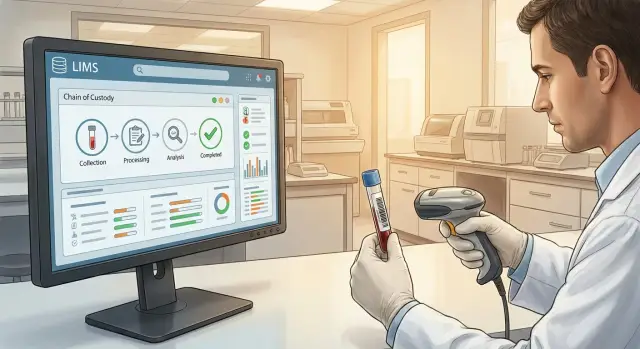
Where LIMS development begins and the problems it solves
LIMS development doesn’t start with screens and reports, but with a map of the real sample path: receipt, labeling, storage, preparation, measurements, quality control and result release. If there are gaps in that path, the system will stay a “pretty facade” and errors will not go away.
Typically LIMS addresses four main problems:
- Losses and sample mix-ups: wrong tube, wrong batch, unclear location.
- Manual entry and copy-paste that create typos and mismatches.
- Gaps between instruments, logs and the final report: data exists, but proving its origin is hard.
- Weak quality control and auditability: who changed a record, why a repeat was done, who approved it.
Define roles and their tasks right away. In one lab the system usually supports reception (registration, barcode, storage conditions), technicians (preparation, measurements, initial recording), QC/quality control (checks, deviations, tolerances), manager or approver (sign-off, result release) and administrator (reference data, permissions, audit).
A simple example: if an instrument reports a value of 7.2, the LIMS should show which sample and method it belongs to, who ran the test, whether repeats occurred and what was ultimately issued to the client.
Measure success with numbers: average turnaround time, share of repeat tests, percent of records without missing fields (temperature, reagent lot, method), audit-readiness of logs without “searching in notebooks.”
Data model: samples, tests, runs and statuses
If the data model is wrong, holes in traceability and disputed results will appear later. First agree on terms and what exactly is the “unit of record.”
Sample — the item that arrived at the lab (e.g., a blood tube). Specimen often means the material inside the sample, and aliquot — a separate portion taken from the sample for specific tests or storage. Test/analysis is a specific measurement (glucose, pH, culture). Run (series) is a group of tests performed together (for example, an instrument run or shift). Store reagent lots separately, because they directly affect quality and investigations.
In the database you usually need entities: client or patient (only minimal identifiers), order with list of tests, method (with version and allowable ranges), instrument (model, serial number, calibrations), operator (who performed and who approved).
Keep statuses simple but meaningful. Often the chain “received” -> “in progress” -> “ready” is enough, with separate flags for “repeat”, “rejected”, “released.” That prevents tests from getting stuck in dead-end statuses while storing the reason for a repeat as an event.
Minimum mandatory fields for each key object: unique ID, timestamp, who performed the action, which procedure/method, and where the data came from (manual entry or instrument). If an aliquot was split into two runs, the history must show when and by whom that was done, and which results belong to which run and reagent lot.
Barcoding: rules, labels and scanning
Barcoding sets the pace for the whole system. If the code is clear and reliably scannable, sample traceability works without failures. Agree early on an identifier format and make it the single source of truth.
Make the unique ID short but robust: fixed length, clear prefix (for example, material type or site) and a check character to catch typos. The same ID should not change during re-bottling, aliquoting or repeats: related entities change (aliquots, subsamples), but each gets its own child code.
For tubes, 2D codes (DataMatrix or QR) are usually better: they read in a small area and survive partial print damage. For forms and boxes, 1D codes may suffice if there’s enough space and contamination risk is lower.
Print and apply labels at clearly defined points: reception, aliquoting, repackaging, creating a repeat test. This keeps the history intact and ensures each new container gets its code without manual entry.
Keep rules simple: printing a label always creates a record (who, when, for which item and on which printer), reprints require a reason (torn, smudged, replaced tube), copy count is limited, and the ID field is not filled in by hand without a noted reason. If scanning fails, the system should ask to rescan rather than “guess.”
Example: a technician prints a label at reception, sticks it to the tube, and scans the code at each subsequent step. For these checkpoints, reliable workstations with connected scanners and label printers are important so the process doesn’t rely on a single weak device.
Sample traceability: making the history continuous
Continuous traceability means that by one sample ID you can reconstruct its entire life: where it was, who handled it, what and when was measured, and why a result changed. This is the basis of data trust and crucial for quality checks and external audits.
Record not only major stages but also transfers between people and zones. Usually it’s enough to log reception and registration, storage and movements, preparation (splitting, dilution, aliquot labeling), measurement (instrument, method, run) and result release or transfer to repeat.
Log each event with time, performer and reason if the step was nonstandard. For example: “moved to fridge 2–8 °C, shelf B3, container 15, due to awaiting reagents.”
Store conditions that can affect results separately: temperature, location, container type, expiry dates, and deviations (opened packaging, time above allowed temperature). Keep these fields simple or they won’t be filled out.
Change history is not for blaming but for a clear trail: what was before and after, who changed it and why. Automate this where possible.
For audit readiness keep per-sample logs (events), data change history (before/after), exports by batches and runs, and records of deviations and corrective actions.
Measurement protocols and methods: making data comparable
Comparability of results begins with how the method is described in the LIMS. If the method is recorded as “the usual way,” in a month or two two people will do it differently and comparing data becomes risky.
A method description should be precise but not overloaded: step order, parameters and tolerances (temperature, time, volumes), units and rounding rules, reagents and materials (including lot and expiry), acceptance criteria and quality controls (controls, calibrations, blanks).
Next you need a measurement protocol template so some fields fill automatically: sample ID, method and its version, instrument and serial number (if selected), date and time, performer, shift, calculated fields (formulas, unit conversions, final metric).
Prevent bad input at the point of entry: require key fields, validate formats (decimal separator), allowable ranges, and unit consistency. If someone enters 5000 mg/L where the method allows up to 50, the system should block save and request a reason.
Versioning is mandatory. When a procedure changes you cannot retroactively overwrite the method: the new version applies only to new measurements while old results remain linked to the prior version.
If evidence is needed for a measurement, store attachments with the protocol: instrument files, photos of readings, scanned paper forms. Then disputes over “why the value differs” are resolved faster.
Instrument connectivity and importing results without manual routine
If results are retyped from printouts or Excel, errors are inevitable: units get mixed up, signs lost, and it becomes hard to tell who and when entered what. Plan integrations with instruments early so data flows into the system quickly and consistently.
In practice three approaches are common: manual import (for rare tests), file exchange (CSV/XML/ASTM parsed on a schedule) and direct connection via instrument interface and a middleware service.
A critical point is linking the result to a specific sample and assigned test. It’s most reliable when the instrument gets identifiers from the LIMS. Typical mapping requires sample ID or barcode, test/method code, run and timestamp, position (e.g., well A1) and instrument ID with calibration/kit version.
Even with automated import there will be failures: wrong format, missing fields, odd values. You need an error queue with clear reasons, the ability to fix mappings and reprocess the file without losing history.
Keep QC data close to results: QC samples, calibrations, tolerances and blocking rules. If QC is out of range, LIMS should mark results as invalid and prevent release until a comment and corrective action (for example, a repeat) are recorded.
Example: a plate analyzer exports a file for wells A1–A12. LIMS maps them to samples by layout, checks QC and then sends results for confirmation.
Repeat tests: rules, reasons and transparent linkage of results
Repeats are inevitable: an instrument may give unstable values, a sample may be contaminated, or QC may fail. The LIMS must record repeats as strictly as primary measurements, otherwise trust in the final result is lost.
A repeat should be formally justified and linked to prior actions. Typical reasons: QC failure, questionable result (outlier, low repeatability, instrument flag), damage/insufficient volume/storage breach, protocol deviation, client or physician request.
The system must guide correct processing: is the repeat on the same sample or a redraw with a new ID? In both cases an explicit link is needed: original result, reason, who ordered it, steps taken and which result is final.
Manage reasons as a reference list rather than free text so you can see recurring issues: transport, a specific instrument, shift, reagents. Split repeat queues by priority: STAT, routine, and on-request.
Reports should be transparent: show the original value (marked “replaced by repeat” if applicable), the final approved value, repeat timestamp and a short reason.
Example: a glucose result of 2.1 mmol/L was flagged “low” by the instrument. LIMS creates a repeat, records reason “instrument flag”, and the report shows the history and final confirmed value.
Validation and approval: quality control before release
Before a result reaches the client, LIMS should run it through a clear chain of checks. Validation means a specific person confirmed correctness against set criteria and this is recorded.
A simple status flow helps: “draft”, “under review”, “correction”, “approved”, “released”. Transitions are role-restricted so, for example, a technician cannot release a report without approval.
Two-stage review
A common practice is two levels of review. First technical: method correctness, units, ranges, calibrations, control samples, no missing fields or duplicates. Then expert: interpretation, comments, clinical significance (if applicable), and agreement on repeats.
Electronic signatures are best implemented as “action confirmations” tied to user, role, time and reason. If a result is corrected, do not overwrite: create a new report version with a comment and justification.
For audits LIMS must keep raw input (as received), who and when reviewed/approved/released, change history by versions, grounds for corrections and repeats, and quality confirmations by run and method.
Result release: reports, timing and data security
Result release is when errors become visible to the client and regulators. Decide in advance which delivery channels to support: PDF for sending, print for archive and export to external systems (for example, an HIS or corporate portal) without manual copying.
A good report should be understandable without calls to the lab. It typically includes identifiers (sample number, barcode, order, client, date and time of receipt), list of tests with methods and units, reference ranges and flags for out-of-range values, comments and conditions (if important), and an approval block: who reviewed, who approved and when.
Partial results should be versioned. A preliminary version must be explicitly marked as provisional, while the final version fixes final values and explains changes (repeat, recalculation, unit adjustment). This simplifies dispute resolution.
Manage turnaround with SLAs: deadlines per order and per test, priority handling for STAT requests, and notifications about overdue risk. Notifications should go to the performer and the shift supervisor.
Security relies on basics: role-based access, view/download logs, block edits after approval (only new versions), masking personal data when needed, and separate rights for exports to external systems.
Step-by-step development plan: from requirements to pilot
LIMS development goes easiest when you first document the actual work, not “how you’d like it to be.” Describe reception, test assignment, measurements, QC, repeats and result release. Then agree roles: who registers the sample, who performs tests, who reviews and who approves.
Map the sample path through statuses. For each transition define who performs the action, what data is entered, what counts as an error and what happens next.
A practical plan:
- Describe processes and roles, collect typical exceptions (urgent, damaged, spill, container change).
- Agree reference data: tests, methods, instruments, units, repeat reasons, statuses, material types.
- Prototype key screens: reception, worksheet, measurement protocol, repeat handling, report release.
- Configure mandatory fields and validation rules (ranges, logical checks, block release without signature).
- Prepare a pilot: scenarios, test data, training and success criteria.
Run the pilot on 1–2 areas with clear, repeatable flows. For example start with clinical chemistry and CBC to test barcodes, instrument queues and report turnaround.
If the lab operates in an isolated network or under strict regulations, decide in advance where the system will be hosted and how support will be organized.
Common mistakes during LIMS implementation
The most frequent problem is a system that doesn’t reduce routine work but cements it. If technicians keep typing sample numbers, moving data from Excel and retyping results, errors persist. Often this happens because barcode scanning, auto-fill from reference data (reagents, methods, units, performers) and clear UI validations were not included from the start.
Second pain point — no unified identifiers. Duplicate samples, confusion between specimen and test, and different numbering formats across departments break traceability. You end up unable to answer which result belongs to which specimen, method and reagent lot.
Third mistake — ignoring versioning. Methods change, report templates update, and without versions you cannot prove which rules were used a month ago.
Fourth — default roles and permissions. If you don’t lock down who can edit results, who only views, and when edits are blocked after approval, silent changes become a risk.
Fifth — poor readiness for failures. For a lab this means not just backups but a full event log: who created a test, who ordered a repeat, who approved release.
Before the pilot check basics: one ID format for sample, aliquot and test; barcode at each handover point; method and report versions enabled; approved roles and permissions; backups and audit enabled.
Example: if a repeat was triggered by QC out-of-range, the chain “first result -> reason -> repeat -> final release” should be visible in one place without manual notes.
Short pre-launch checklist
Before a shift go beyond UI checks and verify end-to-end items. It helps to run one test sample from reception to report to ensure the system won’t accept dubious data.
- Each sample and aliquot has a unique ID and barcode that is non-duplicated and readable on first scan.
- Every action writes an event with time and responsible user.
- Before saving a protocol the system validates units, ranges and flags suspicious values.
- A repeat cannot be created silently: it records a reason and links to the original result.
- Approval follows roles and there is a change log (what was changed, when and why).
Also verify a practical case: can you assemble a complete package for a problematic sample in a few clicks, including events, protocols and edit history?
Example scenario: one sample from receipt to report
A blood tube arrives in the morning. The registrar creates an order in LIMS, selects methods and prints labels. The label contains a unique ID, barcode, material type, collection date and expiry. The sample is split into two aliquots: one for routine testing, the other reserved for repeats. Each aliquot gets its own barcode but remains linked to the original sample.
At the first station a technician scans the barcode and LIMS logs who took the sample, when and where it was transferred. Instrument 1 runs measurements and results import automatically (via file import or integration). LIMS performs an initial check: ranges, instrument flags and QC. If values are suspicious, the system requests a comment and blocks approval.
The sample then goes to instrument 2. After import LIMS applies quality rules. For example, QC failed — a repeat is created with reason “QC fail” and the system suggests using the reserve aliquot. The journal shows the repeat as part of the same history.
After the repeat the responsible specialist reviews, adds a comment and approves. LIMS generates the final report: version 1 (initial run), version 2 (after repeat), who and why changed values, and what was approved for release.
The manager sees a summary: actual times per stage and where delays occurred, number of repeats and reasons, which instruments fail QC most often, who approved results and how long reviews took, and where bottlenecks happen by shift.
Next steps: infrastructure, deployment and support
After you describe the chain from receipt to release, define what will be included in the first phase. It’s better to start with 1–2 key processes and a limited set of instruments than to try to cover everything at once.
Decide hosting early: on-premises in the lab or in a data center. On-prem is simpler for isolated networks and strict access control. A data center is easier for scaling and centralized support but requires network agreements, redundancy and security policies.
Before the pilot check infrastructure basics: workstations (stable network, scanners, label printers, user accounts), server (capacity margin, reliable storage, backups and recovery plan), support (updates, incidents, availability), and integrations (HIS/EMR, reference data, single sign-on).
If a lab processes hundreds of samples a day and runs shifts, build redundancy from the start. Otherwise the first outage will return you to paper logs and lost traceability.
If you lack in-house infrastructure and integration expertise, involve a system integrator. For example, GSE.kz (gse.kz) acts as equipment vendor and system integrator: they can provide server infrastructure, workstations and 24/7 support, which helps stable LIMS operation in large organizations.
Final notes
Start from real processes, keep identifiers consistent, enable scanning and validations, version methods, and lock approval flows by roles. A small, well-run pilot on a couple of test types will reveal the main gaps and let you fix them before full rollout.
Frequently asked questions
Where is the best place to start LIMS development so it actually works?
Start by describing the actual sample path from receipt to result release. If you design interfaces first and leave gaps in the process (transfers, storage, handovers, repeats), the LIMS will look good but won’t reduce errors.
Which roles and permissions should be defined in LIMS first?
A minimal set usually includes receiving (registration and labeling), technician (preparation and measurements), quality control (checks, deviations, locks), approver (sign-off and release) and administrator (permissions, reference data, audit). Define immediately who can create repeats and who can release reports.
What should be considered the main unit of record in LIMS: sample, specimen, or test?
It’s most stable to treat the “sample” as the primary unit with an immutable ID, and build everything around it: aliquots, tests, runs, reagent lots and events. Agree on terminology up front to avoid disputed links and confusing reports.
Which statuses are best to use for samples and tests to avoid confusion?
Keep statuses simple, for example “received”, “in progress”, “ready”, and record reasons for deviations and repeats as events or flags. That prevents tests from getting stuck in dead-end statuses while preserving the meaning of what happened and why.
How to organize identifiers and barcodes to avoid duplicates?
Make IDs short, fixed-length and error-checked so typos are caught automatically. The key rule: the original sample ID must not change; aliquots and new containers get child codes that are explicitly linked in the history.
What exactly should be recorded so sample traceability is continuous?
Record the event chain so a single code can reconstruct the sample’s entire life: where it was, who transferred it, what was done, on which instrument, by which method and under what conditions. The simpler the fields for storage conditions and deviations, the more likely they will be filled in.
Why do LIMS need method versions and what should they contain?
Store the method as a versioned object with units, rounding rules, tolerances, QC requirements and links to reagents. When a protocol is updated you must not rewrite the past: new measurements use the new version, old results remain linked to the previous one.
How to connect instruments to LIMS to avoid manual retyping of results?
The best option is when the instrument receives identifiers from the LIMS and returns results already mapped to the assigned tests. If you start simple, use file import with an error queue so you can correct mappings and re-upload without losing history.
How to handle repeat tests so final results are trusted?
A repeat must be created as a distinct action with a reason, initiator and a link to the primary result. The system should clearly show what triggered the repeat and which result is considered final, avoiding silent replacements of values.
What is important to provide for approval of results and stable LIMS operation?
First, configure a clear review-and-approval workflow with role-based restrictions and recorded timestamps and users. For reliable operation decide in advance where the system will be hosted and who maintains servers, workstations, scanners and support; if you lack an in-house team, a system integrator often covers this, for example GSE.kz, together with equipment and scheduled support.
