7 min read
Microsoft SQL Server licensing for BI and DWH: replica, test and reporting
How Microsoft SQL Server licensing for BI and DWH changes when you add a replica, a test environment or a separate reporting server.
Why adding environments immediately affects licensing
When BI and DWH are small, they are often hosted on a single SQL Server: one database, one server, one point of responsibility. As data, report count and availability requirements grow, the architecture becomes more complex — and so does SQL Server licensing: additional nodes appear, usage scenarios multiply and the number of connections rises.
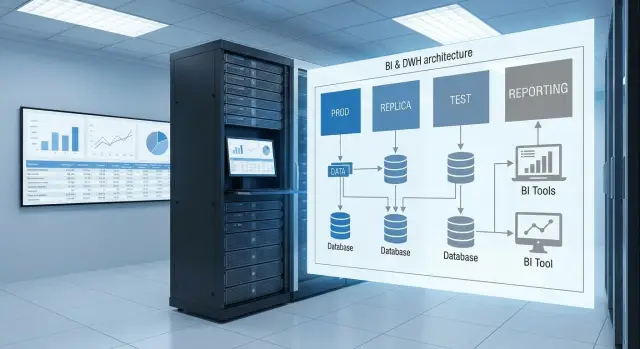
Usually the first step is a replica or standby to survive failures and apply updates without long downtime. Then a test environment is separated: making ETL changes, altering schemas and experimenting with reports directly in production is too risky. A separate reporting server often follows when heavy Power BI, SSRS or ad hoc analytics queries start interfering with nightly loads and mart recalculations.
The problem is that terms like “standby”, “test” and “reporting-only” do not always mean “free” for licensing. Often what matters is not the server name but how it is used: does it execute work queries, serve users, remain constantly active, how many cores it has, and which licensing model you use.
At this stage common questions appear:
- Is a replica considered a second production instance if reports are read or exports are made from it?
- Can a test environment be covered cheaper if business users occasionally work there?
- Must a separate reporting server be licensed if data on it is read-only?
- How do the rules change when virtualization and multiple SQL instances on one host are present?
To calculate without guessing, gather inputs in advance: SQL Server editions, licensing model (Server+CAL or Core), number of physical cores or VM parameters, the role of each server (writes, reads, passive), who and how connects to them, and whether you have Software Assurance (it affects failover and mobility rights). If DWH is deployed on dedicated hardware (for example, on resilient servers like GSE S200 Series), these specs are usually in the bill of materials. Link them to actual usage scenarios.
SQL Server licensing models in plain terms
When people talk about SQL Server licenses they often mix three things: where SQL Server is installed, which components are included and who connects to it. For licensing the important item is the server (or VM) running the database engine. Components like analytics or reporting are typically considered part of “SQL Server” if they are installed and used.
Two common models are Core-based and Server+CAL.
With Core licensing you pay for the server compute and any number of users and systems may connect. With Server+CAL you license the server and then buy CALs (client access licenses) for users or devices that access SQL Server. For BI and DWH Core is frequently chosen because stores are accessed not only by people but also by services, integrations, reports and ETL, and counting CALs becomes difficult.
Useful distinctions:
- Server — the physical machine or virtual machine running SQL Server.
- Instance — a separate SQL Server installation on that server (there can be several instances).
- Database — a specific database within an instance (there can be many).
Key point: a license is usually tied to the server (and its cores, if using Core), not the number of databases. One physical server can technically host DWH, reporting and mart layers simultaneously. That is convenient but complicates accounting: workloads mix, and environment requirements (prod, replica, test) begin to affect the overall licensing plan.
When estimating licenses for BI/DWH, start with the basics: how many separate servers (or VMs) will actually handle production load and which model (Core or Server+CAL) matches your access patterns.
Typical BI/DWH servers and where load appears
In BI and DWH licensing depends more on where queries run and how much compute each environment performs, rather than the number of databases. So before calculating, break the architecture down by roles.
Typical picture: production stores the DWH, alongside a staging area for raw data, ETL/ELT processes, marts (data marts) and a reporting layer. Sometimes reports run on the same server; sometimes they are separated to avoid impacting loads and nightly recalculations.
User queries usually target marts and reporting models. BI tools and analysts produce many parallel reads, heavy aggregations and exports. ETL produces a different load: bulk inserts and updates, sorts, temp tables and heavy transaction log use.
Common roles:
- DWH core: storing facts and dimensions, complex transformations, indexing.
- Staging: ingest and preparation of data for load.
- Marts and semantic layer: report-ready structures, more reads than writes.
- Reporting: ad hoc queries, exports, dashboards — peak concurrency.
- Replica: ranges from disaster reserve to a readable node for reports and exports.
With replicas be honest: is it just waiting for a failure or are queries actually executed there? A readable replica used for reports or exports effectively becomes another production environment.
Test environments also cause confusion. Dev is where code and schema change. Test is where correctness and load are validated. Preprod mirrors production to test releases in production-like settings. If preprod runs almost the same tasks as production, it is a full environment and licensing treats it more strictly.
Example: reports are moved to a separate server and a replica is made readable to offload reporting. BI load now goes to two nodes. In such projects, first document where reads and writes will occur, then calculate licenses to avoid overbuying or under-licensing at audit time.
Replica and failover: when it is standby and when it is a second production
A replica often looks like insurance. For licensing the important thing is not the replica itself but what you do on it. If the secondary node serves users or background jobs, it is no longer a pure standby and becomes a separate production environment.
Passive failover is usually understood as a secondary server that is synchronized but does not perform productive work and is only there to switch in case of disaster. Entitlement to treat such a node as passive depends on your licensing program and whether you have Software Assurance. Verify this before purchase.
A readable replica for reports or exports is a working workload. Even if you “only read” from it, SQL Server still consumes CPU, memory and disks. In effect it becomes a second production node. The same applies if regular checks, heavy reconciliations, mart builds or external access are performed there.
To separate “reserve” from “second production” check:
- Are there user connections to the replica (Power BI, Excel, SSRS, exports)?
- Are SQL Agent jobs, ETL, recalculations or quality checks scheduled there?
- Is it used for backups or maintenance (reindex, CHECKDB) specifically to unload the primary?
- Is it kept continuously readable rather than only on failover?
The line is usually “only on failure” versus “to avoid impacting production.” The latter almost always means the replica must be included in license counts.
If there are multiple replicas (for example one nearby and another in a remote city), check each node’s role. Geo-distribution adds the risk that nodes may be activated for planned switches. For calculations, fix how many nodes may serve load simultaneously and where reads and jobs are allowed.
Test environment: what counts as test in practice
A test environment in BI and DWH allows safe verification of ETL changes, schema updates and calculation logic. A small change in a warehouse load can silently corrupt a week or month of data. A separate test environment helps catch errors before users see them.
For licensing the deciding factor is not the label “test” but who uses it and how. One thing is developers and DBAs running pipelines and checking indexes. Another is opening test to analysts, business users or contractors even occasionally.
Test quickly becomes a “shadow production” if signs of regular operation appear: scheduled integrations run, exports are taken for reconciliation, reports are hosted for a wider audience, test is used as a workaround when production has issues, or “near-current” data is kept and relied upon.
Virtualization changes things further. If a SQL Server VM can freely move between hosts (vMotion/Live Migration), you must consider license reassignment and mobility rules. Often there is a 90-day rule for moving a license between physical servers; more flexible scenarios are easier with Software Assurance. Practically, even a “test” VM may require host licensing or hard pinning to hardware to avoid accounting risk.
Separate reporting server: what needs licensing
The idea to offload reporting to a separate server arises when DWH slows due to heavy queries and users need fast dashboards. Remember: you license SQL Server components where they run, not the reporting interface itself.
If a reporting server only displays already-executed reports and all queries run on the production DWH, licensing mainly concerns the DWH. But note: if SQL Server Reporting Services or other SQL Server components are installed on the reporting server, the server might be considered an installed SQL Server instance and may require licensing even if it has no data. This is a frequent audit point.
If reporting reads from a replica or a separate mart, you must license the instance where queries execute. A replica or mart on a separate server often becomes a working node and typically requires full licensing.
The same architecture can be "light" or very heavy in load. Interactive dashboards produce many parallel queries and daytime peaks. Scheduled reports often run in batches but may create long-running night queries.
Before calculating, fix:
- Which SQL Server components are installed where (engine, SSRS, etc.).
- From where data is read (prod DWH, replica, or mart).
- How many users/devices access reports (critical for Server+CAL).
- Whether local databases exist on the reporting server (cache, marts).
- Expected peaks: concurrent sessions and report refresh frequency.
These answers quickly show whether the server is a thin visualization layer or an additional SQL Server node that must be counted separately.
Step-by-step: how to estimate licenses for your setup
The goal is a rough estimate; unclear points should be verified with a partner or by contract terms. For BI/DWH, replicas, test and reporting can easily turn “one SQL Server” into multiple nodes with different rules.
Step 1. Draw an accurate map of servers
Record specific machines and instances: where SQL Server is installed, where ETL runs and where reporting is hosted. List physical servers, VMs and clusters (if any).
Collect parameters that make a calculation meaningful: number of physical CPUs and cores on each host, virtual cores for each VM, deployment type (standalone, cluster, Always On), and — importantly — the expected load for each node.
Step 2. Describe what replicas and tests actually do
Usage determines classification. Check the short list:
- Is the replica only a standby for DR or is it used for reads/reports/backups?
- Is the test environment isolated or do users run regular integrations there?
- Does the reporting server query its own copy of data or connect to prod DWH?
- Are there scheduled times when a secondary node becomes active (planned switchovers)?
- Who connects: employees, external clients, service accounts?
Step 3. Choose the licensing model and summarize in a table
Choose Core or Server+CAL according to access type. If there are many users, changing users, services and integrations, Core is usually simpler. If users are few and fixed, Server+CAL can be appropriate.
Summarize everything and mark places where a “concession” can easily become full licensing:
| Node | Role | Load | Model (draft) | Risk |
|---|---|---|---|---|
| Prod DWH | write and store | ETL + queries | Core | low |
| Replica | standby or read | reports/backups/reads | Core or concession | high |
| Test | dev/test | regression/load tests | depends on entitlements | medium |
| Reporting | reports | direct queries/cache | Core or Server+CAL | medium |
If you plan infrastructure changes (for example separate servers for database and reporting), immediately document which VMs will be placed where and the cores allocated to SQL Server. This often matters more than merely adding “another server” to the diagram.
Common mistakes and traps when planning licenses
The costliest mistake is assuming licenses are based on data. In practice, what matters is where SQL Server does compute, who (people and services) connects, and where queries run.
Replicas are a frequent pitfall. While a replica is truly a warm standby and carries no production load, this changes once reports, exports, nightly checks or analytics are directed to it — then licensing must be reconsidered.
A second trap is service accounts. Integrations, ETL, schedulers and connectors are often not counted among users, yet they can increase required CALs under Server+CAL.
Another typical scenario: test quietly becomes preprod and is later opened for users to “just check” reports. Once test serves real users or regular business queries, the "dev/test" argument weakens.
Also review virtualization. If a SQL VM migrates between hosts, clarify where licenses must be applied and what mobility rights you have.
Quick checklist:
- Fix where heavy queries and reports run, including replicas.
- List all connections: users, services, integrations.
- Separate dev/test, UAT and preprod by access and purpose.
- Describe virtualization and potential VM migrations.
- Calculate by cores or by CALs, not by database count or data volume.
Pre-purchase and audit checklist
Before budgeting, document the actual layout: which SQL Server instances exist, who connects to them and what tasks they perform. These details usually change the final number.
Check:
- Is the replica truly “only for emergencies” or does it already run readable queries: reports, exports, reconciliations, ad hoc analysis?
- Test environment: who has access (only devs/DBAs or analysts, contractors, business users)? Does it contain data and is it used frequently enough to be considered production-like?
- Where does reporting actually run in practice: on prod, on a replica, or on a separate node/mart?
- For each node verify core counts and virtualization: number of physical cores per server, vCPU per VM, and any license mobility rights.
- What is the growth plan for 6–12 months: another node, an extra replica, expanded marts, more users?
If reports are “accidentally” run on a replica during the day and exports are taken there at night, the replica stops being a reserve. Find this out before finalizing purchases and configurations.
Example scenario: DWH + replica + test + separate reporting
Imagine a setup: a production DWH server, a replica, a separate test environment and a reporting server used by Power BI, Excel, SSRS or other tools.
Assumptions: prod DWH receives ETL loads and queries, the replica is intended for failover, developers use test, and reporting is separated to avoid slowing down DWH.
If you move reporting from prod DWH to the replica, the replica ceases to be only a reserve. It becomes production because it handles regular user load and must be included in licensing.
The test trap is different. While used only for development, checks and load tests, it typically remains non-production. But if the business starts building regular reports on the test server (even temporarily), it becomes a second production: persistent users and business dependency appear.
Matrix to record decisions:
| Server | Role | Load | What it means for licensing |
|---|---|---|---|
| DWH-PROD | Primary DWH | ETL + some reports | Licensed as production |
| DWH-REPL | Replica / failover | Standby only or also reports | If it runs productive load — count as production |
| DWH-TEST | Test | Dev/test without persistent users | Dev/test approaches allowed while no production load |
| REPORT | Reporting | User queries | Must be considered if SQL Server/components run and serve queries |
Useful rule: if a server serves regular reports or persistent users, treat it as production even if it’s named “replica” or “test”.
Next steps: lock requirements and prepare procurement
Before picking edition and calculating licenses, gather facts. In BI/DWH a nuance usually surfaces: replicas become readable, test turns into near-prod, reporting moves to a separate node. Count according to the real setup and the 6–12 month plan.
For an initial assessment collect:
- list of SQL Server instances and roles (prod, replica, test, reporting);
- current and planned server resources (CPU, RAM, disks) and virtualization details;
- who connects (users/services) and how often (interactive, via apps, via BI);
- availability targets (RPO/RTO) and maintenance plans;
- deployment timelines.
Then check whether infrastructure is sufficient to separate roles. A common mistake is to assign replica and reporting on a best-effort basis, then discover nodes compete for resources.
If you engage an integrator for sizing and procurement, it helps if they can match licenses to real load and placement. For example, GSE.kz as a vendor and integrator works with server platforms (including the S200 Series) and can help align prod/replica/reporting configurations with operational and support requirements.
Frequently asked questions
Why does adding a replica, a test environment, or separate reporting immediately change SQL Server licensing?
Focus on actual usage, not the server name. If an additional environment executes regular queries, is accessed by users or services, or is constantly active, it is usually treated as a separate production node and affects license calculations.
Is a readable replica considered a second production instance if reports are built from it?
Most often, yes. Once reports are read from a replica, exports are taken, or scheduled jobs run there, it stops being a “pure standby” and becomes a node that carries load, so it should be included in licensing.
Can a passive failover node be left unlicensed?
If it is truly a passive node used only for disaster recovery and it performs no productive work, some programs allow concessions — but this depends on your licensing terms and whether you have Software Assurance. Without checking contract details, assume any continuously running node may require a license.
Can I save on a test environment if analysts occasionally use it?
Usually not, if analysts or business users access it or if it participates in regular processes. A safe rule: test remains test while access is limited to developers and ops and there is no continuous production workload.
Do I need to license a separate reporting server if it only reads data?
Typically yes — because SQL Server is licensed where queries execute and by who accesses it, not by reads vs writes. If SQL Server engine or its components run on a separate reporting server and serve queries, it normally must be considered in licensing.
What should I choose for BI/DWH: Core or Server+CAL?
For BI/DWH, Core licensing is usually more convenient because databases are accessed by services, ETL, and BI tools, and counting CALs quickly becomes cumbersome. Server+CAL can be cost-effective if you have a small, well-defined set of users and few service connections.
Does the number of instances and databases affect licensing?
Instances and databases matter for architecture, but licenses are generally tied to the server or VM (and cores if using Core licensing) where SQL Server runs. Multiple instances on the same host do not necessarily multiply licensing costs, whereas moving load to a separate server does.
How do virtualization and VM migrations affect SQL Server licensing?
Critical is where SQL Server runs and how VMs move between physical hosts. If VMs can migrate, you need to consider license mobility rules and transfer limits, otherwise you risk under-licensing.
What if the replica is used for backups and maintenance to offload production?
If backups, CHECKDB, reindexing and other maintenance are performed on the replica to offload the primary, that is real workload. If such operations run regularly on the secondary, it is difficult to justify it as passive.
What data do I need to quickly estimate licenses without guessing?
Collect a list of all nodes with SQL Server, their roles (read/write/standby), who connects (users and services), the core/vCPU counts, and whether Software Assurance is in place. If DWH will run on dedicated hardware (for example, GSE S200 Series), record those specs and map them to the real read/write scenarios.
