8 min read
License compliance in mass PC deployments: image, activation and acceptance records
License compliance for mass PC deployments: how to link the OS image, keys and activation, device inventory and acceptance records.
Where the risk lies: how compliance breaks down
In mass PC deployments license problems almost never start from malicious intent — they start from automation without controls. The same OS image is rolled out to hundreds of devices, and along with it unwanted components, the wrong licensing channel or someone else's keys are carried over. Each PC works, but proving legality quickly becomes difficult.
The main trap of the image is that it "remembers" things it shouldn't: preinstalled applications, activation settings, and sometimes traces of test licenses. If an image was built once "on the fly" and then tweaked for years, different states almost inevitably appear within a single batch. During an audit this looks like chaos.
Risks depend on the organization type. In government agencies and schools procurement documents and compliance with delivery terms are most critical. In banks and the financial sector license issues add strict information security controls and change tracking, so any mismatch in the image becomes an incident. In private companies the problem often surfaces later: when an admin changes, an inspection occurs, or the fleet needs rapid expansion.
Inspections typically reveal three groups of problems:
- activation doesn't match the contract (KMS instead of MAK or vice versa, OEM where it shouldn't be)
- no link "device - license - batch" in inventory
- documents don't match: serial numbers, delivery contents, acceptance records
"Compliant" in practice means one simple thing: within 1–2 hours you can show a list of devices, their serial numbers, which image and activation scheme were applied, and which documents prove it. It's a big help when the manufacturer or integrator hands over the batch with a unified device registry and a clear set of acceptance records so you don't have to assemble evidence retroactively.
What to prepare before a batch: roles and source data
Problems usually arise before installation — when there's no single set of source data and responsibilities are unclear. If rules aren't agreed in advance, the OS image, activation keys and documents start diverging in the first week.
Collect source data in one place and approve it as the baseline. Minimum: batch composition (quantities and departments), PC models and configurations, OS edition and versions (e.g., Pro/Enterprise), licensing method (OEM or corporate), delivery and deployment timelines, requirements for labeling and documentation. If an integrator supplies the PCs, immediately record who builds the reference image and who has the right to change it.
Roles: who is responsible for what
Assign a process owner (usually IT) and document areas of responsibility.
IT is responsible for image requirements, the activation plan, verifying OS editions and producing a report on deployed devices. Procurement confirms license types in the contract and collects closing documents from the supplier. Legal or compliance reviews license terms and usage rights. Warehouse or logistics handles acceptance by serial numbers, labeling and batch movement control. The contractor (if any) performs deployment per the procedure and delivers logs and final registries.
Single batch registry and the "single source of truth"
From day one create a single batch registry. It should include: inventory tag, serial number, model, department, acceptance date, deployment status, OS edition, activation type (KMS/MAK/OEM) and links to delivery documents. That way you can quickly verify that hardware, OS, keys and acceptance records describe the same devices.
Choose one place to store approved document versions and artifacts: the batch specification, the contract and attachments, OS image versions, the change log, acceptance templates and final exports. Simple rule: if a file is not in that storage and has no version, it effectively doesn't exist. For large batches it helps to agree with the supplier in advance which data they will deliver with the equipment (serial numbers, configurations, vendor confirmations).
OS image: build rules and change control
The goal of the OS image for a batch is predictability. Problems start when the image contains the wrong Windows edition, foreign keys or a convenient build of unclear origin.
Distinguish two approaches. Factory OS (OEM) is usually bound to a specific device and its delivery: the PC arrives with the correct edition and the right to use it. Corporate licensing follows different rules: you choose the edition and activation method, but you must prove the right to that specific edition and build. A typical error is making one general-purpose image and applying it both to OEM devices and corporate devices without checking edition compliance.
Include in the image only what you are ready to repeat hundreds of times and support: drivers from verified sources (only for your models), cumulative updates and basic security settings, a minimal set of corporate software with clear usage rights, and inventory and management agents (inventory, antivirus, MDM) if allowed by policy. Profiles and templates are acceptable if they contain no personal data.
Don't add to the image anything you don't have explicit rights to. That includes "foreign" OS editions (e.g., editions higher than permitted), third-party keys, activators, modified builds and software licensed to a single PC that you then clone across a batch.
To keep control introduce versioning: image name, date, OS edition, included applications, driver list, hash and responsible person. For each release keep a short change log: what was added, what removed and why. At acceptance record which specific image (version) was applied to each device along with serial number and model.
Keys and activation: avoiding confusion between KMS, MAK and OEM
In mass Windows deployment the confusion is rarely about installation — it's about which license type backs a particular PC and how it should be activated. The device works, but later you have nothing to confirm the right to use.
OEM usually comes with the specific computer and is tied to it (often via firmware). Corporate (Volume) licenses use KMS or MAK. In subscription and digital-rights environments management may be through accounts and services, but the principle is the same: know which device has the right and on what basis it was granted.
Choose the activation method according to operating conditions. KMS is convenient if PCs regularly connect to the organization's network and you need centralized control. MAK suits devices often offline, in branches without stable connectivity, or when a one-time activation per PC is required. OEM is logical for typical workstations accepted as finished goods and not intended to have their license moved.
To avoid exposing keys to unnecessary people, record not the key itself but identifying attributes: license type (OEM/KMS/MAK), source of rights (contract, certificate, delivery number), activation method, who and when performed activation, and the device identifier (serial number, asset tag). Full keys should be accessible only to the role responsible for licensing.
Separate test activation from production: a separate test MAK pool (or a separate test KMS environment), separate device groups in inventory and clearly labeled images. For example, when delivering a batch based on GSE equipment you can activate 5–10 test devices to verify drivers and policies, and include in acceptance only those activated under production rules and matching the batch registry.
Device inventory: how to link a PC to a license and batch
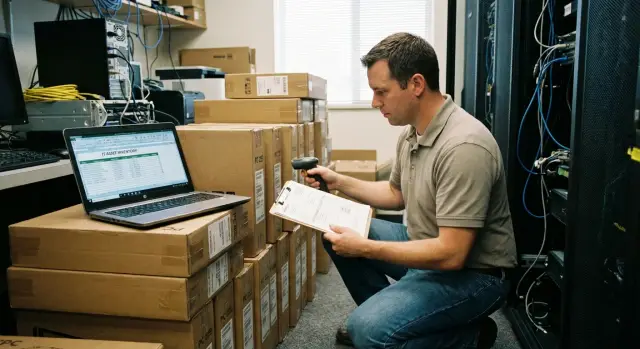
In mass deliveries the weakest link is often not the image or even activation, but inventory. If you cannot quickly show which PC from the batch sits where, what OS edition it has and on what basis it is legal, the inspection turns into a search through boxes and messages.
Use several identifiers to link hardware to a license: serial number (S/N) as the unique device marker, inventory tag for accounting and movement, and hostname for domain and reporting. Store all three in the device record — it makes matching easier even when mistakes occur.
The minimal set of fields that covers most questions: model and configuration (as in the delivery specification), S/N and inventory number, installed OS (edition and language) and commissioning date, installation location and responsible department, batch or delivery number and the supporting document (invoice, acceptance act).
With OEM the proof usually causes trouble. Collect it in advance: information from delivery documents, photos of the label on the case (if available), and system records showing the device arrived with a preinstalled OS. Don't rely on "we'll find it later": after unpacking and distribution traces disappear quickly.
To link a registry entry (CMDB/inventory) to a specific unit from the batch, set the rule: create the record by S/N and batch number, then add the inventory tag and hostname when issuing. Practical scenario: 200 PCs arrive. At acceptance record each device's S/N and mark "Batch 01, invoice N". During image deployment assign hostnames by a template (e.g., FIL-ALM-###) and stick the inventory tag. One row in the registry then ties "what it is", "where from", "where it stands" and "on what basis the OS was provided".
If you buy computers as a ready batch from a local manufacturer it's useful to get the supplier's list of serial numbers and configurations at delivery. For GSE.kz this typically simplifies initial batch reconciliation and reduces the risk of confusion between identical models.
Documents and acceptance records: what must match
License compliance often breaks not in the OS image but in the paperwork: one document says "Windows", another says "without OS", and the acceptance act lacks serial number linkage. It's hard to correct later, especially after an audit or a change of responsibility.
The minimum document package for a batch should allow you to answer three questions: which devices arrived, under what terms they were supplied, and which OS (if supplied) corresponds to each device.
Usually enough: contract specifications (model, configuration, quantity, presence or absence of OS), delivery notes or invoices (proof of transfer), a serial number registry (serial, model, department or installation location), warranty terms and service contacts. Separate license documents are needed if licenses were purchased separately from the hardware.
The most important point is how to state the OS to avoid ambiguity. Phrases "Windows installed" and "Windows licensed" are not the same. Documents should clearly indicate the type: OEM (preinstalled on a specific PC), corporate (activation via KMS/MAK under your agreements), or "delivery without OS". If corporate activation is used, this is usually recorded as a customer obligation rather than the supplier's: otherwise an auditor could conclude licenses must be part of the delivery.
Acceptance acts often miss attachments that save time later: a link to the specification and the exact model names, an appendix with the serial-number registry marked "accepted", a note on the presence or absence of OS per contract and in fact, and results of an initial check (power-on, basic tests, completeness).
Storage is also part of control. Keep originals in one place and scans in a shared folder with a clear structure: year - project/batch - contract - acts - registries - warranty. Make readable scans (signatures and stamps must be legible) and predefine who may modify them. If equipment is supplied as a product of a local manufacturer (important for procurement in Kazakhstan), put supporting documents into the folder in advance so you don't hunt for them later.
Step-by-step deployment process with license control
It's easiest to keep license compliance when the process is split into short control points. Then the image, activation and documents align before batch acceptance.
Practical sequence
-
Approve a matrix: which OS editions and which license types are permitted for each department (e.g., accounting, classrooms, high-demand workstations). Record the basis: contract, delivery specification, OEM, corporate license.
-
Prepare one reference PC and build the image only on it. Log any change (driver, update, inventory agent): date, reason, who applied it, version.
-
Run a pilot on a small group (e.g., 10–15 devices). Produce a short protocol: what installed, what activated, which policies applied, and whether there is any unwanted software. Make image corrections only after a decision, not "on the fly".
-
During mass deployment fill the device registry in parallel. Don't postpone inventory until the end of the day: serial numbers and users get mixed up.
Record at minimum: serial number, inventory tag, model, department, responsible person, OS edition, license type, activation method, deployment date.
- After installation verify activation and assemble the acceptance package: report on activated devices, an export from the batch registry, the image change log, and pilot results. If the batch is delivered as ready PCs (for example, from GSE.kz), reconcile serial numbers and delivery contents with documents before signing acceptance acts so licenses don't "move" between devices.
Short checklist before handover and after commissioning
When a batch is deployed, errors hide in small things: the wrong Windows edition in the image, temporary activation, mismatched serial numbers in delivery notes.
Before handover (acceptance)
Do a spot check (e.g., 10% of devices, but not less than 10 PCs) and record results on one control sheet:
- OS edition and build match the right to use and procurement documents (e.g., Pro vs Enterprise)
- activation status is "Activated", without test or temporary keys and without bypass methods (note separately where it's OEM, KMS or MAK)
- serial number and inventory tag are entered in inventory and match delivery notes and the label on the case
- image version (ID/name of the build) and installation date are recorded in the device card or deployment log
- the batch documents folder is complete: contracts and specifications, delivery notes, serial-number registries, acceptance acts, control sheet, and test protocols (if any)
Then perform a row-by-row reconciliation: one device—one record—one set of confirmations.
After commissioning (1–2 weeks)
The first days reveal issues invisible at acceptance.
Check activation on a subset of PCs (sometimes activation fails after updates or network changes). Ensure devices are in inventory and not duplicated. Record image updates: what was changed, who approved it and under which request. Reconcile results with IT and accounting: accepted device lists, installation locations and responsible persons.
If procurement and delivery were through a local manufacturer and integrator, ask them to match the registry and acceptance packet format to your template. This saves days of cleanup work.
Common mistakes in mass deployment
License issues usually don't show up the day of installation. They surface later: during an audit, when a PC is moved to another department, when a disk is replaced, or when you urgently need to prove the right to use software.
The most typical story is mixing license types without clear accounting. For example, some machines arrived with OEM but the image includes corporate activation, or vice versa. In the end it's hard to prove which license is used where and why a PC is activated in a particular way.
Second source of problems is an OS image that is "tweaked on the fly": today a driver was added, tomorrow Office updated, and the day after an activation script changed. Without an image version number and a changelog you cannot reproduce the installation or prove what was deployed.
Keys are often handled like ordinary passwords: sent in chats, placed in a shared folder, copied into notes. Later you cannot trace who used a MAK, why the activation limit was reached, or where extra activations came from.
Finally, the link "device - location - responsible person" breaks. PCs are swapped, sent to branches, used as replacements and inventory is not updated. During inventory this becomes a manual search.
Quick self-check rule before handing over a batch: for any PC you must be able in 2 minutes to pull its serial number, image version, activation method and the document by which it was accepted and to whom it was handed over.
Example scenario: deploying 200 PCs and handling acceptance
Delivery: 200 PCs for an organization across three buildings. The main office houses accounting and HR workstations, the second building hosts classrooms, the third has reception and medical offices. Requirements vary: some machines must join the domain, some run in kiosk mode, and medical rooms need separate policies and software bundles.
To avoid confusion, before receiving the batch divide devices into groups not by final room but by identical licensing and activation rules. For example: 120 PCs with one Windows edition and KMS, 50 classroom PCs with a different software set and also KMS, and 30 PCs for specific offices using MAK (if there is no stable KMS connection). At this step also record which devices arrive with OEM and how that is reflected in documents.
Warehouse and IT can keep two tables but with common fields that must match. Warehouse handles hardware: serial number, model, inventory tag, delivery note number, arrival date, building/room and status (in stock, issued, in repair). IT tracks licensing and operational data: serial number, hostname, image (version and date), activation method (KMS/MAK/OEM), batch/wave ID, who deployed and when, activation check result, and notes on software. Key point: serial and inventory numbers must match in both tables.
Acceptance is convenient to do in stages so you don't delay launching classrooms or offices. First perform incoming inspection (quantity, models, serial numbers), then acceptance by deployment waves: building 1 - 80 PCs, building 2 - 70 PCs, building 3 - 50 PCs. At each stage record the devices actually commissioned and exceptions (faulty, missing, sent elsewhere).
For an internal check it's usually enough to present a few artifacts: the approved matrix of groups (which OS and activation each group uses), the golden image version and changelog, an activation status export for all 200 PCs, the table matching serial and inventory numbers, the list of installed base applications and policies, staged acceptance acts with registry appendices, and a final report on discrepancies (what was fixed and what was deferred).
If one partner supplies and supports the equipment, it's easier to set unified rules across "delivery - deployment - documents". For example, with GSE.kz as manufacturer and system integrator you can agree in advance which identifiers will appear in shipping documents and which in IT registries so acceptance and license checks proceed without manual reconciliation.
Next steps: how to organize the process and who can help
To make license compliance not depend on individual memory, formalize the process as a repeatable scheme: who is responsible, which data is mandatory and where control checks are recorded. Then every new batch follows the same path and documents match without manual edits.
Start with simple templates stored in one place and versioned: a license matrix (which OS edition and activation type are allowed per category), a device registry (serial number, inventory tag, model, batch, deployment date, responsible person), an appendix for acceptance acts (list of devices with serials and delivery parameters), an image change log (what changed, who approved, which batch used it), and a short technician guide for handling activation or license mismatches.
Next assign a process owner. This need not be the IT director, but the person must have the authority to stop deployment if there is non-compliance. Place two control points: before the batch starts and after it finishes. Before start verify the image is approved and matches the matrix, and that the device list for the batch is known. After deployment reconcile facts: serial numbers, OS editions, activation method and registry entries must match what goes into acceptance acts.
If you procure equipment in batches, agree with the supplier the export format in advance: how serial numbers, models and configurations are delivered and which report confirms the batch composition. This saves hours of reconciliation and reduces the risk of errors in acceptance acts.
If you need help, GSE.kz can cover several parts of the chain: supply of PCs, all-in-ones and servers of Kazakh production, system integration, AI and data-center infrastructure solutions, and round-the-clock technical support via a nationwide service network.
Frequently asked questions
Why do licenses "break" even if nobody intentionally violated anything?
Most often the issue is that the same OS image is rolled out to different device types and licensing channels without checking the correct edition and activation method. As a result, PCs work, but during an audit it's difficult to quickly prove what was installed on each device and on what basis.
How do I know we are actually "license compliant"?
Use the rule “be able to show evidence in 1–2 hours”: a list of devices with serial numbers, which image version was applied, which activation method was used, and which documents confirm delivery and the right to use. If you can’t assemble that quickly, compliance relies on guesses rather than on records.
What should be prepared before a batch starts so you don't end up untangling chaos?
Start with a single set of source data: the batch composition, models and configurations, OS editions, chosen licensing type and document requirements. Then document who approves the image, who is responsible for activation, who maintains the device registry and who collects closing documents — otherwise discrepancies will appear in the first deployment wave.
What image-building rules help avoid audit problems?
Create one golden image and version it: name, date, OS edition, included software, responsible person and control markers like a hash. Record every change in a changelog; otherwise you won’t be able to reproduce the installation or explain why identical PCs in the same batch ended up in different states.
What's the key difference between OEM, KMS and MAK in practice?
Practical separation: OEM is typically tied to a specific PC and its delivery, while corporate (Volume) licenses follow your agreements and are activated via KMS or MAK. The common mistake is using a single image for both OEM devices and corporate ones without checking the Windows edition and permitted activation method for each group.
How to securely manage keys and activations so you don't lose control?
Do not store keys "everywhere" or share them in chats. Record the license and activation type, the source of rights (contract/delivery), and the device identifiers; full keys should be available only to the role responsible for licenses so you can later trace who activated what.
How to correctly link a device, license and specific batch in inventory?
Maintain a single batch registry as the source of truth and tie entries to the serial number; add the inventory tag and hostname when issuing the device. In the device record keep model, S/N, inventory number, OS edition, activation type, commissioning date, location and a reference to delivery documents — discrepancies become obvious immediately rather than during an audit.
Which formulations and documents most often raise questions about the OS at acceptance?
Avoid ambiguous wording: “Windows installed” is not the same as “Windows licensed”. Ideally the specification and acceptance records should explicitly state OEM (preinstalled on a specific PC), or delivery without OS, or that licenses are provided separately under your corporate agreement. Otherwise an auditor may interpret it against you.
What step-by-step deployment process best preserves license compliance?
Use control points: pilot a small group, then roll out in waves while filling the registry in parallel, then check activations and reconcile serial numbers with documents before signing acceptance acts. This order catches errors while they can still be fixed without reworking the entire batch.
What if we're deploying 200+ PCs across different buildings and worry about getting lost?
Group devices by licensing and activation rules rather than only by room or building. If equipment is supplied by one partner or manufacturer, agree the serial-number registry and document set in advance; for deliveries from GSE.kz, a unified device registry per batch usually speeds up reconciliation and reduces the risk of mixing identical models.
