7 min read
Common mistakes when building a LAN in a new office: what usually breaks
LAN build mistakes in a new office lead to downtime and rework. We review design, labeling, line tests and handover documentation to avoid issues.
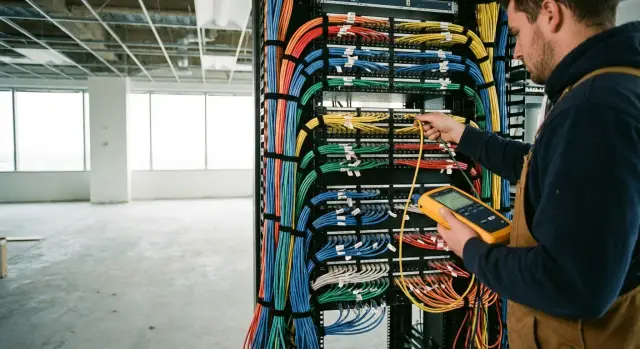
What you encounter after office launch
Problems after a move often don’t show up immediately but appear in the first 1–2 weeks when real load starts. Everything may be connected on paper, yet users complain about slow performance, fluctuating Wi‑Fi and intermittent drops. The worst part is symptoms look random: one department is fine, another loses connectivity daily.
Typical scenarios: an employee moves to a new desk, powers on their PC, and it’s plugged into the wrong socket. Or only one of two access points in a meeting room works because lines were swapped at the cross-connect. LAN build mistakes turn into constant small outages: IT runs around with patch cords, asks someone to “plug into the neighboring port”, and the business loses time.
Rework is almost always more expensive than doing the job right for two reasons. First, fixes happen during working hours and disrupt people. Second, you may need to open ducts and ceilings, and sometimes undo finishes. That becomes a conflict with builders and the landlord. Even a simple relabel and repatching in the rack can take days if there’s no clear logic, diagrams, and test results.
Responsibility usually gets blurred among several parties: the client (if requirements weren’t fixed), the SCS/electrical contractor (if installation rules were violated), IT (if acceptance wasn’t controlled and temporary solutions were left for launch), and the construction crew (if they damaged cables during finishing or cleaning).
To avoid guessing “who’s to blame,” some basic artifacts must remain after handover: a diagram of outlets and routes (at least in an understandable form), the labeling plan for sockets and ports, a mapping table “socket → port”, line measurement results, and a list of actual equipment. With these documents, incident analysis is fast and the network is easier to maintain and expand.
Project and requirements mistakes
The most costly LAN mistakes start before a single cable is handled. If requirements are vague, the installation will be “works generally,” and then reworks, downtime and disputes at acceptance follow.
A common initial problem is lack of a clear workplace and growth plan. Today a department has 20 people, tomorrow 30, plus a new meeting room, a contractor zone, or a video conferencing room. Without forecasting ports, sockets and rack space, the network quickly runs out of outlets and power, and expansion becomes a renovation.
Second, the project is done “to the BTI plan” but real routes aren’t checked. Ceilings may be occupied by ventilation, cable trays can’t pass through shafts, partitions turn out to be load-bearing, or access to routes is possible only at night. As a result cables are run longer, extra joins added, or placed where they can’t be properly serviced later.
Third, there’s no VLAN and addressing scheme before installation. It looks like a minor detail at first, but later cameras, phones and office PCs end up in the same network, or critical services are accidentally blocked by access rules. Fixing this after launch is harder: users and security are impacted.
Another pain point is mixing different systems “as it goes.” Data, IP telephony, video surveillance and access control often require different approaches to PoE, latency, access and redundancy.
Before procurement and installation, record at least:
- a workplace plan with spare capacity and future zones;
- a list of services (data, telephony, Wi‑Fi, cameras, access control) and their priorities;
- a draft VLAN and IP plan and access rules;
- route and maintenance access constraints;
- acceptance criteria: what we test, how and which reports to deliver.
Example: a bank added 12 cameras and turnstiles after finishing. If not accounted for in the project, there won’t be enough PoE ports or rack space, and cables will have to be routed visibly. That immediately affects security and appearance.
Wrong choice of materials and components
Many LAN mistakes start in the procurement basket. On the surface everything looks the same: cable, outlets, patch panels. But differences in quality and compatibility show up later as intermittent drops, low speeds and troublesome acceptance.
A common cost-cutting measure is buying cheaper cable and not thinking about category, patch panels and outlets. The line exists formally, but under real load errors appear and upgrading to faster ports becomes a rework. Another hidden cost is skipping simple items like rack organizers: cables get pulled and kinked, increasing the chance of damage and confusion.
Mixing components from different manufacturers without a clear reason causes problems too. Individually they may be fine, but together they don’t always deliver stable results: different tolerances, different conductor termination schemes, varying contact quality. If you plan SCS design, it’s easier to choose an agreed kit (cable + modules + patch panels) and keep it consistent across the office.
Another common oversight is doing everything "to the limit": ports with no reserve, lengths with no slack, racks without room for growth. In practice workplaces, Wi‑Fi points, cameras and printers are almost always added. The sensible minimum is to include spare ports, a service loop at each outlet and leave space for extra panels and tidy routing.
Finally, fire requirements and jacket types are often ignored. This is not a formality: the wrong cable in evacuation routes or ducts can cause failure at acceptance and a real hazard in an emergency. It’s better to agree the cable type and routes with building rules in advance than to replace kilometers of lines after one inspection.
Mistakes during cable routing
Most network problems start not in settings but in corridors, ceilings and cable ducts. These routing mistakes later show up as random drops, low speeds and unexplained failures.
The most frequent source of interference is power and twisted pair cables running together for long stretches without separation. This happens when everyone puts cables into the same tray “to keep it neat.” As a result some ports show errors, especially under load or near powerful power supplies and UPS units. Where interference risk exists, plan routes in advance and use shielding if needed.
The second group of problems is mechanical. Too-tight bundles, overtight cable ties and sharp bends degrade the line parameters. The cable may look intact, but testing will show increased attenuation and crosstalk. Often this is done quickly on the last day of finishing.
A third mistake is running cable without protection in high-traffic places: under desks, by doors, at floor-wall joints. Cables can be crushed by chair wheels, pinched by skirting boards, or damaged during cleaning. Better to provide a duct, conduit, or proper channel and route cables out of foot zones.
Another frequent oversight is length and extra joins. When a cable “doesn’t reach,” an intermediate splice or, worse, a twisted join is made. Each joint adds risk, and exceeding length limits causes unstable speeds.
Before closing the ceiling, walk through a short checklist:
- power and low-voltage routes separated, crossings handled correctly;
- no over-tight ties or sharp bends;
- cables protected in passage zones;
- no unnecessary joints along the route;
- slack reserved in the rack and at the outlet, no “tangles.”
Labeling: where chaos most often starts
Labeling seems trivial until you need to find a port quickly, move an employee, or understand why the internet “disappeared” in a meeting room. Many LAN mistakes begin here: cables are physically correct but cannot be identified quickly.
The most common problem is labels only on one end. Something is written on the outlet but the server room cable and port are blank (or vice versa). Then any change requires tracing lines with a tone generator, randomly disconnecting neighboring ports and wasting time.
Another issue is lack of a single rule. One installer writes “3.12,” another “Room3-12,” a third “R3-12-Data.” After a month it becomes a puzzle and new staff don’t understand mappings. Agree the format before work starts and stick to it everywhere.
Third, labels that don’t last. Paper stickers, marker on insulation or thin tape wear off under dust, rack heat and cleaning. After a month there are ghost letters, after six months nothing.
For labeling to work, verify four correspondences: outlet → cable → patch-panel port → switch port. Without that you can end up with the outlet marked “A-204-01,” a different number on the patch panel for the same cable, and the switch using a neighboring port.
Practical minimum:
- label both ends of every cable and the patch-panel port;
- use one naming template: room + point number + type (for example, DATA or VOICE);
- use durable heat-shrink or laminated labels;
- maintain a mapping table and update it after every move.
Example: a department moved to another wing and someone swapped a couple of patch cords. Without exact mapping “socket → port” finding the right line takes an hour. With mapping it takes minutes and no disruption to neighbors.
Errors at the cross-connect and in the rack
The cross-connect and rack often look almost complete, but small faults here lead to constant drops, speed degradation and endless support tickets. Many LAN mistakes don’t come from in-wall cabling but from how it’s terminated and organized in the rack.
Termination: pinout, untwisting and connectors
The most common issue is mixing T568A and T568B standards. If some lines use one standard and others the other, everything may appear to be fine yet you’ll see strange symptoms: 100 Mbps instead of 1 Gbps, unstable PoE, and intermittent packet loss.
Another classic fault is too-long pair untwisting when terminating on a patch panel or outlet. Untwisting pairs by several centimeters increases crosstalk and may cause a channel to fail certification. This includes poor crimping and cheap connectors that create micro-contacts visible only under load.
A short self-check list is useful:
- single pinout standard across the site (A or B);
- minimal pair untwist at termination;
- consistent class of components (cable, module, panel);
- quality control of crimps and conductor fixation;
- clean ports without pinched latches.
Patch cords and the "cable mess" in the rack
“Whatever patch cords were found” creates chaos: different lengths, homemade cords without verification, extra loops. The rack becomes a tangle where it’s hard to see what’s connected and a careless tug can take half the office offline.
Typical scenario: after a move the network works, but a week later a couple of workplaces are added. People start plugging into any free spot, patch cords get taut, cables mix and on the next change someone pulls the wrong cord. Neat routing, clear pathways and spare capacity in the rack reduce these incidents and speed up changes.
Line testing: what is done incorrectly
Testing is often treated as a formality before handover. Yet this is where LAN mistakes are uncovered—errors that later become link drops, slow speeds and repeated contractor calls.
The first problem is no basic plan: what we test, by which standard, and what is considered a pass. Without this fixed in advance, acceptance turns into arguments: “ping works now” versus “where are the channel parameters?” At minimum, define channel category/class, length limits, tolerances for attenuation and crosstalk, and the report format.
Second, people confuse continuity testing with certification. Continuity shows pairs aren’t swapped and there’s no open circuit, but it won’t explain why a user sees fluctuating speeds or why PoE is unreliable. A certifier tester checks channel parameters and gives a verdict against the standard.
Third, results aren’t tied to each port and line. A report “generally ok” is useless. You need a binding: outlet number, patch-panel port number, length, date, instrument, result.
Fourth, “fixing by sight” without finding the root cause. Typical example: the meeting room drops periodically. They change the patch cord, then the outlet, then the switch. The real cause was a too-tight bend behind the duct or a poorly punched module.
What to require from testing:
- pre-agreed pass/fail criteria;
- certification of channels, not just continuity;
- a report for each port with identifiers;
- a defect list with cause and retest after correction.
Acceptance documentation: what’s usually missing
Many LAN mistakes surface not because of cable or hardware but because there is no proper as-built documentation. Everything seems fine until a department moves, a switch is replaced, or a security check happens—then nobody knows which port is which or who set it up.
Often the acceptance only includes a sign-off and “a single-sheet diagram.” That’s not enough. You need documents any engineer can use to quickly understand how the network in your office is built and restore it after a failure.
Before signing the act request:
- as-built SCS diagrams and a port register: rack, patch panels, switch ports, outlet numbers;
- an up-to-date floor plan with outlet mappings (room, workstation, point purpose);
- test logs for each link (not selective);
- configuration descriptions: VLANs, DHCP, IP plans, access rules, redundancy, admin accounts;
- an operations package: contacts, change procedures, templates for connect/move requests.
Another recurring issue is “settings in the contractor’s head.” For example, the finance VLAN is configured, guest Wi‑Fi is limited and printers are in a third subnet, but nothing is documented. A month later a new admin creates risk with any change.
One more key point is boundaries of responsibility. Who owns the SCS, who is responsible for active equipment, who can change patching, how fast are responses, how to escalate. Put these rules in writing so you don’t waste hours arguing after launch.
How to organize the work step by step (without extra bureaucracy)
To avoid common LAN mistakes you don’t need to complicate the process. Just lock a few things in advance and keep work orderly.
Start by collecting a clear plan: where workplaces, meeting rooms, printers, Wi‑Fi points and the server room will be, and which services each zone needs (internet, telephony, cameras, access control). A simple rule often helps: “at each workstation — 2 data ports + 1 spare,” and for meeting rooms—separate wiring for video conferencing.
Next, agree rules that save time at acceptance and during operations: outlet and route diagrams, a single labeling format, the handover document format (plans with mappings, port table, measurement results), and control points before closing ceilings and ducts.
During installation distinguish between “done neatly” and “done correctly.” Check actual bend radii, slack in the rack, neat entries, absence of splices and homemade extensions. Only after an intermediate inspection should ceilings be closed.
Testing is better performed before final finishes and furniture placement. A practical order: visual inspection, then line measurements, verify labeling against the plan, and only then sign the acceptance. If a test shows a problem in a meeting room, fix it while the ceiling is still open.
Common acceptance and commissioning traps
The most expensive acceptance mistake is accepting the network by sight: if Wi‑Fi works and a few websites open, “it’s ready.” The office starts to be used and only when all sockets, printers, phones, cameras and meeting rooms are in operation do dead ports and swapped lines surface.
Another trap is signing off without evidence. If there are no test reports and as-built documentation (diagrams, plans, port registers), you are accepting a promise, not a system. Later disputes become “it was like that,” while move deadlines are firm.
Racks are often underestimated as an engineering node. Acceptance may just check that the switch powers on, while nobody verifies UPS under load, correct grounding, rack temperature and maintenance access. The network then “works” only when the rack door is open and the room isn’t hot.
Typical scenario: office is almost ready, staff move in on Monday. On Friday acceptance was done “by Wi‑Fi,” and on Monday half the workplaces have no network because not every port was checked and no time was allowed for fixes.
Before signing do a short check:
- test all ports from the workplace list, not selectively, and record results;
- obtain test reports and as-built docs: plans, labeling, the “socket — cross-connect port” table;
- check the rack: power, UPS under load, ventilation, cable order and service access;
- agree a fix window before the move (at least 2–3 working days) and the responsible party.
Short checklist before the move and what to do next
Before the move, readiness of the LAN for real use is more important than raw internet speed. Most problems show up on the first working day: people sit in wrong places, phones don’t register, printers aren’t visible, and the contractor has no clear diagrams.
Spend 1–2 hours on a short check that saves weeks of troubleshooting.
Pre-move checklist
Request from the contractor and verify on site:
- labeling exists on every line at both ends (workstation and rack) and numbers match plans and patch-panel labels;
- a test report for every port (not selective) and a separate list of exceptions with cause and repair timeline;
- rack diagram up to date: which patch panels are installed, which switch ports they map to, where uplinks and redundancy are (if provided), and any agreed VLAN/port roles;
- clarity on who is responsible for changes after handover: who can move a patch-cord, who updates diagrams, and who confirms new workplaces.
If at least one point fails, close the gaps before staff enter the office. Fixing "live" is always costlier: you lose people’s time and risk damaging an organized rack.
What to do next
After the move appoint a documentation owner and adopt a simple rule: any change in the rack or cross-connect is recorded the same day. Every 3–6 months perform a short audit: spot-check labeling, reconcile diagrams with reports, and see if any “grey” lines have appeared.
If the network will grow quickly or requires 24/7 support, arrange ongoing maintenance in advance. A system integrator with a clear acceptance procedure and commissioning based on measurements and as-built docs helps. For example, GSE.kz operates as a manufacturer and systems integrator and can join projects where, beyond SCS, ongoing operation and IT support are important.
Frequently asked questions
Why does the network begin to fail after a move even though "everything is connected"?
Most issues appear in the first 1–2 weeks: load becomes real and reveals swapped lines, weak contacts, cross-connect errors, and interference from power routes. Practical approach: **check every port from the list immediately** and have on hand a mapping table “socket — port” and the test results for the lines.
What must be fixed in requirements before installing the LAN?
The minimum that truly saves money and nerves: - a workstation plan **with spare capacity** (room to grow, new meeting rooms, contractors); - a list of services (data, Wi‑Fi, telephony, cameras, access control) and their priorities; - a rough VLAN and IP plan; - constraints on routes and maintenance access; - acceptance criteria: what we test, which report we deliver, and what is considered "pass".
How many ports and how much rack space should be provisioned so you won't run out in a month?
Plan for spare capacity from the start; otherwise expansion becomes a repair. Rule of thumb: - per workplace: **2 data ports + 1 spare**; - meeting rooms: a dedicated line for video conferencing/presentation; - rack: spare U-space, patch panels, PoE ports and power capacity. Also keep a service loop at the outlet and in the rack, but avoid "cable piles."
Why does mixing cables, outlets and patch panels from different brands often backfire?
Because "similar" components can have different tolerances and contact quality. Individually they may seem fine, but mixed together they can cause instability: intermittent errors, drops to 100 Mbps, PoE issues. More reliable: choose a **consistent kit** (cable + modules/outlets + patch panels) of the same class and use it across the office.
Which cable-laying mistakes most often cause intermittent drops and low speeds?
Common mistakes: - twisted pair and power cables run together in the same tray for long sections; - over-tight cable ties and sharp bends; - unprotected cables in walkways (under desks, by doors); - extra joints (splices, twists) and incorrect overall length. Check routes **before closing ceilings and ducts**—fixing later is more expensive.
Why does labeling cause chaos later even when cables are laid correctly?
Because without a consistent rule and marking at both ends any small change becomes a random search. Practical minimum: - label **both ends** of every cable; - use one naming template (room + point number + type: DATA/VOICE); - use durable labels (laminated/heat-shrink); - keep a mapping table “socket — patch-panel port — switch port” and update it after each move.
Which cross-connect and rack mistakes most often break the network?
Most often: - mixing T568A and T568B across lines; - too long untwisting of pairs when terminating on modules/panels; - poor crimps or cheap connectors (micro-contacts); - worn ports and broken latches on patch cords. Quick checks: single wiring standard across the site, neat terminations, same class components and a test on every line.
How does continuity testing differ from proper line testing and what should be required at acceptance?
Continuity testing only shows that pairs are not swapped and there is no obvious break. It does not reveal why a user sees 1 Gbps sometimes and 100 Mbps other times, or why IP phones have audio issues. For acceptance require a **certification test** against the standard with a report for each port: socket/port, length, date, instrument, and a pass/fail result.
What documentation should remain after LAN handover so you don't have to "feel around" later?
A sufficient operations package: - as-built SCS diagrams and a port register (rack, patch panels, switch ports, outlet numbers); - current floor plans with outlet locations (room, workstation, point purpose); - test logs for each physical link (not just spot checks); - configuration documentation: VLANs, DHCP, IP plan, access rules, redundancy, admin accounts; - an operations kit: contacts, change procedures, templates for connect/move requests. Without this, any change becomes risky and time-consuming.
How to correctly accept the LAN before commissioning and avoid reworks?
A short checklist before signing: - test **all ports from the workplace list**, not just a sample; - obtain test reports and as-built docs (plans, labeling, the "socket — port" table); - check the rack: power, UPS under load, ventilation, cable order and service access; - agree a short fix window before the move (at least 2–3 working days) and assign responsibility for corrections. If you need infrastructure support (not just cabling but active equipment, servers and operations), it's often best handled by a system integrator. In Kazakhstan such services can be provided, for example, by GSE.kz as a manufacturer and integrator with 24/7 support.
