7 min read
SCS Labeling and Passports: Rules and Templates Without the Confusion
SCS labeling and passportization: naming standard, passport templates, patch-panel rules and a checklist to quickly locate lines during incidents.
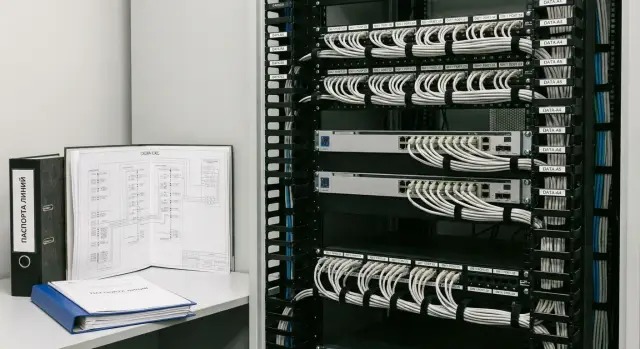
Why label an SCS and keep passports
Labeling isn’t about looks — it’s about being able to maintain the network without guessing. When every line has a clear ID and a passport, any engineer quickly understands where a port leads, what’s connected, and who changed it last.
Without proper labeling, troubleshooting becomes a quest. First you try to figure which socket corresponds to a patch-panel port. Then you discover identical cables in a tray and outdated tags in the rack. People end up offline while you spend time tone-tracing, swapping patch cords and repeating “let’s check again.”
A common trap is “I remember everything.” A diagram in someone’s head isn’t documentation: the person may be on vacation, have left, or be exhausted after a night incident. Documentation must live independently of a single person and be clear to someone visiting the site for the first time.
Passportization covers practical needs: tracking lines and ports, change control, faster diagnostics, acceptance and audits. Most importantly, it saves time when every minute counts.
Losing “10 minutes” can easily become hours. For example, an accountant loses network access 15 minutes before a report deadline. Without labeling you first hunt for the “right” socket, then randomly try ports in the rack, and finally discover the workstation moved a month ago and records weren’t updated. With labeling and a passport you immediately see the chain socket — line — patch-panel port — switch port and check the specific path instead of the whole floor.
The bottom line: labeling and passportization of the SCS reduce downtime, lower the risk of mistakes during changes, and make support predictable even when contractors or teams change.
What to include in labeling and passportization: scope of work
The effect appears only when the entire signal path is covered: from the workplace socket to the patch-panel port and further to the cross-connect. If only the socket is labeled and the rack is left “as is,” the network will still be hard to maintain.
Typically you label workplace sockets (and modules), patch panels and cross-connects, racks and cabinets, horizontal lines and trunks (between floors, between racks). It’s important that the same identifier appears in at least three places: the socket, the patch-panel port and on the cable (at least on one end, preferably both).
The minimal set of documents actually used in practice:
- floor plans with point-to-room mapping;
- a table mapping “socket — patch-panel port — cross/rack”;
- a line passport (test results, length, category, date);
- a change log.
The boundary of responsibility should be clear. SCS ends at the passive part: sockets, cables, patch panels, cross-connects. Active equipment (switches, routers, SFPs, VLAN settings) is managed separately, but it’s useful to note which switch a port connects to in the documentation. That’s reference information that speeds up troubleshooting.
Choose a level of detail that’s “fit for maintenance.” You don’t need to record every tie and every trace in centimeters. But it’s critical to record the room, rack, U height, panel number and port. Then, for an incident like “room 312 lost internet,” you can find the exact spot in the rack in a minute and know what to touch and what to leave alone.
Naming standard: a simple format that stands the test of time
A good naming standard works like an address: the code should immediately show where to find the line end and what it passes through. Without it, labeling quickly becomes a set of stickers “for memory.”
Principles that keep the system usable
The code must be unique, readable, and resistant to change. The most common mistake is tying a name to a person or job function (for example, “CEO” or “Accounting”). People and departments move; the cable stays.
Check the standard against a short list:
- one object — one code (no duplicates across buildings/floors);
- short but clear at a glance;
- the same structure everywhere (consistent separators and block order);
- independent of function or surname, only physical location;
- readable without a “legend in the author’s head.”
How to build a code structure
Most often a chain like building — floor — room — rack — patch panel — port — socket is enough. You don’t have to include every element on every label, but the logic must be consistent. For example, a socket’s label can show where its port is on the panel, while the panel’s label shows where the line goes.
Example formats (choose one and stick to it):
R01-PP03-24(rack 01, patch-panel 03, port 24)F2-305-TO12(floor 2, room 305, telecom-socket 12)MAG-A-B-01(building/zone/row/position, useful for warehouses or factories)
To ensure consistency, agree on reference lists: how buildings are abbreviated, how racks are numbered, which codes zones and rooms use. Keep these rules in one place and don’t overcomplicate. If a year later a new engineer can’t decode a label without help, the standard has failed.
Practical test: imagine a Friday evening incident. The panel code should tell you where to go with a tester and which socket to look for without calls like “who labeled this?”
On-site labeling rules: sockets, cables, racks
Labeling fails without clear on-site rules: where the sticker should be, what it should say, and how it should look after a year. It’s better to agree once on a style and repeat it than to end up with ten “author” variants.
Sockets: visible to the user, useful to the engineer
Label the socket so the number is readable without removing the frame or moving furniture. A practical approach: place the main ID on the faceplate (on or next to the frame) and a duplicate behind the frame or on the module body. That way the ID remains even if the frame is replaced or the external sticker is removed.
It’s important that the same ID is entered verbatim in the line passport and on the patch-panel port. If the socket shows one thing and the documentation another, the documents stop helping.
Cables: labels on both ends and protection against wear
Label the cable on both ends, always. Place the tag 3–10 cm from the connector or entry into the cross-connect so it doesn’t interfere with servicing or get caught in ties. In areas with abrasion or dust, use materials that don’t fade: printed heat-shrink or laminated labels. A marker on the sheath usually becomes a “mystery” in a few months.
A few rules that save time:
- the same ID on both cable ends;
- readable without dismantling organizers or equipment;
- protection from water, dust and handling (laminate or heat-shrink);
- no “temporary” tags that get forgotten;
- record the ID in the line passport immediately after termination and test.
Racks and cabinets: address, height and area of responsibility
Every rack or cabinet should have a clear external ID (on the door or side) and a duplicate inside. Add U-height markings on the rails; otherwise searching for a port becomes counting “from the top down.”
It’s useful to mark responsibility zones: where trunks are, where the server zone is, where access switches are, where the cross-connect is. This reduces the risk of accidentally pulling the wrong patch cord.
One style and be careful with colors
A uniform style (font, size, material, ID format) is more important than aesthetics. Use color coding only where it truly reduces mistakes: for example, separate colors for trunk and access or for different sites. Too many colors become confusing, especially if people use “whatever’s on hand.”
Patch-panel labeling: rules to avoid port confusion
Patch panels are where confusion most often occurs: ports are moved, patch cords are swapped, and labels stay “as they were.” With a single rule here, labeling saves time every day.
How to label panels and ports
First assign a clear ID to the panel itself so it can be uniquely found in the rack. The label should indicate the rack, panel type (copper or fiber) and sequence number. Examples:
R03-PP-CU-01(rack 03, patch-panel, copper, panel 01)R03-ODF-01(optical distribution frame)
Port numbering must be consistent everywhere: left to right, no “zero-based” numbering and no change of logic between panels. For a 24-port panel use 1–24, for 48-port use 1–48. Then R03-PP-CU-01:17 is unambiguous even over the phone.
If you have dual sockets, reflect that in labeling rather than relying on technicians’ memory. A convenient scheme uses one telecom-socket number with A/B suffixes, e.g. TO12A and TO12B. On the panel that looks like mapping a port to the line: port 05 — TO12A, port 06 — TO12B.
Front table of the panel: what to write
A table (on the frame under a transparent insert or on a neat sticker) should answer “what is this line and where does it go?” Usually it’s enough to include:
- panel port;
- line ID;
- destination point (socket/cross/rack);
- type label (DATA, VOICE, AP, CCTV — if you separate by type);
- date or version (to know currency).
Mark spare ports explicitly as SPARE and, if needed, note what they are reserved for. Don’t leave temporary connections “as is”: label them TEMP with the owner (department/client) and the expiry date.
When working in racks, use a simple rule: any change to ports must be accompanied by updating the panel table the same day. Integrators, including GSE.kz, often set this rule so that a month later nobody has to ask “who plugged what where?”.
Passport templates: what to record so they actually work
A passport isn’t meant to be a thick file. It’s meant so an engineer can understand in a couple of minutes what the cable is, where the other end is, whether the line passed a test and if it has any quirks.
Below are minimal templates. They’re convenient to keep in a spreadsheet and print by rack so the site always has an up-to-date copy.
Паспорт линии (кабельная линия)
- ID линии: (например, A-03F-TR1-PP01-12)
- Откуда: здание/этаж/стойка/панель/порт
- Куда: помещение/розетка/порт
- Трасса: (короб/лоток/шахта, ключевые точки)
- Длина (оценка/факт), тип кабеля, категория
- Дата монтажа, исполнитель
- Тест: PASS/FAIL, прибор, № отчета, дата

Паспорт порта патч-панели
- Стойка, панель (модель/позиция), порт
- Связанная розетка (ID), ID линии
- Назначение: (например, пользователь/принтер/камера)
- VLAN/сеть: (если у вас принято фиксировать)
- Примечания: (патч-корд, особенности)

Паспорт розетки
- Здание/этаж/помещение
- Рабочее место/зона (например, W-12 или «ресепшен»)
- Порт(ы) розетки, связанная панель/порт, ID линии
- Примечания: (ограничения, резерв, «не отключать»)
To keep passports from becoming chaotic, follow a few rules:
- one template for all sites and contractors;
- one master table as the source of truth, plus printed sheets in the cabinet (by rack);
- record test results as fact (PASS/FAIL) and include the report number;
- any changes (repatching, workstation moves) are entered in passports the same day.
Example: with a complaint “no network in the meeting room” you immediately see the socket ID, related panel port, purpose and last PASS with a report number. That saves time on tone tracing and hunting “where that cable goes.”
Step-by-step: how to implement labeling and passportization from scratch
Start with preparation, not stickers. If you start by “handing out numbers” and later discover floor plans use different room names or racks sit elsewhere, you’ll redo a lot of work.
1) Prepare the base everything relies on
Collect what already exists: building/floor plans, room list (how rooms are named in the company), rack or server-room layout, inventory of patch panels and sockets. If some lines are already installed, at least record current connections in a draft table.
Then choose a single naming format and make reference lists: building names, floors, rooms, racks. Names must be stable and not depend on who manages the network today.
Helpful sequence:
- assign identifiers to racks, panels, sockets and trunks;
- physically mark: rack, panel, port, socket and cable ends;
- fill passports and mapping tables in parallel;
- verify three things match: sticker, document entry, actual port on site;
- fix discrepancies and record the result as “version 1.0.”
2) Make change rules or order vanishes quickly
The most common cause of chaos is ad-hoc changes. Assign a document owner and introduce a simple regimen: any moved patch-cord, panel replacement or workstation move is recorded the same day.
Typical scenario: two employees moved, someone replugged panel ports, and records weren’t updated. The next incident becomes tone-tracing all lines. With the procedure you open a record and immediately see which port should go where.
Incident example: how labeling saves time during troubleshooting
Accounting loses network access. On the floor there’s one telecom rack with two 24-port panels and a switch. The user only says: “the socket at my desk doesn’t work.” Without a system you start tone-tracing lines, swapping patch cords and guessing where things lead.
With proper labeling and passports the work looks different. The socket shows an ID, for example: BLD1-03F-RM310-WS07-A. In the line passport that ID immediately maps to: patch-panel PP1, port 18, rack R1, switch SW1, port 18, plus note “VLAN 20 (accounting).”
You then check the chain rather than search randomly:
- verify: PP1:18 is labeled and matches the passport;
- check the patch cord PP1:18 → SW1:18 (not unplugged, not in the wrong port, not damaged);
- inspect the switch: SW1:18 is up, not err-disabled, link present;
- rule out config issues quickly: correct VLAN, port not moved to guest network, no MAC lockout;
- if everything matches, the problem isn’t in the SCS (for example, the PC NIC is disabled).
The time saving comes from avoiding tone tracing and guessing. Instead of 30–90 minutes spent checking ports and cables, you often need 5–15 minutes to verify a specific line.
After restoring service, record changes so the next failure isn’t a new quest. In the change log note what was found, who and when worked on it, any config changes made, and what documentation was updated.
Common mistakes and traps that kill SCS value
The issue is often that labeling is done “for project handover” rather than for day-to-day life. Cables are labeled, a folder sits on a shelf, but at the first incident no one can quickly understand the connections.
Most painful mistakes:
- duplicate IDs and “homebrew” tags (different installers label differently, and a month later two cables share the same tag);
- cable labeled only on one end (the far-end tag is often the only way to avoid tone-tracing);
- changing the naming format mid-project (documents end up with two systems);
- poor materials (erasable marker, too-small font, stickers that peel);
- documents not updated after changes.
A quick test to catch problems early:
- take any port on a patch panel and find the other cable end by its tag within 2 minutes;
- confirm the tag on the cable, the socket and the line passport match character-for-character;
- explain the ID format to an outsider in 30 seconds;
- check tag readability under normal cabinet lighting;
- find the last document update date after a change.
If these checks fail, an incident will likely cost you hours searching for the right line instead of fixing the issue.
Short checklist: what to verify before handover and before an audit
Before SCS handover and audit, the most important thing is to ensure the naming system and documents match what’s installed. This is where things most often break: paper looks good, but the rack shows something else.
Five checks that give the most value
- unique IDs: each rack, panel and socket has its own code with no duplicates;
- cable on both ends: labels exist on both ends, are readable and match the line passport;
- patch-panel ports: the table is filled, numbers and assignments match actual connections;
- passport storage: one place, current version, clear fields (date, who changed, what exactly);
- change control: who can edit labeling and documents and how edits are recorded.
Quick sample check
To avoid drowning in details, do a sample of 10–20 lines. Pick random sockets in different zones (office, meeting room, server room, corridor) and follow the whole chain: socket → cable → panel port → passport entry.
If 2–3 of 20 lines don’t match, that’s a sign of systemic problems. Stop before handover and bring everything to one standard.
Next steps: keeping the SCS in order for years
Labeling once isn’t enough. The network evolves: people move, points are added, racks and patch cords change. If you don’t maintain order, documents will drift from reality in a year.
The key rule is simple: any change in the SCS is work not only on the cable but on the documentation. This can be a spreadsheet or specialized inventory, but the source of truth must be one.
A good minimum:
- change log (who changed what, where, date, reason, ticket/work order number);
- “fix it — update it” rule (panel port, socket, scheme and line passport updated the same day);
- audits: quarterly sample checks and an annual full review (especially server rooms and cross-connects);
- contractor rules: work by ticket, before/after photos, submission of updated diagrams and lists;
- a process owner who accepts changes.
When to hire an integrator: reconstruction, floor move, server-room expansion, new site rollout, or an independent audit before inspection.
If you need a turnkey solution, GSE.kz (gse.kz) as a manufacturer and system integrator can take on SCS design and implementation, as well as documentation and ongoing support so the SCS stays orderly not only at handover but in daily operation.
Frequently asked questions
Why label structured cabling if the network is already working?
Labeling links the outlet, cable, patch panel port, and documentation entry. An engineer can immediately see the line path and check a specific connection instead of testing cables across the entire floor.
What information must be included in a cable line record?
At a minimum, include the line ID, the "from" and "to" points, cable type and category, length, installation date, and test result. Add the rack, panel, and port number so you can quickly locate the line on site.
How should I choose an ID format for outlets and ports?
Use a code that describes the physical location: building, floor, room, rack, panel, and port. Do not name lines after employees or departments because people and teams move.
Where should the line identifier be repeated?
Each line should have one ID on the outlet, the corresponding patch panel port, and the cable. It is best to label the cable at both ends, otherwise you will need a tester to find the other end during repairs.
How should I label a network outlet correctly?
Place the main number on the faceplate or next to the frame so it can be read without disassembly. Repeat the ID inside the frame or on the module so it remains after the external label is replaced.
How can I avoid confusion with patch panel ports?
First assign the rack a unique ID, then label each patch panel and number ports from left to right. Keep a table for each panel with the port, line ID, and destination point.
What labels are suitable for structured cabling cables?
Label the cable about 3-10 cm from the connector or the entry into the cross-connect. For server rooms, cable trays, and dusty areas, choose printed heat-shrink tubing or laminated labels instead of writing directly on the insulation with a marker.
What should I do after repatching or moving a workstation?
Record the change on the same day: what was switched, who performed the work, the date, and the new port mappings. One person should maintain the shared table and change log.
Where should I start when documenting structured cabling from scratch?
First collect floor plans, a room list, racks, panels, and existing cable runs. Then approve a single ID format, label the assets, and fill in the mapping table and records at the same time.
How can I check structured cabling labels before an audit?
Select 10-20 random lines in different rooms and trace the chain from the outlet to the panel port and the record. If several lines do not match, correct the whole system before handover, not just the errors you found.
