7 min read
Production and Maintenance KPIs: Tracking Downtime without Paper Logs
Production and maintenance KPIs: how to collect downtime and output data automatically, remove paper logs and double entry, and improve report accuracy.
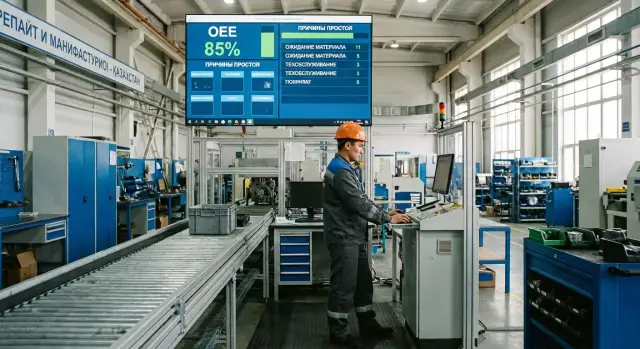
Why logs and double entry hurt KPIs
When downtime and output are recorded in a paper log, the numbers are almost always delayed. The supervisor recalls events at the end of the shift and writes “roughly how it was,” while small stops are lost. As a result, KPIs reflect human memory, not reality.
Paper also causes errors: missed lines, illegible notes, different names for the same cause (“no material”, “raw material”, “waiting for warehouse”). Later the data is transferred to Excel or ERP, adding another layer of distortion.
Double entry quickly breaks trust in reports. If the same data ends up in two places (log and spreadsheet, spreadsheet and ERP), they will inevitably diverge. Meetings then focus not on removing losses but on whose numbers are “correct.” This is especially painful for production and maintenance KPIs, where a single truth about equipment availability is critical.
For metrics to be honest, every downtime and output event needs at least basic documentation: exact start and end times (or at least duration), location (machine, line, area), cause and responsible zone (production, maintenance, supply), and for output — quantity tied to the shift and part number.
A simple example: a line stopped for 7 minutes due to a sensor, then another 12 minutes waiting for an adjuster. In the log this often becomes one entry “downtime 20 minutes.” For maintenance it looks like one problem, for production one loss, but analysis shows two distinct events requiring different actions.
You don’t need “big” automation at the start. Simple steps often suffice: one electronic input source instead of two, time captured from a system (terminal, tablet, PC by the line), and a short reasons catalog. Later data can be connected to MES and equipment monitoring gradually without breaking processes at once.
What data you need for production and maintenance KPIs
If KPI discussions turn into arguments at meetings, the problem is usually not the formulas but the source data and vocabulary. First agree on the data set and definitions: the same downtime and the same output must be counted identically on the shop floor, by mechanics and in reports.
For output, context matters, not just “how many were made per shift.” Plan-vs-actual without scrap and rework often gives a nice number that doesn’t reflect reality. Minimum: planned quantity, actual, scrap, rework, and write-offs. If multiple items are produced, record the part and batch, otherwise it’s hard to find the cause of a drop later.
For downtimes you need details, not the line “we were down 2 hours.” Record duration, cause from an agreed list, area, specific equipment, shift and timestamps for start and end. This lets you separate planned stops from failures and compare shifts fairly.
For maintenance, data should cover the full cycle: from request to recovery. Record registration time, response time, repair time, who performed the work, which spare parts were used, and whether the issue recurred. Then maintenance KPIs become about manageability, not heroics.
To avoid double entry, assign field owners in advance. A simple logic usually works:
- Production is responsible for output, scrap, shift and part identification.
- Maintenance is responsible for fault classification, work performed and spare parts.
- The shift supervisor (or dispatcher) confirms downtime reasons and resolves disputed entries.
A small example: a line stopped for 18 minutes. Production logs the event and the shift, maintenance adds the cause and repair time, the supervisor confirms the record. In reports it becomes one incident, not three different lines.
Data map: from equipment to report
When the chain “what we record at the machine — what a person confirms — what goes to the report” is clear, KPIs stop depending on how someone wrote an entry.
Imagine a packaging line. For downtime and output tracking you usually need three pillars: status (running or stopped), production counter (how many units came out) and the downtime reason. The first two can often be captured automatically, while the third typically requires a short human confirmation.
How data flows
In practice it looks like this:
- Equipment provides status and counters (via controller, sensor, PLC).
- The system records a “stop” event and calculates downtime.
- The operator selects a downtime reason on a terminal/tablet.
- Maintenance adds notes on the work if a call-out happened.
- The report aggregates the shift: output, downtimes, top causes, response times.
The key point: automatic counters say “what happened,” human confirmation says “why.” Trying to “automate the reason” without a person gives you a chart of stops but no actionable insight.
Where to capture reasons and how to avoid drowning in catalogs
It’s best to enter a reason where the person already is and sees the problem: at a line terminal or the supervisor’s tablet. A phone works too, but only with reliable connectivity and extremely short forms.
The reasons catalog should be small and clear. A good rule: 10–20 reasons per area, not 200 plant-wide. Start with broad groups ("breakdown", "no material", "adjustment", "waiting for QC") and add detail only where it’s actually used. If people constantly pick "other," simplify rather than expand.
Practically, this is often solved pragmatically: place an industrial PC or touchscreen all-in-one near the line so the operator has 20–30 seconds to pick a reason from a short list. For example, GSE.kz equipment is used as a reliable workstation in the shop floor so input doesn’t depend on an “office computer” or paper logs.
Data sources without paper logs
The logic is simple: everything a machine can report itself should come automatically. A person adds what the controller can’t know: the reason, explanation and context.
Signals and counters from equipment
The most reliable layer is discrete statuses and events from PLC, machine or line. From these you get an honest time picture: running, failure, waiting for material, adjustment. Agree on a common state vocabulary in advance, otherwise the same downtime will be named differently in different shops.
Output is easiest to count with counters. The choice depends on the process: pulses from a sensor or encoder, a cycle-complete signal, barcode scanning on the pack, or weight control for fill lines.
Built systems and human-sourced data
Some data already exists in your systems: SCADA stores events and trends, ERP knows the plan and parts, CMMS records requests and repairs, and shift rosters tie to crews and time. The automation task is not to move these by hand but to link them by common keys (equipment, shift, order, batch).
The operator and supervisor roles become short actions: pick a downtime reason, optionally add a comment, sometimes attach a photo. It’s more convenient to do this at the line on an industrial PC or touchscreen all-in-one so people don’t run to the office. If the line stopped for 7 minutes, the system records the time and machine; the operator chooses “waiting for material” or “tooling change.” Maintenance gets accurate stats, production gets honest OEE without notebooks and double entry.
How to implement downtime and output tracking in 5 steps
Start with a small pilot. The pilot’s goal is not to “digitize everything at once” but to quickly get data that the shift, supervisor and technicians trust.
1) Choose one line and a short reasons list
Pick a line or machine where downtimes are visible and someone can own the process. For a start 5–10 reasons are enough (adjustment, waiting for material, component failure, no operator, quality control). If there are too many reasons, people will guess.
2) Agree rules for time
You need one clear rule: when a downtime starts and when it ends. Example: a stop counts if it lasts more than 2 minutes; start is triggered by a "stop" signal or a button; end requires operator confirmation. Decide on edge cases: microstops, idling, or test runs after repair.
3) Configure output tracking to match reality
Where there’s a counter or a “product complete” signal, use it. Where output is batched, scanning a batch number and entering quantity is easier. On packaging the supervisor picks the batch at start and the line’s exit counter reports quantity automatically.
4) Consolidate catalogs or numbers won’t match
Before launch agree on the minimum: equipment list, shifts and shift boundaries, downtime reasons, and item catalog. If “Machine 3” is named differently in maintenance, reports will diverge and disputes will return.
5) Do a short daily review of discrepancies
10–15 minutes at the end of a shift: what was missed, where the wrong reason was chosen, why output didn’t match facts. Don’t hunt for blame — find a rule or button to simplify. In 1–2 weeks data quality usually improves noticeably.
Common mistakes and traps when automating tracking
Automation often starts enthusiastically, then KPIs “drift” because of small but systemic mistakes. Instead of trust in numbers you get new manual checks and endless corrections.
The most common trap is not closing downtimes on time. The operator leaves, the supervisor is distracted, and one event stretches to the end of the day, becoming “8 hours in one piece.” You lose the real picture: were there three short stops or one long one?
A second typical issue is an overly long reasons catalog. With dozens of options people pick the first available. Data exists but analysis is useless.
Output errors occur when the line counter counts everything, including scrap and test pieces, while KPIs expect only good items. If you don’t agree in advance what the system counts as “output,” disputes recur.
Another trap is production recording events in one place and maintenance in another. For example, the operator marked “waiting for mechanic,” but the maintenance request was created an hour later. Events don’t match and people start blaming each other instead of fixing rules.
Simple agreements help: who closes downtimes and when, a compact reasons catalog (10–20 key items plus “other” with comment), how to split total/good/scrap for output, how time is synchronized, and what a unified event/request ID looks like. Also require transparent edits with an audit trail.
A short daily ritual reduces noise. Reviewing 3–5 discrepancies — the longest downtime without a reason, downtimes without a maintenance request, output off-target, or an adjustment taking longer than standard — makes quality rise fast.
Example: the line stopped for 18 minutes. The operator chooses “waiting for material” within 10 minutes. If it later turns out a level sensor gave a false signal, the supervisor changes the reason to “failure (sensor)” and maintenance closes the request with details. The report stays honest and no one needs to hunt for a “culprit by feeling.”
How to connect production and maintenance KPIs into one picture
If you calculate metrics separately, disputes are almost guaranteed: production talks about “lost output,” maintenance about a “complex failure.” A common picture appears when the same downtime is described identically for everyone: when it started, when it ended, what caused it, which component was affected and what was done.
At management level a core metric set is usually enough: OEE and availability, share of unplanned downtimes, MTTR and MTBF. The key bridge between production and maintenance is the link “downtime event → request → work.” The system records a stop (or the operator confirms it), a request is created with component and cause, and after repair it is closed with actions and times.
To avoid mixing everything up, agree on three types of stops in advance: production (no assignment, adjustment, waiting for material), maintenance (failure, diagnosis, component replacement) and external (power, network, supplier, safety requirements). Then availability and OEE won’t “punish” maintenance for missing material, and MTTR won’t hide under adjustment time.
For decision-making you need slices, not just a monthly total: shift, line, product, cause, crew. For example, if one line shows more unplanned downtimes in the night shift while MTTR is stable, the issue is often early detection or poor initial failure description, not the technicians.
In practice a quick win is not only connecting signals but enforcing catalog discipline. In monitoring and IT/OT integration projects run by system integrators like GSE.kz, a single vocabulary for reasons and components often reduces disputes faster than any “smart” dashboard.
Quick data quality checklist
Before arguing about KPIs, check whether the data itself is breaking the picture. These checks take 10–15 minutes and usually find the main accounting problems.
5 checks to do weekly
- Shift totals must add up. For each shift, work + downtimes + planned stops should equal 100% of shift time. If not, events are missing or overlapping.
- Output should be logical. Values cannot be negative. Sudden jumps without a change of SKU, mode or crew usually mean a counter error, manual edit or post-close recalculation.
- Downtime reasons should be understandable on the floor. The top 5 reasons for the week should be stable and worded so operator and mechanic interpret them the same. If the list constantly shuffles, it’s too granular or people guess.
- Events without reasons should nearly disappear. Track the share of downtimes with empty reason or “other” and investigate excesses immediately while details are fresh.
- Maintenance times and downtime should match. If maintenance shows 10:00–11:00 but the line’s downtime was 10:20–10:50, sources record the same thing differently. That affects MTTR and “lost time.”
Small example
If the line shows a 35-minute stop but the maintenance request is closed after 60 minutes, check when work actually started (arrival), whether there was a wait for parts, and who recorded the start and end. A helpful rule: production records downtime start, maintenance records repair start, but both must be time-synchronized.
Practical example: a line with frequent short stops
A packaging line runs three shifts. Planned output usually matches, but OEE drops at the week’s end and downtime rises. Stops are short: 30–90 seconds, occurring 50–80 times per shift. They add up to hours, but are easy to miss in the rush.
Previously the supervisor kept a paper log: major failures were noted, small stops were written “later.” At day end everything was transferred to Excel and reasons were recalled from memory. Two typical lines appeared: “unknown” and “other.” In KPI reviews production blamed equipment, maintenance blamed operators, but facts were missing.
They switched to collecting data without double entry. A terminal for selecting stop reason was placed by the line. The operator pressed a button from a short list when the line stopped and pressed again on restart. Meanwhile output by batch was recorded automatically: an exit counter reported quantity and the supervisor selected batch at start. The terminal became a regular workstation — a touchscreen all-in-one kept next to the line.
After two weeks KPIs changed. Unknown downtimes dropped sharply and the top cause became false triggers from a film feed sensor, not a general breakdown. Previously each short stop went into “other” because it was too brief to record in a log.
Solutions became obvious: adjust the sensor and secure its cable, keep a small shift stock of the spare part, add a short “first 30 seconds” operator action checklist, and run a 20-minute on-line training. The outcome: the argument “who’s to blame” turned into “what do we do tomorrow.” Production saw real losses, maintenance got a list of repeatable causes to address.
Next steps: pilot, scale and infrastructure
A logical start is a pilot on one line or narrow area where downtimes hurt most. Pilot goal: prove you can collect downtime and output data without logs and build a clear report view in 1–2 minutes.
For a pilot you need the minimum: run/stop signal, production counter (or takt) and a short downtime reasons list. The report view can be simple: shift, line, minutes down by reason, output, and basic OEE parts.
Plan infrastructure so you don’t redo it later. Typically you need a reliable workstation on the floor (for operators or supervisors), a server for storage and processing, and stable network. If connectivity is unreliable, include local buffering so events aren’t lost on outages.
It often makes sense to give some tasks to an integrator to avoid turning the plant into an experiment: connecting to PLC/SCADA and reading tags, configuring catalogs (lines, parts, shifts, reasons), KPI rules and reconciliation on the floor, basic reports and access roles.
Scaling usually hits not on sensors but on consistent rules. Before expanding to other shops, lock a standard reasons list, report templates and the process for shift confirmation. Otherwise each line will “speak its own language” and KPI comparisons lose meaning.
If you need a reliable foundation for data collection and reporting on site, consider predictable hardware and support from the start. For example, GSE S200 Series servers and GSE workstations, plus integration and 24/7 support from GSE.kz, are often used as the base for such projects so tracking doesn’t depend on ad-hoc fixes.
Frequently asked questions
Why do paper logs almost always distort downtime KPIs?
Because entries are made late and “from memory”: small stops are forgotten and several different causes are merged into one line. Then someone rewrites the data into Excel or ERP and errors multiply, so KPIs reflect people’s interpretations rather than facts.
What’s wrong with double data entry (log + Excel/ERP)?
When the same events are recorded in two places, discrepancies are inevitable: someone rounded the time, someone corrected a reason, someone entered data later. At meetings people argue about the “right numbers” instead of how to reduce losses.
What data should be collected for every downtime?
Record at least: exact start and end (or duration), location (machine/line), reason from an agreed list, and the responsible area. That’s enough to distinguish separate incidents, calculate availability, and avoid confusing production waits with repair failures.
What output data is needed so KPIs are honest?
Count not only “how many were produced” but what of that is good. Practical minimum — plan, actual, scrap, rework, and write-offs, plus shift and item/part identification. Then plan-vs-actual won’t look good on paper but bad in reality.
How to divide responsibilities between production, shift supervisor and maintenance?
Assign owners for fields: production owns the stop event, shift and output; maintenance owns fault classification, work performed and spare parts; the shift supervisor confirms disputed entries and closes the shift. When every field has an owner, data stops being “nobody’s”.
What is “passporting an event” and why is it needed?
“Passporting” is a short, unambiguous record of an event. For downtime it’s start/end time, equipment, reason and responsible area; for output it’s quantity, shift, item/lot and separate counts for good and scrap. This reduces disputes and lets you link a downtime to a repair request.
What should be collected automatically and what left for people to enter?
Automation answers “what happened”: line status and production counters give exact times and quantities. A person is needed for “why”: select a reason from a short list and optionally add a comment. This balance usually gives fast results without overloading operators.
How many downtime reasons should a catalog contain so people actually use it?
Start with 10–20 reasons per area and formulations that operators and mechanics interpret the same way. If people often pick “other”, the list is too complex or causes overlap. A good catalog can be detailed later, but only where it’s actually used.
Which mistakes most often “break” KPIs when automating tracking?
The most common problems: downtimes aren’t closed on time and one event stretches for hours; the reasons catalog grows and people pick at random; the production counter counts scrap and test pieces as good; production and maintenance record the same time intervals differently. These are fixed with closure rules, unified definitions and time synchronization.
How to start tracking downtimes without “big” automation?
Pick one line for a pilot, agree rules for time and micro-stops, connect status and production counters, and keep reasons as a short terminal selection. Then do short daily reviews for 1–2 weeks until the data stabilizes. For the shop floor, provide a reliable workstation and infrastructure so entries don’t return to notebooks; often an industrial PC/all-in-one and a server (for example from GSE) with on-site support are used.
