8 min read
Keyboard layout requirements: Kazakh and Russian
We examine Kazakh and Russian keyboard marking options, methods of applying characters, and how to record keyboard layout requirements in specifications, SOWs and acceptance reports.
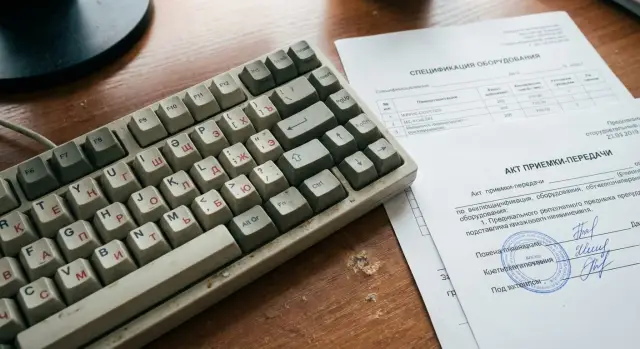
Why record layouts in procurement documents
Disputes over keyboards happen more often than you might think: the supplier insists they delivered “as usual,” while the buyer finds something else at acceptance. If the requirement is not written down, it's hard to prove your case. The disagreement ends up in email threads and delays putting the equipment into operation.
The main confusion is the word “layout.” For some it means “you can switch the language in Windows,” for others it means “the keys have the letters printed on them.” These are different things. You can add Kazakh and Russian languages in the OS on almost any PC, but that doesn't solve the problem when the keyboard itself lacks the needed characters and people have to type blindly.
If key markings are not specified, the consequences become apparent quickly: users are uncomfortable, error rates and typing time increase; IT support receives many “no Kazakh letters” requests; the buyer asks to replace keyboards or reorder (which causes delays); on-site fixes start — stickers, engraving, rearranging keys — which spoils appearance and complicates inventory.
In some cases the issue is critical and should not be left “by default.” This includes public procurement where specifications and acceptance by documents matter; schools and universities where key hints are constantly needed; front offices and call centers where staff type a lot and cannot spend time searching for letters.
Therefore, keyboard layout requirements should be described as explicitly as processor model or RAM size: what must appear on the keys (Kazakh and Russian markings), how the characters are applied, and how acceptance will verify it. Then the delivery has a clear conformity criterion and there are fewer grounds for disputes.
Common variants of Kazakh and Russian markings in deliveries
Procurement often confuses two things: the OS input language and the physical key markings. In documents, marking is usually the important part — it's visible at acceptance and directly affects user convenience.
In practice you can encounter:
- Only Russian markings (RU) without Kazakh letters. Technically people can type, but they must remember where Ә/І/Ң/Ғ/Ү/Ұ/Қ/Ө/Һ are.
- Bilingual RU-KZ markings on keys. Kazakh letters are added together with Russian ones (often smaller or in a different color).
- Only Latin (EN). This occurs for some roles (developers, system operators), but should be negotiated separately, otherwise it's often treated as a delivery mistake.
- Mixed batches. One shipment may contain keyboards with different printings due to different brands, revisions or part replacements.
- Built-in laptop keyboard and external keyboard listed as separate items. The laptop marking is tied to the device, while an external keyboard may be different and should be specified separately.
Even among bilingual keyboards details vary: where Kazakh letters are placed, whether there is a dedicated key for “Ә” or symbols are added to existing keys, whether color and legibility match. If that matters (for example, for school classrooms or service counters), lock in the details beforehand.
A simple rule helps avoid a “zoo” in one office: the same marking type across the entire batch. If exceptions are allowed, describe them in advance: which devices may have RU-KZ and which RU or EN; whether mixing manufacturers is acceptable; how replacements are handled if the desired marking is unavailable in stock.
What counts as the “Kazakh layout” on a keyboard
The phrase “Kazakh keyboard layout” in documents sounds unambiguous, but suppliers deliver different variants. To avoid disputes at acceptance, define in advance what you mean by Kazakh layout: the set of letters, their placement, application method and legibility.
First and foremost — all Kazakh-specific letters of the Cyrillic alphabet must be present on the keys. Typically the expected symbols are: Ә, Ғ, Қ, Ң, Ө, Ұ, Ү, Һ, І. If even one letter is missing on the keys, users do not have a “full Kazakh layout,” even if Windows can enable it.
Second — placement. Most procurements imply the standard scheme: main Russian letters remain in their usual places and Kazakh symbols are added as additional characters. If matching the familiar scheme is critical (so employees don't need retraining), state it clearly: “standard placement of Kazakh symbols on keys within the Russian layout.” If placement is not important (only presence and readability matter), state that instead.
Decide separately whether Latin letters are needed. Many organizations are fine with Cyrillic (Russian + Kazakh), but classrooms, contact centers and users who work with logins and email often require triple marking: RU + KZ + EN. In that case, specify that English letters must also appear on the keys simultaneously with Cyrillic, not only as a switchable OS layout.
For readability and style, set simple criteria that can be checked visually:
- all Kazakh letters are on the same keys as in the chosen scheme, without “moving” them to neighboring keys;
- symbols are high-contrast and readable under normal office lighting;
- Kazakh and Russian symbols are in the same style (same stroke weight, not noticeably different fonts);
- Kazakh letters must not be noticeably paler than others or look like temporary markings;
- key markings must not contradict actual input in the OS.
The last point is often overlooked: keys may show RU-KZ while the system default layout is different, or pressing a key produces the wrong character due to incorrect settings. Therefore, include the pair “keyboard markings + corresponding OS layout” in the definition. This is especially important for mass deliveries to public bodies, schools and clinics, where equipment must be ready to use immediately after unpacking regardless of manufacturer or integrator (including local ones like GSE.kz).
Methods of applying characters and how to describe them
Disputes in PC and keyboard deliveries are often not about whether Kazakh and Russian markings exist, but how the characters are applied and how durable they are. If not specified, you may get “formally present” letters that are hard to use or wear off quickly.
Main marking methods
The most predictable option is factory printing on keycaps. These are even characters with consistent weight, no misalignment, and identical color across keys. Letters look uniform with no signs of manual rework.
Laser engraving is common, especially in corporate deliveries. It is usually resistant to wear, but there is a nuance with backlit keyboards: laser may cut through the layer so characters may glow differently. If backlighting matters, specify this in advance.
Stickers are the most contentious. They work as a temporary solution (e.g., for urgent deliveries or classrooms), but for permanent office use and public procurement they are often unacceptable: stickers peel, collect dirt, interfere with backlighting and change the typing feel.
To avoid ambiguity, explicitly list acceptable methods in the specification:
- Allowed: factory printing or laser engraving on each keycap.
- Backlight (if present): characters must be readable with backlight on and off.
- Not allowed: applying characters with stickers (if you forbid them).
How to state durability and acceptance simply
Describe durability in plain terms, without laboratory methods. For example: markings must not rub off from normal use and cleaning.
Helpful formulations:
- “KZ/RU markings must not be removed by wiping with an isopropyl alcohol cloth (without strong pressure).”
- “Characters must be readable, not shifted, not overlapping.”
- “Selective inspection of at least X% of keyboards is allowed at acceptance.”
- “If stickers are found (when prohibited), the goods are considered nonconforming.”
In practice: if you procure a batch for a school or call center, decide in advance whether delivery speed or long-term durability is more important. For long service life choose factory printing or engraving; allow stickers only as an exception with separate agreement.
Software side: OS layouts and initial settings
Even if keys have Kazakh and Russian characters, improper OS settings can make users unable to type the needed letters or cause unpredictable layout switching. Therefore, specify requirements for both hardware and software.
First define what is being supplied: “PC with preinstalled OS,” “PC without OS,” or “customer image installed separately.” This determines who is responsible for adding layouts and the interface language at first boot: the supplier, the buyer’s IT team or an integrator.
Typical settings to require
A minimal, easily verifiable set for acceptance:
- The OS has Russian and Kazakh layouts installed and available (and English if needed).
- Interface language and the initial setup screen match the request: typically Russian, sometimes Kazakh (e.g., for classrooms or front offices).
- Layout switching works with standard OS methods (e.g., Alt+Shift or Win+Space) without additional language managers.
- Layouts apply not only to the current user but also to the sign-in screen and new user accounts (otherwise settings may revert after handing the PC to an employee).
Phrase these as a verifiable result: after first power-on the user can type қазақ әріптері and Russian letters in any standard input field.
Drivers, images and remote sessions (VDI/RDP)
If a corporate image is used, agree in advance who provides it and who is responsible for final language parameters. In the specification indicate the OS version (or family) and require that layouts be added at the image level.
Also specify expectations about drivers and hotkeys: sometimes vendor utilities capture shortcuts and break layout switching. It’s safer to require default switching behavior without custom utilities.
If users work via thin clients, VDI or RDP, add a clarification: layout must switch correctly in remote sessions. For example: “In an RDP session on the server, Kazakh letters entered from the client keyboard must work without additional settings on the workstation.” This is especially important for call centers and registries.
A practical scenario: for a public agency buying Windows PCs with domain settings, require: interface in Russian at first boot, RU+KZ available on the sign-in screen, Win+Space for switching, and acceptance test — typing a short test string in both languages in Notepad and in a password field. This usually prevents most disputes.
How to write requirements in the specification (step-by-step)
A good specification starts not with “need Kazakh and Russian layout” but with the simple question: where and for whom is this required. One department may be fine with Russian markings and OS switching, while another will stall without Kazakh letters on the keys.
Below is a logic that helps create requirements that can be checked at acceptance.
Step-by-step scheme for the specification
-
Define zones and users. For example: reception, call center, HR, classrooms. Immediately fix the share of workplaces with RU-KZ (e.g., 100% for front office, 30% for back office).
-
Link the requirement to each supply item. In the spec list separately: system unit (if keyboard included), all-in-one (usually with external keyboard), laptop (built-in keyboard), separate wired/wireless keyboard.
-
Describe the key markings specifically, not just availability of OS layouts. “Windows has Kazakh language” does not solve the issue if keys lack symbols.
-
Specify the application method and permissibility of stickers. If stickers are allowed, list conditions (new, do not rub off, do not cover Latin letters, last at least X months). If not allowed — forbid them explicitly.
-
Add a measurable acceptance criterion. This reduces disputes: what is compliance and what is not.
Example wording for the specification
In the specification write short verifiable phrases. For example: “Keyboard (built-in or external included in the kit) must have RU + KZ markings on the keys. Mandatory presence of Kazakh letters: Ә, Ғ, Қ, Ң, Ө, Ұ, Ү, Һ, І. Markings must be permanent (engraving/industrial printing); stickers are not allowed.”
Then repeat the requirement line-by-line in the itemized spec: not just “keyboard - 100 pcs.” but “keyboard - 100 pcs., RU-KZ, permanent key marking.” This ties layout as a product characteristic.
For acceptance add one simple control method: a photo sample (attachment to the specification) or selective inspection, e.g., 10% of units. Practically: the commission samples several workplaces, checks key markings and records results in the acceptance report.
If the supplier is a manufacturer or integrator (for example, GSE.kz), ask to approve a sample keyboard photo before shipment. It’s cheaper than arguing at the warehouse after delivery.
How to fix requirements in the contract and shipping documents
To avoid disputes at acceptance, lock requirements not only in the specification but also in the contract and accompanying documents. Then it becomes a verifiable criterion, not a wish.
A working clause states that characters must be applied on the keys, not only “supported” in the system. For example: “Keyboard: application of Kazakh and Russian characters on keys (permanent, readable), no stickers unless agreed in writing.”
Also define completeness. If the keyboard is supplied as part of a PC, it’s convenient but harder to replace a single element. If listed separately it’s easier to manage compliance and replacement. A practical option: specify the PC as a kit and duplicate the keyboard as a separate line with model and requirements.
To prevent surprises within the batch add: “The layout and application method must be identical across the whole delivery.” This is crucial when units go to regions and swapping is difficult.
Include in the contract and appendices:
- exact description of layout and application method (engraving, factory print, etc.) as a mandatory parameter;
- keyboard model (or allowed models list) and prohibition on replacement without agreement;
- batch uniformity requirement;
- actions in case of nonconformance at acceptance;
- appendix with a reference sample: 2–3 photos of the correct keyboard and a short table “model - layout - application method.”
Specify replacement procedures with clear deadlines. For example: “If nonconforming layout is found the supplier shall replace keyboards within X business days at their expense, including delivery, or supply correct keyboards with corrective documents.”
A small example: a school orders 50 PCs. The delivery note only says “assembled PC” and layout is not listed. On site they find 20 keyboards without Kazakh letters. If the contract and spec had a separate keyboard line and sample photos, the commission quickly records nonconformance and demands replacement under the agreed procedure, avoiding interpretation disputes.
Acceptance: how to check layout and prepare the acceptance report
Acceptance often fails over small wording: the documents said “keyboard with Kazakh” while desks ended up with Russian-English or Kazakh characters placed where users don’t expect them. Check as formally as you would check PC model or serial numbers.
Start with visual inspection. Verify Kazakh letters are present and on the expected keys (not only on a sticker or incomplete set). Assess readability: contrast, size and whether characters rub off with light rubbing.
For large batches you don’t need to check every unit, but the sampling method must be predefined and described in acceptance documents. For example: “10% of the batch, but not less than 5 units, randomly from different boxes.”
Practical acceptance procedure:
- Verify 1–2 units from each selected box for presence of Kazakh letters.
- Check application method (engraving, pad printing, stickers) and defects.
- Connect one keyboard and run a short input test.
- Repeat tests on several keyboards from the sample.
- Record compliance per item (conforms/does not conform).
A quick input test can be done in any text field (Notepad, search, form). Switch to Kazakh and type several letters that are commonly confused: Әә, Өө, Үү, Ғғ, Ққ, Іі, Ңң, Һһ. The test ensures the OS outputs Kazakh characters rather than similar Latin letters or squares.
In the acceptance report use measurable statements rather than general phrases. For example:
- “Keyboards: presence of Russian and Kazakh markings on keys confirmed, application method: ____, readability satisfactory.”
- “Sample inspection: ____ units out of ____ units tested, sampling method: ____.”
- “Input test for Kazakh characters performed on ____ units: result positive/negative.”
If part of the batch is nonconforming (e.g., 7 keyboards lack Kazakh letters), do separate acceptance: accept conforming units, list nonconforming ones, and issue a notice with quantity and replacement timeline. This does not block the whole delivery but preserves legal clarity.
Typical mistakes in requirements and how to avoid them
The most frequent problem is the short phrase “KZ/RU.” It sounds clear but legally and practically almost empty. The supplier may comply formally while you receive keyboards without Kazakh markings or with mixed marking types in one batch. If you specify requirements, clarify whether you mean physical key markings, OS settings, or both.
Another common mistake is mixing requirements for different keyboard types. For external keyboards and built-in laptop keyboards provide separate lines. Otherwise external keyboards may be RU-KZ while built-ins are RU only (or vice versa), and disputes begin after delivery.
About stickers: if you don’t specify their permissibility and quality, the supplier may deliver cheap stickers. “Letters are present,” but a month later they peel off or block backlight. This is especially problematic in schools, call centers and shared workplaces.
Also require batch uniformity. Without it you can get different manufacturers, different glyph shapes, colors or key placements in one delivery. Users complain and there’s nothing to challenge in the paperwork.
A short, testable block of requirements helps avoid this at acceptance:
- Separate “markings on keys” and “OS layouts” as two distinct verifiable items.
- Specify external and built-in keyboards separately if both are in the procurement.
- Fix the application method (factory printing/laser engraving/stickers) and readability requirements.
- Add a batch uniformity clause: the same layout version and application method across the whole batch.
- Describe the check: visual inspection of keys + input test in the OS for a few symbols (e.g., Ә, Ө, Ү and І).
Practical example: an organization accepts 50 PCs for a classroom. OS layouts switch to Kazakh and the acceptance report is almost signed, but some keyboards have stickers and some lack Kazakh letters. If this was not in the specification, the dispute is hard. If specified, record nonconformance and request replacement or correction under the contract.
Short checklist and an example procurement scenario + next steps
When layout requirements are not fixed, disputes usually start at acceptance: the supplier thinks “stickers are fine” while the buyer expects factory marking and specific characters. Below is a short set of points to close the issue in advance and quickly check delivery.
Mini checklist for the specification
Make one clear phrase and add 2–3 clarifications. This usually goes under “keyboard/peripherals” or as a separate specification line. It must be verifiable by sight and in the acceptance report.
- Two layouts on the keys: Russian and Kazakh (specify which Kazakh variant if needed).
- Application method: factory printing or laser engraving on keycaps (avoid “desirable” wording).
- Color and readability: high-contrast symbols that do not rub off under normal use.
- Form factor: full-size or compact, numeric keypad presence (if important).
- Uniformity across the batch: no mixing of marking types.
Example short spec line (1–2 lines):
Keyboard: QWERTY, symbols applied RU+KZ on keycaps (factory print or laser engraving), readable high-contrast markings, uniform variant across the batch.
3-minute acceptance mini checklist
Before signing documents, check several units from the batch (e.g., 1–2 units per model or box). Keep a reference sample photo or a printed sheet with key examples to avoid subjective judgments.
- Are both layouts present on the physical keyboard and do the disputed letters match the reference?
- Is the application method the same across the batch (no stickers in part of the shipment)?
- Readability: characters are not pale, not shifted, not covered.
- Conforms to the specified keyboard type (full-size/compact, NumPad presence).
- Quick input check: OS switches RU and KZ and characters type correctly.
If nonconformance is found, record it briefly but specifically. Example wording for the report:
Nonconformance detected: keyboard lacks Kazakh markings on keys (only RU present). Specification requirement not met. Please replace with conforming keyboards or provide corrective shipment.
Typical next steps inside the organization: the procurement initiator (IT or facilities) agrees on a keyboard sample and wording in the spec, legal locks it in the contract and appendices, and the assigned responsible person (IT specialist or storekeeper) performs acceptance with a preapproved checklist. For large PC and laptop deliveries this prevents dozens of hours of manual rework and disputed reports. Once requirements are fixed, the process becomes predictable.
Frequently asked questions
When do I really need to record the keyboard layout in the documents?
Record the layout when it is important that Kazakh letters are visible on the keys themselves, not only available as a language option in the OS. This is critical for public procurement, schools, front offices and call centers where people type a lot and cannot work “blind”. If the requirement is not written down, it is hard to prove nonconformance at acceptance and the dispute delays putting the equipment into service.
How does the OS layout differ from key markings on the keyboard?
In the OS, “layout” means you can select Kazakh or Russian input. In procurement context, keyboard layout usually refers to physical markings on the keys. Even if Windows can enable Kazakh input, without key markings users are uncomfortable, make more mistakes and file more support requests.
What should I write in the specification: “Kazakh layout” or “RU-KZ marking on keys”?
It’s better to state the physical marking requirement by default: RU+KZ on the keys. That can be checked visually at acceptance and does not depend on who will later configure the OS. If you also need the PC ready to use out of the box, add a separate clause about OS settings: RU and KZ installed and available, and layouts working on the sign-in screen.
Which Kazakh letters should be explicitly required on the keys?
Typically you expect all Kazakh-specific Cyrillic letters to be present on the keys: Ә, Ғ, Қ, Ң, Ө, Ұ, Ү, Һ, І. It’s best to list these letters explicitly in the specification. This removes ambiguity because different suppliers sometimes interpret “KZ” differently.
What marking variants are most commonly delivered in procurement?
Most often you’ll receive keyboards with only RU, bilingual RU-KZ, only EN, or mixed batches where different units have different markings. Another situation is laptops with built-in keyboards versus external keyboards listed separately. To avoid a “zoo”, require a single marking type for the whole batch and list built-in and external keyboards separately.
Which is better: factory print, engraving, or stickers?
The most predictable option is factory printing on keycaps — uniform symbols with consistent weight and color. Laser engraving is also common and usually durable, but with backlit keyboards engraving can alter how characters appear under illumination. Stickers are the most problematic: acceptable as a temporary solution but often rejected for long-term use or public procurement because they peel off, collect dirt and interfere with backlighting.
How to briefly describe durability and quality of markings?
Write requirements so they can be checked without a lab: markings must be readable, not shifted, not look temporary, and not rub off under normal use. A simple test you can state is wiping with an isopropyl alcohol wipe (without strong pressure) — markings should not come off.
What OS layout requirements should be added alongside key markings?
If a PC is delivered with a preinstalled OS and needs to be ready to use, require that RU and KZ are installed and available, layout switching works with standard OS shortcuts, and layouts apply to the sign-in screen and new user accounts. If the customer installs the OS or a corporate image is used, clearly state who is responsible for final language settings so it does not fall between parties.
How to quickly check the layout at acceptance and correctly document the report?
Start with a visual inspection: ensure Kazakh letters are present on the correct keys and check readability: contrast, size, and whether markings rub off with light rubbing. For large batches you don’t need to check every unit, but define the sampling procedure in the acceptance documents (for example, 10% of the batch, at least 5 units, randomly from different boxes). A quick input test in any text field (Notepad, search, form) after switching to Kazakh is sufficient: type several easily confusable letters such as Әә, Өө, Үү, Ғғ, Ққ, Іі, Ңң, Һһ to confirm the OS produces the correct characters.
What specification mistakes most often cause disputes with suppliers?
The most common error is writing simply “KZ/RU”. That sounds clear but is practically ambiguous. A supplier may meet this formally while you end up with keyboards that lack Kazakh markings or a mix of different markings in one batch. Also avoid combining requirements for different keyboard types in one clause. Specify external keyboards and built-in laptop keyboards separately. Require batch uniformity and forbid model replacement without agreement.
